
Digital Growth Lead
Writes about healthcare technology, interoperability, and AI-driven transformation across modern care systems.
Part of our complete guide to HL7 data exchange standards.
Every healthcare developer eventually faces this moment: you're staring at a pipe-delimited HL7v2 message that looks like it was designed by someone who hated readability, and you need to transform it into clean FHIR JSON. The HL7 V2-to-FHIR Implementation Guide was finally published as a Standard for Trial Use in October 2025, but the official spec is 400+ pages of ConceptMaps that don't show you the actual code. This guide fixes that.
We'll walk through real ADT, ORM, and ORU message segments, show the exact FHIR JSON output for each, cover the architecture patterns that actually work in production, and warn you about the gotchas that the official documentation glosses over. Whether you're building a migration from V2 to FHIR, standing up a FHIR facade, or evaluating middleware options, this is the reference you'll keep coming back to.
Why HL7v2 Won't Die (And Why You Still Need to Migrate)
HL7 Version 2 is the cockroach of healthcare IT. Over 95% of US hospitals use V2 messages for ADT notifications, lab results, and order communication. The format was first published in 1989 and is still the dominant integration protocol in 2026. It works, it's everywhere, and every EHR vendor supports it.
But V2 has fundamental limitations that are becoming dealbreakers:
- No underlying information model. V2 is a wire format, not a data model. Two hospitals can send identical ADT^A01 messages with completely different semantic meanings in the same fields.
- Ubiquitous optionality. Nearly every field in every segment is optional. This means you can't rely on any field being populated without checking your specific trading partner's implementation guide (Z-segments, anyone?).
- Poor vocabulary support. V2 was designed before SNOMED CT, LOINC, and RxNorm became standard. Most V2 implementations use local codes that require manual mapping tables.
- No REST API model. V2 is a point-to-point messaging protocol. It doesn't support the query-response patterns that modern apps need.
The regulatory pressure is now unavoidable. ONC's HTI-1 Final Rule mandates USCDI v3 compliance by January 1, 2026, requiring certified health IT to expose data via FHIR US Core 6.1.0 APIs. By July 2026, SMART v2 replaces SMART v1 as the only certified authentication framework. Microsoft's Azure API for FHIR retires September 30, 2026, forcing thousands of organizations to migrate to Azure Health Data Services. Information blocking penalties can cost organizations up to 75% of Medicare payments.
The question isn't whether to adopt FHIR. It's how to run V2 and FHIR side by side during a transition that could take years.
Architecture Patterns for V2-to-FHIR Migration
There is no single "right" architecture for V2-to-FHIR migration. The best pattern depends on your existing infrastructure, team capabilities, and timeline. Here are three patterns we see in production environments, based on our work at Nirmitee building healthcare integration systems.
Pattern 1: FHIR Facade
The FHIR Facade sits in front of your existing V2 infrastructure and translates on the fly. When a client sends a FHIR API request, the facade translates it to the appropriate V2 query, sends it to the existing interface engine, gets the V2 response, and translates it back to FHIR.
When to use it: You need FHIR API compliance quickly, but can't replace your V2 infrastructure yet. Common for organizations that need both standards simultaneously.
Trade-offs: Added latency (50-200ms per translation), limited to the data available in V2 messages, and you're maintaining two systems. But it's the fastest path to FHIR compliance.
Pattern 2: Dual-Write
In the Dual-Write pattern, the source system sends data to both V2 destinations (for legacy consumers) and a FHIR server (for new consumers) simultaneously. The integration engine handles fan-out.
When to use it: You're building new FHIR-native consumers but can't turn off V2 consumers yet. Works well when you have a capable integration engine like Mirth Connect that can handle multiple output channels.
Trade-offs: Data consistency between V2 and FHIR stores becomes your biggest headache. You need idempotency handling and reconciliation jobs. But downstream consumers get native FHIR without translation latency.
Pattern 3: Event-Driven Bridge with Kafka
The Event-Driven Bridge uses a message broker (typically Apache Kafka) as an intermediary. V2 messages are published to Kafka topics, and FHIR consumer services read from those topics, translate, and write to a FHIR server.
When to use it: High-volume environments (10,000+ messages/hour), or when you need replay capability for failed translations. This is the pattern large health systems with multiple facilities typically adopt.
Trade-offs: Highest infrastructure complexity. You need Kafka expertise, consumer group management, and dead letter queue handling. But it gives you decoupled scaling, built-in retry, and audit trails.
ADT to FHIR: Segment-by-Segment Mapping
ADT (Admit/Discharge/Transfer) messages are the most common V2 message type. An ADT^A01 (admit notification) contains patient demographics, visit information, and next-of-kin data. Let's map each segment to its FHIR equivalent.
PID Segment to FHIR Patient Resource
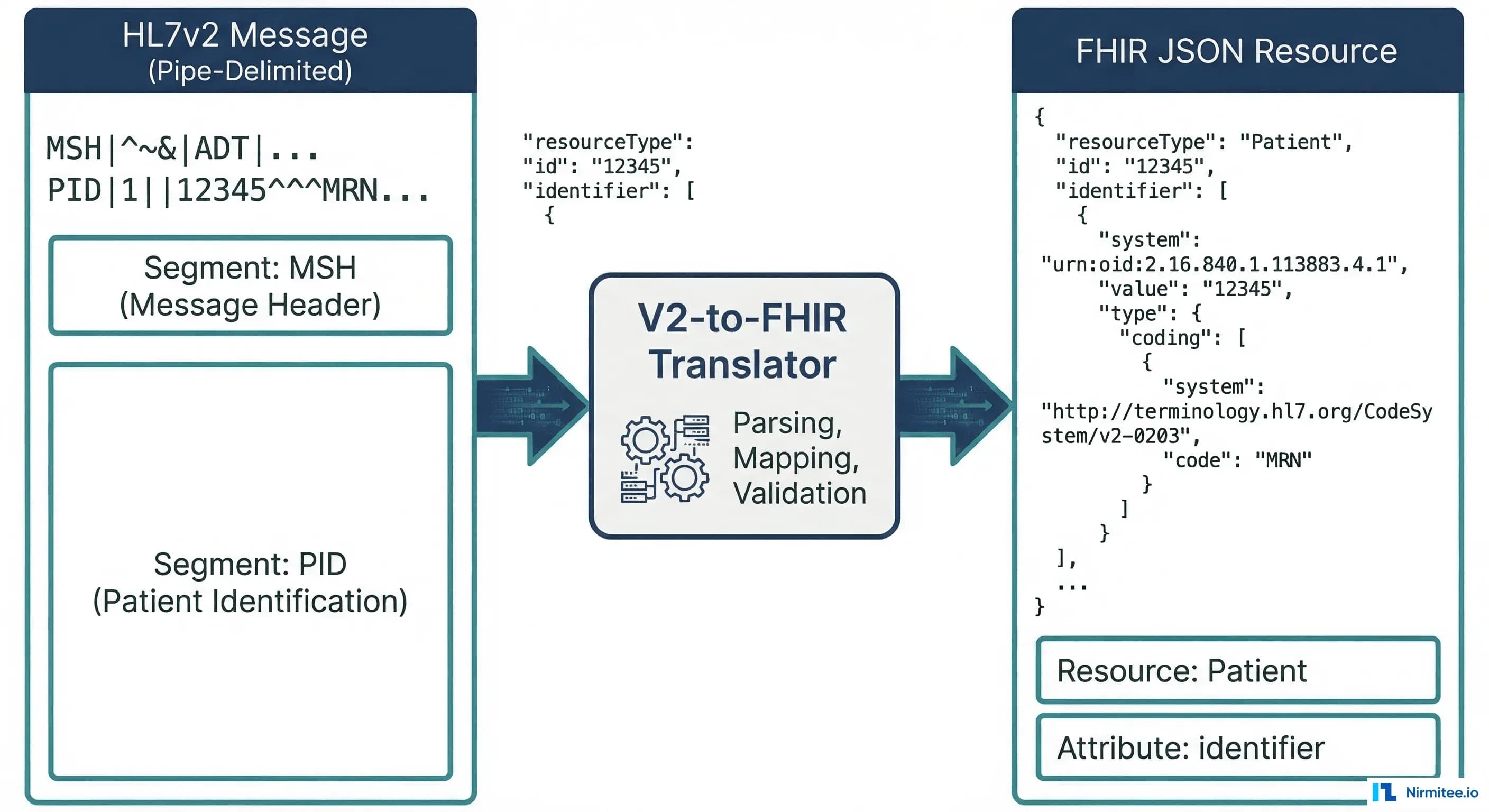
The PID (Patient Identification) segment contains the core demographics. Here's a real V2 PID segment:
PID|1||MRN-12345^^^HOSP^MR~SSN-999-88-7777^^^SSA^SS||Smith^John^A^^Mr.||19800615|M|||123 Main St^^Springfield^IL^62704^US||^PRN^PH^^1^217^5551234|^WPN^PH^^1^217^5555678||M|CAT|ACCT-9876|||||||N||||||NThis maps to the following FHIR Patient resource:
{
  "resourceType": "Patient",
  "identifier": [
    {
      "use": "usual",
      "type": {
        "coding": [{
          "system": "http://terminology.hl7.org/CodeSystem/v2-0203",
          "code": "MR",
          "display": "Medical Record Number"
        }]
      },
      "system": "urn:oid:1.2.3.4.5.6.7",
      "value": "MRN-12345"
    },
    {
      "type": {
        "coding": [{
          "system": "http://terminology.hl7.org/CodeSystem/v2-0203",
          "code": "SS",
          "display": "Social Security Number"
        }]
      },
      "system": "http://hl7.org/fhir/sid/us-ssn",
      "value": "999-88-7777"
    }
  ],
  "name": [{
    "use": "official",
    "family": "Smith",
    "given": ["John", "A"],
    "prefix": ["Mr."]
  }],
  "birthDate": "1980-06-15",
  "gender": "male",
  "address": [{
    "use": "home",
    "line": ["123 Main St"],
    "city": "Springfield",
    "state": "IL",
    "postalCode": "62704",
    "country": "US"
  }],
  "telecom": [
    {
      "system": "phone",
      "value": "+1-217-555-1234",
      "use": "home"
    },
    {
      "system": "phone",
      "value": "+1-217-555-5678",
      "use": "work"
    }
  ],
  "maritalStatus": {
    "coding": [{
      "system": "http://terminology.hl7.org/CodeSystem/v3-MaritalStatus",
      "code": "M",
      "display": "Married"
    }]
  }
}
Key mapping decisions:
- PID-3 (Patient Identifier List) maps to
Patient.identifier[]. Each repetition becomes a separate identifier. The assigning authority (component 4) maps toidentifier.system, and the identifier type code (component 5) maps toidentifier.type. - PID-5 (Patient Name) maps to
Patient.name[]. Family name is component 1, given name is component 2, middle name becomes a second entry in thegivenarray. - PID-7 (Date of Birth) maps to
Patient.birthDate. V2 uses YYYYMMDD format; FHIR requires YYYY-MM-DD (ISO 8601). This seems trivial, but breaks if the V2 system sends partial dates like "198006" (year-month only). - PID-8 (Sex) maps to
Patient.gender. V2 uses single characters (M, F, O, U); FHIR uses full words (male, female, other, unknown).
PV1 Segment to FHIR Encounter Resource
The PV1 (Patient Visit) segment describes the clinical encounter context:
PV1|1|I|ICU^0301^01^^^^HOSP|||ATT^Jones^Sarah^^^Dr.|||MED||||ADM|||ATT^Jones^Sarah^^^Dr.|IN||||||||||||||||||HOSP|||||||20260101083000|20260105140000This maps to:
{
  "resourceType": "Encounter",
  "status": "in-progress",
  "class": {
    "system": "http://terminology.hl7.org/CodeSystem/v3-ActCode",
    "code": "IMP",
    "display": "inpatient encounter"
  },
  "type": [{
    "coding": [{
      "system": "http://terminology.hl7.org/CodeSystem/v2-0007",
      "code": "MED",
      "display": "Medical"
    }]
  }],
  "subject": {
    "reference": "Patient/MRN-12345"
  },
  "participant": [{
    "type": [{
      "coding": [{
        "system": "http://terminology.hl7.org/CodeSystem/v3-ParticipationType",
        "code": "ATND",
        "display": "attender"
      }]
    }],
    "individual": {
      "reference": "Practitioner/ATT-jones",
      "display": "Dr. Sarah Jones"
    }
  }],
  "period": {
    "start": "2026-01-01T08:30:00",
    "end": "2026-01-05T14:00:00"
  },
  "location": [{
    "location": {
      "reference": "Location/ICU-0301-01",
      "display": "ICU Room 0301, Bed 01"
    },
    "status": "active"
  }],
  "hospitalization": {
    "admitSource": {
      "coding": [{
        "system": "http://terminology.hl7.org/CodeSystem/admit-source",
        "code": "hosp-trans"
      }]
    }
  }
}
Key mapping decisions:
- PV1-2 (Patient Class) maps to
Encounter.class. V2 uses codes like I (Inpatient), O (Outpatient), E (Emergency); these must be translated to the FHIR ActCode system: IMP, AMB, EMER respectively. This is one of the most common mapping errors. - PV1-3 (Assigned Patient Location) maps to
Encounter.location[]. The V2 location is a composite field (point of care^room^bed^facility); you typically need to create or reference a FHIR Location resource for each component. - PV1-44/PV1-45 (Admit/Discharge DateTime) maps to
Encounter.period.startandEncounter.period.end. Again, V2 uses YYYYMMDDHHMMSS while FHIR requires ISO 8601.
NK1 Segment to FHIR RelatedPerson Resource
The NK1 (Next of Kin) segment maps to the FHIR RelatedPerson resource:
NK1|1|Smith^Jane^^Mrs.|SPO^Spouse^HL70063|456 Oak Ave^^Springfield^IL^62704|^PRN^PH^^1^217^5559999||EC^Emergency Contact^HL70131{
"resourceType": "RelatedPerson",
"patient": {
"reference": "Patient/MRN-12345"
},
"relationship": [{
"coding": [{
"system": "http://terminology.hl7.org/CodeSystem/v2-0063",
"code": "SPO",
"display": "Spouse"
}]
}],
"name": [{
"family": "Smith",
"given": ["Jane"],
"prefix": ["Mrs."]
}],
"telecom": [{
"system": "phone",
"value": "+1-217-555-9999",
"use": "home"
}],
"address": [{
"line": ["456 Oak Ave"],
"city": "Springfield",
"state": "IL",
"postalCode": "62704"
}]
}ORM to FHIR: Order Message Mapping
ORM (Order) messages are the second most common V2 message type. An ORM^O01 communicates clinical orders between systems (lab orders, radiology orders, medication orders). The key segments are ORC (Common Order) and OBR (Observation Request).
ORC Segment to FHIR ServiceRequest
The ORC (Common Order) segment carries the order control information:
ORC|NW|ORD-2026-001^HIS|LAB-2026-001^LAB||CM||^^^20260115083000^^R||20260115080000|NURSE^Johnson^Mary|||CLI^Main Clinic^HOSP|^WPN^PH^^1^217^5552000||||||HOSP^Springfield General{
"resourceType": "ServiceRequest",
"identifier": [
{
"type": {
"coding": [{
"system": "http://terminology.hl7.org/CodeSystem/v2-0203",
"code": "PLAC",
"display": "Placer Identifier"
}]
},
"system": "urn:oid:1.2.3.4.5.6.8",
"value": "ORD-2026-001"
},
{
"type": {
"coding": [{
"system": "http://terminology.hl7.org/CodeSystem/v2-0203",
"code": "FILL",
"display": "Filler Identifier"
}]
},
"system": "urn:oid:1.2.3.4.5.6.9",
"value": "LAB-2026-001"
}
],
"status": "completed",
"intent": "order",
"priority": "routine",
"authoredOn": "2026-01-15T08:00:00",
"requester": {
"reference": "Practitioner/nurse-johnson-mary",
"display": "Mary Johnson"
}
}Key mapping decisions:
- ORC-1 (Order Control) determines the ServiceRequest's
statusand whether this is a new request or an update. NW (New Order) maps tostatus: active. CA (Cancel) maps tostatus: revoked. SC (Status Changed) updates the existing ServiceRequest. - ORC-2 (Placer Order Number) maps to
ServiceRequest.identifierwith type PLAC. This is critical for order tracking across systems. - ORC-3 (Filler Order Number) maps to
ServiceRequest.identifierwith type FILL. The filler order number is assigned by the receiving (fulfilling) system. - ORC-5 (Order Status) maps to
ServiceRequest.status. V2 codes: CM (Completed), IP (In Progress), SC (Scheduled), CA (Cancelled) must map to FHIR values: completed, active, active, revoked.
OBR Segment to FHIR ServiceRequest
The OBR (Observation Request) segment adds the clinical details to the order:
OBR|1|ORD-2026-001^HIS|LAB-2026-001^LAB|80053^Comprehensive Metabolic Panel^CPT4|||20260115083000|||||||20260115090000||ATT^Jones^Sarah^^^Dr.||||||20260115140000||LAB|F||^^^20260115083000^^RThe OBR fields merge into the same ServiceRequest created from ORC:
{
  "resourceType": "ServiceRequest",
  "identifier": [
    {
      "type": { "coding": [{ "code": "PLAC" }] },
      "value": "ORD-2026-001"
    }
  ],
  "status": "completed",
  "intent": "order",
  "code": {
    "coding": [{
      "system": "http://www.ama-assn.org/go/cpt",
      "code": "80053",
      "display": "Comprehensive Metabolic Panel"
    }]
  },
  "subject": {
    "reference": "Patient/MRN-12345"
  },
  "occurrencePeriod": {
    "start": "2026-01-15T08:30:00",
    "end": "2026-01-15T14:00:00"
  },
  "requester": {
    "reference": "Practitioner/ATT-jones",
    "display": "Dr. Sarah Jones"
  },
  "performer": [{
    "reference": "Organization/lab-dept"
  }]
}
Important: ORC and OBR both contribute to the same ServiceRequest resource. ORC provides administrative details (who ordered, when, order identifiers), while OBR provides clinical details (what was ordered, specimens, results timing). Your translator must merge both segments into a single resource, not create duplicates.
ORU to FHIR: Results Message Mapping
ORU (Observation Result) messages carry lab results, vital signs, and diagnostic reports. The ORU^R01 is the workhorse of clinical data exchange. The critical mapping challenge is that a single ORU message maps to multiple FHIR resources: a DiagnosticReport as the container, with individual Observation resources for each result.
OBX Segment to FHIR Observation
Each OBX (Observation) segment carries a single result value:
OBX|1|NM|2345-7^Glucose^LN||98|mg/dL|74-106|N|||F|||20260115143000||LAB^AutoAnalyzer^L
OBX|2|NM|2160-0^Creatinine^LN||1.1|mg/dL|0.7-1.3|N|||F|||20260115143000||LAB^AutoAnalyzer^L
OBX|3|NM|3094-0^BUN^LN||15|mg/dL|7-20|N|||F|||20260115143000||LAB^AutoAnalyzer^L
OBX|4|NM|17861-6^Calcium^LN||9.4|mg/dL|8.5-10.5|N|||F|||20260115143000||LAB^AutoAnalyzer^L
Each OBX becomes a separate FHIR Observation. Here's the first one (Glucose):
{
  "resourceType": "Observation",
  "status": "final",
  "category": [{
    "coding": [{
      "system": "http://terminology.hl7.org/CodeSystem/observation-category",
      "code": "laboratory",
      "display": "Laboratory"
    }]
  }],
  "code": {
    "coding": [{
      "system": "http://loinc.org",
      "code": "2345-7",
      "display": "Glucose [Mass/volume] in Serum or Plasma"
    }]
  },
  "subject": {
    "reference": "Patient/MRN-12345"
  },
  "effectiveDateTime": "2026-01-15T14:30:00",
  "valueQuantity": {
    "value": 98,
    "unit": "mg/dL",
    "system": "http://unitsofmeasure.org",
    "code": "mg/dL"
  },
  "referenceRange": [{
    "low": { "value": 74, "unit": "mg/dL" },
    "high": { "value": 106, "unit": "mg/dL" }
  }],
  "interpretation": [{
    "coding": [{
      "system": "http://terminology.hl7.org/CodeSystem/v3-ObservationInterpretation",
      "code": "N",
      "display": "Normal"
    }]
  }]
}
Key mapping decisions:
- OBX-2 (Value Type) determines the FHIR value field. NM (Numeric) maps to
valueQuantity. ST/TX/FT (String/Text/Formatted Text) maps tovalueString. CWE/CE (Coded Entry) maps tovalueCodeableConcept. This is where many implementations break, because the same OBX segment structure holds radically different data types. - OBX-3 (Observation Identifier) maps to
Observation.code. When the V2 system sends LOINC codes (as shown above with "LN" as the coding system identifier), the mapping is straightforward. When they send local codes, you need a terminology mapping table. - OBX-7 (Reference Range) maps to
Observation.referenceRange[]. V2 sends this as a string like "74-106" that you must parse into structuredlowandhighvalues. Watch out for ranges like ">60", "<=3.5", or text-based ranges like "Negative". - OBX-8 (Interpretation Codes) maps to
Observation.interpretation. V2 uses H (High), L (Low), N (Normal), A (Abnormal), HH (Critical High), LL (Critical Low). These map directly to the FHIR ObservationInterpretation code system. - OBX-11 (Observation Result Status) maps to
Observation.status. F (Final) = final, P (Preliminary) = preliminary, C (Correction) = corrected, X (Delete) = cancelled.
Full ORU to FHIR DiagnosticReport
The complete ORU^R01 message wraps all the OBX results into a DiagnosticReport bundle. The OBR segment from the ORU message maps to DiagnosticReport (not ServiceRequest, as it does in ORM context):
{
  "resourceType": "DiagnosticReport",
  "status": "final",
  "category": [{
    "coding": [{
      "system": "http://terminology.hl7.org/CodeSystem/v2-0074",
      "code": "LAB",
      "display": "Laboratory"
    }]
  }],
  "code": {
    "coding": [{
      "system": "http://www.ama-assn.org/go/cpt",
      "code": "80053",
      "display": "Comprehensive Metabolic Panel"
    }]
  },
  "subject": {
    "reference": "Patient/MRN-12345"
  },
  "effectivePeriod": {
    "start": "2026-01-15T08:30:00",
    "end": "2026-01-15T14:30:00"
  },
  "issued": "2026-01-15T14:30:00.000Z",
  "performer": [{
    "reference": "Organization/lab-dept"
  }],
  "result": [
    { "reference": "Observation/glucose-001" },
    { "reference": "Observation/creatinine-001" },
    { "reference": "Observation/bun-001" },
    { "reference": "Observation/calcium-001" }
  ],
  "basedOn": [{
    "reference": "ServiceRequest/ORD-2026-001"
  }]
}
The final output is a FHIR Bundle of type "transaction" containing the DiagnosticReport plus all referenced Observation resources, linked by the result array. The basedOn element links back to the original order's ServiceRequest. Our FHIR Bundle resource guide explains how transaction and batch Bundles behave differently when one entry fails.
The Gotchas Nobody Warns You About
The official mapping specification gets you 70% of the way. The remaining 30% is where production implementations break. Here are the gotchas from real projects.
1. Local Codes vs. Standard Terminologies
The HL7 V2-to-FHIR Implementation Guide assumes your V2 messages use standard coding systems (LOINC for observations, SNOMED CT for diagnoses, CPT for procedures). In reality, approximately 40% of V2 messages in US hospitals use local codes. Your lab system might send OBX-3 as GLU^Glucose^L instead of 2345-7^Glucose^LN.
Solution: Build a terminology mapping service. Maintain a ConceptMap resource that maps local codes to standard terminologies. Use the UMLS Metathesaurus as a starting point, but expect manual curation for 15-25% of your local codes.
// Terminology mapping lookup pseudocode
function mapToStandardCode(localCode, localSystem) {
  // Check ConceptMap first
  let mapping = conceptMapLookup(localSystem, localCode);
  if (mapping) return mapping;

  // Fall back to UMLS search
  let umlsResult = umlsSearch(localCode);
  if (umlsResult.confidence > 0.9) return umlsResult;

  // Last resort: include local code with extension
  return {
    coding: [
      { system: localSystem, code: localCode },
      { system: "http://terminology.hl7.org/CodeSystem/data-absent-reason",
        code: "unmapped" }
    ]
  };
}
2. Timezone Handling
V2 timestamps use the format YYYYMMDDHHMMSS[.SSSS][+/-ZZZZ]. The timezone offset is optional and frequently omitted. FHIR requires ISO 8601 with explicit timezone information for dateTime elements. When a V2 system sends 20260115083000 without a timezone, you must decide: is this UTC? Local server time? The patient's timezone?
Solution: Establish a default timezone per sending facility. Store it in your integration engine's configuration. Document the assumption explicitly in your implementation guide. Never silently convert — always tag converted timestamps with the originalText extension so downstream consumers know the timezone was inferred.
3. Missing Required FHIR Elements
FHIR has mandatory elements that V2 leaves entirely optional. For example, Encounter.status is required in FHIR, but V2 has no single field that directly maps to encounter status — you infer it from the message type (A01 = in-progress, A03 = finished). Similarly, Observation.status is required, but OBX-11 might be empty in some V2 implementations. Our guide to the FHIR Encounter resource lists the Encounter status values and shows which PV1 fields drive them.
Solution: Build a defaults table keyed by message type and segment position. When a required FHIR element has no V2 source, apply the default. Log every default application for audit. Use the Data Absent Reason extension when you genuinely cannot determine a value.
4. Batch vs. Real-Time Performance
Translating a single ADT^A01 message takes 5-15ms. Translating a backfill of 2 million historical ADT messages takes weeks if you process them one at a time with FHIR server writes. The performance characteristics differ by 10x or more depending on whether you use individual POST requests or FHIR Batch/Transaction bundles.
Solution: For historical backfill, use FHIR Transaction Bundles with 50-100 resources per bundle. Enable server-side batch processing. For real-time, process individual messages but use connection pooling and async writes. Measure your FHIR server's throughput under load before committing to a timeline.
5. Character Encoding
V2 was designed in the ASCII era. Many V2 implementations use ISO-8859-1 or Windows-1252 encoding, not UTF-8. Patient names with accents (Jose vs. Jose), addresses with special characters, and clinical notes with em-dashes will break if you don't explicitly handle encoding conversion before FHIR serialization.
Solution: Detect encoding from MSH-18 (Character Set) when populated. Default to ISO-8859-1 for V2 messages without explicit encoding. Convert to UTF-8 at the edge of your translator. Validate with a test suite that includes multilingual patient names.
6. Identifier System Reconciliation
A single patient in a health system might have an MRN from Hospital A, a different MRN from Hospital B, an enterprise patient ID, an SSN, and a health plan ID — all appearing in different PID-3 repetitions from different V2 feeds. FHIR's Patient.identifier[] can hold all of these, but you need a consistent system URI for each identifier type across all your V2 sources.
Solution: Create an identifier system registry as an OID-to-URI mapping table. Assign a canonical FHIR system URI to every known V2 assigning authority. Use a consistent mental model for how identifiers flow across systems. This registry becomes one of your most critical configuration artifacts.
Middleware Comparison: Rhapsody vs. Mirth Connect vs. Custom Build
Choosing the right middleware for your V2-to-FHIR translation layer is one of the most consequential decisions in your migration. Here's an honest comparison based on production experience.
| Criteria | Rhapsody | Mirth Connect | Custom Build |
|---|---|---|---|
| Cost | Enterprise license ($50K-$200K+/year) | Community edition free; NextGen Premium for support | Engineering team salary ($150K-$500K+ annually) |
| Learning Curve | Moderate. Good documentation, vendor training available | Low-Moderate. Large community, many tutorials online | High. Building from scratch requires deep protocol knowledge |
| FHIR R4 Support | Native FHIR toolkit with built-in resource validation | Via FHIR Connector extension; community-maintained templates | Full control. Use HAPI FHIR, Firely SDK, or custom parsers |
| HL7v2 Parsing | Excellent. Built-in parser with segment/field-level access | Excellent. Built-in V2 parser with transformer scripting | Use HAPI V2 library (Java) or python-hl7 (Python) |
| Deployment | On-premises or cloud. Container support available | On-premises, Docker, AWS, Azure | Any infrastructure you manage |
| Scalability | Active/passive HA, container clustering | Clustering via shared DB; HA requires extra setup | Limited only by your architecture decisions |
| Community | Vendor-supported. Best in KLAS 2024-2026 | 50,000+ developers. Large open-source community | Internal team only. No external support |
| Best For | Large health systems needing vendor support and SLAs | Mid-size organizations, budget-conscious teams, teams evaluating options | Unique requirements, deep FHIR customization, startups |
Our recommendation: For most V2-to-FHIR migrations, start with Mirth Connect. It handles 80% of use cases, has an enormous community for troubleshooting, and the free community edition lets you validate your architecture before committing budget. Move to Rhapsody if you need enterprise SLAs, are operating across 10+ facilities, or require hardened security compliance. Build custom only when your transformation logic is genuinely unique — and even then, use HAPI FHIR as your foundation, not raw JSON manipulation.
Putting It All Together: A Complete ADT^A01 Translation
Here's how a complete ADT^A01 V2 message translates into a FHIR Transaction Bundle. This is what your translator needs to produce:
MSH|^~\&|ADT|HOSP|FHIR|DEST|20260115083000||ADT^A01^ADT_A01|MSG-001|P|2.5.1
PID|1||MRN-12345^^^HOSP^MR||Smith^John^A^^Mr.||19800615|M|||123 Main St^^Springfield^IL^62704^US
NK1|1|Smith^Jane^^Mrs.|SPO^Spouse|456 Oak Ave^^Springfield^IL^62704|^PRN^PH^^1^217^5559999
PV1|1|I|ICU^0301^01||||ATT^Jones^Sarah^^^Dr.|||MED||||||||IN|||||||||||||||||||20260115083000
Produces this FHIR Transaction Bundle:
{
  "resourceType": "Bundle",
  "type": "transaction",
  "entry": [
    {
      "fullUrl": "urn:uuid:patient-001",
      "resource": {
        "resourceType": "Patient",
        "identifier": [{ "value": "MRN-12345", "system": "urn:oid:1.2.3.4" }],
        "name": [{ "family": "Smith", "given": ["John", "A"], "prefix": ["Mr."] }],
        "birthDate": "1980-06-15",
        "gender": "male",
        "address": [{ "line": ["123 Main St"], "city": "Springfield", "state": "IL", "postalCode": "62704", "country": "US" }]
      },
      "request": { "method": "PUT", "url": "Patient?identifier=urn:oid:1.2.3.4|MRN-12345" }
    },
    {
      "fullUrl": "urn:uuid:encounter-001",
      "resource": {
        "resourceType": "Encounter",
        "status": "in-progress",
        "class": { "system": "http://terminology.hl7.org/CodeSystem/v3-ActCode", "code": "IMP" },
        "subject": { "reference": "urn:uuid:patient-001" },
        "participant": [{ "individual": { "display": "Dr. Sarah Jones" } }],
        "period": { "start": "2026-01-15T08:30:00" },
        "location": [{ "location": { "display": "ICU Room 0301, Bed 01" } }]
      },
      "request": { "method": "POST", "url": "Encounter" }
    },
    {
      "fullUrl": "urn:uuid:relatedperson-001",
      "resource": {
        "resourceType": "RelatedPerson",
        "patient": { "reference": "urn:uuid:patient-001" },
        "name": [{ "family": "Smith", "given": ["Jane"], "prefix": ["Mrs."] }],
        "relationship": [{ "coding": [{ "system": "http://terminology.hl7.org/CodeSystem/v2-0063", "code": "SPO" }] }]
      },
      "request": { "method": "POST", "url": "RelatedPerson" }
    }
  ]
}
Notice the use of urn:uuid: references within the Bundle for cross-resource linking, and the conditional PUT for Patient (upsert by identifier) versus POST for Encounter and RelatedPerson (always create new).
Conclusion: Start Mapping, Stop Planning
V2-to-FHIR migration isn't a project with a clean start and end date. It's a capability you build into your integration infrastructure. The most successful teams we've worked with at Nirmitee follow this pattern:
- Start with ADT. It touches every system, has the most standardized structure, and gives you the Patient and Encounter resources that everything else references.
- Build your terminology mapping service early. This is the bottleneck that delays every other message type. Don't underestimate the effort of mapping local codes to LOINC, SNOMED, and RxNorm.
- Use the official HL7 V2-to-FHIR Implementation Guide as your reference. It won't give you production-ready code, but the ConceptMaps document every field-level mapping decision you need to make.
- Test with SMART on FHIR and Inferno. The ONC Inferno test suite validates your FHIR output against US Core profiles. Run it early and often.
- Plan for dual-running. You will run V2 and FHIR in parallel for 12-24 months minimum. Budget for it.
The code examples in this guide are your starting point. Fork them, adapt them to your V2 implementation quirks, and build from there. The HL7v2-to-FHIR translation isn't conceptually difficult — it's operationally demanding. The difference between success and failure is attention to the details we've covered: timezone handling, terminology mapping, identifier reconciliation, and architecture patterns that match your operational reality.
Ready to accelerate your V2-to-FHIR migration? Talk to our integration engineers about building a production-grade translation layer that handles the edge cases your EHR vendor won't warn you about.
Struggling with healthcare data exchange? Our Healthcare Interoperability Solutions practice helps organizations connect clinical systems at scale. We also offer specialized Healthcare Software Product Development services. Talk to our team to get started.
Frequently Asked Questions
What is HL7v2 to FHIR migration?
Why do hospitals still use HL7v2 if FHIR is the modern standard?
What are the main architecture patterns for HL7v2 to FHIR migration?
What regulatory deadlines are forcing the move from HL7v2 to FHIR?
How do you map an HL7v2 PID segment to a FHIR Patient resource?
How does Nirmitee.io approach healthcare software development?