Infrastructure as Code for Healthcare: Terraform, Pulumi, and HIPAA-Compliant Cloud Provisioning

Digital Growth Lead
Writes about healthcare technology, interoperability, and AI-driven transformation across modern care systems.
Part of our complete guide to HIPAA checklist for infrastructure and code.
In 2024, a major healthcare system suffered a 14-hour outage after a manual configuration change to a load balancer removed the encryption setting from their FHIR server's listener. The change was made by an experienced engineer who simply forgot to check a box. There was no audit trail of the change, no review process, and no automated check to catch the misconfiguration. For 14 hours, patient data transited in cleartext -- a HIPAA violation that resulted in a $1.3 million settlement with the Office for Civil Rights.
Teams that want this built rather than researched can work with our HIPAA-compliant software development team.
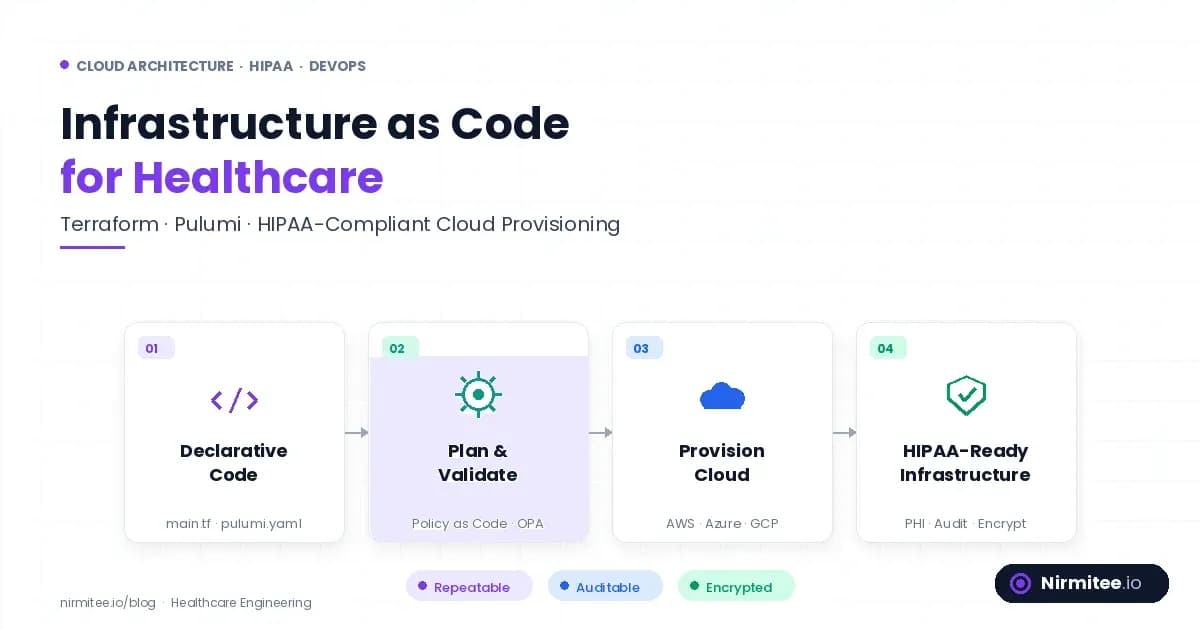
This is the problem Infrastructure as Code solves. When your infrastructure is defined in version-controlled, peer-reviewed, policy-validated code, a missing encryption setting gets caught before it is ever applied. Every change has an audit trail. Every deployment goes through the same validation pipeline. The configuration of your production environment is a known, reproducible, reviewable artifact -- not a set of accumulated manual changes that no one fully understands.
For healthcare organizations managing complex technology stacks with HIPAA compliance requirements, IaC is not a DevOps luxury -- it is a compliance necessity. This guide covers Terraform and Pulumi configurations for HIPAA-compliant AWS infrastructure, reusable modules that encode HIPAA guardrails, and policy-as-code validation that prevents non-compliant deployments.
Terraform vs Pulumi for Healthcare IaC
Both Terraform and Pulumi can deliver HIPAA-compliant infrastructure. The choice depends on your team's preferences and the complexity of your compliance requirements.
| Factor | Terraform (HCL) | Pulumi (Python/TypeScript) | Recommendation |
|---|---|---|---|
| Language | HCL (domain-specific) | Python, TypeScript, Go, C# | Pulumi if team is stronger in Python |
| Testing | Terratest (Go), terraform validate | pytest, jest (native language testing) | Pulumi for complex test scenarios |
| Module ecosystem | Terraform Registry (10,000+ modules) | Pulumi Registry (smaller but growing) | Terraform for breadth |
| State management | S3 + DynamoDB backend (encrypted) | Pulumi Cloud or self-managed S3 | Both adequate for HIPAA |
| HIPAA compliance validation | Checkov, Sentinel, OPA | Checkov, custom policy functions | Terraform has more policy tools |
| Complex logic | Limited (count, for_each, conditions) | Full programming language capabilities | Pulumi for conditional HIPAA rules |
Terraform Module: HIPAA-Compliant FHIR Server on AWS
This Terraform module provisions a complete HIPAA-compliant FHIR server environment on AWS. It creates a VPC with private subnets, an encrypted RDS database, an ECS service with the FHIR server, and all required security controls -- in a single module call.
Main Module Definition
# modules/hipaa-fhir-server/main.tf

terraform {
  required_version = ">= 1.5.0"
  required_providers {
    aws = {
      source  = "hashicorp/aws"
      version = "~> 5.0"
    }
  }
}

# KMS key for encryption across all services
resource "aws_kms_key" "hipaa" {
  description             = "HIPAA encryption key for ${var.environment}"
  deletion_window_in_days = 30
  enable_key_rotation     = true
  policy                  = data.aws_iam_policy_document.kms_policy.json

  tags = merge(var.tags, {
    hipaa-compliant = "true"
    data-classification = "phi"
  })
}

# VPC with private subnets only for PHI workloads
module "vpc" {
  source  = "terraform-aws-modules/vpc/aws"
  version = "5.5.0"

  name = "${var.environment}-hipaa-vpc"
  cidr = var.vpc_cidr

  azs             = var.availability_zones
  private_subnets = var.private_subnet_cidrs
  public_subnets  = var.public_subnet_cidrs

  enable_nat_gateway     = true
  single_nat_gateway     = var.environment != "production"
  enable_dns_hostnames   = true
  enable_dns_support     = true

  # VPC Flow Logs for audit trail
  enable_flow_log                      = true
  create_flow_log_cloudwatch_log_group = true
  create_flow_log_iam_role             = true
  flow_log_max_aggregation_interval    = 60
  flow_log_cloudwatch_log_group_kms_key_id = aws_kms_key.hipaa.arn

  tags = merge(var.tags, {
    hipaa-compliant = "true"
  })
}

# RDS PostgreSQL with HIPAA-required encryption and backups
resource "aws_db_instance" "fhir_database" {
  identifier = "${var.environment}-fhir-db"

  engine         = "postgres"
  engine_version = "16.1"
  instance_class = var.db_instance_class

  allocated_storage     = var.db_allocated_storage
  max_allocated_storage = var.db_max_allocated_storage
  storage_type          = "gp3"
  storage_encrypted     = true  # HIPAA requirement
  kms_key_id            = aws_kms_key.hipaa.arn

  db_name  = "fhir"
  username = var.db_username
  password = var.db_password

  multi_az                = var.environment == "production"
  db_subnet_group_name    = aws_db_subnet_group.private.name
  vpc_security_group_ids  = [aws_security_group.database.id]

  # HIPAA backup requirements
  backup_retention_period = 35  # Exceeds HIPAA minimum
  backup_window           = "03:00-04:00"
  maintenance_window      = "Mon:04:00-Mon:05:00"

  # Enhanced monitoring
  monitoring_interval = 60
  monitoring_role_arn = aws_iam_role.rds_monitoring.arn

  # Audit logging
  enabled_cloudwatch_logs_exports = ["postgresql", "upgrade"]

  # Deletion protection
  deletion_protection = var.environment == "production"
  skip_final_snapshot = var.environment != "production"
  final_snapshot_identifier = "${var.environment}-fhir-db-final"

  tags = merge(var.tags, {
    hipaa-compliant     = "true"
    data-classification = "phi"
    backup-policy       = "hipaa-35-day"
  })
}

# S3 bucket for FHIR bulk data with HIPAA controls
resource "aws_s3_bucket" "fhir_data" {
  bucket = "${var.environment}-fhir-data-${data.aws_caller_identity.current.account_id}"

  tags = merge(var.tags, {
    hipaa-compliant     = "true"
    data-classification = "phi"
  })
}

resource "aws_s3_bucket_server_side_encryption_configuration" "fhir_data" {
  bucket = aws_s3_bucket.fhir_data.id

  rule {
    apply_server_side_encryption_by_default {
      sse_algorithm     = "aws:kms"
      kms_master_key_id = aws_kms_key.hipaa.arn
    }
    bucket_key_enabled = true
  }
}

resource "aws_s3_bucket_public_access_block" "fhir_data" {
  bucket = aws_s3_bucket.fhir_data.id

  block_public_acls       = true
  block_public_policy     = true
  ignore_public_acls      = true
  restrict_public_buckets = true
}

resource "aws_s3_bucket_versioning" "fhir_data" {
  bucket = aws_s3_bucket.fhir_data.id
  versioning_configuration {
    status = "Enabled"
  }
}

# CloudTrail for comprehensive audit logging
resource "aws_cloudtrail" "hipaa_audit" {
  name                          = "${var.environment}-hipaa-audit-trail"
  s3_bucket_name                = aws_s3_bucket.audit_logs.id
  include_global_service_events = true
  is_multi_region_trail         = true
  enable_log_file_validation    = true
  kms_key_id                    = aws_kms_key.hipaa.arn

  event_selector {
    read_write_type           = "All"
    include_management_events = true

    data_resource {
      type   = "AWS::S3::Object"
      values = ["${aws_s3_bucket.fhir_data.arn}/"]
    }
  }

  tags = merge(var.tags, {
    hipaa-compliant = "true"
    purpose         = "hipaa-audit-trail"
  })
}
Module Usage
# environments/production/main.tf
module "fhir_server" {
  source = "../../modules/hipaa-fhir-server"

  environment        = "production"
  vpc_cidr           = "10.0.0.0/16"
  availability_zones = ["us-east-1a", "us-east-1b", "us-east-1c"]
  private_subnet_cidrs = ["10.0.1.0/24", "10.0.2.0/24", "10.0.3.0/24"]
  public_subnet_cidrs  = ["10.0.101.0/24", "10.0.102.0/24", "10.0.103.0/24"]

  db_instance_class       = "db.r6g.xlarge"
  db_allocated_storage    = 100
  db_max_allocated_storage = 500
  db_username             = var.db_username
  db_password             = var.db_password

  tags = {
    Project     = "FHIR-Platform"
    Environment = "production"
    ManagedBy   = "terraform"
    Compliance  = "hipaa"
  }
}
With this module, deploying a HIPAA-compliant FHIR server on AWS becomes a single module call. Every encryption setting, backup policy, network isolation rule, and audit trail is encoded in the module -- no manual configuration required, no settings to forget.
Policy-as-Code: Preventing Non-Compliant Deployments
IaC without policy validation is only half the solution. Policy-as-code tools like Checkov, OPA, and HashiCorp Sentinel scan your Terraform plans and reject deployments that violate HIPAA requirements -- before any infrastructure is created.
Checkov Configuration for HIPAA
# .checkov.yml
compact: true
framework:
  - terraform
check:
  # Encryption checks
  - CKV_AWS_145  # RDS encryption at rest
  - CKV_AWS_16   # RDS encryption at rest (alias)
  - CKV_AWS_17   # RDS encryption at rest (alias)
  - CKV_AWS_19   # S3 server-side encryption
  - CKV_AWS_24   # Security group unrestricted ingress
  - CKV_AWS_18   # S3 access logging
  - CKV_AWS_21   # S3 versioning
  - CKV_AWS_53   # S3 block public access
  - CKV_AWS_54   # S3 block public policy
  - CKV_AWS_55   # S3 ignore public ACLs
  - CKV_AWS_56   # S3 restrict public buckets
  # Backup and recovery
  - CKV_AWS_133  # RDS backup retention
  - CKV_AWS_226  # RDS multi-AZ
  # Audit logging
  - CKV_AWS_35   # CloudTrail encryption
  - CKV_AWS_36   # CloudTrail log file validation
  - CKV_AWS_67   # CloudTrail multi-region
  # Network security
  - CKV_AWS_23   # Security group description
  - CKV_AWS_260  # Security group unrestricted ingress
  # KMS
  - CKV_AWS_7    # KMS key rotation
soft-fail:
  - CKV_AWS_226  # Multi-AZ soft-fail for non-prod
GitHub Actions Pipeline for IaC CI/CD
# .github/workflows/terraform-hipaa.yml
name: HIPAA-Compliant Terraform Pipeline

on:
  pull_request:
    paths:
      - "terraform/**"
  push:
    branches: [main]
    paths:
      - "terraform/**"

env:
  TF_VERSION: "1.7.0"
  AWS_REGION: "us-east-1"

jobs:
  validate:
    name: Validate & Security Scan
    runs-on: ubuntu-latest
    steps:
      - uses: actions/checkout@v4

      - name: Setup Terraform
        uses: hashicorp/setup-terraform@v3
        with:
          terraform_version: ${{ env.TF_VERSION }}

      - name: Terraform Format Check
        run: terraform fmt -check -recursive terraform/

      - name: Terraform Init
        run: terraform init -backend=false
        working-directory: terraform/

      - name: Terraform Validate
        run: terraform validate
        working-directory: terraform/

      - name: Checkov HIPAA Scan
        uses: bridgecrewio/checkov-action@v12
        with:
          directory: terraform/
          config_file: .checkov.yml
          output_format: sarif
          output_file_path: checkov-results.sarif

      - name: Upload Checkov Results
        if: always()
        uses: github/codeql-action/upload-sarif@v3
        with:
          sarif_file: checkov-results.sarif

  plan:
    name: Terraform Plan
    needs: validate
    runs-on: ubuntu-latest
    if: github.event_name == 'pull_request'
    permissions:
      id-token: write
      contents: read
      pull-requests: write
    steps:
      - uses: actions/checkout@v4

      - name: Configure AWS Credentials (OIDC)
        uses: aws-actions/configure-aws-credentials@v4
        with:
          role-to-assume: ${{ secrets.AWS_ROLE_ARN }}
          aws-region: ${{ env.AWS_REGION }}

      - name: Setup Terraform
        uses: hashicorp/setup-terraform@v3
        with:
          terraform_version: ${{ env.TF_VERSION }}

      - name: Terraform Plan
        id: plan
        run: terraform plan -no-color -out=tfplan
        working-directory: terraform/

      - name: Post Plan to PR
        uses: actions/github-script@v7
        with:
          script: |
            const output = `#### Terraform Plan
            \`\`\`\n${{ steps.plan.outputs.stdout }}\n\`\`\`
            *Review HIPAA compliance before approving.*`;
            github.rest.issues.createComment({
              issue_number: context.issue.number,
              owner: context.repo.owner,
              repo: context.repo.repo,
              body: output
            })

  apply:
    name: Terraform Apply
    needs: plan
    runs-on: ubuntu-latest
    if: github.ref == 'refs/heads/main'
    environment: production  # Requires manual approval
    steps:
      - uses: actions/checkout@v4
      - name: Terraform Apply
        run: terraform apply -auto-approve tfplan
        working-directory: terraform/
Drift Detection: Catching Manual Changes
IaC is only effective if all changes go through the IaC pipeline. In practice, engineers sometimes make manual changes through the AWS Console -- "just this once" -- bypassing all policy validation and audit controls. Drift detection catches these unauthorized changes and alerts your team.
# drift-detection-cronjob.yaml (Kubernetes)
apiVersion: batch/v1
kind: CronJob
metadata:
  name: terraform-drift-detection
  namespace: devops
spec:
  schedule: "0 */2 * * *"  # Every 2 hours
  jobTemplate:
    spec:
      template:
        spec:
          containers:
            - name: drift-check
              image: hashicorp/terraform:1.7
              command:
                - /bin/sh
                - -c
                - |
                  cd /terraform
                  terraform init
                  DRIFT=$(terraform plan -detailed-exitcode 2>&1)
                  EXIT_CODE=$?
                  if [ $EXIT_CODE -eq 2 ]; then
                    echo "DRIFT DETECTED"
                    curl -X POST $SLACK_WEBHOOK \
                      -H "Content-Type: application/json" \
                      -d "{\"text\": \"ALERT: Infrastructure drift detected in HIPAA environment. Manual changes may have bypassed IaC controls. Review immediately.\"}"
                  fi
              env:
                - name: SLACK_WEBHOOK
                  valueFrom:
                    secretKeyRef:
                      name: slack-webhook
                      key: url
              volumeMounts:
                - name: terraform-config
                  mountPath: /terraform
          volumes:
            - name: terraform-config
              configMap:
                name: terraform-config
          restartPolicy: OnFailure
Drift detection is particularly important for HIPAA compliance because manual changes can inadvertently remove security controls. A well-meaning engineer who disables encryption on a test database "temporarily" creates a HIPAA violation that persists until detected. Automated drift detection with alerting ensures these changes are caught within hours, not months.
Pulumi Alternative: Python-Based HIPAA IaC
For teams that prefer Python over HCL, Pulumi offers the same HIPAA compliance capabilities with the added benefit of real programming language features -- loops, conditionals, classes, and unit testing with pytest:
import pulumi
import pulumi_aws as aws

class HIPAAFHIRServer(pulumi.ComponentResource):
    """Pulumi component that provisions a HIPAA-compliant
    FHIR server environment on AWS with all required
    encryption, backup, and audit controls."""

    def __init__(self, name: str, environment: str,
                 vpc_cidr: str = "10.0.0.0/16",
                 db_instance_class: str = "db.r6g.large",
                 opts=None):
        super().__init__("hipaa:fhir:Server", name, {}, opts)

        # KMS key for all encryption
        self.kms_key = aws.kms.Key(
            f"{name}-hipaa-key",
            description=f"HIPAA encryption key for {environment}",
            enable_key_rotation=True,
            deletion_window_in_days=30,
            tags={"hipaa-compliant": "true"},
            opts=pulumi.ResourceOptions(parent=self),
        )

        # VPC with private subnets
        self.vpc = aws.ec2.Vpc(
            f"{name}-vpc",
            cidr_block=vpc_cidr,
            enable_dns_hostnames=True,
            enable_dns_support=True,
            tags={"Name": f"{environment}-hipaa-vpc",
                  "hipaa-compliant": "true"},
            opts=pulumi.ResourceOptions(parent=self),
        )

        # Encrypted RDS instance
        self.database = aws.rds.Instance(
            f"{name}-fhir-db",
            engine="postgres",
            engine_version="16.1",
            instance_class=db_instance_class,
            allocated_storage=100,
            storage_encrypted=True,
            kms_key_id=self.kms_key.arn,
            backup_retention_period=35,
            multi_az=(environment == "production"),
            deletion_protection=(environment == "production"),
            tags={"hipaa-compliant": "true",
                  "data-classification": "phi"},
            opts=pulumi.ResourceOptions(parent=self),
        )

        # S3 with all HIPAA controls
        self.data_bucket = aws.s3.BucketV2(
            f"{name}-fhir-data",
            tags={"hipaa-compliant": "true"},
            opts=pulumi.ResourceOptions(parent=self),
        )

        aws.s3.BucketServerSideEncryptionConfigurationV2(
            f"{name}-fhir-data-encryption",
            bucket=self.data_bucket.id,
            rules=[{
                "apply_server_side_encryption_by_default": {
                    "sse_algorithm": "aws:kms",
                    "kms_master_key_id": self.kms_key.arn,
                },
                "bucket_key_enabled": True,
            }],
            opts=pulumi.ResourceOptions(parent=self),
        )

        aws.s3.BucketPublicAccessBlock(
            f"{name}-fhir-data-public-block",
            bucket=self.data_bucket.id,
            block_public_acls=True,
            block_public_policy=True,
            ignore_public_acls=True,
            restrict_public_buckets=True,
            opts=pulumi.ResourceOptions(parent=self),
        )

        self.register_outputs({
            "vpc_id": self.vpc.id,
            "database_endpoint": self.database.endpoint,
            "data_bucket_name": self.data_bucket.bucket,
            "kms_key_arn": self.kms_key.arn,
        })


# Deploy
fhir_prod = HIPAAFHIRServer(
    "fhir-prod",
    environment="production",
    vpc_cidr="10.0.0.0/16",
    db_instance_class="db.r6g.xlarge",
)

pulumi.export("fhir_db_endpoint", fhir_prod.database.endpoint)
pulumi.export("data_bucket", fhir_prod.data_bucket.bucket)
Conclusion
Infrastructure as Code for healthcare is not about adopting a DevOps trend -- it is about making HIPAA compliance reproducible, auditable, and enforceable. The Terraform modules and Checkov configurations in this guide encode HIPAA requirements as code: encryption at rest, encrypted backups, private networking, audit logging, and access controls.
Every deployment goes through the same policy validation pipeline, every change is reviewed, and drift detection catches unauthorized modifications. For healthcare organizations managing complex technology stacks with interoperability requirements, IaC transforms compliance from a manual checklist into an automated, continuous guarantee.
Start with one module -- the HIPAA-compliant FHIR server module above -- deploy it, and expand from there.
Ready to scale?
Talk to our healthcare engineering team about building, integrating, and shipping faster.
Frequently Asked Questions
Is IaC required for HIPAA compliance?
Should I store Terraform state in S3 with encryption?
How do I handle secrets in IaC for healthcare?
What is the recommended drift detection frequency?
Can I use IaC for multi-cloud healthcare deployments?
How does Nirmitee.io approach healthcare software development?