
The PHI Problem Every Healthcare Developer Faces
You need realistic patient data to build and test your EHR integration, FHIR API, or clinical decision support tool. But real patient data is locked behind HIPAA's Privacy Rule, and for good reason. A single breach can cost your organization $1.3 million on average in fines alone, plus the reputational damage that follows.
De-identification under HIPAA's Safe Harbor method requires stripping 18 categories of identifiers. Expert Determination requires a qualified statistician to certify the risk is "very small." Both approaches are expensive, slow, and still carry residual re-identification risk, especially with genomic and longitudinal data. Even after de-identification, the data often loses the clinical richness you need for meaningful testing.
The answer? Synthetic patient data: clinically realistic records generated algorithmically, with zero connection to real people. No HIPAA obligations. No IRB approval. No data use agreements. Just realistic FHIR bundles you can spin up in minutes.
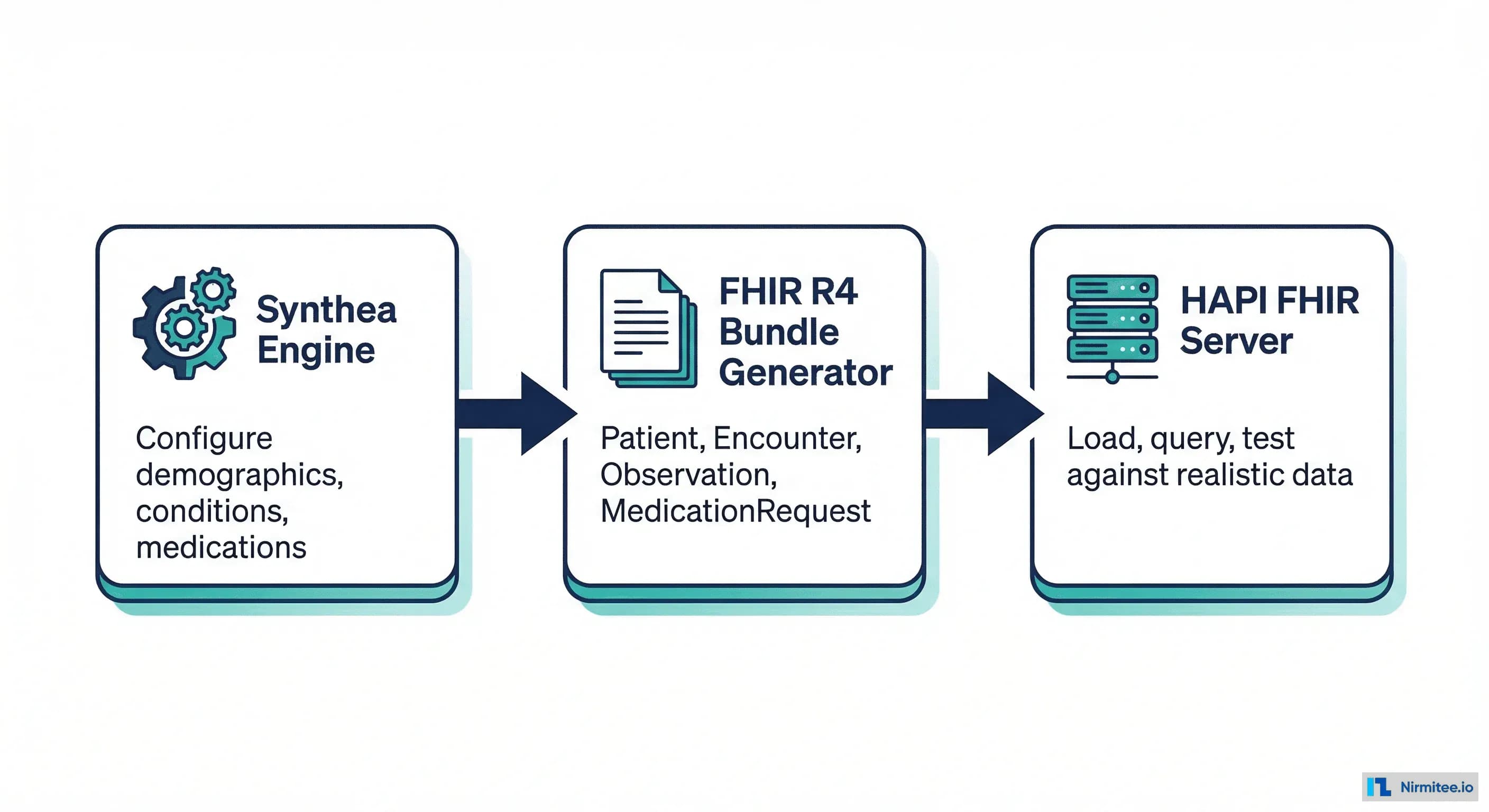
This guide walks you through the complete pipeline: generating synthetic patients with Synthea, loading them into a HAPI FHIR server, and building test scenarios that actually exercise your code. You will have working test data within 30 minutes.
Synthea: The Gold Standard for Synthetic Clinical Data
Synthea is an open-source synthetic patient generator developed by The MITRE Corporation. It is not a random data generator. Synthea simulates realistic patient lifecycles from birth to death using clinically validated disease progression models, real demographic distributions from US Census data, and standard medical coding systems (SNOMED CT, LOINC, RxNorm, ICD-10).
Each synthetic patient gets a complete medical history: encounters, conditions, medications, procedures, immunizations, lab results, vital signs, and care plans. The output is native FHIR R4 (or C-CDA, CSV, and other formats), ready to load into any FHIR-compliant system.
What Makes Synthea Data Realistic
- Disease modules: Over 90 clinical modules model conditions like diabetes, hypertension, cancer, asthma, and COVID-19 with evidence-based state machines
- Demographics: Population distributions match US Census data for age, gender, race, ethnicity, and geographic location
- Temporal coherence: Lab values change over time in clinically plausible ways (e.g., HbA1c drifting upward in uncontrolled diabetes)
- Standard codes: Every condition, medication, lab test, and procedure uses real SNOMED CT, LOINC, and RxNorm codes
- Payer simulation: Insurance coverage, claims, and costs follow realistic patterns
Installation: Two Options
Option 1: From Source (Recommended for Customization)
Synthea requires Java 11 or higher. On macOS, install via Homebrew: brew install openjdk@17. On Ubuntu: sudo apt install openjdk-17-jdk.
# Clone the repository
git clone https://github.com/synthetichealth/synthea.git
cd synthea

# Build (Gradle wrapper included)
./gradlew build check test

# Verify installation
./run_synthea --help
Option 2: Docker (Fastest Start)
# Pull and run the Docker image
docker pull ghcr.io/synthetichealth/synthea:master

# Generate 100 patients from Massachusetts
docker run --rm -v "$(pwd)/output:/output" \
  ghcr.io/synthetichealth/synthea:master \
  -p 100 Massachusetts
Generating Your First Patient Population
The basic command generates FHIR R4 bundles by default:
# Generate 500 patients from Massachusetts
./run_synthea -p 500 Massachusetts

# Output lands in ./output/fhir/
ls output/fhir/ | head -10
# Abe604_Koss676_0a1b2c3d-4e5f-6789-abcd-ef0123456789.json
# Ada529_Mertz280_1a2b3c4d-5e6f-7890-bcde-f01234567890.json
# ...
Each file is a FHIR Bundle (type: transaction) containing all resources for one patient. A typical patient bundle includes 50-200 resources depending on age and clinical history.
Key CLI Options
# Generate specific number of patients in a specific state
./run_synthea -p 1000 California

# Target a specific city
./run_synthea -p 200 Massachusetts Boston

# Set a seed for reproducible output
./run_synthea -p 100 -s 12345 New_York

# Generate only living patients (no deceased)
./run_synthea -p 500 --exporter.years_of_history 10

# Control age range via overrides
./run_synthea -p 100 -a 60-80 Massachusetts
Customizing Synthea for Your Use Case
The real power of Synthea is customization. You can control demographics, disease prevalence, and which clinical modules run.
Demographics Configuration
Edit src/main/resources/synthea.properties to control population characteristics:
# synthea.properties - key configuration options

# Export format (FHIR R4 is default)
exporter.fhir.export = true
exporter.ccda.export = false
exporter.csv.export = false

# Transaction bundles (true) vs individual resources (false)
exporter.fhir.transaction_bundle = true

# Include hospital/practitioner bundles
exporter.fhir.export_hospital = true
exporter.fhir.export_practitioner = true

# Limit history to recent years
exporter.years_of_history = 5

# Gender ratio (default 50/50)
generate.demographics.gender.male = 0.5
generate.demographics.gender.female = 0.5
Disease Module Targeting
Synthea includes 90+ disease modules. You can enable or disable specific ones to create focused datasets:
# Generate only patients with diabetes-related conditions
./run_synthea -p 200 -m diabetes*

# Multiple modules
./run_synthea -p 300 -m "diabetes*,hypertension,chronic_kidney_disease"

# List available modules
ls src/main/resources/modules/
# allergic_rhinitis.json
# asthma.json
# atopy.json
# breast_cancer.json
# chronic_kidney_disease.json
# colorectal_cancer.json
# copd.json
# covid19.json
# diabetes.json
# heart_failure.json
# hypertension.json
# lung_cancer.json
# ...
Setting Up a Local HAPI FHIR Server
Generating FHIR bundles is step one. To actually query and test against them, you need a FHIR server. HAPI FHIR is the most widely used open-source FHIR server, written in Java, with full R4 and R5 support.
Launch with Docker (30 Seconds)
# Start HAPI FHIR R4 server on port 8080
docker run -d --name hapi-fhir \
  -p 8080:8080 \
  -e hapi.fhir.default_encoding=json \
  hapiproject/hapi:latest

# Verify it is running
curl -s http://localhost:8080/fhir/metadata | python3 -m json.tool | head -20
The server starts with an empty database. The /fhir/metadata endpoint returns the CapabilityStatement, confirming it is ready.
Loading Synthea Bundles into HAPI
Each Synthea output file is a FHIR transaction bundle. Post them directly:
# Load a single patient bundle
curl -s -X POST http://localhost:8080/fhir \
  -H "Content-Type: application/fhir+json" \
  -d @output/fhir/Abe604_Koss676_0a1b2c3d.json | python3 -m json.tool

# Bulk load all bundles with a bash loop
for bundle in output/fhir/*.json; do
  echo "Loading: $bundle"
  curl -s -X POST http://localhost:8080/fhir \
    -H "Content-Type: application/fhir+json" \
    -d @"$bundle" > /dev/null
done
echo "Done. Loaded $(ls output/fhir/*.json | wc -l) bundles."
For large datasets (1,000+ patients), consider parallel loading:
# Parallel load using xargs (4 concurrent uploads)
ls output/fhir/*.json | xargs -P 4 -I {} \
  curl -s -X POST http://localhost:8080/fhir \
  -H "Content-Type: application/fhir+json" \
  -d @{} -o /dev/null
Querying Your Loaded Data
# Count total patients
curl -s "http://localhost:8080/fhir/Patient?_summary=count" | python3 -c \
  "import sys,json; print(f'Patients: {json.load(sys.stdin)[\"total\"]}')"

# Search for diabetic patients
curl -s "http://localhost:8080/fhir/Condition?code=44054006" \
  | python3 -m json.tool | head -30

# Get a patient with all their data using $everything
curl -s "http://localhost:8080/fhir/Patient/PATIENT_ID/\$everything" \
  | python3 -m json.tool
SMART on FHIR Sandbox for App Testing
If you are building a SMART on FHIR application, launch.smarthealthit.org provides a free sandbox with pre-loaded synthetic patients and a full OAuth2 authorization flow. You can test your app's launch sequence, patient context, and scopes without deploying your own server.
Key features of the SMART sandbox:
- EHR Launch simulation: Test the full EHR launch flow with patient/practitioner context selection
- Standalone Launch: Test standalone patient app launches with authorization code flow
- Pre-loaded patients: Dozens of synthetic patients with clinical data ready for testing
- Scope negotiation: Test different SMART scopes (patient/*.read, launch/patient, openid, fhirUser)
# Register your app with the SMART sandbox
# 1. Go to https://launch.smarthealthit.org/
# 2. Set your App Launch URL (e.g., http://localhost:3000/launch)
# 3. Set redirect URI (e.g., http://localhost:3000/callback)
# 4. Choose launch type: EHR Launch or Standalone Patient
# 5. Select patient and practitioner context
# 6. Click "Launch" to start the OAuth flow
Building a Realistic Clinical Scenario
Let us walk through what a realistic test patient looks like in FHIR. Meet Maria Rodriguez: a 65-year-old woman in Boston with Type 2 Diabetes, Hypertension, and a history of 12 office visits over 5 years. Synthea generates exactly this kind of patient.
The Patient Resource
{
  "resourceType": "Patient",
  "id": "maria-rodriguez-test",
  "name": [{
    "use": "official",
    "family": "Rodriguez",
    "given": ["Maria"],
    "prefix": ["Mrs."]
  }],
  "gender": "female",
  "birthDate": "1961-03-15",
  "address": [{
    "line": ["123 Commonwealth Ave"],
    "city": "Boston",
    "state": "MA",
    "postalCode": "02115",
    "country": "US"
  }],
  "maritalStatus": {
    "coding": [{
      "system": "http://terminology.hl7.org/CodeSystem/v3-MaritalStatus",
      "code": "M",
      "display": "Married"
    }]
  }
}
A Condition Resource (Type 2 Diabetes)
{
  "resourceType": "Condition",
  "clinicalStatus": {
    "coding": [{
      "system": "http://terminology.hl7.org/CodeSystem/condition-clinical",
      "code": "active"
    }]
  },
  "verificationStatus": {
    "coding": [{
      "system": "http://terminology.hl7.org/CodeSystem/condition-ver-status",
      "code": "confirmed"
    }]
  },
  "code": {
    "coding": [{
      "system": "http://snomed.info/sct",
      "code": "44054006",
      "display": "Type 2 diabetes mellitus"
    }]
  },
  "subject": {
    "reference": "Patient/maria-rodriguez-test"
  },
  "onsetDateTime": "2018-07-22"
}
An Observation Resource (HbA1c Lab Result)
{
  "resourceType": "Observation",
  "status": "final",
  "category": [{
    "coding": [{
      "system": "http://terminology.hl7.org/CodeSystem/observation-category",
      "code": "laboratory"
    }]
  }],
  "code": {
    "coding": [{
      "system": "http://loinc.org",
      "code": "4548-4",
      "display": "Hemoglobin A1c/Hemoglobin.total in Blood"
    }]
  },
  "subject": {
    "reference": "Patient/maria-rodriguez-test"
  },
  "effectiveDateTime": "2025-09-15",
  "valueQuantity": {
    "value": 7.2,
    "unit": "%",
    "system": "http://unitsofmeasure.org",
    "code": "%"
  }
}
MedicationRequest Resource (Metformin)
{
  "resourceType": "MedicationRequest",
  "status": "active",
  "intent": "order",
  "medicationCodeableConcept": {
    "coding": [{
      "system": "http://www.nlm.nih.gov/research/umls/rxnorm",
      "code": "860975",
      "display": "Metformin hydrochloride 500 MG Oral Tablet"
    }]
  },
  "subject": {
    "reference": "Patient/maria-rodriguez-test"
  },
  "authoredOn": "2018-07-22",
  "dosageInstruction": [{
    "text": "Take 500mg twice daily with meals",
    "timing": {
      "repeat": {
        "frequency": 2,
        "period": 1,
        "periodUnit": "d"
      }
    },
    "doseAndRate": [{
      "doseQuantity": {
        "value": 500,
        "unit": "mg",
        "system": "http://unitsofmeasure.org",
        "code": "mg"
      }
    }]
  }]
}
Data Quality: Where Synthetic Falls Short
Synthea data is excellent for development and integration testing, but it has known gaps you should be aware of.
What Synthea Gets Right
- Standard coding: Every element uses SNOMED CT, LOINC, RxNorm, or ICD-10 codes correctly
- Temporal consistency: Disease progression follows clinically plausible timelines
- Resource references: All FHIR references resolve correctly within a patient bundle
- US Core compliance: Output aligns with the US Core Implementation Guide profiles
What Real-World Data Looks Like (That Synthea Doesn't Model)
- Free-text notes: Real EHRs contain extensive unstructured clinical notes. Synthea generates minimal narrative text.
- Missing codes: In production, up to 30% of conditions may use local codes or free text instead of SNOMED. Synthea always uses standard codes.
- Data entry errors: Real data has typos, incorrect codes, contradictory information. Synthea data is pristine.
- Partial records: Patients switch providers, creating gaps in history. Synthea generates complete histories.
- Workflow artifacts: Duplicate entries, amended results, retracted orders are common in real EHRs but absent in Synthea.
If your application handles these edge cases (and it should), supplement Synthea data with hand-crafted FHIR bundles that deliberately include these imperfections.
When Synthetic Data Is Not Enough
Synthea covers the 80% case well, but some testing scenarios require different approaches:
| Scenario | Why Synthea Falls Short | Better Approach |
|---|---|---|
| Rare diseases (e.g., Gaucher disease, ALS) | No disease module exists | Hand-craft FHIR bundles using Orphanet codes |
| Complex medication regimens (oncology protocols) | Simplified medication modeling | Build custom MedicationRequest bundles with real RxNorm codes |
| Genomic data (molecular testing results) | No genomic observations | Use FHIR Genomics Reporting IG examples |
| Social determinants of health (SDOH) | Limited SDOH data | Use Gravity Project SDOH IG examples |
| ML model training (statistical validity) | Synthetic distributions may not match | Use Gretel.ai or MOSTLY AI for privacy-safe synthetic data trained on real distributions |
| Performance/load testing | Need massive scale | Synthea with -p 100000 plus parallel HAPI loading |
Putting It All Together: A Complete Testing Pipeline
Here is a production-ready script that generates patients, loads them into HAPI, and validates the data is queryable:
#!/bin/bash
# synthetic-test-pipeline.sh
# Generates synthetic patients and loads into a local HAPI FHIR server

set -e

PATIENT_COUNT=${1:-500}
STATE=${2:-Massachusetts}
HAPI_URL="http://localhost:8080/fhir"

echo "=== Step 1: Start HAPI FHIR Server ==="
docker run -d --name hapi-fhir-test \
  -p 8080:8080 \
  hapiproject/hapi:latest

echo "Waiting for HAPI to start..."
until curl -sf "$HAPI_URL/metadata" > /dev/null 2>&1; do
  sleep 2
done
echo "HAPI FHIR server is ready."

echo "=== Step 2: Generate $PATIENT_COUNT Patients ==="
cd synthea
./run_synthea -p "$PATIENT_COUNT" "$STATE"

echo "=== Step 3: Load Bundles into HAPI ==="
LOADED=0
for bundle in output/fhir/*.json; do
  HTTP_CODE=$(curl -s -o /dev/null -w "%{http_code}" \
    -X POST "$HAPI_URL" \
    -H "Content-Type: application/fhir+json" \
    -d @"$bundle")
  if [ "$HTTP_CODE" = "200" ]; then
    LOADED=$((LOADED + 1))
  else
    echo "WARN: Failed to load $bundle (HTTP $HTTP_CODE)"
  fi
done
echo "Loaded $LOADED bundles successfully."

echo "=== Step 4: Validate ==="
TOTAL=$(curl -s "$HAPI_URL/Patient?_summary=count" | \
  python3 -c "import sys,json; print(json.load(sys.stdin)['total'])")
echo "Total patients in HAPI: $TOTAL"

CONDITIONS=$(curl -s "$HAPI_URL/Condition?_summary=count" | \
  python3 -c "import sys,json; print(json.load(sys.stdin)['total'])")
echo "Total conditions: $CONDITIONS"

OBS=$(curl -s "$HAPI_URL/Observation?_summary=count" | \
  python3 -c "import sys,json; print(json.load(sys.stdin)['total'])")
echo "Total observations: $OBS"

echo "=== Pipeline Complete ==="
echo "HAPI FHIR server running at $HAPI_URL"
echo "Query patients: curl '$HAPI_URL/Patient?_count=10'"
Quick Reference: Tools Compared
| Tool | Data Quality | FHIR Support | Best For | Cost |
|---|---|---|---|---|
| Synthea | High (clinically modeled) | R4 native | Full dev/test, CI pipelines | Free / Open Source |
| HAPI FHIR | N/A (server only) | R4, R5 | Local FHIR API testing | Free / Open Source |
| SMART Sandbox | Medium | R4 | SMART app launch testing | Free |
| Gretel.ai | High (ML-generated) | Custom export | Privacy-safe ML training | Freemium |
| CMS Test Data | Medium | Bulk FHIR (limited) | Claims/billing testing | Free |
Next Steps
Synthetic patient data eliminates the biggest bottleneck in healthcare software development: getting realistic test data without legal risk. With Synthea and HAPI FHIR, you can go from zero to a fully populated FHIR server in under 30 minutes.
Start with ./run_synthea -p 100 Massachusetts, load the bundles into HAPI, and build your tests against real SNOMED, LOINC, and RxNorm codes. When you hit edge cases that Synthea does not cover, hand-craft targeted FHIR bundles. The combination gives you comprehensive test coverage without ever touching PHI.
At Nirmitee, we build healthcare systems that handle real-world FHIR data at scale, from EHR integrations to clinical data pipelines. Synthetic data is how we test every feature before it touches production. If you are building in healthcare and need help with FHIR implementation, we would love to talk.
Struggling with healthcare data exchange? Our Healthcare Interoperability Solutions practice helps organizations connect clinical systems at scale. We also offer specialized Healthcare AI Solutions services. Talk to our team to get started.