Part of our complete guide to What Are AI Agents in Healthcare and How Are They Transforming Care Delivery?.
FHIR was designed for apps. Now it is the operating system for AI agents. The same RESTful API that lets a patient portal display lab results lets an AI agent read a patient's medication history, check for drug interactions, generate a clinical note, and write it back to the EHR — all within the authorization boundaries that SMART on FHIR already enforces.
This is not a theoretical convergence. HL7 is building the AI Transparency on FHIR specification. Researchers at major academic medical centers are publishing MCP-FHIR frameworks that give LLMs structured tool access to clinical data. AWS just launched Amazon Connect Health with FHIR-integrated AI agents. The infrastructure is here — the question is whether you build your agent on it correctly.
This guide covers the three integration patterns for running AI agents on FHIR, the read/write operations agents actually need, authentication and authorization with SMART on FHIR, the emerging MCP-FHIR standard, and the HL7 AI Transparency framework that will become the compliance baseline.
Why FHIR Is the Natural Runtime for Healthcare AI Agents
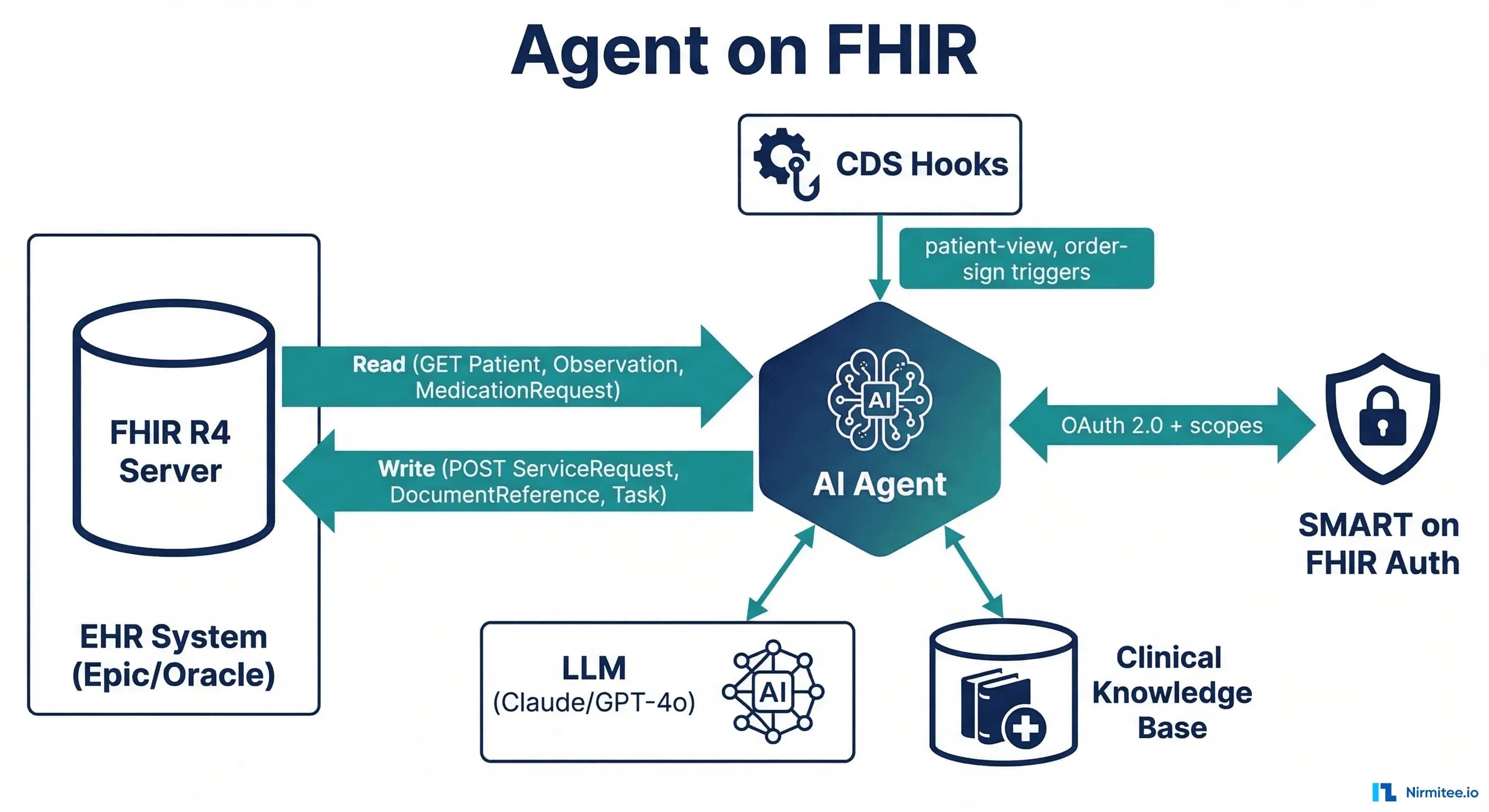
An AI agent needs three things from a healthcare data layer: the ability to read clinical data (patient history, labs, medications), the ability to write results back (notes, orders, alerts), and an authorization model that controls what the agent can access. FHIR R4 provides all three out of the box.
Before FHIR, healthcare AI systems had to build custom integrations for every EHR — parsing proprietary database schemas, handling vendor-specific APIs, and managing authentication through ad-hoc mechanisms. With FHIR, an agent built to read Observation resources from Epic will also read Observation resources from Oracle Health, MEDITECH, and any FHIR-compliant server. The data model is standardized. The API is standardized. The auth is standardized.
98% of US hospitals now expose FHIR R4 APIs (mandated by the ONC's 21st Century Cures Act regulations). Your AI agent's data layer is already deployed in every hospital you will sell to. You do not need to build it — you need to connect to it.
What an Agent Reads and Writes via FHIR
An AI agent's FHIR interactions fall into two categories: reading clinical context (to inform its reasoning) and writing clinical outputs (to deliver its results into the clinical workflow).
Read Operations (GET)
Every clinical AI agent needs access to some subset of these FHIR resources:
# Patient demographics and identifiers
GET /Patient/{id}

# Active medications (what the patient is currently taking)
GET /MedicationRequest?patient={id}&status=active

# Lab results (recent, filtered by category)
GET /Observation?patient={id}&category=laboratory&date=ge2026-01-01&_sort=-date

# Allergies and intolerances
GET /AllergyIntolerance?patient={id}&clinical-status=active

# Active conditions/diagnoses
GET /Condition?patient={id}&clinical-status=active

# Current encounter context
GET /Encounter/{encounter_id}

# Recent clinical notes
GET /DocumentReference?patient={id}&type=http://loinc.org|11506-3&_sort=-date&_count=5
The key architectural decision: load only what the agent needs. A medication reconciliation agent needs MedicationRequest and AllergyIntolerance — it does not need DocumentReference or Encounter history. Selective loading reduces token consumption by 40-60% and enforces HIPAA's minimum necessary principle.
Write Operations (POST/PUT)
Agents that only read are assistants. Agents that write are participants in the clinical workflow. FHIR supports both:
# Write a clinical note (agent-generated documentation)
POST /DocumentReference
{
  "resourceType": "DocumentReference",
  "status": "current",
  "type": {"coding": [{"system": "http://loinc.org", "code": "11506-3", "display": "Progress note"}]},
  "subject": {"reference": "Patient/{patient_id}"},
  "content": [{
    "attachment": {
      "contentType": "text/html",
      "data": "{base64_encoded_note}"
    }
  }],
  "extension": [{
    "url": "http://hl7.org/fhir/uv/ai-transparency/StructureDefinition/ai-generated",
    "valueBoolean": true
  }]
}

# Create a task for clinical staff (agent delegates to human)
POST /Task
{
  "resourceType": "Task",
  "status": "requested",
  "intent": "order",
  "code": {"text": "Review AI-flagged drug interaction: warfarin + amiodarone"},
  "for": {"reference": "Patient/{patient_id}"},
  "requester": {"display": "AI Clinical Safety Agent"},
  "restriction": {"period": {"end": "2026-03-18T12:00:00Z"}}
}

# Suggest an order (agent recommends, clinician approves)
POST /ServiceRequest
{
  "resourceType": "ServiceRequest",
  "status": "draft",
  "intent": "proposal",
  "code": {"coding": [{"system": "http://loinc.org", "code": "600-7", "display": "Blood culture"}]},
  "subject": {"reference": "Patient/{patient_id}"},
  "reasonCode": [{"text": "AI sepsis risk assessment: qSOFA 2/3"}]
}
The critical distinction: agents should write with status: draft and intent: proposal. The agent suggests — the clinician approves.
Three Integration Patterns
Pattern 1: CDS Hooks Agent
CDS Hooks is the HL7 standard for real-time clinical decision support. The EHR fires a hook at defined trigger points (opening a chart, signing an order, prescribing a medication), and your agent returns recommendation cards within 500ms.
# CDS Hooks service discovery
GET https://your-agent.example.com/cds-services
{
  "services": [{
    "id": "drug-interaction-check",
    "hook": "medication-prescribe",
    "title": "AI Drug Interaction Checker",
    "description": "Checks for drug-drug and drug-allergy interactions using clinical guidelines + LLM reasoning",
    "prefetch": {
      "medications": "MedicationRequest?patient={{context.patientId}}&status=active",
      "allergies": "AllergyIntolerance?patient={{context.patientId}}"
    }
  }]
}
When to use: Real-time clinical alerts during order entry, prescription, or chart review. The agent must respond within 500ms — which means either precomputed results or a very fast inference pipeline. Complex LLM reasoning (multi-step, RAG-augmented) typically exceeds CDS Hooks latency requirements unless you use caching or pre-computation strategies.
EHR support: Epic (comprehensive), Oracle Health (core hooks), MEDITECH (limited—often requires Mirth Connect as middleware).
Pattern 2: SMART App Agent
A SMART on FHIR application launched from within the EHR. The clinician clicks an icon in the EHR, your app launches in a browser frame, and your agent has full read/write access to the patient's FHIR data within the granted scopes.
When to use: Interactive clinical tools where the clinician engages with the agent — differential diagnosis assistants, care plan generators, clinical documentation tools. Latency is flexible (the clinician waits for results), and you control the UI entirely.
Advantage over CDS Hooks: Full bidirectional read/write. CDS Hooks agents can only return cards — SMART apps can read any FHIR resource, display rich UI, and write multiple resources back to the EHR.
Pattern 3: Event-Driven Agent
Triggered by clinical events (ADT messages, lab results, discharge notifications) via FHIR Subscriptions (R5) or HL7v2 message feeds. The agent runs in the background, processes data, and writes results back to the FHIR server without any clinician interaction.
When to use: Background automation — post-discharge follow-up scheduling, population health risk stratification, automated coding, quality measure calculation. No latency constraint, no UI required.
Auth model: Service-to-service authentication (SMART Backend Services using client_credentials grant with signed JWTs). No user interaction — the agent operates with its own identity and pre-defined scopes.
The Agent Tool-Calling Loop on FHIR
Modern AI agents use a ReAct (Reasoning + Acting) loop: the LLM reasons about what information it needs, calls tools (FHIR API endpoints) to get that information, reasons over the results, and repeats until it can answer the query or complete the task.
Here is a concrete example — a clinician asks: "What are this patient's active medications, and are there any interactions I should know about?"
# Agent tool definitions (function calling / MCP tools)
tools = [
    {
        "name": "get_medications",
        "description": "Fetch active medications for a patient from FHIR",
        "parameters": {
            "patient_id": {"type": "string", "description": "FHIR Patient ID"}
        }
    },
    {
        "name": "get_allergies",
        "description": "Fetch active allergies for a patient from FHIR",
        "parameters": {
            "patient_id": {"type": "string", "description": "FHIR Patient ID"}
        }
    },
    {
        "name": "check_interactions",
        "description": "Check drug-drug interactions using NLM RxNorm API",
        "parameters": {
            "rxcui_list": {"type": "array", "description": "List of RxNorm CUIs"}
        }
    },
    {
        "name": "create_flag",
        "description": "Write a Flag resource to the FHIR server for clinical review",
        "parameters": {
            "patient_id": {"type": "string"},
            "severity": {"type": "string", "enum": ["high", "medium", "low"]},
            "detail": {"type": "string"}
        }
    }
]

# Agent execution trace:
# Step 1: LLM calls get_medications(patient_id="p-28491")
#   -> Returns 8 active MedicationRequests with RxNorm codes
# Step 2: LLM calls get_allergies(patient_id="p-28491")
#   -> Returns 2 active AllergyIntolerances (penicillin, sulfa)
# Step 3: LLM calls check_interactions(rxcui_list=[...8 CUIs...])
#   -> Returns 1 high-severity interaction: warfarin + amiodarone
# Step 4: LLM reasons: "High-severity interaction found. Writing flag."
# Step 5: LLM calls create_flag(patient_id="p-28491", severity="high",
#     detail="Warfarin + Amiodarone: increased bleeding risk. Monitor INR closely.")
# Step 6: LLM returns structured response to clinician with evidence
Each tool call maps to a FHIR API operation. The agent never accesses raw database tables — it goes through the FHIR API, which enforces authorization, logs access, and ensures data consistency.
MCP-FHIR: The Emerging Standard
The Model Context Protocol (MCP) — originally developed by Anthropic — is becoming the standard interface between LLMs and external data sources. MCP-FHIR implementations provide a structured bridge: the LLM sends tool-use requests through MCP, the MCP server translates them into FHIR REST API calls, and returns structured results.
An open-source MCP-FHIR framework published in 2025 demonstrated that this architecture enables dynamic querying, context-aware prompt generation, and real-time summarization of EHR data — without the LLM needing to understand FHIR query syntax directly. The MCP server handles the translation.
Why MCP matters for healthcare AI builders:
- Standardized tool interface: Define FHIR operations once as MCP tools, use them across Claude, GPT-4o, Gemini, or any MCP-compatible model
- Authorization passthrough: The MCP server can enforce SMART on FHIR scopes, ensuring the LLM never accesses data outside its authorization boundary
- Audit trail: Every MCP tool call is logged with input parameters and output summaries — the exact audit trail HIPAA requires
- Model-agnostic: Switch LLM providers without rewriting your FHIR integration layer
HL7 AI Transparency on FHIR
HL7 is developing the AI Transparency on FHIR specification — a set of FHIR extensions that encode AI provenance metadata directly into FHIR resources. When an AI agent creates a DocumentReference (clinical note) or RiskAssessment (prediction score), The AI Transparency extensions capture:
- Model provenance: What model generated this output, what version, and when was it last retrained
- Confidence scoring: The model's self-assessed confidence in its output, enabling downstream systems to route low-confidence outputs to human review
- Evidence linking: Which specific FHIR resources (lab results, medications, notes) were in the context window when the model generated its output
- Audit metadata: Who requested the AI output, when, through which interface, and whether it was reviewed before clinical action
This specification is not yet normative, but it is the direction HL7 is heading. Building your agent to produce AI-transparent FHIR resources now means you will not need to retrofit when this becomes a compliance requirement.
Building Your First Agent on FHIR
- Pick one pattern. Start with the SMART App if you need an interactive clinical tool. Start with Event-Driven if you need background automation. Only use CDS Hooks if you need sub-500ms real-time alerting and your use case fits one of the standard hooks.
- Get FHIR access. Stand up a FHIR R4 server (HAPI FHIR for open-source, or connect to your target EHR's sandbox). Load Synthea synthetic data for development.
- Implement SMART auth. Register your agent as a SMART app. Request the minimum scopes needed:
patient/Observation.read,patient/MedicationRequest.read,patient/DocumentReference.write. Expect auth to be the hardest part. - Define your FHIR tools. Map each agent capability to specific FHIR operations. Use MCP if your LLM supports it. Build a thin wrapper if it does not.
- Add safety layers. Clinical guardrails, output schema validation, and evaluation suites are not optional. Build them before your first demo.
- Write with transparency. Include AI provenance extensions on every FHIR resource your agent creates. Even before HL7 finalizes the spec, the metadata will make your system auditable and debuggable.
Struggling with healthcare data exchange? Our Healthcare Interoperability Solutions practice helps organizations connect clinical systems at scale. We also offer specialized Agentic AI for Healthcare services. Talk to our team to get started.
Related reading
For more insights, explore our guides on The FHIR write problem for AI agents and Building a FHIR-native RAG pipeline.
You may also find value in AI agents in healthcare and FHIR in Modern Healthcare.