

Part of our complete guide to EHR Software Development: Ultimate Guide for 2026.
Every tutorial on building healthcare AI agents starts the same way: pick a framework, connect an LLM, define some tools. Then it hand-waves past the hardest part — how does the agent actually read from and write to an Electronic Health Record?
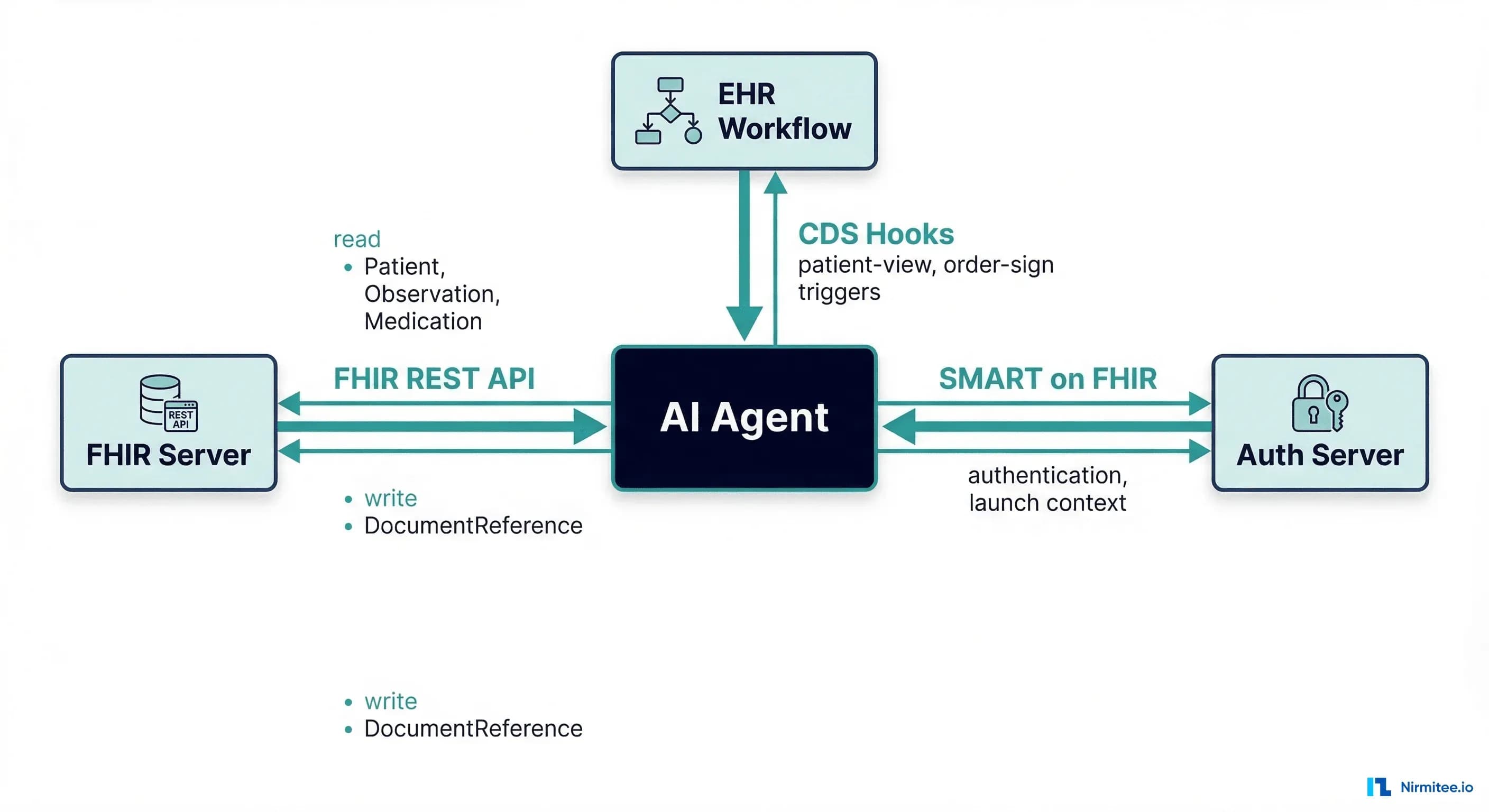
The answer is not "just call an API." EHRs like Epic, Cerner (Oracle Health), and MEDITECH expose clinical data through FHIR (Fast Healthcare Interoperability Resources), authenticate via SMART on FHIR, and trigger workflows through CDS Hooks. These three standards are the agent's interface to the clinical world. If your AI agent cannot speak these protocols, it cannot participate in patient care.
This guide shows you how to wrap FHIR endpoints as agent tools, trigger agents from clinical workflows using CDS Hooks, and authenticate everything with SMART on FHIR — with working Python code you can deploy this week.
Why Your Agent Needs Three Protocols, Not One
Most developers building healthcare AI agents think they only need FHIR. But FHIR alone answers only one question: how do I read and write clinical data? Two equally important questions remain unanswered:
- When should the agent run? You don't want it polling the EHR on a cron job. CDS Hooks tells the agent exactly when a clinician needs help — when they open a chart, sign an order, or prescribe a medication.
- How does the agent prove it's allowed to access this patient's data? SMART on FHIR handles OAuth 2.0 authorization, scoping access to specific patients and operations.
Together, these three standards form the complete interface between your agent and the EHR: FHIR for data, CDS Hooks for timing, and SMART on FHIR for trust. The ONC's 21st Century Cures Act mandates that certified EHRs support all three, which means your agent architecture works across Epic, Cerner, MEDITECH, and any ONC-certified system.
FHIR Endpoints as Agent Tools
In agent frameworks like LangChain, CrewAI, or custom tool-calling architectures, "tools" are functions the LLM can invoke. Each FHIR endpoint maps naturally to a tool. The key insight: FHIR's RESTful design was practically made for tool-based agents. Every resource type has a predictable URL pattern, standardized search parameters, and structured JSON responses.
The Core FHIR Tool Kit
Here is a Python class that wraps FHIR REST calls as callable tools. This pattern works with any agent framework — the tools are plain functions with type hints and docstrings that the LLM uses to decide when and how to call them:
import httpx
from typing import Optional

class FHIRTools:
    """FHIR R4 tools for AI agent access to EHR data."""

    def __init__(self, base_url: str, access_token: str):
        self.base_url = base_url.rstrip("/")
        self.headers = {
            "Authorization": f"Bearer {access_token}",
            "Accept": "application/fhir+json"
        }

    def read_patient(self, patient_id: str) -> dict:
        """Retrieve patient demographics: name, DOB, gender,
        contact info, and identifiers."""
        resp = httpx.get(
            f"{self.base_url}/Patient/{patient_id}",
            headers=self.headers
        )
        resp.raise_for_status()
        return resp.json()

    def search_conditions(self, patient_id: str,
                          clinical_status: str = "active") -> list:
        """Find active diagnoses for a patient. Returns a list
        of Condition resources with code, onset, and severity."""
        resp = httpx.get(
            f"{self.base_url}/Condition",
            params={
                "patient": patient_id,
                "clinical-status": clinical_status
            },
            headers=self.headers
        )
        resp.raise_for_status()
        bundle = resp.json()
        return bundle.get("entry", [])

    def search_medications(self, patient_id: str,
                           status: str = "active") -> list:
        """Get current medication orders for a patient."""
        resp = httpx.get(
            f"{self.base_url}/MedicationRequest",
            params={"patient": patient_id, "status": status},
            headers=self.headers
        )
        resp.raise_for_status()
        return resp.json().get("entry", [])

    def search_labs(self, patient_id: str,
                    code: Optional[str] = None) -> list:
        """Retrieve laboratory results. Optionally filter by
        LOINC code (e.g., '4548-4' for HbA1c)."""
        params = {
            "patient": patient_id,
            "category": "laboratory",
            "_sort": "-date",
            "_count": "20"
        }
        if code:
            params["code"] = f"http://loinc.org|{code}"
        resp = httpx.get(
            f"{self.base_url}/Observation",
            params=params,
            headers=self.headers
        )
        resp.raise_for_status()
        return resp.json().get("entry", [])

    def search_allergies(self, patient_id: str) -> list:
        """Get all documented allergies and intolerances."""
        resp = httpx.get(
            f"{self.base_url}/AllergyIntolerance",
            params={"patient": patient_id},
            headers=self.headers
        )
        resp.raise_for_status()
        return resp.json().get("entry", [])
Each method has a descriptive docstring because agent frameworks use these to generate tool descriptions for the LLM. When the agent needs to answer "What medications is this patient on?", the LLM matches the question to search_medications and calls it with the patient ID.
Registering FHIR Tools with LangChain
In LangChain, you convert these methods into tools the agent can invoke:
from langchain_core.tools import tool

fhir = FHIRTools(
    base_url="https://fhir.epic.com/interconnect-fhir-oauth/api/FHIR/R4",
    access_token=access_token
)

@tool
def read_patient(patient_id: str) -> dict:
    """Retrieve patient demographics from the EHR."""
    return fhir.read_patient(patient_id)

@tool
def search_active_conditions(patient_id: str) -> list:
    """Find all active diagnoses for a patient."""
    return fhir.search_conditions(patient_id, "active")

@tool
def search_current_medications(patient_id: str) -> list:
    """Get active medication orders for a patient."""
    return fhir.search_medications(patient_id, "active")

@tool
def search_recent_labs(patient_id: str) -> list:
    """Retrieve recent laboratory results for a patient."""
    return fhir.search_labs(patient_id)

tools = [read_patient, search_active_conditions,
         search_current_medications, search_recent_labs]
Tool Design for Safety — The Human-in-the-Loop Gate
Read operations are safe — they do not change clinical state. But the moment your agent can write to the EHR, you cross from "decision support" into "clinical action." This is the line that determines whether your system is a helpful assistant or a liability.
The Three Zones of Agent Operations
| Zone | Operations | Agent Permission |
|---|---|---|
| Green — Safe Reads | GET Patient, Observation, Condition, MedicationRequest, AllergyIntolerance | Agent executes freely |
| Amber — Approved Writes | POST DocumentReference (summaries), POST Communication (messages) | Agent proposes, human approves, tool executes |
| Red — Never Auto-Write | POST MedicationRequest (prescriptions), POST CarePlan, POST DiagnosticReport | Agent must never write these — clinician creates directly |
The approval gate is a design pattern, not a framework feature. Here is how to implement it:
class ApprovedWriteTool:
    """Write tool that requires human approval before executing."""

    def __init__(self, fhir_tools: FHIRTools):
        self.fhir = fhir_tools
        self.pending_writes = {}

    def propose_write(self, patient_id: str,
                      doc_type: str, content: str) -> str:
        """Agent proposes a write. Returns a proposal ID
        for the clinician to review."""
        import uuid
        proposal_id = str(uuid.uuid4())
        self.pending_writes[proposal_id] = {
            "patient_id": patient_id,
            "doc_type": doc_type,
            "content": content,
            "status": "pending_review"
        }
        return f"Proposal {proposal_id} created. Awaiting review."

    def approve_and_execute(self, proposal_id: str) -> dict:
        """Clinician approves, then tool writes to FHIR."""
        proposal = self.pending_writes.get(proposal_id)
        if not proposal or proposal["status"] != "pending_review":
            raise ValueError("Invalid or already processed proposal")

        doc_ref = {
            "resourceType": "DocumentReference",
            "status": "current",
            "subject": {
                "reference": f"Patient/{proposal['patient_id']}"
            },
            "type": {
                "coding": [{
                    "system": "http://loinc.org",
                    "code": "51855-5",
                    "display": "Patient Note"
                }]
            },
            "content": [{
                "attachment": {
                    "contentType": "text/plain",
                    "data": proposal["content"]
                }
            }]
        }
        resp = httpx.post(
            f"{self.fhir.base_url}/DocumentReference",
            json=doc_ref,
            headers=self.fhir.headers
        )
        resp.raise_for_status()
        proposal["status"] = "executed"
        return resp.json()
This pattern ensures that every agent-generated write passes through a human checkpoint before it reaches the EHR. The clinician sees exactly what the agent wants to write, can modify it, and bears responsibility for the final clinical action — exactly how clinical decision support systems are designed to operate.
CDS Hooks — Triggering Your Agent at the Right Moment
Running an AI agent on a schedule is wasteful. Running it when a clinician needs help is powerful. CDS Hooks is an HL7 standard that fires HTTP requests from the EHR to external services at specific workflow moments.
Key Hook Types for Agents
- patient-view — fires when a clinician opens a patient's chart. Use this for: pre-visit summaries, care gap alerts, risk score calculations.
- order-sign — fires when a clinician is about to sign an order. Use this for: drug interaction checks, duplicate order detection, guideline compliance alerts.
- medication-prescribe — fires during medication ordering. Notably, use formulary checking, therapeutic alternatives, and dosage verification.
Building a CDS Hook Endpoint
Your agent service exposes two endpoints: a discovery endpoint and a hook handler. Here is a complete implementation using FastAPI:
from fastapi import FastAPI, Request
from pydantic import BaseModel

app = FastAPI()

# 1. Discovery endpoint: tells the EHR what hooks we handle
@app.get("/cds-services")
def discovery():
    return {
        "services": [{
            "hook": "patient-view",
            "id": "ai-care-gap-agent",
            "title": "AI Care Gap Detection",
            "description": "Analyzes patient data and identifies "
                           "care gaps, overdue screenings, and "
                           "missing preventive measures.",
            "prefetch": {
                "patient": "Patient/{{context.patientId}}",
                "conditions": "Condition?patient={{context.patientId}}"
                              "&clinical-status=active",
                "labs": "Observation?patient={{context.patientId}}"
                        "&category=laboratory&_sort=-date&_count=10"
            }
        }]
    }

# 2. Hook handler: receives the hook, runs the agent, returns cards
@app.post("/cds-services/ai-care-gap-agent")
async def handle_patient_view(request: Request):
    hook_request = await request.json()

    patient_id = hook_request["context"]["patientId"]
    prefetch = hook_request.get("prefetch", {})

    # Extract clinical data from prefetch or fetch via FHIR
    patient = prefetch.get("patient", {})
    conditions = prefetch.get("conditions", {}).get("entry", [])
    labs = prefetch.get("labs", {}).get("entry", [])

    # Run the AI agent with the clinical context
    analysis = await run_care_gap_agent(
        patient=patient,
        conditions=conditions,
        labs=labs
    )

    # Return CDS Cards
    cards = []
    for gap in analysis.get("care_gaps", []):
        cards.append({
            "uuid": gap["id"],
            "summary": gap["title"],
            "detail": gap["detail"],
            "indicator": "warning",
            "source": {
                "label": "AI Care Gap Agent",
                "url": "https://your-service.com/about"
            },
            "suggestions": [{
                "label": gap.get("suggested_action",
                                 "Review recommendation"),
                "uuid": f"suggest-{gap['id']}"
            }]
        })

    return {"cards": cards}
CDS Hook Request Anatomy
When the EHR fires a hook, it sends a JSON payload containing the clinical context. The prefetch field is critical for performance — it lets you specify FHIR queries that the EHR resolves before calling your service, saving round-trip. A typical patient-view payload includes:
{
  "hookInstance": "d1577c69-dfbe-44ad-ba6d-3e05e953b2ea",
  "hook": "patient-view",
  "context": {
    "userId": "Practitioner/dr-smith-123",
    "patientId": "patient-456"
  },
  "prefetch": {
    "patient": { "resourceType": "Patient", "id": "patient-456" },
    "conditions": { "resourceType": "Bundle", "entry": [] },
    "labs": { "resourceType": "Bundle", "entry": [] }
  },
  "fhirServer": "https://fhir.hospital.org/R4",
  "fhirAuthorization": {
    "access_token": "eyJhbG...",
    "token_type": "Bearer",
    "scope": "patient/*.read"
  }
}
Notice that the EHR can provide a fhirAuthorization token, letting your agent make additional FHIR queries beyond what was prefetched. This is how the integration prerequisites we discussed in our earlier guide come into play — your agent needs pre-configured FHIR access to operate at this level.
SMART on FHIR — Authenticating Your Agent
Your agent needs an identity. SMART on FHIR provides OAuth 2.0 authorization tailored for healthcare. For backend AI agents (no user present), you use the Backend Services authorization flow.
Backend Service Authorization Flow
Unlike user-facing SMART apps that use authorization code flow, backend services use client_credentials with a signed JWT assertion. This flow has no user interaction — the agent authenticates as itself:
import jwt
import time
import httpx

class SMARTBackendAuth:
    """SMART on FHIR Backend Services authorization."""

    def __init__(self, client_id: str, token_url: str,
                 private_key: str, key_id: str):
        self.client_id = client_id
        self.token_url = token_url
        self.private_key = private_key
        self.key_id = key_id
        self._token = None
        self._expires_at = 0

    def _create_jwt_assertion(self) -> str:
        """Create a signed JWT for client authentication."""
        now = int(time.time())
        claims = {
            "iss": self.client_id,
            "sub": self.client_id,
            "aud": self.token_url,
            "exp": now + 300,  # 5 minutes
            "jti": str(now)
        }
        return jwt.encode(
            claims,
            self.private_key,
            algorithm="RS384",
            headers={"kid": self.key_id}
        )

    def get_access_token(self) -> str:
        """Get a valid access token, refreshing if needed."""
        if self._token and time.time() < self._expires_at - 60:
            return self._token

        assertion = self._create_jwt_assertion()
        resp = httpx.post(self.token_url, data={
            "grant_type": "client_credentials",
            "scope": "system/Patient.read system/Observation.read "
                     "system/Condition.read "
                     "system/MedicationRequest.read "
                     "system/AllergyIntolerance.read "
                     "system/DocumentReference.write",
            "client_assertion_type":
                "urn:ietf:params:oauth:client-assertion-type:"
                "jwt-bearer",
            "client_assertion": assertion
        })
        resp.raise_for_status()
        token_data = resp.json()
        self._token = token_data["access_token"]
        self._expires_at = time.time() + token_data.get(
            "expires_in", 3600)
        return self._token
Scope Design for Agents
SMART scopes control exactly what your agent can do. For a production healthcare AI agent (see our guide to observability for agentic AI in healthcare), request the minimum scopes needed:
| Scope | Permission | Use Case |
|---|---|---|
system/Patient.read | Read any patient | Demographics lookup |
system/Observation.read | Read observations | Lab results, vitals |
system/Condition.read | Read conditions | Active diagnoses |
system/MedicationRequest.read | Read medication orders | Current prescriptions |
system/AllergyIntolerance.read | Read allergies | Safety checks |
system/DocumentReference.write | Write documents | Agent summaries (with approval) |
Use system/ scopes for backend services (no patient context) or patient/ scopes when launched in the context of a specific patient via CDS Hooks. The principle of least privilege applies — an agent that only reads lab results should not have write access to anything.
Putting It All Together — The Complete Agent Architecture
Here is the end-to-end flow that connects all three protocols into a working system:
- Clinician opens a patient chart in Epic/Cerner. The EHR fires a
patient-viewCDS Hook to your agent service. - Your FastAPI service receives the hook request with the patient ID and prefetched data.
- The agent authenticates via SMART on FHIR (backend services flow) to get an access token for additional FHIR queries beyond the prefetch.
- The agent reads FHIR data using its toolkit — Patient, Conditions, Medications, Labs, Allergies.
- The agent reasons with the LLM — analyzing the clinical picture, identifying care gaps, and checking guidelines.
- The agent returns CDS Cards — structured suggestions that appear inline in the EHR's UI.
- The clinician reviews and approves. If the agent generated a useful summary, the approved write tool posts a DocumentReference back to FHIR.
Connecting the Components
import json
from openai import OpenAI

async def run_care_gap_agent(patient, conditions, labs):
    """Core agent logic: analyze clinical data, find care gaps."""
    client = OpenAI()

    # Build clinical context for the LLM
    context = f"""Patient: {patient.get('name', [{}])[0].get('text', 'Unknown')}
Age: {calculate_age(patient.get('birthDate', ''))}
Active Conditions: {format_conditions(conditions)}
Recent Labs: {format_labs(labs)}"""

    response = client.chat.completions.create(
        model="gpt-4o",
        messages=[
            {"role": "system",
             "content": "You are a clinical decision support agent. "
                        "Analyze patient data and identify care gaps "
                        "based on USPSTF and ADA guidelines. Return "
                        "structured JSON with care_gaps array."},
            {"role": "user", "content": context}
        ],
        response_format={"type": "json_object"}
    )

    return json.loads(response.choices[0].message.content)
Write-Back Patterns — Persisting Agent Output in the EHR
When your agent produces useful output — a clinical summary, a care gap report, a pre-visit brief — that output should live in the EHR, not in a separate dashboard. Two FHIR resources handle agent write-back:
DocumentReference for Clinical Summaries
The DocumentReference Resource is the standard way to attach agent-generated documents to a patient's chart. Clinicians see these alongside other clinical notes.
Communication for Alerts and Messages
For time-sensitive notifications — "Patient's HbA1c has been above 9% for three consecutive readings" — use the Communication resource:
def write_care_gap_alert(fhir: FHIRTools, patient_id: str,
                         practitioner_id: str, message: str):
    """Write a care gap alert as a FHIR Communication resource."""
    communication = {
        "resourceType": "Communication",
        "status": "completed",
        "subject": {"reference": f"Patient/{patient_id}"},
        "recipient": [
            {"reference": f"Practitioner/{practitioner_id}"}
        ],
        "payload": [{
            "contentString": message
        }],
        "category": [{
            "coding": [{
                "system": "http://terminology.hl7.org/CodeSystem"
                          "/communication-category",
                "code": "notification",
                "display": "Notification"
            }]
        }]
    }
    resp = httpx.post(
        f"{fhir.base_url}/Communication",
        json=communication,
        headers=fhir.headers
    )
    resp.raise_for_status()
    return resp.json()
Remember: all write operations must pass through the approval gate described earlier. The pattern is always agent proposes → clinician reviews → tool executes. This is not optional — it is how you keep your system aligned with patient safety standards and HIPAA compliance requirements.
Production Considerations
Performance: CDS Hooks Have a 10-Second Window
EHRs expect CDS Hook responses within 10 seconds. If your agent takes longer, the EHR discards the response, and the clinician never sees it. Strategies:
- Maximize prefetch — every FHIR query your agent makes inside the hook handler adds latency. Define comprehensive prefetch templates in your discovery endpoint.
- Use faster models for CDS responses — GPT-4o-mini or Claude Haiku for time-critical hooks, GPT-4o or Claude Opus for asynchronous analysis.
- Cache FHIR responses — patient demographics rarely change. Cache aggressively with short TTLs (5 minutes).
- Stream or defer — if analysis takes longer than 10 seconds, return a card with a link to the full analysis rather than blocking.
Error Handling and Observability
Your agent service must never crash the clinical workflow. If the agent fails, return an empty cards array — not a 500 error. Log every FHIR call, every LLM invocation, and every CDS response for audit trails. As we covered in our guide on observability for agentic AI in healthcare, monitoring agent behavior in production is more important than monitoring your servers.
Compliance and Audit
Under HIPAA, every access to patient data must be logged. Your agent is no different — it needs an audit trail of every FHIR read, every LLM prompt that included PHI, and every write-back to the EHR. Include the clinician's identity (from the CDS Hook's userId context) in every audit entry to maintain the chain of accountability.
Getting Started — A Practical Roadmap
If you are building your first EHR-connected agent, follow this sequence:
- Week 1: FHIR tools only. Build the
FHIRToolsclass, connect to a SMART on FHIR sandbox (free, no registration), and verify you can read Patient, Condition, Observation, and MedicationRequest resources. - Week 2: Add the agent layer. Wrap the FHIR tools in LangChain or your framework of choice. Test the agent's ability to answer clinical questions using real sandbox data.
- Week 3: CDS Hook integration. Deploy the FastAPI service, register it with the CDS Hooks sandbox, and verify that your agent responds to
patient-viewhooks within 10 seconds. - Week 4: SMART Backend Services auth. Generate an RSA key pair, register your service with the FHIR server, and implement the
client_credentialsflow. - Week 5: Write-back and approval gates. Add the
ApprovedWriteTool, test DocumentReference creation, build the clinician approval UI.
At Nirmitee, we build EHR integration systems that connect AI agents to production FHIR servers across Epic, Cerner, and MEDITECH. If you need help going from sandbox to production — where the real complexity lives — we would like to hear from you.
Building interoperable healthcare systems is complex. Our Healthcare Interoperability Solutions team has deep experience shipping production integrations. We also offer specialized Agentic AI for Healthcare services. Talk to our team to get started.
Frequently Asked QuestionsCan I use FHIR Bulk Data Export instead of individual queries?
Bulk Data Export ($export) is designed for population-level analytics, not real-time agent workflows. It returns NDJSON files asynchronously, which is too slow for CDS Hook responses. Use individual FHIR REST queries for real-time agent tools and Bulk Data Export for batch analytics and model training.
Does my agent need separate credentials for each EHR vendor?
Yes. Each hospital's FHIR server has its own authorization server. Your agent registers separately with Epic's App Orchard, Oracle Health's (Cerner) Open Platform, etc. However, the FHIR and SMART protocols are standardized — the same code works across vendors, only the configuration changes.
What about FHIR versions — R4 vs. R5?
Stick with FHIR R4 for production. It is the version mandated by ONC for US-certified EHRs, and what Epic, Cerner, and MEDITECH implement. FHIR R5 is published but not yet widely deployed. The resource types and patterns in this guide work with R4.
How do I test without access to a real EHR?
Use the SMART on FHIR Launcher and HAPI FHIR Server (open source). Both support synthetic patient data. The CDS Hooks sandbox at sandbox.cds-hooks.org lets you test hook integrations without a real EHR.
Is there a risk of the agent hallucinating clinical data?
The agent reads real data from FHIR — it does not generate clinical facts. Hallucination risk exists in the agent's interpretation of data (e.g., incorrectly identifying a care gap). This is why write-backs require human approval and why CDS Cards include source references. The clinician validates every suggestion before acting on it.
Related reading
For more insights, explore our guides on AI agents in healthcare: an overview and FHIR in Modern Healthcare.
You may also find value in EHR Software Development Guide and Building a Healthtech App.