

Part of our complete guide to what is FHIR.
Over 500 million people worldwide wear smartwatches and fitness trackers that continuously collect heart rate, sleep patterns, activity levels, blood oxygen, and more. Yet the vast majority of this data never reaches a clinician. Patients track their health obsessively on Apple Watch, Fitbit, Oura Ring, and Garmin — but their providers see none of it during appointments.
Related case study: consumer health data at work — our wellness and nutrition management platform with gym health.
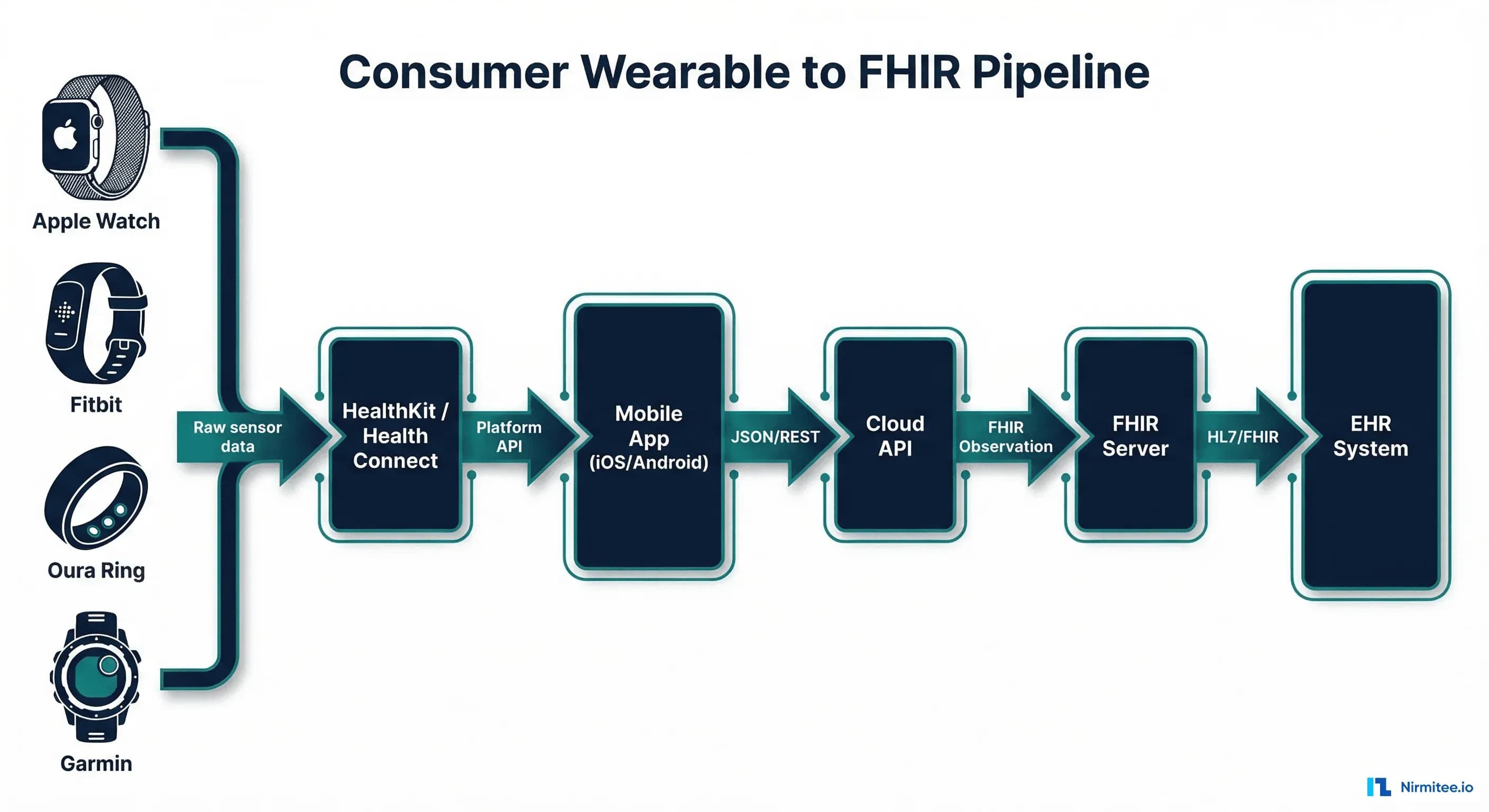
The technical bridge between consumer wearables and clinical systems runs through two platform APIs: Apple HealthKit (iOS) and Google Health Connect (Android). By building a pipeline from these APIs through a FHIR-compliant backend, healthcare organizations can ingest consumer wearable data as structured FHIR Observation resources — ready for clinical decision-making, remote monitoring programs, and population health analytics.
This guide provides the complete technical implementation: Swift code for HealthKit, Kotlin code for Health Connect, FHIR mapping tables for 20+ health data types, consent management patterns, and data quality strategies for production deployments.
Apple HealthKit vs Google Health Connect: Platform Comparison
Before writing integration code, understand the architectural differences between Apple and Google's health data platforms. Both serve the same purpose — unified health data storage — but their APIs, data models, and permission systems differ significantly.
| Feature | Apple HealthKit | Google Health Connect |
|---|---|---|
| Platform | iOS only (iPhone, Apple Watch) | Android 14+ (built-in), Android 9+ (installable) |
| Data Types | 100+ quantity, category, and correlation types | 50+ standardized data types across 6 categories |
| Storage | On-device HealthKit Store (encrypted) | On-device, managed by Health Connect module |
| Background Delivery | Yes — observer queries trigger on new data | Yes — via WorkManager and data change tokens |
| Permissions | Per-data-type read/write, cannot check read status | Per-data-type read/write, can check grant status |
| BLE Device Support | CoreBluetooth framework, direct pairing | Companion device manager, varies by OEM |
| Language | Swift / Objective-C | Kotlin / Java |
| Key Library | HealthKit framework (built-in) | androidx.health.connect:connect-client |
| Wearable Sources | Apple Watch, Withings, Dexcom, Oura, Garmin | Fitbit, Samsung Health, Google Fit, Oura, Garmin |
Swift HealthKit Integration: Reading Wearable Data on iOS
The HealthKit framework provides access to health data stored in the Apple Health app. Here is a production-ready Swift implementation for reading heart rate, step count, SpO2, and sleep data from HealthKit.
Step 1: Configure HealthKit Capabilities
In your Xcode project, enable the HealthKit capability under Signing & Capabilities. Add the required usage descriptions to Info.plist:
<key>NSHealthShareUsageDescription</key>
<string>We need access to your health data to share it with your care team for remote monitoring.</string>
<key>NSHealthUpdateUsageDescription</key>
<string>We write health summaries back to Apple Health for your records.</string>
Step 2: Request Authorization and Read Data
import HealthKit

class HealthKitManager {
    let healthStore = HKHealthStore()

    // Define the data types we want to read
    let readTypes: Set<HKObjectType> = [
        HKQuantityType(.heartRate),
        HKQuantityType(.stepCount),
        HKQuantityType(.oxygenSaturation),
        HKQuantityType(.bloodPressureSystolic),
        HKQuantityType(.bloodPressureDiastolic),
        HKQuantityType(.bodyMass),
        HKQuantityType(.bodyTemperature),
        HKQuantityType(.respiratoryRate),
        HKQuantityType(.activeEnergyBurned),
        HKQuantityType(.bloodGlucose),
        HKCategoryType(.sleepAnalysis)
    ]

    func requestAuthorization() async throws {
        guard HKHealthStore.isHealthDataAvailable() else {
            throw HealthKitError.notAvailable
        }
        try await healthStore.requestAuthorization(
            toShare: [],
            read: readTypes
        )
    }

    func fetchHeartRate(from startDate: Date, to endDate: Date) async throws -> [HeartRateReading] {
        let heartRateType = HKQuantityType(.heartRate)
        let predicate = HKQuery.predicateForSamples(
            withStart: startDate,
            end: endDate,
            options: .strictStartDate
        )
        let sortDescriptor = NSSortDescriptor(
            key: HKSampleSortIdentifierStartDate,
            ascending: true
        )

        return try await withCheckedThrowingContinuation { continuation in
            let query = HKSampleQuery(
                sampleType: heartRateType,
                predicate: predicate,
                limit: HKObjectQueryNoLimit,
                sortDescriptors: [sortDescriptor]
            ) { _, samples, error in
                if let error = error {
                    continuation.resume(throwing: error)
                    return
                }
                let readings = (samples as? [HKQuantitySample])?.map { sample in
                    HeartRateReading(
                        value: sample.quantity.doubleValue(
                            for: HKUnit.count().unitDivided(by: .minute())
                        ),
                        timestamp: sample.startDate,
                        sourceDevice: sample.sourceRevision.source.name
                    )
                } ?? []
                continuation.resume(returning: readings)
            }
            healthStore.execute(query)
        }
    }

    // Background delivery — get notified when new data arrives
    func enableBackgroundDelivery() {
        let heartRateType = HKQuantityType(.heartRate)
        healthStore.enableBackgroundDelivery(
            for: heartRateType,
            frequency: .immediate
        ) { success, error in
            if success {
                print("Background delivery enabled for heart rate")
            }
        }
    }
}
Step 3: Send Data to Your FHIR Backend
struct FHIRUploader {
    let serverURL: URL
    let authToken: String

    func uploadHeartRate(_ readings: [HeartRateReading], patientId: String) async throws {
        for reading in readings {
            let observation: [String: Any] = [
                "resourceType": "Observation",
                "status": "final",
                "category": [["coding": [["system": "http://terminology.hl7.org/CodeSystem/observation-category",
                                          "code": "vital-signs"]]]],
                "code": ["coding": [["system": "http://loinc.org",
                                     "code": "8867-4",
                                     "display": "Heart rate"]]],
                "subject": ["reference": "Patient/\\(patientId)"],
                "effectiveDateTime": ISO8601DateFormatter().string(from: reading.timestamp),
                "valueQuantity": [
                    "value": reading.value,
                    "unit": "beats/minute",
                    "system": "http://unitsofmeasure.org",
                    "code": "/min"
                ],
                "device": ["display": reading.sourceDevice]
            ]

            var request = URLRequest(url: serverURL.appendingPathComponent("Observation"))
            request.httpMethod = "POST"
            request.setValue("application/fhir+json", forHTTPHeaderField: "Content-Type")
            request.setValue("Bearer \\(authToken)", forHTTPHeaderField: "Authorization")
            request.httpBody = try JSONSerialization.data(withJSONObject: observation)

            let (_, response) = try await URLSession.shared.data(for: request)
            guard let httpResponse = response as? HTTPURLResponse,
                  (200...299).contains(httpResponse.statusCode) else {
                throw FHIRError.uploadFailed
            }
        }
    }
}
Kotlin Health Connect Integration: Reading Wearable Data on Android
Google Health Connect provides a unified API for reading health data from Fitbit, Samsung Health, Google Fit, and other Android health apps. Here is the Kotlin implementation.
Step 1: Add Dependencies and Permissions
// build.gradle.kts
dependencies {
    implementation("androidx.health.connect:connect-client:1.1.0-alpha10")
}

// AndroidManifest.xml permissions
// <uses-permission android:name="android.permission.health.READ_HEART_RATE" />
// <uses-permission android:name="android.permission.health.READ_STEPS" />
// <uses-permission android:name="android.permission.health.READ_BLOOD_PRESSURE" />
// <uses-permission android:name="android.permission.health.READ_OXYGEN_SATURATION" />
// <uses-permission android:name="android.permission.health.READ_SLEEP" />
// <uses-permission android:name="android.permission.health.READ_BODY_TEMPERATURE" />
Step 2: Read Health Data from Health Connect
import androidx.health.connect.client.HealthConnectClient
import androidx.health.connect.client.records.*
import androidx.health.connect.client.request.ReadRecordsRequest
import androidx.health.connect.client.time.TimeRangeFilter
import java.time.Instant

class HealthConnectManager(private val context: Context) {

    private val client = HealthConnectClient.getOrCreate(context)

    suspend fun readHeartRate(
        startTime: Instant,
        endTime: Instant
    ): List<HeartRateRecord> {
        val request = ReadRecordsRequest(
            recordType = HeartRateRecord::class,
            timeRangeFilter = TimeRangeFilter.between(startTime, endTime)
        )
        val response = client.readRecords(request)
        return response.records
    }

    suspend fun readSteps(
        startTime: Instant,
        endTime: Instant
    ): List<StepsRecord> {
        val request = ReadRecordsRequest(
            recordType = StepsRecord::class,
            timeRangeFilter = TimeRangeFilter.between(startTime, endTime)
        )
        return client.readRecords(request).records
    }

    suspend fun readBloodPressure(
        startTime: Instant,
        endTime: Instant
    ): List<BloodPressureRecord> {
        val request = ReadRecordsRequest(
            recordType = BloodPressureRecord::class,
            timeRangeFilter = TimeRangeFilter.between(startTime, endTime)
        )
        return client.readRecords(request).records
    }

    suspend fun readOxygenSaturation(
        startTime: Instant,
        endTime: Instant
    ): List<OxygenSaturationRecord> {
        val request = ReadRecordsRequest(
            recordType = OxygenSaturationRecord::class,
            timeRangeFilter = TimeRangeFilter.between(startTime, endTime)
        )
        return client.readRecords(request).records
    }

    // Convert to FHIR-ready format
    fun toFhirObservation(
        record: HeartRateRecord,
        patientId: String
    ): Map<String, Any> {
        return mapOf(
            "resourceType" to "Observation",
            "status" to "final",
            "category" to listOf(mapOf(
                "coding" to listOf(mapOf(
                    "system" to "http://terminology.hl7.org/CodeSystem/observation-category",
                    "code" to "vital-signs"
                ))
            )),
            "code" to mapOf(
                "coding" to listOf(mapOf(
                    "system" to "http://loinc.org",
                    "code" to "8867-4",
                    "display" to "Heart rate"
                ))
            ),
            "subject" to mapOf("reference" to "Patient/$patientId"),
            "effectiveDateTime" to record.startTime.toString(),
            "valueQuantity" to mapOf(
                "value" to record.samples.first().beatsPerMinute,
                "unit" to "beats/minute",
                "system" to "http://unitsofmeasure.org",
                "code" to "/min"
            )
        )
    }
}
FHIR Observation Mapping: 20+ Health Data Types
Every health data type from HealthKit and Health Connect must map to a specific FHIR Observation with the correct LOINC code, unit of measure, and category. The following table provides the complete mapping for the most clinically relevant data types.
| Health Data | HealthKit Type | Health Connect Record | LOINC Code | FHIR Unit |
|---|---|---|---|---|
| Heart Rate | HKQuantityType(.heartRate) | HeartRateRecord | 8867-4 | /min |
| Steps | HKQuantityType(.stepCount) | StepsRecord | 55423-8 | {steps}/d |
| SpO2 | HKQuantityType(.oxygenSaturation) | OxygenSaturationRecord | 59408-5 | % |
| Systolic BP | HKQuantityType(.bloodPressureSystolic) | BloodPressureRecord | 8480-6 | mm[Hg] |
| Diastolic BP | HKQuantityType(.bloodPressureDiastolic) | BloodPressureRecord | 8462-4 | mm[Hg] |
| Body Weight | HKQuantityType(.bodyMass) | WeightRecord | 29463-7 | kg |
| Body Temp | HKQuantityType(.bodyTemperature) | BodyTemperatureRecord | 8310-5 | Cel |
| Respiratory Rate | HKQuantityType(.respiratoryRate) | RespiratoryRateRecord | 9279-1 | /min |
| Blood Glucose | HKQuantityType(.bloodGlucose) | BloodGlucoseRecord | 2339-0 | mg/dL |
| Active Energy | HKQuantityType(.activeEnergyBurned) | ActiveCaloriesBurnedRecord | 41981-2 | kcal |
| Sleep Duration | HKCategoryType(.sleepAnalysis) | SleepSessionRecord | 93832-4 | h |
| Height | HKQuantityType(.height) | HeightRecord | 8302-2 | cm |
| BMI | HKQuantityType(.bodyMassIndex) | n/a (calculated) | 39156-5 | kg/m2 |
| HRV (SDNN) | HKQuantityType(.heartRateVariabilitySDNN) | n/a | 80404-7 | ms |
| VO2 Max | HKQuantityType(.vo2Max) | Vo2MaxRecord | 60842-2 | mL/kg/min |
| Resting HR | HKQuantityType(.restingHeartRate) | RestingHeartRateRecord | 40443-4 | /min |
| Walking HR Avg | HKQuantityType(.walkingHeartRateAverage) | n/a | 8867-4 | /min |
| Distance Walking | HKQuantityType(.distanceWalkingRunning) | DistanceRecord | 41953-1 | km |
| Flights Climbed | HKQuantityType(.flightsClimbed) | FloorsClimbedRecord | 93831-6 | {floors} |
| Dietary Energy | HKQuantityType(.dietaryEnergyConsumed) | NutritionRecord | 9052-2 | kcal |
FHIR Observation Resource: Complete Structure
Each wearable data point becomes a FHIR Observation resource. Here is the complete structure for a heart rate reading from an Apple Watch, fully compliant with the FHIR Vital Signs profile:
{
  "resourceType": "Observation",
  "id": "hr-reading-20260316-1030",
  "meta": {
    "profile": ["http://hl7.org/fhir/StructureDefinition/vitalsigns"]
  },
  "status": "final",
  "category": [{
    "coding": [{
      "system": "http://terminology.hl7.org/CodeSystem/observation-category",
      "code": "vital-signs",
      "display": "Vital Signs"
    }]
  }],
  "code": {
    "coding": [{
      "system": "http://loinc.org",
      "code": "8867-4",
      "display": "Heart rate"
    }]
  },
  "subject": {
    "reference": "Patient/patient-123"
  },
  "effectiveDateTime": "2026-03-16T10:30:00-05:00",
  "valueQuantity": {
    "value": 72,
    "unit": "beats/minute",
    "system": "http://unitsofmeasure.org",
    "code": "/min"
  },
  "device": {
    "reference": "Device/apple-watch-series-9",
    "display": "Apple Watch Series 9"
  },
  "extension": [{
    "url": "http://example.org/fhir/StructureDefinition/data-quality",
    "valueString": "consumer-grade"
  }]
}
Consent Management: Patient-Controlled Data Sharing
Both HealthKit and Health Connect enforce granular, patient-controlled permissions. Patients decide exactly which data types to share. Your application must respect these boundaries and build a transparent consent flow that builds trust.
Consent Architecture
- Platform-level consent: HealthKit/Health Connect permissions dialog — patient grants read access to specific data types
- Application-level consent: Your app explains how data will be used, who sees it, and how to revoke
- FHIR Consent resource: Store the consent decision as a FHIR Consent resource for audit trail and compliance
- Revocation: Patient can revoke at any time — app must stop querying revoked data types immediately
{
  "resourceType": "Consent",
  "status": "active",
  "scope": {
    "coding": [{
      "system": "http://terminology.hl7.org/CodeSystem/consentscope",
      "code": "patient-privacy"
    }]
  },
  "category": [{
    "coding": [{
      "system": "http://loinc.org",
      "code": "59284-0",
      "display": "Consent Document"
    }]
  }],
  "patient": {
    "reference": "Patient/patient-123"
  },
  "dateTime": "2026-03-16T09:00:00Z",
  "provision": {
    "type": "permit",
    "data": [
      {"meaning": "instance", "reference": {"display": "Heart Rate (8867-4)"}},
      {"meaning": "instance", "reference": {"display": "Steps (55423-8)"}},
      {"meaning": "instance", "reference": {"display": "Sleep (93832-4)"}},
      {"meaning": "instance", "reference": {"display": "SpO2 (59408-5)"}}
    ]
  }
}
Data Quality: Consumer-Grade vs Medical-Grade
Consumer wearables are not FDA-cleared medical devices (with few exceptions like Apple Watch ECG and Dexcom CGM). This creates important data quality considerations when ingesting wearable data into clinical systems.
| Metric | Consumer Wearable Accuracy | Medical Device Accuracy | Clinical Implication |
|---|---|---|---|
| Heart Rate | +/- 5 BPM (optical PPG) | +/- 1 BPM (ECG) | Sufficient for trends, not diagnostics |
| SpO2 | +/- 3% (wrist-based) | +/- 2% (fingertip pulse ox) | May miss mild desaturation |
| Steps | +/- 10% (accelerometer) | N/A | Good for activity tracking |
| Sleep Stages | ~80% agreement with PSG | 100% (polysomnography) | Useful for patterns, not diagnosis |
| Blood Pressure | Not measured (most wearables) | +/- 3 mmHg (validated cuff) | Requires dedicated device |
| Blood Glucose | N/A (CGMs are medical devices) | +/- 10-15% (CGM vs lab) | CGMs like Dexcom are FDA-cleared |
Data Quality Mitigation Strategies
- Confidence scoring: Tag each Observation with a data quality extension indicating consumer-grade vs medical-grade source
- Outlier filtering: Reject physiologically impossible values (HR > 250 or < 20, SpO2 < 50%)
- Trend analysis over point values: Use rolling averages rather than individual readings for clinical decisions
- Source device tracking: Record the Device resource so clinicians know the data source (Apple Watch vs Masimo pulse ox)
- Wear-time validation: Only count data from periods of confirmed device wear (motion sensor cross-reference)
Cloud Backend Architecture
The backend service that receives wearable data from mobile apps and converts it to FHIR must handle high-volume ingestion, data validation, FHIR conversion, and delivery to EHR systems.
Key Components
- API Gateway: Receives authenticated REST calls from mobile apps, rate limiting, request validation
- Data Validation Service: Filters outliers, validates physiologic ranges, checks timestamps, deduplicates
- FHIR Conversion Engine: Maps platform-specific data types to FHIR Observation resources with correct LOINC codes, units, and profiles
- Consent Service: Checks patient consent status before processing each data type — respects revocations in real-time
- FHIR Server: Stores Observations as FHIR R4 resources, supports search, subscriptions, and bulk export
- Alert Engine: Monitors incoming data against clinical thresholds — triggers notifications for abnormal values. Integrates with clinical decision support systems for intelligent alerting
- EHR Integration: Pushes relevant Observations to the EHR system via FHIR API or HL7v2 interface
Supported Wearable Ecosystem
The breadth of supported devices determines how many patients can participate in your wearable data program. Here is the current ecosystem by platform:
| Device | HealthKit (iOS) | Health Connect (Android) | Key Data Types |
|---|---|---|---|
| Apple Watch | Native | N/A | HR, HRV, ECG, SpO2, Steps, Sleep, VO2 Max |
| Fitbit | Via app | Native | HR, Steps, Sleep, SpO2, Active Minutes |
| Oura Ring | Yes | Yes | HR, HRV, Sleep Stages, Body Temp, Readiness |
| Garmin | Yes | Yes | HR, Steps, Sleep, SpO2, Stress, Body Battery |
| Samsung Galaxy Watch | N/A | Native | HR, BP (select models), SpO2, Sleep, ECG |
| Withings | Yes | Yes | HR, BP, Weight, SpO2, Sleep, ECG, Temp |
| Dexcom CGM | Yes | Yes | Continuous Glucose (5-min intervals) |
| Whoop | Yes | Coming 2026 | HR, HRV, Sleep, Strain, Recovery |
RPM Program Integration: Wearables as Monitoring Devices
Consumer wearable data, when properly integrated via HealthKit/Health Connect and FHIR, can support Remote Patient Monitoring (RPM) programs. However, RPM billing requires FDA-cleared devices — not all consumer wearables qualify. Devices like Withings BPM Connect (FDA-cleared BP cuff with HealthKit integration) and Dexcom G7 (FDA-cleared CGM) bridge the gap between consumer convenience and clinical billing requirements.
The architecture described in this article supports both FDA-cleared device data (billable under RPM) and consumer wearable data (clinically useful but not billable) through the same pipeline — tagged appropriately with device metadata and data quality indicators.
Conclusion:
The combination of Apple HealthKit, Google Health Connect, and FHIR creates a standardized pipeline for bringing consumer wearable data into clinical workflows. The code examples, mapping tables, and architecture patterns in this guide provide everything needed to build a production-ready integration.
The key to success is treating consumer wearable data as complementary to — not a replacement for — clinical-grade monitoring. Tag data quality, respect patient consent, validate readings, and present trends rather than point values to clinicians. For organizations building remote patient monitoring solutions or healthcare technology platforms, wearable data integration is rapidly becoming a competitive requirement — and the technical barriers are lower than ever.


