Healthcare integration engineers test their Mirth channels by opening the Mirth Administrator, pasting a sample HL7 message into the message sender, clicking "Send," and then checking whether it arrived at the destination. This works for one channel. It does not work for 50 channels, nightly deployments, or the moment when a "small change" to one transformer breaks three other channels that nobody tested.
Automated testing for Mirth Connect is the missing piece that separates hobby-level integration from production-grade healthcare infrastructure. With a proper test suite, you can deploy channel changes with confidence, catch regressions before they reach production, and eliminate the 3 AM phone calls when a lab results interface silently stops working.
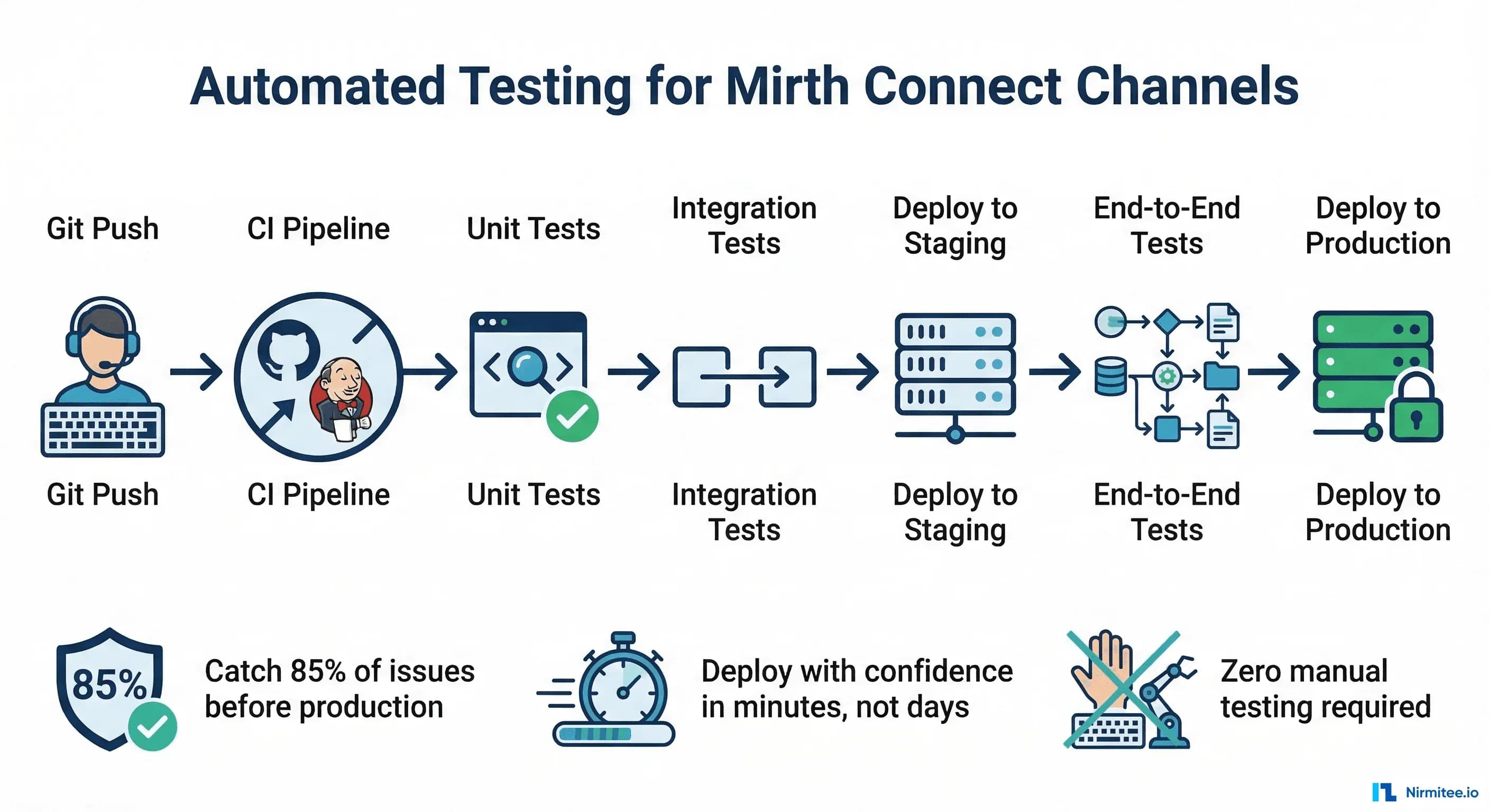
This guide covers the complete testing and CI/CD pipeline: version-controlling channels with MirthSync, unit testing transformer functions, integration testing complete channels with Docker, and building a GitHub Actions pipeline that validates every change before it reaches production. This is the guide that does not exist anywhere else because most Mirth content treats testing as a manual process.
The Problem: Why Manual Testing Breaks Down
Manual testing has three fatal flaws in the context of healthcare integration:
- It does not scale. With 5 channels, manual testing takes 30 minutes. With 50 channels, it takes a full day. Nobody does a full day of manual testing for every change, so channels stop being tested, and regressions accumulate silently.
- It does not catch edge cases. A manual tester sends 3-5 sample messages. Production will send messages with missing segments, unexpected character encodings, truncated fields, and message types the tester never thought to test. Automated tests can cover hundreds of edge cases in seconds.
- It does not prevent regressions. You fix a bug in the ADT transformer. The fix works for ADT^A01 messages. But it also broke ADT^A08 processing, and nobody notices until a clinician reports that patient demographics are not updating. With automated tests, the ADT^A08 test fails immediately and the deployment is blocked.
The Mirth Connect Testing Pyramid
Layer 1: Unit Tests (70% of test effort)
Test individual JavaScript functions from your transformers and code template libraries in isolation. No Mirth instance needed. Run in milliseconds.
Layer 2: Integration Tests (20% of test effort)
Test complete channel processing. Send an HL7 message via MLLP, let it flow through the channel, and verify the output. Requires a running Mirth instance (Docker-based for CI).
Layer 3: End-to-End Tests (10% of test effort)
Test full workflows across multiple channels. ADT message enters the router, gets distributed by the fan-out, and arrives at all downstream systems. Runs against a staging environment.
Version Control with MirthSync
Before you can automate testing, you need your channels in version control. Mirth channels are stored in the database, not in files. MirthSync bridges this gap by extracting channel definitions as XML files and syncing them with a Git repository.
Setting Up MirthSync
# Install MirthSync (Java-based tool)
git clone https://github.com/SagaHealthcareIT/mirthsync.git
cd mirthsync
./gradlew build

# Pull channels from Mirth to Git
java -jar mirthsync.jar \
  -s https://localhost:8443/api \
  -u admin -p admin \
  -t /path/to/git-repo \
  pull

# Repository structure after pull:
mirth-channels/
  channels/
    ADT_FANOUT/
      channel.xml          # Channel definition
      source-connector.xml # Source configuration
      destination-1.xml    # Destination configurations
    ORU_LAB_TO_HIS/
      channel.xml
      ...
  code-templates/
    shared-utilities/
      template.xml
    date-formatters/
      template.xml
  global-scripts/
    deploy-script.xml
    undeploy-script.xml
Branching Strategy
main           - Production channels (deployed to prod Mirth)
staging        - Staging channels (deployed to staging Mirth)
feature/XYZ    - Feature branches for new channels or changes

Workflow:
1. Create feature branch from main
2. Make channel changes in dev Mirth
3. MirthSync pull to feature branch
4. Push branch, create PR
5. CI pipeline runs automated tests
6. Code review + test pass = merge to staging
7. Deploy to staging, run E2E tests
8. Merge staging to main, deploy to production
Unit Testing Transformer Functions
The biggest bang for your testing buck. Transformer functions contain the business logic: field mappings, code translations, date formatting, patient matching logic. These can be tested without Mirth by extracting the JavaScript functions and running them in a standard test framework.
Extracting Testable Functions
The key is writing transformer code as functions in Code Template Libraries rather than inline scripts in the transformer editor. Instead of this:
// BAD: Inline transformer code (untestable)
var dob = msg['PID']['PID.7']['PID.7.1'].toString();
var year = dob.substring(0, 4);
var month = dob.substring(4, 6);
var day = dob.substring(6, 8);
tmp['PID']['PID.7']['PID.7.1'] = year + '-' + month + '-' + day;
Write this:
// GOOD: Code Template Library function (testable)
function formatHL7Date(hl7Date) {
    if (!hl7Date || hl7Date.length < 8) return '';
    var year = hl7Date.substring(0, 4);
    var month = hl7Date.substring(4, 6);
    var day = hl7Date.substring(6, 8);
    return year + '-' + month + '-' + day;
}

function mapGender(hl7Gender) {
    var genderMap = {'M': 'MALE', 'F': 'FEMALE', 'O': 'OTHER', 'U': 'UNKNOWN'};
    return genderMap[hl7Gender] || 'UNKNOWN';
}

function lookupDepartmentCode(sourceCode) {
    var deptMap = {
        'ICU': 'INTENSIVE_CARE',
        'ER': 'EMERGENCY',
        'OT': 'OPERATING_THEATRE',
        'RAD': 'RADIOLOGY',
        'LAB': 'LABORATORY',
        'WARD': 'GENERAL_WARD'
    };
    return deptMap[sourceCode] || 'UNKNOWN_DEPT';
}
Writing Unit Tests (Node.js/Jest)
// test/transformers/date-formatter.test.js
const { formatHL7Date, mapGender, lookupDepartmentCode } = require('./transformer-functions');

describe('formatHL7Date', () => {
    test('formats standard HL7 date', () => {
        expect(formatHL7Date('19750315')).toBe('1975-03-15');
    });

    test('handles datetime format', () => {
        expect(formatHL7Date('19750315103000')).toBe('1975-03-15');
    });

    test('returns empty for null input', () => {
        expect(formatHL7Date(null)).toBe('');
    });

    test('returns empty for short input', () => {
        expect(formatHL7Date('1975')).toBe('');
    });
});

describe('mapGender', () => {
    test('maps M to MALE', () => {
        expect(mapGender('M')).toBe('MALE');
    });

    test('maps F to FEMALE', () => {
        expect(mapGender('F')).toBe('FEMALE');
    });

    test('returns UNKNOWN for unmapped value', () => {
        expect(mapGender('X')).toBe('UNKNOWN');
    });

    test('returns UNKNOWN for undefined', () => {
        expect(mapGender(undefined)).toBe('UNKNOWN');
    });
});

describe('lookupDepartmentCode', () => {
    test('maps ICU correctly', () => {
        expect(lookupDepartmentCode('ICU')).toBe('INTENSIVE_CARE');
    });

    test('returns UNKNOWN_DEPT for unmapped code', () => {
        expect(lookupDepartmentCode('XYZ')).toBe('UNKNOWN_DEPT');
    });
});
Integration Testing with Docker
Integration tests require a running Mirth instance. Docker makes this repeatable and isolated.
Docker Compose Setup
# docker-compose.test.yml
version: '3.8'
services:
  mirth:
    image: nextgenhealthcare/connect:latest
    ports:
      - "8443:8443"   # Mirth API
      - "6661:6661"   # Test MLLP port
      - "6662:6662"   # Test MLLP port 2
    environment:
      - DATABASE=postgres
      - DATABASE_URL=jdbc:postgresql://postgres:5432/mirthdb
      - DATABASE_USERNAME=mirth
      - DATABASE_PASSWORD=mirth
    depends_on:
      - postgres
    healthcheck:
      test: ["CMD", "curl", "-k", "-f", "https://localhost:8443/api/server/status"]
      interval: 10s
      timeout: 5s
      retries: 30

  postgres:
    image: postgres:15
    environment:
      - POSTGRES_DB=mirthdb
      - POSTGRES_USER=mirth
      - POSTGRES_PASSWORD=mirth
    ports:
      - "5432:5432"

  test-runner:
    build: ./test
    depends_on:
      mirth:
        condition: service_healthy
    environment:
      - MIRTH_API_URL=https://mirth:8443/api
      - MIRTH_MLLP_HOST=mirth
      - MIRTH_MLLP_PORT=6661
    volumes:
      - ./channels:/channels
      - ./test:/test
Integration Test Script (Python)
# test/integration/test_adt_channel.py
import socket
import time
import pytest

MLLP_HOST = 'localhost'
MLLP_PORT = 6661
MLLP_START = b'\x0b'
MLLP_END = b'\x1c\x0d'

def send_hl7_message(message):
    # Send an HL7 message via MLLP and return the ACK.
    sock = socket.socket(socket.AF_INET, socket.SOCK_STREAM)
    sock.settimeout(10)
    sock.connect((MLLP_HOST, MLLP_PORT))

    # Wrap message in MLLP envelope
    mllp_message = MLLP_START + message.encode('utf-8') + MLLP_END
    sock.sendall(mllp_message)

    # Receive ACK
    response = sock.recv(4096)
    sock.close()

    # Strip MLLP envelope from response
    ack = response.strip(MLLP_START).strip(MLLP_END).decode('utf-8')
    return ack

class TestADTChannel:
    def test_adt_a01_returns_ack(self):
        # Verify ADT^A01 is accepted with positive ACK.
        msg = (
            "MSH|^~\\&|HIS|HOSP|LAB|HOSP|202603141030||ADT^A01|MSG001|P|2.5\r"
            "EVN|A01|202603141030\r"
            "PID|1||MRN123^^^HOSP^MR||SHARMA^RAJESH||19750315|M\r"
            "PV1|1|I|ICU^301^1|||DOC001^PATEL^ANITA"
        )
        ack = send_hl7_message(msg)
        assert 'MSA|AA' in ack, f"Expected positive ACK, got: {ack}"

    def test_adt_a01_missing_mrn_returns_nak(self):
        # Verify ADT without MRN is rejected.
        msg = (
            "MSH|^~\\&|HIS|HOSP|LAB|HOSP|202603141030||ADT^A01|MSG002|P|2.5\r"
            "EVN|A01|202603141030\r"
            "PID|1||||SHARMA^RAJESH||19750315|M\r"
            "PV1|1|I|ICU^301^1"
        )
        ack = send_hl7_message(msg)
        assert 'MSA|AE' in ack or 'MSA|AR' in ack

    def test_adt_a08_update_accepted(self):
        # Verify ADT^A08 patient update is processed.
        msg = (
            "MSH|^~\\&|HIS|HOSP|LAB|HOSP|202603141045||ADT^A08|MSG003|P|2.5\r"
            "EVN|A08|202603141045\r"
            "PID|1||MRN123^^^HOSP^MR||SHARMA^RAJESH^KUMAR||19750315|M\r"
            "PV1|1|I|ICU^301^1"
        )
        ack = send_hl7_message(msg)
        assert 'MSA|AA' in ack

    def test_unsupported_message_type_handled(self):
        # Verify unsupported message types are handled gracefully.
        msg = (
            "MSH|^~\\&|HIS|HOSP|LAB|HOSP|202603141100||MFN^M01|MSG004|P|2.5\r"
            "MFI|OM4|MFN_M01"
        )
        ack = send_hl7_message(msg)
        # Should either ACK (with routing to unhandled channel) or NAK
        assert 'MSA|' in ack
Building the CI/CD Pipeline
GitHub Actions Workflow
# .github/workflows/mirth-ci.yml
name: Mirth Connect CI/CD

on:
  push:
    branches: [main, staging]
  pull_request:
    branches: [main]

jobs:
  unit-tests:
    runs-on: ubuntu-latest
    steps:
      - uses: actions/checkout@v4
      - uses: actions/setup-node@v4
        with:
          node-version: '20'
      - run: npm install
      - run: npm test -- --coverage
        name: Run unit tests

  integration-tests:
    needs: unit-tests
    runs-on: ubuntu-latest
    steps:
      - uses: actions/checkout@v4

      - name: Start Mirth + PostgreSQL
        run: docker compose -f docker-compose.test.yml up -d

      - name: Wait for Mirth to be healthy
        run: |
          echo "Waiting for Mirth..."
          timeout 120 bash -c 'until curl -ks https://localhost:8443/api/server/status; do sleep 5; done'

      - name: Deploy test channels
        run: python3 scripts/deploy-channels.py --env test

      - name: Run integration tests
        run: python3 -m pytest test/integration/ -v --junitxml=test-results.xml

      - name: Collect Mirth logs on failure
        if: failure()
        run: docker compose -f docker-compose.test.yml logs mirth

      - name: Tear down
        if: always()
        run: docker compose -f docker-compose.test.yml down -v

  deploy-staging:
    needs: integration-tests
    if: github.ref == 'refs/heads/staging'
    runs-on: ubuntu-latest
    steps:
      - uses: actions/checkout@v4
      - name: Deploy to staging Mirth
        run: python3 scripts/deploy-channels.py --env staging
        env:
          MIRTH_STAGING_URL: ${{ secrets.MIRTH_STAGING_URL }}
          MIRTH_STAGING_USER: ${{ secrets.MIRTH_STAGING_USER }}
          MIRTH_STAGING_PASS: ${{ secrets.MIRTH_STAGING_PASS }}

  deploy-production:
    needs: integration-tests
    if: github.ref == 'refs/heads/main'
    runs-on: ubuntu-latest
    environment: production
    steps:
      - uses: actions/checkout@v4
      - name: Deploy to production Mirth
        run: python3 scripts/deploy-channels.py --env production
        env:
          MIRTH_PROD_URL: ${{ secrets.MIRTH_PROD_URL }}
          MIRTH_PROD_USER: ${{ secrets.MIRTH_PROD_USER }}
          MIRTH_PROD_PASS: ${{ secrets.MIRTH_PROD_PASS }}
Channel Deployment Script
# scripts/deploy-channels.py
import requests
import json
import xml.etree.ElementTree as ET
import glob
import argparse
import os
import urllib3

urllib3.disable_warnings()  # Self-signed certs in Mirth

def get_mirth_session(base_url, username, password):
    # Authenticate with Mirth API and return session.
    session = requests.Session()
    session.verify = False
    resp = session.post(
        f"{base_url}/users/_login",
        data={"username": username, "password": password}
    )
    resp.raise_for_status()
    return session

def deploy_channel(session, base_url, channel_xml_path):
    # Deploy a single channel from XML file.
    with open(channel_xml_path, 'r') as f:
        channel_xml = f.read()

    tree = ET.parse(channel_xml_path)
    channel_id = tree.find('.//id').text
    channel_name = tree.find('.//name').text

    # Check if channel exists
    resp = session.get(f"{base_url}/channels/{channel_id}")
    if resp.status_code == 200:
        # Update existing channel
        resp = session.put(
            f"{base_url}/channels/{channel_id}",
            data=channel_xml,
            headers={"Content-Type": "application/xml"}
        )
    else:
        # Create new channel
        resp = session.post(
            f"{base_url}/channels",
            data=channel_xml,
            headers={"Content-Type": "application/xml"}
        )

    resp.raise_for_status()
    print(f"  Deployed: {channel_name} ({channel_id})")

    # Redeploy channel
    session.post(f"{base_url}/channels/{channel_id}/_deploy")
    print(f"  Redeployed: {channel_name}")

def main():
    parser = argparse.ArgumentParser()
    parser.add_argument('--env', choices=['test', 'staging', 'production'])
    args = parser.parse_args()

    config = {
        'test': ('https://localhost:8443/api', 'admin', 'admin'),
        'staging': (os.environ['MIRTH_STAGING_URL'],
                    os.environ['MIRTH_STAGING_USER'],
                    os.environ['MIRTH_STAGING_PASS']),
        'production': (os.environ['MIRTH_PROD_URL'],
                       os.environ['MIRTH_PROD_USER'],
                       os.environ['MIRTH_PROD_PASS']),
    }

    base_url, user, password = config[args.env]
    session = get_mirth_session(base_url, user, password)

    # Deploy all channels
    for channel_file in sorted(glob.glob('channels/*/channel.xml')):
        deploy_channel(session, base_url, channel_file)

if __name__ == '__main__':
    main()
Test Data Management
Building a Test Message Library
Create a library of test HL7 messages that cover common scenarios and edge cases:
test/fixtures/
  adt/
    a01_standard_admit.hl7        # Happy path admission
    a01_missing_mrn.hl7           # Missing patient ID (should reject)
    a01_special_characters.hl7    # Name with accents, apostrophes
    a01_multiple_insurance.hl7    # Patient with IN1 + IN2 segments
    a02_transfer.hl7              # Standard transfer
    a03_discharge.hl7             # Standard discharge
    a08_update_demographics.hl7   # Patient info update
    a08_update_location.hl7       # Location change only
  orm/
    o01_lab_order.hl7             # Standard lab order
    o01_radiology_order.hl7       # Radiology order with OBR
    o01_cancelled_order.hl7       # Order cancellation
    o01_stat_order.hl7            # Urgent/STAT priority order
  oru/
    r01_lab_result.hl7            # Normal lab result
    r01_critical_result.hl7       # Critical value flagged
    r01_microbiology.hl7          # Culture and sensitivity
    r01_multiple_obx.hl7          # Panel with 20+ OBX segments
Generating Test Messages Programmatically
# test/helpers/message_generator.py
import datetime

def generate_adt_a01(mrn, patient_name, dob, gender, location, attending_doc):
    # Generate a valid ADT^A01 message.
    now = datetime.datetime.now().strftime('%Y%m%d%H%M%S')
    msg_id = f"MSG{now}"

    segments = [
        f"MSH|^~\\&|HIS|HOSP|LAB|HOSP|{now}||ADT^A01|{msg_id}|P|2.5",
        f"EVN|A01|{now}",
        f"PID|1||{mrn}^^^HOSP^MR||{patient_name}||{dob}|{gender}",
        f"PV1|1|I|{location}|||{attending_doc}"
    ]
    return "\r".join(segments)

# Usage in tests:
msg = generate_adt_a01(
    mrn="MRN456",
    patient_name="PATEL^ANITA^DEVI",
    dob="19850720",
    gender="F",
    location="WARD^201^1",
    attending_doc="DOC002^SHARMA^VIKRAM"
)
Testing Strategies for Common Scenarios
Testing Field Mappings
For each channel, verify that every mapped field arrives at the destination correctly. Send a message with known values and assert that the output contains the expected transformed values.
Testing Error Handling
Send deliberately malformed messages and verify they are routed to the error handling channel: missing required segments, invalid date formats, unexpected message types, oversized messages.
Testing Retry Behavior
Stop the destination system, send messages, and verify the queue. Restart the destination; verify queued messages are delivered. This tests your queue configuration under realistic failure conditions.
Testing Under Load
Send 1,000+ messages rapidly and verify that no messages are lost or duplicated. Check that processing time stays within acceptable bounds. This catches performance regressions that only appear under load.
Monitoring Test Coverage
Coverage Targets:
  Unit tests:        90%+ of transformer functions
  Integration tests: 100% of message type/event combinations
  Error scenarios:   Every reject/error path tested at least once

Coverage Tracking:
  - Maintain a test coverage matrix:
    Channel | ADT Events | ORM Events | Error Cases | Status
    --------|------------|------------|-------------|-------
    ADT_FAN | A01,A02,   | N/A        | Missing MRN,| PASS
            | A03,A08    |            | Bad date    |
    ORM_LAB | N/A        | O01,O01    | Missing OBR,| PASS
            |            | cancel     | Invalid code|
    ORU_LAB | N/A        | N/A        | Empty OBX,  | PASS
            |            |            | Critical val|
The Bottom Line
Automated testing for Mirth Connect is not a luxury. It is the foundation of reliable healthcare integration. Every untested channel is a ticking time bomb: it works today because nobody has changed it, but the next vendor upgrade, the next HL7 version change, or the next "small fix" will break it, and without tests, nobody will know until patients are affected.
Start with version control. Get your channels into Git with MirthSync. Then write unit tests for your transformer functions. Then build a Docker-based integration test environment. Then wire it into a CI pipeline. Each step adds a layer of confidence that your integration infrastructure is working correctly.
The investment pays off the first time a test catches a regression that would have gone to production. In healthcare, where integration failures mean delayed lab results, missing orders, and broken clinical workflows, the return on investment is not measured in engineering hours saved. It is measured in patient safety events prevented.
Testing pays off most when the surrounding practices match: channels structured for testability (channel design patterns that scale), deployment automation that knows the API's sharp edges (7 undocumented REST API gotchas), and governance across the estate (managing 100+ Mirth channels).