
Why PHI in Your Logs Is a Ticking HIPAA Time Bomb
Every healthcare application generates logs. Every log entry is a potential HIPAA violation waiting to happen. When a developer writes logger.error(f"Failed to process patient {patient.name}, MRN: {patient.mrn}"), they have just committed Protected Health Information to a system that likely lacks the safeguards HIPAA demands. According to the HHS Breach Portal, logging-related exposures have contributed to breaches affecting millions of patients, with penalties reaching $1.5 million per violation category per year.
The challenge is real: you need logs for debugging, performance monitoring, and incident response. But HIPAA's Security Rule (45 CFR 164.312) requires that any system storing or transmitting PHI must implement access controls, audit controls, integrity controls, and transmission security. Your ELK stack, your Grafana Loki instance, your CloudWatch logs -- if they contain PHI, they are subject to every HIPAA safeguard your production database has.
This guide walks through building a centralized logging pipeline that gives your engineering and DevOps teams full observability without exposing PHI in your observability stack. We cover PHI detection, automated redaction, encrypted storage, retention policies, access control, and meta-audit trails -- with production-ready code and configurations you can deploy today.
What Constitutes PHI in Application Logs
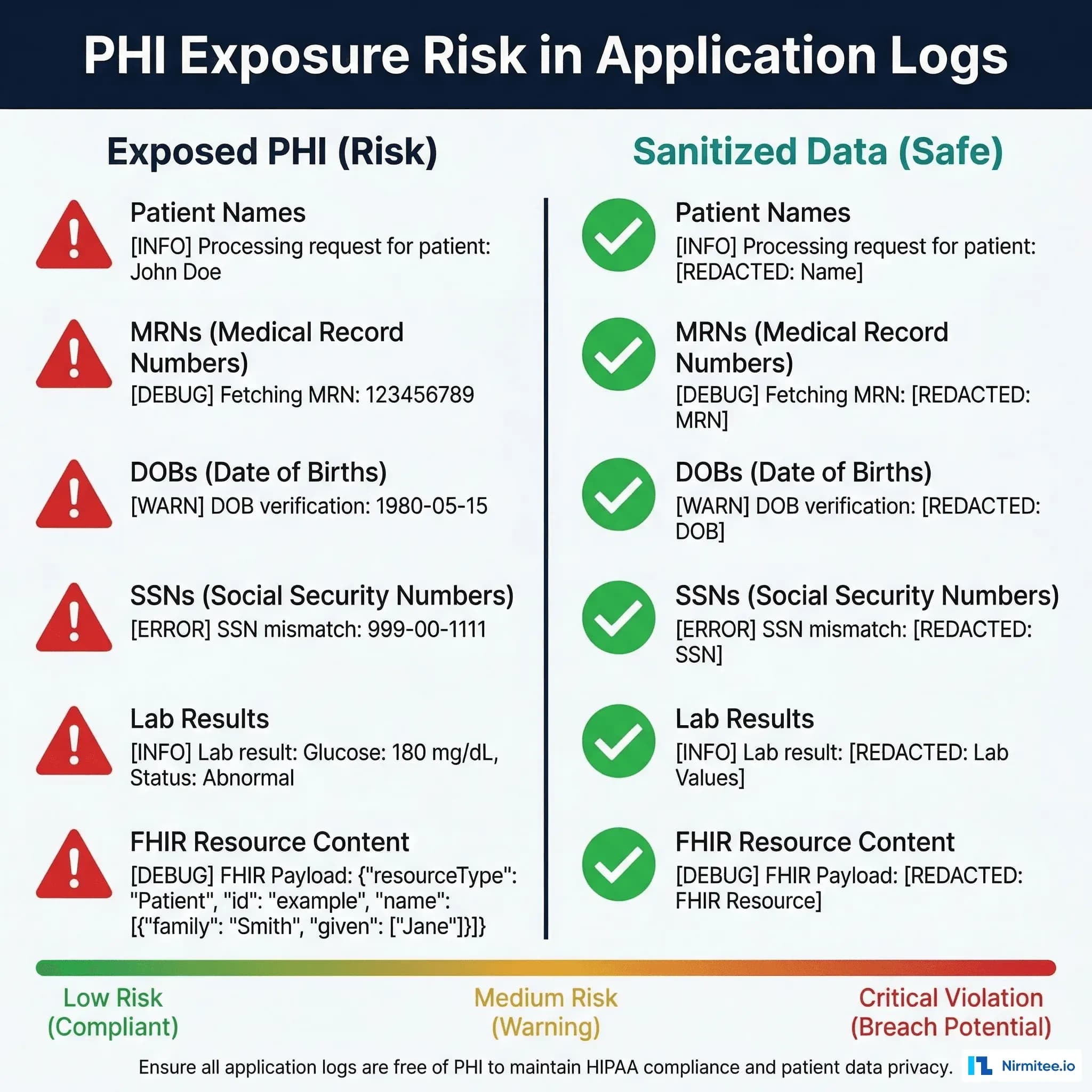
Before building a sanitization pipeline, you need to know exactly what you are looking for. HIPAA defines 18 identifiers that constitute PHI. In practice, the following appear most frequently in application logs:
| PHI Type | How It Appears in Logs | Risk Level | Common Source |
|---|---|---|---|
| Patient Names | Error messages, debug output, search queries | Critical | Exception handlers, API request logging |
| Medical Record Numbers (MRNs) | Request URLs, database query logs, correlation IDs | Critical | FHIR resource URLs, ORM queries |
| Dates of Birth | Search parameters, validation errors, demographic lookups | High | Patient matching algorithms |
| Social Security Numbers | Insurance verification logs, eligibility checks | Critical | Payer integration modules |
| FHIR Resource Content | Debug-level logging of request/response bodies | Critical | FHIR server middleware, integration engines |
| Lab Results | HL7 message processing logs, result delivery confirmations | High | Lab interface engines, Mirth Connect channels |
| IP Addresses | Access logs, authentication events | Medium | Web server access logs, WAF logs |
| Email Addresses | User authentication, notification logs | Medium | Identity provider integrations |
The most dangerous scenario is debug-level logging in production. A single log.debug(f"FHIR response: {response.json()}") can dump an entire Patient resource -- name, DOB, SSN, medical conditions, medications -- into your log aggregator. If that aggregator is a SaaS tool without a Business Associate Agreement (BAA), you have a reportable breach on your hands.
Building a Log Sanitization Pipeline
The core principle is simple: detect and redact PHI before it reaches your log storage. This means sanitization happens at the application level, not at the aggregator level. By the time a log entry leaves your application, it should already be clean.
Python Log Sanitizer Middleware
The following Python middleware integrates with the standard logging module and sanitizes every log record before it is emitted. It uses a combination of regex patterns for structured PHI (SSNs, MRNs, dates) and keyword detection for contextual PHI (patient names appearing near clinical terms):
import re
import logging
import hashlib
from typing import Dict, List, Pattern

class PHISanitizer:
    """HIPAA-compliant log sanitizer that detects and redacts PHI
    before log entries reach any storage backend."""

    # Compiled regex patterns for common PHI formats
    PATTERNS: Dict[str, Pattern] = {
        'ssn': re.compile(r'\b\d{3}-\d{2}-\d{4}\b'),
        'mrn': re.compile(r'\b(?:MRN|mrn|Medical Record)[:\s#]*([A-Z0-9]{6,12})\b'),
        'dob': re.compile(
            r'\b(?:DOB|dob|Date of Birth|birth[_\s]?date)[:\s]*'
            r'(\d{1,2}[/-]\d{1,2}[/-]\d{2,4}|\d{4}-\d{2}-\d{2})\b'
        ),
        'phone': re.compile(r'\b(?:\+1[-.\s]?)?\(?\d{3}\)?[-.\s]?\d{3}[-.\s]?\d{4}\b'),
        'email': re.compile(r'\b[A-Za-z0-9._%+-]+@[A-Za-z0-9.-]+\.[A-Z|a-z]{2,}\b'),
        'ip_address': re.compile(r'\b\d{1,3}\.\d{1,3}\.\d{1,3}\.\d{1,3}\b'),
        'fhir_patient_ref': re.compile(r'Patient/[A-Za-z0-9\-]{8,}'),
    }

    # Fields in structured logs that should never contain PHI
    SENSITIVE_FIELDS = {
        'patient_name', 'patientName', 'patient_id', 'patientId',
        'ssn', 'social_security', 'date_of_birth', 'dob',
        'address', 'phone', 'email', 'mrn', 'medical_record_number',
    }

    def __init__(self, salt: str = "hipaa-log-sanitizer"):
        self.salt = salt

    def _tokenize(self, value: str, phi_type: str) -> str:
        """Replace PHI with a consistent, non-reversible token."""
        hash_val = hashlib.sha256(
            f"{self.salt}:{value}".encode()
        ).hexdigest()[:12]
        return f"[REDACTED_{phi_type.upper()}_{hash_val}]"

    def sanitize_text(self, text: str) -> str:
        """Scan text for PHI patterns and replace with tokens."""
        if not isinstance(text, str):
            return text
        sanitized = text
        for phi_type, pattern in self.PATTERNS.items():
            for match in pattern.finditer(sanitized):
                original = match.group(0)
                token = self._tokenize(original, phi_type)
                sanitized = sanitized.replace(original, token)
        return sanitized

    def sanitize_dict(self, data: dict) -> dict:
        """Recursively sanitize a dictionary (for structured logs)."""
        sanitized = {}
        for key, value in data.items():
            if key.lower() in self.SENSITIVE_FIELDS:
                sanitized[key] = self._tokenize(str(value), key)
            elif isinstance(value, str):
                sanitized[key] = self.sanitize_text(value)
            elif isinstance(value, dict):
                sanitized[key] = self.sanitize_dict(value)
            elif isinstance(value, list):
                sanitized[key] = [
                    self.sanitize_dict(item) if isinstance(item, dict)
                    else self.sanitize_text(item) if isinstance(item, str)
                    else item
                    for item in value
                ]
            else:
                sanitized[key] = value
        return sanitized


class PHISanitizingFilter(logging.Filter):
    """Logging filter that sanitizes PHI from all log records."""

    def __init__(self, sanitizer: PHISanitizer = None):
        super().__init__()
        self.sanitizer = sanitizer or PHISanitizer()

    def filter(self, record: logging.LogRecord) -> bool:
        if isinstance(record.msg, str):
            record.msg = self.sanitizer.sanitize_text(record.msg)
        if record.args:
            if isinstance(record.args, dict):
                record.args = self.sanitizer.sanitize_dict(record.args)
            elif isinstance(record.args, tuple):
                record.args = tuple(
                    self.sanitizer.sanitize_text(str(a))
                    if isinstance(a, str) else a
                    for a in record.args
                )
        return True


# Usage
sanitizer = PHISanitizer(salt="your-unique-org-salt")
phi_filter = PHISanitizingFilter(sanitizer)

logger = logging.getLogger()
logger.addFilter(phi_filter)

# This will be automatically sanitized:
logger.info("Patient John Smith (MRN: ABC123456) DOB: 03/15/1985")
# Output: Patient [REDACTED_MRN_a1b2c3d4e5f6] DOB: [REDACTED_DOB_f6e5d4c3b2a1]
The tokenization approach using salted SHA-256 hashes ensures that the same PHI value always produces the same token within your system. This means you can still correlate log entries for the same patient across services without knowing the actual PHI value -- essential for debugging distributed systems.
Structured Logging: Preventing PHI at the Source
Sanitization is your safety net, but the first line of defense is never logging PHI in the first place. Structured logging with a defined schema gives you control over exactly which fields appear in your logs.
JSON Structured Logging with Field Allowlists
Instead of logging free-text messages, emit structured JSON with a strict field allowlist. Here is a production pattern using Python's structlog library:
import structlog
import time
from functools import wraps

# Define allowed fields -- anything not on this list is dropped
ALLOWED_LOG_FIELDS = {
    'timestamp', 'level', 'logger', 'event', 'request_id',
    'service', 'method', 'path', 'status_code', 'duration_ms',
    'error_type', 'error_message', 'user_role', 'tenant_id',
    'fhir_resource_type', 'fhir_operation', 'record_count',
}

def field_allowlist_processor(logger, method_name, event_dict):
    """Drop any fields not in the allowlist."""
    return {k: v for k, v in event_dict.items() if k in ALLOWED_LOG_FIELDS}

def add_request_context(logger, method_name, event_dict):
    """Add safe request context."""
    event_dict.setdefault('timestamp', time.time())
    event_dict.setdefault('service', 'fhir-server')
    return event_dict

structlog.configure(
    processors=[
        structlog.stdlib.add_log_level,
        add_request_context,
        field_allowlist_processor,
        structlog.processors.JSONRenderer(),
    ],
    logger_factory=structlog.stdlib.LoggerFactory(),
)

log = structlog.get_logger()

# Safe: only allowed fields are emitted
log.info("fhir_request",
    method="GET",
    path="/fhir/Patient",
    status_code=200,
    duration_ms=45,
    record_count=10,
    fhir_resource_type="Patient",
    fhir_operation="search",
)

# Even if a developer accidentally includes PHI, it is dropped:
log.info("fhir_request",
    method="GET",
    path="/fhir/Patient",
    patient_name="John Smith",       # DROPPED by allowlist
    patient_ssn="123-45-6789",       # DROPPED by allowlist
    response_body='{"resourceType": "Patient", ...}',  # DROPPED
)
The field allowlist processor acts as a compile-time guarantee: even if a developer accidentally passes PHI as a log field, it never reaches your log storage. This is defense-in-depth -- the allowlist prevents PHI from entering, and the sanitizer catches anything that slips through in the event message field.
Encrypted Log Storage: ELK, Loki, and Cloud-Native Options
Even with sanitization, your log storage must be encrypted and access-controlled. HIPAA requires encryption at rest (45 CFR 164.312(a)(2)(iv)) and in transit (45 CFR 164.312(e)(1)). Here are production configurations for the three most common healthcare log stacks.
ELK Stack with Fluentd PHI Redaction
This Fluentd configuration sits between your applications and Elasticsearch. It performs a final PHI redaction pass before indexing, encrypts transit via TLS, and routes audit logs to a separate, more restricted index:
# fluentd.conf -- HIPAA-compliant log pipeline
# Source: application logs via forward protocol (TLS)
<source>
  @type forward
  port 24224
  <transport tls>
    cert_path /etc/fluentd/tls/server.crt
    private_key_path /etc/fluentd/tls/server.key
    ca_path /etc/fluentd/tls/ca.crt
    client_cert_auth true
  </transport>
</source>

# PHI Redaction Filter
<filter healthcare.**>
  @type record_transformer
  enable_ruby true
  <record>
    message ${record["message"]
      .gsub(/\b\d{3}-\d{2}-\d{4}\b/, '[REDACTED_SSN]')
      .gsub(/\b(?:MRN|mrn)[:\s#]*[A-Z0-9]{6,12}\b/, '[REDACTED_MRN]')
      .gsub(/\b\d{1,2}\/\d{1,2}\/\d{2,4}\b/, '[REDACTED_DATE]')
      .gsub(/\b[A-Za-z0-9._%+-]+@[A-Za-z0-9.-]+\.[a-z]{2,}\b/, '[REDACTED_EMAIL]')
    }
  </record>
</filter>

# Remove raw request/response bodies entirely
<filter healthcare.**>
  @type record_transformer
  remove_keys request_body, response_body, raw_payload, patient_data
</filter>

# Route: audit logs to restricted index
<match healthcare.audit.**>
  @type elasticsearch
  host elasticsearch.internal
  port 9200
  scheme https
  ssl_verify true
  user fluentd_audit
  password "#{ENV['FLUENTD_AUDIT_PASSWORD']}"
  index_name hipaa-audit-%Y.%m.%d
  <buffer>
    @type file
    path /var/log/fluentd/audit-buffer
    flush_interval 5s
    chunk_limit_size 8MB
  </buffer>
</match>

# Route: application logs to standard index
<match healthcare.**>
  @type elasticsearch
  host elasticsearch.internal
  port 9200
  scheme https
  ssl_verify true
  user fluentd_app
  password "#{ENV['FLUENTD_APP_PASSWORD']}"
  index_name hipaa-app-%Y.%m.%d
  <buffer>
    @type file
    path /var/log/fluentd/app-buffer
    flush_interval 10s
    chunk_limit_size 16MB
  </buffer>
</match>
Grafana Loki Retention Policy Configuration
Loki's retention policies let you implement HIPAA's 6-year minimum retention with automatic tiering from hot to cold storage. This configuration uses S3 with server-side encryption for long-term storage:
# loki-config.yaml -- HIPAA-compliant retention
auth_enabled: true

server:
  http_listen_port: 3100
  grpc_listen_port: 9096
  http_tls_config:
    cert_file: /etc/loki/tls/server.crt
    key_file: /etc/loki/tls/server.key

storage_config:
  boltdb_shipper:
    active_index_directory: /loki/index
    cache_location: /loki/cache
    shared_store: s3
  aws:
    s3: s3://us-east-1/hipaa-loki-logs
    sse:
      type: SSE-KMS
      kms_key_id: "arn:aws:kms:us-east-1:123456789:key/your-cmk-id"
    bucketnames: hipaa-loki-chunks

schema_config:
  configs:
    - from: "2024-01-01"
      store: boltdb-shipper
      object_store: s3
      schema: v12
      index:
        prefix: hipaa_index_
        period: 24h

compactor:
  working_directory: /loki/compactor
  shared_store: s3
  compaction_interval: 10m
  retention_enabled: true
  retention_delete_delay: 2h
  retention_delete_worker_count: 150

limits_config:
  retention_period: 2232h  # 93 days hot retention
  max_query_lookback: 2232h
  per_stream_rate_limit: 5MB
  per_stream_rate_limit_burst: 15MB
  max_entries_limit_per_query: 5000

# Lifecycle rules handle 6-year HIPAA retention via S3:
# Hot (Loki): 93 days > Warm (S3 IA): 1 year > Cold (Glacier): 6 years
The key insight is that Loki handles hot retention (fast queries for recent logs), while S3 lifecycle rules handle the HIPAA 6-year requirement via automatic tiering to Glacier. This keeps costs manageable -- storing 6 years of logs in hot storage would be prohibitively expensive for most healthcare organizations.
HIPAA Retention Policies: The 6-Year Minimum
HIPAA's retention requirements come from 45 CFR 164.316(b)(2)(i), which mandates that documentation of policies and procedures -- including audit logs -- be retained for six years from the date of creation or the date when it was last in effect. Several states impose even stricter requirements: Arkansas requires 10 years, and North Carolina requires retention until a minor patient reaches age 30.
| Storage Tier | Duration | Technology | Cost per TB/Month | Query Latency | Use Case |
|---|---|---|---|---|---|
| Hot | 0-90 days | SSD-backed Elasticsearch / Loki | $100-250 | < 1 second | Active debugging, dashboards |
| Warm | 90 days - 1 year | HDD-backed Elasticsearch / S3 Standard | $23-50 | 5-30 seconds | Incident investigation |
| Cold | 1-3 years | S3 Infrequent Access / Glacier Instant | $4-12.50 | Minutes | Compliance audits |
| Deep Archive | 3-6+ years | S3 Glacier Deep Archive | $0.99 | 12 hours | HIPAA retention, legal holds |
A practical S3 lifecycle policy for HIPAA log retention looks like this:
{
  "Rules": [
    {
      "ID": "hipaa-log-lifecycle",
      "Status": "Enabled",
      "Filter": {"Prefix": "logs/"},
      "Transitions": [
        {"Days": 90, "StorageClass": "STANDARD_IA"},
        {"Days": 365, "StorageClass": "GLACIER_IR"},
        {"Days": 1095, "StorageClass": "DEEP_ARCHIVE"}
      ],
      "Expiration": {"Days": 2555},
      "NoncurrentVersionExpiration": {"NoncurrentDays": 2555}
    }
  ]
}
Note the Expiration at 2,555 days (approximately 7 years). The extra year beyond HIPAA's 6-year minimum provides a safety buffer for organizations with fiscal-year-aligned retention policies. Always consult your compliance officer and legal team -- state laws may require longer retention periods.
Access Control: RBAC on Log Queries
Logs may not contain raw PHI after sanitization, but they still contain PHI-adjacent data -- timestamps, resource types, user actions -- that can reveal sensitive information in aggregate. HIPAA requires that access to any system containing or processing PHI be controlled and audited. This extends to your logging infrastructure.
Elasticsearch RBAC Configuration
Using Elasticsearch's built-in security features (or Search Guard for additional controls), define roles that restrict log access by index pattern and field:
# elasticsearch-roles.yml -- HIPAA log access control
hipaa_devops:
  cluster:
    - monitor
  indices:
    - names: ["hipaa-app-*"]
      privileges: ["read"]
      field_security:
        grant: ["timestamp", "level", "service", "method",
                "path", "status_code", "duration_ms", "error_type"]
        except: ["source_ip", "user_id", "session_id"]
    - names: ["hipaa-infra-*"]
      privileges: ["read", "view_index_metadata"]

hipaa_security_analyst:
  cluster:
    - monitor
    - manage_security
  indices:
    - names: ["hipaa-audit-*", "hipaa-security-*"]
      privileges: ["read"]
    - names: ["hipaa-app-*"]
      privileges: ["read"]

hipaa_compliance_officer:
  cluster:
    - monitor
  indices:
    - names: ["hipaa-audit-*"]
      privileges: ["read"]
    - names: ["hipaa-meta-audit-*"]
      privileges: ["read"]

hipaa_developer:
  cluster: []
  indices:
    - names: ["hipaa-app-*"]
      privileges: ["read"]
      field_security:
        grant: ["timestamp", "level", "event", "service",
                "error_type", "error_message", "duration_ms"]
Field-level security is critical here. A developer debugging a slow FHIR query needs to see duration_ms and error_type, but does not need to see source_ip or user_id. The principle of minimum necessary access -- a core HIPAA concept -- applies directly to log queries.
Audit Logging of Log Access: The Meta-Audit Trail
HIPAA requires that you log who accesses PHI. If your logs contain PHI-adjacent data, you must also log who queries those logs. This creates a meta-audit trail -- an audit log of your audit log access.
Implementing a Meta-Audit Trail
Elasticsearch's audit logging captures every query, but you need to process and alert on suspicious patterns. Here is a Python service that monitors Elasticsearch's audit log and flags anomalous access patterns:
import json
import time
from datetime import datetime, timedelta
from elasticsearch import Elasticsearch
from collections import defaultdict

class LogAccessAuditor:
    """Monitor and alert on suspicious log access patterns.
    Implements HIPAA requirement for audit controls on
    systems containing PHI or PHI-adjacent data."""

    ALERT_THRESHOLDS = {
        'bulk_query_count': 50,
        'off_hours_query': True,
        'sensitive_index_access': True,
        'broad_time_range_days': 90,
    }

    def __init__(self, es_client: Elasticsearch):
        self.es = es_client
        self.access_counts = defaultdict(list)

    def check_access_pattern(self, audit_event: dict) -> list:
        """Analyze a single audit event for suspicious patterns."""
        alerts = []
        user = audit_event.get('user', {}).get('name', 'unknown')
        timestamp = datetime.fromisoformat(
            audit_event.get('@timestamp', '')
        )
        indices = audit_event.get('indices', [])

        # Check 1: Off-hours access
        if timestamp.hour < 7 or timestamp.hour > 19:
            alerts.append({
                'type': 'off_hours_access',
                'severity': 'medium',
                'user': user,
                'timestamp': str(timestamp),
                'detail': f'Log query at {timestamp.strftime("%H:%M")} '
                          f'outside business hours',
            })

        # Check 2: Audit index access
        audit_indices = [i for i in indices
                        if 'audit' in i.lower()]
        if audit_indices:
            alerts.append({
                'type': 'audit_index_access',
                'severity': 'high',
                'user': user,
                'indices': audit_indices,
                'detail': 'User accessed audit trail indices',
            })

        # Check 3: Bulk query detection
        self.access_counts[user].append(timestamp)
        cutoff = timestamp - timedelta(minutes=10)
        self.access_counts[user] = [
            t for t in self.access_counts[user] if t > cutoff
        ]
        if len(self.access_counts[user]) > self.ALERT_THRESHOLDS[
            'bulk_query_count'
        ]:
            alerts.append({
                'type': 'bulk_query_pattern',
                'severity': 'high',
                'user': user,
                'query_count': len(self.access_counts[user]),
                'detail': f'{len(self.access_counts[user])} queries '
                          f'in 10 minutes -- possible data exfiltration',
            })

        return alerts

    def log_alert(self, alert: dict):
        """Store alert in meta-audit index."""
        self.es.index(
            index='hipaa-meta-audit',
            body={
                **alert,
                'logged_at': datetime.utcnow().isoformat(),
                'action': 'alert_generated',
            }
        )
This meta-audit system answers the question every OCR (Office for Civil Rights) auditor will ask: "Who has been looking at your logs, and why?" Without this layer, you cannot demonstrate that your logging infrastructure itself is properly controlled -- a gap that has led to enforcement actions even when the primary PHI safeguards were adequate.
Putting It All Together: End-to-End Architecture
A complete HIPAA-compliant logging architecture combines all the layers we have discussed. Here is how they fit together in a production healthcare environment:
| Layer | Component | Purpose | HIPAA Requirement |
|---|---|---|---|
| 1. Application | Structured Logger + PHI Sanitizer | Prevent PHI from entering logs | Minimum Necessary (164.502(b)) |
| 2. Collection | Fluentd/Promtail with TLS + Redaction | Secure transit + final scrub | Transmission Security (164.312(e)) |
| 3. Storage | Elasticsearch/Loki with encryption | Encrypted at rest | Encryption (164.312(a)(2)(iv)) |
| 4. Access | RBAC + Field-Level Security | Role-based query access | Access Control (164.312(a)(1)) |
| 5. Retention | S3 Lifecycle Policies | 6-year retention + auto-tiering | Documentation (164.316(b)(2)(i)) |
| 6. Audit | Meta-Audit Trail + Anomaly Detection | Log who accesses logs | Audit Controls (164.312(b)) |
Each layer maps directly to a specific HIPAA Security Rule requirement. When an OCR auditor asks how you protect PHI in your logging infrastructure, you can point to each layer and its corresponding regulation. This is not theoretical -- organizations that can demonstrate this level of systematic control consistently fare better in HIPAA audits and breach investigations.
Common Pitfalls and How to Avoid Them
1. Third-Party Log Aggregators Without BAAs
If you send logs to Datadog, Splunk Cloud, or any SaaS observability platform, you need a Business Associate Agreement in place -- even if you believe your logs are sanitized. A BAA is not optional; it is a legal requirement under HIPAA's Omnibus Rule. Both Datadog and Elastic Cloud offer HIPAA-eligible tiers with BAA coverage.
2. Database Query Logging
PostgreSQL's log_statement = 'all' setting will log every SQL query, including those containing patient data in WHERE clauses. Use log_statement = 'ddl' in production and rely on application-level audit logging for query tracking. If you need query performance data, use pg_stat_statements which captures query patterns without parameter values.
3. Container Stdout Logging
In Kubernetes environments, anything written to stdout/stderr is captured by the container runtime. If your healthcare application stack uses a FHIR server like HAPI that logs request details to stdout, those logs end up in the node's filesystem before any sanitization pipeline can process them. Configure log drivers to pipe directly to Fluentd/Promtail with redaction filters.
4. Error Reporting Services
Sentry, Bugsnag, and similar crash reporting tools capture exception context -- which often includes local variables containing PHI. Configure scrubbing rules in these tools and ensure they are covered under your BAA.
Frequently Asked Questions
Does HIPAA specifically require centralized logging?
HIPAA does not mandate a specific logging architecture. However, 45 CFR 164.312(b) requires "audit controls" -- mechanisms that record and examine activity in information systems containing ePHI. Centralized logging is the industry-standard approach to meeting this requirement because it provides unified visibility, consistent retention, and centralized access control. The OCR's Technical Safeguards guidance recommends centralized audit trails for exactly these reasons.
Can I use a SaaS logging tool like Datadog or Splunk for HIPAA-covered logs?
Yes, provided you have a signed BAA with the vendor and their service is configured for HIPAA compliance. Datadog, Elastic Cloud, and Splunk Cloud all offer HIPAA-eligible tiers. However, even with a BAA, you should still sanitize PHI before sending logs to minimize risk. A BAA does not absolve you of the responsibility to implement the minimum necessary standard.
What happens if PHI is accidentally logged?
Under HIPAA's Breach Notification Rule (45 CFR 164.404), an unauthorized disclosure of PHI -- including in logs -- may constitute a reportable breach. However, if the PHI is encrypted (rendering it "unsecured PHI" per HHS guidance), or if a risk assessment determines low probability of compromise, notification may not be required. The best defense is prevention: implement the sanitization pipeline described in this guide, test it regularly, and conduct periodic log audits to verify PHI is not leaking through.
How do I handle log retention when state laws conflict with HIPAA?
Always follow the stricter requirement. If your state requires 10-year retention (like Arkansas) but HIPAA requires 6 years, retain for 10 years. If your organization operates across multiple states, apply the longest retention period across all jurisdictions. Document your retention policy decision in your HIPAA policies and procedures -- this documentation itself must be retained for six years per 45 CFR 164.316(b)(2)(i).
Should I encrypt logs even after PHI has been redacted?
Yes. Encryption at rest and in transit should be applied regardless of whether logs contain PHI. Even redacted logs contain PHI-adjacent information (timestamps, user IDs, FHIR resource types, error patterns) that could reveal sensitive information in aggregate. Encryption is also an addressable safeguard under the HIPAA Security Rule -- choosing not to implement it requires a documented risk assessment justifying the decision, which is rarely defensible.
Conclusion
HIPAA-compliant log management is not about choosing between observability and compliance -- it is about building a pipeline that delivers both. The architecture described in this guide gives your engineering team full debugging capability while maintaining the technical safeguards HIPAA requires. Start with the PHI sanitizer middleware (the highest-impact, lowest-effort change), then layer on structured logging, encrypted storage, RBAC, and meta-audit trails. Every layer you add reduces your risk exposure and strengthens your position in any compliance audit or breach investigation.
For healthcare organizations building modern technology stacks, integrating HIPAA-compliant logging from the start is significantly easier -- and cheaper -- than retrofitting it later. If you are building FHIR-based systems with interoperability requirements, the structured logging patterns in this guide map directly to FHIR's audit event resources, creating a unified compliance story across your entire platform.