Managing 100+ Mirth Channels Without Losing Your Mind

Founder & CEO
15+ years building healthcare technology. Founder & CEO of Nirmitee.io, whose teams deliver EHR integrations, FHIR and HL7 platforms, ABDM and NHCX connectivity, and clinical AI for health systems and healthtech companies.
Part of our complete guide to Mirth Connect - Complete Guide for Healthcare Leaders.
New to Mirth? Start with our Mirth Connect guide: what it is, how it works, and when it fits.
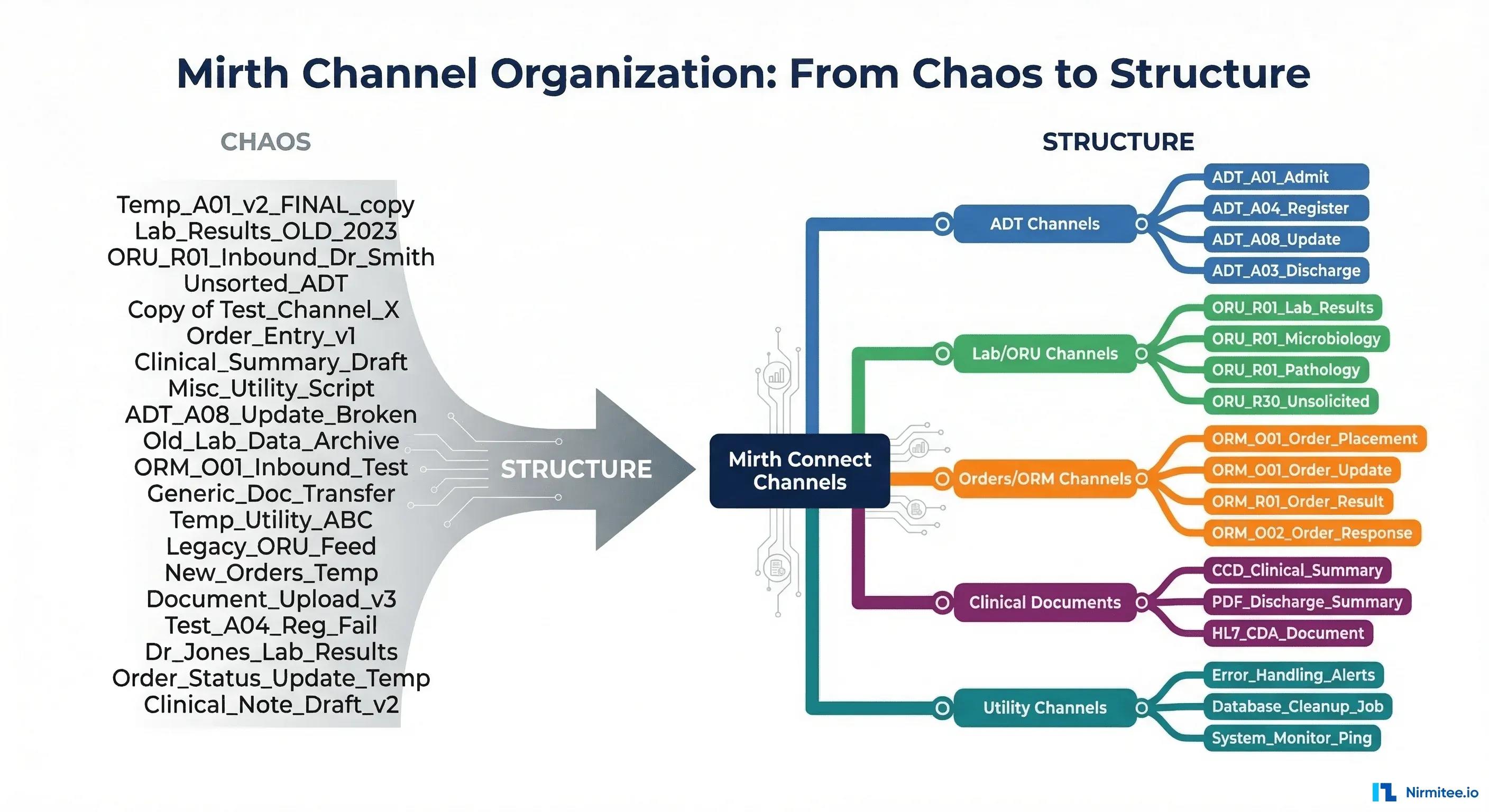
It starts with five channels. One for ADT messages from the HIS, one for lab results to the EHR, one for orders, one for radiology, and one utility channel that somebody built for a "temporary" data migration that became permanent three years ago. Five channels are manageable. You know what each one does. You can hold the entire integration landscape in your head.
Then it grows. A new clinic joins the network. The lab system gets upgraded and needs a separate interface for the transition period. Somebody builds a channel to forward alerts to a paging system. Another channel appears for a research data extract. Before you realize it, you have 50 channels. Then 80. Then 127. And one morning you get a ticket that says "Lab results are not arriving at the West Campus clinic" and you spend 45 minutes just figuring out which of your 127 channels is responsible for that specific message flow.
This is the channel sprawl problem, and it affects every healthcare organization that has been running Mirth Connect for more than two years. According to HIMSS analytics data, the average hospital manages between 50 and 100 integration interfaces, with large health systems managing 300 or more. At that scale, the integration engine is not the bottleneck. Your ability to organize, document, monitor, and govern those channels is what determines whether your integration infrastructure is reliable or fragile.
This guide is the governance playbook that integration team leads need but rarely have time to write. It covers naming conventions, grouping strategies, documentation standards, monitoring at scale, deployment workflows, team structure, and lifecycle management. Every recommendation comes from production experience managing large-scale Mirth deployments.
Watch: Running Mirth Connect in Production: Daily Checks, Backups and Runbooks (1:52).
The Channel Sprawl Problem
Channel sprawl is not a technology problem. It is a governance problem. Mirth Connect makes it easy to create channels. Too easy, in some respects. A developer can clone an existing channel, modify a few settings, and deploy it to production in 20 minutes. If there is no process governing channel creation, naming, documentation, or retirement, the result is predictable: a growing mass of channels that nobody fully understands.
The symptoms of channel sprawl are consistent across organizations:
- Incident response takes too long. When a message flow breaks, the first 30-60 minutes are spent identifying which channel is responsible. With 100+ channels and no clear naming convention, this becomes an archaeological exercise.
- Knowledge lives in people's heads. The engineer who built the channel knows what it does. When that engineer leaves (and they will, given that integration engineers command $120,000-$180,000/year salaries and are actively recruited), the knowledge leaves with them.
- Duplicate channels exist. Without visibility into what already exists, engineers build new channels for problems that existing channels already solve. We have seen organizations with three separate channels doing the same ADT transformation because three different engineers built them at different times without knowing about each other's work.
- Retired channels are never removed. Channels that are no longer needed stay deployed because nobody is confident enough to remove them. They consume resources, generate noise in monitoring, and confuse new team members.
- Testing is inconsistent. Some channels have test messages documented. Most do not. When a change is needed, the engineer has to reverse-engineer the expected message format from production logs.
The good news: channel sprawl is solvable. The bad news: it requires discipline, not technology. The tools help (and we will cover them), but the foundation is process and standards.
Naming Conventions That Scale
A consistent naming convention is the single highest-leverage change you can make. It costs nothing to implement and reduces incident response time by 40-60% because engineers can identify the responsible channel from the name alone, without opening the Mirth Administrator.
The Standard Format: ENV_SOURCE_MSGTYPE_DESTINATION
Every channel name follows this pattern:
FORMAT: [ENV]_[SOURCE]_[MSGTYPE]_[DESTINATION]

ENV:         PROD, STG, DEV, QA
SOURCE:      Sending system abbreviation (HIS, LIS, RIS, EHR, PACS)
MSGTYPE:     HL7 message type (ADT, ORM, ORU, MDM, SIU) or data type (FHIR, CSV, JSON)
DESTINATION: Receiving system abbreviation

EXAMPLES:
  PROD_HIS_ADT_LAB        Production: HIS sends ADT to Lab system
  PROD_LIS_ORU_EHR        Production: Lab sends results to EHR
  PROD_RIS_ORM_PACS       Production: Radiology orders to PACS
  STG_HIS_ADT_LAB         Staging copy of the HIS-to-Lab ADT channel
  DEV_TEST_ADT_MOCK       Development test channel with mock destination

SPECIAL CASES:
  PROD_HIS_ADT_FANOUT     Fan-out: one source, multiple destinations
  PROD_UTIL_ETL_DW        Utility: ETL to data warehouse
  PROD_EHR_FHIR_HIE       FHIR-based interface to health information exchange
  PROD_ALERT_ERR_PAGER    Error alerting channel to paging system
Rules for the convention
- All uppercase. No mixed case, no camelCase, no spaces. Consistent casing eliminates an entire category of "which one is it?" questions.
- Underscores as separators. Not hyphens, not dots. Underscores are universally safe in Mirth channel names and easily parsed programmatically.
- Abbreviations from a controlled list. Maintain a shared document listing every valid system abbreviation. When a new source or destination system is added, agree on the abbreviation before creating channels. This prevents HIS vs HOSP vs HOSPITAL vs H1 proliferation.
- Environment prefix is mandatory. This prevents the production/staging confusion that causes real incidents. If you see PROD_ in the name, you know to be careful. If you see DEV_, you know you can experiment freely.
Renaming existing channels
If you have 100+ channels with inconsistent names, renaming them is a project in itself. Do it in waves. Start with the most critical channels (ADT, orders, results). Rename 10-15 channels per week. Update monitoring, documentation, and runbooks after each wave. Mirth allows renaming deployed channels without stopping message flow, but verify in your environment first. The channel design patterns guide provides additional naming considerations for complex architectures.
Channel Grouping Strategies
Mirth Connect supports channel groups (called "Channel Tags" in Mirth 4.x). Groups provide visual organization in the Mirth Administrator and can be used for bulk operations (deploy all channels in a group, undeploy a group, export a group).
Strategy 1: Group by clinical workflow
ADT / Patient Movement
  PROD_HIS_ADT_LAB
  PROD_HIS_ADT_RAD
  PROD_HIS_ADT_PHARMACY
  PROD_HIS_ADT_FANOUT

Lab / Results
  PROD_LIS_ORU_EHR
  PROD_LIS_ORU_CLINIC_NORTH
  PROD_LIS_ORU_CLINIC_SOUTH
  PROD_REF_LAB_ORU_LIS

Orders
  PROD_EHR_ORM_LIS
  PROD_EHR_ORM_RIS
  PROD_EHR_ORM_PHARMACY

Clinical Documents
  PROD_EHR_MDM_HIE
  PROD_DICTATION_MDM_EHR

Scheduling
  PROD_EHR_SIU_RIS
  PROD_RIS_SIU_EHR

Utility / Infrastructure
  PROD_ALERT_ERR_PAGER
  PROD_UTIL_ETL_DW
  PROD_UTIL_HEARTBEAT_MON
Strategy 2: Group by source system
Useful when most troubleshooting starts with "the HIS team says messages are not being sent." Grouping by source lets you quickly see all channels fed by a specific system.
Strategy 3: Group by clinical domain
Similar to workflow grouping but organized around patient care domains: inpatient, outpatient, emergency, laboratory, radiology, pharmacy. This aligns well with organizations where different teams own different clinical areas.
Choose one primary grouping strategy and stick with it. Adding secondary grouping via channel tags is fine, but the primary group hierarchy should be consistent and obvious.
Documentation Standards
Every channel in production needs a minimum set of documentation. Documented channels resolve issues 3x faster than undocumented ones. The documentation does not need to be elaborate, but it must exist and be findable.
The minimum channel documentation template
CHANNEL: PROD_HIS_ADT_LAB
DESCRIPTION: Routes ADT messages from the Hospital Information System
             to the Laboratory Information System for patient registration
             and location updates.

DATA FLOW:
  Source: Epic HIS (10.0.1.50:2575, MLLP)
  → Filter: Accept only ADT^A01, A02, A03, A04, A08
  → Transform: Map PID, PV1, IN1 segments; translate location codes
  → Destination: Sunquest LIS (10.0.2.30:2576, MLLP)

MESSAGE TYPES: ADT^A01, ADT^A02, ADT^A03, ADT^A04, ADT^A08
VOLUME: ~2,500 messages/day (peak: 400/hour during 7-9 AM admits)
SLA: Messages delivered within 30 seconds. Alerting if queue > 50.

CONTACTS:
  Owner: Sarah Chen (Integration Team)
  HIS Vendor: Epic support ticket queue
  LIS Vendor: Sunquest support (support@sunquest.com)
  Clinical Stakeholder: Lab Director, Dr. Patel

DEPENDENCIES: Requires VPN tunnel to lab network (managed by Network Ops)
LAST MODIFIED: 2026-01-15 by J. Rodriguez — added A04 pre-admit support
CHANGE HISTORY:
  2025-11-01: Initial deployment
  2025-12-10: Added IN1 segment mapping for insurance data
  2026-01-15: Added ADT^A04 pre-admit message type
Where to store documentation
- Channel description field in Mirth: Use this for the one-line purpose description. Every engineer sees it in the Mirth Administrator without opening additional tools.
- Git repository: If you are using MirthSync or a similar version control workflow, store a README.md alongside each channel's XML definition. Documentation lives with the code and is version-controlled.
- Confluence/Wiki: For organizations that already use a wiki for operational documentation. Ensure the wiki page is linked from the Mirth channel description.
- mc-docu: An open-source tool that auto-generates channel documentation from Mirth's API. It extracts channel metadata, connector configurations, and deployed status into browsable documentation. Useful as a starting point but does not replace human-written purpose descriptions and contact information.
Template Channels and Reuse
The DRY principle (Don't Repeat Yourself) applies to Mirth channels just as much as it applies to application code. When you need a new HL7 v2 inbound channel, you should not build it from scratch every time. You should clone a tested, documented template and customize the specific differences.
Template library approach
TEMPLATES:
  TPL_INBOUND_HL7V2_MLLP
    - Standard MLLP listener configuration
    - Auto-ACK enabled with configurable ACK code
    - Error handling: route to PROD_ALERT_ERR channel
    - Standard pre-processing: strip BOM, normalize line endings
    - Logging: message ID, timestamp, message type to channel log

  TPL_OUTBOUND_HL7V2_MLLP
    - Standard MLLP sender configuration
    - Queue enabled with 100-message buffer
    - Retry: 3 attempts, 30-second intervals
    - Error handling: route to error channel after max retries
    - ACK validation: reject NAK responses

  TPL_INBOUND_FHIR_REST
    - HTTPS listener with OAuth2 bearer token validation
    - JSON parsing with FHIR R4 resource validation
    - Standard error response format (OperationOutcome)
    - Rate limiting: configurable requests/minute

  TPL_OUTBOUND_REST_API
    - HTTPS sender with configurable authentication
    - Retry with exponential backoff
    - Circuit breaker: disable after 5 consecutive failures
    - Response logging and validation
When creating a new channel from a template, the developer changes only what is unique to the new interface: the port number, the specific message types to accept, the transformation logic, and the destination address. Everything else (error handling, logging, retry behavior, monitoring hooks) comes from the template and is consistent across all channels.
Code Template Libraries
Mirth's Code Template Libraries are the mechanism for sharing JavaScript functions across channels. Instead of copying and pasting the same date formatting function into 30 different transformers, you define it once in a Code Template Library and all channels reference it.
CODE TEMPLATE LIBRARIES:

  lib-date-utils
    formatHL7Date(hl7Date) — Convert HL7 date to ISO format
    parseDate(dateStr, format) — Parse various date formats
    calculateAge(dob) — Calculate patient age from DOB
    isValidHL7DateTime(dtStr) — Validate HL7 datetime format

  lib-code-translations
    translateGender(hl7Code) — Map HL7 gender to local codes
    translateMaritalStatus(hl7Code) — Map marital status codes
    lookupDepartment(code) — Translate department codes
    lookupInsurancePlan(code) — Map insurance plan identifiers

  lib-message-utils
    getMessageType(msg) — Extract MSH-9 message type
    getPatientMRN(msg) — Extract PID-3 MRN from any message
    getSendingFacility(msg) — Extract MSH-4 sending facility
    buildACK(originalMsg, ackCode, errorMsg) — Build ACK response

  lib-error-handling
    logError(channelName, errorType, details) — Standardized error logging
    sendAlert(severity, message) — Route alert to monitoring
    shouldRetry(errorCode) — Determine if error is retryable
The discipline required: when an engineer writes a useful function in a transformer, they should ask "will any other channel need this?" If yes, move it to a Code Template Library. Schedule a monthly review of inline transformer code to identify candidates for library extraction.
Monitoring at Scale
Monitoring 5 channels is visual. You open the Mirth Administrator dashboard, glance at the status column, and see green or red. Monitoring 100+ channels requires a different approach. You cannot watch a dashboard with 127 rows. You need alerting that tells you when something needs attention, and a dashboard that gives you context when you respond.
Alerting strategy
ALERT TIERS:

  CRITICAL (page on-call immediately):
    - Channel stopped unexpectedly
    - Queue depth > 500 messages (indicates destination down)
    - Error rate > 10% of messages in last 15 minutes
    - No messages received in 2x expected interval (source may be down)

  WARNING (notify team channel, respond within 1 hour):
    - Queue depth > 100 messages
    - Error rate > 2% of messages in last hour
    - Channel processing time > 5x normal average
    - Disk usage > 80% on Mirth server

  INFO (log only, review in daily standup):
    - Channel redeployed
    - New channel deployed
    - Configuration change detected
    - Message volume deviation > 30% from baseline
Dashboard design principles
- Group by channel group, not alphabetically. Your brain processes "ADT channels: all green, Lab channels: one yellow" faster than scanning 127 rows.
- Show rate of change, not absolute numbers. "Queue growing at 50 messages/minute" is more actionable than "Queue has 200 messages."
- Include the last-message-received timestamp. A channel showing "green/started" with no messages in 6 hours is not healthy. It is silently broken.
- Link directly to channel details. Clicking a channel in the dashboard should open the Mirth channel view. Reduce the clicks between "something is wrong" and "I can see why."
Tools like Mirth Command Center provide multi-server monitoring dashboards purpose-built for large Mirth deployments. For custom dashboards, Mirth's REST API exposes channel statistics, queue depths, and error counts that can feed Grafana, Datadog, or any monitoring platform your organization already uses.
Deployment Workflows
Deploying channel changes to production should not involve opening the Mirth Administrator and clicking buttons. Manual deployments are error-prone, unrepeatable, and unauditable. At scale, you need a deployment workflow that is version-controlled, reviewed, and automated.
Git-based promotion workflow
WORKFLOW:
  1. Developer makes channel changes in DEV Mirth instance
  2. MirthSync pull: extract channel XML to Git feature branch
  3. Push branch, create Pull Request
  4. PR Review: another engineer reviews channel changes
     - Check: naming convention followed?
     - Check: documentation updated?
     - Check: error handling present?
     - Check: test messages included?
  5. Merge to staging branch
  6. CI pipeline deploys to STG Mirth automatically
  7. Run automated integration tests against STG
  8. Manual validation in STG (send test messages, verify output)
  9. Merge staging to main branch
  10. CI pipeline deploys to PROD Mirth
  11. Post-deployment verification: monitor for 30 minutes

ENVIRONMENT PROMOTION:
  DEV → STG → PROD

  Each environment has its own Mirth instance.
  Channel XML is identical; only Configuration Map values differ
  (hostnames, ports, credentials).
MirthSync is the most established tool for this workflow, but alternatives exist. Some organizations build custom scripts using the Mirth REST API to export and import channels. The principle is the same: channels in Git, changes reviewed via PRs, deployments automated. For a deeper dive on CI/CD for Mirth, see our automated testing and CI/CD guide.
Change Management
At scale, the question "who changed what and why?" must always have a clear answer. Channel changes without documentation cause incidents. A 2024 Gartner analysis found that 60% of IT incidents in healthcare organizations are caused by poorly managed changes to integration systems.
Change request requirements
- What is changing? Specific channel names and the nature of the change.
- Why is it changing? Business requirement, bug fix, vendor request, or optimization.
- What is the impact? Which message flows are affected? What is the blast radius if the change causes a problem?
- What is the rollback plan? How do you undo the change if it causes issues?
- Who approved? Channel owner and clinical stakeholder sign-off for production changes.
Impact analysis for channel changes
Before modifying any channel, trace the full message flow. Use mirthgraph, an open-source tool that visualizes channel dependencies by analyzing source and destination configurations. A change to the ADT fan-out channel potentially affects every downstream channel that receives ADT messages. Without impact analysis, a "small change" to one channel can cascade into failures across a dozen interfaces.
Team Roles and Responsibilities
Managing 100+ channels is not a one-person job. It requires a team with defined roles, clear ownership, and structured communication.
Role definitions
- Integration Team Lead: Owns the governance framework. Sets naming conventions, documentation standards, and deployment processes. Reviews and approves production changes. Manages vendor relationships for integration-related issues. Typically, 1 person for up to 100 channels, 2 for 100-300.
- Senior Integration Engineer: Designs complex channel architectures. Builds and maintains code template libraries. Mentors junior engineers. Leads incident response for critical failures. Owns 20-40 channels each.
- Integration Engineer: Builds and maintains channels. Writes documentation. Responds to alerts during on-call rotation. Owns 15-25 channels each.
- HL7/FHIR Analyst: Interprets specifications from vendors. Validates message content accuracy with clinical stakeholders. Ensures compliance with interoperability standards. Not necessarily a developer, but understands message structure deeply.
- DevOps Engineer: Manages Mirth server infrastructure, CI/CD pipelines, monitoring systems, and high availability configurations. Typically shared with other infrastructure responsibilities.
On-call rotation
With 100+ channels, you will have after-hours alerts. Establish a rotation with at least 3 engineers to prevent burnout. Provide a runbook for each alert type so the on-call engineer can resolve common issues without waking up the channel owner. Escalation path: on-call engineer → channel owner → team lead → vendor support.
Channel ownership model
Every channel has exactly one owner. Ownership does not mean "the only person who can touch it." Ownership means "person responsible for its health, documentation, and evolution." When the owner leaves or changes roles, ownership is formally transferred with a handoff document. Unowned channels are the most dangerous channels in your environment.
Tools That Help
Several community and commercial tools address specific aspects of channel governance at scale:
- MirthSync: Version control synchronization. Extracts channel XML to Git repositories. Essential for any deployment workflow that involves code review or CI/CD.
- mirthgraph: Channel dependency visualization. Generates a graph showing how channels connect to each other and to external systems. Invaluable for impact analysis before making changes.
- mc-docu: Automatic documentation generation. Connects to the Mirth API and produces browsable documentation of all channels, connectors, and configurations. Good starting point for organizations that have zero documentation today.
- Mirth Command Center: Multi-server monitoring and management. If you run multiple Mirth instances (production, DR, staging), this provides a unified view across all servers. Shows channel status, queue depths, and error rates across your entire Mirth fleet.
- Custom Grafana dashboards: Mirth exposes statistics via its REST API. Many teams build Grafana dashboards that pull channel metrics every 30-60 seconds and provide the at-a-glance monitoring view that the Mirth Administrator does not offer at scale.
Channel Lifecycle Management
Channels are not permanent. They have a lifecycle: creation, testing, active production, deprecation, and retirement. Managing this lifecycle explicitly prevents the accumulation of dead channels that consume resources and confuse your team.
Stage 1: Creation
New channel request submitted with business justification. Channel built from template in DEV environment. Documentation was created following the template. Code review by a senior engineer. Naming convention verified.
Stage 2: Testing
The channel was deployed to the STG environment. Test messages were sent for every supported message type and edge case. The destination system validates received messages. Performance tested at expected peak volume. Monitoring and alerting are configured.
Stage 3: Active Production
The channel was deployed to PROD via an automated pipeline. Owner monitors for 7 days post-deployment. Channel added to monitoring dashboard and on-call runbook. Quarterly health check scheduled.
Stage 4: Deprecated
Business needs have changed. The channel is no longer the primary interface for its message flow (replaced by a newer channel or the source/destination system has been decommissioned). Channel remains deployed but is tagged as DEPRECATED. No new features or modifications. Monitoring continues. Target retirement date set (typically 30-90 days after deprecation).
Stage 5: Retired
Channel undeployed from production. Channel XML archived in Git with a retirement commit message explaining why. Documentation updated with retirement date and reason. Monitoring removed. Server resources reclaimed.
The retirement audit
Every quarter, review all channels and identify candidates for deprecation or retirement. Ask: "If this channel stopped processing messages tomorrow, who would notice and how quickly?" Channels where the answer is "nobody, for weeks" are strong retirement candidates. Channels where the answer is "the entire ED in 5 minutes" need enhanced monitoring and documentation.
The Quarterly Health Check
Schedule a quarterly review of your entire integration landscape. Block 2-4 hours. Bring the full integration team. Cover these items:
- Channel inventory review: Are there new channels that were not properly documented? Any channels that should be deprecated?
- Naming convention compliance: Are all channels following the convention? Fix any deviations.
- Documentation freshness: Are contact lists current? Have any vendor contacts changed? Are SLAs still accurate?
- Monitoring coverage: Are all critical channels monitored? Have any alert thresholds become stale?
- Performance review: Which channels have the highest error rates? Which have growing queue depths? Which are approaching volume thresholds? Refer to performance tuning guidelines for channels that need optimization.
- Ownership verification: Does every channel have a current owner? Have any ownership transfers been missed?
- Technical debt assessment: Which channels use deprecated code patterns? Which are still on old templates?
Document the findings and action items. Track completion. The quarterly health check is the single most effective practice for preventing channel sprawl from becoming channel chaos.
Related guides
This article is part of our complete guide to Mirth Connect: Mirth Connect explained. Related deep-dives:
- five Mirth channel patterns
- Mirth Connect as an HL7 interface engine
- healthcare integration architecture with Kafka
- Mirth Connect Integration Engine
Need production-grade Mirth Connect help? See our Mirth Connect integration services.
Ready to scale?
Talk to our healthcare engineering team about building, integrating, and shipping faster.
Frequently Asked Questions
How do I convince management to invest time in channel governance?
Should I rename all existing channels at once to follow the new convention?
What is the ideal team size for managing 100+ channels?
How do I handle channels that span multiple clinical workflows?
What metrics should I track to measure governance effectiveness?
How does Nirmitee.io approach healthcare software development?