Mirth Connect HTTP API Calls on Java 17

CTO & Co-Founder
CTO & Co-Founder at Nirmitee.io. Architects healthcare integrations across FHIR, SMART on FHIR, ABDM and NHCX, writing from production experience taking hospital software from sandbox to go-live.
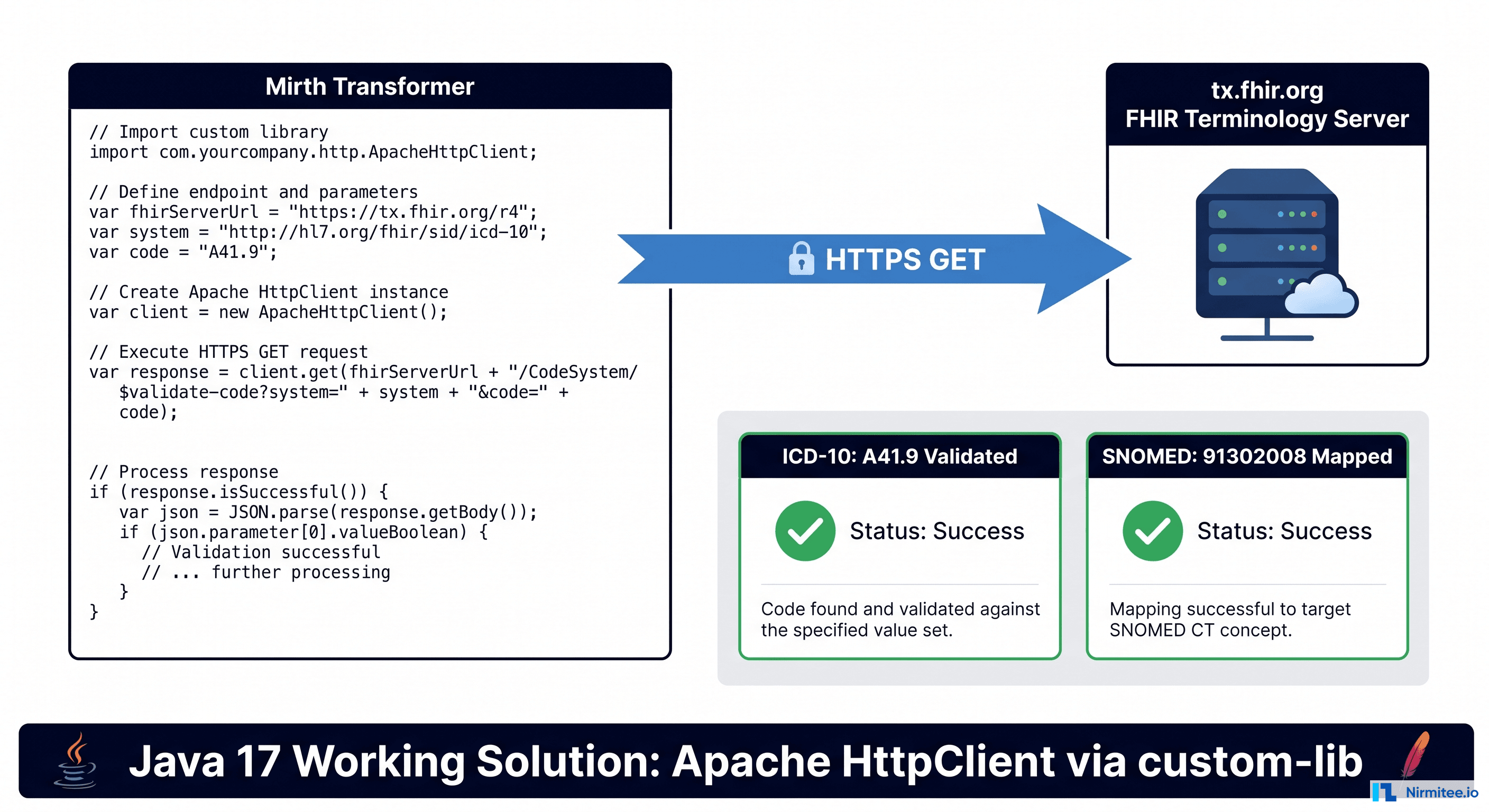
If you have spent the last several hours trying to make a simple HTTP GET request from a Mirth Connect JavaScript transformer and watched every approach silently fail, you are not alone. The intersection of Mirth Connect's Rhino JavaScript engine, Java 17's module access controls, and an underdocumented classpath means that the three most obvious approaches to making HTTP calls from transformer code are all broken in non-obvious ways.
This guide documents every approach we tried, the exact error messages you will encounter, why each one fails, and the one method that actually works. The context is real: we needed to validate ICD-10 diagnosis codes against the HL7 public FHIR Terminology Server (tx.fhir.org) during an HL7v2 ADT-to-FHIR-R4 bundle transformation. The solution applies to any outbound HTTP call from Mirth transformer JavaScript — REST APIs, webhook notifications, terminology lookups, or external system queries.
Environment: Mirth Connect 4.5.2, Docker (nextgenhealthcare/connect:4.5.2), OpenJDK Temurin 17.0.13, PostgreSQL 16 backend.
Mirth Connect transformers execute JavaScript through Mozilla Rhino, a Java-based JavaScript engine. Rhino has a powerful feature: the Packages global lets you instantiate any Java class directly from JavaScript. In theory, this means every Java HTTP library is available to your transformer code.
In practice, three things conspire to break this assumption on modern Mirth installations:
- Java 17's module system (JPMS) restricts access to internal JDK classes that Rhino previously used freely.
- Mirth's classpath configuration does not load JARs from every directory you might expect.
- Mirth's template variable syntax uses
$for string substitution, which collides with FHIR operation URLs like$lookupand$validate-code.
The result is that the most commonly recommended approaches on the Mirth forums and Stack Overflow — approaches that worked on Java 8 and Java 11 — fail silently or with cryptic errors on Java 17.
Approach 1: java.net.URL — Broken on Java 17
This is the approach you will find most often in Mirth Connect forums, blog posts, and legacy documentation. It looks clean and requires no additional JARs:
// DO NOT USE — Broken on Java 17
var url = new java.net.URL('https://tx.fhir.org/r4/CodeSystem/$lookup?system=http%3A%2F%2Fhl7.org%2Ffhir%2Fsid%2Ficd-10-cm&code=A41.9');
var conn = url.openConnection();
conn.setRequestMethod('GET');
conn.setRequestProperty('Accept', 'application/fhir+json');
var reader = new java.io.BufferedReader(new java.io.InputStreamReader(conn.getInputStream()));
var line, response = '';
while ((line = reader.readLine()) != null) {
    response += line;
}
reader.close();
The Error You Will See
When you run this in a Mirth 4.5.x transformer on Java 17, you get:
ERROR: TypeError: Cannot call method "setRequestMethod" of nullOr, depending on the exact call path:
java.lang.reflect.InaccessibleObjectException: Unable to make field private
java.net.URL sun.net.www.protocol.http.HttpURLConnection.url accessible:
module java.base does not "opens sun.net.www.protocol.http" to unnamed module
Why It Fails
When Rhino evaluates url.openConnection(), it does not return a java.net.HttpURLConnection. The Rhino engine resolves the concrete implementation class, which is sun.net.www.protocol.http.HttpURLConnection (or the HTTPS equivalent). This is an internal JDK class that lives inside java.base.
Java 17 enforces strong encapsulation by default. The sun.net.www.protocol.http package is not opened to unnamed modules (which is where Rhino and all Mirth plugin code runs). The JVM blocks reflective access, and Rhino cannot inspect or invoke methods on the returned object.
This is documented in Mirth Connect GitHub Issue #6254. The issue has been open since the Java 17 migration and remains unresolved as of Mirth 4.5.2.
The JVM Flag Workaround (And Why You Should Not Use It)
You can technically force the JVM to open internal modules by adding flags to Mirth's vmoptions:
--add-opens java.base/sun.net.www.protocol.http=ALL-UNNAMED
--add-opens java.base/sun.net.www.protocol.https=ALL-UNNAMED
This is a bad idea for production. It weakens the security model that Java 17 introduced, it ties your deployment to specific JVM internal implementation details that can change between patch releases, and it masks the root cause rather than fixing it. Every JDK update becomes a potential breakage point.
Approach 2: Apache HttpClient — Not on the Classpath
The next thing you try — because it is the correct library for the job — is Apache HttpClient. Mirth Connect ships with Apache HttpClient JARs in its installation. You can find them inside the container:
docker exec mirth-connect find /opt/connect -name "httpclient*.jar"Output:
/opt/connect/server-lib/commons/httpclient-4.5.13.jar
/opt/connect/server-lib/commons/httpcore-4.4.13.jar
The JARs are right there. So you write:
// DO NOT USE — Will fail with ClassNotFoundException
var HttpClients = Packages.org.apache.http.impl.client.HttpClients;
var client = HttpClients.createDefault();
The Error You Will See
JavaException: java.lang.RuntimeException: org.mozilla.javascript.EvaluatorException:
The choice of Java constructor for org.apache.http.impl.client.HttpClients
matching JavaScript argument types () is ambiguous
Or, more commonly, the Packages.org.apache.http.impl.client.HttpClients reference simply resolves to a generic JavaPackage object rather than the actual class, and createDefault() returns undefined or throws:
TypeError: Cannot find function createDefault in object [JavaPackage org.apache.http.impl.client.HttpClients]When you see [JavaPackage ...] instead of [JavaClass ...] in Rhino, it means the class was not found on the classpath. Rhino does not throw ClassNotFoundException — it silently wraps the reference as a package placeholder.
Why It Fails
This is the part that wastes the most time, because the JARs are physically present in the Mirth installation. The problem is the classpath configuration.
Mirth Connect's startup script loads JARs from specific directories:
/opt/connect/server-lib/— core Mirth JARs/opt/connect/extensions/*/lib/— extension-specific JARs/opt/connect/custom-lib/— user-provided JARs (only if enabled)
The commons/ subdirectory under server-lib/ is used by Mirth's internal Java code (destinations, connectors, the HTTP Sender). But JARs in subdirectories of server-lib/ are not automatically added to the classpath available to Rhino transformer code. The Apache HttpClient classes are available to Mirth's Java destination code but not to your JavaScript transformer code.
This distinction is not documented anywhere in the Mirth Connect user guide. Related discussion: GitHub Issue #6273.
Approach 3: HTTP Sender Destination — Dollar Sign Conflicts
At this point, you might try the "Mirth way" — use an HTTP Sender as a destination, let Mirth handle the HTTP call natively, and process the response in a Response Transformer.
This works for many use cases. But it fails for FHIR terminology operations, and the failure mode is subtle.
The Dollar Sign Problem
FHIR operations use $ in their URLs:
https://tx.fhir.org/r4/CodeSystem/$lookup?system=...&code=...Mirth Connect uses ${} syntax for variable substitution in destination URLs, channelMap references, and template strings. When you put $lookup in an HTTP Sender URL field, Mirth interprets $lookup as a variable reference and attempts to resolve it. Since no variable named lookup exists, the substitution either produces an empty string or throws an error.
The URL that reaches the server is:
https://tx.fhir.org/r4/CodeSystem/?system=...&code=...The $lookup is silently stripped, and the FHIR server returns a 404 or a Bundle search result instead of the Parameters response you expect.
The Workaround
You can pre-build the URL in a JavaScript transformer and store it in a channelMap variable, then reference the entire URL from the HTTP Sender:
// In source transformer (before the HTTP Sender destination)
var lookupUrl = 'https://tx.fhir.org/r4/CodeSystem/$lookup'
    + '?system=' + encodeURIComponent('http://hl7.org/fhir/sid/icd-10-cm')
    + '&code=' + encodeURIComponent(dx);
channelMap.put('terminologyUrl', lookupUrl);
Then in the HTTP Sender destination URL field: ${terminologyUrl}
This avoids the $ parsing because the dollar sign is inside a Java String value, not in the Mirth template. The full URL is substituted as an opaque value.
The Response Transformer Problem
Even with the URL workaround, there is a second issue. On Java 17, the HTTP Sender's Response Transformer can throw a NullPointerException when processing the response body for certain content types. The error appears in the server log:
ERROR (transformer:?): java.lang.NullPointerException: Cannot invoke
"org.mozilla.javascript.Scriptable.getParentScope()" because "scope" is null
This is a Rhino scoping issue specific to response transformers on Java 17 and is intermittent, making it difficult to diagnose. The combination of the URL workaround and the response transformer instability makes the HTTP Sender approach unreliable for FHIR terminology lookups.
The Working Solution: Custom-Lib with Apache HttpClient
The approach that works reliably is:
- Copy the Apache HttpClient JARs into Mirth's
custom-lib/directory. - Enable custom-lib loading in
mirth.properties. - Restart Mirth Connect.
- Use the
Packages.org.apache.http.*classes directly in Rhino JavaScript.
This works because custom-lib/ is the designated extension point for user-provided JARs. When server.includecustomlib=true is set, Mirth's classloader adds everything in custom-lib/ to the classpath that Rhino can access. The Apache HttpClient classes become available to transformer JavaScript, and since you are using a proper HTTP library rather than JDK internals, there is no conflict with Java 17's module system.
Step-by-Step Setup
For Docker Deployments
Step 1: Create the custom-lib directory and copy JARs.
If you are running Mirth in Docker (as most new deployments do), you need to copy the JARs from the commons directory to custom-lib inside the container, then update the configuration.
# Copy the required JARs to custom-lib
docker exec mirth-connect mkdir -p /opt/connect/custom-lib

docker exec mirth-connect cp \
    /opt/connect/server-lib/commons/httpclient-4.5.13.jar \
    /opt/connect/custom-lib/

docker exec mirth-connect cp \
    /opt/connect/server-lib/commons/httpcore-4.4.13.jar \
    /opt/connect/custom-lib/
Step 2: Enable custom-lib in mirth.properties.
# Edit mirth.properties inside the container
docker exec -it mirth-connect bash -c \
    "sed -i 's/^#\?server.includecustomlib\s*=.*/server.includecustomlib = true/' \
    /opt/connect/conf/mirth.properties"
Verify the change took effect:
docker exec mirth-connect grep "includecustomlib" /opt/connect/conf/mirth.propertiesExpected output:
server.includecustomlib = trueStep 3: Restart Mirth Connect.
docker restart mirth-connectWait 30-45 seconds for Mirth to fully restart. You can monitor with:
docker logs -f mirth-connect 2>&1 | grep -i "started"Look for: Mirth Connect <version> Started
Step 4: Verify the classpath.
Deploy a test channel with this transformer script:
var testResult;
try {
    var HC = Packages.org.apache.http.impl.client.HttpClients;
    testResult = 'CLASS_FOUND: ' + HC;
    // If this prints [JavaClass ...], the JAR is loaded
    // If this prints [JavaPackage ...], the JAR is NOT loaded
} catch (e) {
    testResult = 'ERROR: ' + e;
}
channelMap.put('classLoadTest', testResult);
If the result contains [JavaClass org.apache.http.impl.client.HttpClients], the setup is correct. If it contains [JavaPackage ...], the JARs are not on the classpath — double-check that server.includecustomlib = true is set and that you restarted after the change.
For Production Docker Compose
For a repeatable deployment, mount the custom-lib directory as a volume and include the JARs in your deployment artifacts:
services:
  mirth-connect:
    image: nextgenhealthcare/connect:4.5.2
    volumes:
      - mirth-appdata:/opt/connect/appdata
      - ./custom-lib:/opt/connect/custom-lib:ro
      - ./mirth.properties:/opt/connect/conf/mirth.properties:ro
    # ... rest of configuration
Place httpclient-4.5.13.jar and httpcore-4.4.13.jar in a custom-lib/ directory alongside your docker-compose.yml, and include a mirth.properties file with server.includecustomlib = true.
For Bare-Metal Installations
# Find your Mirth installation directory
MIRTH_HOME=/opt/connect  # or /usr/local/mirthconnect, etc.

# Create custom-lib if it doesn't exist
mkdir -p ${MIRTH_HOME}/custom-lib

# Copy the JARs
cp ${MIRTH_HOME}/server-lib/commons/httpclient-4.5.13.jar ${MIRTH_HOME}/custom-lib/
cp ${MIRTH_HOME}/server-lib/commons/httpcore-4.4.13.jar ${MIRTH_HOME}/custom-lib/

# Enable custom-lib
sed -i 's/^#\?server.includecustomlib\s*=.*/server.includecustomlib = true/' \
    ${MIRTH_HOME}/conf/mirth.properties

# Restart the Mirth service
systemctl restart mirthconnect
# or: service mirthconnect restart
# or: ${MIRTH_HOME}/mcservice restart
Complete Working Code: ICD-10 Validation Against tx.fhir.org
Here is the complete, production-tested code for calling the HL7 FHIR Terminology Server from a Mirth transformer. This example validates an ICD-10-CM code extracted from a DG1 segment and retrieves the official display name.
// ============================================================
// FHIR Terminology Lookup via Apache HttpClient (Java 17 safe)
// Requires: httpclient-4.5.13.jar + httpcore-4.4.13.jar
//           in /opt/connect/custom-lib/
//           server.includecustomlib = true in mirth.properties
// ============================================================

// Extract diagnosis code from DG1 segment
var dx = '';
var dxDesc = '';
var dxSys = '';
try {
    dx = msg['DG1']['DG1.3']['DG1.3.1'].toString();
    dxDesc = msg['DG1']['DG1.3']['DG1.3.2'].toString();
    dxSys = msg['DG1']['DG1.3']['DG1.3.3'].toString();
} catch (e) {
    // No DG1 segment — skip terminology lookup
}

// Perform terminology validation if we have a diagnosis code
var txValidationResult = 'NOT_TESTED';
var txDisplayName = '';
var txValidated = false;

if (dx) {
    try {
        // Step 1: Get a reference to the HttpClients factory
        var HttpClients = Packages.org.apache.http.impl.client.HttpClients;
        var HttpGet = Packages.org.apache.http.client.methods.HttpGet;
        var EntityUtils = Packages.org.apache.http.util.EntityUtils;

        // Step 2: Create the HTTP client
        var client = HttpClients.createDefault();

        // Step 3: Build the request URL
        var fhirSystem = 'http://hl7.org/fhir/sid/icd-10-cm';
        var lookupUrl = 'https://tx.fhir.org/r4/CodeSystem/$lookup'
            + '?system=' + encodeURIComponent(fhirSystem)
            + '&code=' + encodeURIComponent(dx);

        // Step 4: Create and configure the GET request
        var httpGet = new HttpGet(lookupUrl);
        httpGet.addHeader('Accept', 'application/fhir+json');

        // Step 5: Execute the request
        var response = client.execute(httpGet);
        var statusCode = response.getStatusLine().getStatusCode();

        if (statusCode === 200) {
            // Step 6: Read the response body
            var body = EntityUtils.toString(response.getEntity(), 'UTF-8');

            // Step 7: Parse the FHIR Parameters response
            var parsed = JSON.parse(body);
            var params = parsed.parameter || [];

            for (var i = 0; i < params.length; i++) {
                if (params[i].name === 'display') {
                    txDisplayName = params[i].valueString;
                    txValidated = true;
                    txValidationResult = 'VALIDATED: ' + txDisplayName;
                }
            }

            if (!txValidated) {
                txValidationResult = 'PARSED_BUT_NO_DISPLAY (status: 200)';
            }
        } else {
            txValidationResult = 'HTTP_ERROR: ' + statusCode;
        }

        // Step 8: Clean up resources
        response.close();
        client.close();

    } catch (txError) {
        txValidationResult = 'ERROR: ' + txError;
    }
}

// Store results for downstream use
channelMap.put('txValidationResult', txValidationResult);
channelMap.put('txDisplayName', txDisplayName);
channelMap.put('txValidated', txValidated.toString());

// Log the outcome
if (txValidated) {
    logger.info('ICD-10 ' + dx + ' validated: ' + txDisplayName);
} else if (dx) {
    logger.warn('ICD-10 ' + dx + ' validation failed: ' + txValidationResult);
}
What the FHIR Terminology Server Returns
For a successful lookup of A41.9 (Sepsis, unspecified organism), tx.fhir.org returns a FHIR Parameters resource:
{
  "resourceType": "Parameters",
  "parameter": [
    {
      "name": "name",
      "valueString": "icd10CM"
    },
    {
      "name": "version",
      "valueString": "2024"
    },
    {
      "name": "display",
      "valueString": "Sepsis, unspecified organism"
    },
    {
      "name": "property",
      "part": [
        {
          "name": "code",
          "valueCode": "status"
        },
        {
          "name": "value",
          "valueCode": "active"
        }
      ]
    }
  ]
}
The display parameter gives you the canonical name for the code, which you can use to validate or enrich the DG1.3.2 description that came with the HL7v2 message.
Using the Validated Code in a FHIR Bundle
Once you have the validated display name, you can build a more accurate FHIR Condition resource:
// Build the Condition resource with validated terminology
if (dx) {
    var fhirDxSystem = (dxSys === 'ICD10')
        ? 'http://hl7.org/fhir/sid/icd-10-cm'
        : 'http://snomed.info/sct';

    // Use the validated display name if available, fall back to HL7v2 description
    var displayName = txValidated ? txDisplayName : dxDesc;

    var condition = {
        resourceType: 'Condition',
        id: 'cond-' + mrn + '-' + dx.replace(/\./g, '-'),
        clinicalStatus: {
            coding: [{
                system: 'http://terminology.hl7.org/CodeSystem/condition-clinical',
                code: 'active'
            }]
        },
        code: {
            coding: [{
                system: fhirDxSystem,
                code: dx,
                display: displayName
            }],
            text: displayName
        },
        subject: { reference: 'Patient/' + mrn },
        encounter: { reference: 'Encounter/enc-' + (visitNum || mrn) }
    };

    // Add SNOMED CT cross-mapping if available (local lookup table)
    var ICD_TO_SNOMED = {
        'A41.9': { code: '91302008', display: 'Sepsis (disorder)' },
        'I21.9': { code: '22298006', display: 'Myocardial infarction (disorder)' },
        'J18.9': { code: '233604007', display: 'Pneumonia (disorder)' },
        'S72.001A': { code: '5913000', display: 'Fracture of neck of femur (disorder)' }
        // ... additional mappings
    };

    if (ICD_TO_SNOMED[dx]) {
        condition.code.coding.push({
            system: 'http://snomed.info/sct',
            code: ICD_TO_SNOMED[dx].code,
            display: ICD_TO_SNOMED[dx].display
        });
    }

    bundle.entry.push({
        resource: condition,
        request: { method: 'PUT', url: 'Condition/' + condition.id }
    });
}
Production Considerations
Connection Timeouts
The default Apache HttpClient has no explicit timeout configured. In a transformer context, a hung HTTP call blocks the entire message processing thread. Always set timeouts:
var RequestConfig = Packages.org.apache.http.client.config.RequestConfig;
var config = RequestConfig.custom()
    .setConnectTimeout(5000)       // 5 seconds to establish connection
    .setSocketTimeout(10000)       // 10 seconds to receive data
    .setConnectionRequestTimeout(3000)  // 3 seconds to get connection from pool
    .build();

var HttpClients = Packages.org.apache.http.impl.client.HttpClients;
var client = HttpClients.custom()
    .setDefaultRequestConfig(config)
    .build();
For a terminology lookup, 10 seconds is generous. The HL7 public tx.fhir.org server typically responds in 0.8-1.1 seconds. If you are calling internal services, tighten these further.
Client Reuse and Connection Pooling
Creating and destroying an HttpClient for every message is expensive. For high-throughput channels, store the client in the globalChannelMap so it persists across messages:
// In the channel Deploy script (runs once when channel starts)
var RequestConfig = Packages.org.apache.http.client.config.RequestConfig;
var config = RequestConfig.custom()
    .setConnectTimeout(5000)
    .setSocketTimeout(10000)
    .setConnectionRequestTimeout(3000)
    .build();

var client = Packages.org.apache.http.impl.client.HttpClients.custom()
    .setDefaultRequestConfig(config)
    .setMaxConnTotal(10)
    .setMaxConnPerRoute(5)
    .build();

globalChannelMap.put('httpClient', client);

// In the channel Undeploy script (runs when channel stops)
var client = globalChannelMap.get('httpClient');
if (client) {
    client.close();
}
Then in your transformer:
var client = globalChannelMap.get('httpClient');
// Use client for requests — do not close it here
Response Caching for Terminology Lookups
ICD-10 code display names do not change during a calendar year (the code set is versioned annually). Calling tx.fhir.org for the same code on every message is wasteful. Implement a simple in-memory cache:
// In the channel Deploy script
globalChannelMap.put('terminologyCache', new java.util.concurrent.ConcurrentHashMap());

// In the transformer
var cache = globalChannelMap.get('terminologyCache');
var cacheKey = 'icd10:' + dx;
var cached = cache.get(cacheKey);

if (cached) {
    txDisplayName = cached;
    txValidated = true;
    txValidationResult = 'CACHED: ' + txDisplayName;
} else {
    // ... perform the HTTP lookup as shown above ...
    if (txValidated) {
        cache.put(cacheKey, txDisplayName);
    }
}
Using ConcurrentHashMap ensures thread safety — Mirth processes messages on multiple threads, and multiple transformer instances may access the cache concurrently.
Error Handling: Fail Open or Fail Closed
Decide your error policy before writing the code. For terminology validation:
- Fail open (recommended for enrichment): If the lookup fails, use the original DG1.3.2 description from the HL7v2 message. The message still processes; you just lose the validated display name.
- Fail closed (required for compliance): If the lookup fails, reject or queue the message. This is appropriate when the terminology validation is a regulatory requirement rather than an enrichment.
// Fail-open pattern
var displayName = dxDesc; // default to HL7v2 value
try {
    // ... terminology lookup ...
    if (txValidated) {
        displayName = txDisplayName;
    }
} catch (e) {
    logger.warn('Terminology lookup failed for ' + dx + ', using HL7v2 description: ' + e);
    // displayName remains the HL7v2 value — message continues processing
}
TLS Certificate Considerations
The Apache HttpClient in the default configuration trusts the JVM's default trust store (cacerts). For public servers like tx.fhir.org, this works out of the box. For internal APIs with self-signed certificates, you will need to either:
- Import the certificate into the JVM trust store inside the container.
- Configure a custom SSL context on the HttpClient.
Option 1 is simpler and recommended:
docker exec mirth-connect keytool -importcert \
    -alias internal-api \
    -file /path/to/cert.pem \
    -keystore /opt/java/openjdk/lib/security/cacerts \
    -storepass changeit \
    -noprompt
Comparison Table: All Approaches
| Approach | Java 8 | Java 11 | Java 17 | Setup Required | FHIR $ URLs | Notes |
|---|---|---|---|---|---|---|
| java.net.URL in Rhino | Yes | Yes (warnings) | No | None | Yes | Blocked by JPMS strong encapsulation |
| Apache HttpClient (server-lib) | Yes | Yes | No | None | Yes | JARs exist but not on Rhino's classpath |
| Apache HttpClient (custom-lib) | Yes | Yes | Yes | Copy JARs, enable flag, restart | Yes | Recommended |
| HTTP Sender Destination | Yes | Yes | Partial | Channel config | No ($ conflict) | $ in FHIR URLs breaks template parsing |
| HTTP Sender + channelMap | Yes | Yes | Partial | Channel config + JS | Yes (workaround) | Response transformer still unreliable |
| JVM --add-opens flags | N/A | Yes | Yes (fragile) | JVM config change | Yes | Weakens security, not recommended |
| External script (Runtime.exec) | Yes | Yes | Yes | Script on filesystem | Yes | Performance overhead, security risk |
Architecture Patterns for External API Calls
Depending on your throughput requirements and the nature of the external API, there are several patterns for structuring outbound HTTP calls in Mirth channels.
Pattern 1: Inline Transformer Call (Simple)
Best for: Low-throughput channels (<100 messages/hour), enrichment that can fail gracefully.
The external API call happens directly in the source transformer, as shown in the code examples above. Simple, self-contained, easy to debug. The downside is that the API call blocks message processing — if the external service is slow, messages queue up.
Pattern 2: Lookup Channel with Channel Reader/Writer
Best for: Reusable lookups shared across multiple channels, centralized caching.
Create a dedicated "lookup" channel that accepts a code as input and returns the validated display name. Other channels call it via Channel Writer/Reader. This centralizes the HTTP configuration and caching in one place.
Pattern 3: Pre-Populated Database Lookup
Best for: High-throughput channels, stable code sets (ICD-10, SNOMED CT, LOINC).
Instead of calling an external API at message time, load the terminology into Mirth's database (or a local PostgreSQL table) on a scheduled basis. Use a Database Reader source on a timer channel to refresh the data nightly. Then use a simple database query in your transformer for lookups — no HTTP call needed.
// Database lookup alternative (requires terminology table)
var dbConn = DatabaseConnectionFactory.createDatabaseConnection(
    'org.postgresql.Driver',
    'jdbc:postgresql://mirth-db:5432/mirthdb',
    'mirthdb', 'mirthdb'
);
var result = dbConn.executeCachedQuery(
    "SELECT display FROM icd10_codes WHERE code = '" + dx + "'"
);
if (result.next()) {
    txDisplayName = result.getString('display');
    txValidated = true;
}
dbConn.close();
This eliminates runtime dependency on external services entirely.
Need expert help with healthcare interoperability or Mirth Connect integration at scale? Explore our Healthcare Software Product Development services, or talk to our team to get started.
How do I make POST requests (not just GET)?
The pattern is nearly identical. Replace HttpGet with HttpPost and set the request body:
var HttpPost = Packages.org.apache.http.client.methods.HttpPost;
var StringEntity = Packages.org.apache.http.entity.StringEntity;
var ContentType = Packages.org.apache.http.entity.ContentType;

var httpPost = new HttpPost('https://example.com/api/endpoint');
var jsonBody = JSON.stringify({ code: dx, system: 'icd-10-cm' });
var entity = new StringEntity(jsonBody, ContentType.APPLICATION_JSON);
httpPost.setEntity(entity);
httpPost.addHeader('Accept', 'application/json');

var response = client.execute(httpPost);
// ... read response as before
What is the performance impact of making HTTP calls in a transformer?
Measured on our test setup (Mirth 4.5.2, Docker on macOS ARM64, tx.fhir.org over public internet):
- Cold call (no connection reuse): 800-1100ms per lookup
- Warm call (connection pooled): 400-600ms per lookup
- Cached lookup: <1ms
For a channel processing 1,000 ADT messages per hour, the cold-call approach adds roughly 15-18 minutes of cumulative processing time. With connection pooling, this drops to 8-10 minutes. With caching (and assuming ~200 unique ICD-10 codes in a typical hospital's ADT volume), the overhead after cache warm-up is negligible.
For channels processing more than 5,000 messages per hour, use the database lookup pattern. External HTTP calls at that volume introduce unacceptable latency and create a runtime dependency on an external service.
Pre-Flight Checklist
- JARs in place. Confirm
httpclient-4.5.13.jarandhttpcore-4.4.13.jarexist in/opt/connect/custom-lib/. - Custom-lib enabled. Confirm
server.includecustomlib = truein/opt/connect/conf/mirth.properties. - Mirth restarted. Classpath changes require a full restart — redeploying the channel is not sufficient.
- Class loads correctly. Test that
Packages.org.apache.http.impl.client.HttpClientsresolves to[JavaClass ...], not[JavaPackage ...]. - Timeouts configured. Never use default (infinite) timeouts in production.
- Error handling defined. Decide fail-open vs. fail-closed before writing the transformer.
- TLS verified. If calling HTTPS endpoints with non-public certificates, import them into the JVM trust store.
- Connection pooling enabled. For channels processing >100 messages/hour, store the HttpClient in
globalChannelMap. - Caching implemented. For terminology lookups, use a
ConcurrentHashMapcache. - FHIR $ URLs handled. If using HTTP Sender destinations with FHIR operation URLs, build the URL in JavaScript and pass via
channelMap. - Monitoring in place. Log lookup successes, failures, and cache hit rates.
- Docker volumes persistent. Ensure
custom-lib/contents survive container recreation.
Wrapping Up
Making HTTP calls from Mirth Connect transformers on Java 17 is a solved problem, but the solution is not where most developers expect to find it. The combination of Java 17's module encapsulation and Mirth's classpath structure means the obvious approaches fail, and the error messages do not point you toward the fix.
The custom-lib approach with Apache HttpClient is reliable, well-supported by Mirth's extension mechanism, and compatible with every Java version from 8 through 21. It takes five minutes to set up and eliminates an entire category of deployment surprises.
If you are building healthcare integration channels that need real-time terminology validation, eligibility checks, or any outbound API call during message transformation, this is the pattern to use. Copy the JARs, flip the flag, restart, and your transformers can talk to the outside world.
Looking for more Mirth Connect best practices? Read our guide on how to set up Mirth Connect for high availability, or explore our deep dive into interoperability standards in healthcare covering FHIR, HL7, and more.
Related guides
This article is part of our complete guide to Mirth Connect: Mirth Connect explained. Related deep-dives:
- the Mirth REST API in practice
- Mirth Connect cloud deployment
- CI/CD for Mirth Connect
Need production-grade Mirth Connect help? See our Mirth Connect integration services.
Ready to scale?
Talk to our healthcare engineering team about building, integrating, and shipping faster.
Frequently Asked Questions
Why does java.net.URL fail in Mirth Connect on Java 17?
What JARs are needed for the custom-lib solution in Mirth Connect?
How do I handle FHIR dollar sign URLs in Mirth Connect HTTP Sender?
What is the performance impact of HTTP calls in Mirth transformers?
Can I use OkHttp or other HTTP libraries in Mirth Connect custom-lib?