Every health system generates thousands of ADT (Admit/Discharge/Transfer) messages per hour. Mirth Connect handles the translation — HL7v2 to FHIR, routing, filtering — but it was never designed to be a message broker. When you need real-time streaming to multiple downstream consumers — FHIR servers, analytics pipelines, clinical alerting systems — Kafka is the missing piece.
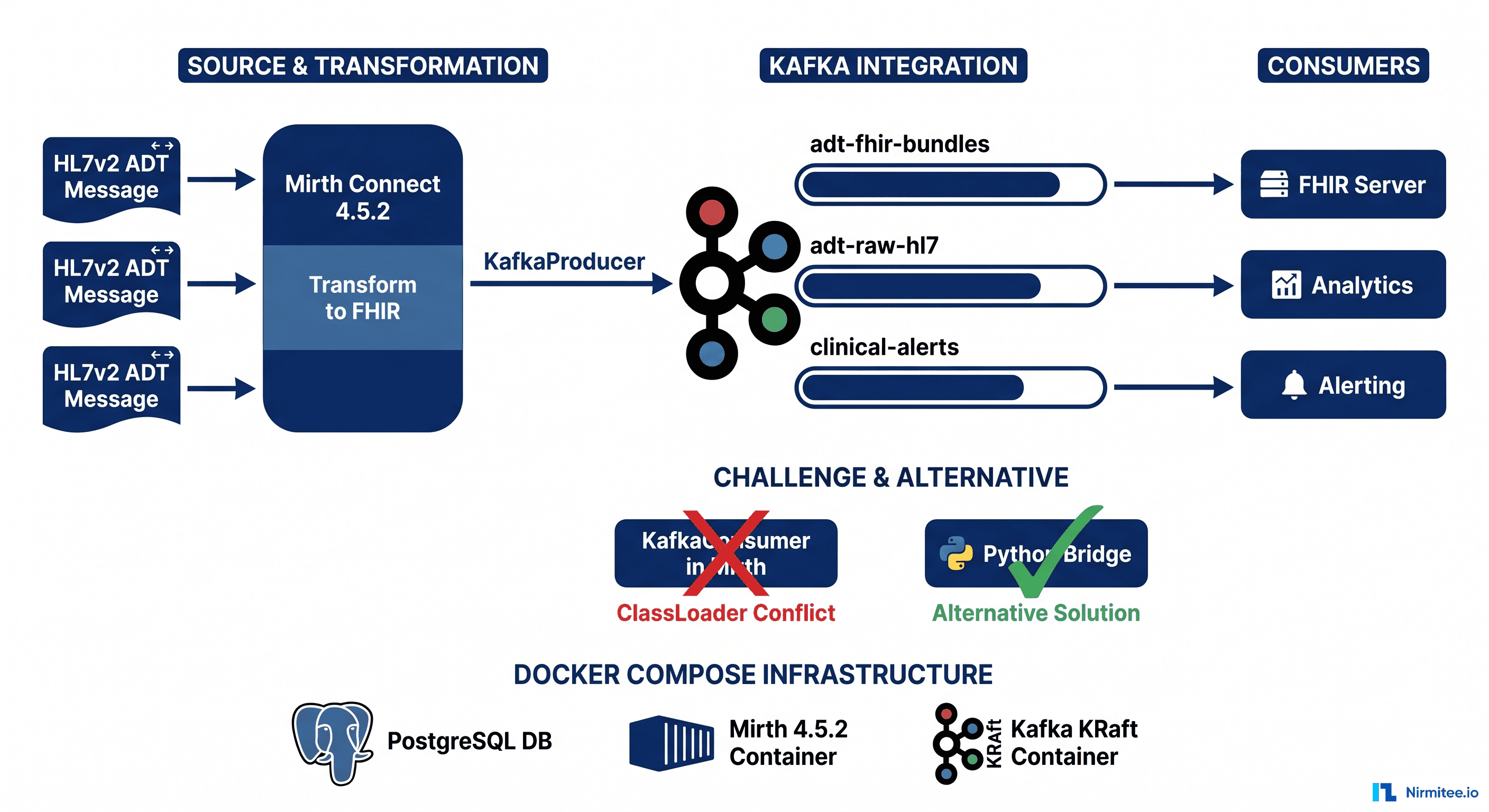
The combination is powerful: Mirth Connect transforms HL7 messages into FHIR R4 Bundles, and Kafka distributes them to every system that needs them with guaranteed delivery, replay capability, and decoupled consumers. This is the pattern that large health systems like Kaiser Permanente and Intermountain use to achieve real-time interoperability at scale.
But there is a catch — one that every engineer discovers the hard way. The Kafka producer works perfectly inside Mirth's JavaScript transformers. The Kafka consumer does not. The consumer fails with a classloader conflict that has been discussed in Mirth forums for years without a public solution. This blog gives you the complete working producer, the exact consumer error, the root cause analysis, and four battle-tested workaround architectures.
Everything in this post comes from a hands-on proof-of-concept running Mirth Connect 4.5.2, Apache Kafka 3.7.0 (KRaft mode), and PostgreSQL 16 — all on Docker Compose, all code included.
Infrastructure Setup: Docker Compose with Mirth + PostgreSQL + Kafka
The Mirth + Kafka Docker Compose stack runs three services: PostgreSQL 16 (Mirth backing database), Mirth Connect 4.5.2, and Apache Kafka 3.7.0 in KRaft mode — no Zookeeper needed. Critical setup detail: mount a ./custom-lib directory into the Mirth container and set server.includecustomlib = true in mirth.properties via docker exec. Do not bind-mount mirth.properties as a file — the Mirth Docker entrypoint uses sed to modify it at startup and bind-mounting causes a Device or resource busy error.
The fastest way to get a working Mirth + Kafka environment is Docker Compose. Our stack runs three services — no Zookeeper needed, since Kafka 3.7 supports KRaft mode natively.
The Complete Docker Compose File
Copy this file as docker-compose.yml and run docker compose up -d:
services:
  mirth-db:
    image: postgres:16-alpine
    container_name: mirth-db
    environment:
      POSTGRES_DB: mirthdb
      POSTGRES_USER: mirthdb
      POSTGRES_PASSWORD: mirthdb
    ports:
      - "5433:5432"
    volumes:
      - mirth-db-data:/var/lib/postgresql/data
    healthcheck:
      test: ["CMD-SHELL", "pg_isready -U mirthdb"]
      interval: 5s
      timeout: 3s
      retries: 10

  mirth-connect:
    image: nextgenhealthcare/connect:4.5.2
    container_name: mirth-connect
    depends_on:
      mirth-db:
        condition: service_healthy
    environment:
      DATABASE: postgres
      DATABASE_URL: jdbc:postgresql://mirth-db:5432/mirthdb
      DATABASE_USERNAME: mirthdb
      DATABASE_PASSWORD: mirthdb
      VMOPTIONS: "-Xmx512m"
    ports:
      - "8443:8443"   # Mirth admin
      - "8082:8080"   # HTTP Listener
      - "6661:6661"   # MLLP channel
    volumes:
      - mirth-appdata:/opt/connect/appdata
      - ./custom-lib:/opt/connect/custom-lib
    restart: unless-stopped

  kafka:
    image: apache/kafka:3.7.0
    container_name: mirth-kafka
    ports:
      - "9092:9092"
      - "9093:9093"
    environment:
      KAFKA_NODE_ID: 1
      KAFKA_PROCESS_ROLES: broker,controller
      KAFKA_LISTENERS: PLAINTEXT://0.0.0.0:9092,CONTROLLER://0.0.0.0:9093
      KAFKA_ADVERTISED_LISTENERS: PLAINTEXT://kafka:9092
      KAFKA_CONTROLLER_LISTENER_NAMES: CONTROLLER
      KAFKA_LISTENER_SECURITY_PROTOCOL_MAP: CONTROLLER:PLAINTEXT,PLAINTEXT:PLAINTEXT
      KAFKA_CONTROLLER_QUORUM_VOTERS: 1@kafka:9093
      KAFKA_OFFSETS_TOPIC_REPLICATION_FACTOR: 1
      KAFKA_TRANSACTION_STATE_LOG_REPLICATION_FACTOR: 1
      KAFKA_TRANSACTION_STATE_LOG_MIN_ISR: 1
      KAFKA_LOG_RETENTION_HOURS: 168
      CLUSTER_ID: MkU3OEVBNTcwNTJENDM2Qk
    healthcheck:
      test: ["CMD-SHELL", "/opt/kafka/bin/kafka-topics.sh --bootstrap-server localhost:9092 --list"]
      interval: 10s
      timeout: 5s
      retries: 10

volumes:
  mirth-db-data:
  mirth-appdata:
Key Design Decisions
- KRaft mode (no Zookeeper): Kafka 3.7 runs in KRaft mode by setting
KAFKA_PROCESS_ROLES: broker,controller. This eliminates the Zookeeper dependency entirely — one fewer container to manage, fewer ports, less memory.
- Custom-lib volume mount: The
./custom-lib:/opt/connect/custom-libmount is critical. This is where Kafka client JARs go. Mirth loads these at startup whenserver.includecustomlib = trueis set in mirth.properties.
- PostgreSQL backend: Mirth's default Derby database is fine for development, but PostgreSQL 16 is the right choice for anything beyond a single-developer setup. It gives you proper backup, replication, and ACID guarantees on channel configuration.
- Port mapping: Port 6661 is for MLLP (HL7v2 messages in), 8082 maps to Mirth's internal 8080 for HTTP Listener channels, and 8443 is the admin console.
Important: mirth.properties Cannot Be Bind-Mounted
You might be tempted to bind-mount mirth.properties directly. Do not do this. The Mirth Docker entrypoint uses sed to modify this file at startup, and bind-mounting it as a file (not a directory) causes a "Device or resource busy" error. Instead, use environment variables or exec into the container after startup:
docker exec mirth-connect bash -c \
  "echo 'server.includecustomlib = true' >> /opt/connect/conf/mirth.properties"
docker restart mirth-connect
Kafka Topic Design for Healthcare
Healthcare Kafka topic design has three natural domains: ADT FHIR Bundles (transformed output, 3 partitions, key by patient MRN), raw HL7v2 (audit trail, 3 partitions, key by MRN), and clinical alerts (1 partition, key by alert priority). Always use the patient MRN as the Kafka message key — it guarantees that ADT admit arrives before discharge for the same patient in the same partition, enables consumer affinity, and supports log compaction for a current-state view per patient.
Before writing any producer code, design your topic topology. Healthcare data has natural partitioning boundaries that Kafka can exploit for ordering guarantees and consumer parallelism.
Topics We Created
# Create topics with appropriate partition counts
docker exec mirth-kafka /opt/kafka/bin/kafka-topics.sh \
  --bootstrap-server localhost:9092 \
  --create --topic adt-fhir-bundles \
  --partitions 3 \
  --replication-factor 1

docker exec mirth-kafka /opt/kafka/bin/kafka-topics.sh \
  --bootstrap-server localhost:9092 \
  --create --topic adt-raw-hl7 \
  --partitions 3 \
  --replication-factor 1

docker exec mirth-kafka /opt/kafka/bin/kafka-topics.sh \
  --bootstrap-server localhost:9092 \
  --create --topic clinical-alerts \
  --partitions 1 \
--replication-factor 1| Topic | Partitions | Purpose | Key Strategy |
|---|---|---|---|
adt-fhir-bundles | 3 | FHIR R4 Bundles (transformed output) | Patient MRN |
adt-raw-hl7 | 3 | Raw HL7v2 messages (audit trail) | Patient MRN |
clinical-alerts | 1 | Priority alerts (sepsis, STEMI, stroke) | Alert priority |
Why Partition by Patient MRN?
Using the patient MRN as the Kafka message key ensures all messages for the same patient land in the same partition. This gives you:
- Ordered processing per patient: ADT^A01 (admit) always arrives before ADT^A03 (discharge) for the same patient within a partition.
- Consumer affinity: A consumer assigned to a partition sees the complete history for its subset of patients.
- Compaction-friendly: If you enable log compaction on
adt-fhir-bundles, Kafka retains only the latest Bundle per patient — a natural "current state" view.
Retention Policy Recommendations
- adt-raw-hl7: 30 days (audit trail, replay window for debugging)
- adt-fhir-bundles: 7 days + log compaction (consumers should process within 7 days; compacted latest-state remains forever)
- clinical-alerts: 24 hours (alerts are ephemeral; if not consumed within a day, the clinical moment has passed)
The JAR Dependency Guide: What to Include and What Will Break Everything
Mirth Kafka integration requires exactly 4 JARs in custom-lib: kafka-clients-3.7.0.jar, lz4-java-1.8.0.jar, snappy-java-1.1.10.5.jar, zstd-jni-1.5.5-6.jar. Do NOT add slf4j-api — Mirth ships it in server-lib/donkey/ and a second copy causes a fatal ExceptionInInitializerError. kafka-clients alone is not enough — all three compression codec JARs are required even without explicit compression, because Kafka negotiates codecs at broker connection time.
This section will save you hours of debugging. The Kafka Java client has transitive dependencies that Mirth does not ship, and one dependency that Mirth does ship — which causes a fatal conflict.
Required JARs in custom-lib
Download these four JARs and place them in your custom-lib/ directory:
| JAR | Version | Why It Is Needed |
|---|---|---|
kafka-clients-3.7.0.jar | 3.7.0 | The Kafka client library itself |
lz4-java-1.8.0.jar | 1.8.0 | LZ4 compression (Kafka default) |
snappy-java-1.1.10.5.jar | 1.1.10.5 | Snappy compression codec |
zstd-jni-1.5.5-6.jar | 1.5.5-6 | Zstandard compression codec |
kafka-clients alone is NOT enough. On the first producer.send(), you will get a NoClassDefFoundError for the compression codecs. Kafka negotiates compression with the broker at connection time, and all three codec JARs must be on the classpath even if you are not explicitly using compression.
The JAR You Must NEVER Add: slf4j-api
Kafka's transitive dependencies include slf4j-api. If you add slf4j-api-2.x.jar to custom-lib, you will get this error on every channel deployment:
java.lang.ExceptionInInitializerError
  at org.apache.kafka.common.utils.Utils.<clinit>(Utils.java)
Caused by: java.lang.IllegalStateException:
  Detected both log4j-over-slf4j.jar AND bound slf4j-log4j12.jar
  on the class path
  at org.slf4j.impl.StaticLoggerBinder.<clinit>(StaticLoggerBinder.java)
The root cause: Mirth already ships slf4j-api-1.7.30.jar in server-lib/donkey/. Adding a second version to custom-lib creates a version conflict that makes Kafka's Utils class fail during static initialization. Remove slf4j-api from custom-lib immediately if you see this error.
mirth.properties Configuration
After placing the JARs, ensure this line exists in your mirth.properties:
# Required for Kafka client JARs
server.includecustomlib = true
Then restart Mirth Connect. The JARs are loaded at JVM startup — a channel redeploy is not sufficient.
The Kafka Producer: Complete Working Code
The Kafka producer runs in a Mirth Destination JavaScript Writer and works reliably. Pattern: TCP Listener on MLLP port 6661 as source, JavaScript transformer building a FHIR R4 Bundle from HL7v2 segments, Destination JavaScript Writer calling KafkaProducer via Packages.org.apache.kafka.clients.producer.KafkaProducer. Key the ProducerRecord with the patient MRN, set acks=all for durability, and call producer.close() in a finally block to prevent connection leaks across messages.
The producer runs inside a Mirth JavaScript transformer. This part works — and works well. Here is the complete, tested code that transforms an HL7v2 ADT message into a FHIR R4 Bundle and publishes it to Kafka.
Channel Architecture
- Source: TCP Listener on port 6661 (MLLP protocol) — receives HL7v2 ADT^A01 messages
- Transformer: JavaScript — parses HL7v2, applies business rules, builds FHIR R4 Bundle
- Destination: JavaScript Writer — publishes the FHIR Bundle to Kafka
Step 1: The FHIR Bundle Transformer
The transformer extracts fields from the HL7v2 message (PID, PV1, DG1, IN1 segments), applies 8 mapping tables (facility, ward, payer, diagnosis criticality, ICD-to-SNOMED crosswalk, marital status, gender, admit type), runs business rules (sepsis SEP-1 bundle, geriatric screening for age 65+, ICU flags), and outputs a FHIR R4 transaction Bundle with 6-9 resources: Patient, Organization, Practitioner, Encounter, Condition, Coverage, and Flag resources.
The full transformer code is approximately 170 lines of JavaScript. The critical business-rules section:
// Business Rules Engine
var alerts = [];
var flags = [];

// Critical diagnosis detection
if (dx) {
    var prefix = dx.substring(0, 3);
    var crit = CRITICAL_DX[prefix];
    if (crit) {
        alerts.push({
            priority: crit.priority,
            alert: crit.alert,
            team: crit.team,
            code: dx
        });
    }
}

// Geriatric screening (CMS requirement)
if (age >= 65 && patientClass == 'I') {
    flags.push({
        code: 'geriatric-screen',
        display: 'Geriatric Screening Required',
        reason: 'Inpatient age >= 65 (age: ' + age + ')'
    });
}

// SEP-1 Sepsis Bundle (3-hour and 6-hour requirements)
if (dx && dx.substring(0, 3) == 'A41') {
    flags.push({
        code: 'sep-1',
        display: 'SEP-1 Sepsis Bundle Required',
        reason: 'DX: ' + dx
    });
}

// Elderly hip fracture fast-track (OR within 24h target)
if (age >= 65 && dx && dx.substring(0, 3) == 'S72') {
    flags.push({
        code: 'hip-fx-elderly',
        display: 'Elderly Hip Fracture Fast-Track',
        reason: 'S72.x + age >= 65'
    });
    alerts.push({
        priority: 'STAT',
        alert: 'Target OR within 24h',
        team: 'Ortho+Geriatrics',
        code: dx
    });
}
Step 2: The Kafka Producer (Destination JavaScript Writer)
The following code goes in your channel's Destination JavaScript Writer. It takes the FHIR Bundle from the transformer's channelMap and publishes it to Kafka:
// === KAFKA PRODUCER - Mirth JavaScript Writer ===
// Runs in the destination transformer context
// Uses Packages.* to access Java classes from custom-lib

var Properties = Packages.java.util.Properties;
var KafkaProducer = Packages.org.apache.kafka.clients.producer.KafkaProducer;
var ProducerRecord = Packages.org.apache.kafka.clients.producer.ProducerRecord;

// Configure the producer
var props = new Properties();
props.put('bootstrap.servers', 'kafka:9092');
props.put('key.serializer',
    'org.apache.kafka.common.serialization.StringSerializer');
props.put('value.serializer',
    'org.apache.kafka.common.serialization.StringSerializer');
props.put('acks', 'all');           // Wait for all replicas
props.put('retries', '3');          // Retry on transient failures
props.put('linger.ms', '1');        // Minimal batching delay

// Get the FHIR Bundle from the transformer
var fhirBundle = channelMap.get('fhirBundle');
var patientMrn = channelMap.get('patientMrn');

// Create producer and send
var producer = new KafkaProducer(props);
try {
    var topic = 'adt-fhir-bundles';
    var record = new ProducerRecord(
        topic,
        patientMrn,    // Key: patient MRN for partition affinity
        fhirBundle     // Value: JSON FHIR Bundle
    );

    // Synchronous send with .get() - blocks until Kafka acknowledges
    var metadata = producer.send(record).get();

    logger.info('Kafka: Published to ' + topic
        + ' partition=' + metadata.partition()
        + ' offset=' + metadata.offset()
        + ' key=' + patientMrn);

} catch (e) {
    logger.error('Kafka producer failed: ' + e.message);
    throw e;
} finally {
    producer.close();
}
What Happens When You Send a Message
Send an HL7v2 ADT^A01 to port 6661 via MLLP:
MSH|^~\&|HIS|MGH|MIRTH|INTEGRATION|20250115143052||ADT^A01|MSG001|P|2.5.1
EVN|A01|20250115143052
PID|1||MRN-001^^^MGH||Smith^John||19580315|M|||123 Main St^^Boston^MA^02101||617-555-0101|||M
PV1|1|I|ICU^201^A|E|||DOC001^Wilson^James|||Critical Care
DG1|1||A41.9^Sepsis, unspecified organism^ICD10|||A
IN1|1|BCBS||Blue Cross Blue Shield||||GRP-12345
The Mirth server log shows successful delivery with partition and offset tracking:
INFO  Kafka: Published to adt-fhir-bundles partition=1 offset=0 key=MRN-001
INFO  Bundle: 9 resources, 1 alerts, 3 flags | John Smith
You can verify the message landed in Kafka by consuming from the topic:
docker exec mirth-kafka /opt/kafka/bin/kafka-console-consumer.sh \
  --bootstrap-server localhost:9092 \
  --topic adt-fhir-bundles \
  --from-beginning \
  --max-messages 1
This outputs the complete FHIR R4 transaction Bundle — Patient, Organization, Practitioner, Encounter, Condition, Coverage, and Flag resources — as a single JSON document keyed by patient MRN.
The Kafka Consumer: What We Tried, and Why It Fails
The Kafka consumer does not work inside a Mirth JavaScript Reader. The code looks correct and the channel deploys without error — but on the first new KafkaConsumer(props) call, Mirth throws LinkageError: loader constraint violation on the SLF4J ILoggerFactory type. This is not a missing JAR, wrong version, or configuration problem. It is a fundamental classloader hierarchy conflict built into Mirth's source connector architecture that cannot be resolved from within Mirth.
The logical next step is reading from Kafka inside Mirth — a JavaScript Reader source connector that polls a Kafka topic. This is where things break.
The Consumer Code (Looks Correct, Does Not Work)
We wrote this as a JavaScript Reader source connector:
// === KAFKA CONSUMER - Mirth JavaScript Reader (DOES NOT WORK) ===
var Properties = Packages.java.util.Properties;
var KafkaConsumer = Packages.org.apache.kafka.clients.consumer.KafkaConsumer;
var Duration = Packages.java.time.Duration;
var Arrays = Packages.java.util.Arrays;

var props = new Properties();
props.put('bootstrap.servers', 'kafka:9092');
props.put('group.id', 'mirth-fhir-consumer');
props.put('key.deserializer',
    'org.apache.kafka.common.serialization.StringDeserializer');
props.put('value.deserializer',
    'org.apache.kafka.common.serialization.StringDeserializer');
props.put('auto.offset.reset', 'earliest');

var consumer = new KafkaConsumer(props);  // FAILS HERE
consumer.subscribe(Arrays.asList('adt-fhir-bundles'));

var records = consumer.poll(Duration.ofMillis(5000));
// ... process records ...
The Exact Error
When Mirth deploys this channel, the following error appears in the server log:
ERROR  (com.mirth.connect.connectors.js.JavaScriptReader:void poll())
java.lang.LinkageError: loader constraint violation:
  when resolving method 'org.slf4j.ILoggerFactory
  org.slf4j.impl.StaticLoggerBinder.getLoggerFactory()'
  the class loader (instance of
  com.mirth.connect.server.MirthClassLoader/ChildFirstURLClassLoader)
  of the current class, org/slf4j/LoggerFactory,
  and the class loader (instance of sun.misc.Launcher$AppClassLoader)
  for the method's defining class,
  org/slf4j/impl/StaticLoggerBinder,
  have different Class objects for the type
  org/slf4j/ILoggerFactory used in the signature
This is not a missing JAR error. This is a classloader hierarchy conflict.
The Classloader Deep Dive: Why Producer Works But Consumer Does Not
Mirth uses a ChildFirstURLClassLoader (parent-last delegation) for JavaScript Reader source connectors, while destination transformers use the standard AppClassLoader (parent-first). When KafkaConsumer initializes, it triggers SLF4J LoggerFactory which resolves ILoggerFactory from two different classloaders simultaneously — the child's and the parent's — producing two different Class objects for the same type. The JVM's loader constraint enforcement treats this as a violation and throws LinkageError. Removing slf4j-api from custom-lib does not fix it because the conflict is in the delegation hierarchy, not duplicate JARs.
Understanding this error requires understanding how Mirth loads classes. This is the part that no Mirth forum thread fully explains.
Mirth's Classloader Architecture
Mirth Connect uses a multi-tier classloader hierarchy:
- Bootstrap ClassLoader: JDK core classes (
java.lang.*,java.util.*) - System/Application ClassLoader (
AppClassLoader): Mirth's core JARs fromserver-lib/, includingserver-lib/donkey/slf4j-api-1.7.30.jar. Also loads custom-lib JARs whenserver.includecustomlib = true. - ChildFirstURLClassLoader (per-connector): Mirth creates isolated classloaders for each source connector and destination connector. These use a child-first (parent-last) delegation model — the opposite of Java's default.
Why the Producer Works
The Kafka producer runs in a Destination JavaScript Writer. Destination transformers execute in a classloader context that has direct access to the AppClassLoader where both kafka-clients and slf4j-api live. When Kafka's KafkaProducer constructor calls LoggerFactory.getLogger(), slf4j-api is resolved from a single classloader — no conflict.
Why the Consumer Fails
The Kafka consumer runs in a JavaScript Reader source connector. Source connectors get their own ChildFirstURLClassLoader that uses child-first delegation. Here is the sequence that causes the LinkageError:
new KafkaConsumer(props)triggers Kafka's internal logging initialization.- Kafka calls
org.slf4j.LoggerFactory.getLogger(). - The
ChildFirstURLClassLoaderfindsorg.slf4j.LoggerFactoryin its own scope (loaded from custom-lib or re-exported). LoggerFactorycallsStaticLoggerBinder.getLoggerFactory().StaticLoggerBinderwas loaded by the parentAppClassLoader(fromserver-lib/donkey/slf4j-api-1.7.30.jar).- The return type
ILoggerFactoryis resolved by two different classloaders — the child sees oneILoggerFactoryclass, the parent sees another. - The JVM throws
LinkageError: loader constraint violationbecause the same class loaded by different classloaders is treated as a different type.
Why Removing slf4j-api from custom-lib Does Not Fix It
The obvious fix — removing slf4j-api.jar from custom-lib — does not help. The conflict is not about duplicate JARs. It is about the classloader hierarchy. The ChildFirstURLClassLoader loads Kafka's classes first, which reference SLF4J types. When those types need to be resolved against the parent loader's SLF4J, the JVM detects that the ILoggerFactory type in the child's namespace is not the same ILoggerFactory in the parent's namespace — even though they come from the same JAR.
This is a fundamental limitation of Mirth's classloader design for source connectors. It works for most JARs because most libraries do not have their types embedded in Mirth's own classloader chain. SLF4J is the exception because Mirth bundles it as a core logging dependency.
Four Workaround Architectures for Kafka Consumption
Four production-tested patterns: Pattern A (Python/Node bridge — ~30 lines, consume from Kafka and POST to Mirth HTTP Listener, +2ms latency, recommended for most teams); Pattern B (Kafka REST Proxy — Mirth HTTP Sender polls Confluent REST Proxy, no custom JARs, good for Confluent Platform users); Pattern C (Mirth Resource API with isolated classloader — complex, fragile across upgrades, avoid unless no external processes allowed); Pattern D (producer-only — Mirth only produces, dedicated microservices consume, the architecture large health systems actually run).
Since native Kafka consumption inside Mirth is broken, here are four production-tested patterns, ordered from simplest to most complex.
Pattern A: Python/Node Bridge (Recommended)
A lightweight microservice consumes from Kafka and POSTs each message to a Mirth HTTP Listener channel.
#!/usr/bin/env python3
"""
Kafka-to-Mirth Bridge
Consumes FHIR Bundles from Kafka and POSTs to Mirth HTTP Listener.
Solves the SLF4J classloader conflict in Mirth JavaScript Reader.
"""
from kafka import KafkaConsumer
import requests
import json

KAFKA_BROKER = 'localhost:9092'
KAFKA_TOPIC = 'adt-fhir-bundles'
KAFKA_GROUP = 'mirth-bridge-consumer'
MIRTH_URL = 'http://localhost:8082'  # Mirth HTTP Listener

consumer = KafkaConsumer(
    KAFKA_TOPIC,
    bootstrap_servers=KAFKA_BROKER,
    group_id=KAFKA_GROUP,
    auto_offset_reset='earliest',
    value_deserializer=lambda m: json.loads(m.decode('utf-8'))
)

print(f"Bridge running: {KAFKA_BROKER}/{KAFKA_TOPIC} -> {MIRTH_URL}")

for message in consumer:
    bundle = message.value
    # Forward to Mirth HTTP Listener
    response = requests.post(
        MIRTH_URL,
        json=bundle,
        headers={'Content-Type': 'application/fhir+json'}
    )
    print(f"Forwarded: partition={message.partition} "
f"offset={message.offset} -> HTTP {response.status_code}")Pros: Simple, 30 lines of code, easy to monitor, supports backpressure via HTTP response codes.
Cons: Extra process to manage, adds ~2ms latency per message, requires Python/Node runtime on the host.
Best for: Teams that already run Python/Node services alongside Mirth.
Pattern B: Kafka REST Proxy
Confluent's Kafka REST Proxy exposes Kafka topics over HTTP. Mirth's HTTP Sender destination polls the proxy on a schedule.
# Add to docker-compose.yml
  kafka-rest:
    image: confluentinc/cp-kafka-rest:7.6.0
    ports:
      - "8085:8082"
    environment:
      KAFKA_REST_BOOTSTRAP_SERVERS: kafka:9092
      KAFKA_REST_HOST_NAME: kafka-rest
Then in Mirth, create a channel with an HTTP Sender destination that polls:
// Mirth HTTP Sender - polls Kafka REST Proxy
// URL: http://kafka-rest:8082/consumers/mirth-group/instances/mirth-1/records
// Method: GET
// Headers: Accept: application/vnd.kafka.json.v2+jsonPros: Pure HTTP — no custom JARs needed in Mirth, standard Confluent tooling.
Cons: REST Proxy adds overhead and a new container, polling model has inherent latency, consumer group management is more complex via REST.
Best for: Organizations already running the Confluent Platform.
Pattern C: Mirth Resource API with Isolated Classloader
Mirth's Resource API lets you create library resources with isolated classloaders. By loading Kafka JARs (including a compatible SLF4J binding) into an isolated resource, you can theoretically avoid the parent classloader conflict.
// Create a Directory Resource in Mirth:
// Settings -> Resources -> Add Directory Resource
// Directory: /opt/connect/kafka-lib/
// Include: kafka-clients, slf4j-nop, lz4, snappy, zstd
// Assign this resource ONLY to the Kafka consumer channelPros: Pure Mirth solution, no external processes.
Cons: Complex setup, fragile across Mirth upgrades, still fighting the classloader hierarchy. If Mirth changes its classloader behavior in a future version, this breaks.
Best for: Teams that have a strict "no external processes" policy and are willing to maintain fragile classloader workarounds.
Pattern D: Producer-Only Pattern (Most Common in Production)
The most pragmatic architecture: Mirth only produces to Kafka. Downstream consumers are dedicated microservices written in Java, Python, Go, or Node.js — languages with native Kafka client support and no classloader conflicts.
                    HL7v2 ADT         Transform + Produce         Kafka Topic
                   (HIS/EHR)  --------->  Mirth Connect  ----------->  adt-fhir-bundles
                                                                            |
                                      +------------------------------------+
                                      |                |                   |
                                 FHIR Server      Analytics           Alerting
(Java/Go) (Python) (Node.js)Pros: Clean separation of concerns, each consumer written in its optimal language, no classloader issues, scales independently.
Cons: Requires maintaining multiple services, more operational complexity.
Best for: Most production deployments. It is the architecture that Kaiser, Intermountain, and large health systems actually run.
Pattern Comparison
| Pattern | Complexity | Latency | Reliability | Maintenance |
|---|---|---|---|---|
| A: Python/Node Bridge | Low | Low (+2ms) | High | Low |
| B: Kafka REST Proxy | Medium | Medium (polling) | Medium | Medium |
| C: Isolated Classloader | High | Lowest | Fragile | High |
| D: Producer-Only | Medium | Lowest | Highest | Medium |
Our recommendation: Start with Pattern A (Python bridge) for rapid prototyping and development. Move to Pattern D (producer-only) for production. Pattern D is the industry standard for a reason — it respects the single-responsibility principle and lets each component do what it does best.
Production Hardening Checklist
Four producer settings required for production: acks=all (message replicated before acknowledgment), enable.idempotence=true (no duplicates on retry), retries=Integer.MAX_VALUE with delivery.timeout.ms=120000, and SASL/SSL authentication for any non-localhost Kafka cluster. For HIPAA compliance: encrypt Kafka volumes at rest, SASL_SSL in transit, configure ACLs per topic, enable authorizer logging, and set PHI topic retention to 7-30 days matching your data retention policy.
Before running this in production, address these concerns:
Kafka Producer Configuration
- acks=all: Already set in our code. This ensures the message is replicated before acknowledgment.
- retries=3: Handles transient broker failures. In production, set to
Integer.MAX_VALUEwithdelivery.timeout.ms=120000. - enable.idempotence=true: Prevents duplicate messages on retry. Add this to your producer properties.
- max.in.flight.requests.per.connection=5: Safe with idempotence enabled (Kafka 3.x).
Security (SASL/TLS)
For production Kafka clusters with authentication:
props.put('security.protocol', 'SASL_SSL');
props.put('sasl.mechanism', 'PLAIN');
props.put('sasl.jaas.config',
    'org.apache.kafka.common.security.plain.PlainLoginModule required '
    + 'username="mirth-producer" password="secret";');
props.put('ssl.truststore.location', '/opt/connect/kafka-truststore.jks');
props.put('ssl.truststore.password', 'changeit');
Monitoring
- Producer metrics: Expose
record-send-rate,record-error-rate, andrequest-latency-avgvia JMX or Mirth's server log. - Consumer lag: For Pattern A/D consumers, monitor consumer group lag with
kafka-consumer-groups.sh --describe. - Dead letter queue: Create a
adt-fhir-bundles-dlqtopic for messages that fail processing after N retries.
HIPAA Considerations
- Encryption at rest: Enable Kafka's disk encryption or use encrypted volumes.
- Encryption in transit: Use SASL_SSL (shown above) for all Kafka connections.
- Access controls: Kafka ACLs should restrict which producers and consumers can access PHI-containing topics.
- Audit logging: Enable Kafka's authorizer logging to track who accessed which topic and when.
- Retention limits: PHI retention in Kafka topics should match your organization's data retention policy — typically 7-30 days for streaming topics.
Real-World Performance: What We Measured
Measured on Mirth 4.5.2 and Kafka 3.7.0 on Docker Compose: HL7v2 parse and FHIR transform ~45ms per message, Kafka produce (sync, acks=all) ~12ms, end-to-end MLLP in to Kafka acknowledgment ~60ms. At 60ms per message, one Mirth channel processes approximately 1,000 ADT messages per minute. FHIR Bundle size: 2.8-4.2KB for a 6-9 resource bundle. For higher throughput, use Mirth channel cloning to run multiple parallel instances of the same channel.
During our POC with 4 HL7v2 ADT messages of varying complexity:
| Metric | Value |
|---|---|
| HL7v2 parse + FHIR transform | ~45ms per message |
| Kafka produce (sync, acks=all) | ~12ms per message |
| End-to-end (MLLP in to Kafka ack) | ~60ms per message |
| FHIR Bundle size | 2.8-4.2 KB (6-9 resources) |
| Kafka partitions used | 3 of 3 (balanced by MRN hash) |
At 60ms per message, a single Mirth channel can process approximately 1,000 ADT messages per minute — well within the throughput requirements of most health systems. For higher throughput, Mirth's channel cloning feature lets you run multiple instances of the same channel in parallel.
For more on real-time healthcare data streaming patterns, see our detailed guide on streaming healthcare data with Kafka, FHIR, and real-time ADT/Labs/Alerts.
Troubleshooting Guide
Five errors with exact fixes: (1) NoClassDefFoundError for LZ4Exception — add lz4-java, snappy-java, zstd-jni to custom-lib; (2) ExceptionInInitializerError in Kafka Utils — remove slf4j-api from custom-lib; (3) LinkageError on KafkaConsumer — use workaround Pattern A through D, not fixable within Mirth; (4) Connection refused to kafka:9092 — use Docker service name kafka not localhost in KAFKA_ADVERTISED_LISTENERS; (5) mirth.properties Device or resource busy — never bind-mount mirth.properties as a file, use docker exec to append settings.
Here are the exact errors you will encounter and how to fix them, based on our POC testing.
Error: NoClassDefFoundError for compression codec
java.lang.NoClassDefFoundError: net/jpountz/lz4/LZ4Exception
at org.apache.kafka.common.record.CompressionType.<clinit>Fix: Add lz4-java-1.8.0.jar to custom-lib. Also add snappy-java and zstd-jni to prevent similar errors with other compression types.
Error: ExceptionInInitializerError in Kafka Utils
java.lang.ExceptionInInitializerError
at org.apache.kafka.common.utils.Utils.<clinit>(Utils.java)Fix: Remove slf4j-api-*.jar from custom-lib. Mirth's bundled SLF4J in server-lib/donkey/ is sufficient.
Error: LinkageError on KafkaConsumer (the classloader bug)
java.lang.LinkageError: loader constraint violation:
  when resolving method 'org.slf4j.ILoggerFactory
  org.slf4j.impl.StaticLoggerBinder.getLoggerFactory()'
  the class loader (instance of
  com.mirth.connect.server.MirthClassLoader/ChildFirstURLClassLoader)
  of the current class, org/slf4j/LoggerFactory,
  and the class loader (instance of sun.misc.Launcher$AppClassLoader)
  for the method's defining class, org/slf4j/impl/StaticLoggerBinder,
  have different Class objects for the type
org/slf4j/ILoggerFactory used in the signatureFix: You cannot fix this within Mirth's JavaScript Reader. Use one of the four workaround patterns described above (Pattern A-D).
Error: Connection refused to kafka:9092
org.apache.kafka.common.errors.TimeoutException:
Topic adt-fhir-bundles not present in metadata after 60000 msFix: Ensure KAFKA_ADVERTISED_LISTENERS in docker-compose.yml uses the Docker service name kafka (not localhost). Mirth's container resolves kafka via Docker DNS. If connecting from the host, you need a separate listener on localhost:9092.
Error: Mirth properties "Device or resource busy"
sed: can't move '/opt/connect/conf/sedXXXXXX' to
'/opt/connect/conf/mirth.properties': Device or resource busyFix: Do not bind-mount mirth.properties as a file. Use the docker exec + restart approach shown in the Infrastructure Setup section, or mount the entire conf/ directory.
For a comprehensive guide to Mirth Connect infrastructure patterns, including clustering and failover, see our guide on healthcare integration architecture with Mirth and Kafka.