openEHR Task Planning: The Clinical Workflow Engine Nobody's Talking About

Software Development Expert
Writes about software development, scalable architecture, and practical problem-solving across modern digital products. Focuses on turning complex technical ideas into clear, real-world solutions.
The Missing Piece in Clinical Process Automation
Every hospital runs clinical pathways. Sepsis bundles, stroke protocols, post-operative care plans, chemotherapy regimens. These pathways define the difference between good outcomes and adverse events. Yet the tools most organizations use to manage them — paper checklists, custom EHR alerts, or repurposed business process engines — consistently fail to capture what makes clinical workflows fundamentally different from business processes.
The openEHR Task Planning (TP) specification, part of the PROC (Process and Planning) component, addresses this gap directly. It provides a formal model for defining clinical workflows as structured, executable plans — complete with tasks, decision points, performer allocation, timing constraints, and native integration with clinical data. Unlike generic workflow engines, Task Planning understands that a "task" in healthcare is not the same as a "task" in an insurance claims pipeline.
Despite being one of the most sophisticated clinical workflow specifications ever created, Task Planning remains largely unknown outside the openEHR community. This guide changes that.
Understanding the Task Planning Architecture
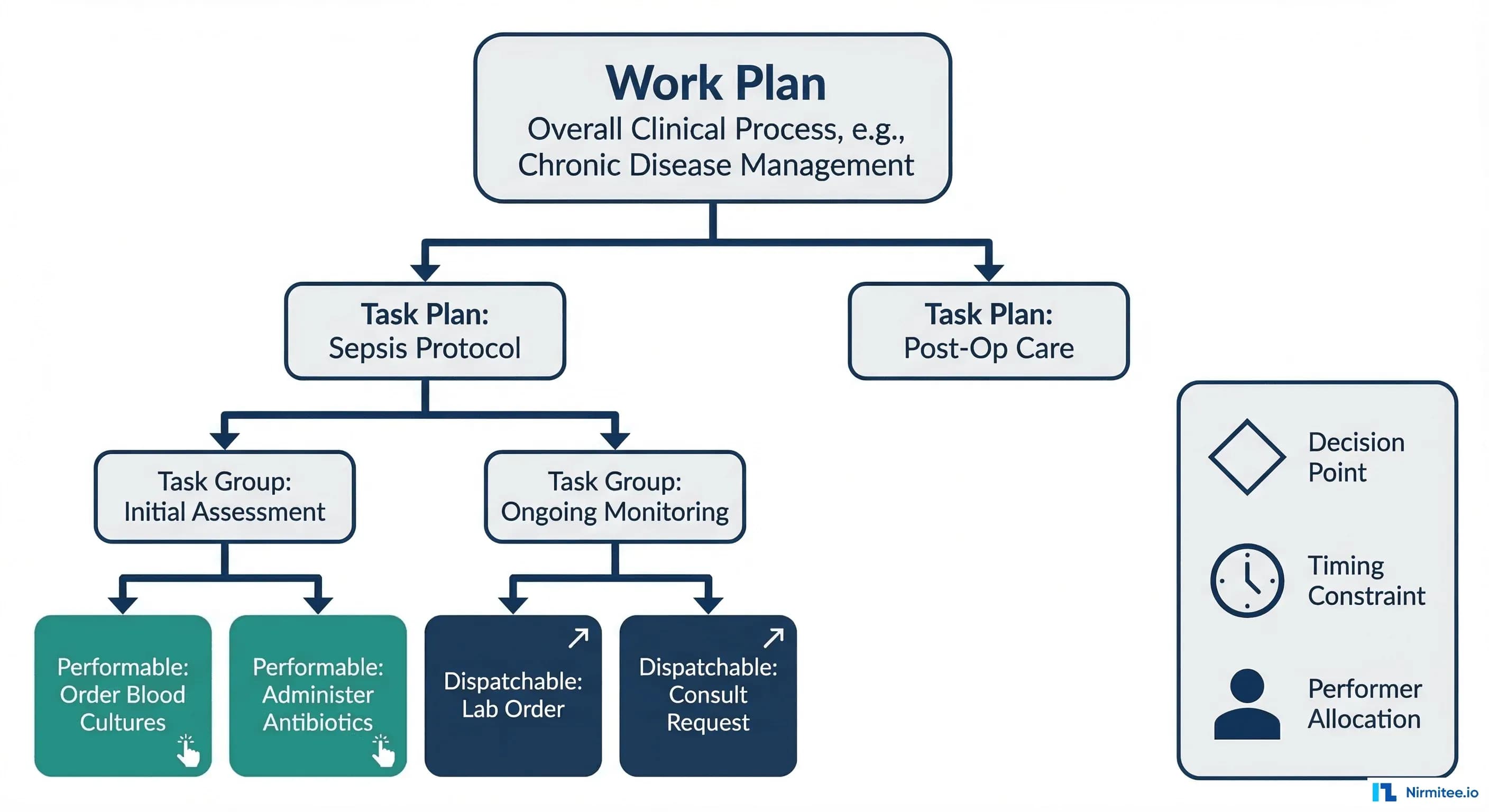
Task Planning organizes clinical workflows into a clear four-level hierarchy, each level adding specificity to how work is defined and executed.
Work Plan
The top-level container. A Work Plan represents the overall clinical objective for a patient — managing a sepsis episode, executing a post-surgical recovery protocol, or coordinating a chemotherapy cycle. It aggregates one or more Task Plans and defines the global context: which patient, which care episode, and what overarching goal. In the openEHR reference model, a Work Plan is instantiated when a clinical situation triggers the need for structured process execution.
Task Plan
Each Task Plan within a Work Plan represents a specific pathway assigned to a principal performer. For example, a sepsis Work Plan might contain separate Task Plans for nursing assessment, pharmacy medication management, and laboratory processing. A Task Plan defines the sequence and structure of work that one role (or one individual) is primarily responsible for executing. This mirrors how clinical work actually operates — multiple professionals, each with their own workflow, coordinating toward a shared patient outcome.
Task Group
Task Groups organize related tasks within a Task Plan. They provide structure — sequential, parallel, or conditional grouping. An "Initial Assessment" Task Group might contain tasks for vital signs recording, blood culture ordering, and initial antibiotic administration. Groups can be nested, enabling complex workflows without losing readability.
Tasks: Performable and Dispatchable
At the lowest level, individual Tasks come in two fundamental types:
- Performable Tasks — executed directly by the assigned performer. A nurse administering IV antibiotics, a physician conducting a bedside assessment, or a pharmacist reviewing medication interactions. These tasks are carried out within the current care context.
- Dispatchable Tasks — sent to an external system or service for execution. A laboratory order dispatched to the LIS, a radiology request sent to the RIS, or a consultation request forwarded to another department. The Task Planning engine tracks the dispatched request and waits for completion notification before advancing the workflow.
This distinction is critical. In openEHR's architecture, a Performable Task results in local data creation (a Composition in the CDR), while a Dispatchable Task creates an external request and monitors its fulfillment. No other clinical workflow specification makes this distinction at the model level.
Decision Points, Timing, and Performer Allocation
What separates Task Planning from a simple task list are three capabilities that generic workflow engines struggle to provide natively.
Decision Points
Task Planning supports condition-based and event-based decision points that reference clinical data directly. A decision point can evaluate an AQL query result — "Is serum lactate greater than 2 mmol/L?" — and branch the workflow accordingly. These conditions are defined using the openEHR Decision Language, which operates on archetype paths rather than arbitrary variable names. This means decision logic is semantically bound to the clinical data model, not loosely coupled through integration middleware.
Timing Constraints
Clinical workflows are governed by time in ways business processes rarely are. The Surviving Sepsis Campaign mandates broad-spectrum antibiotics within one hour of sepsis recognition. Stroke protocols require CT imaging within 25 minutes of arrival. Task Planning models these constraints as first-class objects — delays (wait 30 minutes before next assessment), deadlines (complete within 1 hour or escalate), and repetitions (reassess vitals every 15 minutes). When a deadline is missed, the TP engine can trigger escalation pathways automatically.
Performer Allocation
Tasks are assigned to clinical roles (nurse, physician, pharmacist, lab technician) rather than named individuals. The TP engine resolves role-based allocation at runtime based on availability, scope of practice, and organizational rules. This means a sepsis protocol defined once can execute correctly across different shifts, departments, and staffing configurations without modification.
TP-VML: A Visual Language for Clinical Processes
The Task Planning Visual Modelling Language (TP-VML) provides a standardized notation for authoring and communicating Task Plans visually. Unlike BPMN — which was designed for business analysts modeling procurement workflows — TP-VML was built specifically for clinical process modelling.
The core TP-VML symbols map directly to the Task Planning formal model:
- Rounded Rectangle — Performable Task (executed by a clinical performer)
- Hexagon — Dispatchable Task (sent to an external system)
- Diamond — Decision Point (condition-based branching)
- Circle — Event Trigger (clinical event initiates workflow)
- Solid Arrow — Sequence Flow (task ordering)
- Clock Icon — Timing Constraint (deadline, delay, or repetition)
Every TP-VML element has a direct mapping to the underlying formal specification, meaning a visual diagram can be compiled into an executable Task Plan without ambiguity. Draw.io library files are available from the openEHR TP-examples repository for immediate use.
Task Planning vs. BPMN: Why Clinical Workflows Need a Clinical Engine
The most common question from informatics teams evaluating Task Planning: "Why not just use BPMN?" The comparison is worth examining in detail, especially given the findings from a 2022 JMIR study that systematically compared both approaches for modeling infection clinical pathways.
| Capability | openEHR Task Planning | BPMN |
|---|---|---|
| Clinical Data Awareness | Native archetype references; conditions evaluate AQL queries against the CDR | Requires external data integration layer; no built-in clinical data model |
| Performer Roles | Clinical roles (nurse, physician, pharmacist) built into the model with scope-of-practice semantics | Generic swim lanes with no clinical role semantics |
| Decision Logic | Decision Language modules operating on clinical data paths (e.g., [blood_pressure/systolic] > 140) | XOR/OR gateways with external rule engine integration |
| Timing | First-class clinical timers: medication intervals, escalation deadlines, reassessment cycles | Generic timer events without clinical context |
| Data Capture | Linked to openEHR templates and forms; task completion generates structured Compositions | External form systems; no native clinical data capture |
| Audit Trail | Full clinical provenance: who performed what, when, with which data, versioned in the EHR | Process-level event logging without clinical versioning |
The JMIR study concluded that "shifting to the natively clinical-oriented openEHR Task Planning could constitute a major step toward clinical process improvement" over BPMN-based approaches. The critical difference is not just feature comparison — it is that Task Planning was designed from the ground up for the semantics of clinical care, while BPMN requires extensive extension and customization to handle the same scenarios.
Practical Example: Sepsis Screening Pathway
To make these concepts concrete, here is a sepsis screening pathway modeled using Task Planning constructs. This follows the clinical decision support principles aligned with the Surviving Sepsis Campaign guidelines.
Trigger
Patient admission with recorded temperature greater than 38.5 degrees Celsius triggers Work Plan instantiation.
Task Plan: Sepsis Initial Response
- Order Blood Cultures (Dispatchable Task, Performer: Nurse, t=0) — Two sets of blood cultures ordered before antibiotic administration. Dispatched to Laboratory Information System.
- Administer Broad-Spectrum Antibiotics (Performable Task, Performer: Pharmacist + Nurse, DEADLINE: t < 1 hour) — Pharmacist verifies drug selection, nurse administers. Deadline triggers escalation to charge nurse if not completed within 60 minutes.
- Measure Serum Lactate (Dispatchable Task, Performer: Lab, t < 30 minutes) — Point-of-care or lab-drawn lactate. Result feeds into decision point.
- IV Fluid Resuscitation (Performable Task, Performer: Nurse, t < 1 hour) — 30 mL/kg crystalloid for hypotension or lactate greater than or equal to 4 mmol/L.
- Decision Point: Lactate Result Evaluation — If lactate greater than 2 mmol/L: escalate to ICU consultation (new Task Plan instantiated). If lactate normal: continue standard monitoring.
- Physician Review (Performable Task, Performer: Physician, t = 3 hours) — Reassessment of clinical response, antibiotic adjustment, disposition decision.
Task Plan ADL/JSON Representation
Below is a simplified JSON representation of the sepsis screening Task Plan, following the openEHR TP reference model structure:
{
  "work_plan": {
    "name": "Sepsis Screening Protocol",
    "description": "Early sepsis detection and initial management",
    "care_pathway": "Surviving Sepsis Campaign 2021",
    "subject": { "_type": "PARTY_SELF" },
    "task_plans": [
      {
        "name": "Sepsis Initial Response",
        "principal_performer": {
          "role": ["nurse", "physician"],
          "mode": "any_available"
        },
        "definition": {
          "_type": "TASK_GROUP",
          "execution_type": "sequential",
          "members": [
            {
              "_type": "DISPATCHABLE_TASK",
              "name": "Order Blood Cultures",
              "description": "Two sets before antibiotics",
              "action": {
                "_type": "EXTERNAL_REQUEST",
                "target_system": "LIS",
                "archetype_id": "openEHR-EHR-INSTRUCTION.laboratory_order.v1"
              },
              "performer": { "role": "nurse" }
            },
            {
              "_type": "PERFORMABLE_TASK",
              "name": "Administer Broad-Spectrum Antibiotics",
              "action": {
                "_type": "DEFINED_ACTION",
                "archetype_id": "openEHR-EHR-ACTION.medication.v1",
                "form_id": "antibiotic_administration_form"
              },
              "performer": { "role": ["pharmacist", "nurse"] },
              "timing": {
                "deadline": "PT1H",
                "escalation_on_miss": {
                  "notify": "charge_nurse",
                  "action": "urgent_page"
                }
              }
            },
            {
              "_type": "DISPATCHABLE_TASK",
              "name": "Measure Serum Lactate",
              "action": {
                "_type": "EXTERNAL_REQUEST",
                "target_system": "LIS",
                "archetype_id": "openEHR-EHR-INSTRUCTION.laboratory_order.v1"
              },
              "performer": { "role": "lab_technician" },
              "timing": { "deadline": "PT30M" }
            },
            {
              "_type": "DECISION_BRANCH",
              "name": "Lactate Evaluation",
              "condition": {
                "expression": "$lactate_result > 2.0",
                "data_binding": {
                  "lactate_result": {
                    "aql": "SELECT o/data/events/data/items[at0001]/value/magnitude FROM EHR e CONTAINS OBSERVATION o[openEHR-EHR-OBSERVATION.laboratory_test_result.v1] WHERE o/data/events/data/items[at0005]/value/defining_code/code_string = '2524-7' ORDER BY o/data/events/time DESC LIMIT 1"
                  }
                }
              },
              "branches": {
                "true": {
                  "_type": "DISPATCHABLE_TASK",
                  "name": "Escalate to ICU",
                  "action": {
                    "_type": "HAND_OFF",
                    "target_team": "ICU"
                  }
                },
                "false": {
                  "_type": "PERFORMABLE_TASK",
                  "name": "Continue Standard Monitoring"
                }
              }
            },
            {
              "_type": "PERFORMABLE_TASK",
              "name": "Physician Review",
              "action": {
                "_type": "DEFINED_ACTION",
                "archetype_id": "openEHR-EHR-OBSERVATION.progress_note.v1"
              },
              "performer": { "role": "physician" },
              "timing": { "scheduled_at": "PT3H" }
            }
          ]
        }
      }
    ]
  }
}
Note how each task references openEHR archetypes directly — openEHR-EHR-INSTRUCTION.laboratory_order.v1 for lab orders, openEHR-EHR-ACTION.medication.v1 for medication administration. Decision conditions bind to AQL queries that execute against the Clinical Data Repository. This semantic binding is what makes Task Planning fundamentally different from generic workflow engines.
Real-World Validation: Portuguese Hospital Case Study
The most comprehensive production deployment of openEHR Task Planning to date is documented in a 2025 study published in Computer Methods and Programs in Biomedicine. A Portuguese hospital implemented Task Planning to automate its medical imaging exam workflow — covering the full lifecycle from exam request to radiologist assignment to result delivery.
Architecture
The implementation followed a three-layer architecture:
- openEHR Forms — clinical data capture for exam requests, patient preparation checklists, and reporting
- Task Planning Engine — workflow orchestration managing task assignment, state transitions, and deadline monitoring
- openEHR CDR — structured clinical data storage with full versioning and audit trail
Results
The study analyzed data from over 6,800 imaging exam requests processed through the automated workflow. Key findings included:
- Reduced patient waiting times — automated task assignment and status tracking eliminated manual scheduling delays. Average waiting days decreased significantly compared to the pre-implementation period (2019 baseline vs. 2022 post-implementation).
- Automated radiologist assignment — Task Planning managed performer allocation based on availability, specialization, and workload balancing.
- Complete audit trail — every task state transition, performer action, and timing metric was recorded as structured data in the CDR.
- Health professional adoption — the study documented willingness among clinical staff to adopt the automated tools, attributing this to the intuitive mapping between Task Planning concepts and actual clinical workflow patterns.
This case study demonstrates that Task Planning is not a theoretical specification — it executes in production, at scale, with measurable clinical workflow improvements.
Integration with FHIR: Bridging Standards
For organizations running openEHR and FHIR together, Task Planning integrates with FHIR's clinical reasoning resources through several patterns.
FHIR PlanDefinition as Protocol Template
A FHIR PlanDefinition defines a protocol template — the "what should happen" for a given clinical scenario. An openEHR Work Plan is the executable instance — the "what is happening right now for this patient." The bridge between them works as follows:
- A FHIR PlanDefinition (e.g., Surviving Sepsis Campaign protocol) is published as an interoperable, shareable guideline.
- When a patient meets trigger criteria, the PlanDefinition is instantiated as an openEHR Work Plan with concrete Task Plans, timing constraints, and performer allocations.
- Tasks execute within the openEHR ecosystem, with clinical data captured as Compositions in the CDR.
- Results are projected back to FHIR resources (Observation, DiagnosticReport, MedicationAdministration) for interoperability with FHIR-native systems.
CDS Hooks Integration
CDS Hooks provides a mechanism for triggering clinical decision support at specific points in the EHR workflow. Task Planning can consume CDS Hooks events as task triggers — for example, a patient-admit hook with a fever flag could instantiate a sepsis screening Work Plan. Conversely, Task Planning decision points can invoke CDS Hooks services for complex decision logic that lives in external clinical decision support systems.
Getting Started: Practical Next Steps
For clinical informatics teams and openEHR implementers ready to evaluate Task Planning:
- Read the specification — Start with the PROC Overview, then the Task Planning specification (Release 1.5.0), and review the worked examples.
- Model a pathway — Take one existing clinical pathway (sepsis, stroke, VTE prophylaxis) and model it using TP-VML. Download the Draw.io TP-VML libraries and build a visual representation.
- Evaluate your CDR — Check whether your openEHR CDR vendor supports Task Planning execution. EHRbase and Better Platform have varying levels of TP support.
- Map to existing FHIR workflows — If you already use FHIR PlanDefinition or CDS Hooks, identify where Task Planning can provide the execution layer that FHIR's planning resources describe but do not execute.
- Start small — Pick a single-department, single-pathway implementation. The imaging exam case study from Portugal started with one workflow and proved the model before expanding.
Building interoperable healthcare systems is complex. Our Healthcare Interoperability Solutions team has deep experience shipping production integrations. We also offer specialized healthcare product engineering services. Talk to our team to get started.
Frequently Asked Questions
Is Task Planning production-ready?
Yes. The specification is at Release 1.5.0, and the Portuguese hospital case study demonstrates production deployment processing over 6,800 exam requests with measurable workflow improvements.
Can Task Planning work alongside existing BPMN-based workflows?
Yes. Task Planning does not require replacing existing infrastructure. It can run alongside BPMN engines, handling clinical-specific workflows while BPMN manages administrative processes like billing or supply chain.
Does Task Planning require openEHR for data storage?
Task Planning is designed to work with openEHR CDRs for maximum benefit (archetype-based conditions, AQL queries, Composition-linked task completion). However, the task orchestration concepts can be implemented with other clinical data stores through adaptation layers.
How does Task Planning handle multi-disciplinary care coordination?
Through multiple Task Plans within a single Work Plan. Each discipline (nursing, medicine, pharmacy, lab) gets its own Task Plan with role-appropriate tasks, while the Work Plan coordinates dependencies and shared decision points across disciplines.
What tools support TP-VML diagram creation?
The openEHR community provides Draw.io library files for TP-VML symbols. These can be imported into Draw.io (now diagrams.net) for visual process modeling. The resulting diagrams map directly to the formal TP specification.
Task Planning represents the most clinically aware workflow specification available today. For teams building the next generation of clinical process automation — whether on openEHR platforms, in hybrid FHIR environments, or as part of broader EHR integration initiatives — understanding Task Planning is no longer optional. It is the clinical workflow engine that the industry needs to start talking about.
At Nirmitee, we build healthcare software that leverages open standards — including openEHR, FHIR, and HL7 — to deliver interoperable, clinically intelligent systems. If your organization is exploring clinical workflow automation or openEHR implementation, we would welcome the conversation.
Ready to scale?
Talk to our healthcare engineering team about building, integrating, and shipping faster.
Frequently Asked Questions
What is openEHR Task Planning?
How is the openEHR Task Planning hierarchy structured?
What is the difference between Performable and Dispatchable tasks in openEHR?
How does openEHR Task Planning handle clinical timing constraints?
What is TP-VML and how does it compare to BPMN for clinical workflows?
How does Nirmitee.io approach healthcare software development?