Why ABDM M2 Certification Breaks Most Development Teams

Software Development Expert
Writes about software development, scalable architecture, and practical problem-solving across modern digital products. Focuses on turning complex technical ideas into clear, real-world solutions.

Part of our complete guide to the four ABDM integration milestones.
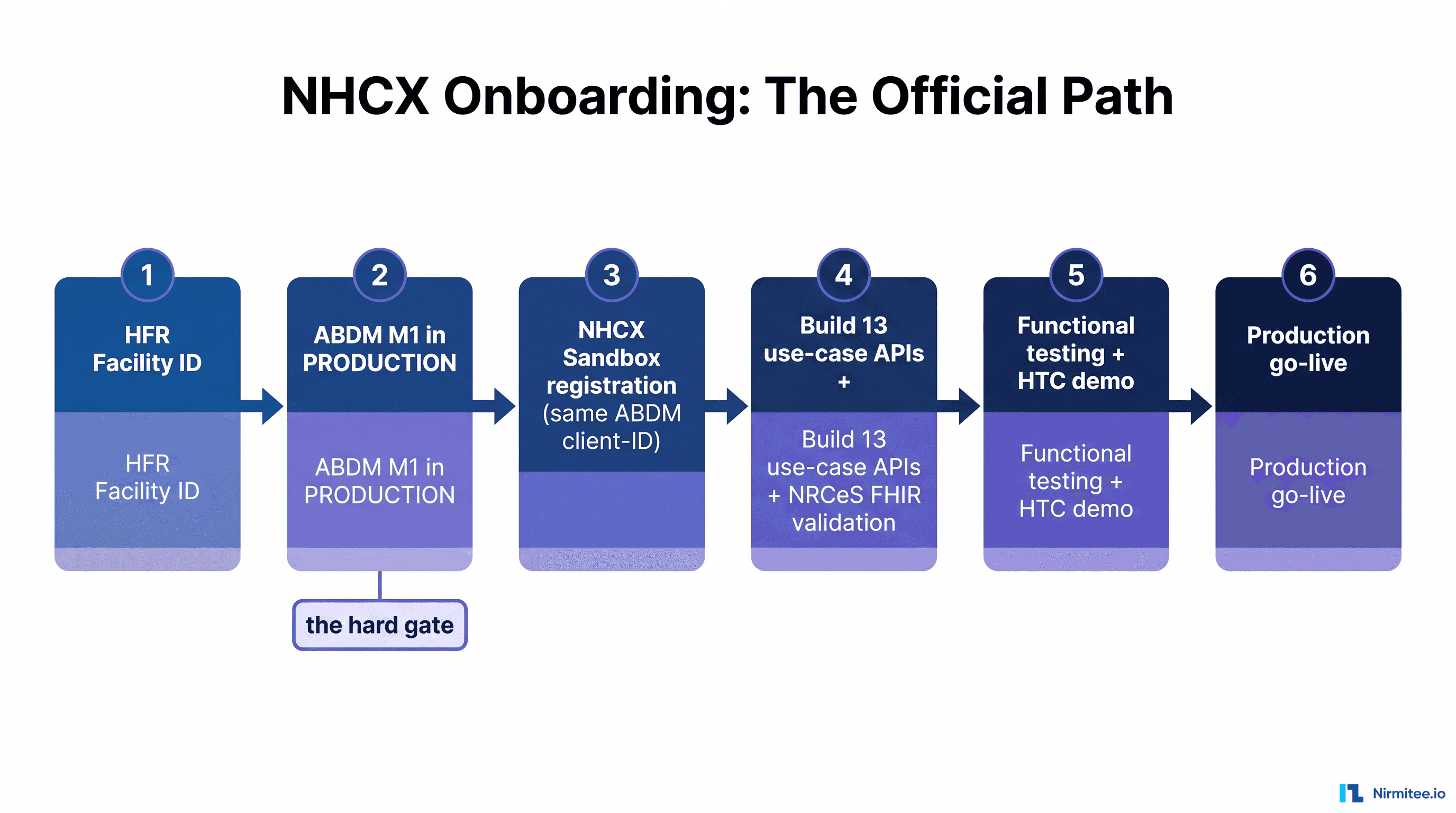
You finished M1. Your facility is registered on the Health Facility Registry, ABHA verification works, patient discovery returns results, and the sandbox lights are green. Your team celebrates, you are ABDM-certified.
Then you open the M2 specification.
M2, Health Information Provider, is where ABDM integration stops being a registration exercise and becomes a distributed systems problem. Where M1 took your team two to four weeks of mostly API calls and form submissions, M2 will demand that you build a FHIR-compliant health record pipeline, implement military-grade encryption from scratch, handle an asynchronous callback architecture that silently drops requests, and aggregate clinical data from systems that were never designed to talk to each other.
We have shipped M2 certification for hospital systems running on .NET Web Forms, modern Node.js stacks, and everything in between. We have watched teams stall for three, four, even six months on problems that have known solutions. This guide documents every wall you will hit, the exact technical fix for each one, and a complete certification checklist you can work through sequentially.
What M2 Actually Requires: A Technical Breakdown
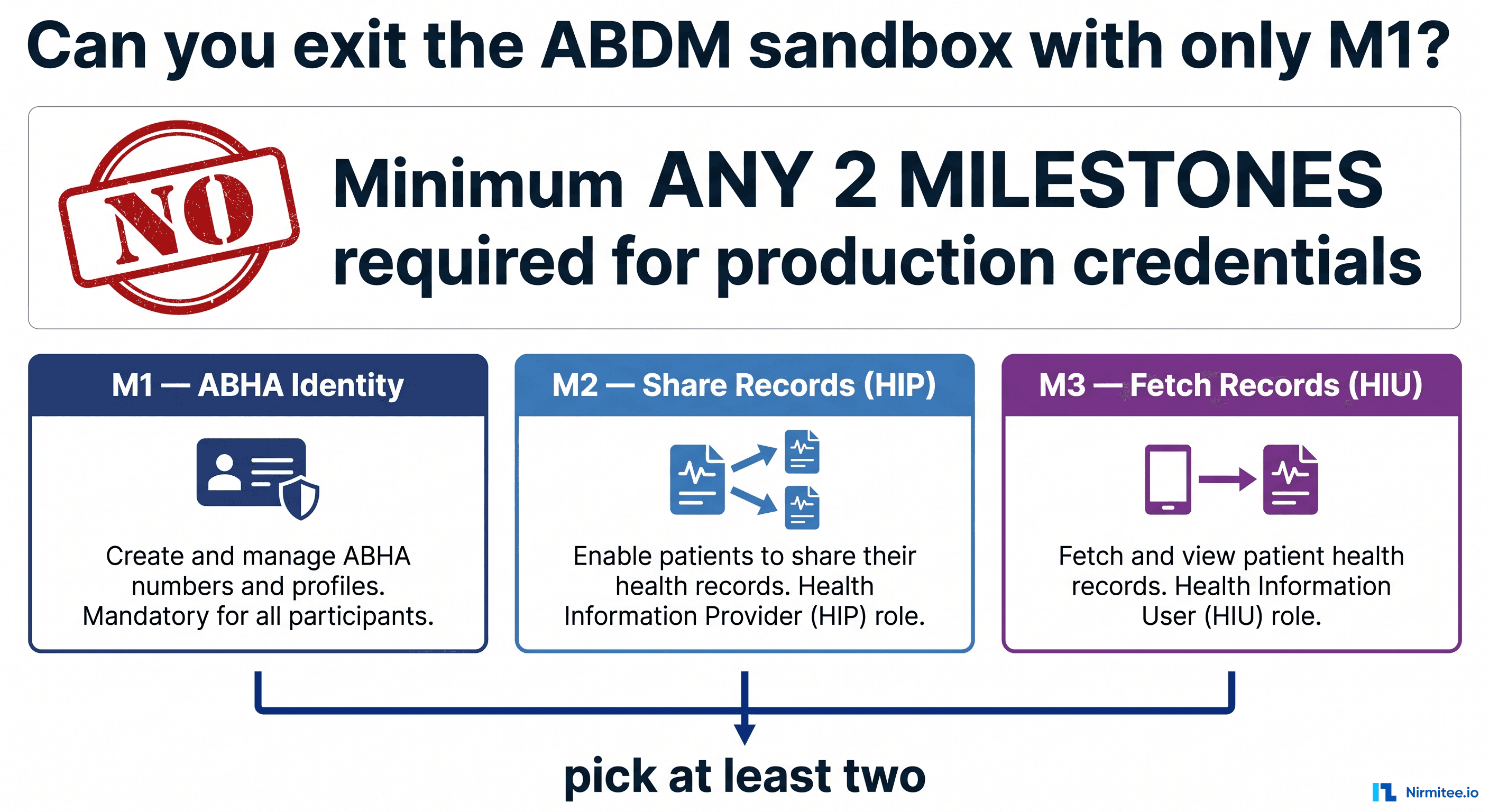
M2 certifies your system as a Health Information Provider (HIP): meaning your hospital or clinic can share patient health records digitally through the ABDM network. This is not a simple API integration. It is a six-part orchestration that spans your entire technology stack.
Here is the full scope of what M2 demands:
- Care Context Creation: Every clinical encounter (OPD visit, lab test, prescription, discharge) must be registered as a "care context" in your system with a unique reference ID that ABDM can later request.
- Patient Discovery Callbacks: When a patient or Consent Manager searches for records at your facility, ABDM sends a discovery request to your server. You must respond asynchronously via
/v3/patient/care-context/on-discoverwith matching care contexts. In V3, this is fully async: you return HTTP 202 immediately, then POST your response to the gateway. - User-Initiated and HIP-Initiated Linking: Care contexts must be linkable in both directions. The patient can initiate linking through the ABHA app (user-initiated), or your system can push links using a link token (HIP-initiated via
/hip/v3/link/carecontext). - Health Information Request Handling: When a consent-approved request arrives at
/v3/hip/health-information/request, your system must fetch the relevant clinical records, convert them into FHIR R4 bundles compliant with NRCES Implementation Guide profiles, encrypt them using the Fidelius protocol, and push them to the provideddataPushUrl. - Fidelius Encryption: Every health record must be encrypted using Elliptic Curve Diffie-Hellman (ECDH) key agreement on Curve25519 (BouncyCastle Weierstrass form) with AES-256-GCM symmetric encryption. This is not optional. Unencrypted data pushes are rejected.
- Transfer Notification: After pushing encrypted data, you must notify ABDM of completion via
/data-flow/v3/health-information/notifywith the session status set toTRANSFERRED.
Each of these six components has its own failure modes, its own undocumented behaviors, and its own set of sandbox quirks. The ABDM developer forum at devforum.abdm.gov.in is filled with threads from teams stuck at various points in this pipeline, and the pattern is remarkably consistent. Teams hit the same five walls.
The 5 Technical Walls That Stop M2 in Its Tracks
Wall 1: FHIR Bundle Creation from Relational Databases
This is the wall that breaks the most teams, and it is the one least discussed in ABDM documentation.
ABDM requires health records as FHIR R4 bundles conforming to the NRCES Implementation Guide (currently v6.5.0, with v7.0.0 in draft). Every bundle must be a document-type Bundle with a Composition resource as the first entry, followed by referenced clinical resources, Patient, Practitioner, Organization, Encounter, Condition, MedicationRequest, DiagnosticReport, and so on.
The problem: no hospital system in India stores data in FHIR format. Your HIS stores an OPD visit as rows in opd_visits, prescriptions, vitals, and diagnoses tables. Your LIMS stores lab results in test_results with numeric values and text comments. Your pharmacy system stores dispensed medications in its own schema. None of these map cleanly to FHIR resources.
The mapping challenges are specific and painful:
- SNOMED CT coding: FHIR Condition resources need SNOMED CT codes. Your database stores "Type 2 Diabetes" as a free-text string or an ICD-10 code. You need a mapping layer that converts your internal codes to SNOMED, and there is no complete, freely available mapping table for Indian clinical terminology.
- Reference integrity: Every resource in a FHIR bundle references other resources using
urn:uuid:URIs. A MedicationRequest must reference the Patient, Practitioner, Encounter, and the Condition it treats. Miss one reference and the bundle fails validation. - Profile compliance: Each resource must declare its NRCES profile in
meta.profile. The Composition must use the correct profile for the record type (OPConsultRecord, PrescriptionRecord, DiagnosticReportRecord, etc.), and each section must use the correct SNOMED codes for itssection.code. - Sandbox bundle examples have errors: This is confirmed on the ABDM developer forum. The sample bundles provided by NHA contain structural issues. Do not use them as your ground truth. Use the NRCES IG examples directly.
The required bundle types for M2 certification are:
- OPConsultRecord: outpatient consultation with chief complaint, allergies, history, investigations, medications, procedures, follow-up
- DiagnosticReportRecord: lab and imaging results with specimen, observations, and report narrative
- PrescriptionRecord: medication orders with dosage instructions, route, frequency
- DischargeSummaryRecord: inpatient discharge with admission details, procedures performed, discharge medications, follow-up plan
- HealthDocumentRecord: catch-all for scanned documents, PDFs, and any record that does not fit the above types
For a deeper look at FHIR bundle compliance issues we have encountered in production, see our guide on ABDM FHIR bundle N/A fields and NRCES compliance fixes.
Wall 2: Fidelius Encryption
Fidelius is ABDM's encryption protocol for the in-transit protection of health data. It uses Elliptic Curve Diffie-Hellman key agreement to establish a shared secret between the HIP (your system) and the requesting entity, then encrypts the FHIR bundle payload using AES-256-GCM.
On paper, this sounds like standard crypto. In practice, three things make it brutal:
The curve is not standard X25519. ABDM's Fidelius uses BouncyCastle's Curve25519 implementation, which operates on the Short Weierstrass form of the curve, not the Montgomery form used by libsodium, Web Crypto API, or Node.js's built-in X25519. The curve parameters are:
p: 7fffffffffffffffffffffffffffffffffffffffffffffffffffffffffffffed
a: 2AAAAAAAAAAAAAAAAAAAAAAAAAAAAAAAAAAAAAAAAAAAAAAAAAAAAA984914A144
b: 7B425ED097B425ED097B425ED097B425ED097B425ED097B4260B5E9C7710C864
n: 1000000000000000000000000000000014def9dea2f79cd65812631a5cf5d3ed
If you use the wrong curve form, your key agreement will produce a different shared secret. The encryption will succeed on your end but decryption will fail on the receiver's end, with zero error message explaining why.
The key encoding is X.509 DER. Public keys exchanged with ABDM must be in X.509 SubjectPublicKeyInfo DER format (base64-encoded), which includes a fixed ASN.1 prefix encoding the curve parameters followed by the 64-byte uncompressed public key coordinates. Raw public keys will be silently rejected.
The nonce XOR trick. The sender's nonce and requester's nonce are XORed together. The first 20 bytes of the XOR result become the HKDF salt, and the last 12 bytes become the AES-GCM initialization vector. Get the byte slicing wrong, even by one byte, and decryption fails with an authentication tag mismatch.
We wrote a comprehensive implementation walkthrough in our Fidelius encryption Node.js implementation guide.
Wall 3: Async Callback Architecture
ABDM V3 moved to a fully asynchronous callback architecture. When the Consent Manager sends a patient discovery request to your HIP, you do not return the results in the HTTP response. Instead:
- You receive the request at your registered callback URL (e.g.,
POST /v3/hip/patient/care-context/discover) - You return HTTP
202 Acceptedimmediately - You process the request, find matching records, and POST your response to
/user-initiated-linking/v3/patient/care-context/on-discoveron the ABDM gateway - You must include the original
requestIdfrom the incoming request headers in your response payload for correlation
This pattern repeats for every M2 interaction: link init/confirm, consent notification, health information request. Every single one is request-in, 202-out, callback-back.
The failure modes are legion:
- Bridge URL not receiving callbacks: You registered your URL via
PATCH /gateway/v3/bridge/url, got a 202 back, but callbacks never arrive. Bridge URL propagation takes 5 to 15 minutes after a successful PATCH. Most teams assume it is instant and spend hours debugging their server when the real problem is propagation delay. - Callbacks arriving at the wrong path: ABDM sends callbacks to specific sub-paths under your bridge URL. If your bridge URL is
https://abc.ngrok.io, discovery requests arrive at/v3/hip/patient/care-context/discover. Miss the exact path and you get 404s that ABDM silently swallows. - requestId correlation failures: The
requestIdarrives in the HTTP headers (asREQUEST-IDorrequest-id, case varies). If your callback response does not echo it back inresponse.requestId, ABDM cannot correlate your response and the request times out. - Tunnel instability: For sandbox testing, your local server needs a public URL. ngrok works; Cloudflare Tunnels are unreliable for this use case (we have tested both extensively). Every tunnel restart changes your URL, requiring another bridge URL PATCH and another 5-15 minute wait.
For a complete debugging guide on callback issues, see ABDM callback debugging: bridge URL not receiving requests.
Wall 4: Care Context Linking
Care context linking is conceptually simple, associate a clinical encounter with a patient's ABHA address, but the implementation has bi-directional complexity that catches teams off guard.
User-initiated linking (CM-initiated): The patient uses their ABHA app to discover records at your facility. ABDM sends a discovery request, you respond with available care contexts, the patient selects which ones to link, ABDM sends a link-init with an OTP challenge, and you confirm with link-confirm. This is a four-step async flow with three separate callback/response pairs.
HIP-initiated linking: Your system proactively links a care context after a visit. This requires:
- Calling
/v3/token/generate-tokenwith the patient's ABHA number, name, gender, and year of birth (the X-HIP-ID header must be set) - Receiving the link token via callback
- Calling
/hip/v3/link/carecontextwith the link token and care context details in theX-LINK-TOKENheader
The tricky part: the link token has a short expiry, the patient details must exactly match what ABDM has on file (including the gender format, M/F, not Male/Female), and the ABHA number must be passed as a numeric value (not a formatted string with hyphens) in the V3 API.
Wall 5: Multi-System Data Aggregation
This wall is not a technical API problem. It is an integration architecture problem that no amount of ABDM documentation will help you solve.
A real hospital runs four to eight separate systems:
- HIS (Hospital Information System): patient demographics, encounter records, admission/discharge
- LIMS (Laboratory Information Management System): test orders, results, reference ranges
- RIS/PACS (Radiology): imaging orders, reports, DICOM references
- Pharmacy: dispensed medications, stock management
- Billing: charges, insurance claims, payment records
- EMR modules: clinical notes, vitals, assessments (often separate from HIS)
When a health information request arrives for a care context, you need to:
- Determine which systems have data for that encounter
- Query each system (often with different connection methods, direct DB, HL7 v2 messages, REST APIs, or flat file exports)
- Map each system's data schema to FHIR resources
- Assemble everything into a single compliant bundle with correct cross-references
- Handle the case where one system is down or slow (your 202 response already went out, you have a limited window to push data before ABDM times out)
Most teams underestimate this wall because they start M2 development against a single database. The moment they try to aggregate from production systems, especially legacy systems running on SQL Server 2008 or Oracle 11g with stored procedures, the integration timeline doubles.
FHIR Bundle Creation: Step-by-Step with Code
Let us build an OPConsultRecord bundle from scratch. This is the most common bundle type for M2 certification and covers an outpatient consultation with chief complaint, medical history, medications, and follow-up.
Every ABDM FHIR bundle follows this structure:
- Bundle wrapper:
type: "document", withmeta.profileset to the NRCES DocumentBundle profile, a uniqueidentifier, and atimestamp - Composition (first entry): the "table of contents" that references all other resources via sections
- Supporting resources: Patient, Practitioner, Organization, Encounter, then clinical resources (Condition, MedicationRequest, etc.)
Here is a minimal but valid OPConsultRecord bundle. Every resource includes its required NRCES profile, every reference uses urn:uuid: format, and the Composition includes the mandatory sections per the OPConsultRecord profile:
{
  "resourceType": "Bundle",
  "id": "op-consult-example-01",
  "meta": {
    "versionId": "1",
    "lastUpdated": "2026-04-02T10:30:00.000Z",
    "profile": [
      "https://nrces.in/ndhm/fhir/r4/StructureDefinition/DocumentBundle"
    ],
    "security": [{
      "system": "http://terminology.hl7.org/CodeSystem/v3-Confidentiality",
      "code": "V",
      "display": "very restricted"
    }]
  },
  "identifier": {
    "system": "http://hip.in",
    "value": "op-consult-example-01"
  },
  "type": "document",
  "timestamp": "2026-04-02T10:30:00.000Z",
  "entry": [
    {
      "fullUrl": "urn:uuid:comp-001",
      "resource": {
        "resourceType": "Composition",
        "id": "comp-001",
        "meta": {
          "versionId": "1",
          "lastUpdated": "2026-04-02T10:30:00.000Z",
          "profile": [
            "https://nrces.in/ndhm/fhir/r4/StructureDefinition/OPConsultRecord"
          ]
        },
        "identifier": {
          "system": "https://ndhm.in/phr",
          "value": "comp-001"
        },
        "status": "final",
        "type": {
          "coding": [{
            "system": "http://snomed.info/sct",
            "code": "371530004",
            "display": "Clinical consultation report"
          }],
          "text": "Clinical consultation report"
        },
        "subject": {
          "reference": "urn:uuid:pat-001",
          "display": "Rajesh Kumar"
        },
        "encounter": {
          "reference": "urn:uuid:enc-001",
          "display": "OPD Visit"
        },
        "date": "2026-04-02T10:30:00.000Z",
        "author": [{
          "reference": "urn:uuid:prac-001",
          "display": "Dr. Priya Sharma"
        }],
        "title": "OP Consultation",
        "custodian": {
          "reference": "urn:uuid:org-001",
          "display": "City General Hospital"
        },
        "section": [
          {
            "title": "Chief Complaints",
            "code": {
              "coding": [{
                "system": "http://snomed.info/sct",
                "code": "422843007",
                "display": "Chief complaint section"
              }]
            },
            "entry": [{
              "reference": "urn:uuid:cond-chief-001",
              "display": "Persistent fever with body ache"
            }]
          },
          {
            "title": "Allergies",
            "code": {
              "coding": [{
                "system": "http://snomed.info/sct",
                "code": "722446000",
                "display": "Allergy record"
              }]
            },
            "entry": [{
              "reference": "urn:uuid:allergy-001",
              "display": "Penicillin allergy"
            }]
          },
          {
            "title": "Medical History",
            "code": {
              "coding": [{
                "system": "http://snomed.info/sct",
                "code": "371529009",
                "display": "History and physical report"
              }]
            },
            "entry": [{
              "reference": "urn:uuid:cond-history-001",
              "display": "Type 2 Diabetes Mellitus"
            }]
          },
          {
            "title": "Medications",
            "code": {
              "coding": [{
                "system": "http://snomed.info/sct",
                "code": "721912009",
                "display": "Medication summary document"
              }]
            },
            "entry": [
              {
                "reference": "urn:uuid:medreq-001",
                "display": "Azithromycin 500mg"
              },
              {
                "reference": "urn:uuid:medreq-002",
                "display": "Paracetamol 650mg"
              }
            ]
          },
          {
            "title": "Follow Up",
            "code": {
              "coding": [{
                "system": "http://snomed.info/sct",
                "code": "736271009",
                "display": "Follow up encounter"
              }]
            },
            "entry": [{
              "reference": "urn:uuid:appt-001",
              "display": "Follow-up in 7 days"
            }]
          }
        ]
      }
    },
    {
      "fullUrl": "urn:uuid:prac-001",
      "resource": {
        "resourceType": "Practitioner",
        "id": "prac-001",
        "meta": {
          "profile": [
            "https://nrces.in/ndhm/fhir/r4/StructureDefinition/Practitioner"
          ]
        },
        "identifier": [{
          "type": {
            "coding": [{
              "system": "http://terminology.hl7.org/CodeSystem/v2-0203",
              "code": "MD",
              "display": "Medical License number"
            }]
          },
          "system": "https://doctor.ndhm.gov.in",
          "value": "DOC-12345"
        }],
        "name": [{ "text": "Dr. Priya Sharma" }]
      }
    },
    {
      "fullUrl": "urn:uuid:org-001",
      "resource": {
        "resourceType": "Organization",
        "id": "org-001",
        "meta": {
          "profile": [
            "https://nrces.in/ndhm/fhir/r4/StructureDefinition/Organization"
          ]
        },
        "identifier": [{
          "type": {
            "coding": [{
              "system": "http://terminology.hl7.org/CodeSystem/v2-0203",
              "code": "PRN",
              "display": "Provider number"
            }]
          },
          "system": "https://facility.ndhm.gov.in",
          "value": "IN2710004770"
        }],
        "name": "City General Hospital"
      }
    },
    {
      "fullUrl": "urn:uuid:pat-001",
      "resource": {
        "resourceType": "Patient",
        "id": "pat-001",
        "meta": {
          "profile": [
            "https://nrces.in/ndhm/fhir/r4/StructureDefinition/Patient"
          ]
        },
        "identifier": [{
          "type": {
            "coding": [{
              "system": "http://terminology.hl7.org/CodeSystem/v2-0203",
              "code": "MR",
              "display": "Medical record number"
            }]
          },
          "system": "https://healthid.ndhm.gov.in",
          "value": "91-7345-1816-0779"
        }],
        "name": [{ "text": "Rajesh Kumar" }],
        "gender": "male",
        "birthDate": "1985-06-15"
      }
    },
    {
      "fullUrl": "urn:uuid:enc-001",
      "resource": {
        "resourceType": "Encounter",
        "id": "enc-001",
        "meta": {
          "profile": [
            "https://nrces.in/ndhm/fhir/r4/StructureDefinition/Encounter"
          ]
        },
        "identifier": [{
          "system": "https://ndhm.in",
          "value": "enc-001"
        }],
        "status": "finished",
        "class": {
          "system": "http://terminology.hl7.org/CodeSystem/v3-ActCode",
          "code": "AMB",
          "display": "ambulatory"
        },
        "subject": {
          "reference": "urn:uuid:pat-001",
          "display": "Rajesh Kumar"
        },
        "period": {
          "start": "2026-04-02T09:00:00.000Z",
          "end": "2026-04-02T09:30:00.000Z"
        }
      }
    },
    {
      "fullUrl": "urn:uuid:cond-chief-001",
      "resource": {
        "resourceType": "Condition",
        "id": "cond-chief-001",
        "meta": {
          "profile": [
            "https://nrces.in/ndhm/fhir/r4/StructureDefinition/Condition"
          ]
        },
        "clinicalStatus": {
          "coding": [{
            "system": "http://terminology.hl7.org/CodeSystem/condition-clinical",
            "code": "active",
            "display": "Active"
          }]
        },
        "code": {
          "coding": [{
            "system": "http://snomed.info/sct",
            "code": "386661006",
            "display": "Fever"
          }],
          "text": "Persistent fever with body ache for 3 days"
        },
        "subject": {
          "reference": "urn:uuid:pat-001",
          "display": "Rajesh Kumar"
        }
      }
    },
    {
      "fullUrl": "urn:uuid:allergy-001",
      "resource": {
        "resourceType": "AllergyIntolerance",
        "id": "allergy-001",
        "meta": {
          "profile": [
            "https://nrces.in/ndhm/fhir/r4/StructureDefinition/AllergyIntolerance"
          ]
        },
        "clinicalStatus": {
          "coding": [{
            "system": "http://terminology.hl7.org/CodeSystem/allergyintolerance-clinical",
            "code": "active",
            "display": "Active"
          }]
        },
        "verificationStatus": {
          "coding": [{
            "system": "http://terminology.hl7.org/CodeSystem/allergyintolerance-verification",
            "code": "confirmed",
            "display": "Confirmed"
          }]
        },
        "code": {
          "coding": [{
            "system": "http://snomed.info/sct",
            "code": "91936005",
            "display": "Allergy to penicillin"
          }],
          "text": "Penicillin allergy"
        },
        "patient": {
          "reference": "urn:uuid:pat-001",
          "display": "Rajesh Kumar"
        },
        "recordedDate": "2026-04-02T10:30:00.000Z",
        "recorder": {
          "reference": "urn:uuid:prac-001",
          "display": "Dr. Priya Sharma"
        }
      }
    },
    {
      "fullUrl": "urn:uuid:cond-history-001",
      "resource": {
        "resourceType": "Condition",
        "id": "cond-history-001",
        "meta": {
          "profile": [
            "https://nrces.in/ndhm/fhir/r4/StructureDefinition/Condition"
          ]
        },
        "clinicalStatus": {
          "coding": [{
            "system": "http://terminology.hl7.org/CodeSystem/condition-clinical",
            "code": "active",
            "display": "Active"
          }]
        },
        "code": {
          "coding": [{
            "system": "http://snomed.info/sct",
            "code": "44054006",
            "display": "Type 2 diabetes mellitus"
          }],
          "text": "Type 2 Diabetes Mellitus — diagnosed 2019, on Metformin 500mg BD"
        },
        "subject": {
          "reference": "urn:uuid:pat-001",
          "display": "Rajesh Kumar"
        }
      }
    },
    {
      "fullUrl": "urn:uuid:medreq-001",
      "resource": {
        "resourceType": "MedicationRequest",
        "id": "medreq-001",
        "meta": {
          "profile": [
            "https://nrces.in/ndhm/fhir/r4/StructureDefinition/MedicationRequest"
          ]
        },
        "status": "active",
        "intent": "order",
        "medicationCodeableConcept": {
          "coding": [{
            "system": "http://snomed.info/sct",
            "code": "96034006",
            "display": "Azithromycin"
          }],
          "text": "Azithromycin 500mg"
        },
        "subject": {
          "reference": "urn:uuid:pat-001",
          "display": "Rajesh Kumar"
        },
        "encounter": {
          "reference": "urn:uuid:enc-001",
          "display": "OPD Visit"
        },
        "authoredOn": "2026-04-02T10:30:00.000Z",
        "requester": {
          "reference": "urn:uuid:prac-001",
          "display": "Dr. Priya Sharma"
        },
        "reasonReference": [{
          "reference": "urn:uuid:cond-chief-001",
          "display": "Fever"
        }],
        "dosageInstruction": [{
          "text": "One tablet once daily for 5 days",
          "route": {
            "coding": [{
              "system": "http://snomed.info/sct",
              "code": "26643006",
              "display": "Oral route"
            }],
            "text": "Oral"
          }
        }]
      }
    },
    {
      "fullUrl": "urn:uuid:medreq-002",
      "resource": {
        "resourceType": "MedicationRequest",
        "id": "medreq-002",
        "meta": {
          "profile": [
            "https://nrces.in/ndhm/fhir/r4/StructureDefinition/MedicationRequest"
          ]
        },
        "status": "active",
        "intent": "order",
        "medicationCodeableConcept": {
          "coding": [{
            "system": "http://snomed.info/sct",
            "code": "387517004",
            "display": "Paracetamol"
          }],
          "text": "Paracetamol 650mg"
        },
        "subject": {
          "reference": "urn:uuid:pat-001",
          "display": "Rajesh Kumar"
        },
        "encounter": {
          "reference": "urn:uuid:enc-001",
          "display": "OPD Visit"
        },
        "authoredOn": "2026-04-02T10:30:00.000Z",
        "requester": {
          "reference": "urn:uuid:prac-001",
          "display": "Dr. Priya Sharma"
        },
        "dosageInstruction": [{
          "text": "One tablet every 6 hours as needed for fever",
          "route": {
            "coding": [{
              "system": "http://snomed.info/sct",
              "code": "26643006",
              "display": "Oral route"
            }],
            "text": "Oral"
          }
        }]
      }
    },
    {
      "fullUrl": "urn:uuid:appt-001",
      "resource": {
        "resourceType": "Appointment",
        "id": "appt-001",
        "meta": {
          "profile": [
            "https://nrces.in/ndhm/fhir/r4/StructureDefinition/Appointment"
          ]
        },
        "status": "booked",
        "serviceType": [{
          "coding": [{
            "system": "http://snomed.info/sct",
            "code": "11429006",
            "display": "Consultation"
          }]
        }],
        "appointmentType": {
          "coding": [{
            "system": "http://terminology.hl7.org/CodeSystem/v2-0276",
            "code": "FOLLOWUP",
            "display": "A follow up visit"
          }]
        },
        "reasonReference": [{
          "reference": "urn:uuid:cond-chief-001",
          "display": "Follow up for fever"
        }],
        "description": "Follow-up consultation — reassess fever, review blood work",
        "start": "2026-04-09T10:00:00.000Z",
        "end": "2026-04-09T10:30:00.000Z",
        "participant": [
          {
            "actor": {
              "reference": "urn:uuid:prac-001",
              "display": "Dr. Priya Sharma"
            },
            "status": "accepted"
          },
          {
            "actor": {
              "reference": "urn:uuid:pat-001",
              "display": "Rajesh Kumar"
            },
            "status": "accepted"
          }
        ]
      }
    }
  ]
}
Key implementation notes:
- The
Bundle.meta.profilemust be the NRCESDocumentBundleprofile, not a generic FHIR Bundle profile - The
Compositionmust always be the first entry. ABDM validators check entry order. - Every
referencemust use theurn:uuid:prefix. Relative references likePatient/pat-001will fail validation. - The
meta.securitywith confidentiality codeV(very restricted) is required by ABDM for health records - Include a
displayfield on every reference, it is technically optional in FHIR but ABDM validators and the PHR app use it for rendering - The OPConsultRecord Composition profile requires at minimum a Chief Complaints section. Other sections are recommended but not strictly required for sandbox validation.
Fidelius Encryption Demystified
Here is the complete encryption flow, written in TypeScript. This is a simplified version of the implementation in our ABDM SDK (296 tests, 83.5% coverage).
Step 1: Generate your keypair and nonce
import crypto from 'crypto';
import elliptic from 'elliptic';
import BN from 'bn.js';

// BouncyCastle Curve25519 — Weierstrass form (NOT Montgomery X25519)
const bc25519 = new elliptic.curve.short({
  p: '7fffffffffffffffffffffffffffffffffffffffffffffffffffffffffffffed',
  a: '2AAAAAAAAAAAAAAAAAAAAAAAAAAAAAAAAAAAAAAAAAAAAAAAAAAAAA984914A144',
  b: '7B425ED097B425ED097B425ED097B425ED097B4260B5E9C7710C864',
  n: '1000000000000000000000000000000014def9dea2f79cd65812631a5cf5d3ed',
  g: [
    '2aaaaaaaaaaaaaaaaaaaaaaaaaaaaaaaaaaaaaaaaaaaaaaaaaaaaaaaaaad245a',
    '20ae19a1b8a086b4e01edd2c7748d14c923d4d7e6d7c61b229e9c5a27eced3d9',
  ],
  h: '08',
});

const G = bc25519.g;
const N = bc25519.n;

function generateKeyMaterial() {
  let privBN;
  do {
    privBN = new BN(crypto.randomBytes(32));
  } while (privBN.isZero() || privBN.gte(N));

  const pubPoint = G.mul(privBN);
  const xBuf = pubPoint.getX().toArrayLike(Buffer, 'be', 32);
  const yBuf = pubPoint.getY().toArrayLike(Buffer, 'be', 32);
  const privBuf = privBN.toArrayLike(Buffer, 'be', 32);

  // Uncompressed public key: 0x04 + x + y
  const publicKey = Buffer.concat([Buffer.from([0x04]), xBuf, yBuf]);

  // X.509 DER encoding: fixed ASN.1 prefix + x + y
  const x509Prefix = Buffer.from(X509_PREFIX_BASE64, 'base64');
  const x509PublicKey = Buffer.concat([x509Prefix, xBuf, yBuf]);

  const nonce = crypto.randomBytes(32);

  return {
    privateKey: privBuf.toString('base64'),
    publicKey: publicKey.toString('base64'),
    x509PublicKey: x509PublicKey.toString('base64'),
    nonce: nonce.toString('base64'),
  };
}
Step 2: Perform ECDH key agreement and derive the AES key
function computeSharedSecret(privateKeyB64, publicKeyB64) {
  const privBN = new BN(Buffer.from(privateKeyB64, 'base64'));
  const pubBuf = Buffer.from(publicKeyB64, 'base64');

  // Decode public key — handle both raw (65-byte) and X.509 DER formats
  let x, y;
  if (pubBuf.length === 65) {
    x = pubBuf.subarray(1, 33);
    y = pubBuf.subarray(33, 65);
  } else {
    // X.509: last 64 bytes are x + y
    x = pubBuf.subarray(pubBuf.length - 64, pubBuf.length - 32);
    y = pubBuf.subarray(pubBuf.length - 32);
  }

  const pubPoint = bc25519.point(new BN(x), new BN(y));
  const sharedPoint = pubPoint.mul(privBN);
  return sharedPoint.getX().toArrayLike(Buffer, 'be', 32);
}
Step 3: XOR nonces to derive salt and IV, then encrypt with AES-256-GCM
function encrypt({ senderNonce, requesterNonce, senderPrivateKey,
                    requesterPublicKey, plaintext }) {
  const sNonce = Buffer.from(senderNonce, 'base64');
  const rNonce = Buffer.from(requesterNonce, 'base64');

  // XOR the two 32-byte nonces
  const xorNonces = Buffer.alloc(32);
  for (let i = 0; i < 32; i++) {
    xorNonces[i] = sNonce[i] ^ rNonce[i];
  }

  // First 20 bytes = HKDF salt, last 12 bytes = AES-GCM IV
  const salt = xorNonces.subarray(0, 20);
  const iv = xorNonces.subarray(20, 32);

  // ECDH shared secret
  const sharedSecret = computeSharedSecret(senderPrivateKey, requesterPublicKey);

  // HKDF-SHA256: derive 32-byte AES key
  const aesKey = Buffer.from(
    crypto.hkdfSync('sha256', sharedSecret, salt, Buffer.alloc(0), 32)
  );

  // AES-256-GCM encrypt
  const cipher = crypto.createCipheriv('aes-256-gcm', aesKey, iv);
  const encrypted = Buffer.concat([
    cipher.update(plaintext, 'utf-8'),
    cipher.final(),
  ]);
  const authTag = cipher.getAuthTag(); // 16 bytes

  // Concatenate ciphertext + auth tag, then base64 encode
  return Buffer.concat([encrypted, authTag]).toString('base64');
}
Step 4: Format for the ABDM data push
function formatForDataPush(encryptedContent, hipKeyMaterial, careContextRef) {
  return {
    pageNumber: 0,
    pageCount: 1,
    transactionId: transactionId,
    entries: [{
      content: encryptedContent,
      media: 'application/fhir+json',
      checksum: crypto.createHash('md5').update(encryptedContent).digest('hex'),
      careContextReference: careContextRef,
    }],
    keyMaterial: {
      cryptoAlg: 'ECDH',
      curve: 'Curve25519',
      dhPublicKey: {
        expiry: new Date(Date.now() + 86400000).toISOString(),
        parameters: 'Curve25519/32byte random key',
        keyValue: hipKeyMaterial.x509PublicKey, // X.509 DER format
      },
      nonce: hipKeyMaterial.nonce,
    },
  };
}
The most common failure point: using Node.js's built-in crypto.diffieHellman with X25519. It will not work. ABDM's Fidelius uses the BouncyCastle Weierstrass representation of Curve25519, which requires the elliptic library with the custom curve parameters shown above. We have verified this against the Java reference implementation (mgrmtech/fidelius-cli) and the Python implementation (dimagi/pyfidelius).
Debugging the Callback Architecture
If your callbacks are not arriving, work through this checklist in order. Each step eliminates one class of problems.
1. Verify your bridge URL is registered and propagated
# Register bridge URL
curl -X PATCH https://dev.abdm.gov.in/gateway/v3/bridge/url \
  -H "Authorization: Bearer $TOKEN" \
  -H "Content-Type: application/json" \
  -d '{"url": "https://your-tunnel.ngrok.io"}'

# Expected: HTTP 202 Accepted
# WAIT 5-15 minutes before testing. This is not instant.
After the wait, test with a patient discovery from the sandbox PHR app or NHA's testing tool. Check your server logs for any incoming POST request.
2. Verify your tunnel is stable and forwarding
# Start ngrok (recommended over cloudflared for ABDM)
ngrok http 3000

# Test it independently
curl -X POST https://your-tunnel.ngrok.io/test \
  -H "Content-Type: application/json" \
  -d '{"test": true}'

# Your server should log this request
3. Verify you are handling the correct paths
ABDM sends callbacks to these paths under your bridge URL:
| Callback | Path |
|---|---|
| Patient Discovery | /v3/hip/patient/care-context/discover |
| Link Init | /v3/hip/link/care-context/init |
| Link Confirm | /v3/hip/link/care-context/confirm |
| Consent Notify (HIP) | /v3/hip/consent/request/hip/notify |
| Health Info Request | /v3/hip/health-information/request |
| Patient Share (Scan & Share) | /v3/hip/patient/share |
Set up a catch-all route that logs every incoming request path. If you see requests arriving at unexpected paths, adjust your route handlers.
4. Verify your 202 response is fast enough
ABDM's gateway has a short timeout for the initial HTTP response. If your server takes more than a few seconds to return 202, the gateway marks the request as failed and does not retry. Return 202 immediately and process asynchronously:
// Express example
app.post('/v3/hip/patient/care-context/discover', (req, res) => {
  // Return 202 FIRST — do not process before responding
  res.status(202).json({ status: 'Accepted' });

  // Process async — find matching care contexts
  processDiscoveryAsync(req.body, req.headers['request-id'])
    .then(result => {
      // POST to on-discover endpoint
      return postToGateway('/user-initiated-linking/v3/patient/care-context/on-discover', {
        transactionId: req.body.transactionId,
        patient: result,
        response: { requestId: req.headers['request-id'] },
      });
    })
    .catch(err => console.error('Discovery callback failed:', err));
});
5. Verify requestId correlation
Extract the requestId from the incoming request headers (check both request-id and REQUEST-ID, the casing is inconsistent across ABDM gateway versions). Include it in every callback response as response.requestId. Without this, ABDM cannot match your response to the original request.
For a comprehensive list of callback errors and their solutions, see our ABDM integration troubleshooting: 25 common errors and fixes.
The M2 Certification Checklist
Work through these 15 items sequentially. Do not skip ahead, each builds on the previous.
Phase 1: Foundation
- Complete M1 certification: HFR registration, ABHA verification, patient discovery must all be working before M2 begins. See our sandbox to production certification guide for the full M1 walkthrough.
- Register your bridge URL: Call
PATCH /gateway/v3/bridge/urlwith a stable public URL. Use ngrok with a reserved domain if possible (free ngrok URLs change on restart). Wait 15 minutes for propagation. Verify by triggering a sandbox discovery request. - Implement callback endpoint routing: Set up catch-all POST handlers for all M2 callback paths. Log every incoming request during development. Return 202 immediately for all routes.
- Implement requestId extraction and correlation: Build a middleware that extracts
request-idfrom incoming headers and passes it through to your gateway response calls. Test this with a discovery round-trip.
Phase 2: Core Integration
- Implement patient discovery response: When a discovery request arrives, search your patient database by ABHA number, phone, or name. Return matching care contexts via
on-discover. Each care context needs a uniquereferenceNumberand a human-readabledisplay. - Implement user-initiated linking: Handle the link-init callback (respond with OTP details via
on-init), then handle link-confirm (verify OTP and confirm the link viaon-confirm). Test the full flow using the ABHA app connected to the sandbox. - Implement HIP-initiated linking: Call
/v3/token/generate-tokenafter a patient visit, receive the link token via callback, then call/hip/v3/link/carecontextwith the token and care context details. - Implement consent notification acknowledgment: When a consent notification arrives at your HIP endpoint, respond with an acknowledgment via
/consent/v3/request/hip/on-notifywith statusOK. - Implement health information request acknowledgment: When a data request arrives at
/v3/hip/health-information/request, acknowledge via/data-flow/v3/health-information/hip/on-requestwith sessionStatusACKNOWLEDGED.
Phase 3: Data Pipeline
- Build FHIR bundle generators: Implement at least OPConsultRecord and one additional bundle type (DiagnosticReport or Prescription). Validate bundles against NRCES profiles using the FHIR validator or ABDM's sandbox validation endpoint.
- Implement database-to-FHIR mapping: Build a mapping layer that queries your clinical database and transforms relational rows into FHIR resources. Handle SNOMED CT coding, reference integrity, and missing data gracefully (use appropriate "unknown" codes rather than omitting required fields).
- Implement Fidelius encryption: Use the BouncyCastle Weierstrass Curve25519 parameters. Test encryption/decryption round-trip with known test vectors before attempting a live data push. Cross-validate against the Java reference implementation if possible.
- Implement encrypted data push: On health information request, fetch the relevant FHIR bundles, encrypt each one with Fidelius, POST to the
dataPushUrlfrom the request, then call/data-flow/v3/health-information/notifywith sessionStatusTRANSFERRED.
Phase 4: Certification
- Complete WASA security audit: ABDM requires a WASA (Web Application Security Audit) before production certification. This covers OWASP top-10 vulnerabilities, TLS configuration, data handling practices, and API security. Engage a CERT-In empaneled auditor. Budget 2-4 weeks for audit and remediation.
- Run NHA functional testing: Coordinate with the NHA testing team (or their designated tester, such as CodeDecodeLabs). They will execute the full M2 test suite: discovery, linking (both directions), consent flow, data request, and data push. All paths must complete without manual intervention.
SDK vs Build-from-Scratch: Timeline Comparison
Based on our experience shipping M2 for multiple hospital systems, here is a realistic timeline comparison. The "from scratch" column assumes a competent team of 2-3 developers with backend experience but no prior ABDM or FHIR experience. The "with SDK" column assumes using a production-grade ABDM SDK with built-in FHIR generation, Fidelius encryption, and callback handling.
| M2 Component | From Scratch | With SDK | Key Difference |
|---|---|---|---|
| FHIR Bundle Generation | 5-6 weeks | 3-5 days | SDK includes NRCES-compliant builders for all 7 bundle types with correct profiles, SNOMED codes, and reference wiring |
| Fidelius Encryption | 2-3 weeks | Already built in | Curve parameter research, X.509 encoding, nonce XOR derivation, all pre-implemented and tested |
| Callback Architecture | 2-3 weeks | 2-3 days | SDK provides Express middleware and Next.js handlers with automatic requestId correlation and 202 response handling |
| Care Context Linking | 1-2 weeks | 2-3 days | Both directions (HIP-initiated and CM-initiated) are single method calls with correct header and parameter formatting |
| Multi-System Aggregation | 3-4 weeks | 2-3 weeks | This is hospital-specific. SDK helps with the FHIR transformation layer but not with querying legacy systems. |
| Testing and Debugging | 2-3 weeks | 1 week | SDK errors include actionable messages. Fidelius is pre-validated against reference implementations. |
| WASA + NHA Certification | 3-4 weeks | 2-3 weeks | Slightly faster with SDK because the data pipeline is already hardened and tested. |
| Total | 18-25 weeks | 6-10 weeks |
The biggest time savings come from Fidelius and FHIR, the two components where getting the implementation wrong is easy, and debugging is nearly impossible without reference test vectors.
Stop Rebuilding What Already Exists
With 834 million ABHA IDs created and ABDM compliance now mandatory for AB-PMJAY empaneled hospitals, M2 certification is no longer optional. But it does not need to take six months.
The five walls, FHIR bundle creation, Fidelius encryption, async callback handling, care context linking, and multi-system aggregation, are known problems with known solutions. The teams that stall are the ones that rebuild each component from first principles, discover edge cases that have already been documented, and debug crypto failures that have already been solved.
Nirmitee's ABDM SDKs, available in both TypeScript and .NET, handle all five walls out of the box. The TypeScript SDK has 296 tests at 83.5% coverage, covering every FHIR bundle type, the complete Fidelius encryption pipeline (validated against the Java and Python reference implementations), a framework-agnostic callback handler with Express and Next.js adapters, and pre-built M2 methods for bridge URL registration, link token generation, care context linking, encrypted data push, and transfer notification.
If you are planning M2 certification or stuck partway through, review our V3 API migration guide for the latest endpoint and protocol changes, then evaluate whether building from scratch is the right use of your team's time.
Ready to scale?
Talk to our healthcare engineering team about building, integrating, and shipping faster.
Frequently Asked Questions
Can we skip M2 and go straight to M3?
Do we need to support all FHIR bundle types for M2 certification?
How long does bridge URL propagation actually take?
Can we use the Web Crypto API for Fidelius instead of the elliptic library?
What happens if our data push fails or times out?
Is WASA mandatory for sandbox testing or only for production?