Part of our complete guide to Epic FHIR integration step-by-step.
"How do I actually connect my app to Epic?" is one of the most common questions we hear from healthtech founders, and the honest answer is that there is no single door. Epic exposes several connection methods, each suited to a different job, and a real integration usually combines two or more of them. Picking the wrong one, or skipping the partnership steps a hospital expects, is the most common reason an Epic project stalls.
This guide maps the whole picture: the four ways a third-party app connects to Epic, how to choose between them, and the Vendor Services and Showroom path that turns a working prototype into an app a hospital will actually enable. It sits alongside our deeper guides on FHIR and HL7, and links back to our Epic integration services for the full module-by-module view.
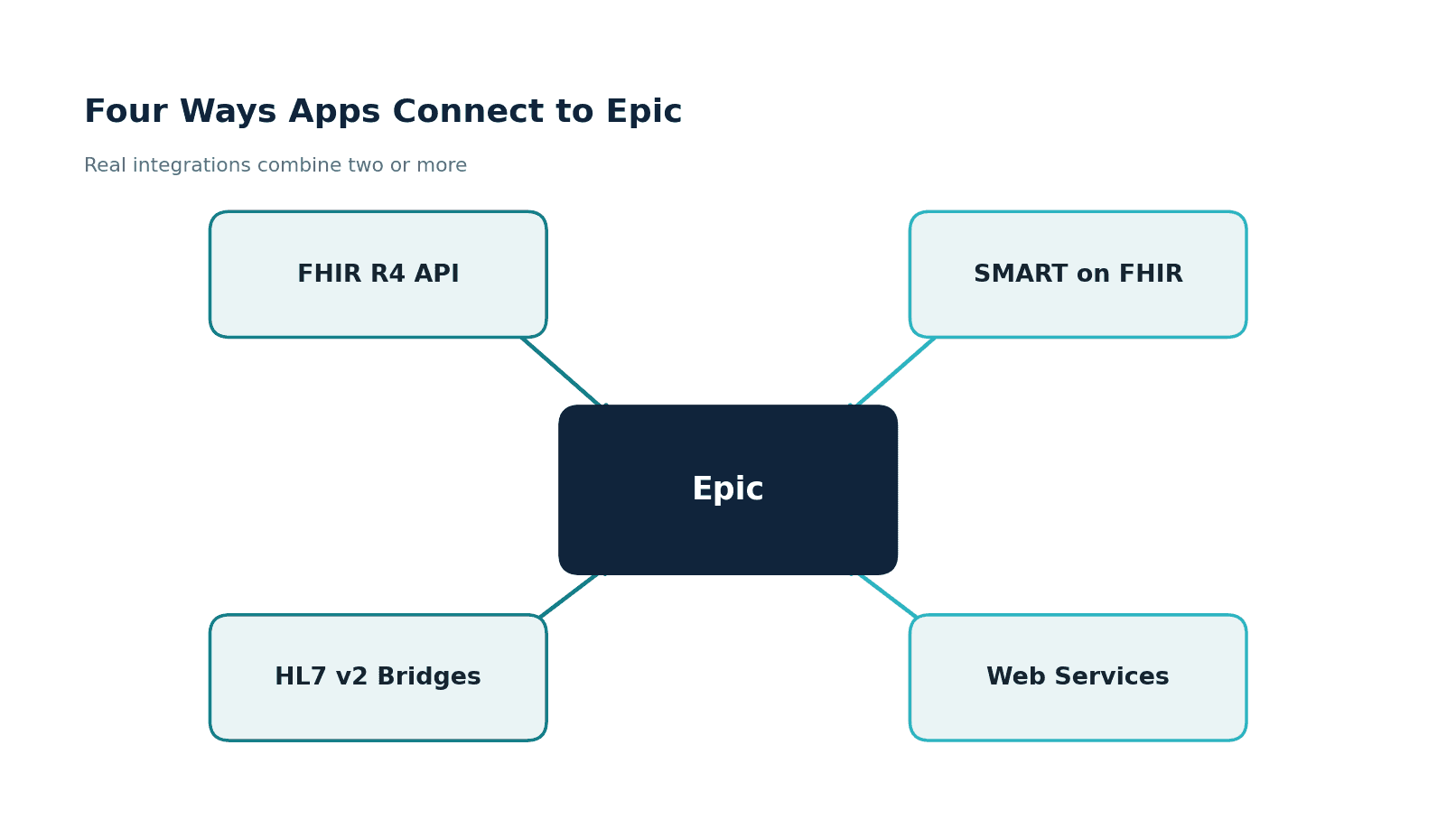
The four ways apps connect to Epic
FHIR R4 API. A REST API for reading structured clinical data, and selectively writing it. This is the modern default for pulling patient records, problems, medications, labs, and documents into your application. It is governed by US Core and USCDI, and access runs through OAuth2.
SMART on FHIR. The framework that lets your app launch inside Epic, embedded in the clinician's chart in Hyperdrive, with the patient and user context passed automatically. To the clinician it feels like part of Epic. Underneath, it uses FHIR scopes and OAuth2.
HL7 v2 through Epic Bridges. The real-time messaging channel for results, orders, charges, ADT, and scheduling. This is the operational backbone of most hospital integrations and runs through Epic's interface engine, Bridges.
Web Services (open.epic). A set of SOAP and REST calls for specific transaction types, such as eligibility checks or particular scheduling operations, that the other methods do not cover cleanly.
Which method for which use case
The fastest way to scope an Epic project is to start from the outcome you want and work back to the method. This matrix is the shortcut we use in early conversations.
If you want to pull patient records into your app, FHIR is the answer, and a read-only version can move in weeks. If you want your tool to launch inside the chart, that is SMART on FHIR. If you need to receive lab or imaging results, or send orders and charges, that is HL7 v2 through Bridges, covered in our Epic Bridges integration guide. If you need server-to-server bulk data with no user present, that is SMART Backend Services, detailed in our Epic FHIR integration guide. And if you want any Epic customer to be able to enable your app, you are signing up for the full Vendor Services and Showroom path.
Vendor Services, Showroom, and the Connection Hub
Three Epic program names cause a lot of confusion, partly because Epic renamed them. Here is what each one is.
Epic Vendor Services is Epic's developer partnership program. Signing up pairs you with the right integration technology for your use case and gives you expanded documentation, support, and a larger testing sandbox than the free public one.
The Epic Showroom (formerly App Orchard) is the public gallery where health systems discover integration-ready apps. Listing there signals that your app has passed Epic's review and meets its integration standards. This matters more than it looks: many Epic customer sites will only enable apps that are listed in Showroom.
The Connection Hub is the technical backend where developers register products, manage OAuth2 client IDs, and access the sandbox. It is where the hands-on configuration of your app's Epic identity happens.
The path from prototype to live
Working code is not the finish line. An app earns the right to run at a customer site by moving through a defined partnership path.
You sign up for Vendor Services and get paired with the right technology. You build and validate against the sandbox. You pass a security review covering HIPAA, the scopes you request, and how you handle data. You list in the Showroom so customers can find you. A health system contracts and enables your app in their environment, with its own FHIR base URL. Then you go live with production traffic, monitored.
Plan for this whole arc, not just the coding. A focused, read-only MVP can be ready in 3 to 6 months. A bidirectional integration that combines FHIR with HL7 v2 Bridges interfaces, multi-site validation, and full Vendor Services approval typically runs 6 to 14 months.
Three integration patterns you are likely building
Underneath the program names and standards, most Epic integrations fall into one of three shapes.
The embedded SMART app runs inside Epic, launched from the chart with user and patient context, using FHIR scopes for data. The backend data sync is server-to-server, authenticating with a signed JWT and pulling data on a schedule or via Bulk Data export, common for analytics and registries.
The bidirectional messaging pattern uses HL7 v2 through Bridges to send orders out and bring results in, with acknowledgement and error-queue handling. Knowing which pattern you are building tells you which standards and which partnership steps you actually need.
What hospital customers will require of you
Beyond the technology, Epic customers bring expectations that catch generalist development teams off guard. They expect a Showroom listing or a clear plan to get one. They run a security review, and they expect HIPAA compliance with evidence behind it. They expect their interface team to be involved, and they expect operational discipline once you are live: monitored connections, clean error handling, and a vendor who understands Epic's release cycle. Underestimating any of these is what turns a six-month plan into an eighteen-month one.
What a SMART on FHIR launch looks like
To make the embedded pattern concrete: when a clinician opens your app from the chart, Epic calls your launch URL with a launch token and the FHIR server's address. Your app then redirects the user to Epic's authorize endpoint with the scopes it needs:
GET /authorize?
  response_type=code
  &client_id=YOUR_CLIENT_ID
  &redirect_uri=https://yourapp.example.com/callback
  &launch=LAUNCH_TOKEN_FROM_EPIC
  &scope=launch openid fhirUser patient/Observation.read
  &aud=https://fhir.epic.com/.../api/FHIR/R4
The user (already logged into Epic) consents, Epic returns an authorization code, and your backend exchanges it for an access token plus the patient context. From there, your app reads the chart over FHIR. The whole exchange is invisible to the clinician, which is the point of the embedded pattern.
Build, partner, or both: avoiding the common mistakes
Two mistakes account for most blown Epic timelines. The first is treating Epic like a generic API: teams build a clean FHIR client, demo it against the sandbox, and only then discover that each customer has a different base URL, a security review, and a Showroom expectation. The second is over-scoping write access. Reading data is well supported; writing back is narrower and version-dependent, and promising a write workflow you have not confirmed with the customer's Epic team is a fast way to miss a deadline.
On cost, the API access itself is not the expensive part. The budget goes into the partnership work, the security and compliance evidence, the per-customer enablement, and the ongoing maintenance as Epic moves through its release cycle. A realistic plan funds the first year of operation, not just the initial build.
How we approach Epic integration
Healthcare is the only industry we work in, and we have built EHR integrations for 30+ healthtech startups. We have shipped apps that read from Epic over FHIR, embedded SMART apps inside the chart, and HL7 v2 interfaces through Bridges, including a multi-EHR platform that connects to Epic, Cerner, Allscripts, and athenahealth behind one interface. We open-sourced a Headless EHR covering 28 clinical domains and more than 70 FHIR R4 resources, so the FHIR side is well-worn ground for our team.
Our work is HIPAA-compliant by default, with SOC 2 and ISO 27001 behind it, which is exactly what a hospital security review asks for. When a generalist dev shop stalls at that review, that is usually when teams call us to take the integration over the line.
One more thing worth planning for is ownership after go-live. Epic moves through regular version upgrades, scopes and endpoints evolve, and a customer configuration can change. An integration that shipped cleanly still needs monitoring, alerting on failed calls or messages, and someone watching Epic release notes. Teams that treat the integration as a one-time project tend to get caught out; teams that budget for ongoing ownership keep their hospital customers running and their renewals intact. The maintenance line item is small next to the cost of an integration that quietly breaks after an Epic upgrade and takes a clinical workflow down with it.
Where to start
Write down the single outcome you need from Epic, match it to a connection method using the matrix above, and decide early whether you need a Showroom listing. That clarity shapes the entire timeline and budget.
If you want help choosing the method or running the partnership path, see our Epic integration services, or reach out to talk through your app.
Related guides
- Epic FHIR Integration Guide for Healthcare Apps
- Epic Bridges Integration: Connecting Epic via HL7
- Epic Integration Services (pillar guide)