Mirth Connect + OpenTelemetry: Instrumenting Your Integration Engine for Real Observability

CTO & Co-Founder
CTO & Co-Founder at Nirmitee.io. Architects healthcare integrations across FHIR, SMART on FHIR, ABDM and NHCX, writing from production experience taking hospital software from sandbox to go-live.
If you run Mirth Connect in production, you already know the feeling: a downstream system complains about missing messages, and you are left clicking through the Mirth Administrator dashboard, channel by channel, trying to reconstruct what happened 47 minutes ago. The built-in dashboard shows you that a channel is running. It does not tell you why a message took 12 seconds instead of the usual 200 milliseconds, which downstream hop introduced the latency, or whether your error rate is creeping toward your SLA threshold. Teams that want their HL7 interfaces built and monitored for them can use our HL7 integration services.
New to Mirth? Start with our Mirth Connect guide: what it is, how it works, and when it fits.
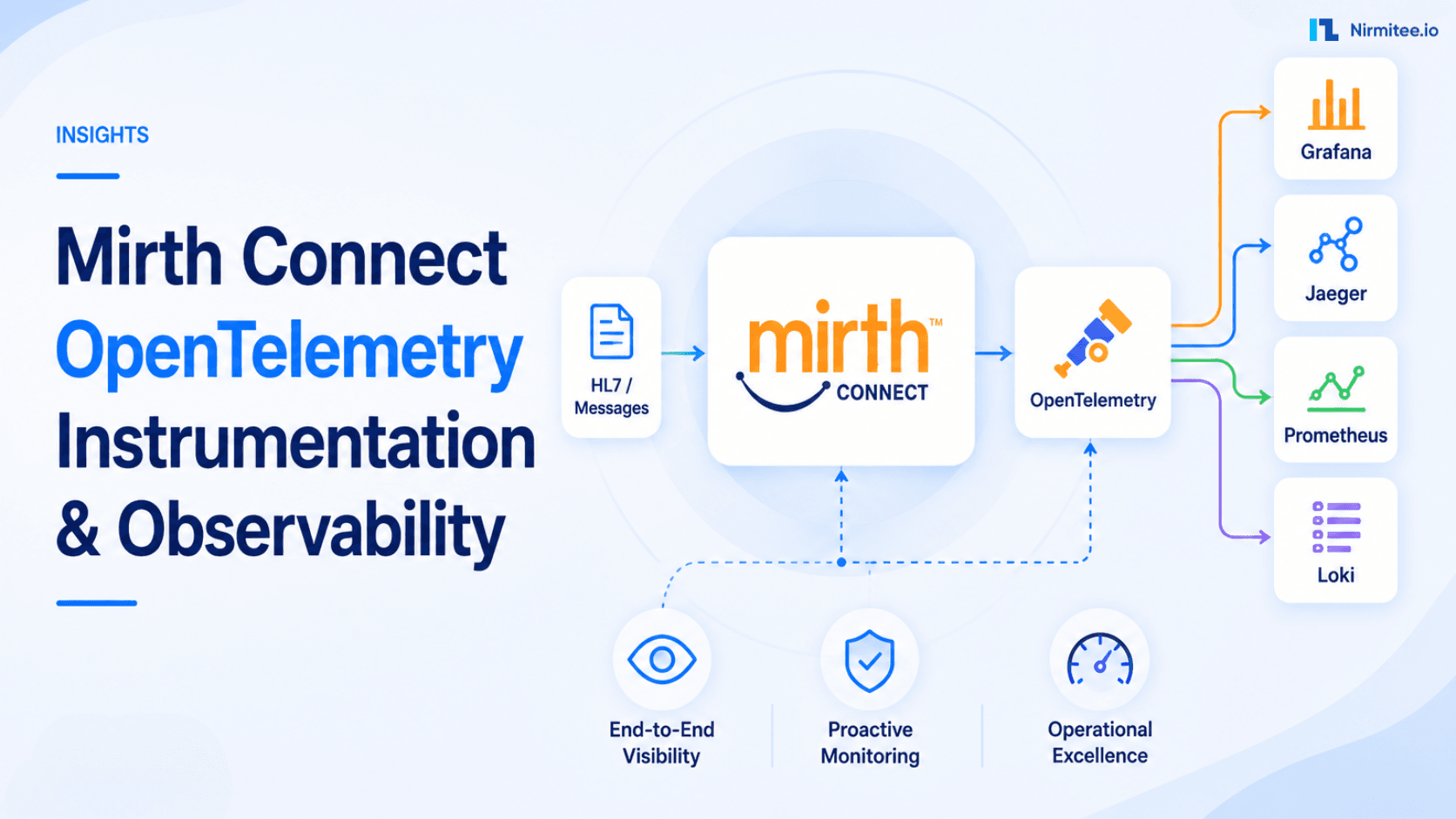
This is the gap that OpenTelemetry (OTel) fills. By instrumenting Mirth Connect with OTel, you get distributed tracing across channels and downstream systems, custom metrics with dimensional labels, structured logs correlated to specific message traces, and the ability to define and track real SLOs. This guide walks through every step: from the OTel concepts that map to integration engine work, to production-ready JavaScript code you can paste into your Mirth channels today.
Watch: Mirth Connect Observability: Alerts That Catch Outages (and the One That Did Not) (2:11).
Why Mirth's Built-In Dashboard Falls Short
The Mirth Connect Administrator provides a real-time view of channel status, message counts, and basic error information. For a two-channel proof-of-concept, that is sufficient. For a production deployment processing thousands of HL7 ADT, ORM, and ORU messages per hour across 20+ channels, the limitations become painful:
- No distributed tracing — When a message flows from Channel A (HL7 receiver) through Channel B (FHIR transformer) to Channel C (destination router), each channel is an isolated silo. There is no single trace that shows the full message journey.
- No correlation with downstream systems — If your Mirth channel sends a FHIR Bundle to a HAPI FHIR server, and that server takes 3 seconds to respond, Mirth shows a slow destination. It cannot tell you whether the latency was in the FHIR server's database, its validation layer, or the network.
- No SLO tracking — You cannot define "99.9% of ADT messages must be delivered within 5 seconds" and get alerted when your error budget is burning too fast.
- Limited historical analysis — Mirth stores message content, but querying historical performance data (p99 latency over the last 30 days, error rate trends by message type) requires manual SQL against the Mirth database with no built-in visualization.
- No dimensional metrics — You cannot break down throughput by message type, sending facility, or HL7 version without writing custom reports.
OpenTelemetry solves all of these by providing a vendor-neutral standard for traces, metrics, and logs that you can export to any observability backend.
OpenTelemetry Fundamentals for Integration Engineers
If you have worked with APM tools like Datadog or New Relic, OTel will feel familiar. If you are coming from a pure integration background, here is how the core concepts map to message processing work:
Traces and Spans
A trace represents the complete lifecycle of a single message through your integration engine. Think of it as one ADT^A01 message arriving at the TCP listener and completing its journey through all channels to all destinations. A span is one unit of work within that trace. Each channel step — source reception, transformation, filtering, destination delivery — is a span. Spans have a start time, duration, status (OK or ERROR), and custom attributes.
Metrics
Metrics are numerical measurements collected over time: messages per second, processing latency histograms, error counts, queue depths. Unlike traces (which capture every individual message), metrics are aggregated and consume far less storage. You will use metrics for dashboards and alerting.
Logs
OTel structured logs are correlated with traces via a shared trace_id. When you see an error in your Grafana dashboard, you click through to the trace, and from the trace, you jump to the exact log lines from that message's processing. No more grep-ing through Mirth log files.
How They Map to Mirth
| OTel Concept | Mirth Equivalent | Example |
|---|---|---|
| Trace | Single message lifecycle | ADT^A01 from Epic → all destinations |
| Span | Channel processing step | "Transform HL7 to FHIR" (8ms) |
| Span Attribute | Message metadata | message_type=ADT^A01, sending_facility=EPIC |
| Metric (Counter) | Message count | mirth_messages_total{channel="ADT_Router"} |
| Metric (Histogram) | Processing latency | mirth_processing_duration_ms{quantile="0.99"} |
| Log | Channel log entry | "Validation failed: missing PID.3" + trace_id |
Instrumenting Mirth Channels with OpenTelemetry
The key insight is that you do not need a Java agent or Mirth plugin. Mirth's JavaScript execution context in preprocessors and postprocessors can make HTTP calls to the OTel Collector's OTLP/HTTP endpoint. This approach is non-invasive — no JVM restarts, no classpath modifications, and it works with any Mirth Connect version from 3.x onward.
Channel Preprocessor: Start the Trace
Place this code in your channel's preprocessor. It generates a trace ID and span ID, records the start time, and stores them in the channel map for the postprocessor to retrieve:
// Channel Preprocessor — Start OTel Span
// Generate W3C-compatible trace and span IDs
function generateHexId(bytes) {
    var chars = '0123456789abcdef';
    var result = '';
    for (var i = 0; i < bytes * 2; i++) {
        result += chars.charAt(Math.floor(Math.random() * 16));
    }
    return result;
}

var traceId = generateHexId(16);  // 32 hex chars
var spanId = generateHexId(8);    // 16 hex chars
var startTimeNano = java.lang.System.currentTimeMillis() * 1000000;

// Extract HL7 metadata for span attributes
var msgType = '';
var sendingFacility = '';
var hl7Version = '';
try {
    var rawMsg = connectorMessage.getRawData();
    if (rawMsg && rawMsg.indexOf('MSH') === 0) {
        var fields = rawMsg.split('|');
        msgType = fields[8] || '';           // MSH-9: Message Type
        sendingFacility = fields[3] || '';   // MSH-4: Sending Facility
        hl7Version = fields[11] || '';       // MSH-12: Version ID
    }
} catch(e) { /* non-HL7 message */ }

// Store in channel map for postprocessor
channelMap.put('otel_trace_id', traceId);
channelMap.put('otel_span_id', spanId);
channelMap.put('otel_start_time_nano', startTimeNano.toString());
channelMap.put('otel_msg_type', msgType);
channelMap.put('otel_sending_facility', sendingFacility);
channelMap.put('otel_hl7_version', hl7Version);

return message;
Channel Postprocessor: End the Span and Export
The postprocessor calculates the duration, builds the OTLP JSON payload, and sends it to the OTel Collector via HTTP:
// Channel Postprocessor — End OTel Span and Export
var traceId = channelMap.get('otel_trace_id');
var spanId = channelMap.get('otel_span_id');
var startTimeNano = channelMap.get('otel_start_time_nano');
var endTimeNano = (java.lang.System.currentTimeMillis() * 1000000).toString();

// Determine span status from response status
var status = responseStatus == 'SENT' ? 1 : 2;  // 1=OK, 2=ERROR
var statusMsg = responseStatus == 'SENT' ? '' : responseStatusMessage;

// Build OTLP trace export payload
var payload = {
    "resourceSpans": [{
        "resource": {
            "attributes": [
                {"key": "service.name", "value": {"stringValue": "mirth-connect"}},
                {"key": "service.version", "value": {"stringValue": "4.5.0"}},
                {"key": "deployment.environment", "value": {"stringValue": "production"}}
            ]
        },
        "scopeSpans": [{
            "scope": {"name": "mirth.channel", "version": "1.0.0"},
            "spans": [{
                "traceId": traceId,
                "spanId": spanId,
                "name": channelName,
                "kind": 2,
                "startTimeUnixNano": startTimeNano,
                "endTimeUnixNano": endTimeNano,
                "status": {"code": status, "message": statusMsg},
                "attributes": [
                    {"key": "mirth.channel.id", "value": {"stringValue": channelId}},
                    {"key": "mirth.channel.name", "value": {"stringValue": channelName}},
                    {"key": "hl7.message_type", "value": {"stringValue": $('otel_msg_type')}},
                    {"key": "hl7.sending_facility", "value": {"stringValue": $('otel_sending_facility')}},
                    {"key": "hl7.version", "value": {"stringValue": $('otel_hl7_version')}},
                    {"key": "mirth.message.id", "value": {"stringValue": connectorMessage.getMessageId().toString()}}
                ]
            }]
        }]
    }]
};

// Send to OTel Collector OTLP/HTTP endpoint
try {
    var url = new java.net.URL('http://otel-collector:4318/v1/traces');
    var conn = url.openConnection();
    conn.setRequestMethod('POST');
    conn.setRequestProperty('Content-Type', 'application/json');
    conn.setDoOutput(true);
    var os = conn.getOutputStream();
    os.write(new java.lang.String(JSON.stringify(payload)).getBytes('UTF-8'));
    os.flush();
    os.close();
    var responseCode = conn.getResponseCode();
    if (responseCode != 200) {
        logger.warn('OTel export failed: HTTP ' + responseCode);
    }
    conn.disconnect();
} catch(e) {
    logger.warn('OTel export error: ' + e.message);
}

return;
Trace Correlation Across Channels and Systems
The real power of distributed tracing is correlating a single message across multiple channels and downstream systems. When Mirth Channel A writes to Channel B via a Channel Writer, and Channel B sends a FHIR resource to a HAPI FHIR server, you want one unified trace.
Propagating Trace Context via Channel Writer
When sending from one channel to another, pass the trace ID through the source map:
// In Channel A's Destination Transformer (before Channel Writer)
// Pass trace context to downstream channel
connectorMap.put('parent_trace_id', $('otel_trace_id'));
connectorMap.put('parent_span_id', $('otel_span_id'));

// In Channel B's Preprocessor — inherit parent trace
var parentTraceId = sourceMap.get('parent_trace_id');
if (parentTraceId) {
    channelMap.put('otel_trace_id', parentTraceId);  // Same trace
    channelMap.put('otel_parent_span_id', sourceMap.get('parent_span_id'));
} else {
    channelMap.put('otel_trace_id', generateHexId(16));  // New trace
}
channelMap.put('otel_span_id', generateHexId(8));  // Always new span
Propagating to HTTP Destinations
When your Mirth channel sends HTTP requests to a FHIR server or REST API, inject the W3C traceparent header so the downstream system can continue the trace:
// In HTTP Sender Destination — add traceparent header
var traceId = $('otel_trace_id');
var spanId = $('otel_span_id');
var traceparent = '00-' + traceId + '-' + spanId + '-01';

// Set on the HTTP connector
var headers = new java.util.LinkedHashMap();
headers.put('traceparent', traceparent);
headers.put('Content-Type', 'application/fhir+json');
connectorMap.put('HTTP_HEADERS', headers);
Custom Metrics for Healthcare Integration
Traces tell you about individual messages. Metrics tell you about system behavior over time. Here are the essential Prometheus metric definitions for a production healthcare integration engine:
Core Metric Definitions
# Prometheus metric definitions for Mirth Connect

# Counter: Total messages processed per channel
mirth_messages_total{
  channel="ADT_Inbound",
  message_type="ADT^A01",
  sending_facility="EPIC_PROD",
  status="sent"           # sent | error | filtered | queued
}

# Histogram: Processing duration per channel (milliseconds)
mirth_processing_duration_ms_bucket{
  channel="FHIR_Transformer",
  le="100"                # buckets: 10, 50, 100, 500, 1000, 5000, 10000
}

# Gauge: Current queue depth per channel
mirth_queue_depth{
  channel="ADT_Inbound",
  destination="FHIR_Server"
}

# Histogram: Message size in bytes
mirth_message_size_bytes_bucket{
  channel="Lab_Results",
  direction="inbound",    # inbound | outbound
  le="1024"               # buckets: 256, 1024, 4096, 16384, 65536
}

# Counter: Errors by type
mirth_errors_total{
  channel="ADT_Inbound",
  error_type="validation",  # validation | timeout | connection | transform
  severity="error"          # error | warning
}

# Gauge: Channel status (1=started, 0=stopped)
mirth_channel_status{
  channel="ADT_Inbound"
}
Healthcare-Specific Attributes
Standard APM attributes are not enough for healthcare integration. Add these dimensional labels to every span and metric to enable meaningful filtering:
| Attribute | Source | Example Values | Why It Matters |
|---|---|---|---|
hl7.message_type | MSH-9 | ADT^A01, ORM^O01, ORU^R01 | Filter latency by message type |
hl7.sending_facility | MSH-4 | EPIC_PROD, CERNER_LAB | Identify slow senders |
hl7.receiving_facility | MSH-6 | PACS_SYSTEM, LAB_LIS | Track destination health |
hl7.version | MSH-12 | 2.3, 2.5.1 | Version-specific issues |
fhir.resource_type | Output | Patient, Observation, Bundle | FHIR transform performance |
patient.id_hash | PID-3 (SHA-256) | a1b2c3... (hashed) | Per-patient tracing (HIPAA-safe) |
Important: Never include raw patient identifiers (MRN, SSN, name) in telemetry data. Always hash patient IDs with SHA-256 before adding them as span attributes. This maintains HIPAA compliance while still allowing you to trace all messages for a specific patient.
Exporting to Your Observability Stack
The OTel Collector is the central hub that receives telemetry from Mirth and routes it to your storage backends. Here is a production-ready collector configuration:
OTel Collector Configuration
# otel-collector-config.yaml
receivers:
  otlp:
    protocols:
      http:
        endpoint: "0.0.0.0:4318"
      grpc:
        endpoint: "0.0.0.0:4317"

processors:
  batch:
    timeout: 5s
    send_batch_size: 1024
  memory_limiter:
    check_interval: 1s
    limit_mib: 512
    spike_limit_mib: 128
  filter/healthcare:
    # Drop spans from health-check channels
    spans:
      exclude:
        match_type: strict
        attributes:
          - key: mirth.channel.name
            value: "Health_Check_Ping"
  attributes/sanitize:
    actions:
      # Ensure no PHI leaks into telemetry
      - key: patient.name
        action: delete
      - key: patient.ssn
        action: delete
      - key: patient.mrn
        action: delete

exporters:
  otlp/jaeger:
    endpoint: "jaeger:4317"
    tls:
      insecure: true
  prometheus:
    endpoint: "0.0.0.0:8889"
    namespace: mirth
    resource_to_telemetry_conversion:
      enabled: true
  loki:
    endpoint: "http://loki:3100/loki/api/v1/push"
    default_labels_enabled:
      exporter: true
      job: true

service:
  pipelines:
    traces:
      receivers: [otlp]
      processors: [memory_limiter, filter/healthcare, attributes/sanitize, batch]
      exporters: [otlp/jaeger]
    metrics:
      receivers: [otlp]
      processors: [memory_limiter, batch]
      exporters: [prometheus]
    logs:
      receivers: [otlp]
      processors: [memory_limiter, attributes/sanitize, batch]
      exporters: [loki]
Docker Compose for the Full Stack
Deploy the complete observability stack alongside Mirth with Docker Compose:
# docker-compose.observability.yaml
version: '3.8'
services:
  otel-collector:
    image: otel/opentelemetry-collector-contrib:0.96.0
    command: ["--config", "/etc/otel/config.yaml"]
    volumes:
      - ./otel-collector-config.yaml:/etc/otel/config.yaml
    ports:
      - "4317:4317"   # gRPC
      - "4318:4318"   # HTTP
      - "8889:8889"   # Prometheus metrics
    depends_on:
      - jaeger
      - loki

  jaeger:
    image: jaegertracing/all-in-one:1.54
    ports:
      - "16686:16686"  # Jaeger UI
      - "4317"         # OTLP gRPC (internal)
    environment:
      - COLLECTOR_OTLP_ENABLED=true

  prometheus:
    image: prom/prometheus:v2.50.0
    volumes:
      - ./prometheus.yaml:/etc/prometheus/prometheus.yml
    ports:
      - "9090:9090"

  loki:
    image: grafana/loki:2.9.4
    ports:
      - "3100:3100"

  grafana:
    image: grafana/grafana:10.3.1
    ports:
      - "3000:3000"
    environment:
      - GF_SECURITY_ADMIN_PASSWORD=admin
    volumes:
      - ./grafana-datasources.yaml:/etc/grafana/provisioning/datasources/ds.yaml
      - ./grafana-dashboards:/etc/grafana/provisioning/dashboards
    depends_on:
      - prometheus
      - jaeger
      - loki
SLO Definitions for Integration Engines
Service Level Objectives give you a framework for answering "is our integration engine healthy?" with a number, not a feeling. Here are three SLOs every healthcare integration team should define:
SLO 1: Message Delivery Rate
Target: 99.9% of received messages are successfully delivered
# PromQL: Message Delivery Rate (30-day window)
(
  sum(increase(mirth_messages_total{status="sent"}[30d]))
  /
  sum(increase(mirth_messages_total[30d]))
) * 100

# Error budget: 0.1% = 8.76 hours/year of allowed failures
# Burn rate alert: fire if burning 14.4x the budget in 1 hour
# (catches outages that would exhaust the monthly budget in ~5 hours)

# Alertmanager rule:
- alert: MirthDeliveryRateBurning
  expr: |
    (
      1 - (
        sum(rate(mirth_messages_total{status="sent"}[1h]))
        /
        sum(rate(mirth_messages_total[1h]))
      )
    ) > (14.4 * 0.001)
  for: 2m
  labels:
    severity: critical
  annotations:
    summary: "Message delivery SLO burn rate critical"
SLO 2: Processing Latency (p99)
Target: 99th percentile processing latency under 5 seconds
# PromQL: p99 Processing Latency
histogram_quantile(0.99,
  sum(rate(mirth_processing_duration_ms_bucket[5m])) by (le, channel)
)

# Alert when p99 exceeds target
- alert: MirthLatencyP99High
  expr: |
    histogram_quantile(0.99,
      sum(rate(mirth_processing_duration_ms_bucket[5m])) by (le)
    ) > 5000
  for: 5m
  labels:
    severity: warning
  annotations:
    summary: "Mirth p99 latency exceeds 5s SLO target"
SLO 3: Channel Availability
Target: 99.95% uptime per channel (4.38 hours/year downtime budget)
# PromQL: Channel Availability (per channel)
(
  sum_over_time(mirth_channel_status{channel="ADT_Inbound"}[30d])
  /
  count_over_time(mirth_channel_status{channel="ADT_Inbound"}[30d])
) * 100

# Alert when channel is down
- alert: MirthChannelDown
  expr: mirth_channel_status == 0
  for: 3m
  labels:
    severity: critical
  annotations:
    summary: "Mirth channel {{ $labels.channel }} is stopped"
Complete Grafana Dashboard
Here is a production Grafana dashboard configuration that you can import directly. It provides a single-pane view of all Mirth Connect telemetry:
{
  "dashboard": {
    "title": "Mirth Connect Observability",
    "uid": "mirth-otel-main",
    "timezone": "browser",
    "refresh": "30s",
    "panels": [
      {
        "title": "Messages/sec by Channel",
        "type": "timeseries",
        "gridPos": {"h": 8, "w": 8, "x": 0, "y": 0},
        "targets": [{
          "expr": "sum(rate(mirth_messages_total[5m])) by (channel)",
          "legendFormat": "{{channel}}"
        }]
      },
      {
        "title": "Processing Latency p50 / p99",
        "type": "timeseries",
        "gridPos": {"h": 8, "w": 8, "x": 8, "y": 0},
        "targets": [
          {
            "expr": "histogram_quantile(0.50, sum(rate(mirth_processing_duration_ms_bucket[5m])) by (le))",
            "legendFormat": "p50"
          },
          {
            "expr": "histogram_quantile(0.99, sum(rate(mirth_processing_duration_ms_bucket[5m])) by (le))",
            "legendFormat": "p99"
          }
        ]
      },
      {
        "title": "Error Rate",
        "type": "gauge",
        "gridPos": {"h": 8, "w": 4, "x": 16, "y": 0},
        "targets": [{
          "expr": "(sum(rate(mirth_messages_total{status='error'}[5m])) / sum(rate(mirth_messages_total[5m]))) * 100"
        }],
        "fieldConfig": {
          "defaults": {
            "thresholds": {
              "steps": [
                {"value": 0, "color": "green"},
                {"value": 0.05, "color": "yellow"},
                {"value": 0.1, "color": "red"}
              ]
            },
            "unit": "percent",
            "max": 1
          }
        }
      },
      {
        "title": "Active Channels",
        "type": "stat",
        "gridPos": {"h": 4, "w": 4, "x": 20, "y": 0},
        "targets": [{
          "expr": "sum(mirth_channel_status)"
        }]
      },
      {
        "title": "Queue Depth by Channel",
        "type": "timeseries",
        "gridPos": {"h": 8, "w": 12, "x": 0, "y": 8},
        "targets": [{
          "expr": "mirth_queue_depth",
          "legendFormat": "{{channel}} → {{destination}}"
        }],
        "fieldConfig": {
          "defaults": {
            "custom": {"fillOpacity": 20, "stacking": {"mode": "normal"}}
          }
        }
      },
      {
        "title": "Message Delivery SLO (30d)",
        "type": "gauge",
        "gridPos": {"h": 8, "w": 6, "x": 12, "y": 8},
        "targets": [{
          "expr": "(sum(increase(mirth_messages_total{status='sent'}[30d])) / sum(increase(mirth_messages_total[30d]))) * 100"
        }],
        "fieldConfig": {
          "defaults": {
            "thresholds": {
              "steps": [
                {"value": 0, "color": "red"},
                {"value": 99.0, "color": "yellow"},
                {"value": 99.9, "color": "green"}
              ]
            },
            "unit": "percent",
            "min": 98,
            "max": 100
          }
        }
      },
      {
        "title": "Errors by Type",
        "type": "piechart",
        "gridPos": {"h": 8, "w": 6, "x": 18, "y": 8},
        "targets": [{
          "expr": "sum(increase(mirth_errors_total[24h])) by (error_type)",
          "legendFormat": "{{error_type}}"
        }]
      },
      {
        "title": "Message Size Distribution",
        "type": "histogram",
        "gridPos": {"h": 8, "w": 12, "x": 0, "y": 16},
        "targets": [{
          "expr": "sum(increase(mirth_message_size_bytes_bucket[1h])) by (le)"
        }]
      },
      {
        "title": "Top 10 Slowest Channels (p99)",
        "type": "bargauge",
        "gridPos": {"h": 8, "w": 12, "x": 12, "y": 16},
        "targets": [{
          "expr": "topk(10, histogram_quantile(0.99, sum(rate(mirth_processing_duration_ms_bucket[1h])) by (le, channel)))",
          "legendFormat": "{{channel}}"
        }],
        "fieldConfig": {
          "defaults": {"unit": "ms"}
        }
      }
    ],
    "templating": {
      "list": [
        {
          "name": "channel",
          "type": "query",
          "query": "label_values(mirth_messages_total, channel)",
          "multi": true,
          "includeAll": true
        }
      ]
    }
  }
}
Production Deployment Checklist
Before rolling this out across your Mirth channels, work through this checklist to avoid common pitfalls:
- Start with one channel — Instrument your highest-volume channel first. Validate that traces appear in Jaeger and metrics in Prometheus before rolling out to all channels.
- Set connection timeouts — The HTTP call to the OTel Collector in the postprocessor must have a timeout (500ms max). A hung collector should never block message processing.
- Use async export for high-volume channels — For channels processing >100 messages/second, consider writing telemetry to a local file and using the OTel Collector's
filelogreceiver instead of HTTP per-message. - Sanitize PHI — Audit every span attribute and metric label. Never include patient names, MRNs, SSNs, or dates of birth. Use SHA-256 hashed patient IDs if you need per-patient tracing.
- Monitor the monitor — Set up alerts for the OTel Collector itself:
otelcol_exporter_send_failed_spansandotelcol_processor_dropped_spans. - Size your storage — At 1,000 messages/hour across 20 channels, expect approximately 480K spans/day in Jaeger. Plan Jaeger storage (Elasticsearch or Cassandra) accordingly.
- Template the code — Use Mirth's code template feature to create a shared OTel library. Define
startOtelSpan()andendOtelSpan()functions once, then call them from every channel's pre/postprocessor.
From Dashboard Clicking to Data-Driven Operations
The shift from Mirth's built-in dashboard to a full OpenTelemetry observability stack changes how your team operates. Instead of reactive troubleshooting — someone reports a missing message, you log into Mirth Administrator and start clicking — you get proactive alerting based on SLO burn rates, sub-second root cause identification via distributed traces, capacity planning backed by real throughput and latency data, and cross-system visibility that connects Mirth behavior to downstream system health.
The instrumentation code in this guide adds approximately 50-80ms of overhead per message for the OTel HTTP export. For most healthcare integration workloads, this is negligible compared to the seconds spent on database lookups and network calls. The observability you gain — knowing exactly where every message is, how long each step takes, and whether you are meeting your SLOs — is worth orders of magnitude more.
For teams running Mirth Connect as a critical piece of their healthcare interoperability infrastructure, OpenTelemetry transforms the integration engine from a black box into a fully observable system.
Related guides
This article is part of our complete guide to Mirth Connect: understanding Mirth Connect. Related deep-dives:
- zero-downtime Mirth Connect setup
- production monitoring for Mirth Connect
- how Mirth integrations fail
Need production-grade Mirth Connect help? See our Mirth Connect integration services.
Ready to scale?
Talk to our healthcare engineering team about building, integrating, and shipping faster.
Frequently Asked Questions
Why instrument Mirth Connect with OpenTelemetry instead of using the built-in dashboard?
Where do you add OpenTelemetry instrumentation in a Mirth channel?
What SLOs make sense for a healthcare integration engine?
Does OpenTelemetry instrumentation slow message processing down?
How does Nirmitee.io approach healthcare software development?