The FHIR Write Problem: Why AI Agents That Only Read Are Assistants, Not Participants

Digital Growth Lead
Writes about healthcare technology, interoperability, and AI-driven transformation across modern care systems.
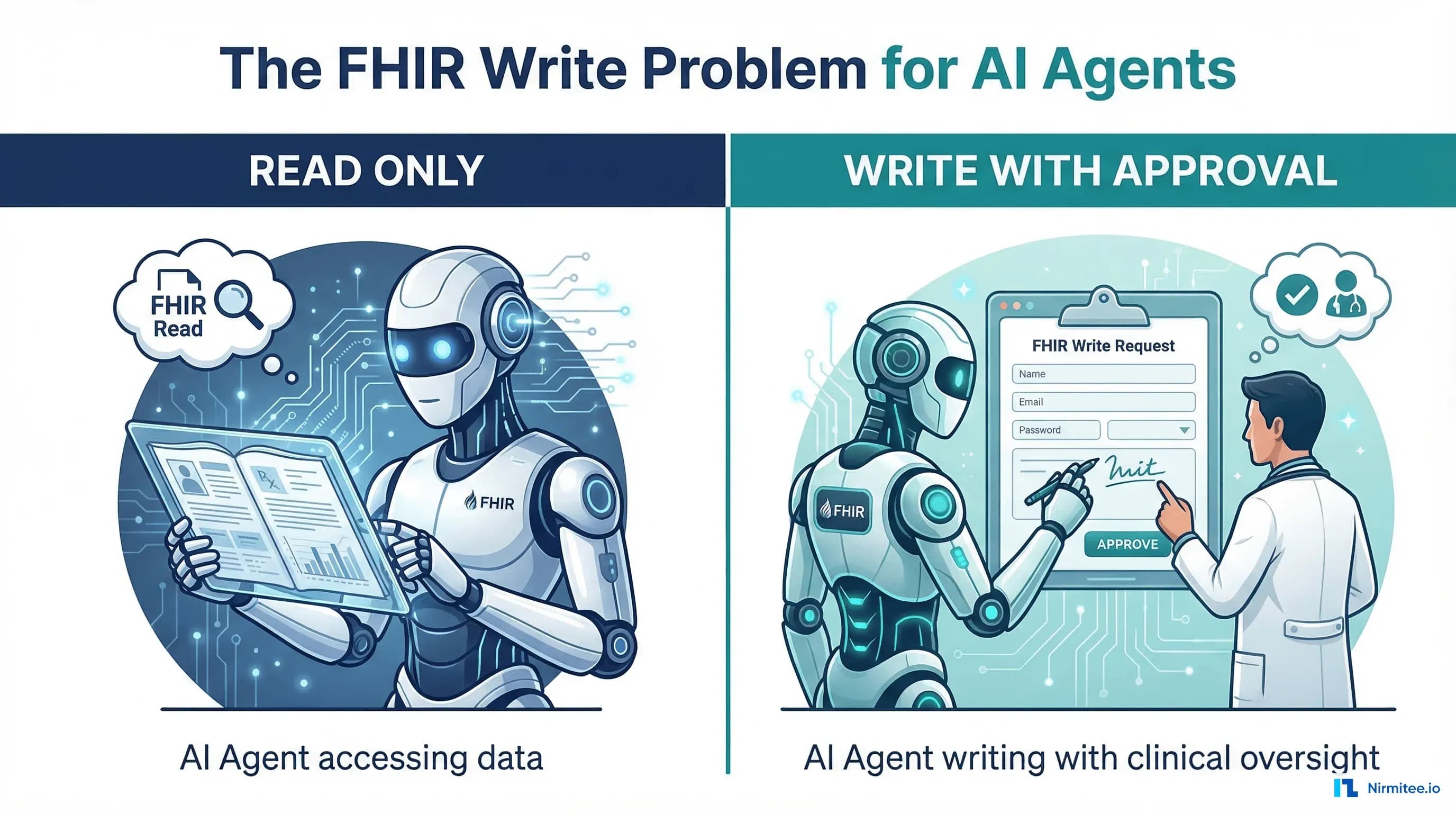
Open any healthcare AI agent demo, and you will see the same pattern: the agent reads a patient record, summarizes medications, flags potential issues, and presents findings to a clinician. Impressive — until you realize the agent cannot act on its own findings. It cannot create a referral order, document a risk assessment, flag a safety concern in the chart, or schedule a follow-up task. It can only read and report. That is not a clinical participant. That is a sophisticated search engine with a conversational interface.
The difference between an AI assistant and an AI participant is the ability to write back to the clinical record. And writing to FHIR is architecturally, legally, and operationally harder than reading from it. This post explains why, identifies the five FHIR resources that are the right starting points for AI agent writes, and walks through the engineering patterns — human-in-the-loop review, draft status workflows, SMART scope management, and audit trail requirements — that make write operations production-safe.
Why Most AI Agents Stop at Read
Three forces keep healthcare AI agents in read-only mode:
1. Regulatory Uncertainty
When an AI agent reads a patient record and presents information to a clinician, the clinician remains the decision-maker. The agent is an information retrieval tool. But when an agent writes to the clinical record — even in draft status — it crosses into clinical documentation territory. Questions arise: Is the agent a medical device under FDA guidance? Who is responsible if the agent creates an incorrect DocumentReference? Does the agent's output need to be treated as a medical record under state retention laws?
The FDA's 2025 guidance on clinical decision support distinguishes between software that "displays" information and software that "recommends actions." An AI agent that writes a ServiceRequest (referral recommendation) into the EHR is closer to "recommends actions" than one that verbally tells the clinician "consider a referral." The regulatory line is blurry, and most organizations choose the safe side: read only.
2. EHR Write Access Is Hard to Get
Epic's App Orchard requires extensive review for applications that write to the EHR. Read-only SMART apps get approved in 4-6 weeks. Apps with write access go through additional clinical safety review, adding 3-6 months. Oracle Health's write access process is similarly gated. The EHR vendors are (justifiably) cautious about automated systems modifying clinical records.
SMART on FHIR write scopes are granular: patient/DocumentReference.write is different from patient/Condition.write. Getting approval for one write scope does not give you approval for others. Each resource type requires separate justification.
3. Clinical Safety Risk
A read operation cannot harm a patient. A write operation can. An AI agent that creates an incorrect medication order, documents a wrong diagnosis, or generates a misleading risk assessment introduces clinical risk that the organization is liable for. The clinical safety guardrails needed for write operations are an order of magnitude more complex than for read operations.
The Five FHIR Resources AI Agents Should Write To First
Not all write operations carry equal risk. These five FHIR resources are the right starting points because they support draft workflows, have clear human review expectations, and deliver immediate clinical value:
1. DocumentReference (Clinical Notes)
The highest-value, lowest-risk write target. AI agents create draft clinical documentation — progress notes, visit summaries, referral letters — as FHIR DocumentReference resources with status=current and docStatus=preliminary. The provider reviews, edits, and finalizes. The agent's output is explicitly a draft that requires human approval.
This is what ambient clinical documentation tools do today. The FHIR write pattern formalizes it: the document exists in the EHR as a first-class resource, visible in the chart, editable by the provider, and tracked through version history.
{
  "resourceType": "DocumentReference",
  "status": "current",
  "docStatus": "preliminary",
  "type": {
    "coding": [{
      "system": "http://loinc.org",
      "code": "11506-3",
      "display": "Progress note"
    }]
  },
  "subject": {
    "reference": "Patient/patient-abc-123"
  },
  "author": [{
    "reference": "Device/ai-documentation-agent",
    "display": "AI Documentation Agent v2.1"
  }],
  "date": "2026-03-17T14:30:00Z",
  "content": [{
    "attachment": {
      "contentType": "text/html",
      "data": "base64-encoded-note-content"
    }
  }],
  "context": {
    "encounter": [{
      "reference": "Encounter/enc-2026-0317"
    }]
  }
}
Key design decisions in this resource:
- author references a
Deviceresource, not aPractitioner. This makes it clear that the note was AI-generated. The Device resource contains the agent version, model identifier, and configuration details - docStatus=preliminary signals to the EHR and downstream systems that this document is not finalized. Most EHRs will display it with a visual indicator ("draft" badge) and exclude it from official medical record views until a provider changes the status
- encounter reference ties the document to a specific visit, maintaining temporal and clinical context
2. ServiceRequest (Referrals and Orders)
When an AI agent identifies that a patient needs a specialist referral (based on lab results, clinical criteria, or care gap analysis), it can create a ServiceRequest in draft status. The provider sees the suggested referral in their workflow, reviews the clinical rationale, and either activates or cancels it.
The intent=proposal value explicitly marks this as a suggestion, not an order. The FHIR specification was designed for exactly this use case — decision support suggestions that need human approval before they become active orders.
3. Task (Workflow Items)
The Task resource is the agent's worklist interface to the care team. When the agent identifies action items — "follow up on pending lab results," "schedule patient for annual wellness visit," "review medication reconciliation" — it creates Task resources assigned to specific providers or teams.
Tasks are inherently safe for AI writes because they are workflow coordination tools, not clinical data. A Task saying "review this patient's lab results" does not change the clinical record — it prompts a human to take action. This makes Task the easiest write operation to get through clinical safety review.
4. Flag (Clinical Alerts)
The Flag resource communicates prospective warnings to clinicians — "patient has fall risk," "medication interaction detected," "overdue for screening." AI agents that analyze patient data and identify risks can persist those findings as Flag resources, making them visible across care settings.
Flags created by AI agents should include: the agent identifier in the author field, the clinical evidence that triggered the flag (as contained references), and a confidence score in an extension. This gives the reviewing clinician enough context to assess the flag's validity without needing to re-derive the agent's reasoning.
5. Risk Assessment
When an AI agent runs a predictive model — readmission risk, sepsis probability, fall risk score — the output should be persisted as a FHIR RiskAssessment resource. This resource type was specifically designed for probability-based clinical predictions and includes fields for the prediction method, outcome probability, and basis references.
The RiskAssessment resource gives clinical predictions a permanent, queryable home in the patient record. Instead of risk scores living in a separate application's database, they become part of the FHIR record — available to other agents, CDS Hooks, and downstream analytics.
The Draft Status Pattern: Write Without Risk
The universal pattern for safe AI writes is: create in draft, review by a human, promote to active.
| Resource | Draft Status Field | Draft Value | Active Value | Who Promotes |
|---|---|---|---|---|
| DocumentReference | docStatus | preliminary | final | Provider signs/finalizes |
| ServiceRequest | status + intent | draft + proposal | active + order | Provider activates order |
| Task | status | requested | accepted/completed | Assignee accepts and acts |
| Flag | status | inactive | active | Provider validates and activates |
| RiskAssessment | status | preliminary | final | Provider reviews and confirms |
This pattern works because:
- Draft resources are visible but clearly marked as AI-generated and unverified
- No automated system acts on draft resources — billing, pharmacy, and scheduling all filter on
status=active - The promotion from draft to active creates a clear audit trail showing human review
- If the agent is wrong, the provider simply deletes or cancels the draft — no clinical harm occurs
SMART Scopes for Write Access
SMART on FHIR v2 defines granular scopes that separate read and write permissions per resource type. For AI agent write operations, you need to request and be granted specific write scopes:
# Read-only agent scopes (typical current state)
patient/Patient.read
patient/Observation.read
patient/Condition.read
patient/MedicationRequest.read

# Write-capable agent scopes (what you need to add)
patient/DocumentReference.write    # Create draft clinical notes
patient/ServiceRequest.write       # Create draft referrals/orders
patient/Task.write                 # Create workflow tasks
patient/Flag.write                 # Create clinical alerts
patient/RiskAssessment.write       # Persist risk predictions

# System-level scopes for agent infrastructure
system/AuditEvent.write            # Log all agent actions
system/Device.read                 # Read agent identity configuration
Three critical rules for writing scope management:
- Principle of least privilege: Request only the write scopes your agent actually needs. An agent that generates clinical notes needs
DocumentReference.writebut notMedicationRequest.write - No blanket write access: Never request
patient/*.write. Resource-specific scopes ensure that a vulnerability in the note generation agent cannot be exploited to modify medication orders - Separate read and write tokens: When architecturally possible, use different access tokens for read operations and write operations. This allows tighter monitoring and easier revocation of write access without disrupting read functionality
Human-in-the-Loop Review Architecture
Creating a draft resource is only half the problem. The other half is getting a human to review it efficiently. If the review process adds 5 minutes per item to a provider's workflow, it defeats the purpose of automation.
In-EHR Review
The best review experience embeds the agent's draft into the provider's existing workflow. For DocumentReference drafts, this means the note appears in the provider's inbox or chart review screen with a clear "AI-generated draft" label. The provider reads, edits in place, and signs — the same workflow they use for any clinical note, with the additional context that the initial content came from an agent.
Epic's In-Basket and Oracle Health's Message Center can both surface draft DocumentReferences. The integration requires SMART app integration or native EHR workflow configuration.
Batch Review Dashboard
For high-volume agent outputs (50+ drafts per day per provider), a dedicated review dashboard is more efficient than in-EHR review. The dashboard presents: the draft resource, the clinical evidence the agent used, a confidence score, and one-click approve/reject actions. Approved items are automatically promoted to active status in the FHIR server.
We have seen approval rates of 85-92% for well-tuned documentation agents, meaning 85-92% of drafts are accepted with minimal or no edits. The 8-15% rejection rate is not a failure — it is the system working correctly, catching cases where the agent's output does not match clinical reality.
Escalation Pathways
Not all drafts deserve the same review urgency. The review system should prioritize:
- Immediate review: Flags for drug interactions, critical lab values, safety concerns
- Same-day review: Clinical notes, referral suggestions, risk assessments
- Batch review: Workflow tasks, administrative flags, routine follow-up items
Audit Trail Requirements for AI Writes
Every AI agent write operation must generate a FHIR AuditEvent resource that records:
| Field | Value | Why It Matters |
|---|---|---|
| Agent identity | Device resource reference | Traceability to specific agent version and configuration |
| Action | create, update, delete | Compliance audit — what did the agent do? |
| Resource affected | Reference to the created/modified resource | Direct link to the clinical data the agent produced |
| Patient context | Patient reference | Required for HIPAA access logging |
| Input data | References to resources the agent read | Reproducibility — what data drove the agent's output? |
| Model version | Extension with model ID and version | If the model changes, you need to know which version produced which output |
| Confidence score | Extension with a numeric score | Identifies low-confidence outputs for targeted review |
| Reviewer identity | Practitioner reference (after review) | Proves human oversight occurred before clinical use |
| Review outcome | approved/rejected/modified | Tracks human agreement rate for quality monitoring |
HIPAA requires that access to PHI is logged and retained for 6 years minimum. Some state laws extend this to 10 years, and records for minors must be retained until the patient reaches the age of majority plus the retention period. AI agent audit logs must meet these same requirements.
Beyond compliance, the audit trail enables continuous monitoring: if an agent's rejection rate spikes from 10% to 25%, the audit trail lets you identify when the change started, which model version was deployed, and what input patterns caused the degradation.
The Path from Read-Only to Read-Write Agents
Moving from read-only to read-write is not a single step. Here is the progression that minimizes risk while delivering incremental value:
- Month 1-2: Task creation only. Start with the lowest-risk write operation. The agent creates workflow tasks assigned to providers. No clinical data is created or modified. This validates your SMART write scope configuration, audit logging, and review workflow.
- Month 3-4: Document Reference drafts. Add clinical note generation with mandatory human review. Monitor acceptance rate, edit distance (how much providers change the drafts), and time-to-review. Target: 80%+ acceptance rate before proceeding.
- Month 5-6: Flag and Risk Assessment. Add clinical alerting and risk scoring. These are informational writes — they tell clinicians something, they do not order or prescribe anything. Validate with clinical safety committee review.
- Month 7+: Service Request drafts. The highest-risk category: suggested orders and referrals. Requires the most rigorous human review workflow and clinical safety committee approval. Start with a single, well-defined use case (e.g., colorectal cancer screening referrals for eligible patients).
What Changes When Agents Can Write
The shift from read-only to read-write transforms what AI agents can do in clinical settings:
- Care gap closure becomes automated: Instead of alerting that a patient is due for screening, the agent creates the screening order in draft status. The provider clicks approve instead of manually entering the order. Time savings: 2-3 minutes per order, multiplied across hundreds of patients
- Documentation moves from assistance to delegation: Instead of suggesting note content, the agent creates the full draft note. The provider reviews and signs instead of dictating from scratch.
- Risk identification becomes persistent: Instead of flagging risk in a chat window that disappears when the session ends, the agent persists RiskAssessment resources that are visible across encounters, care settings, and providers
- Agent-to-agent workflows become possible: A documentation agent writes a note that triggers a coding agent to suggest CPT codes, which triggers a billing agent to verify payer requirements. Each agent reads the previous agent's output and writes its own.
Build Write-Capable Healthcare AI Agents
Read-only agents were a necessary first step. They proved that AI can safely access clinical data and generate useful outputs. But the clinical value ceiling for read-only agents is low — they can inform, but they cannot act. Write-capable agents, with proper production engineering, are where healthcare AI moves from interesting demos to measurable clinical impact.
At Nirmitee, we build the full write pipeline: SMART scope negotiation with EHR vendors, draft status resource creation, human-in-the-loop review interfaces, audit trail compliance, and the clinical safety framework that gets your write operations approved by both your compliance team and the EHR vendor.
We have navigated Epic App Orchard write access for three health systems and built custom FHIR server write endpoints for organizations running their own clinical data stores.
Related reading
For more insights, explore our guides on AI agents in healthcare: an overview and FHIR in Modern Healthcare.
You may also find value in EHR Software Development Guide and Building a Healthtech App.
Ready to scale?
Talk to our healthcare engineering team about building, integrating, and shipping faster.
Frequently Asked Questions
What is the FHIR write problem for AI agents in healthcare?
Why are most healthcare AI agents read-only?
Which FHIR resources should AI agents write to first?
How do you make AI agent writes to the EHR safe?
How can a health system start moving AI agents from read-only to write-enabled?
How does Nirmitee.io approach healthcare software development?