

Digital Growth Lead
Writes about healthcare technology, interoperability, and AI-driven transformation across modern care systems.
You move from HL7 v2 to FHIR by running both side by side: keep the existing v2 feeds, add a translation layer that turns v2 messages into FHIR resources, build every new integration on FHIR, and convert old interfaces one at a time only where it pays off. Very few organizations switch off HL7 v2 entirely, and they do not need to.
This guide is for engineering and integration leads planning that move. It covers why you migrate and which approach fits your reason, the architecture patterns that work, a phased roadmap, which interfaces should stay on v2, segment-by-segment mapping for ADT, ORM and ORU with FHIR JSON output, the production gotchas, testing, and how to choose the engine that runs the translation. If you want a team to build the translation layer, see our FHIR integration services. For the field-level detail of every segment, read our companion guide on HL7 v2 to FHIR mapping, and to build the pipeline itself, see how to convert HL7 v2 to FHIR with Mirth Connect.
Why do you still need both HL7 v2 and FHIR?
HL7 v2 still carries most real-time hospital traffic (admissions, orders, results, schedules and charges), while regulation and every modern app expect FHIR APIs. You need both because the v2 feeds work and will not disappear on your timeline, and the new capabilities you are asked to deliver cannot be built on v2.
HL7 v2 has limits that become dealbreakers as data leaves the hospital:
- No underlying information model. v2 is a wire format. Two hospitals can send identical ADT^A01 messages that mean different things in the same fields.
- Optionality everywhere. Almost every field is optional, so you cannot rely on a field being populated without the trading partner's own specification (and its Z-segments).
- Weak vocabulary support. v2 predates the routine use of SNOMED CT, LOINC and RxNorm, so many feeds carry local codes that need mapping tables.
- No query model for apps. v2 is point-to-point messaging; it does not offer the REST query and response patterns apps expect.
On the FHIR side, ONC's HTI-1 rule moved certified health IT to USCDI v3 exposed through US Core 6.1.0 APIs from January 1, 2026, CMS rules require FHIR APIs for patient access, provider access, payer-to-payer exchange and prior authorization, and Microsoft retires Azure API for FHIR on September 30, 2026, pushing its users to Azure Health Data Services. The practical question is not whether to adopt FHIR, it is how to run v2 and FHIR together during a transition that takes years.
Which migration approach fits your reason for moving?
Pick the approach from the reason you are migrating: compliance, modernization or a new product each lead to a different scope. Most failed migrations started with the wrong scope, not the wrong technology.
| Your main driver | Approach | What to avoid |
|---|---|---|
| CMS or ONC compliance (patient access, prior authorization, certification) | Expose the required FHIR resources through a facade or FHIR server over your existing data, and stop there | Migrating internal interfaces that no rule requires |
| Modernization (lower maintenance, faster new integrations) | Bridge v2 and FHIR, then convert interfaces in waves, highest maintenance burden or business value first | Ripping out working v2 feeds |
| New product | Build FHIR-first; add a v2 bridge only where a legacy system can only speak v2 | Carrying v2 structures into your own data model |
The rule behind all three: HL7 v2 and FHIR coexist. Labs, pharmacies, devices and older EHRs will send v2 for years, so your architecture must support both.
What architecture patterns work for HL7 v2 to FHIR?
Three patterns cover most production migrations: a FHIR facade over existing v2 flows, dual-write to v2 consumers and a FHIR server, and an event-driven bridge through a message broker. All three sit inside a coexistence architecture: legacy systems keep sending v2, an integration hub (an engine such as Mirth Connect plus a FHIR server) translates, and modern apps consume only FHIR.
There is no single "right" architecture for V2-to-FHIR migration. The best pattern depends on your existing infrastructure, team capabilities, and timeline. Here are the three patterns.
Pattern 1: FHIR Facade
The FHIR Facade sits in front of your existing V2 infrastructure and translates on the fly. When a client sends a FHIR API request, the facade translates it to the appropriate V2 query, sends it to the existing interface engine, gets the V2 response, and translates it back to FHIR.
When to use it: You need FHIR API compliance quickly, but can't replace your V2 infrastructure yet. Common for organizations that need both standards simultaneously.
Trade-offs: Added latency on every request, limited to the data available in V2 messages, and you're maintaining two systems. But it's the fastest path to FHIR compliance.
Pattern 2: Dual-Write
In the Dual-Write pattern, the source system sends data to both V2 destinations (for legacy consumers) and a FHIR server (for new consumers) simultaneously. The integration engine handles fan-out.
When to use it: You're building new FHIR-native consumers but can't turn off V2 consumers yet. Works well when you have a capable integration engine like Mirth Connect that can handle multiple output channels.
Trade-offs: Data consistency between V2 and FHIR stores becomes your biggest headache. You need idempotency handling and reconciliation jobs. But downstream consumers get native FHIR without translation latency.
Pattern 3: Event-Driven Bridge with Kafka
The Event-Driven Bridge uses a message broker (typically Apache Kafka) as an intermediary. V2 messages are published to Kafka topics, and FHIR consumer services read from those topics, translate, and write to a FHIR server.
When to use it: High-volume environments (10,000+ messages/hour), or when you need replay capability for failed translations. This is the pattern large health systems with multiple facilities typically adopt.
Trade-offs: Highest infrastructure complexity. You need Kafka expertise, consumer group management, and dead letter queue handling. But it gives you decoupled scaling, built-in retry, and audit trails.
How do you plan an HL7 v2 to FHIR migration?
Plan it in four phases: inventory and score every v2 interface, stand up a v2-in, FHIR-out bridge, build all new integrations FHIR-first, then convert existing interfaces in small waves. Each phase is measured in months, and the phases overlap.
Phase 1: Inventory and assessment
List every HL7 v2 interface with its source and destination systems, message types, daily and peak volume, criticality (patient safety, clinical workflow or administrative), customization level (standard, or heavy Z-segments and site logic), whether a partner owns the other side, and any contract or regulatory requirement behind it. Then classify each one:
- Green: both sides support FHIR R4; migration is mostly configuration.
- Yellow: one side supports FHIR; a translation layer can bridge the gap.
- Red: neither side supports FHIR; it stays on v2 until a system is replaced.
Score the candidates so the order is defensible: priority = regulatory urgency x 3 + business value x 2 + technical readiness x 1, each rated 1 to 5.
Phase 2: The bridge (HL7 v2 in, FHIR out)
Your integration engine receives v2 on its existing MLLP listener, maps segments to FHIR resources (PID to Patient, PV1 to Encounter, OBX to Observation), writes them to a FHIR server or forwards them to a FHIR API, and still returns the ACK the source expects. Source systems change nothing. If you are new to how that listener and acknowledgement work, start with what an HL7 interface is.
Phase 3: New integrations FHIR-first
From here, no new v2 interfaces: new partners, apps, portals and regulatory APIs connect through FHIR with SMART on FHIR authorization. That needs a FHIR server, authorization, validation against US Core, a developer sandbox and FHIR Subscriptions for event-driven exchange.
Phase 4: Convert existing interfaces in waves
Convert a few interfaces at a time in score order. For each one: define the target FHIR resources and profiles, build and test the FHIR version, run both in parallel and compare outputs, cut over with the v2 interface on standby, monitor, and only then decommission and document it. Keep a rollback path to v2 for at least 30 days on anything that touches patient safety.
Which interfaces should stay on HL7 v2?
Leave an interface on v2 when converting it adds risk without adding value. Four groups usually convert last or never:
- Medical devices with firmware that only speaks v2; they change when the device is replaced.
- Reference labs, where v2 remains the primary interface for the foreseeable future.
- Legacy vendor systems that are no longer upgraded.
- High-volume, simple feeds such as a plain ADT feed with no transformation, where the v2 interface already works.
How do ADT messages map to FHIR?
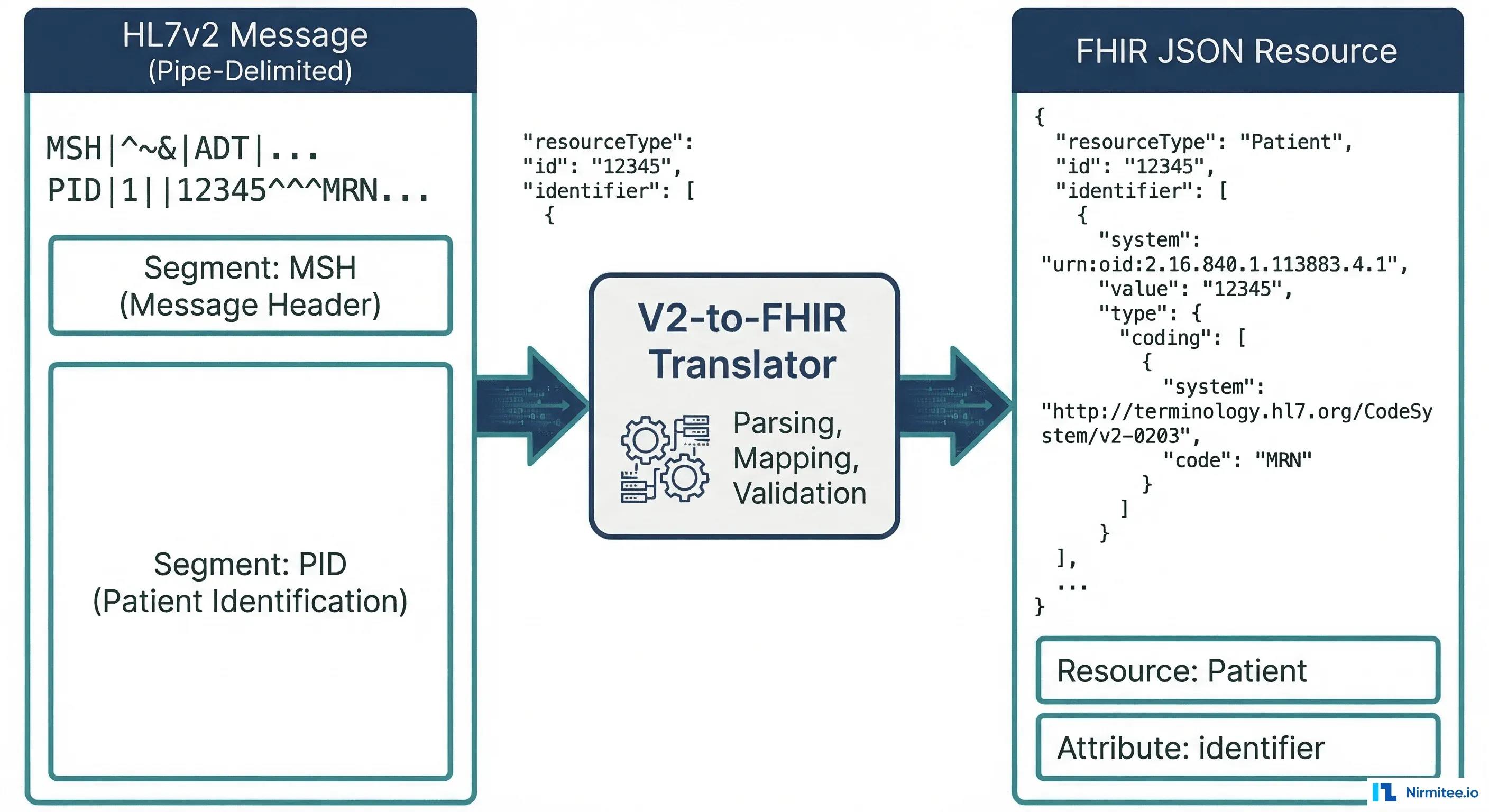
ADT (Admit/Discharge/Transfer) messages are the most common V2 message type. An ADT^A01 (admit notification) contains patient demographics, visit information, and next-of-kin data. Let's map each segment to its FHIR equivalent.
PID Segment to FHIR Patient Resource
The PID (Patient Identification) segment contains the core demographics. Here's a real V2 PID segment:
PID|1||MRN-12345^^^HOSP^MR~SSN-999-88-7777^^^SSA^SS||Smith^John^A^^Mr.||19800615|M|||123 Main St^^Springfield^IL^62704^US||^PRN^PH^^1^217^5551234|^WPN^PH^^1^217^5555678||M|CAT|ACCT-9876|||||||N||||||NThis maps to the following FHIR Patient resource:
{
  "resourceType": "Patient",
  "identifier": [
    {
      "use": "usual",
      "type": {
        "coding": [{
          "system": "http://terminology.hl7.org/CodeSystem/v2-0203",
          "code": "MR",
          "display": "Medical Record Number"
        }]
      },
      "system": "urn:oid:1.2.3.4.5.6.7",
      "value": "MRN-12345"
    },
    {
      "type": {
        "coding": [{
          "system": "http://terminology.hl7.org/CodeSystem/v2-0203",
          "code": "SS",
          "display": "Social Security Number"
        }]
      },
      "system": "http://hl7.org/fhir/sid/us-ssn",
      "value": "999-88-7777"
    }
  ],
  "name": [{
    "use": "official",
    "family": "Smith",
    "given": ["John", "A"],
    "prefix": ["Mr."]
  }],
  "birthDate": "1980-06-15",
  "gender": "male",
  "address": [{
    "use": "home",
    "line": ["123 Main St"],
    "city": "Springfield",
    "state": "IL",
    "postalCode": "62704",
    "country": "US"
  }],
  "telecom": [
    {
      "system": "phone",
      "value": "+1-217-555-1234",
      "use": "home"
    },
    {
      "system": "phone",
      "value": "+1-217-555-5678",
      "use": "work"
    }
  ],
  "maritalStatus": {
    "coding": [{
      "system": "http://terminology.hl7.org/CodeSystem/v3-MaritalStatus",
      "code": "M",
      "display": "Married"
    }]
  }
}
Key mapping decisions:
- PID-3 (Patient Identifier List) maps to
Patient.identifier[]. Each repetition becomes a separate identifier. The assigning authority (component 4) maps toidentifier.system, and the identifier type code (component 5) maps toidentifier.type. - PID-5 (Patient Name) maps to
Patient.name[]. Family name is component 1, given name is component 2, middle name becomes a second entry in thegivenarray. - PID-7 (Date of Birth) maps to
Patient.birthDate. V2 uses YYYYMMDD format; FHIR requires YYYY-MM-DD (ISO 8601). This seems trivial, but breaks if the V2 system sends partial dates like "198006" (year-month only). - PID-8 (Sex) maps to
Patient.gender. V2 uses single characters (M, F, O, U); FHIR uses full words (male, female, other, unknown).
PV1 Segment to FHIR Encounter Resource
The PV1 (Patient Visit) segment describes the clinical encounter context:
PV1|1|I|ICU^0301^01^^^^HOSP|||ATT^Jones^Sarah^^^Dr.|||MED||||ADM|||ATT^Jones^Sarah^^^Dr.|IN||||||||||||||||||HOSP|||||||20260101083000|20260105140000This maps to:
{
  "resourceType": "Encounter",
  "status": "in-progress",
  "class": {
    "system": "http://terminology.hl7.org/CodeSystem/v3-ActCode",
    "code": "IMP",
    "display": "inpatient encounter"
  },
  "type": [{
    "coding": [{
      "system": "http://terminology.hl7.org/CodeSystem/v2-0007",
      "code": "MED",
      "display": "Medical"
    }]
  }],
  "subject": {
    "reference": "Patient/MRN-12345"
  },
  "participant": [{
    "type": [{
      "coding": [{
        "system": "http://terminology.hl7.org/CodeSystem/v3-ParticipationType",
        "code": "ATND",
        "display": "attender"
      }]
    }],
    "individual": {
      "reference": "Practitioner/ATT-jones",
      "display": "Dr. Sarah Jones"
    }
  }],
  "period": {
    "start": "2026-01-01T08:30:00",
    "end": "2026-01-05T14:00:00"
  },
  "location": [{
    "location": {
      "reference": "Location/ICU-0301-01",
      "display": "ICU Room 0301, Bed 01"
    },
    "status": "active"
  }],
  "hospitalization": {
    "admitSource": {
      "coding": [{
        "system": "http://terminology.hl7.org/CodeSystem/admit-source",
        "code": "hosp-trans"
      }]
    }
  }
}
Key mapping decisions:
- PV1-2 (Patient Class) maps to
Encounter.class. V2 uses codes like I (Inpatient), O (Outpatient), E (Emergency); these must be translated to the FHIR ActCode system: IMP, AMB, EMER respectively. This is one of the most common mapping errors. - PV1-3 (Assigned Patient Location) maps to
Encounter.location[]. The V2 location is a composite field (point of care^room^bed^facility); you typically need to create or reference a FHIR Location resource for each component. - PV1-44/PV1-45 (Admit/Discharge DateTime) maps to
Encounter.period.startandEncounter.period.end. Again, V2 uses YYYYMMDDHHMMSS while FHIR requires ISO 8601.
NK1 Segment to FHIR RelatedPerson Resource
The NK1 (Next of Kin) segment maps to the FHIR RelatedPerson resource:
NK1|1|Smith^Jane^^Mrs.|SPO^Spouse^HL70063|456 Oak Ave^^Springfield^IL^62704|^PRN^PH^^1^217^5559999||EC^Emergency Contact^HL70131{
"resourceType": "RelatedPerson",
"patient": {
"reference": "Patient/MRN-12345"
},
"relationship": [{
"coding": [{
"system": "http://terminology.hl7.org/CodeSystem/v2-0063",
"code": "SPO",
"display": "Spouse"
}]
}],
"name": [{
"family": "Smith",
"given": ["Jane"],
"prefix": ["Mrs."]
}],
"telecom": [{
"system": "phone",
"value": "+1-217-555-9999",
"use": "home"
}],
"address": [{
"line": ["456 Oak Ave"],
"city": "Springfield",
"state": "IL",
"postalCode": "62704"
}]
}How do ORM order messages map to FHIR?
ORM (Order) messages are the second most common V2 message type. An ORM^O01 communicates clinical orders between systems (lab orders, radiology orders, medication orders). The key segments are ORC (Common Order) and OBR (Observation Request).
ORC Segment to FHIR ServiceRequest
The ORC (Common Order) segment carries the order control information:
ORC|NW|ORD-2026-001^HIS|LAB-2026-001^LAB||CM||^^^20260115083000^^R||20260115080000|NURSE^Johnson^Mary|||CLI^Main Clinic^HOSP|^WPN^PH^^1^217^5552000||||||HOSP^Springfield General{
"resourceType": "ServiceRequest",
"identifier": [
{
"type": {
"coding": [{
"system": "http://terminology.hl7.org/CodeSystem/v2-0203",
"code": "PLAC",
"display": "Placer Identifier"
}]
},
"system": "urn:oid:1.2.3.4.5.6.8",
"value": "ORD-2026-001"
},
{
"type": {
"coding": [{
"system": "http://terminology.hl7.org/CodeSystem/v2-0203",
"code": "FILL",
"display": "Filler Identifier"
}]
},
"system": "urn:oid:1.2.3.4.5.6.9",
"value": "LAB-2026-001"
}
],
"status": "completed",
"intent": "order",
"priority": "routine",
"authoredOn": "2026-01-15T08:00:00",
"requester": {
"reference": "Practitioner/nurse-johnson-mary",
"display": "Mary Johnson"
}
}Key mapping decisions:
- ORC-1 (Order Control) determines the ServiceRequest's
statusand whether this is a new request or an update. NW (New Order) maps tostatus: active. CA (Cancel) maps tostatus: revoked. SC (Status Changed) updates the existing ServiceRequest. - ORC-2 (Placer Order Number) maps to
ServiceRequest.identifierwith type PLAC. This is critical for order tracking across systems. - ORC-3 (Filler Order Number) maps to
ServiceRequest.identifierwith type FILL. The filler order number is assigned by the receiving (fulfilling) system. - ORC-5 (Order Status) maps to
ServiceRequest.status. V2 codes: CM (Completed), IP (In Progress), SC (Scheduled), CA (Cancelled) must map to FHIR values: completed, active, active, revoked.
OBR Segment to FHIR ServiceRequest
The OBR (Observation Request) segment adds the clinical details to the order:
OBR|1|ORD-2026-001^HIS|LAB-2026-001^LAB|80053^Comprehensive Metabolic Panel^CPT4|||20260115083000|||||||20260115090000||ATT^Jones^Sarah^^^Dr.||||||20260115140000||LAB|F||^^^20260115083000^^RThe OBR fields merge into the same ServiceRequest created from ORC:
{
  "resourceType": "ServiceRequest",
  "identifier": [
    {
      "type": { "coding": [{ "code": "PLAC" }] },
      "value": "ORD-2026-001"
    }
  ],
  "status": "completed",
  "intent": "order",
  "code": {
    "coding": [{
      "system": "http://www.ama-assn.org/go/cpt",
      "code": "80053",
      "display": "Comprehensive Metabolic Panel"
    }]
  },
  "subject": {
    "reference": "Patient/MRN-12345"
  },
  "occurrencePeriod": {
    "start": "2026-01-15T08:30:00",
    "end": "2026-01-15T14:00:00"
  },
  "requester": {
    "reference": "Practitioner/ATT-jones",
    "display": "Dr. Sarah Jones"
  },
  "performer": [{
    "reference": "Organization/lab-dept"
  }]
}
Important: ORC and OBR both contribute to the same ServiceRequest resource. ORC provides administrative details (who ordered, when, order identifiers), while OBR provides clinical details (what was ordered, specimens, results timing). Your translator must merge both segments into a single resource, not create duplicates.
How do ORU result messages map to FHIR?
ORU (Observation Result) messages carry lab results, vital signs, and diagnostic reports. The ORU^R01 is the workhorse of clinical data exchange. The critical mapping challenge is that a single ORU message maps to multiple FHIR resources: a DiagnosticReport as the container, with individual Observation resources for each result.
OBX Segment to FHIR Observation
Each OBX (Observation) segment carries a single result value:
OBX|1|NM|2345-7^Glucose^LN||98|mg/dL|74-106|N|||F|||20260115143000||LAB^AutoAnalyzer^L
OBX|2|NM|2160-0^Creatinine^LN||1.1|mg/dL|0.7-1.3|N|||F|||20260115143000||LAB^AutoAnalyzer^L
OBX|3|NM|3094-0^BUN^LN||15|mg/dL|7-20|N|||F|||20260115143000||LAB^AutoAnalyzer^L
OBX|4|NM|17861-6^Calcium^LN||9.4|mg/dL|8.5-10.5|N|||F|||20260115143000||LAB^AutoAnalyzer^L
Each OBX becomes a separate FHIR Observation. Here's the first one (Glucose):
{
  "resourceType": "Observation",
  "status": "final",
  "category": [{
    "coding": [{
      "system": "http://terminology.hl7.org/CodeSystem/observation-category",
      "code": "laboratory",
      "display": "Laboratory"
    }]
  }],
  "code": {
    "coding": [{
      "system": "http://loinc.org",
      "code": "2345-7",
      "display": "Glucose [Mass/volume] in Serum or Plasma"
    }]
  },
  "subject": {
    "reference": "Patient/MRN-12345"
  },
  "effectiveDateTime": "2026-01-15T14:30:00",
  "valueQuantity": {
    "value": 98,
    "unit": "mg/dL",
    "system": "http://unitsofmeasure.org",
    "code": "mg/dL"
  },
  "referenceRange": [{
    "low": { "value": 74, "unit": "mg/dL" },
    "high": { "value": 106, "unit": "mg/dL" }
  }],
  "interpretation": [{
    "coding": [{
      "system": "http://terminology.hl7.org/CodeSystem/v3-ObservationInterpretation",
      "code": "N",
      "display": "Normal"
    }]
  }]
}
Key mapping decisions:
- OBX-2 (Value Type) determines the FHIR value field. NM (Numeric) maps to
valueQuantity. ST/TX/FT (String/Text/Formatted Text) maps tovalueString. CWE/CE (Coded Entry) maps tovalueCodeableConcept. This is where many implementations break, because the same OBX segment structure holds radically different data types. - OBX-3 (Observation Identifier) maps to
Observation.code. When the V2 system sends LOINC codes (as shown above with "LN" as the coding system identifier), the mapping is straightforward. When they send local codes, you need a terminology mapping table. - OBX-7 (Reference Range) maps to
Observation.referenceRange[]. V2 sends this as a string like "74-106" that you must parse into structuredlowandhighvalues. Watch out for ranges like ">60", "<=3.5", or text-based ranges like "Negative". - OBX-8 (Interpretation Codes) maps to
Observation.interpretation. V2 uses H (High), L (Low), N (Normal), A (Abnormal), HH (Critical High), LL (Critical Low). These map directly to the FHIR ObservationInterpretation code system. - OBX-11 (Observation Result Status) maps to
Observation.status. F (Final) = final, P (Preliminary) = preliminary, C (Correction) = corrected, X (Delete) = cancelled.
Full ORU to FHIR DiagnosticReport
The complete ORU^R01 message wraps all the OBX results into a DiagnosticReport bundle. The OBR segment from the ORU message maps to DiagnosticReport (not ServiceRequest, as it does in ORM context):
{
  "resourceType": "DiagnosticReport",
  "status": "final",
  "category": [{
    "coding": [{
      "system": "http://terminology.hl7.org/CodeSystem/v2-0074",
      "code": "LAB",
      "display": "Laboratory"
    }]
  }],
  "code": {
    "coding": [{
      "system": "http://www.ama-assn.org/go/cpt",
      "code": "80053",
      "display": "Comprehensive Metabolic Panel"
    }]
  },
  "subject": {
    "reference": "Patient/MRN-12345"
  },
  "effectivePeriod": {
    "start": "2026-01-15T08:30:00",
    "end": "2026-01-15T14:30:00"
  },
  "issued": "2026-01-15T14:30:00.000Z",
  "performer": [{
    "reference": "Organization/lab-dept"
  }],
  "result": [
    { "reference": "Observation/glucose-001" },
    { "reference": "Observation/creatinine-001" },
    { "reference": "Observation/bun-001" },
    { "reference": "Observation/calcium-001" }
  ],
  "basedOn": [{
    "reference": "ServiceRequest/ORD-2026-001"
  }]
}
The final output is a FHIR Bundle of type "transaction" containing the DiagnosticReport plus all referenced Observation resources, linked by the result array. The basedOn element links back to the original order's ServiceRequest. Our FHIR Bundle resource guide explains how transaction and batch Bundles behave differently when one entry fails.
What breaks in production HL7 v2 to FHIR translation?
The official mappings cover the standard cases; production breaks on local codes, time zones, missing required elements, backfill volume, character encoding and identifiers. Plan for each of these before go-live.
1. Local Codes vs. Standard Terminologies
The HL7 V2-to-FHIR Implementation Guide assumes your V2 messages use standard coding systems (LOINC for observations, SNOMED CT for diagnoses, CPT for procedures). In reality, many v2 feeds use local codes. Your lab system might send OBX-3 as GLU^Glucose^L instead of 2345-7^Glucose^LN.
Solution: Build a terminology mapping service. Maintain a ConceptMap resource that maps local codes to standard terminologies. Use the UMLS Metathesaurus as a starting point, and expect a share of local codes to need manual curation. FHIR ConceptMap resources are the right place to keep these mappings as a maintained reference; budget real time for this work, because it is where most migrations underestimate effort.
// Terminology mapping lookup pseudocode
function mapToStandardCode(localCode, localSystem) {
  // Check ConceptMap first
  let mapping = conceptMapLookup(localSystem, localCode);
  if (mapping) return mapping;

  // Fall back to UMLS search
  let umlsResult = umlsSearch(localCode);
  if (umlsResult.confidence > 0.9) return umlsResult;

  // Last resort: include local code with extension
  return {
    coding: [
      { system: localSystem, code: localCode },
      { system: "http://terminology.hl7.org/CodeSystem/data-absent-reason",
        code: "unmapped" }
    ]
  };
}
2. Timezone Handling
V2 timestamps use the format YYYYMMDDHHMMSS[.SSSS][+/-ZZZZ]. The timezone offset is optional and frequently omitted. FHIR requires ISO 8601 with explicit timezone information for dateTime elements. When a V2 system sends 20260115083000 without a timezone, you must decide: is this UTC? Local server time? The patient's timezone?
Solution: Establish a default timezone per sending facility. Store it in your integration engine's configuration. Document the assumption explicitly in your implementation guide. Never silently convert, always tag converted timestamps with the originalText extension so downstream consumers know the timezone was inferred.
3. Missing Required FHIR Elements
FHIR has mandatory elements that V2 leaves entirely optional. For example, Encounter.status is required in FHIR, but V2 has no single field that directly maps to encounter status, you infer it from the message type (A01 = in-progress, A03 = finished). Similarly, Observation.status is required, but OBX-11 might be empty in some V2 implementations. Our guide to the FHIR Encounter resource lists the Encounter status values and shows which PV1 fields drive them.
Solution: Build a defaults table keyed by message type and segment position. When a required FHIR element has no V2 source, apply the default. Log every default application for audit. Use the Data Absent Reason extension when you genuinely cannot determine a value.
4. Batch vs. Real-Time Performance
A single ADT^A01 translates in milliseconds, but a backfill of millions of historical ADT messages can take weeks if every resource is written to the FHIR server one request at a time. Throughput changes dramatically between individual POST requests and FHIR batch or transaction bundles.
Solution: For historical backfill, use FHIR Transaction Bundles with 50-100 resources per bundle. Enable server-side batch processing. For real-time, process individual messages but use connection pooling and async writes. Measure your FHIR server's throughput under load before committing to a timeline.
5. Character Encoding
V2 was designed in the ASCII era. Many V2 implementations use ISO-8859-1 or Windows-1252 encoding, not UTF-8. Patient names with accents (Jose vs. Jose), addresses with special characters, and clinical notes with em-dashes will break if you don't explicitly handle encoding conversion before FHIR serialization.
Solution: Detect encoding from MSH-18 (Character Set) when populated. Default to ISO-8859-1 for V2 messages without explicit encoding. Convert to UTF-8 at the edge of your translator. Validate with a test suite that includes multilingual patient names.
6. Identifier System Reconciliation
A single patient in a health system might have an MRN from Hospital A, a different MRN from Hospital B, an enterprise patient ID, an SSN, and a health plan ID, all appearing in different PID-3 repetitions from different V2 feeds. FHIR's Patient.identifier[] can hold all of these, but you need a consistent system URI for each identifier type across all your V2 sources.
Solution: Create an identifier system registry as an OID-to-URI mapping table. Assign a canonical FHIR system URI to every known V2 assigning authority. Use a consistent mental model for how identifiers flow across systems. This registry becomes one of your most critical configuration artifacts.
How do you test and validate the FHIR output?
Validate every generated resource against the profiles you claim, from the first sprint. Three tools cover most teams: the HAPI FHIR validator for structural and profile checks in the pipeline, ONC's Inferno test kits for US Core and SMART conformance, and Synthea for realistic synthetic patients so testing never needs real PHI. Our HL7 v2 to FHIR mapping guide lists the US Core validation errors teams hit most often and how to fix them.
Which integration engine should run the translation?
Use an engine you can staff and support for years: Rhapsody when you want a vendor-supported enterprise platform, Mirth Connect when you want a widely used engine with a large community of engineers who know it, and a custom build only when your transformation logic is genuinely unique.
| Criteria | Rhapsody | Mirth Connect | Custom build |
|---|---|---|---|
| Licensing | Commercial license | Open-source releases ended with 4.5.2; current versions need a NextGen commercial license | No license; you carry the engineering cost |
| HL7 v2 parsing | Built-in parser with segment and field access | Built-in parser with JavaScript transformers | Libraries such as HAPI v2 (Java) or python-hl7 |
| FHIR R4 | FHIR toolkit with resource validation | FHIR connector and transformer scripting | HAPI FHIR, Firely SDK or your own models |
| High availability | Active/passive and container clustering | Clustering needs extra setup or the commercial clustering option | Whatever you design and operate |
| Best for | Large health systems wanting vendor support and SLAs | Teams that want a proven engine and a large hiring pool | Unusual requirements and teams with deep FHIR skills |
Whichever you choose, build on a proper FHIR library, not hand-assembled JSON. For current Mirth licence costs, see our Mirth Connect pricing guide.
What does a complete ADT^A01 to FHIR translation look like?
Here's how a complete ADT^A01 V2 message translates into a FHIR Transaction Bundle. This is what your translator needs to produce:
MSH|^~\&|ADT|HOSP|FHIR|DEST|20260115083000||ADT^A01^ADT_A01|MSG-001|P|2.5.1
PID|1||MRN-12345^^^HOSP^MR||Smith^John^A^^Mr.||19800615|M|||123 Main St^^Springfield^IL^62704^US
NK1|1|Smith^Jane^^Mrs.|SPO^Spouse|456 Oak Ave^^Springfield^IL^62704|^PRN^PH^^1^217^5559999
PV1|1|I|ICU^0301^01||||ATT^Jones^Sarah^^^Dr.|||MED||||||||IN|||||||||||||||||||20260115083000
Produces this FHIR Transaction Bundle:
{
  "resourceType": "Bundle",
  "type": "transaction",
  "entry": [
    {
      "fullUrl": "urn:uuid:patient-001",
      "resource": {
        "resourceType": "Patient",
        "identifier": [{ "value": "MRN-12345", "system": "urn:oid:1.2.3.4" }],
        "name": [{ "family": "Smith", "given": ["John", "A"], "prefix": ["Mr."] }],
        "birthDate": "1980-06-15",
        "gender": "male",
        "address": [{ "line": ["123 Main St"], "city": "Springfield", "state": "IL", "postalCode": "62704", "country": "US" }]
      },
      "request": { "method": "PUT", "url": "Patient?identifier=urn:oid:1.2.3.4|MRN-12345" }
    },
    {
      "fullUrl": "urn:uuid:encounter-001",
      "resource": {
        "resourceType": "Encounter",
        "status": "in-progress",
        "class": { "system": "http://terminology.hl7.org/CodeSystem/v3-ActCode", "code": "IMP" },
        "subject": { "reference": "urn:uuid:patient-001" },
        "participant": [{ "individual": { "display": "Dr. Sarah Jones" } }],
        "period": { "start": "2026-01-15T08:30:00" },
        "location": [{ "location": { "display": "ICU Room 0301, Bed 01" } }]
      },
      "request": { "method": "POST", "url": "Encounter" }
    },
    {
      "fullUrl": "urn:uuid:relatedperson-001",
      "resource": {
        "resourceType": "RelatedPerson",
        "patient": { "reference": "urn:uuid:patient-001" },
        "name": [{ "family": "Smith", "given": ["Jane"], "prefix": ["Mrs."] }],
        "relationship": [{ "coding": [{ "system": "http://terminology.hl7.org/CodeSystem/v2-0063", "code": "SPO" }] }]
      },
      "request": { "method": "POST", "url": "RelatedPerson" }
    }
  ]
}
Notice the use of urn:uuid: references within the Bundle for cross-resource linking, and the conditional PUT for Patient (upsert by identifier) versus POST for Encounter and RelatedPerson (always create new).
What mistakes slow HL7 v2 to FHIR migrations down?
Five mistakes account for most overruns: converting everything at once, neglecting the v2 feeds that still run the hospital, underestimating mapping and terminology work, skipping the parallel run, and having no rollback plan.
- Boiling the ocean. Migrate in small waves and stabilize between them.
- Starving HL7 v2 operations. Existing feeds still need fixes and new partners may still need v2; keep part of the integration team on v2 operations throughout.
- Underestimating mapping. Z-segments, local codes and non-standard field use make every organization's mapping different. Add generous contingency to mapping and validation estimates.
- Skipping the parallel run. Running v2 and FHIR side by side and comparing outputs catches the discrepancies testing misses.
- No rollback. If the FHIR path fails in production you must be able to revert to v2 in minutes.
Frequently asked questions
How do you migrate from HL7 v2 to FHIR?
Run both side by side. Keep the existing v2 feeds, add a translation layer (usually your integration engine plus a FHIR server) that turns v2 messages into FHIR resources, build every new integration on FHIR, and convert old interfaces in small waves only where it pays off.
Will HL7 v2 go away after a FHIR migration?
No. Labs, devices, pharmacies and older EHRs will keep sending HL7 v2 for years, so plan for coexistence. Many simple, high-volume v2 feeds are best left as they are.
What are the main architecture patterns for HL7 v2 to FHIR?
A FHIR facade that translates API requests into existing v2 flows, dual-write to v2 consumers and a FHIR server, and an event-driven bridge through a message broker such as Kafka. All three sit inside a coexistence architecture where legacy systems keep sending v2 and apps consume only FHIR.
How long does an HL7 v2 to FHIR migration take?
It depends on the number of interfaces and your reason for migrating. A compliance-only scope (expose the required FHIR APIs) is far smaller than modernizing every interface. Plan in phases measured in months: inventory, bridge, FHIR-first for new work, then waves of conversion, with a parallel run for each converted interface.
Should we wait for FHIR R5?
No. US regulation is built on FHIR R4 with US Core, including US Core 6.1.0 for USCDI v3, so build on R4 today.
How do you handle Z-segments that have no FHIR equivalent?
Decide field by field: map to a standard element if one fits, carry the data in a FHIR extension defined in your implementation guide, or drop it with a documented reason. Never let Z-segment data disappear silently.
Which integration engine should run the translation?
Choose one you can staff for years: Rhapsody for a vendor-supported enterprise platform, Mirth Connect for a widely used engine with a large pool of engineers (current versions need a commercial license), or a custom build on HAPI or Firely libraries only when your logic is genuinely unique.
Where should you start?
Start with ADT: it touches every system and produces the Patient and Encounter resources everything else references. Build the terminology mapping service early, use the HL7 Version 2 to FHIR Implementation Guide's ConceptMaps as your reference, validate with Inferno from the start, and budget for months of dual running. Every one of these flows begins at an HL7 interface; if you want help building the translation layer, our FHIR integration team does this work, and our team has built 350+ interfaces on Mirth Connect.
Planning a migration? Tell us about your interfaces or talk to our team.
Frequently Asked Questions
How do you migrate from HL7 v2 to FHIR?
Will HL7 v2 go away after a FHIR migration?
What are the main architecture patterns for HL7 v2 to FHIR?
How long does an HL7 v2 to FHIR migration take?
Should we wait for FHIR R5?
How do you handle Z-segments that have no FHIR equivalent?
Which integration engine should run the translation?


