Mirth Connect on AWS: HA Reference Architecture with Terraform (Production-Grade)

CTO & Co-Founder
CTO & Co-Founder at Nirmitee.io. Architects healthcare integrations across FHIR, SMART on FHIR, ABDM and NHCX, writing from production experience taking hospital software from sandbox to go-live.
Running an HL7 interface engine in production is not a Docker Compose exercise. Mirth Connect, sitting in front of hospital ADT feeds, lab result streams, claims pipelines, and EHR write-backs, has to survive Availability Zone failures, encrypt every PHI byte at rest and in transit, scale with message volume, log every administrative action, and pass a HIPAA audit on day one.
The cost of getting it wrong is not just downtime; it is a breach notification, a corrective action plan, and a halted go-live.
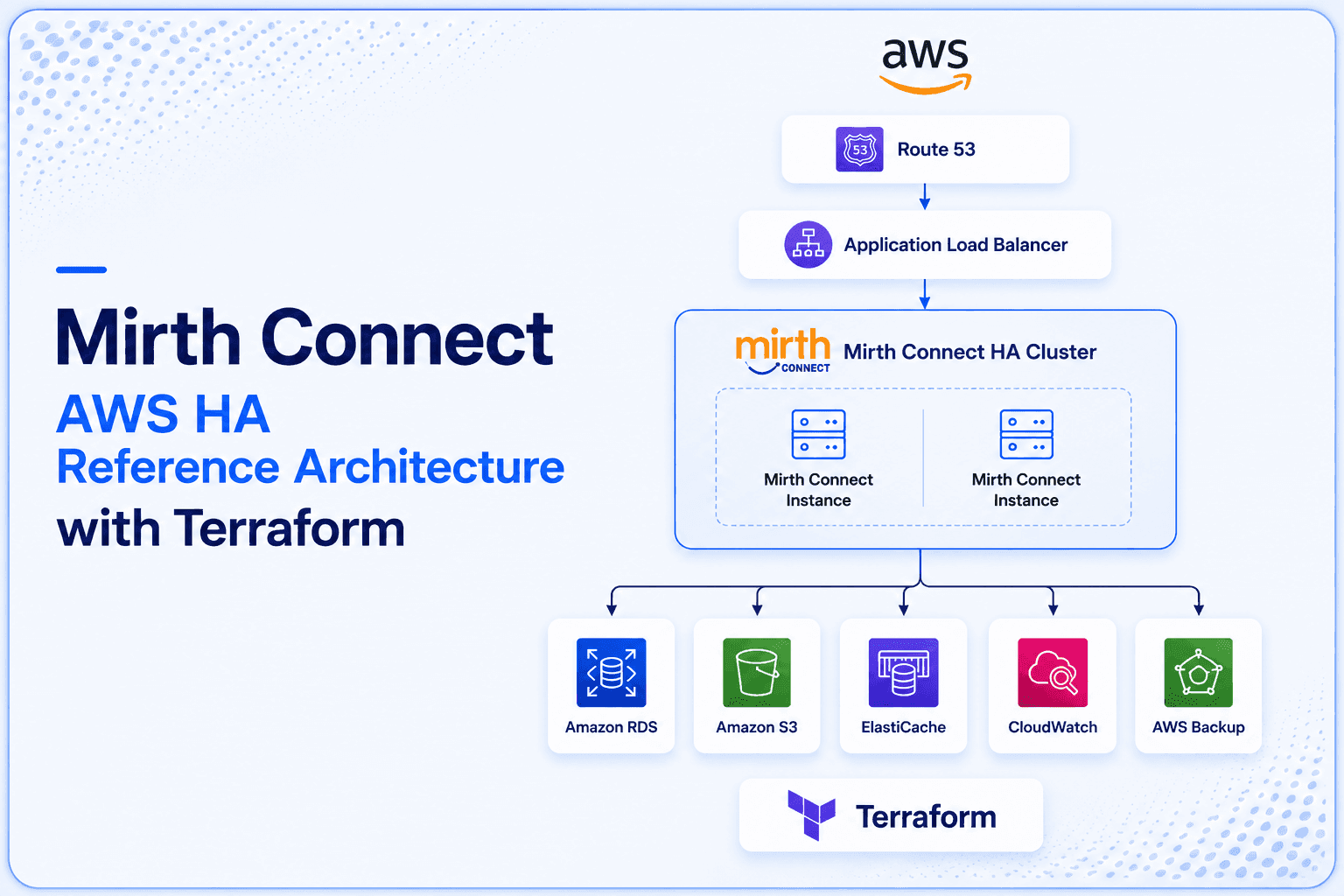
This is the production-grade reference architecture our team deploys for hospitals, payers, and digital health platforms that run Mirth Connect on AWS. It covers the full stack, multi-AZ ECS Fargate, RDS PostgreSQL Multi-AZ, dual load balancers for admin and HL7 traffic, ElastiCache for shared state, KMS-backed encryption, CloudTrail audit trail, and cross-region disaster recovery.
The accompanying Terraform module is available as a public GitHub repo, so you can fork it, customise it, and run terraform apply In your own AWS account this week.
Why "Mirth on EC2" Is Not a Production Architecture
A single Mirth Connect instance on EC2 is not a production architecture because it has a single point of failure with no automatic recovery. When the instance stops — for maintenance, a hardware fault, or an AZ outage — all channel processing stops and messages queue or drop. A production architecture distributes Mirth across multiple compute instances in multiple Availability Zones with a shared backing database so no single failure brings down the integration layer.
The most common Mirth deployment we audit looks like this: a single EC2 instance running the Mirth JAR, a co-located PostgreSQL database on the same box, channel XML committed nowhere, no backup beyond an occasional EBS snapshot, and the admin console exposed to the internet on port 8443 with a self-signed certificate. It survives until it doesn't, and when it falls over, the on-call engineer is reverse-engineering channel state from an AMI backup at 3 AM while ADT messages queue up in the upstream EHR.
The problems with the single-EC2 pattern are structural, not incidental:
- No high availability. An EC2 failure, an EBS volume corruption, or an AZ-level outage takes the entire interface engine down. There is no automatic failover.
- No horizontal scaling. The JVM heap and CPU-bound Mirth's destination throughput on a single node. You cannot grow past one box without re-architecting.
- Database co-location. Mirth's metadata, messages, and statistics database competing for IO with the channel runtime is a textbook performance anti-pattern.
- Stateful local storage. Channel attachments, file readers, and writers point to the local disk. The moment you scale out, the file state diverges between nodes.
- No audit trail. Mirth's built-in event log is not HIPAA-grade audit logging. You need CloudTrail, CloudWatch Logs and VPC Flow Logs alongside it.
- No infrastructure-as-code. Re-creating the environment after a failure means hand-clicking through the AWS console and hoping you remember every security group rule.
Every problem above is solved by treating Mirth Connect as a stateless container running on top of managed AWS services. The architecture below does exactly that.
The Reference Architecture: Multi-AZ ECS Fargate
The production Mirth Connect reference architecture on AWS uses ECS Fargate (not EC2) across multiple Availability Zones: an Application Load Balancer routes MLLP and HTTPS traffic to Fargate tasks running the Mirth container, a shared Amazon RDS PostgreSQL Multi-AZ instance backs the Mirth database, Amazon EFS provides shared storage for channel exports and code templates, and Secrets Manager stores all credentials. Fargate eliminates instance management; RDS Multi-AZ provides automatic database failover.
The target topology has six load-bearing components: ECS Fargate for Mirth task execution, an Application Load Balancer for HTTPS admin and API traffic, a Network Load Balancer for MLLP HL7 listeners, RDS PostgreSQL Multi-AZ for backend state, ElastiCache for distributed locks and shared cache, and S3 for attachments. Every component runs across at least two Availability Zones.
1. Compute Layer, ECS Fargate, Not EC2 or Kubernetes
We default to ECS Fargate over EC2-backed ECS, EKS, or self-managed Kubernetes for one simple reason: Mirth Connect doesn't need orchestration features that justify the operational cost of EKS. Fargate gives us a serverless container runtime, per-task ENI, IAM task roles, and zero patching of the underlying host, which means one fewer surface for the HIPAA audit team to question.
The Mirth task definition allocates 2 vCPU and 4 GB of RAM by default, with JVM heap set to -Xmx3g to leave headroom for the container OS. The container image is a hardened Mirth Connect build (we use Mirth 4.5 LTS as the baseline, with Log4j and Tomcat libraries pinned to current CVE-free versions). Channel XML is mounted from S3 at startup via an init container; the running task is fully stateless and can be replaced at will.
Two Fargate tasks run as the steady-state baseline (one per AZ), with auto-scaling triggered by CPU and ALB request count. For a 10K messages-per-day deployment, this is over-provisioned; for 1M messages-per-day deployments, we scale to eight tasks with cluster auto-scaling on the RDS side.
2. Admin Traffic, ALB with WebSocket Support
The Mirth Administrator (the Java Web Start client and the newer browser-based admin) talks to the Mirth server over HTTPS, including persistent WebSocket connections for live dashboard updates. An Application Load Balancer in the public subnets terminates TLS using an ACM-issued certificate, then forwards traffic to the ECS service target group on port 8443.
Two ALB configuration details matter: (a) idle timeout must be raised to 300 seconds so the admin WebSocket doesn't drop during long deployments, and (b) sticky sessions are enabled using lb_cookie so the same admin session stays pinned to one Mirth task. Without stickiness, the admin client gets state-mismatch errors as it round-robins across nodes.
3. HL7 MLLP, Network Load Balancer
HL7 v2 MLLP is a raw TCP protocol, there is no HTTP envelope, no host header, no Layer-7 routing. ALB cannot route it. The Network Load Balancer is the correct AWS construct: it operates at Layer 4, preserves client source IPs, and forwards TCP streams unmodified to the Mirth MLLP listeners.
For each upstream HL7 sender (Epic interface, Cerner interface, lab feed, ADT broker), we expose a dedicated NLB listener on a unique TCP port, typically 6661 for ADT, 6662 for ORM/ORU, 6663 for results, and so on. The MLLP source channel inside Mirth binds to the corresponding port. Because NLB preserves source IP, the Mirth source connector can apply IP allow-lists at the Java level as a second layer beyond the security group.
4. Backend Database, RDS PostgreSQL Multi-AZ
Mirth's backend database stores channel definitions, message metadata, statistics, and the message store itself when persistence is enabled. We run PostgreSQL on RDS Multi-AZ, never MySQL, never Aurora Serverless (the cold-start latency wrecks Mirth's startup), never co-located on the same box as the engine.
A db.m6g.large A multi-AZ instance is the right starting point for 10K-100K messages/day; it provides synchronous standby replication to the second AZ and automatic failover within 60-120 seconds.
We enable automated backups with a 35-day retention window, encryption at rest using a customer-managed KMS key, and Performance Insights to surface slow Mirth queries (which are usually the d_mm message table scans hospitals discover when channel pruning hasn't been configured).
5. Shared State, ElastiCache Redis
Multiple Mirth nodes need to coordinate on three things: distributed locks for once-only message delivery, shared rate-limit counters, and cached destination connector responses (especially for FHIR reference resolution). ElastiCache Redis with cluster mode and an encryption-in-transit configuration handles all three.
For a two-node deployment, a single A cache.t3.medium Redis instance with automatic failover is sufficient. At scale, we run a three-shard cluster with one replica per shard, distributed across all available AZs.
6. Attachment Storage, S3 with Lifecycle Policies
HL7 messages frequently carry attachments, CDA documents, base64-encoded PDFs, and lab result images. Storing these in the RDS message table balloons the database size and IO cost. The pattern we recommend: route attachments to S3 via a custom Mirth destination, store only the S3 key in the message metadata, and apply an S3 lifecycle policy to transition objects to S3 Standard-IA after 90 days and Glacier Deep Archive after 365 days. For a typical hospital, this drops attachment storage cost by 70-80% compared to keeping them in RDS.
Related reading: Mirth Connect Database Growing? Pruning + Archive Guide 2026.
Network Topology: VPC Layout That Passes a HIPAA Audit
The HIPAA-compliant VPC layout for Mirth Connect: public subnets in 2+ AZs hold the Application Load Balancer only; private subnets in 2+ AZs hold the Fargate tasks and RDS instances; no PHI-handling component sits in a public subnet. Security groups restrict MLLP ports (6661–666x) to trusted interface partner CIDRs only, admin port 8443 to your VPN CIDR only, and database port 5432 to the Fargate task security group only within the VPC. All traffic between components stays within the VPC.
The VPC is a single regional VPC with three subnet tiers across two Availability Zones, public for load balancers and NAT gateways, private application for ECS tasks, and database for RDS and ElastiCache. There are no public IPs on any compute or data resource.
Subnet Plan
| Tier | AZ-A CIDR | AZ-B CIDR | Contains |
|---|---|---|---|
| Public | 10.0.1.0/24 | 10.0.2.0/24 | ALB, NLB, NAT Gateway |
| Private App | 10.0.10.0/24 | 10.0.11.0/24 | ECS Fargate tasks |
| Database | 10.0.20.0/24 | 10.0.21.0/24 | RDS PostgreSQL, ElastiCache |
VPC Endpoints Are Non-Negotiable
Without VPC endpoints, every ECS pull from ECR, every Secrets Manager fetch, every CloudWatch log upload, and every S3 attachment write traverses the public internet via NAT, which is both a security finding and a cost line item. We provision four endpoints by default:
- S3 Gateway endpoint: free, routes attachment traffic, and ECR Docker image layer pulls directly to S3
- ECR Interface endpoint (and
com.amazonaws.region.ecr.api), keeps container image pulls in-VPC - Secrets Manager Interface endpoint: Mirth fetches DB credentials and channel secrets at startup without leaving the VPC
- CloudWatch Logs Interface endpoint: log shipping stays internal
Security Group Architecture
Each tier has its own security group, with rules expressed in terms of other security groups rather than CIDR blocks. This is the single most important security-group practice on AWS: it makes the rules self-documenting and resilient to IP changes.
alb-sg: ingress 443 from 0.0.0.0/0; ingress 8443 from corporate VPN CIDR for adminnlb-sg: ingress on MLLP ports (6661-6669) from upstream sender public IPs onlyecs-sg: ingress 8443 fromalb-sg; ingress 6661-6669 fromnlb-sg; no other ingressrds-sg: ingress 5432 fromecs-sgonlyredis-sg: ingress 6379 fromecs-sgonly
HIPAA Technical Safeguards: AWS Service Mapping
HIPAA technical safeguard requirements map to AWS services as follows: encryption at rest → RDS encryption + EFS encryption + S3 SSE; encryption in transit → TLS 1.2+ on ALB + in-transit encryption on EFS; access control → IAM roles for Fargate tasks, Secrets Manager for credentials, no hardcoded passwords; audit controls → CloudWatch Logs for all Mirth output, CloudTrail for API calls, S3 access logs; integrity controls → RDS automated backups + point-in-time recovery; transmission security → VPN or AWS Direct Connect for interface partner connections.
Running Mirth Connect on AWS does not automatically make you HIPAA-compliant. AWS provides services that enable compliance; the configuration is your responsibility. The 45 CFR § 164.312 Technical Safeguards section of the HIPAA Security Rule names five categories of controls. Here is how we map each to AWS services for a Mirth deployment.
Access Control (§ 164.312(a))
- IAM roles for ECS tasks: the Mirth container receives temporary credentials, never long-lived access keys
- IAM Identity Center (formerly AWS SSO) for human admin access, with MFA enforced
- Resource-based policies on KMS and S3: only the Mirth task role can decrypt attachments or fetch secrets
- Automatic logoff on the Mirth admin console, configured via the Mirth server property
server.idle.timeout
Audit Controls (§ 164.312(b))
- CloudTrail organization trail: every API call against the AWS account, including console logins, IAM changes, and KMS key usage
- CloudWatch Logs: Mirth application logs streamed via the FireLens log driver in the ECS task definition
- VPC Flow Logs: every accepted and rejected packet at the ENI level, retained 90+ days
- AWS Config: continuous configuration recording with managed rules for encrypted RDS, encrypted EBS, no public S3 buckets, and CloudTrail enabled
- Mirth's internal event log: replicated to CloudWatch and S3 for long-term retention beyond the Mirth database
Integrity (§ 164.312(c))
- KMS encryption at rest for RDS, S3, EBS, ElastiCache and Secrets Manager, all with customer-managed CMKs
- S3 Object Lock in compliance mode for the audit log bucket and the channel XML archive
- RDS automated backups with point-in-time recovery enabled
- AWS Backup centralised backup vault with cross-region copy for disaster recovery
Person or Entity Authentication (§ 164.312(d))
- MFA mandatory for every IAM Identity Center user via SAML federation to the corporate identity provider (Okta, Azure AD, Google Workspace)
- Mirth Administrator authentication backed by LDAP or Cognito user pool, never local Mirth users
- IAM roles for ECS tasks rotate credentials automatically via the ECS task metadata endpoint
- Short-lived credentials only: no static IAM access keys for any service principal
Transmission Security (§ 164.312(e))
- ACM-issued TLS certificates for the ALB, with TLS 1.2 minimum policy
- MLLP-over-TLS, where the upstream sender supports it, Mirth's MLLP source connector can be wrapped in a TLS listener with mutual authentication
- VPN or AWS PrivateLink for traffic from on-premises EHR systems, never public-internet MLLP without TLS
- S3 bucket policies denying any request that arrives over plain HTTP
The BAA Question
AWS will sign a Business Associate Addendum (BAA) at no charge as part of your AWS Organization agreement. The BAA covers all HIPAA-eligible services; the current list includes ECS, Fargate, RDS, ElastiCache, S3, KMS, CloudTrail, CloudWatch, Secrets Manager, ALB and NLB. Verify before you architect: AWS publishes the list at aws.amazon.com/compliance/hipaa-eligible-services-reference, and a service not on the list cannot store, process, or transmit PHI.
Cost Breakdown: What This Actually Costs to Run
A production Mirth Connect HA deployment on AWS runs approximately $800–$1,400/month for a standard workload: ECS Fargate (2 tasks × 2 vCPU / 4GB) ~$200–$300/month, RDS PostgreSQL Multi-AZ (db.t3.medium) ~$150–$250/month, ALB ~$30–$50/month, EFS ~$30–$100/month depending on storage, CloudWatch ~$50–$100/month, NAT Gateway ~$100–$150/month, data transfer ~$50–$100/month. High-volume deployments with larger task sizes and Multi-AZ across 3 AZs run $2,000–$4,000/month.
One of the most common reasons hospitals stay on a single EC2 box is the assumption that Multi-AZ everything will be five-figure monthly. It is not. The reference architecture above, sized for 10,000 messages per day with two Mirth tasks, lands at approximately $1,800 per month on-demand in us-east-1.
Where the Money Goes
| Component | Configuration | Monthly Cost |
|---|---|---|
| ECS Fargate | 2 tasks, 2 vCPU + 4 GB, 24×7 | ~$630 |
| RDS PostgreSQL Multi-AZ | db.m6g.large, 100 GB gp3, 35-day backup | ~$450 |
| Data Transfer | Cross-AZ + egress to upstream HL7 senders | ~$216 |
| CloudWatch | Logs ingestion, metrics, alarms, dashboards | ~$180 |
| S3 | Attachments + lifecycle to IA/Glacier | ~$144 |
| ElastiCache | cache.t3.medium with replica | ~$108 |
| NAT Gateway, ALB, NLB, ACM, Route 53 | Networking + DNS | ~$72 |
| Total | ~$1,800/mo |
Cost Optimisation Levers
The same architecture can drop to $1,100-1,200 per month with the right commitments, without compromising HA:
- Compute Savings Plans: a one-year Compute Savings Plan covering the baseline Fargate spend yields ~30% savings on the ECS line. Three-year plans get to ~50%. The Mirth task baseline is highly predictable, so this is essentially free money.
- Reserved Instances for RDS: a one-year reserved instance for the db.m6g.large saves ~40%. Three-year savings ~60%.
- S3 Intelligent-Tiering: instead of manually tiering attachments, let S3 move them automatically; saves another 15-25% on attachment storage with zero ops cost.
- RDS scheduled scaling for dev/staging: non-prod environments don't need to be Multi-AZ or running 24×7. Lambda-based scheduled start/stop drops dev RDS cost by 70%.
- Fargate Spot for non-prod: staging Mirth tasks on Fargate Spot saves up to 70%. We do not use Spot for production; Mirth's startup time (60-120 seconds) is too long to recover gracefully from a Spot interruption mid-message-batch.
- CloudWatch Logs retention: set log groups to 30-day retention by default; only the audit log group and CloudTrail bucket need long-term retention for HIPAA.
Capacity Planning: Sizing for Real Workloads
Mirth's bottleneck is rarely Mirth itself; it is the JVM heap, the destination connector concurrency, or the underlying database. The sizing table below reflects the configurations we have benchmarked in production for hospitals and payers.
| Tier | Throughput | ECS Tasks | Task Size | RDS | ElastiCache | Est. $/mo |
|---|---|---|---|---|---|---|
| Small | ≤ 10 msg/sec | 2 | 1 vCPU / 2 GB | db.t3.medium Multi-AZ | cache.t3.micro | $650 |
| Medium | 10-100 msg/sec | 4 (with auto-scale) | 2 vCPU / 4 GB | db.m6g.large Multi-AZ | cache.m6g.large | $1,800 |
| Large | 100-1,000 msg/sec | 8-16 (auto-scale) | 4 vCPU / 8 GB | db.m6g.2xlarge Multi-AZ + read replica | cache.m6g.xlarge cluster | $5,400 |
| XL | 1,000+ msg/sec | Custom, talk to us | Custom | db.r6g.4xlarge + replicas | 3-shard cluster | $12K+ |
For deep tuning at the Mirth process level, JVM heap sizing, destination queue concurrency, and database connection pool tuning, see our detailed guide on Mirth Connect performance tuning and the related piece on setting up Mirth Connect for high availability.
Observability: CloudWatch + Prometheus, Not Either-Or
Production Mirth Connect monitoring on AWS uses both CloudWatch and Prometheus — not either-or. CloudWatch Logs captures all Mirth stdout/stderr and channel output for compliance and debugging. Prometheus scrapes Mirth's JMX metrics (message count, error rate, queue depth, JVM heap) via a sidecar container. Grafana dashboards visualise queue depth per channel and alert on anomalies. PagerDuty receives alerts for queue depth over 1,000, error rate over 1%, and JVM heap over 85%.
Mirth Connect on AWS needs two observability layers. CloudWatch handles the AWS-native side, ECS task health, RDS performance metrics, ALB and NLB request counts and target health, KMS API errors, and CloudTrail anomalies. Prometheus (with a Grafana frontend or AMP/AMG) handles the Mirth-specific side, per-channel message counts, queue depths, destination connector latency, error rates, and JVM heap utilisation.
The integration pattern is straightforward: Mirth exposes JMX metrics, which we scrape using jmx_exporter running as a sidecar in the same ECS task definition. The sidecar exposes a /metrics endpoint that Amazon Managed Prometheus scrapes via its remote-write agent. CloudWatch metrics are surfaced in the same Grafana dashboard via the CloudWatch data source, so the on-call engineer sees both layers in one place.
Critical alarms we always provision:
- ECS service unhealthy task count > 0 for 5 minutes
- RDS CPU > 80% for 10 minutes
- RDS free storage space < 20%
- ALB 5XX error rate > 1% for 5 minutes
- NLB unhealthy target count > 0
- Mirth channel error count > 10/minute (custom Prometheus alert)
- Mirth queue depth > 1,000 messages on any destination (custom Prometheus alert)
- KMS API throttle errors > 0
For the full Mirth-specific monitoring stack, see reliable Mirth Connect monitoring.
Secrets Management: Mirth, Postgres, EHR Credentials
All Mirth Connect credentials on AWS must go through Secrets Manager — never in environment variables, never in mirth.properties committed to Git. Three secret sets: (1) Mirth admin credentials (used by the Fargate task to configure channels programmatically), (2) RDS PostgreSQL credentials (referenced in mirth.properties via Secrets Manager SDK call at container startup), (3) EHR interface credentials (API keys, SFTP keys, MLLP certs — stored as SecureStrings and injected into channel config at deploy time).
Mirth deployments have at least four credential types: the Mirth database connection string, channel destination credentials (Epic, Cerner, lab systems, downstream APIs), the Mirth admin user password, and the LDAP bind credentials. None of these belong in mirth.properties in plain text.
We store everything in AWS Secrets Manager, with one secret per credential and an automatic rotation Lambda for the RDS credentials. The Mirth container fetches secrets at startup via the AWS SDK using its task role, there is no aws_access_key_id anywhere in the container or the AMI. For channel-level secrets that need to be available to Mirth's JavaScript transformers, we expose them via the Mirth Configuration Map, which is itself populated from Secrets Manager at task startup.
The Secrets Manager pattern also makes credential rotation a non-event: rotate the RDS password, and the next Mirth task restart picks up the new value. No channel downtime, no manual reconfiguration.
Terraform Module Structure
The Terraform module structure for Mirth Connect on AWS: modules/vpc (VPC, subnets, route tables, NAT gateways), modules/ecs-mirth (ECS cluster, task definition, Fargate service, IAM role), modules/rds (PostgreSQL Multi-AZ, parameter group, subnet group), modules/alb (ALB, target group, listeners, health check on port 8443), modules/efs (EFS file system, mount targets, access point), modules/monitoring (CloudWatch log groups, alarms, SNS topic). Each module is independently versioned and reusable across dev/staging/prod.
Infrastructure-as-code is non-negotiable for a production Mirth deployment. Hand-clicked AWS environments are unreviewable, undocumentable and unrecoverable. We publish our Mirth AWS Terraform module as an open reference, the structure below is what you should expect from any serious interoperability infrastructure codebase.
Module Layout
mirth-aws/
├── README.md
├── main.tf
├── variables.tf
├── outputs.tf
├── versions.tf
├── modules/
│   ├── network/         # VPC, subnets, NAT, VPC endpoints
│   ├── compute/         # ECS cluster, service, task def, ALB, NLB
│   ├── database/        # RDS PostgreSQL, ElastiCache, Secrets
│   ├── monitoring/      # CloudWatch dashboards, alarms, log groups
│   └── security/        # IAM roles, KMS keys, security groups
└── environments/
    ├── dev/
    │   ├── terraform.tfvars
    │   └── backend.tf
    ├── staging/
    │   ├── terraform.tfvars
    │   └── backend.tf
    └── prod/
        ├── terraform.tfvars
        └── backend.tf
Sample Root Configuration
module "network" {
  source = "./modules/network"

  vpc_cidr            = "10.0.0.0/16"
  availability_zones  = ["us-east-1a", "us-east-1b"]
  enable_vpc_endpoints = true
  tags                = local.common_tags
}

module "database" {
  source = "./modules/database"

  vpc_id              = module.network.vpc_id
  database_subnet_ids = module.network.database_subnet_ids
  ecs_security_group  = module.compute.ecs_security_group_id

  instance_class      = "db.m6g.large"
  multi_az            = true
  storage_encrypted   = true
  kms_key_arn         = module.security.rds_kms_key_arn
  backup_retention    = 35
}

module "compute" {
  source = "./modules/compute"

  vpc_id             = module.network.vpc_id
  public_subnet_ids  = module.network.public_subnet_ids
  private_subnet_ids = module.network.private_subnet_ids

  mirth_image        = "ghcr.io/your-org/mirth-hardened:4.5.2"
  task_cpu           = 2048
  task_memory        = 4096
  desired_count      = 2

  db_endpoint        = module.database.endpoint
  db_secret_arn      = module.database.credentials_secret_arn
  redis_endpoint     = module.database.redis_endpoint

  mllp_ports         = [6661, 6662, 6663]
  admin_certificate_arn = var.admin_acm_arn
}

module "monitoring" {
  source = "./modules/monitoring"

  ecs_cluster_name = module.compute.cluster_name
  ecs_service_name = module.compute.service_name
  rds_identifier   = module.database.identifier
  alarm_sns_topic  = var.ops_sns_topic_arn
}
State Management and Workflow
Each environment has its own remote state bucket and DynamoDB lock table; never share state across environments. The CI workflow runs terraform plan On every pull request, requires human approval before terraform apply on production, and stores plan output as a PR comment for review.
For teams adopting Mirth on AWS for the first time, we open-source the module and run a hands-on architecture review session; see the lead-magnet section at the end of this post.
Disaster Recovery: Cross-Region Replication
Cross-region disaster recovery for Mirth Connect on AWS: RDS automated backups replicate to the DR region daily (configure backup retention at 7 days).
Mirth channel configurations are exported nightly to S3 with cross-region replication enabled. The Terraform modules are stored in Git and can redeploy the full stack in the DR region in under 2 hours. RTO target: 2 hours. RPO target: 24 hours for channel config, 5 minutes for message data (RDS Multi-AZ synchronous replication within the primary region).
Multi-AZ protects against AZ failures. It does not protect against region failures, accidental deletion of the entire VPC, or a compromised root account. For tier-1 deployments (hospitals running ADT and orders through Mirth as the primary integration backbone), we add a cross-region DR strategy with a 30-minute RTO and 5-minute RPO target.
What Replicates Where
- Channel XML: committed to Git (GitHub or CodeCommit). The DR region's ECS task pulls the same image and the same XML from the same Git repo at startup. No replication lag because nothing is replicating; both regions read from the source of truth.
- RDS PostgreSQL: a cross-region read replica running in us-west-2, replicating asynchronously from the us-east-1 primary. Typical lag is under one minute. In a failover, the read replica is promoted to a standalone Multi-AZ primary.
- S3 attachments: Cross-Region Replication (CRR) configured on the source bucket, with the destination bucket in us-west-2. Replication is asynchronous but typically completes within seconds for objects under a few MB.
- Secrets Manager: secrets are replicated to us-west-2 using Secrets Manager's built-in multi-region replication.
- Route 53 health checks: primary record points at the us-east-1 ALB; a secondary failover record points at us-west-2. On health-check failure, Route 53 fails over DNS within 60 seconds.
Failover Process
- Primary region health check fails (ALB unreachable, ECS service down)
- Operations confirms incident (not a Route 53 false positive)
- Promote RDS read replica in us-west-2 to a standalone
- Scale ECS service in us-west-2 from 0 desired tasks to 2
- Verify Mirth admin reachable, channels deployed, MLLP listeners bound
- Update Route 53 weighted records to send 100% traffic to us-west-2
- Notify upstream HL7 senders to confirm reconnection on the failover NLB endpoint
Total time from incident detection to message-flow restoration: 20-30 minutes with practiced runbooks. We rehearse this quarterly for every client we host; paper-only DR plans fail at 3 AM. The RPO depends on how recent the last replicated RDS transaction is; in steady state, this is under one minute.
Cost of DR
A warm-standby DR region adds roughly 40-50% to the base architecture cost, the RDS read replica is a full instance, the ECS tasks are scaled to zero (so essentially free), and the S3 storage is duplicated. For a $1,800/month primary, expect $2,500-2,700/month total with DR. Skip DR if your tolerance is 24-hour region-outage recovery and you trust backups; do not skip it if Mirth is in the critical path for patient care.
Common Anti-Patterns We See
The five most common Mirth Connect AWS anti-patterns: (1) single EC2 instance with no failover — when it stops, everything stops; (2) RDS in single-AZ mode — one AZ outage takes down the database and all channels; (3) Mirth admin port 8443 exposed to 0.0.0.0/0 — the admin console has no rate limiting and accepts brute-force attacks; (4) PHI in CloudWatch Logs without log scrubbing — Mirth's default logs include message bodies, which is a HIPAA violation; (5) no dead-letter channel — failed messages are silently dropped with no recovery path.
Architecting Mirth on AWS is as much about what not to do. The patterns below come up in nearly every client engagement.
- EBS-backed Mirth with channel state on local disk. The moment you scale out, two nodes write to different file readers, and you lose ordering guarantees. Externalise all state to RDS, ElastiCache and S3.
- One ALB for both admin and MLLP. ALB does not route TCP. Even if you front MLLP with a Network Load Balancer, do not co-locate it with HTTPS admin, separate target groups, separate listeners, separate failure modes.
- Mirth's admin console is exposed on 0.0.0.0/0. The admin port should be behind a VPN or a strict source-IP allow list. Public exposure is a common finding in our pre-audit reviews.
- Aurora Serverless for the Mirth database. Cold starts and scaling pauses do not play well with Mirth's connection pool. Use provisioned RDS PostgreSQL.
- No connection pooling between Mirth and RDS. Mirth's default pool is small. Tune it via the
mirth.propertiesDatabase connection settings to match the destination connector concurrency.
- CloudWatch Logs without metric filters. Logs without filters are landfill. Provision metric filters that count ERROR-level log lines, expose them as CloudWatch metrics, and alarm on them.
- Skipping VPC Flow Logs. Auditors will ask for them. Provide them by default with a 90-day retention.
- Self-signed certificates on the admin ALB. ACM-issued certs are free and auto-rotate. There is no excuse.
When Mirth on AWS Is Not the Answer
The architecture above assumes Mirth Connect is the right interface engine for your roadmap. Since the August 2024 license change, that is a fresh strategic question for every team running Mirth in production.
If you are evaluating alternatives, see our breakdown of Mirth Connect alternatives in 2026 after the licensing change and the detailed Mirth vs Rhapsody vs Iguana comparison. The open-source BridgeLink fork is also a viable path for teams that want to stay on the NextGen Connect codebase without the commercial dependency. The AWS reference architecture in this post applies equally well to BridgeLink, the same ECS task pattern, the same RDS backend, the same observability stack.
From Reference to Production: How We Help Teams Get There
Reading an architecture diagram is one thing; running terraform apply In your AWS account with your HIPAA controls, your security team's review, your existing VPC peering, and your live HL7 feeds is another. The Terraform module is open; fork it, customise it, ship it. If you want a faster path, we offer two things to teams getting started.
Free Architecture Review (45 minutes). Bring your current Mirth Connect topology, your AWS account structure, your message volumes, and your compliance constraints. We will walk through the reference architecture, flag risks specific to your environment, identify cost optimisation opportunities, and leave you with a concrete migration plan. No sales pitch, engineering-to-engineering. Book a slot via our team page.
End-to-End Deployment. If you would rather not own the Terraform, the IAM design, the runbooks, and the four-week migration project internally, we run end-to-end Mirth-on-AWS implementations as fixed-scope engagements. Architecture, infrastructure, channel migration, observability, runbooks, and a HIPAA-aligned handover.
For more depth on the upstream Mirth-side work, channel design, performance, and security hardening, see our guides on building a robust HL7 interface engine with Mirth, Mirth security hardening for Log4j and HIPAA, and the top 10 Mirth integration failures we have seen in production
Ready to scale?
Talk to our healthcare engineering team about building, integrating, and shipping faster.
Frequently Asked Questions
What is the recommended AWS architecture for Mirth Connect high availability?
How do you deploy Mirth Connect on AWS with Terraform?
Can Mirth Connect run on multiple nodes sharing one database?
What ports does Mirth Connect need open in AWS security groups?
How do you handle Mirth Connect failover on AWS?