The Anatomy of a Mirth Connect Support Contract

CTO & Co-Founder
CTO & Co-Founder at Nirmitee.io. Architects healthcare integrations across FHIR, SMART on FHIR, ABDM and NHCX, writing from production experience taking hospital software from sandbox to go-live.
If you have ever had a Mirth Connect production outage at 2am and watched your support vendor reply with "we will look at it in the morning," you already know the truth about most support contracts: the SLA is the product. Everything else is marketing.
In 2026, Mirth Connect support is a different market than it was three years ago. The Mirth Commercial Extensions transition pushed thousands of hospitals and HIEs to evaluate paid support for the first time. New vendors entered the space. Old vendors changed their pricing. And procurement teams who used to rubber-stamp an MSA are now reading every line — because a bad Mirth Connect support contract can cost more in one outage than the entire annual fee.
This guide is for the person on the buy side. The CIO, the IT director, the procurement lead, or the integration architect who has been told "go find us a support vendor." We will walk through every clause that should be in a real Mirth support agreement, show you the sample MSA language to ask for, flag the red flags that signal a bad vendor, and give you a 12-point scorecard to compare proposals side by side.
Why the SLA is the Whole Contract
The SLA is the only section of a Mirth support contract that determines whether your ADT feeds flow during a Joint Commission survey or your lab results reach the EHR before the physician walks in. Every other clause — IP ownership, termination terms, liability cap — matters only if the SLA holds up. A real Mirth SLA has five non-negotiable components: severity matrix, response and resolution time commitments, coverage hours with named escalation, maintenance cadence, and performance commitments tied to your message volume.
A Mirth Connect SLA is not a marketing document. It is the operational contract that determines whether your ADT feed flows during a Joint Commission survey, whether your lab results reach the EHR before the physician walks into the room, and whether you have someone to call when log4j 2.x ships its next zero-day. Every other section of the MSA — IP ownership, termination terms, liability cap — matters only if the SLA holds up.
Here is the uncomfortable reality: most "Mirth support contracts" you will see in 2026 are repurposed generic IT support agreements with the word "Mirth" added to the SOW. They contain no severity matrix, no response-time commitments tied to specific scenarios, no penalty for missed SLAs, and no language about HL7 message backlogs, channel failures, or interface engine performance. If your prospective vendor cannot show you a Mirth-specific severity matrix in their first proposal, that is your first red flag.
A real Mirth support contract has five non-negotiable components: a severity matrix, response and resolution time commitments per severity, coverage hours with named escalation, a maintenance and patch cadence, and performance commitments tied to your specific message volume. Everything else — pricing model, communication channels, reporting cadence — is negotiable. These five are not.
The Severity Matrix: How Your Vendor Decides What "Urgent" Means
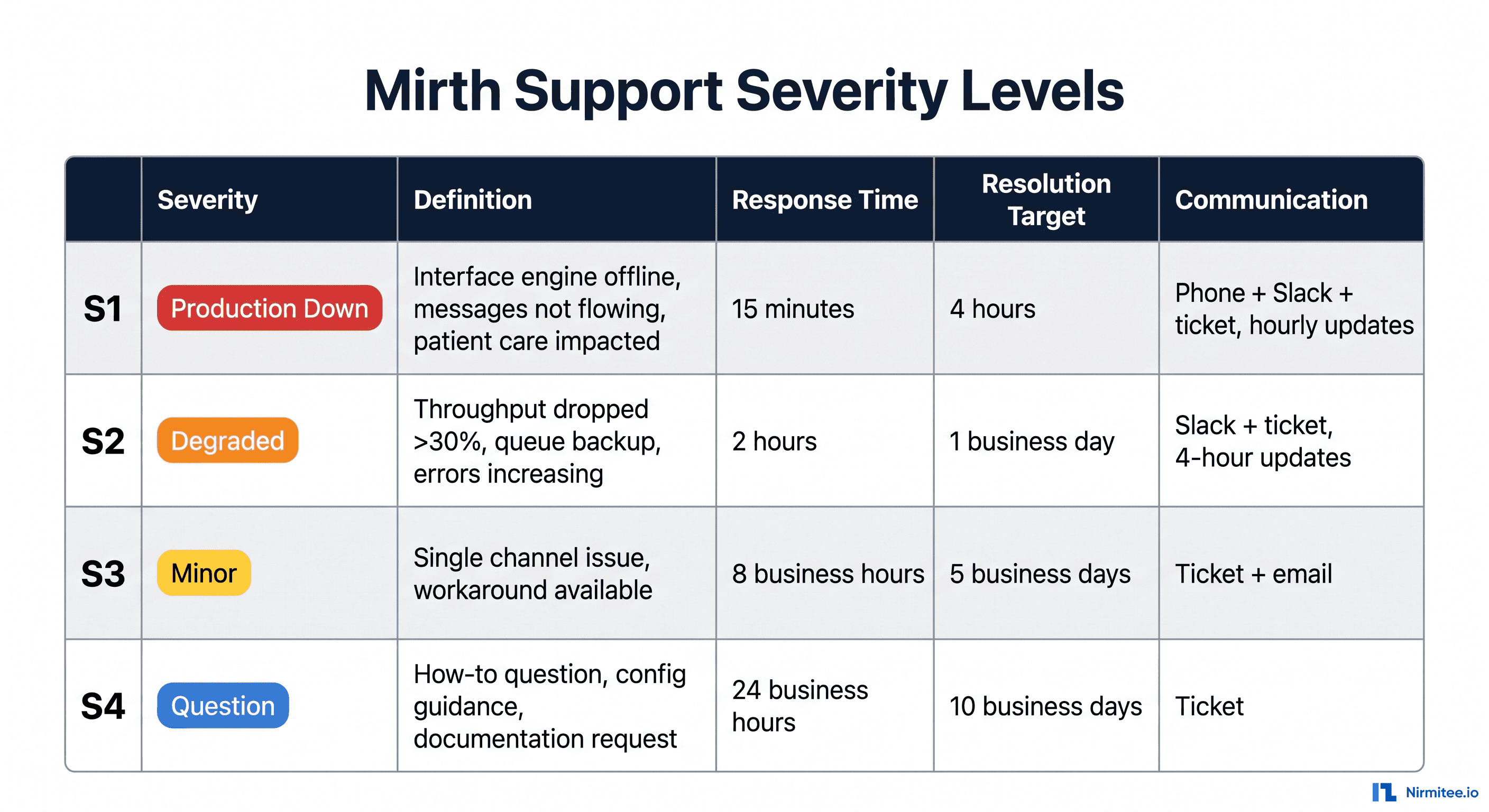
A Mirth Connect severity matrix has four tiers: S1 (production down — engine offline, no message flow, patient care impacted), S2 (severely degraded — throughput dropped >30%, critical channel failing), S3 (minor issue — single non-critical channel, workaround available), S4 (question or enhancement request, no production impact). Without this matrix in the contract, your vendor decides what is urgent based on their workload, not your patients.
Without a defined severity matrix, your vendor decides what is urgent based on their workload, not your patients. Every Mirth support contract needs a four-tier matrix that maps real failure modes to response commitments.
S1 — Production Down. The Mirth Connect server is offline, the interface engine has crashed, or message flow has stopped entirely. Patient care is impacted because clinicians cannot see lab results, ADT feeds are not posting to the EHR, or orders are stuck. S1 is binary. Either messages are flowing or they are not. There is no S1 "kind of."
S2 — Severely Degraded. Mirth is running, but throughput has dropped by more than 30 percent, queue depth is growing, errors are accumulating, or a critical channel (lab results, ADT, orders) is failing while others work. A clinical workflow is impacted but not stopped. The classic S2 is "the lab interface dropped from 12,000 messages an hour to 800 and queue depth is climbing."
S3 — Minor Issue. A single non-critical channel has issues, performance is mildly degraded, or there is a workaround available. Example: the radiology interface is dropping 2 percent of messages on a specific Z-segment edge case, but the workaround is to re-send manually until the fix is in. Operations continue.
S4 — Question or Request. A how-to question, configuration guidance, documentation request, or non-urgent enhancement. No production impact. Example: "what is the best way to add a new ORM filter for our cardiology department?"
The matrix must include not just the severity definition but also: response time, resolution time target, communication cadence, and the channel through which updates will be delivered. Here is the structure to ask for:
SEVERITY MATRIX (Exhibit B to SLA)

S1 - Production Down
  Definition:       Interface engine offline; no message flow; patient care impacted
  Response:         15 minutes (24x7 - phone + Slack)
  Resolution:       4 hours target; 8 hours hard cap
  Communication:    Hourly written updates until resolution
  Escalation:       Engineer L1 -> L2 (1hr) -> CTO (2hr)
  Service Credit:   10% monthly fee per hour over 4hr SLA

S2 - Severely Degraded
  Definition:       Throughput dropped >30%, queue backup, critical channel failing
  Response:         2 hours (24x7)
  Resolution:       1 business day target
  Communication:    4-hour updates via ticket + Slack
  Escalation:       L1 -> L2 (4hr) -> CTO (8hr)
  Service Credit:   5% monthly fee per business day over SLA

S3 - Minor Issue
  Definition:       Single channel issue, workaround available
  Response:         8 business hours
  Resolution:       5 business days
  Communication:    Daily ticket updates
  Escalation:       Standard queue

S4 - Question / Request
  Definition:       Configuration question, documentation, enhancement
  Response:         24 business hours
  Resolution:       10 business days or by mutual agreement
  Communication:    Ticket updates as warranted
Notice the service credit language. Without financial consequence, an SLA is a wish. With service credits — typically 5 to 25 percent of the monthly fee per hour or day of breach — the SLA becomes a real commitment. Most healthcare procurement teams underestimate how much this changes vendor behavior.
Response Time vs. Resolution Time: Don't Confuse Them
Response time and resolution time are different commitments and both must be in the contract. Response time is elapsed clock from your page until a qualified engineer (not a chatbot) confirms they are working on it — should be 15 minutes for S1. Resolution time is elapsed clock until message flow is restored — should be 4 hours target, 8 hours hard cap for S1. "Best effort" and "reasonable timeframe" are not resolution time commitments. Demand specific hours with service credits for breach of both.
This is the single most common contract trap. Vendors love to promise a "15-minute response time" for S1. That is great — it means someone will reply within 15 minutes. It tells you nothing about when the problem will be fixed.
Response time is the elapsed clock from your ticket open or page until a qualified engineer (not a chatbot, not "we received your ticket") acknowledges the issue and confirms they are working on it. For S1 in a 24x7 contract, this should be 15 minutes maximum. For S2, two hours. Anything longer for S1 in a production hospital environment is unacceptable.
Resolution time is the elapsed clock from response until the problem is actually fixed and message flow is restored. This is harder to commit to because root cause varies — a JVM tuning issue and a corrupt H2 database have different resolution profiles. But the contract must commit to a target. "Best effort" is not a target. "Reasonable timeframe" is not a target. A specific number of hours, with service credits for breach, is a target.
For a well-run Mirth support practice, S1 resolution targets should sit in the 4-to-8 hour window with a hard cap. S2 should be one business day. S3 should be five business days. If a vendor refuses to commit to resolution targets, they are telling you their on-call rotation is one tired engineer who does not want to be held accountable.
Coverage Tiers: 24x7, Business Hours, or On-Demand
Three coverage tiers exist in 2026: 24x7 Premium ($15K–$25K/month) with a real on-call rotation of at least 3 engineers and documented handoff — for hospitals, large HIEs, and any environment where a 3am outage causes patient harm; Business Hours ($5K–$12K/month) for stable environments with a capable internal team; On-Demand ($150–$250/hour, no retainer) for dev environments and non-clinical use cases only. Never use on-demand for production clinical workflows.
Not every Mirth deployment needs 24x7 coverage. The right tier depends on your clinical risk profile, message volume, and your internal team's ability to triage off-hours. Here is how the three coverage tiers actually break down in 2026 pricing:
24x7 Premium ($15K-$25K/month). Genuine round-the-clock coverage with a real on-call rotation — not one engineer with a pager. The right vendor has at least three engineers in the rotation, with documented handoff procedures, and a phone tree that escalates if the primary on-call does not acknowledge within 5 minutes. Best for hospitals, large HIEs, RCM platforms, and any environment where a 3am outage means real patient harm or revenue loss.
Business Hours ($5K-$12K/month). Coverage Monday through Friday, typically 8am to 6pm in your local time zone. After hours falls to internal team or accumulates until next business day. Best for stable production environments where the internal team can hold the line overnight, or for mid-sized health systems that have phased their critical workflows to daytime.
On-Demand ($150-$250/hour, no retainer). Pay only when you need help. No SLA commitment. Best for development environments, non-clinical use cases, or organizations that have a strong internal team and just need surge capacity. Do not use this for production clinical workflows.
One nuance: "24x7" can mean different things. Some vendors offer 24x7 ticket monitoring but only attempt resolution during business hours. Others offer 24x7 response but 8x5 resolution. The contract must specify both — when will someone respond, and when will they actually start fixing it. Demand the resolution clock match the response clock for S1.
Communication Channels and Cadence
For S1 incidents, the communication channel priority order must be: (1) phone hotline with documented primary and backup on-call numbers, (2) shared Slack or Teams channel for real-time collaboration, (3) ticketing system for audit trail, (4) email for non-urgent updates. Written updates every hour during an active S1 are non-negotiable — not because the engineer needs to type, but because writing forces structured thinking and creates an audit trail for post-incident review.
How will you reach your vendor when Mirth crashes at 11pm? If the answer is "submit a ticket," walk away. A serious Mirth support contract specifies the channels in priority order:
- Phone hotline for S1 (with documented numbers for primary and backup on-call)
- Shared Slack or Teams channel for real-time collaboration with your team
- Ticketing system for tracking, audit trail, and metric reporting
- Email for non-urgent communication and weekly digests
The cadence of updates matters as much as the channels. For an active S1, you want written updates every hour — not because the engineer needs to type, but because writing forces structured thinking and creates an audit trail for post-incident review. For S2, updates every 4 hours. For S3, daily.
Demand a post-incident report for every S1 within 5 business days. The report should include root cause, timeline of events, what was fixed, and what changed to prevent recurrence. If you do not get post-incident reports, you have no way to know whether the vendor is actually improving your system or just patching the same symptom every month.
Maintenance Windows and Patch Cadence
The contract must define four patch categories explicitly: critical security patches (CVE High/Critical) deploy to test within 14 days, production within 30 days; non-critical point releases on a quarterly cadence; major version upgrades (e.g. 4.x to 5.x) are separate SOW projects with a rollback plan; JVM and OS patching — state explicitly whether the vendor or your infrastructure team owns each layer. Silence on patching responsibility is a red flag.
Mirth Connect is a security-sensitive interface engine that runs Java, sits in your DMZ, and handles PHI. It needs patches. Your support contract must define who is responsible for what.
Mirth version upgrades. Major version upgrades (4.x to 5.x) are scoped projects, not routine maintenance. The contract should commit to delivering an upgrade plan within 30 days of a new major version release, with rollback procedures and test plan. Pricing for the upgrade itself is typically a separate SOW.
Mirth point releases and security patches. Critical security patches (CVE-rated High or Critical) should ship to your test environment within 14 days of upstream release, with production rollout within 30 days. Non-critical point releases follow a quarterly cadence. The contract must commit to a specific cadence — not "as needed."
JVM and OS patching. Often falls in a gray zone between Mirth support and infrastructure support. Make sure the contract is explicit. Either the vendor handles JVM and OS patching for the Mirth host, or you do. There is no "we will look at it" middle ground.
Maintenance windows. The contract should define standard maintenance windows (typically a 4-hour window on a Sunday between 1 am and 5 am local time) and the notice period required for changes outside the window (typically 7 days). Emergency maintenance for critical security patches should have a shorter notice period (24 hours) with an explicit approval workflow.
For background on patch discipline in production Mirth environments, see our Mirth Connect security hardening guide and our high-availability setup walkthrough.
Performance Commitments: Uptime, Throughput, Queue Depth
Real Mirth support performance language commits to specific numbers: 99.9% uptime measured monthly, sustained message throughput minimum (matched to your actual volume), steady-state queue depth under 1,000 messages per channel, and p99 message latency under 5 seconds. "We will keep Mirth running" is not a performance commitment. Tie every number to your production load — if you process 50,000 messages/hour, do not accept a generic 10,000 msg/hour commitment.
This is where most contracts get hand-wavy. "We will keep Mirth running" is not a performance commitment. Real performance language sounds like this:
PERFORMANCE COMMITMENTS (Exhibit C to SLA)

Uptime:
  - Mirth Connect application: 99.9% measured monthly
    (excludes scheduled maintenance windows and customer-caused outages)
  - Monitoring infrastructure: 99.95% measured monthly

Throughput:
  - Sustained message processing: minimum 10,000 msg/hour
    (measured across all channels during business hours)
  - Burst capacity: 25,000 msg/hour for 1 hour without queue growth

Queue depth:
  - Steady-state queue depth: under 1,000 messages per channel
  - Sustained queue depth over 5,000 messages triggers automatic
    P2 incident with vendor notification

Latency:
  - p50 message processing time: under 500ms
  - p99 message processing time: under 5 seconds
  - Outliers over 30 seconds logged and reviewed weekly
Tie performance commitments to your specific environment. If you process 50,000 messages per hour, do not accept a generic 10,000 msg/hour commitment. The numbers should match your real production load with reasonable headroom. For performance benchmarking guidance, see our performance tuning playbook.
HIPAA BAA Requirements (Non-Negotiable)
A BAA is required before any Mirth support vendor accesses your environment — not after onboarding, not at renewal, before first access. Any vendor that sees your Mirth logs, channel payloads, or message samples is handling PHI and is a Business Associate under HIPAA 45 CFR §164.504(e). The BAA must address permitted uses of PHI, safeguards, subcontractor requirements, breach notification within 24–48 hours, audit rights, and return or destruction of PHI on termination.
If your Mirth support vendor will see, transmit, or store PHI in the course of supporting your environment — which, in practice, every Mirth support vendor will, even just from log files — they are a Business Associate under HIPAA. The contract must include a signed Business Associate Agreement (BAA) executed before any access is granted.
The BAA must address the requirements in 45 CFR § 164.504(e):
- Permitted uses of PHI. Specify that the vendor will only access PHI as necessary to provide the support services in the SOW.
- Safeguards. Vendor commits to implementing administrative, physical, and technical safeguards consistent with the Security Rule (45 CFR § 164.308-310).
- Subcontractors. Vendor will require any subcontractor with PHI access to sign an equivalent BAA.
- Breach notification. Vendor must notify you of any breach within a specified period — 24 to 48 hours is standard, 60 days is the regulatory ceiling and is too long for production environments.
- Audit and access. You retain the right to audit the vendor's PHI handling on reasonable notice (annually is typical).
- Return or destruction. At termination, vendor returns or destroys all PHI in their possession.
Two practical notes. First, the BAA should be an exhibit to the MSA, not a separate floating document. Second, the vendor should already have a standard BAA they sign with other healthcare clients. If they ask "what's a BAA?" or send you back a marked-up version that strips out breach notification, that is a critical red flag — they are not a healthcare vendor and you do not want them touching your Mirth instance.
The Document Hierarchy: MSA, SOW, SLA, BAA, Exhibits
A proper Mirth support engagement requires five documents, not one: MSA (umbrella relationship — terms, liability, IP, termination), SOW (specific scope — which channels, which instances, which integrations), SLA (operational commitments — severity matrix, response times, service credits), BAA (HIPAA compliance — executed before access), and Exhibits (channel inventory, escalation tree, report templates). If a vendor sends you a single 6-page agreement with no SOW or SLA separation, that is a red flag.
A proper Mirth support engagement is structured as a layered document set, not a single 6-page agreement. Each layer governs a different aspect of the relationship and lets you make changes without renegotiating everything.
Master Services Agreement (MSA). The umbrella contract. Governs the overall relationship — initial term (typically 1-3 years), renewal terms, termination rights, liability cap, indemnification, IP ownership, confidentiality, governing law, dispute resolution. The MSA is signed once and changes rarely.
Statement of Work (SOW). The specific engagement. Scope of services (which Mirth instances, which channels, which integrations), deliverables, milestones, acceptance criteria, fees and payment terms. You may have multiple SOWs under one MSA — one for ongoing support, another for an upgrade project, a third for a new integration build.
Service Level Agreement (SLA). The operational commitments. Severity matrix, response and resolution targets, coverage hours, communication cadence, performance commitments, service credits. The SLA is the document your operations team will read every week.
Business Associate Agreement (BAA). The HIPAA compliance attachment. Non-negotiable for any vendor that will see PHI.
Exhibits. Channel inventory, named contacts and escalation tree, security policy, change order template, acceptance test plan, post-incident report template. Exhibits live as attachments and can be updated without re-executing the MSA.
Sample MSA Language: What "Good" Looks Like
Good Mirth support MSA language is specific and numeric. On uptime: "99.9% monthly with service credits of 10% of monthly fee per 0.1% below target." On S1 response: "Qualified engineer acknowledgment within 15 minutes, 24x7x365, with 5% monthly fee credit per 15-minute interval of delay." On data ownership: "All channel configurations, transformers, and routing logic developed under this agreement are works made for hire and the sole property of Customer." Any language that substitutes "commercially reasonable" for specific numbers is the vendor protecting themselves, not you.
Here is sample language you should expect to see in a real Mirth support MSA. Use this as a baseline when reviewing vendor proposals. Mark up anything that deviates.
On uptime commitment:
"Vendor commits to maintaining 99.9% monthly uptime for the Mirth Connect
application, measured as (Total Minutes in Month - Unscheduled Downtime
Minutes) / Total Minutes in Month. Scheduled maintenance windows defined in
Section 4.2 are excluded. Failure to meet this commitment in any calendar
month entitles Customer to a service credit equal to 10% of the monthly fee
for each 0.1% below 99.9%, up to a maximum of 50% of the monthly fee."
On response time commitment:
"For Severity 1 incidents (as defined in Exhibit B), Vendor commits to
acknowledging the incident with a qualified engineer (not an automated
response) within fifteen (15) minutes of receipt, 24 hours per day, 7 days
per week, 365 days per year. For each 15-minute interval that response is
delayed beyond this commitment, Customer is entitled to a service credit
equal to 5% of the monthly fee."
On termination for convenience:
"Either party may terminate this Agreement for convenience upon thirty (30)
days written notice. Upon termination, Vendor will (a) provide all
documentation, runbooks, configuration files, and knowledge transfer
materials in a usable format within fifteen (15) business days, (b) refund
any prepaid fees on a pro-rata basis, and (c) return or destroy all
Customer PHI per the BAA. Customer's right to terminate is not waived by
non-exercise."
On data ownership and IP:
"All Mirth Connect channel configurations, code templates, JavaScript
transformers, and message routing logic developed by Vendor for Customer
under this Agreement are works made for hire and the sole property of
Customer. Vendor retains no license to use, sublicense, or replicate
Customer's configurations for any other engagement."
On named primary and backup engineers:
"Vendor will designate a named Primary Engineer and a named Backup Engineer
assigned to the Customer account, both of whom shall be qualified Mirth
Connect practitioners with a minimum of three (3) years production
experience. Replacement of either named engineer requires fifteen (15) days
written notice and Customer's reasonable consent. Backup Engineer shall be
trained on Customer's environment within thirty (30) days of assignment."
The 10 Red Flags That Signal a Bad Mirth Support Contract
The 10 red flags that predict a bad Mirth support vendor: (1) best-effort SLA with no defined times, (2) no financial penalties for missed SLAs, (3) undefined resolution time, (4) no BAA on day one, (5) single-engineer dependency with no backup, (6) no patch management SLA, (7) indefinite auto-renewal without termination for convenience, (8) no requirement for written post-incident reports, (9) no uptime or throughput commitment, (10) vague SOW where every request becomes a change order. Three or more of these is a hard pass.
Over hundreds of Mirth support engagements we have reviewed, these are the contract patterns that consistently predict trouble. If you see any of these, push back hard or walk away.
- "Best effort" SLA language. "Vendor will use commercially reasonable efforts to respond." This means nothing legally and nothing operationally. Demand defined times with service credits.
- No financial penalties for missed SLAs. An SLA without service credits is a wish list. The vendor has zero incentive to hit the targets.
- Unlimited or undefined resolution time. "Vendor will resolve issues in a reasonable timeframe." Reasonable to whom? Demand specific hour and day commitments per severity.
- No BAA included. If the vendor does not have a BAA on day one, they are not a healthcare vendor. Move on.
- Single-engineer dependency. The proposal names one expert engineer with no backup. When that person quits, takes a vacation, or burns out, you have no coverage.
- No patch SLA. The contract is silent on when security patches will be applied. Two log4j cycles ago, this killed people's weekends.
- Indefinite auto-renewal with no termination for convenience. The MSA renews automatically for multi-year terms and only allows termination for cause. You are locked in.
- Verbal-only incident updates. No requirement for written post-incident reports. You have no audit trail and no way to identify systemic issues.
- No uptime or throughput commitment. The contract talks about response and resolution but never commits to keeping the system actually running at a defined level.
- Vague scope of work. The SOW says "Mirth Connect support" without specifying channels, integrations, or scope boundaries. Every request becomes a change order.
Pricing Models: Fixed Retainer, Hours Bank, or Hybrid
Three pricing models exist for Mirth support: Fixed Retainer ($3K–$25K/month) — predictable cost, dedicated capacity, vendor incentivised to stabilise your environment; Hours Bank ($5K–$30K prepaid) — pay for what you use, but no guaranteed capacity and vendor incentivised to create incidents; Hybrid (retainer plus overage) — baseline reliability with surge flexibility. For mission-critical clinical workflows, the fixed retainer is the only model that aligns vendor incentives with your uptime.
The pricing model shapes vendor behavior more than the hourly rate. Each model has trade-offs.
Fixed Retainer ($3K-$25K/month). A predictable monthly fee covers a defined scope. Pros: predictable budgeting, dedicated capacity, vendor has an incentive to stabilize your environment because every incident eats their margin. Cons: you pay even in quiet months, scope creep risk, harder to terminate mid-term. Best for hospitals running mission-critical integrations 24x7 where predictability matters more than utilization efficiency.
Hours Bank ($5K-$30K prepaid). You buy a block of hours upfront and draw down as needed at a defined hourly rate ($150-$250/hour typical). Pros: pay only for what you use, flexible, easy to start small. Cons: hours expire (typically 12 months), slower response (no guaranteed capacity), vendor has no incentive to stabilize because every incident grows their billing. Best for stable production environments with occasional project work.
Hybrid (Retainer + Overage). Base retainer covers baseline support (monitoring, patches, S3/S4 work), plus overage hours at a discounted rate for major incidents or project work. Pros: covers baseline reliably, scales for surges, more predictable than pure hours. Cons: more complex billing, requires monthly reconciliation, can be harder to budget if utilization is volatile. Best for growing health systems with variable load.
One pricing pattern to avoid: the "all-you-can-eat" flat fee with no scope boundary. Sounds great until the vendor realizes they are losing money and starts dragging their feet on every request. A well-priced retainer has a clear scope envelope and a defined process for handling out-of-scope work.
The 12-Point Vendor Scorecard
Score every Mirth support vendor on these 12 criteria (1–5 each, maximum 60): response time SLA with service credits, 24x7 on-call rotation, Mirth certifications, healthcare references you can call, healthcare regulatory fluency, BAA included at contract execution, named backup engineer, documentation quality, patch management SLA, monitoring included in scope, knowledge transfer commitment, and 30-day termination for convenience. Under 36/60 is a hard pass. 36–48 requires significant contract negotiation. 49–60 advances to reference checks.
When you have three or four vendor proposals on your desk, score them against the same rubric. Use a 1-to-5 scale on each of these 12 criteria. A vendor scoring under 36 out of 60 is a hard pass. 36-48 is negotiable with significant pushback. 49-60 is a strong vendor worth advancing to reference checks.
- Response Time SLA. Defined times per severity with service credits. Generic "we respond fast" is a 1.
- 24x7 On-Call. Real rotation with documented escalation, not "email goes to a shared inbox."
- Mirth Certifications. NextGen MCA certification or equivalent demonstrated competency.
- Reference Clients. At least 3 healthcare references at a similar scale you can actually call.
- Healthcare Expertise. The team is fluent in HIPAA, FHIR, HL7, and the regulatory context.
- BAA Included. Signed at contract execution, not bolted on later.
- Named Backup Engineer. Not a single point of failure on the human side.
- Documentation Quality. Commits to delivering runbooks, configuration docs, and post-incident reports.
- Patch Management. Defined SLA for security patches (14 days critical, 30 days standard).
- Monitoring Included. Dashboards and alerting are part of the package, not a paid add-on.
- Knowledge Transfer. Commits to leaving your team capable of operating without them.
- Termination Terms. 30-day termination for convenience, clean exit, documentation handoff.
Two Procurement Tactics That Save You Money
Two tactics that consistently save money and improve contract terms: (1) Negotiate the SLA before the price — vendors expect price negotiation, not SLA negotiation; if you lock in response times, resolution targets, and service credits first, you negotiate price from a better baseline. (2) Run parallel reference calls — use the same five questions with each reference, compare structured answers across vendors. Signal-to-noise on reference calls drops dramatically when you compare rather than accept in isolation.
Run a parallel reference call session. When you have your top 2 vendors, ask each for three references at a similar scale. Schedule 30-minute calls back-to-back. Use the same five questions for each. The signal-to-noise on reference calls drops dramatically when you compare structured answers across vendors.
Negotiate the SLA before the price. Vendors expect price negotiation. They are less prepared for SLA negotiation. If you push hard on response times, resolution targets, and service credits in the first round, you often get those improvements and then negotiate price from the improved baseline. If you negotiate price first and SLA second, you have already given away your leverage.
What Mirth Support Should Actually Cost You in 2026
2026 market rates for Mirth Connect support: small clinic 8x5 $3,500–$5,000/month; mid-size health system 8x5 with on-call $7,000–$12,000/month; hospital or HIE 24x7 $15,000–$25,000/month; large multi-instance 24x7 with dedicated engineer $25,000–$50,000/month. Upgrade project (4.x to 5.x) $15,000–$40,000 SOW; new channel build $5,000–$15,000 per channel. Pricing 50% below market signals junior consultants or hidden change-order billing. Pricing 50% above market requires clear differentiation proof.
Real numbers, based on what we are seeing in the market right now:
- Small clinic / single-instance Mirth, 8x5 coverage: $3,500-$5,000/month
- Mid-size health system, 8x5 coverage with on-call: $7,000-$12,000/month
- Hospital or HIE, 24x7 coverage: $15,000-$25,000/month
- Large multi-instance environment, 24x7 with dedicated engineer: $25,000-$50,000/month
- Upgrade project (4.x to 5.x): $15,000-$40,000 one-time SOW
- Channel build (new integration): $5,000-$15,000 per channel SOW
If a vendor's pricing is wildly outside these ranges, ask why. If they are 50 percent below market, they are either junior consultants learning on your dime or planning to upsell change orders. If they are 50 percent above market, they should be able to demonstrate clear differentiation in their team, tooling, or response commitments.
What This Means in Practice
The single best thing you can do in 2026 is treat your Mirth support contract as a real legal instrument, not a procurement formality. Read every clause. Demand specific numbers. Insist on service credits. Verify the BAA. Get the named engineer in the SOW. Run reference calls. The vendor that pushes back the least on tight contract language is usually the one with the most to hide.
A good Mirth support contract is boring. Defined severities. Specific times. Real penalties. Clear scope. Predictable cost. If your draft MSA reads like marketing copy or makes you feel uncertain about what you are actually getting, send it back. The vendors worth working with will respect that.
For more on the operational side of Mirth — what monitoring should look like, how to harden production, how to plan for failures — see our deep-dive guides on production monitoring, common integration failures, and 2026 alternatives to Mirth Connect.
Download the Sample MSA + SLA Template
We have packaged a ready-to-use sample MSA, SLA, severity matrix, and BAA exhibit set as a redlineable Word document. It is the same baseline we use when reviewing client contracts. Free download in exchange for a discovery call — we will walk you through your current contract and flag the clauses that need attention.
Ready to scale?
Talk to our healthcare engineering team about building, integrating, and shipping faster.
Frequently Asked Questions
What should the response time be for a Severity 1 Mirth Connect outage?
Is a BAA required for a Mirth Connect support vendor?
What is the difference between response time and resolution time in a Mirth SLA?
What are the biggest red flags in a Mirth Connect support contract?
Should the Mirth support vendor handle JVM and OS patching?
What does a Mirth Connect support contract cost in 2026?
What documents should be in a proper Mirth support contract package?