
FHIR Profiles, Extensions and Must Support Explained: How to Read and Build an Implementation Guide with FSH (R4)

CTO & Co-Founder
CTO & Co-Founder at Nirmitee.io. Architects healthcare integrations across FHIR, SMART on FHIR, ABDM and NHCX, writing from production experience taking hospital software from sandbox to go-live.
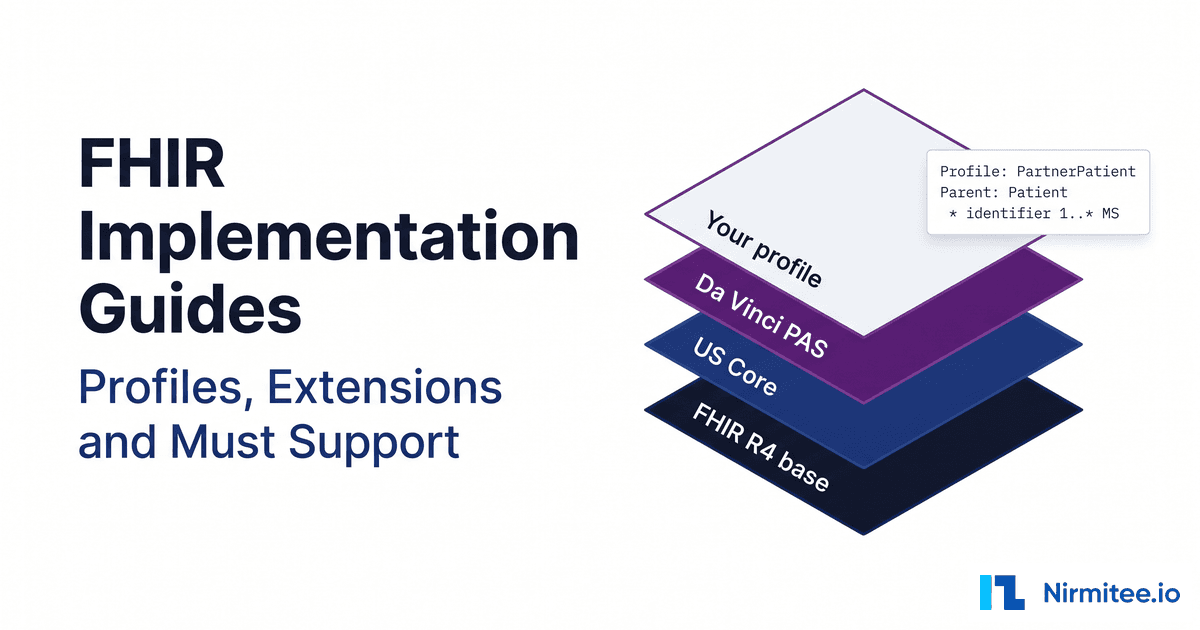
A FHIR implementation guide (IG) is a published package of profiles, extensions, value sets and written rules that says exactly how FHIR resources must look for a country, program or partner. The base spec is the grammar; the implementation guide is the contract that narrows cardinality, fixes terminology and defines what each system must support.
This guide is for engineers and product leads who read IGs such as US Core and ship code against them. Every rule was checked against FHIR R4 (4.0.1), US Core 9.0.0, FHIR Shorthand 3.0.0 and the HL7 FHIR Validator documentation, and the FSH example compiles with SUSHI 3.20.1 with zero errors.
For the full list of USCDI v3 data classes and the US Core profile each one maps to, see our USCDI v3 data elements and FHIR mapping guide.
Key takeaways
- A profile is a StructureDefinition that can only narrow its parent. It cannot add elements.
- Cardinality and binding are independent:
Patient.genderis optional in base R4, yet any value sent must come from a required value set. - Must Support is not "required". In US Core it means responders can populate the element and requestors process it without failing.
- Every extension has a canonical
urlplus avalue[x]or child extensions, never both. - FSH and SUSHI make profiles reviewable code;
validator_cli.jar -igmakes them a gate for CI and ingestion.
Watch: FHIR DSTU2 vs STU3 vs R4 vs R5 vs R6: What Changed, Which to Use, and 5 Myths (Live Test) (5:11).
What is a FHIR implementation guide, and why do profiles exist?
Profiles exist because base FHIR is deliberately loose. The R4 conformance rules say very few elements have a minimum cardinality of 1, because resources are used in contexts where even basic data is incomplete. An implementation guide adds context: which elements a use case needs, which codes are allowed, and what each system owes the other.
The machine-readable part of an IG is a set of StructureDefinitions with derivation set to constraint, as described on the R4 profiling page. The human-readable part is narrative: Must Support definitions, missing data rules and search requirements.
IGs stack. A national IG such as US Core constrains the base spec. Use-case IGs build on it: Da Vinci PAS 2.2.1, the prior authorization guide, depends on US Core 3.1.1, 6.1.0 and 7.0.0, though it notes it does not always derive from US Core profiles. Your own data contract sits on top, and each layer can only narrow the one below.
For US Core's own profiles and testing, see our US Core implementation guide walkthrough; for how its releases map to USCDI, see USCDI vs US Core version mapping. This post stays general, so the skills apply to any IG.
What can a FHIR profile constrain?
A FHIR profile can constrain seven things: cardinality, types and reference targets, terminology bindings, fixed or pattern values, invariants, Must Support flags, and slicing, which is also how extensions attach. Every change must be a restriction. R4 says profiles cannot add elements, rename base elements or break base cardinality.
| Lever | What it does | FSH rule | StructureDefinition key |
|---|---|---|---|
| 1. Cardinality | Tightens min and max within base limits (0..1 can become 1..1; 1..1 cannot change) | * birthDate 1..1 | min, max |
| 2. Types and targets | Restricts choice types or Reference target profiles | * value[x] only Quantity | type |
| 3. Bindings | Binds a coded element to a value set or strengthens a binding | * gender from VS (required) | binding |
| 4. Fixed and pattern values | Fixed must match exactly; pattern requires at least the given properties | * system = "..." (exactly) | fixed[x], pattern[x] |
| 5. Invariants | Adds FHIRPath rules with a severity | * obeys partner-pat-1 | constraint |
| 6. Must Support | Flags elements whose obligations the IG defines in prose | * name MS | mustSupport |
| 7. Slicing and extensions | Splits repeating elements into named slices; extensions are slices of extension | * identifier contains mrn 1..1 | slicing, sliceName |
Two limits matter. R4 states "it must be safe to process a resource without knowing the profile", so meaning a receiver cannot ignore must travel in a modifier extension, not in the profile. And minimum cardinality 1 does not guarantee a usable value, because a present element can carry only an extension; use an invariant for that. Choice types matter most on Observation.value[x], covered in our FHIR Observation resource guide.
FHIR binding strengths: required vs extensible vs preferred vs example
A binding links a coded element to a value set; its strength says how strictly instances must follow it. FHIR R4 defines four strengths. Only required and extensible affect conformance. Preferred and example are guidance, and derived profiles may rebind them to any value set.
| Strength | R4 meaning | Derived profiles may | Base R4 example |
|---|---|---|---|
| required | "The concept in this element SHALL be from the specified value set." | Remove codes, never add | Patient.gender |
| extensible | SHALL be from the value set if any of its codes applies; otherwise another code or text | Add codes only if none in the base set fits | Patient.maritalStatus |
| preferred | Encouraged, but not required to be conformant | Bind any value set | Resource.language |
| example | Not expected or even encouraged; illustration only | Bind any value set | Meta.tag |
Two details catch teams. With a required binding on a CodeableConcept, at least one Coding must come from the value set, and text "is not an acceptable substitute". With extensible, if a value set code covers your meaning, even more generally, you must send it; a more specific local code can ride along as an extra Coding but cannot replace it. For code mapping at scale, see FHIR terminology services in production.
Cardinality vs binding: why Patient.gender is optional but strictly coded
Cardinality says whether an element must appear and how often. Binding says which codes are valid when it does. In base R4, Patient.gender is 0..1 with a required binding to AdministrativeGender: you may omit it, but if you send it, it must be male, female, other or unknown.
A profile turns each dial separately. gender 1..1 makes the element mandatory and leaves the binding alone. So when you read an IG table, check both "Card." and the binding; a missing-element error and a wrong-code error need different fixes. Our FHIR Patient resource guide lists both for every Patient element.
What does Must Support mean in FHIR?
Must Support is a flag a profile sets on an element to say systems must support it "in some meaningful way". The base spec never sets it, and the R4 conformance rules require each profile to state what support means: storing, displaying, capturing, using in logic or passing on. There is no universal definition; you read it in each IG.
US Core's Must Support rules are the ones most US integrations are measured against:
- Responders SHALL be capable of populating Must Support elements in query results.
- Requestors SHALL process those elements without generating an error or failing.
- If data is absent and the reason is unknown, responders SHALL NOT include the element, and requestors SHALL read it as not present in the source system.
- If the reason is known, responders SHOULD send it, and requestors SHALL be able to process it.
US Core separates Mandatory (minimum cardinality 1) from Must Support: each Patient must have an identifier and a name, and systems must support birth date and address, among others. Certifying systems must also treat "Additional USCDI Requirements" as Must Support. One trap: Must Support on a sliced element is not inherited by its slices. And conformant servers still return empty Must Support fields, a gap we cover in FHIR specification vs production reality.
How do FHIR extensions work?
An extension carries data the base resource does not define. Under the R4 extensibility rules, its url SHALL be the canonical URL of its StructureDefinition, and it has either a value[x] or child extensions, never both. Applications should not reject resources merely because they contain extensions.
A simple extension holds one typed value (you will see one in the FSH example below). A complex extension nests child extensions whose url values are local names. This is the patient-citizenship example from the R4 spec:
{
  "resourceType": "Patient",
  "extension": [{
    "url": "http://hl7.org/fhir/StructureDefinition/patient-citizenship",
    "extension": [{
      "url": "code",
      "valueCodeableConcept": {
        "coding": [{ "system": "urn:iso:std:iso:3166", "code": "DE" }]
      }
    }, {
      "url": "period",
      "valuePeriod": { "start": "2009-03-14" }
    }]
  }]
}- Context. Each definition lists where the extension may appear (element path, FHIRPath or another extension), and it "SHALL only be used on a target that appears in their context list."
- Modifier extensions. Extensions that change meaning go in
modifierExtension. Receivers cannot safely process ones they do not understand, and R4 says to avoid them where possible. - Profiles pick extensions. A profile slices
extensionbyurl, which is how US Core Patient names its race and ethnicity extensions.
Vendor-specific extensions are where "FHIR compliant" integrations diverge; see why FHIR compliant does not mean interoperable.
How does FHIR slicing work?
Slicing splits a repeating element into named sub-lists with their own constraints. A discriminator, a path plus a type, tells the validator which slice each repetition belongs to. R4 defines five types: value, exists, pattern, type and profile. Slicing identifier by system is the classic case.
* identifier 1..* MS
* identifier ^slicing.discriminator.type = #value
* identifier ^slicing.discriminator.path = "system"
* identifier ^slicing.rules = #open
* identifier contains mrn 1..1 MS
* identifier[mrn].system = "https://example.org/fhir/sid/mrn" (exactly)
* identifier[mrn].value 1..1 MS
The validator reads each identifier's system. One in the MRN namespace matches the mrn slice and needs a value. With open rules, other identifiers are allowed; closed rules would reject them, and derived profiles may tighten open to closed but not the reverse. For value and pattern discriminators, each slice must pin the element with a fixed value, a pattern or a required binding, which is what (exactly) does.
How to read a FHIR implementation guide page, step by step
Read an IG profile page top down: confirm version and canonical URL, read the plain-language summary, use the Key Elements or Differential table for exact constraints, check bindings and invariants, then read the narrative guidance. Leave the Snapshot table for edge cases.
- Check the version banner. US Core's current release is 9.0.0 (STU 9), but a partner may be on an older one.
- Copy the Official URL, such as
http://hl7.org/fhir/us/core/StructureDefinition/us-core-patient. It goes inmeta.profileand the validator's-profileflag. - Read the summary ("Each Patient Must Have", "Each Patient Must Support") for scope.
- Open the Key Elements table: the root, every Must Support element, everything in the differential, and their parents.
- Check the Differential table for what this profile changes. If the parent is another profile, open it too; inherited rules are not repeated.
- Decode the flags: S is Must Support, ?! a modifier, Σ summary, I an invariant. The HL7 guide to reading IGs defines every view.
- Read bindings and constraints, such as US Core's
us-core-6on Patient.name:family.exists() or given.exists(). - Use the Snapshot table to confirm an inherited element is allowed at all.
- Read the guidance pages for Must Support, missing data and search, then compare the server's CapabilityStatement.
How to write a FHIR profile with FSH (FHIR Shorthand)
FHIR Shorthand (FSH) is an HL7 standard text language for profiles, extensions, value sets and examples. SUSHI is its reference compiler: write FSH, run sushi build, get StructureDefinition JSON. FSH 3.0.0 is current, and SUSHI 3.20.1 implements it.
Below is a data contract for an intake API: a Patient profile with cardinality, Must Support, a required binding, an identifier slice and an invariant, plus a simple extension and an example. Project config (sushi-config.yaml):
canonical: https://example.org/fhir
status: draft
version: 0.1.0
fhirVersion: 4.0.1
FSHOnly: true
And input/fsh/partner-patient.fsh:
Alias: $contact-point-system = http://hl7.org/fhir/contact-point-system

Extension: PreferredContactWindow
Id: preferred-contact-window
Title: "Preferred Contact Window"
Description: "The time window in which the patient prefers to be contacted."
Context: Patient
* value[x] only Period

ValueSet: PartnerContactSystems
Id: partner-contact-systems
Title: "Partner Contact Systems"
Description: "The ContactPoint systems our intake API accepts."
* $contact-point-system#phone
* $contact-point-system#email
* $contact-point-system#sms

Invariant: partner-pat-1
Description: "birthDate SHALL NOT be in the future"
Expression: "birthDate.empty() or birthDate <= today()"
Severity: #error

Profile: PartnerPatient
Parent: Patient
Id: partner-patient
Title: "Partner Patient"
Description: "The Patient data contract for records sent to our intake API."
* obeys partner-pat-1
* identifier 1..* MS
* identifier ^slicing.discriminator.type = #value
* identifier ^slicing.discriminator.path = "system"
* identifier ^slicing.rules = #open
* identifier contains mrn 1..1 MS
* identifier[mrn].system 1..1 MS
* identifier[mrn].system = "https://example.org/fhir/sid/mrn" (exactly)
* identifier[mrn].value 1..1 MS
* name 1..* MS
* name.family 1..1 MS
* name.given MS
* gender 1..1 MS
* birthDate 1..1 MS
* telecom MS
* telecom.system 1..1 MS
* telecom.system from PartnerContactSystems (required)
* telecom.value 1..1 MS
* extension contains PreferredContactWindow named contactWindow 0..1 MS

Instance: partner-patient-example
InstanceOf: PartnerPatient
Usage: #example
Description: "A synthetic patient that conforms to PartnerPatient."
* identifier[mrn].value = "000123"
* name.family = "Rivera"
* name.given = "Ana"
* gender = #female
* birthDate = "1984-03-02"
* telecom.system = #email
* telecom.value = "ana.rivera@example.org"
* extension[contactWindow].valuePeriod.start = "2026-07-20T09:00:00-05:00"
* extension[contactWindow].valuePeriod.end = "2026-07-20T12:00:00-05:00"
The ValueSet narrows ContactPoint.system, already a required binding in R4, to three codes; removing codes is allowed, adding them is not. gender 1..1 makes gender mandatory while its required binding is inherited. We built it with npx fsh-sushi build ., and these are key parts of the generated differential, trimmed but otherwise as output:
{
  "resourceType": "StructureDefinition",
  "id": "partner-patient",
  "url": "https://example.org/fhir/StructureDefinition/partner-patient",
  "fhirVersion": "4.0.1",
  "kind": "resource",
  "type": "Patient",
  "baseDefinition": "http://hl7.org/fhir/StructureDefinition/Patient",
  "derivation": "constraint",
  "differential": {
    "element": [
      {
        "id": "Patient",
        "path": "Patient",
        "constraint": [
          {
            "key": "partner-pat-1",
            "severity": "error",
            "human": "birthDate SHALL NOT be in the future",
            "expression": "birthDate.empty() or birthDate <= today()"
          }
        ]
      },
      {
        "id": "Patient.extension:contactWindow",
        "path": "Patient.extension",
        "sliceName": "contactWindow",
        "min": 0,
        "max": "1",
        "type": [
          {
            "code": "Extension",
            "profile": [
              "https://example.org/fhir/StructureDefinition/preferred-contact-window"
            ]
          }
        ],
        "mustSupport": true
      },
      {
        "id": "Patient.identifier",
        "path": "Patient.identifier",
        "slicing": {
          "discriminator": [
            {
              "type": "value",
              "path": "system"
            }
          ],
          "rules": "open"
        },
        "min": 1,
        "mustSupport": true
      },
      {
        "id": "Patient.identifier:mrn.system",
        "path": "Patient.identifier.system",
        "min": 1,
        "fixedUri": "https://example.org/fhir/sid/mrn",
        "mustSupport": true
      },
      {
        "id": "Patient.telecom.system",
        "path": "Patient.telecom.system",
        "min": 1,
        "mustSupport": true,
        "binding": {
          "strength": "required",
          "valueSet": "https://example.org/fhir/ValueSet/partner-contact-systems"
        }
      }
    ]
  }
}
There is no snapshot: SUSHI writes differentials by default and leaves snapshots to the IG Publisher unless you pass --snapshot. The extension appears as a slice named contactWindow, discriminated by url.
How an instance claims conformance with meta.profile
An instance claims a profile by listing its canonical URL in meta.profile (0..*, so several are allowed). SUSHI set it on our example because setMetaProfile defaults to always:
{
  "resourceType": "Patient",
  "id": "partner-patient-example",
  "meta": {
    "profile": [
      "https://example.org/fhir/StructureDefinition/partner-patient"
    ]
  },
  "identifier": [
    {
      "system": "https://example.org/fhir/sid/mrn",
      "value": "000123"
    }
  ],
  "extension": [
    {
      "url": "https://example.org/fhir/StructureDefinition/preferred-contact-window",
      "valuePeriod": {
        "start": "2026-07-20T09:00:00-05:00",
        "end": "2026-07-20T12:00:00-05:00"
      }
    }
  ],
  "gender": "female",
  "birthDate": "1984-03-02"
}
A claim is not proof. The R4 Resource page warns that resources can conform without the tag or falsely claim it, and that applications SHOULD check against the StructureDefinitions directly.
How to validate FHIR data against profiles in CI and ingestion pipelines
Run the HL7 FHIR Validator (validator_cli.jar) in two places: in CI, to prove profiles and examples are correct on every commit, and at run time, to check partner data before it reaches your store. Both use -version, -ig to load packages or folders, and -profile to name the target.
These commands are illustrative, assembled from the official validator documentation rather than captured from a run:
wget https://github.com/hapifhir/org.hl7.fhir.core/releases/latest/download/validator_cli.jar

# Against a published IG package
java -jar validator_cli.jar patient.json -version 4.0.1 \
  -ig hl7.fhir.us.core#9.0.0 \
  -profile http://hl7.org/fhir/us/core/StructureDefinition/us-core-patient

# A folder of inbound data against your SUSHI output, JSON OperationOutcome
java -jar validator_cli.jar incoming/ -version 4.0.1 \
  -ig fsh-generated/resources \
  -profile https://example.org/fhir/StructureDefinition/partner-patient \
  -output outcome.json
Per the docs, -ig takes a package id, a canonical URL or a local directory, and the default terminology server, tx.fhir.org, "is not offered (or provisioned)" for production, so point -tx at your own.
- Author time: FSH lives in Git; CI runs SUSHI and validates every example, so a breaking profile change fails the build with a readable diff.
- Run time: ingestion validates each resource (or a sample for bulk loads); errors quarantine the record with its OperationOutcome, warnings are trended by source.
- Pin versions in both, so a new US Core release cannot change results without a deliberate upgrade.
Structural validation is only the first gate; see parsing vs clinical validation. For whole-server testing, our open-source FHIR server passes the ONC (g)(10) Inferno SMART App Launch suite 47 of 47, and our Inferno walkthrough covers the process.
Defining data contracts for partner or EHR feeds? We build EHR integration across Epic, Oracle Health, athenahealth, eClinicalWorks and NextGen, and turn what each source actually sends into profiles and validation gates. Talk to our team and we will map your sources against the profiles you need.
When should you write your own FHIR profiles?
Write your own profile when you own the data contract: a partner API you publish, an ingestion pipeline with quality rules, or a store other teams depend on. Reuse US Core or a Da Vinci IG when a certification program or trading partner already defines the contract. Never copy a published profile just to loosen it.
| Situation | Do this | Why |
|---|---|---|
| Exposing patient data under ONC certification | Implement US Core at the required version | Its Mandatory, Must Support and Additional USCDI elements are in certification scope |
| Exchanging prior auth data with payers | Implement the Da Vinci PAS version your partner uses | The partner validates against that IG |
| Publishing an API partners send data into | Write profiles derived from US Core | A versioned contract partners can validate before sending |
| Ingesting from many EHRs into one store | Write thin ingestion profiles for the elements your product needs | Missing data fails at the door, not in analytics |
| Need an element base FHIR lacks | Check published HL7 and US Core extensions first | Receivers may already understand them |
| A published profile is too strict | Derive from its parent or agree changes with the partner | Profiles only narrow; a loosened copy is not conformant |
For product teams, rows three and four are where profiles pay off. A profile is a contract you version in Git and enforce with the same validator partners can run, turning "your feed is missing birth dates" into a failed validation with an element path. Profiles are also FHIR-version bound; see our R4 vs R5 vs R6 decision framework.
Where teams get stuck with FHIR profiles
Most profile problems are not syntax errors. They come from the wrong document, the wrong version, or treating a flag as a promise, and they surface late, in partner testing or after data is loaded, when they cost the most engineering time to unwind.
- Reading the base spec instead of the IG. Base R4 has
Patient.identifierat 0..*; US Core requires an identifier and a name. Code built from the base page gets rejected in partner testing. - The wrong IG version. US Core ships annually and profile canonical URLs stay the same, so
meta.profilelooks identical while rules differ. Confirm and pin each partner's version. - Must Support treated as required. Clients that throw on a missing element break the requestor rule; servers that fill placeholders break the rule that absent data is omitted.
- Unvalidated extensions. Storing extensions as opaque blobs or ignoring
modifierExtensioncan reverse a record's meaning silently. Reject modifier extensions you do not understand. - Silent data loss. Mappers that read only known elements drop extensions, extra identifiers and extra codings with no error. Keep the raw resource and test round trips on real samples.
FHIR profile checklist
- Record the IG, IG version and FHIR version each partner requires.
- Record the canonical URL of every profile you produce or consume.
- List Mandatory, Must Support and Additional USCDI elements from each Key Elements table.
- Write down what Must Support means for your role in that IG.
- Confirm code mappings cover every required and extensible binding.
- Inventory extensions you send and accept, and decide how to handle unknown modifier extensions.
- Write contract profiles in FSH, derived from national IG profiles.
- Compile with SUSHI and validate every example in CI.
- Validate inbound data with pinned packages and your own terminology server.
- Re-validate whenever a partner changes IG version.
Profiles are where integration scope becomes testable. Our healthcare interoperability team builds and validates these layers for US Core and Da Vinci partners, and our healthcare product engineering team builds the ingestion and validation services around them. Talk to our team to scope your first profile set.
Ready to scale?
Talk to our healthcare engineering team about building, integrating, and shipping faster.
Frequently Asked Questions
What is a FHIR implementation guide?
What is the difference between a FHIR profile and a FHIR extension?
Does Must Support mean an element is required in FHIR?
What is the difference between required and extensible bindings in FHIR?
What are FHIR Shorthand (FSH) and SUSHI?
How do I validate a FHIR resource against a profile?
Does meta.profile prove a FHIR resource conforms to a profile?


