Denticon integration · United States

Denticon API Integration for DSOs and Dental Software

We connect dental software and DSO systems to Denticon, Planet DDS's cloud practice management system. Planet DDS runs an API program with a developer portal, REST APIs, webhooks, batch data extracts and writebacks for patient information, documents, medical history and appointment status. We plan the access with you, build the integration once and roll it out office by office.

  • Denticon
  • Planet DDS API
  • REST
  • Webhooks
  • Batch data
  • Writebacks
  • DSO rollout

Denticon has a real API program. Access runs through Planet DDS.
  1. 01Apply and get access

    Join the Planet DDS API program for the developer portal, documentation and sandbox; production access follows Planet DDS's terms.

  2. 02Build once

    Patients, appointments, insurance and clinical data through REST, changes through webhooks, history through batch extracts.

  3. 03Roll out by office

    Each office or DSO turns the integration on, and we check every write before calling an office live.

Evidence you can check

The problem

Sound Familiar?

These are the four problems DSO operations teams and dental software vendors raise first when Denticon comes up.

Every office set up a little differently

Forty offices on one Denticon account, each with its own providers, operatories and appointment types. An integration that works in one office books the wrong chair in the next.

Intake forms retyped at the front desk

Patients fill in forms online, then someone types the same details and uploads the insurance card into Denticon by hand, and sometimes creates the patient twice.

Bookings that never reached the schedule

Online booking said confirmed, but the slot was already taken in Denticon. The patient arrives and the office has no record of the visit.

Data that drifts out of date

A product polls Denticon on a timer, misses a cancellation and sends a reminder for a visit that no longer exists.

Use cases

What It Looks Like When It Works

Four use cases, each shown as the screen your team works in. The offices and patients are fictional; the Denticon capabilities behind each screen are the ones Planet DDS publishes.

One Integration, Rolled Out Office by Office

Today

Every new office is a small project, and nobody knows which offices are actually live.

With the integration

One integration with each office's mapping kept in settings. Every office shows its status, its workflows and what is blocking it, and goes live only after staff check it in Denticon.

What we build
  • Per-office mapping of providers, operatories and appointment types
  • Office enablement tracked as a step under Planet DDS's terms
  • Live checks with office staff before an office counts as live
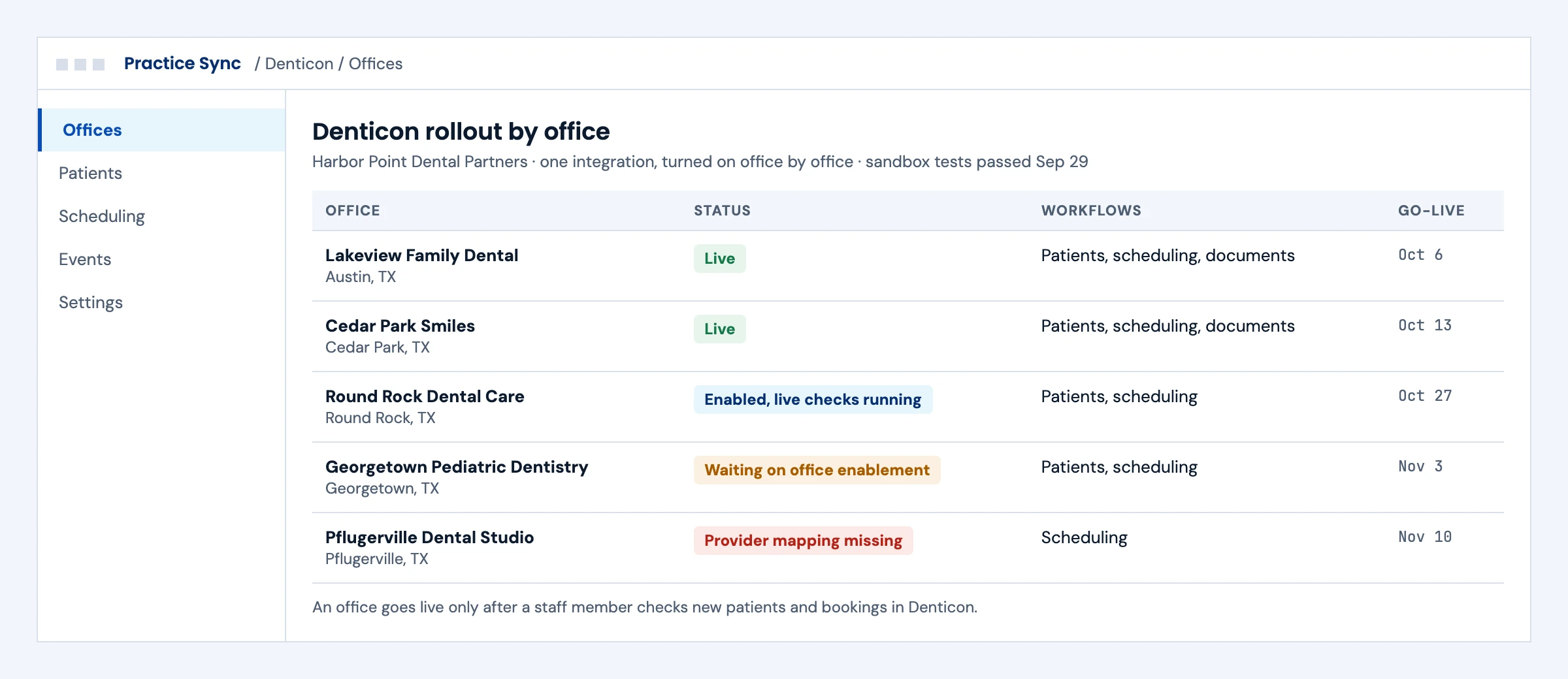
DSO rollout screen listing Denticon offices with live, enabled, waiting and blocked status and go-live dates
Illustrative screen with fictional offices and patients: dSO rollout screen listing Denticon offices with live, enabled, waiting and blocked status and go-live dates. Tap to open full size.

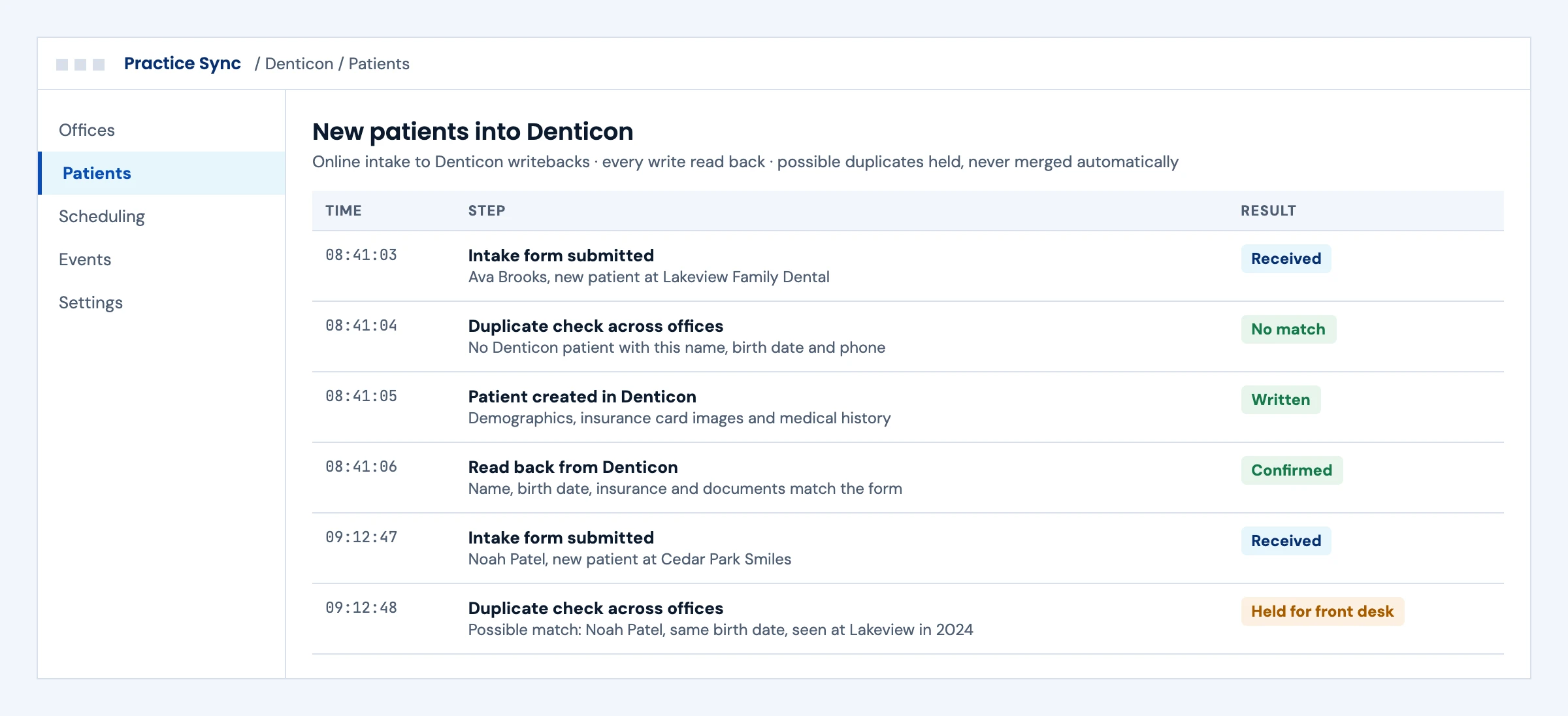
New Patients Written Into Denticon Once

Today

Front desk staff retype intake forms and upload insurance cards by hand.

With the integration

Online intake creates the patient in Denticon with documents and medical history, reads the record back to confirm it, and holds possible duplicates for the front desk instead of merging them.

What we build
  • Patient create and update with document upload through Denticon writebacks
  • Duplicate checks across every office in the DSO
  • Read-back of each write before it counts as done
Log of online intake forms written into Denticon, with a duplicate check, a read-back and one possible duplicate held
Illustrative screen with fictional offices and patients: log of online intake forms written into Denticon, with a duplicate check, a read-back and one possible duplicate held. Tap to open full size.

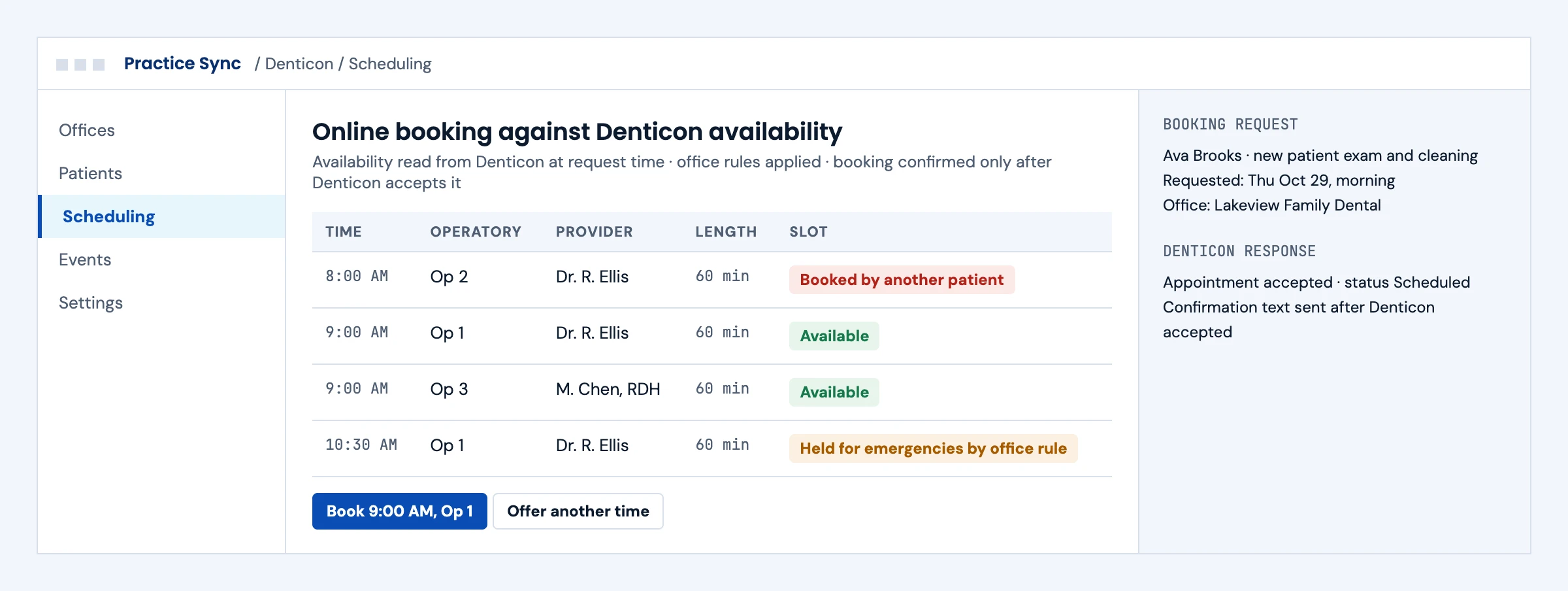
Online Booking Against Real Availability

Today

Online booking works from a copy of the schedule and double-books chairs.

With the integration

Availability is read from Denticon when the patient asks, office rules hold back emergency slots, and the patient gets a confirmation only after Denticon accepts the appointment.

What we build
  • Availability, booking, confirm and cancel through the Denticon API
  • Office rules for held slots, providers and appointment length
  • Confirmation messages sent only after Denticon accepts
Booking screen showing Denticon availability by operatory and provider, with a held emergency slot and Denticon's acceptance
Illustrative screen with fictional offices and patients: booking screen showing Denticon availability by operatory and provider, with a held emergency slot and Denticon's acceptance. Tap to open full size.

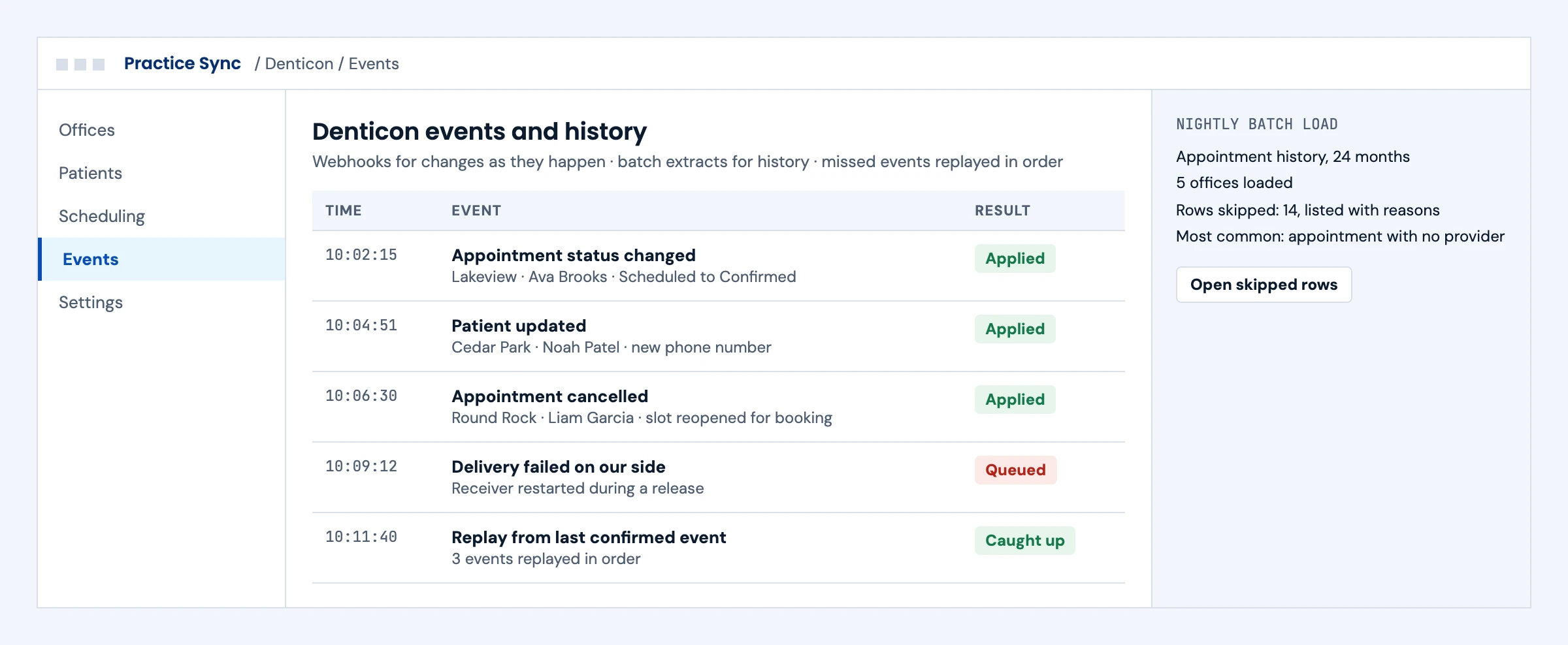
Changes as They Happen, History in Bulk

Today

A timer polls Denticon, misses changes and puts load on the API.

With the integration

Webhooks deliver changes such as cancellations as they happen, missed events are replayed in order, and history loads through batch extracts that list every skipped row and why.

What we build
  • Webhook receivers with replay from the last confirmed event
  • Batch extracts for history and nightly reconciliation
  • Skipped-row reports a support team can act on
Denticon webhook event feed with a failed delivery replayed in order, next to a nightly batch load summary
Illustrative screen with fictional offices and patients: denticon webhook event feed with a failed delivery replayed in order, next to a nightly batch load summary. Tap to open full size.

Booking

What an AI Receptionist Can Book, Reschedule and Cancel in Denticon

Planet DDS lists appointment status among Denticon's writebacks and sends changes by webhook. This is what Planet DDS's own pages say, as read on October 26, 2026.

ActionDenticon (Planet DDS API program)
Book a new appointmentThrough the Denticon API. We confirm a booking only after Denticon accepts it.
RescheduleNot named as its own action on Planet DDS's public pages. We confirm the route in the API program.
CancelAppointment status is on Planet DDS's writeback list.
Hear about changesWebhooks send changes such as cancellations as they happen.

Access and the exact writebacks come through the Planet DDS API program. Vendor terms change, so we recheck every action in the program before a release.

First call

Questions We Will Ask You on the First Call

The answers decide the access steps, the timeline and where Denticon projects usually go wrong. You do not need them all before we talk.

Are you a DSO connecting your own offices, or a vendor whose customers run Denticon?

The route through the Planet DDS API program and who signs what differ between the two.

Have you applied to the Planet DDS API program yet?

Sandbox access usually comes first, and production access follows Planet DDS's terms. The application sets the start of the timeline.

Which workflows come first?

Scheduling, intake, insurance and claims, clinical data and analytics each use different resource groups and tests.

Do you need to write into Denticon, or only read?

Writebacks need read-back checks and more failure handling, and they are limited to what Planet DDS supports.

How many offices, and how differently are they set up?

Providers, operatories and appointment types differ by office, and each one becomes a mapping to test.

How fresh does the data need to be?

Webhooks for changes, batch extracts for history, or both. The answer sets the sync design and the API load.

Do any offices also run Cloud 9 or Apteryx?

Planet DDS describes APIs across its products; we confirm each product's coverage during access.

Who owns a failed write or a held duplicate?

Every exception needs a named owner in the office or your support team, or the queue quietly grows.

The short answer

Does Denticon Have an API?

Yes. Planet DDS publishes the Denticon API Portal for its API program. The portal lists resource groups for patients, appointments, revenue cycle management, financial data, clinical data and practice setup, and three ways to connect: REST APIs, webhooks for real-time changes and batch data extracts. Planet DDS also describes writebacks that let outside systems update patient information, documents, medical history and appointment status in Denticon. Partners in the program get the developer portal, documentation, beta releases and a sandbox. Production access and how each office turns an integration on follow Planet DDS's terms, so we plan them first.

Who it is for
DSOs running Denticon across many offices, and dental software vendors in patient engagement, revenue cycle, AI imaging and analytics whose customers use Denticon.
What we build
The integration against Denticon's REST APIs and webhooks, batch loads for history, writebacks with read-back checks and a rollout plan per office.
The outcome we design for
Schedules, patients and claims in sync without staff retyping, and each write confirmed in Denticon. These are intended outcomes, confirmed in your pilot.

Denticon API

What the Denticon API Covers

From the Denticon API Portal and Planet DDS's integrations page, read in October 2026. Exact endpoints and fields are in the portal once you have access.

Resource groupWhat Planet DDS listsTypical useWhat we design for
PatientCreate new patients, update patient information, sync patient updates, upload patient documentsPatient intake, forms and document filingMatching rules so a new patient is not created twice across offices
AppointmentsSee the schedule, get availability, book, confirm and cancel appointmentsOnline booking, reminders, AI voice schedulingAvailability rules per office and operatory, and a check before every booking
Revenue cycle managementRetrieve insurance and claims, and write back into DenticonEligibility, claims status and payment toolsClear mapping between payer data and Denticon's insurance records
FinancialLedger and account balance dataAnalytics, collections and patient financingRead-only financial views unless a writeback is confirmed for the workflow
ClinicalMedical history, treatment plans, patient charts, clinical notesAI imaging, clinical decision tools, treatment acceptanceLeast access for the use case and clear patient context
PracticeLocations, providers, production types, custom definitionsSetup across a DSO's officesOne mapping per office kept in configuration, not code
Webhooks and batch dataReal-time change events and bulk data extractsKeeping a product in sync, loading historyEvent handling with replay, and batch loads that report what they skipped

Planet DDS's integrations page says the platform covers Denticon, Cloud 9 and Apteryx. This page covers Denticon; confirm the other products' routes during access.

What we build

What Our Denticon Integration Builds

Pick the workstreams you need. Each one ships with a specification, test runs and an owner.

01

Access and Sandbox Setup

The Planet DDS API program application, sandbox credentials and an access plan for production and office enablement under Planet DDS's terms.

API program · developer portal · sandbox

02

Patient Sync and Intake

Creating and updating patients and uploading documents, with matching rules so intake does not create duplicates across offices.

Patient create · update · document upload

Dental practice management integration →
03

Scheduling and Booking

Reading availability, booking, confirming and cancelling appointments, with a check against Denticon before any booking is reported as done.

Availability · book · confirm · cancel

04

Insurance, Claims and Ledger

Reading insurance, claims and ledger data, and writing back where Planet DDS supports it, mapped to your revenue cycle tools.

Insurance · claims · ledger · writeback

RCM integration →
05

Webhooks and Batch Loads

Receiving change events for near real-time sync and loading history through batch extracts, with replay for missed events.

Webhooks · batch data · replay

06

Monitoring and Support

Per-office health checks, failed-write alerts, redacted operational logs and a runbook your support team can follow.

Office health · alerts · runbook

Integration monitoring and support →

Buyer decisions

Denticon Integration Options Compared

Use the Planet DDS API program first. It is the route Planet DDS supports.

OptionBest fitStrengthsWhat to plan for
Planet DDS API programProducts and DSOs that need ongoing sync and writebacksREST, webhooks, batch data and writebacks from the vendorProgram application, production access and office enablement per Planet DDS terms
Batch data extracts onlyAnalytics and reportingBulk history without many API callsNot near real time; pair with webhooks for changes
Reports and exportsOne-time migrationsNo integration buildManual steps and no ongoing sync
Login-based automationA gap the API does not coverWorks where the API stopsPlanet DDS's terms, the practice's written authorization and strict controls

Some vendors sell unofficial Denticon access that automates the web application. With a published API program available, we use the official route.

Integration boundaries

Denticon Integration Boundaries: Who Owns What

We write the split down before the build starts.

The DSO or practice

Approves the integration for its offices, decides which data moves and names an owner for exceptions.

Planet DDS

Owns the API program, access approval, the developer portal and how offices enable an integration.

Your product team

Owns the product features that use the data and the customer relationship.

The integration layer (ours)

API calls, webhooks, batch loads, writebacks, read-back checks, monitoring and alerts. Defects in this layer are ours to fix.

Security and PHI

A BAA is available for agreed work involving PHI. We work inside our ISO 27001:2022 certified management system, encrypt data in transit and at rest, keep credentials in a vault and keep raw payloads out of operational logs.

Deliverables

Denticon Integration Deliverables

Everything lands in your repository and your runbook.

01

Access plan

Program application, sandbox setup and the production and office enablement steps agreed with Planet DDS.

02

Integration code

API clients, webhook receivers and batch loaders in your repository, with office settings kept out of the code.

03

Test evidence

Recorded runs in the sandbox and the first offices: new patients, duplicates, bookings, cancellations, writebacks and failures.

04

Monitoring and runbook

Per-office health, alerts and who to contact at Planet DDS for each kind of failure.

Delivery phases

Denticon Integration Timeline

Initial planning estimate: 6 to 10 weeks to a first live office, subject to Planet DDS program access, production approval and testing. We confirm a release plan after discovery.

  1. 01

    Access and discovery

    Weeks 1 to 2

    Program application, sandbox credentials, workflows and data agreed

  2. 02

    Build in the sandbox

    Weeks 2 to 6

    REST calls, webhooks, batch loads and writebacks built and tested

  3. 03

    First office

    Weeks 5 to 8

    Production access, office enablement, live checks with staff

  4. 04

    Rollout and hypercare

    Weeks 7 to 10

    Further offices on a schedule, monitoring on, runbook handed over

Cost drivers

What Drives Denticon Integration Cost

Use the scoping call to pin down the workflow, the access you need and what goes into a scoped proposal. These are the factors that move cost.

Resource groups

Each area, such as scheduling or claims, adds mapping and tests.

Writebacks

Writing into Denticon needs read-back checks and more failure handling than reading.

Number of offices

Rollout across a DSO adds per-office setup and testing.

Sync model

Webhooks for near real time, batch extracts for history, or both.

Support level

Monitoring and on-call support are priced per connection.

Book a call ↗

Proof

Dental Integration Work You Can Check

Client names are withheld. These published guides and service pages show how we approach dental integrations; they do not prove Planet DDS approval or a live Denticon connection.

Published engineering guide

Dental Practice Management API Integration

How dental products connect to practice management systems, with Open Dental as the worked example.

Read the guide →

Published engineering guide

Interoperability Beyond the Hospital

Where dental systems sit in the wider interoperability picture.

Read the guide →

Service we deliver

Dental Practice Management Integration

Our comparison of access routes for Dentrix, Eaglesoft, Open Dental and Curve Dental.

See dental integration →

Case study

Dental Practice Software Case Study

Charting, treatment plans, insurance billing and practice accounting in one system for a multi-location dental group. Live in production.

Read the case study →

Security

ISO 27001:2022 Certified, BAAs Signed

We are ISO 27001:2022 certified and sign Business Associate Agreements for work that touches patient data.

FAQ

Denticon API Integration: Questions Buyers Ask

Does Denticon have an API?

Yes. Planet DDS publishes the Denticon API Portal for its API program, with REST APIs, webhooks for real-time changes and batch data extracts across patients, appointments, revenue cycle, financial, clinical and practice data.

How do we get access to the Denticon API?

Through the Planet DDS API program. Planet DDS says partners get the developer portal, documentation, early access to beta releases and a sandbox. Production access and how each office enables the integration follow Planet DDS's terms, which we confirm during discovery.

Can we write data back into Denticon?

Yes, for the areas Planet DDS supports. Its integrations page lists writebacks for patient information, documents, medical history and appointment status, and the portal lists claims writeback in revenue cycle. We read every write back before treating it as done.

Can our product book appointments in Denticon?

The portal lists seeing availability and booking, confirming and cancelling appointments. We build the booking flow with a check against Denticon so a booking is only reported once Denticon accepts it.

Does Denticon support webhooks?

Yes. The portal lists webhooks to send real-time changes from Denticon to your application, alongside REST APIs and batch data extracts.

Is there a Denticon sandbox?

Planet DDS says partners in its API program get access to a sandbox. We build and test there before any production office is connected.

Does the API cover Cloud 9 and Apteryx too?

Planet DDS's integrations page describes its APIs across Denticon, Cloud 9 and Apteryx. This page covers Denticon; we confirm the other products' coverage during access.

Is there an unofficial Denticon API?

Some vendors sell access that automates the web application. Because Planet DDS runs a published API program, we use the official route.

How do you handle a DSO with many offices?

One integration, configured per office. Each office is enabled, tested and monitored on its own, so one office's problem does not stop the rollout.

How long does a Denticon integration take?

Our initial planning estimate is 6 to 10 weeks to a first live office, depending mostly on program access and production approval.

How much does a Denticon integration cost?

Cost depends on the resource groups, writebacks, number of offices, sync model and support level. Any Planet DDS program fees are separate and set by Planet DDS. After a scoping call we send a scoped proposal with the access dependencies listed.

Next step

Plan Your Denticon Integration

Tell us which workflows need Denticon data and how many offices. An engineer replies with the access steps and the resource groups for each workflow.

Start with your workflow

Tell Us About Your Denticon Integration

Share the workflows, the number of offices and your target date. Use de-identified examples only. Read by an engineer, answered within one business day.

Please exclude patient data and credentials. We use these details to respond to your inquiry. Privacy policy

Thank you. Your inquiry has been received. Our team will review your requirements.