Eaglesoft integration · United States

Eaglesoft Integration for Dental Software and DSOs

We connect dental software and DSO systems to Eaglesoft, Patterson Dental's practice management system. Patterson offers Eaglesoft integration to third-party software vendors through the Patterson Innovation Connection program, and provides the technical documentation through the program rather than publishing it openly. We plan the application with you, check each office's Eaglesoft version and server first, and build a sync that survives office-by-office differences.

  • Eaglesoft
  • Patterson Innovation Connection
  • Office server
  • Version checks
  • Scheduling
  • Patients
  • DSO rollout

Eaglesoft access runs through Patterson's program.
  1. 01Apply to the program

    Patterson Innovation Connection is for approved software vendors; documentation comes with enrollment.

  2. 02Check each office

    Eaglesoft runs on the office's own server, so the version and setup of every office decide what works there.

  3. 03Build and roll out

    One integration, tested on the versions your offices run, turned on office by office.

Evidence you can check

The problem

Sound Familiar?

These are the four problems dental software vendors and DSO teams raise first when Eaglesoft comes up.

No public documentation to start from

The team searches for Eaglesoft API docs and finds only forum posts. Patterson provides the documentation through its program, so the work starts with an application.

Every office on a different version

One office upgraded last month, another is three versions behind, and nobody has a list. A feature that works in one office fails in the next.

A server in every office

Eaglesoft runs on the practice's own server. When it restarts or loses its connection, the sync stops and reminders go out from stale data.

Tempting shortcuts

Someone suggests reading the office database directly. It works until the next upgrade, and Patterson does not support it.

Use cases

What It Looks Like When It Works

Four use cases, each shown as the screen your team works in. The offices, patients and version numbers are fictional examples.

Every Office's Version Known Before Rollout

Today

Rollout starts and the team learns office by office what each one runs.

With the integration

Each office's Eaglesoft version and server access are checked first. Ready offices connect, offices that need an upgrade or a check with Patterson are flagged, and nothing is assumed.

What we build
  • A version and server inventory for every office
  • Readiness rules confirmed against Patterson's program documentation
  • Upgrade and remote access follow-ups with a named owner
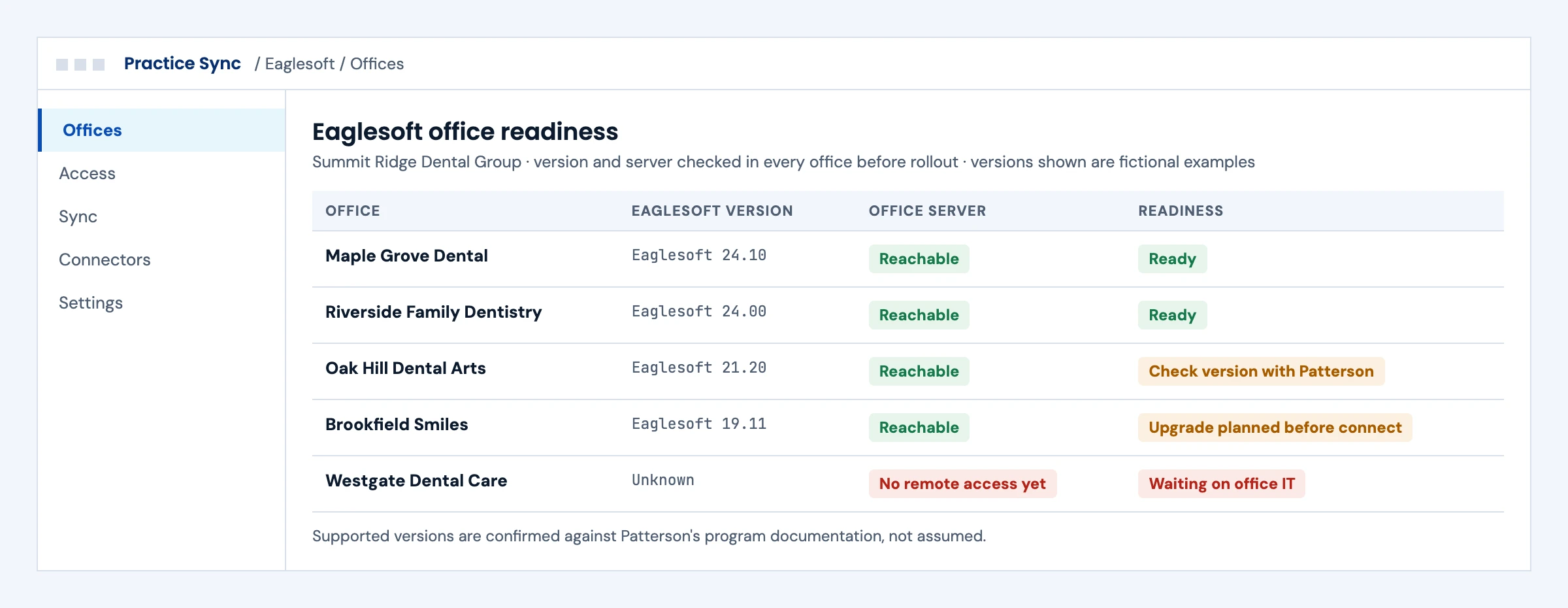
Office readiness screen listing each office's Eaglesoft version, server access and whether it is ready to connect
Illustrative screen with fictional offices and patients: office readiness screen listing each office's Eaglesoft version, server access and whether it is ready to connect. Tap to open full size.

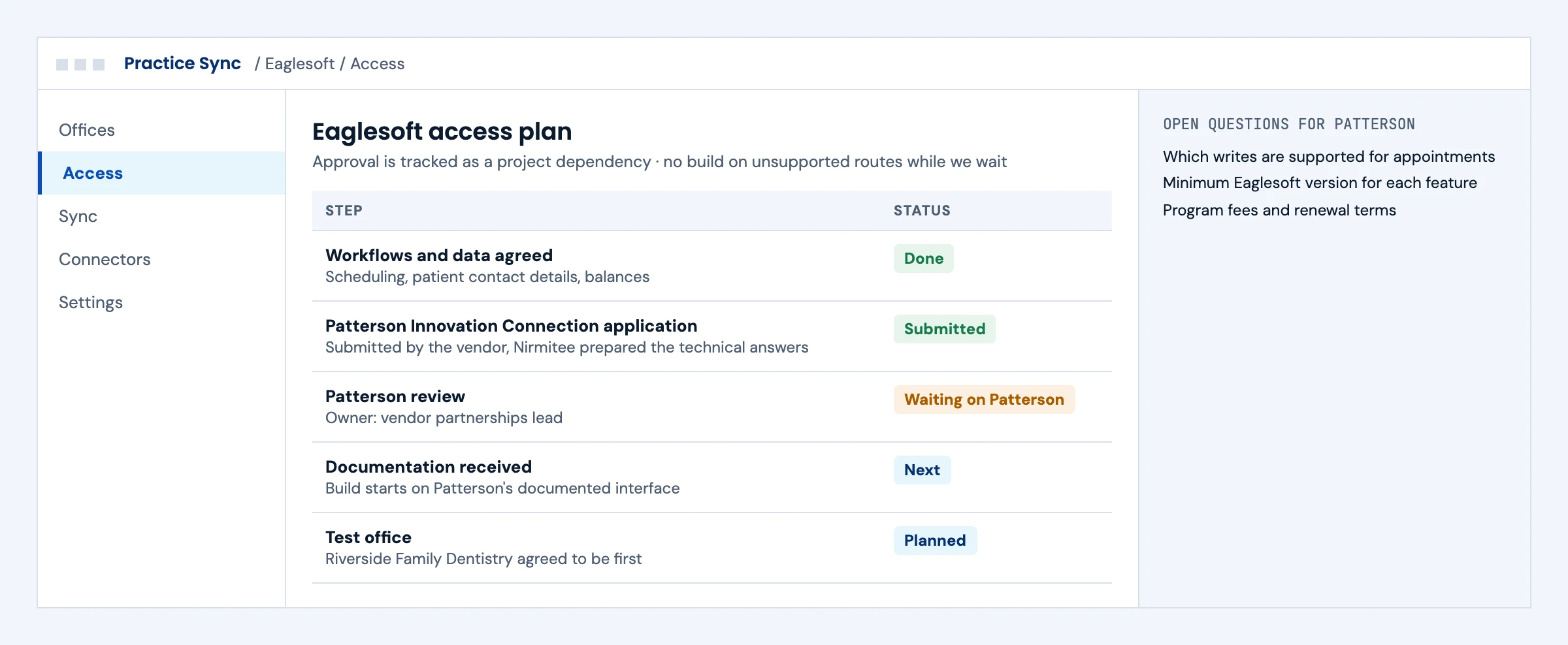
The Patterson Application Tracked Like a Dependency

Today

The application sits in someone's inbox while engineers guess at the interface.

With the integration

The Patterson Innovation Connection application, the review and the documentation are tracked as project steps, with the open questions for Patterson written down. The build starts on the documented interface.

What we build
  • Technical answers for the application prepared with your team
  • Open questions on writes, versions and fees listed for Patterson
  • A first test office agreed before documentation arrives
Access plan screen tracking the Patterson Innovation Connection application, review, documentation and first test office
Illustrative screen with fictional offices and patients: access plan screen tracking the Patterson Innovation Connection application, review, documentation and first test office. Tap to open full size.

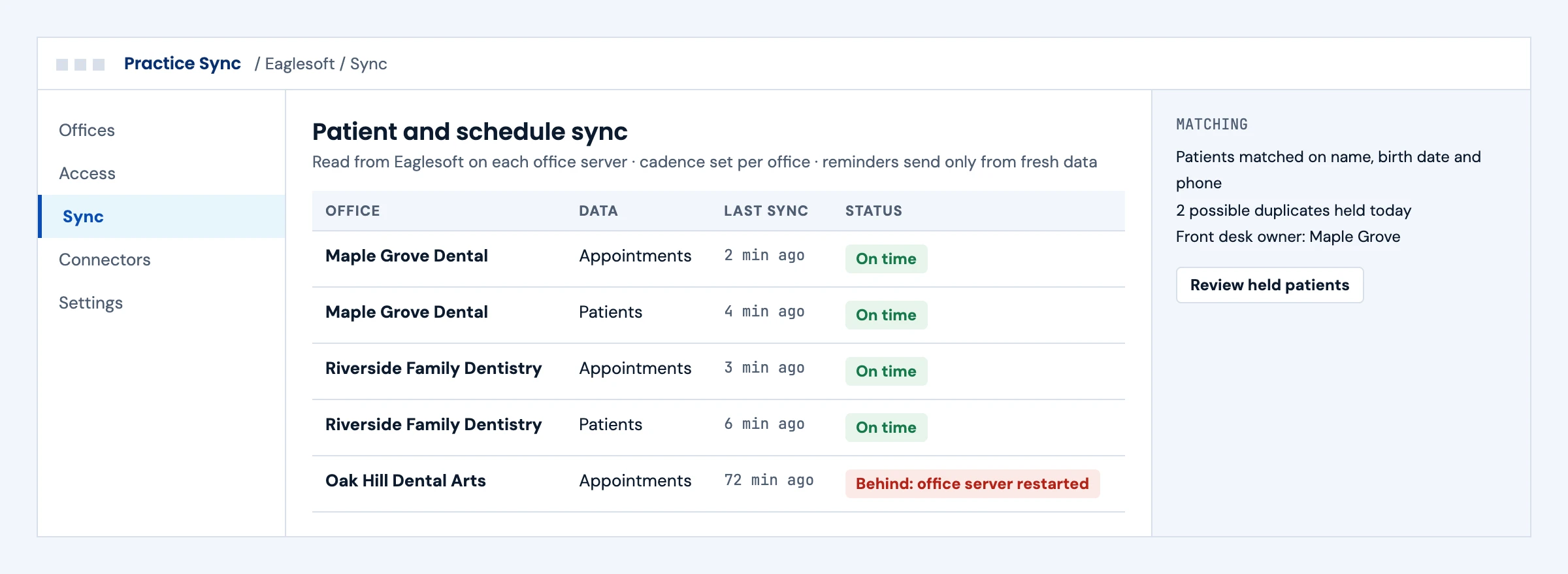
Patients and Schedules in Sync Across Offices

Today

Reminders go out from a schedule copied hours ago.

With the integration

Patients and appointments sync from each office server on a cadence set per office. An office that falls behind is flagged, and reminders only send from fresh data. Possible duplicates wait for the front desk.

What we build
  • Patient and appointment sync on Patterson's documented interface
  • Matching on name, birth date and phone, with held duplicates
  • Freshness checks before reminders or messages go out
Sync status by office for Eaglesoft appointments and patients, with one office behind after a server restart
Illustrative screen with fictional offices and patients: sync status by office for Eaglesoft appointments and patients, with one office behind after a server restart. Tap to open full size.

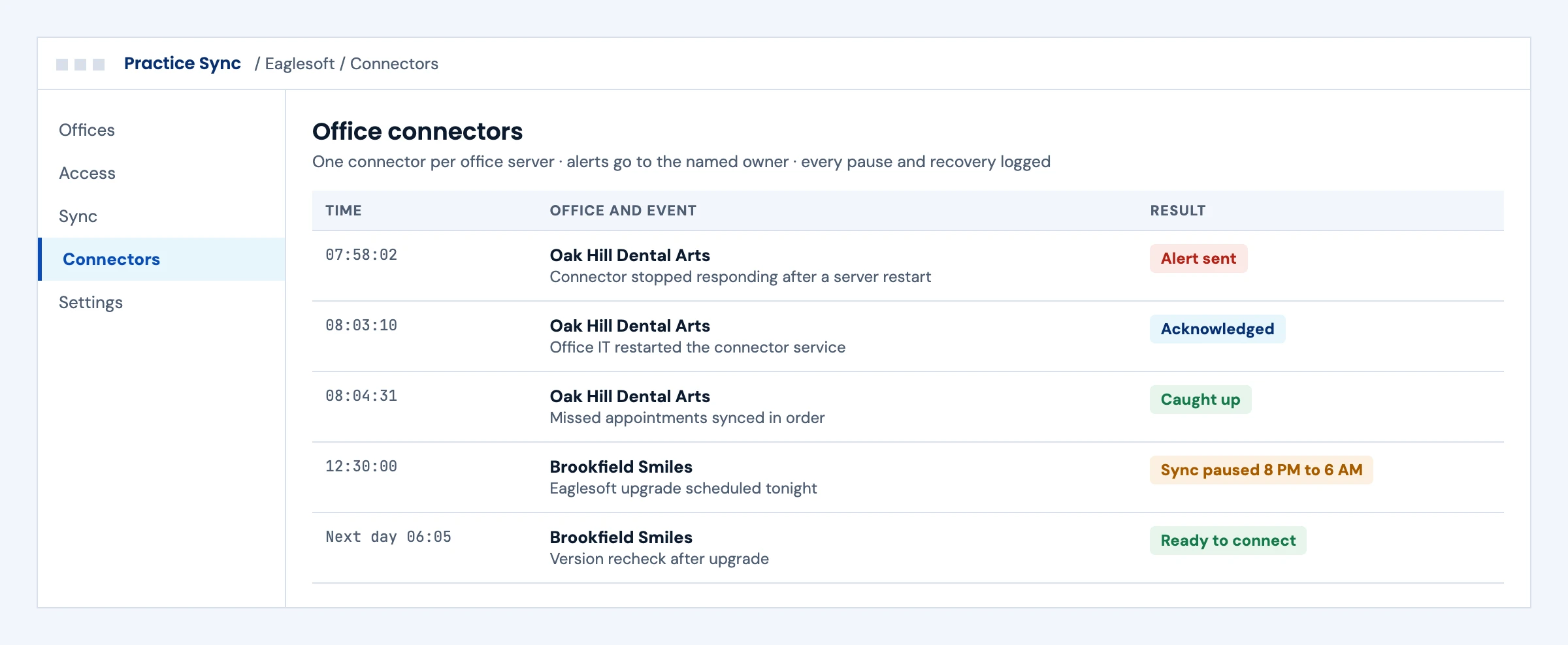
Office Connectors You Can Watch

Today

An office server restarts and nobody notices until patients complain.

With the integration

Each office connector reports its health. When one stops, the named owner gets an alert, and once it is back the missed changes sync in order. Planned upgrades pause the sync and trigger a version recheck.

What we build
  • A connector per office server with health checks
  • Alerts to a named owner and a log of every pause and recovery
  • Version rechecks after every Eaglesoft upgrade
Office connector log showing an alert, recovery and catch-up, and a sync paused for an Eaglesoft upgrade
Illustrative screen with fictional offices and patients: office connector log showing an alert, recovery and catch-up, and a sync paused for an Eaglesoft upgrade. Tap to open full size.

Booking

Can an AI Receptionist Book in Eaglesoft?

Only through Patterson's program. Patterson does not publish the list of actions, so we confirm each one with Patterson before we promise it.

ActionEaglesoft (Patterson Innovation Connection)
Book a new appointmentSet by Patterson Innovation Connection. We confirm it in the program.
RescheduleSet by Patterson Innovation Connection. We confirm it in the program.
CancelSet by Patterson Innovation Connection. We confirm it in the program.
Hear about changesData syncs from the office server. We set the sync cadence per office.

Eaglesoft runs on a server in each office, so the connection and its health are planned per office. Vendor terms change, so we recheck every action in the program before a release.

First call

Questions We Will Ask You on the First Call

The answers decide the access steps, the timeline and where Eaglesoft projects usually go wrong. You do not need them all before we talk.

Have you applied to Patterson Innovation Connection yet?

Approval and documentation come through the program, so the application date sets the start of the build.

Which Eaglesoft versions do your offices run?

A rough list is enough to start. We confirm each office's version before rollout and check requirements with Patterson.

Which workflows come first?

Scheduling, reminders, patient records, payments and analytics each need different data and tests.

Do you need to write into Eaglesoft?

We build writes only where Patterson's documentation confirms them, so this shapes the scope early.

Who can give us access to each office server?

Practice owners or their IT providers install and maintain the office connector, and each office needs a contact.

How fresh does the data need to be?

Reminders and online booking need fresher data than a monthly report, which sets the sync cadence per office.

Are any offices moving to another system?

Offices that plan to switch practice management systems can be left out of the first rollout.

Who owns a stopped connector or a held duplicate?

Every alert needs a named owner, or offices quietly fall out of sync.

The short answer

Does Eaglesoft Have an API?

Yes, for approved partners. Patterson Dental offers integration with Eaglesoft to third-party software vendors through its Patterson Innovation Connection program, and provides the technical documentation through the program rather than publishing it openly. When Patterson launched the program in 2017, it said developers who meet its criteria receive an API for Eaglesoft 18 and later versions. Integration vendors report different version requirements today, so the version each office runs is the first thing to check. Eaglesoft is installed on the office's own server, which shapes how an integration connects and syncs.

Who it is for
Dental software vendors in patient engagement, payments, membership plans, analytics and AI whose customers run Eaglesoft, and DSOs with Eaglesoft offices.
What we build
The program application plan, a version and server check per office, the integration on Patterson's documented interface, and monitoring across offices.
The outcome we design for
Schedules and patient records in sync without staff retyping, with every office's version known before rollout. These are intended outcomes, confirmed in your pilot.

Eaglesoft route

What an Eaglesoft Integration Involves

From Patterson's program description and its 2017 launch announcement, plus what integration vendors publish. Exact capabilities come with program documentation.

AreaWhat is knownWhat it means for your buildWhat we design for
AccessPatterson Innovation Connection for third-party software vendors, with documentation through the programAn application and approval before any buildThe application timeline treated as a dependency
VersionsLaunch announcement: Eaglesoft 18 and later; integration vendors cite later versions for their own featuresOffices on older versions may not support what you needA version inventory per office before rollout
Where Eaglesoft runsInstalled on the practice's own serverYour integration reaches a server inside each officeA connector or service per office, with health checks
Data integrators useRevenueWell's Eaglesoft guide covers patient care, scheduling, intake, patient communication and reporting, and says features behave differently by Eaglesoft versionReading schedule and patient data is the common patternWrite access only where Patterson's documentation confirms it
Fees and termsSet by PattersonBudget for program fees separately from the buildFees confirmed with Patterson before scoping
Unofficial routesSome vendors read the database directly or automate screensRisky for support and termsThe program route first; nothing unsanctioned

Patterson's site blocks automated reads from our networks, so this page uses Patterson's program statement read on October 17, 2026 and its 2017 announcement. Confirm current terms with Patterson.

What we build

What Our Eaglesoft Integration Builds

Pick the workstreams you need. Each one ships with a specification, test runs and an owner.

01

Program Application Plan

The Patterson Innovation Connection application, what Patterson asks of vendors and the documentation you receive, tracked as a project dependency.

Patterson Innovation Connection · approval · documentation

02

Office Version and Server Check

An inventory of each office's Eaglesoft version and server setup, so you know which offices can connect before rollout starts.

Version inventory · server access · readiness

03

Patient and Schedule Sync

Reading patients and appointments on Patterson's documented interface, with matching rules and a sync cadence that fits the office server.

Patients · appointments · sync cadence

Dental practice management integration →
04

Workflow Writes Where Supported

Writes such as payments or appointment updates only where Patterson's documentation confirms them, each one read back before it counts.

Confirmed writes · read-back

05

Office Connector Operations

Installing, updating and monitoring the per-office component, with alerts when an office goes offline.

Per-office connector · health checks

Integration monitoring and support →
06

Monitoring and Support

Sync status across offices, redacted operational logs and a runbook your support team can follow.

Sync status · alerts · runbook

Integration monitoring and support →

Buyer decisions

Eaglesoft Integration Options Compared

Use Patterson's program first. It is the route Patterson supports.

OptionBest fitStrengthsWhat to plan for
Patterson Innovation ConnectionVendors with an ongoing Eaglesoft integrationSupported by Patterson, with documentationApplication, approval and program fees set by Patterson
Reports and exportsOne-time migrations and simple analyticsNo integration buildManual steps and no ongoing sync
Direct database readsNot recommendedNone worth the riskUnsupported by Patterson and fragile across versions
Login-based automationA narrow gap the program does not coverWorks where an interface stopsPatterson's terms, the practice's written authorization and strict controls

Unofficial Eaglesoft access sold by some vendors reads the office database or automates the application. We do not build on those routes.

Integration boundaries

Eaglesoft Integration Boundaries: Who Owns What

We write the split down before the build starts.

The practice or DSO

Approves the integration, provides server access for each office and names an owner for exceptions.

Patterson Dental

Owns the Patterson Innovation Connection program, approval, documentation and Eaglesoft itself.

Your product team

Owns the product features that use the data and the customer relationship.

The integration layer (ours)

The office connector, sync logic, matching, read-back checks, monitoring and alerts. Defects in this layer are ours to fix.

Security and PHI

A BAA is available for agreed work involving PHI. We work inside our ISO 27001:2022 certified management system, encrypt data in transit and at rest, keep credentials in a vault and keep raw payloads out of operational logs.

Deliverables

Eaglesoft Integration Deliverables

Everything lands in your repository and your runbook.

01

Access plan

Program application steps, the documentation received and the open questions for Patterson.

02

Office readiness report

Each office's Eaglesoft version and server setup, and which offices are ready to connect.

03

Integration code

Connector, sync logic and mapping in your repository, with office settings kept out of the code.

04

Monitoring and runbook

Per-office sync status, alerts and who to contact for each kind of failure.

Delivery phases

Eaglesoft Integration Timeline

Initial planning estimate: 8 to 12 weeks to a first live office, subject to Patterson's program approval, office server access and testing. We confirm a release plan after discovery.

  1. 01

    Application and discovery

    Weeks 1 to 3

    Program application, workflows and data agreed, office versions listed

  2. 02

    Build

    Weeks 3 to 7

    Connector and sync built on Patterson's documentation, tested on the versions you need

  3. 03

    First office

    Weeks 6 to 10

    Installed in the first office, live checks with staff

  4. 04

    Rollout and hypercare

    Weeks 9 to 12

    Further offices on a schedule, monitoring on, runbook handed over

Cost drivers

What Drives Eaglesoft Integration Cost

Use the scoping call to pin down the workflow, the access you need and what goes into a scoped proposal. These are the factors that move cost.

Workflows

Each area, such as scheduling or payments, adds mapping and tests.

Version spread

More Eaglesoft versions across offices means more testing.

Office connectors

Installing and supporting a component in every office adds setup and monitoring.

Writes

Writing into Eaglesoft, where supported, needs read-back checks and more failure handling.

Support level

Monitoring and on-call support are priced per connection.

Book a call ↗

Proof

Dental Integration Work You Can Check

Client names are withheld. These published guides and service pages show how we approach dental integrations; they do not prove Patterson approval or a live Eaglesoft connection.

Published engineering guide

Dental Practice Management API Integration

How dental products connect to practice management systems, with Open Dental as the worked example.

Read the guide →

Published engineering guide

Interoperability Beyond the Hospital

Where dental systems sit in the wider interoperability picture.

Read the guide →

Service we deliver

Dental Practice Management Integration

Our comparison of access routes for Dentrix, Eaglesoft, Open Dental and Curve Dental.

See dental integration →

Case study

Dental Practice Software Case Study

Charting, treatment plans, insurance billing and practice accounting in one system for a multi-location dental group. Live in production.

Read the case study →

Security

ISO 27001:2022 Certified, BAAs Signed

We are ISO 27001:2022 certified and sign Business Associate Agreements for work that touches patient data.

FAQ

Eaglesoft Integration: Questions Buyers Ask

Does Eaglesoft have an API?

Yes, for approved partners. Patterson Dental offers integration with Eaglesoft to third-party software vendors through the Patterson Innovation Connection program, with technical documentation provided through the program rather than published openly.

How do we get access to the Eaglesoft API?

Apply to Patterson Innovation Connection. Patterson approves vendors that meet its criteria and provides the documentation through the program. We plan the application with you and treat approval as a project dependency.

Which Eaglesoft versions can we integrate with?

Patterson's 2017 launch announcement named Eaglesoft 18 and later. Integration vendors cite later versions for their own features, so we check the version every office runs before rollout and confirm requirements with Patterson.

Is Eaglesoft cloud or installed in the office?

Eaglesoft is installed on the practice's own server. That means an integration reaches a server inside each office, so office access, uptime and version all matter.

Can we write data into Eaglesoft?

Only where Patterson's program documentation confirms it. Many integrations read schedules and patient data; we build writes only on confirmed capabilities and read each one back.

How much does Patterson charge for the program?

Program fees are set by Patterson and are separate from the integration build. We confirm them with Patterson before scoping.

Is there an unofficial Eaglesoft API?

Some vendors sell access that reads the office database or automates the application. Those routes are not supported by Patterson, so we do not build on them.

What data do Eaglesoft integrations usually use?

Integration vendors' help pages describe scheduling and appointments, patient records, intake, patient communication and reporting. What your product can use depends on the access Patterson grants.

How do you handle a DSO with many Eaglesoft offices?

One integration, with a version and server check and a connector per office. Each office is turned on and monitored on its own.

How long does an Eaglesoft integration take?

Our initial planning estimate is 8 to 12 weeks to a first live office, depending mostly on program approval and office server access.

How much does an Eaglesoft integration cost?

Cost depends on the workflows, the spread of Eaglesoft versions, office connectors, writes and support level. Patterson's program fees are separate. After a scoping call we send a scoped proposal with the access dependencies listed.

Next step

Plan Your Eaglesoft Integration

Tell us which workflows need Eaglesoft data and how many offices. An engineer replies with the access steps and the version checks to run first.

Start with your workflow

Tell Us About Your Eaglesoft Integration

Share the workflows, the number of offices and their Eaglesoft versions if you know them. Use de-identified examples only. Read by an engineer, answered within one business day.

Please exclude patient data and credentials. We use these details to respond to your inquiry. Privacy policy

Thank you. Your inquiry has been received. Our team will review your requirements.