Legacy EHR Data Migration: Size Your Data Before You Pay for a Pipeline

CTO & Co-Founder
CTO & Co-Founder at Nirmitee.io. Architects healthcare integrations across FHIR, SMART on FHIR, ABDM and NHCX, writing from production experience taking hospital software from sandbox to go-live.
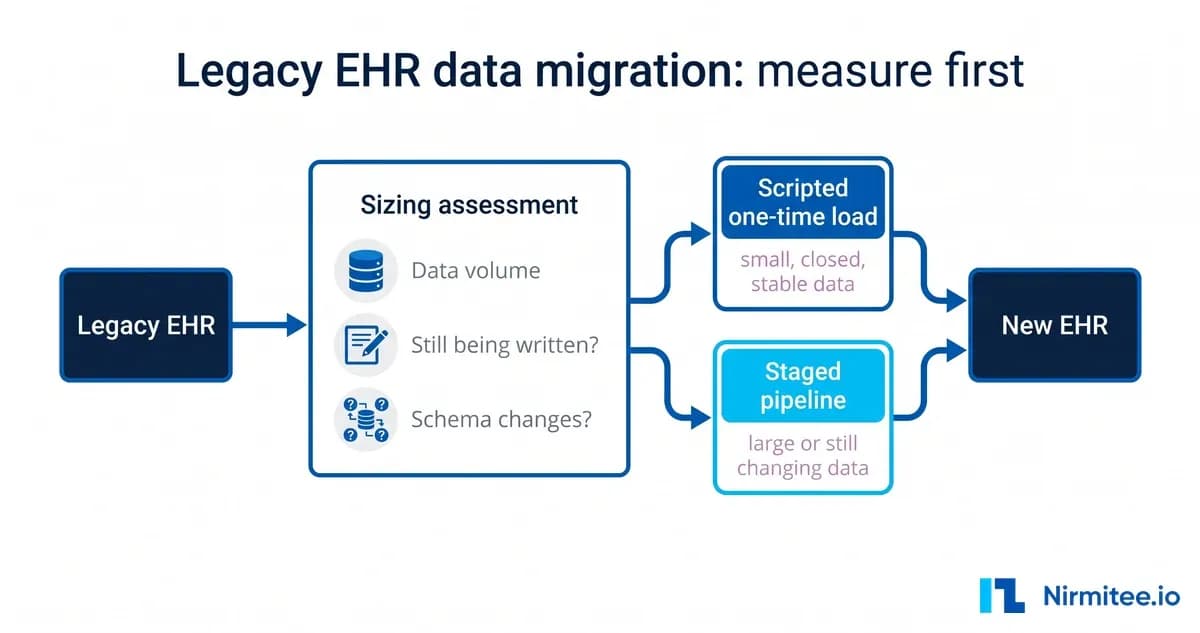
Legacy EHR data migration (moving records out of an old EHR or EMR) is often priced before anyone has measured the data. A vendor hears "ten years of records" and quotes a pipeline: staged loads, checkpoints, change capture, a reconciliation service and the infrastructure to run it all. Sometimes that is right. Often the data turns out to be smaller, closed to new writes and stable in structure, and a single well-tested scripted load would have done the job for a fraction of the cost. This guide explains what to measure first, the decisions that follow from the answers, and how to scope the work so that you pay for the migration your data needs.
Who this guide is for
It is written for practice and agency leaders, IT directors and product owners at health technology companies who are replacing an EMR or EHR, or onboarding a provider's historical data into a new platform. It applies to hospitals, home health and hospice agencies, behavioral health and post-acute providers, and ambulatory groups. The technical detail is kept to one labelled section for your engineers. If you already know you need a delivery partner, our healthcare data migration page describes how we run this work.
What is at stake
Four things go wrong when a migration is designed on assumptions. The budget goes on infrastructure the data never needed. The schedule slips because the design is revised after the first real extract. Clinical risk rises when records are dropped or mismatched without anyone noticing. And compliance questions go unanswered: which records must stay available, for how long, and who can prove that what arrived matches what left.
Retention deserves a specific note. Medical record retention periods are set mainly by state law and by payer and licensing rules. The six-year retention requirement in 45 CFR 164.316 applies to HIPAA compliance documentation, such as policies and procedures, not to the clinical record itself. Ask your compliance lead for the governing periods before deciding what to migrate and what to archive.
The seven decisions that set cost and risk
1. How big is the data, measured rather than estimated
Ask for row counts per major table, the number of patients and encounters, the date range, and the size of scanned documents and attachments, reported separately. Documents often make up most of the storage and are migrated differently from structured data. A round figure from memory is a hypothesis until someone has run the counts.
2. Is anyone still writing to the old system
If the legacy system becomes read-only at cut-over, there is nothing new to chase, and change data capture is unnecessary. If the old and new systems will run in parallel, you need either continuous change capture or a planned final catch-up load. Get the answer in writing, because it changes the design more than any other.
3. Does the source schema still change
A static schema can be mapped once. A schema that is still being altered, for example because the old vendor is shipping updates during your transition, needs versioned mappings and a way to detect drift.
4. What must move, what can be archived, and what can stay
Not every record needs to become structured data in the new system. Active problems, medications, allergies, recent encounters and open care plans usually do. Older history may be better held in a read-only archive that clinicians can search. Deciding this early can remove large parts of the mapping effort.
5. Who owns the field mapping and signs it off
Either your clinical and data teams supply the mapping from old fields to the new model, or the vendor builds it and your team reviews it. Both work. What does not work is leaving it unassigned, because mapping questions then surface one by one during testing.
6. What happens to a record that fails
Agree the error policy with the business before the first run. A sound default is to fail the record, not the run: the failing record is set aside in a follow-up list with a reason, and a named team corrects it. This is a decision about who fixes bad data, not a coding detail.
7. How you will report on the data afterwards
Managers will want reports that combine the new platform with billing, scheduling or other operational databases. Decide whether that needs a warehouse now, or whether reporting in place will serve for the first year. Our guide to clinical dashboards on FHIR with Superset shows one lighter route.
Match the approach to the answers
| What the sizing shows | Approach that fits | What you avoid paying for |
|---|---|---|
| Small or medium, closed to new writes, stable schema | One scripted load, rehearsed on a copy, with reconciliation counts | Pipeline infrastructure, change capture, ongoing operations |
| Large, closed, stable | Staged batch loads with checkpoints and restart from the last good batch | Change capture and streaming tooling |
| Any size, old system still live during a parallel run | Initial load plus change capture, or a planned final catch-up load | Manual re-entry of records created during the parallel run |
| Schema still changing | Versioned mappings with drift checks before each load | Silent field loss when a column is renamed |
| Long history, little clinical use | Structured migration of recent data, read-only archive for the rest | Mapping effort for records nobody will open |
Common mistakes and what they cost
- Designing for an assumed size. A large assumed volume leads to batching, checkpoints, change capture and a service to operate. If a short measurement exercise would have shown a much smaller, closed data set, that design is paid for and never needed.
- Counting structured data and forgetting documents. Scanned documents and attachments can dominate volume and need their own route and storage decision.
- Leaving the error policy until the first failure. A load that stops on the first malformed record wastes a migration window. A load that skips records silently loses data.
- No reconciliation. Without per-type counts and sample checks agreed in advance, nobody can sign off that the migration is complete.
- Building a warehouse before the reporting need is clear. A warehouse project added to a migration project doubles the risk and often delays both.
For your engineering team
These points are for the engineers who will size, build or review the migration.
- Measure first. Pull row counts and table sizes from the source database catalogue, count distinct patients and encounters, record the date range, and size document storage separately. Ask for a sample extract of every major table early, even if it is only a few hundred rows.
- Export route. If the source system supports the HL7 FHIR Bulk Data Access
$exportoperation, it may provide a standard, asynchronous extract in NDJSON. Many older systems do not, so plan for database extracts or CSV files as well. - Idempotent loads. Carry each source record's ID into the new record as an identifier, so a load can be rerun without creating duplicates and every migrated record can be traced back to its source.
- Failure isolation. Wrap each record, or each patient's bundle, so that one failure is logged with its reason and the load continues. Write failures to a queue that the data team can work through.
- Reconciliation. Compare source and target counts per resource type and per patient, and run field-level checks on a random sample. Store the results as the sign-off evidence.
- Rehearsal. Run the full load at least once against a copy of production before the real cut-over, and time it. That timing sets the length of the cut-over window.
- Reporting in place. If the new FHIR server stores data in PostgreSQL, foreign data wrappers let one reporting database query it and other PostgreSQL databases where they sit, and materialized views flatten nested resources into report-shaped tables. Those queries run against production databases, so schedule heavy refreshes off-peak or point them at a read replica.
If your source is a custom database rather than a packaged EMR, our guide on migrating a custom EHR schema covers mapping and dual-write in more depth.
Checklist before you approve a migration budget
- Row counts, date range and document volume are measured, not estimated.
- The legacy system's status after cut-over (read-only or live) is confirmed in writing.
- Schema stability is confirmed.
- The split between structured migration, archive and leave-behind is agreed with clinical and compliance leads.
- The mapping owner and reviewer are named.
- The per-record error policy and the team that works the follow-up list are agreed.
- Reconciliation checks and sign-off criteria are written down.
- Access to the source data, whether by VPN, extract files or API, is arranged and tested.
- A business associate agreement covers every party that will handle PHI.
How to scope a first phase
Make the first phase a sizing and design phase, not a build. It should produce the measured counts, the answers to the seven decisions, a mapping for the highest-value record types, a rehearsal load of a sample on a copy of the target, and a reconciliation report for that sample. It should end with a written recommendation: one scripted load, staged loads or a pipeline, with the reasons. Only then commit budget to the build. The first phase often shortens the rest of the project, because it removes work the data does not need. For the wider cost picture, see our EHR implementation cost guide, and for how FHIR export changes vendor switching, see EHR migration and FHIR data portability.
Book a migration sizing assessment
Nirmitee's engineers plan and build healthcare data migrations and the integrations around them. We are ISO 27001:2022 certified, HIPAA-enabled, and we sign BAAs. Our team has built more than 350 interfaces on Mirth Connect. If you are planning an EHR switchover, see our healthcare data migration services and book a sizing assessment. We will start with the measurements and the seven decisions above and give you a written recommendation on the approach your data needs. If the new system must also exchange data with other EHRs after go-live, our EHR and EMR integration services cover that work.
Ready to scale?
Talk to our healthcare engineering team about building, integrating, and shipping faster.
Frequently Asked Questions
How much does EHR data migration cost?
How long does an EMR data migration take?
What data should be migrated when switching EHRs?
Do you need change data capture when migrating from an old EMR?
What happens to records that fail during an EMR migration?