Delivery journal · The context behind the implementationDiscuss a similar challenge ↗
Case study, Netherlands

Home care mobile app for Dutch care workers: an iOS and Android app for visits, records and reports

We built the home care mobile app of a Dutch home care software company, for iOS and Android in React Native. Care workers link their phone with a QR code, unlock it with a PIN or fingerprint, plan visits with travel time, open a patient's record and write reports on the spot, with an AI summary from the company's own service. Every screen is in Dutch.

November 22, 2026 · 11 min read · Jitendra Choudhary, CTO & Co-Founder
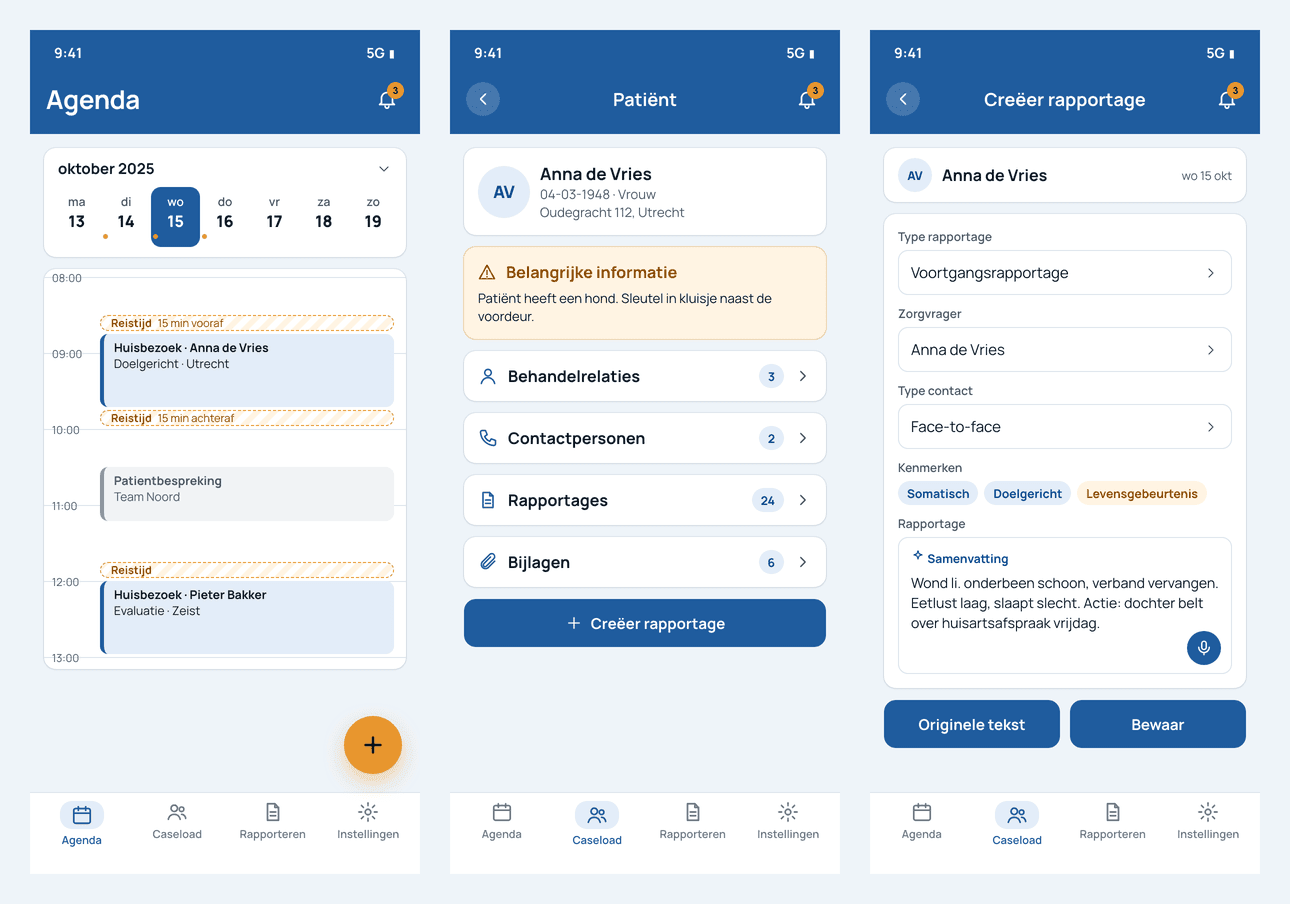
Home care app on three phones: Dutch agenda with travel time, patient record and AI report summary

This was healthcare mobile app development for a European client, built against their existing backend and sign-in server as custom healthcare software development.

Why a home care app for care workers on the road

Home care workers spend the day on the road between patients. The company's web console works well at a desk, but a care worker needs the day's visits, the patient's key facts and a place to write the report in their pocket.

Secure, but quick

Patient data on a phone needs strong sign-in. Typing a password at every visit does not work.

A day of visits, not meetings

Visits repeat, and each one has travel time before and after it.

Reports while memory is fresh

A report written in the car after the visit is better than one written at the end of the day.

Dutch care language

Caseload, rapportage, zorgvrager, Wvggz. The app speaks the users' own terms.

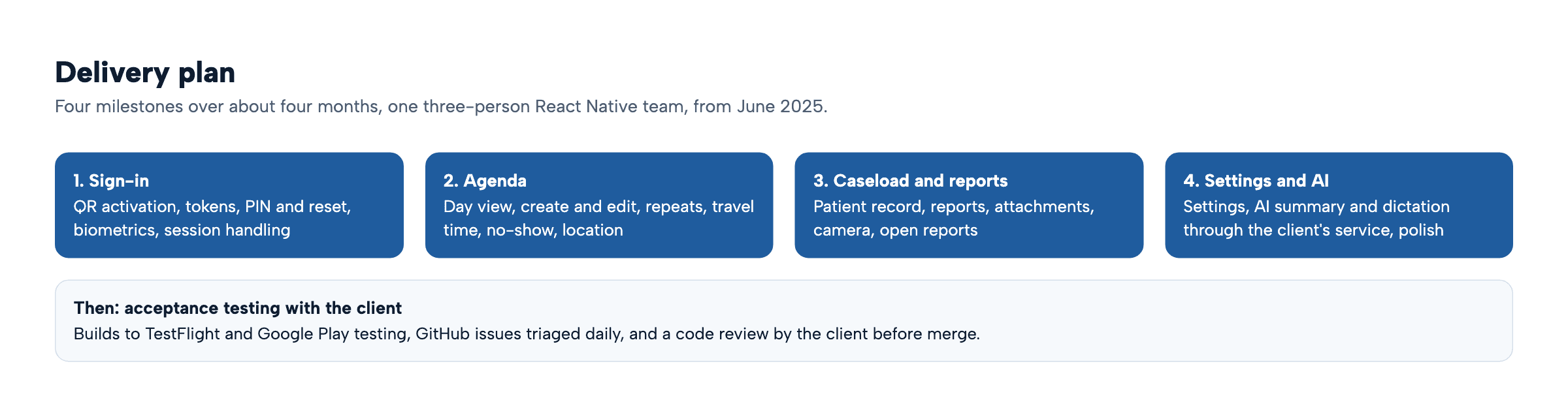
Work started in June 2025 with a three-person React Native team, over four milestones of about a month each.

How the home care mobile app works

The app is React Native 0.79 for iOS and Android. It does not keep its own copy of patient records. It reads and writes through the company's mobile API, and the company's SMART auth server handles sign-in. One Redux middleware sits in front of every call, so the rules for tokens, network and errors live in one place.
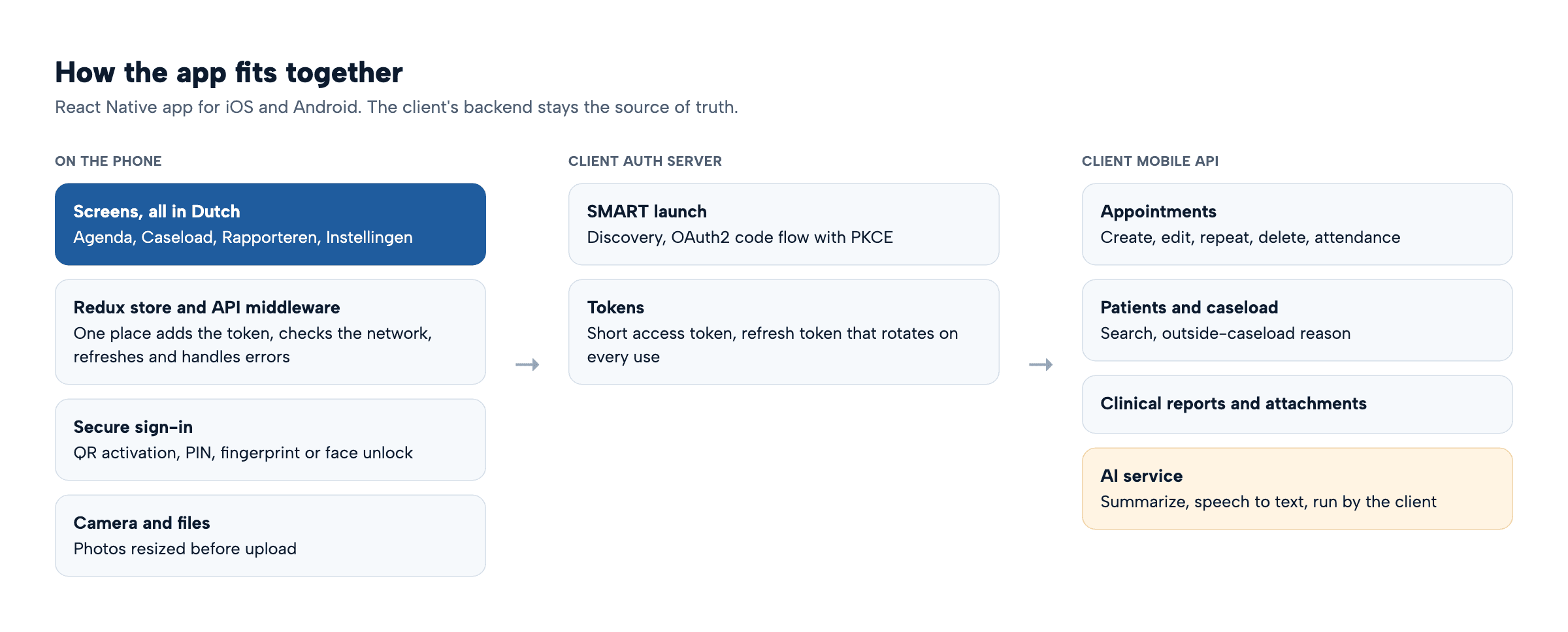
Home care mobile app system architecture: phone screens and middleware, client auth server, client mobile API and AI service

The phone holds no copy of patient records. Every call goes through one middleware to the company's servers.

React NativeiOS and TestFlightAndroidGoogle Play testingCompany's SMART auth serverCompany's mobile APICompany's AI service

Our healthcare product engineering team worked inside the company's repository and issue tracker from day one, and the five flows below are drawn from the app's code. For the wider build process, see our healthtech app development guide.

Care worker app workflows, screen by screen

Each flow is drawn from the code, followed by the screens with their real Dutch labels. Names and patient details are invented. On a phone, scroll a flowchart sideways.

1. Activate the phone once, then unlock with a PIN or fingerprint
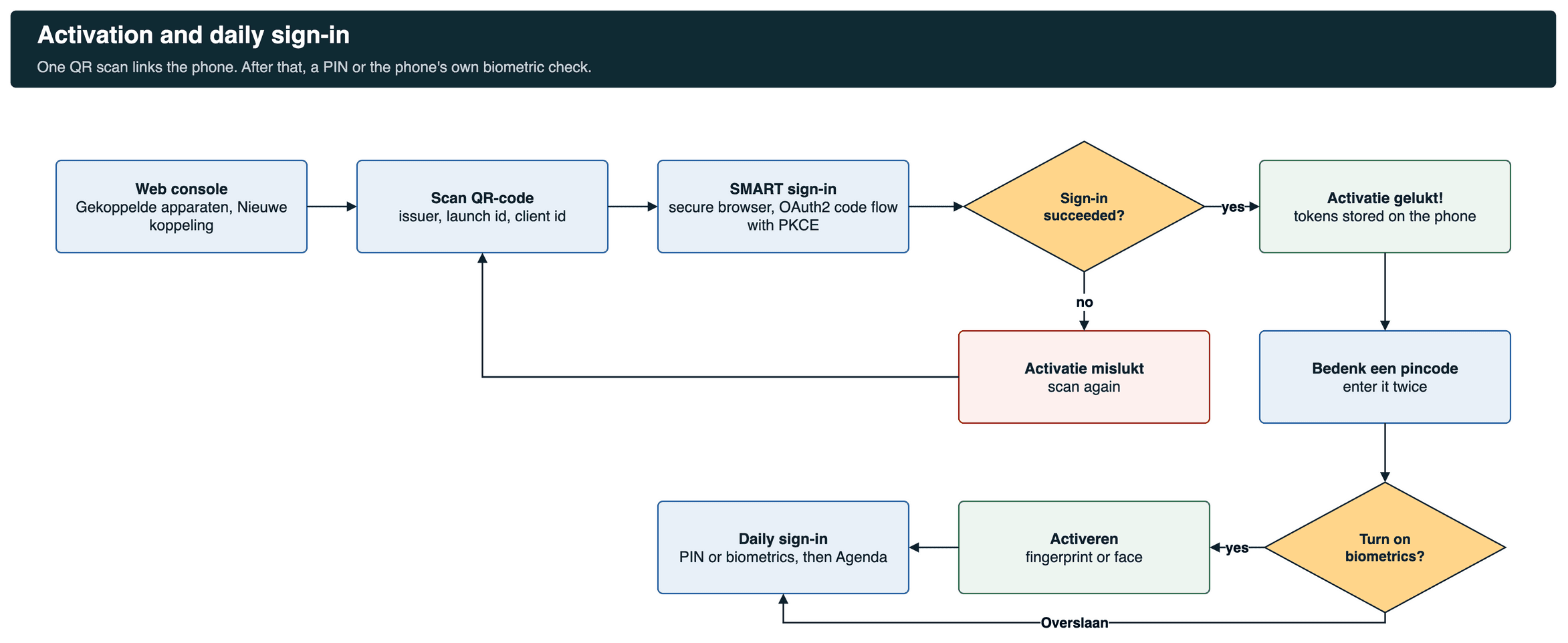
Flowchart: web console, scan QR code, SMART sign-in, success check, PIN, optional biometrics, daily unlock

Activation runs once per phone. A failed sign-in goes back to the scan.
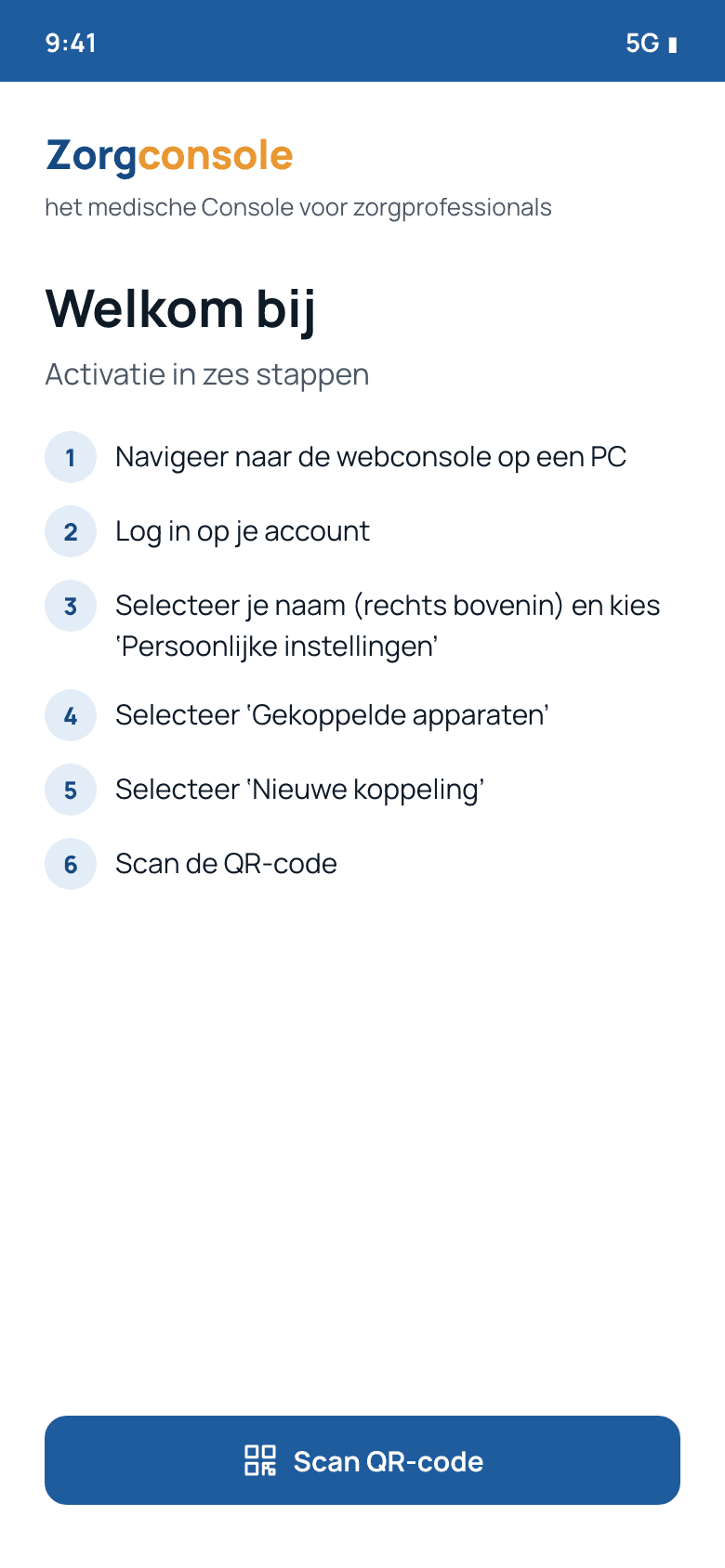
Welkom bij screen with six activation steps

Welkom bij: six steps from the web console.
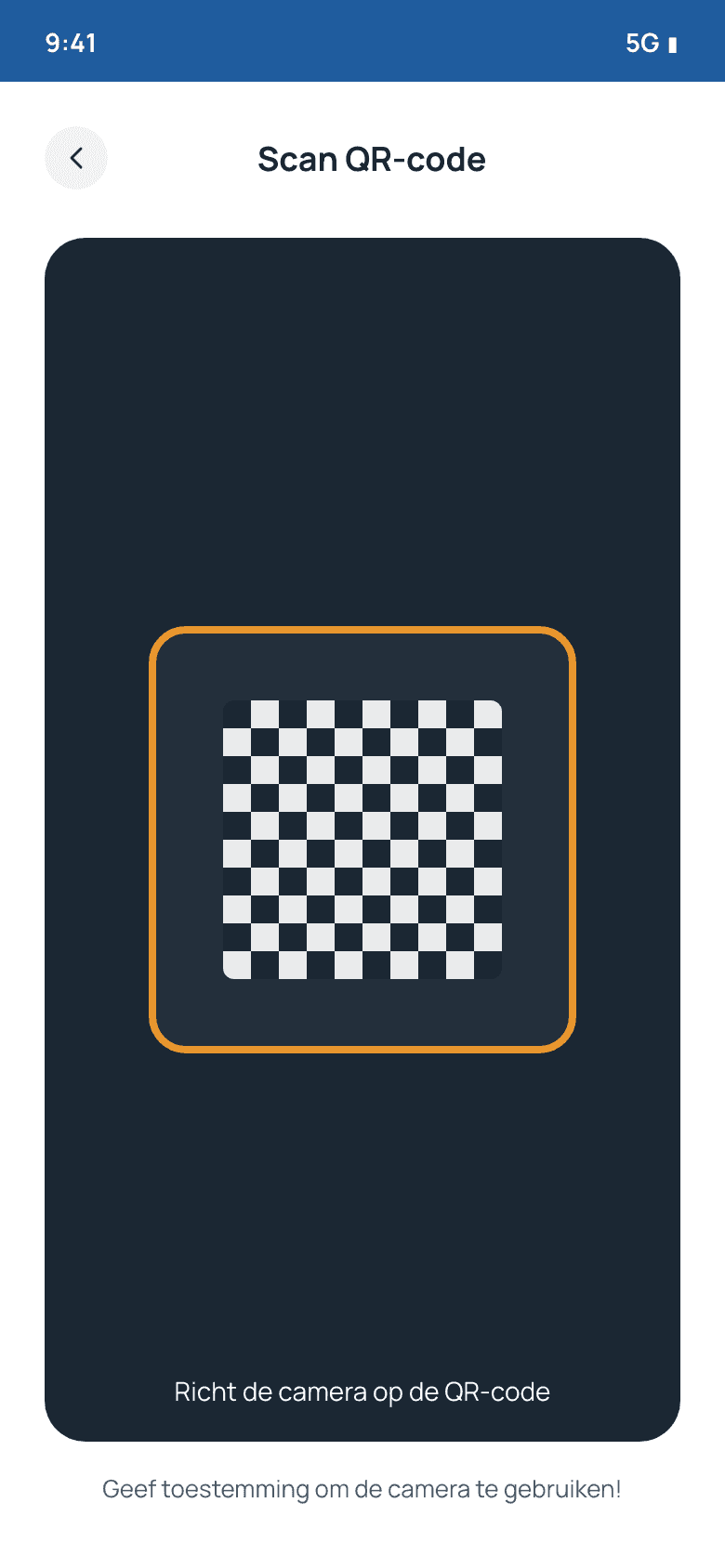
Scan QR-code camera view

Scan QR-code.

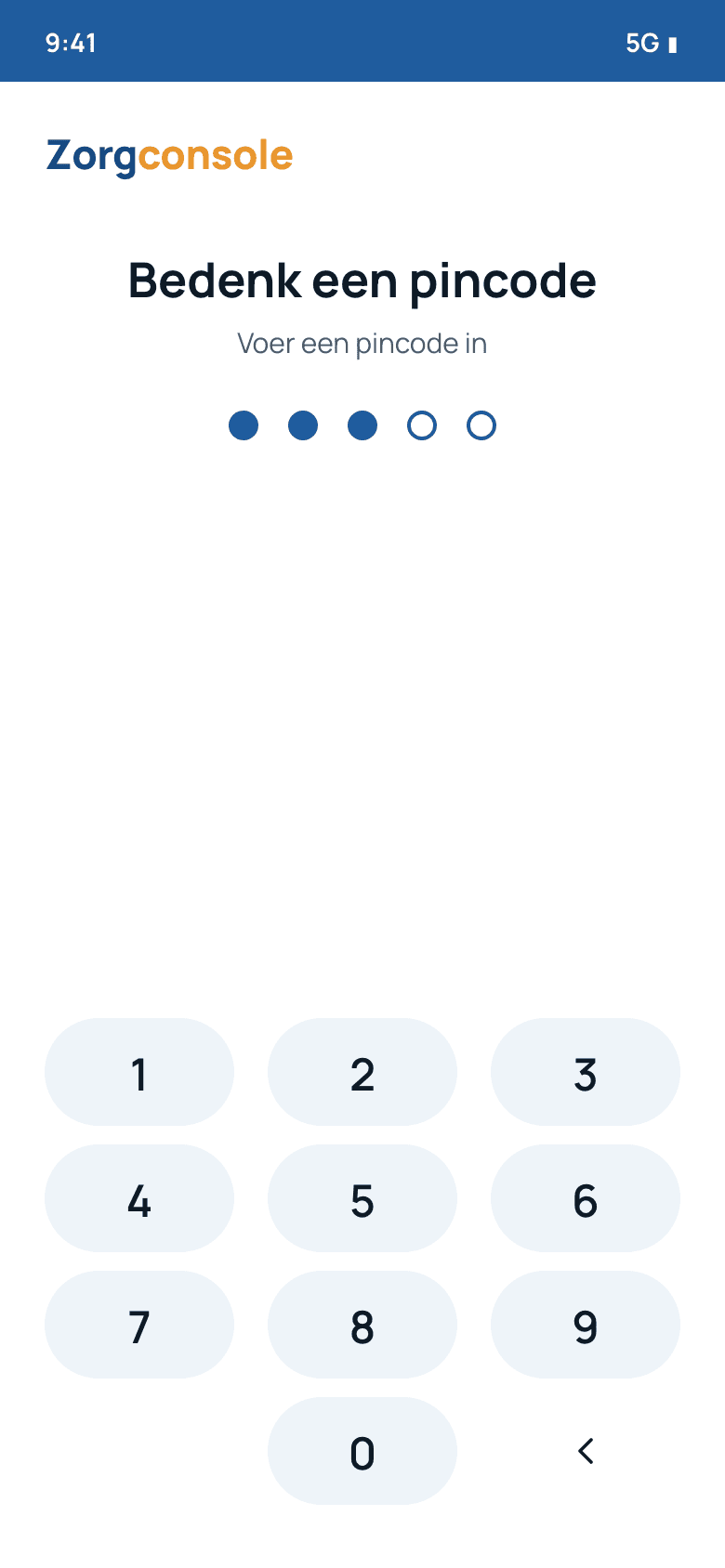
Bedenk een pincode keypad

Bedenk een pincode (create a PIN).

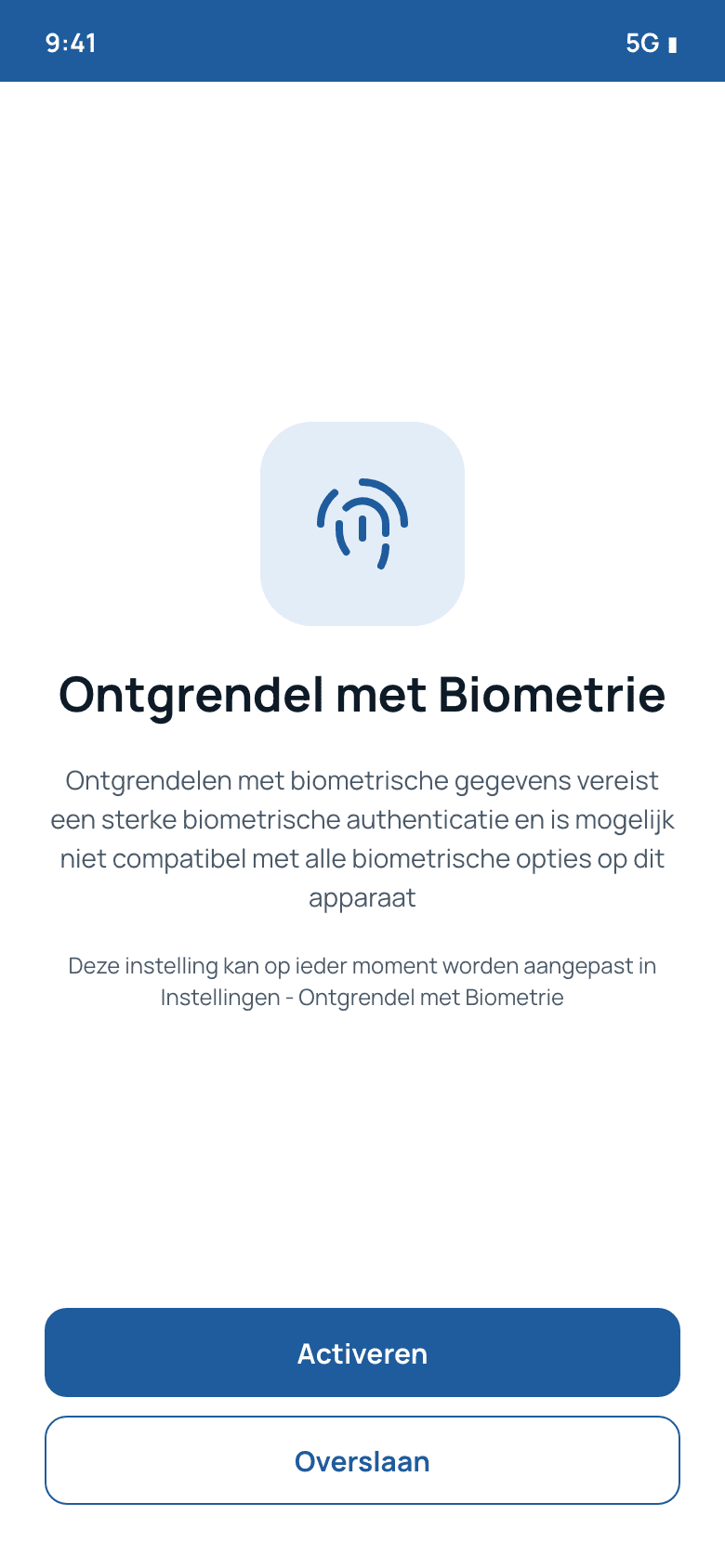
Ontgrendel met Biometrie with Activeren and Overslaan

Ontgrendel met Biometrie (optional).

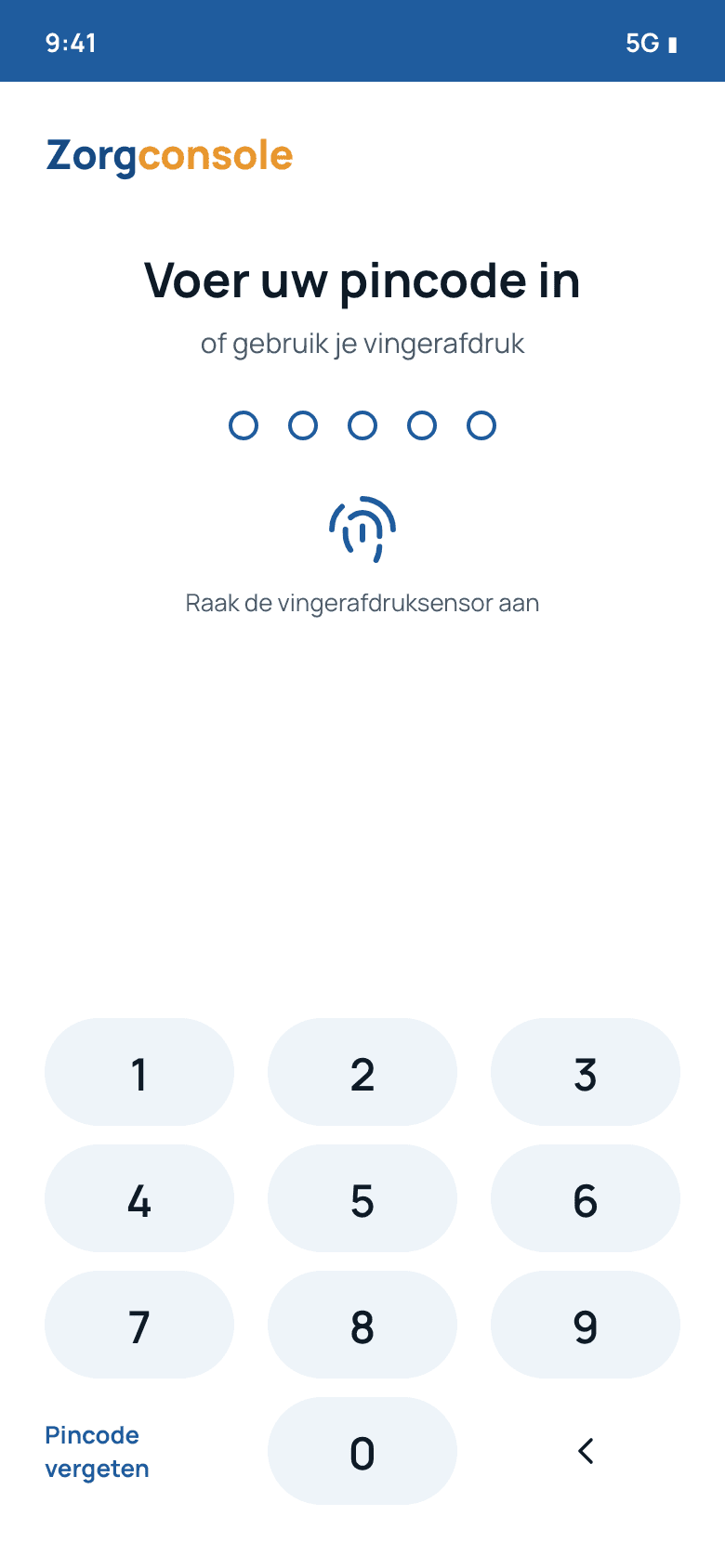
Voer uw pincode in with fingerprint option

Daily unlock: PIN or fingerprint.

2. Home care scheduling: plan, change and close a visit
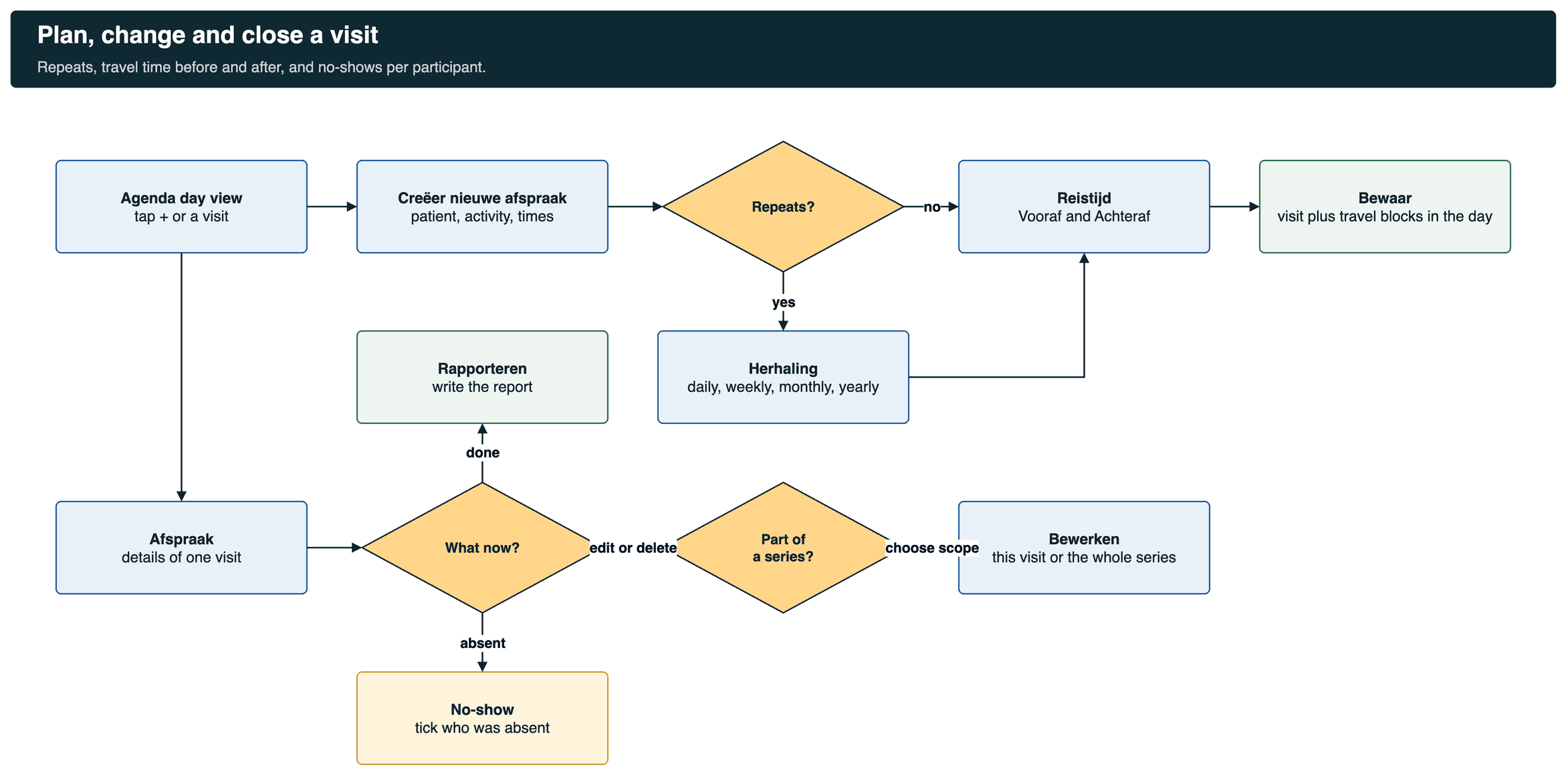
Flowchart: agenda, new appointment, repeat decision, travel time, save; appointment details, edit series or one, no-show, report

Edits to a repeating visit ask whether to change one visit or the series.
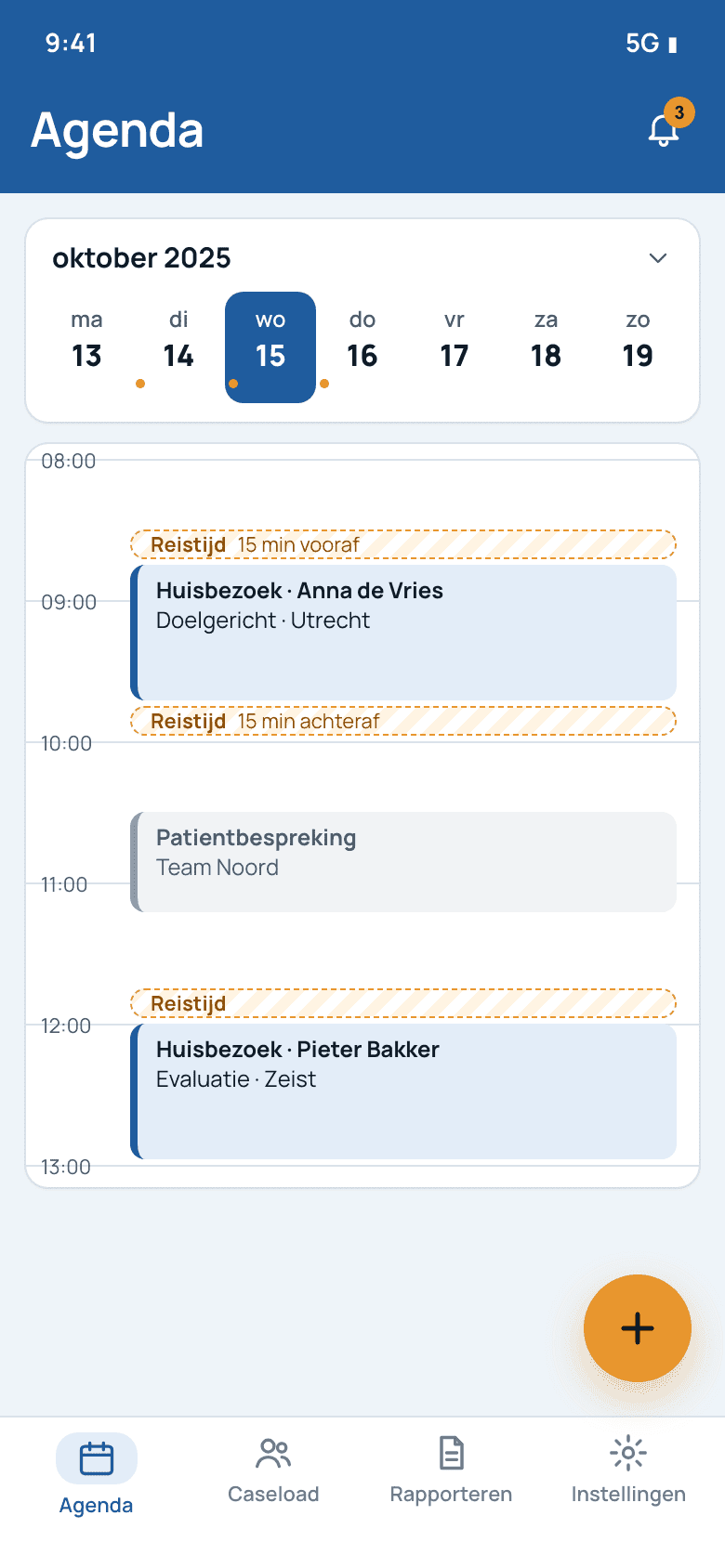
Agenda day view with travel time blocks

Agenda with Reistijd (travel time) blocks.
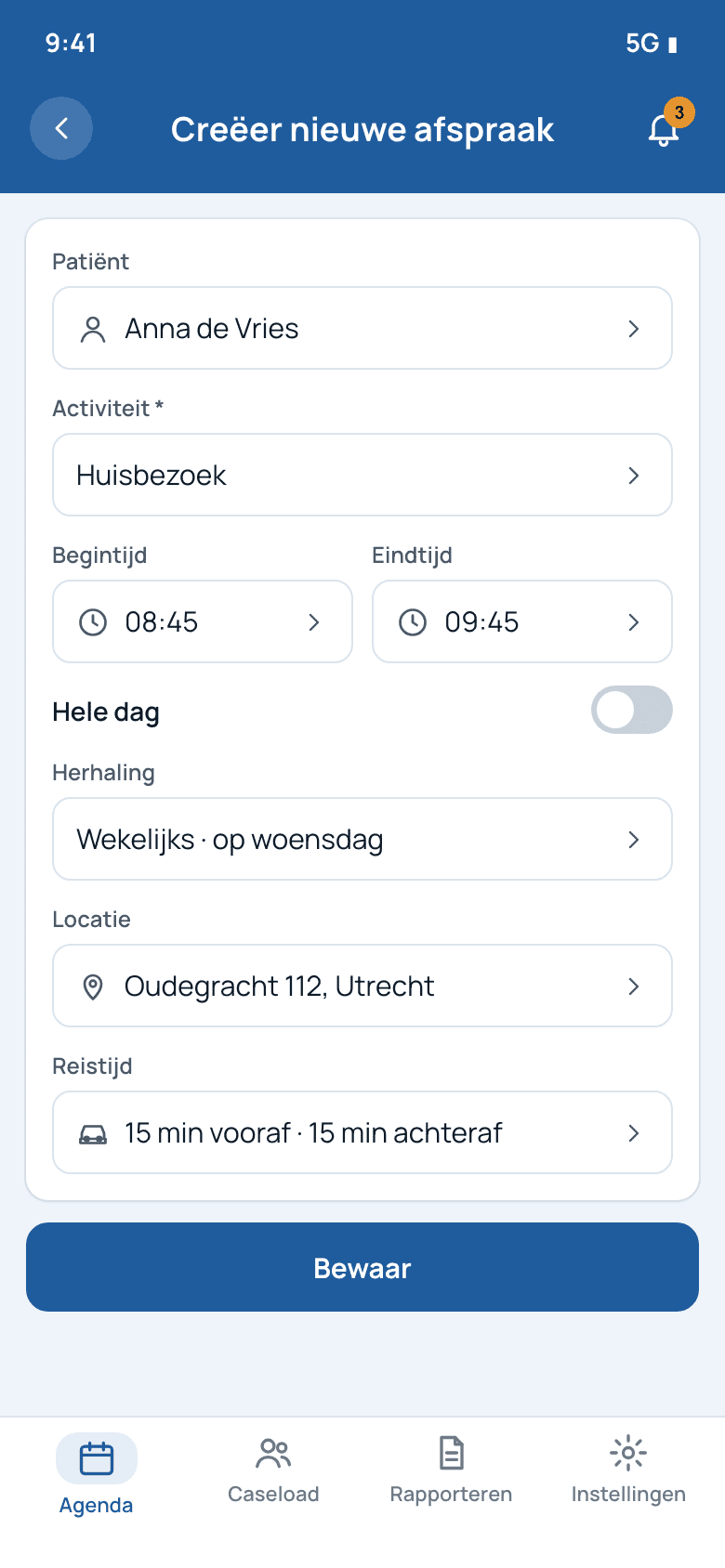
Creëer nieuwe afspraak form

Creëer nieuwe afspraak (new visit).

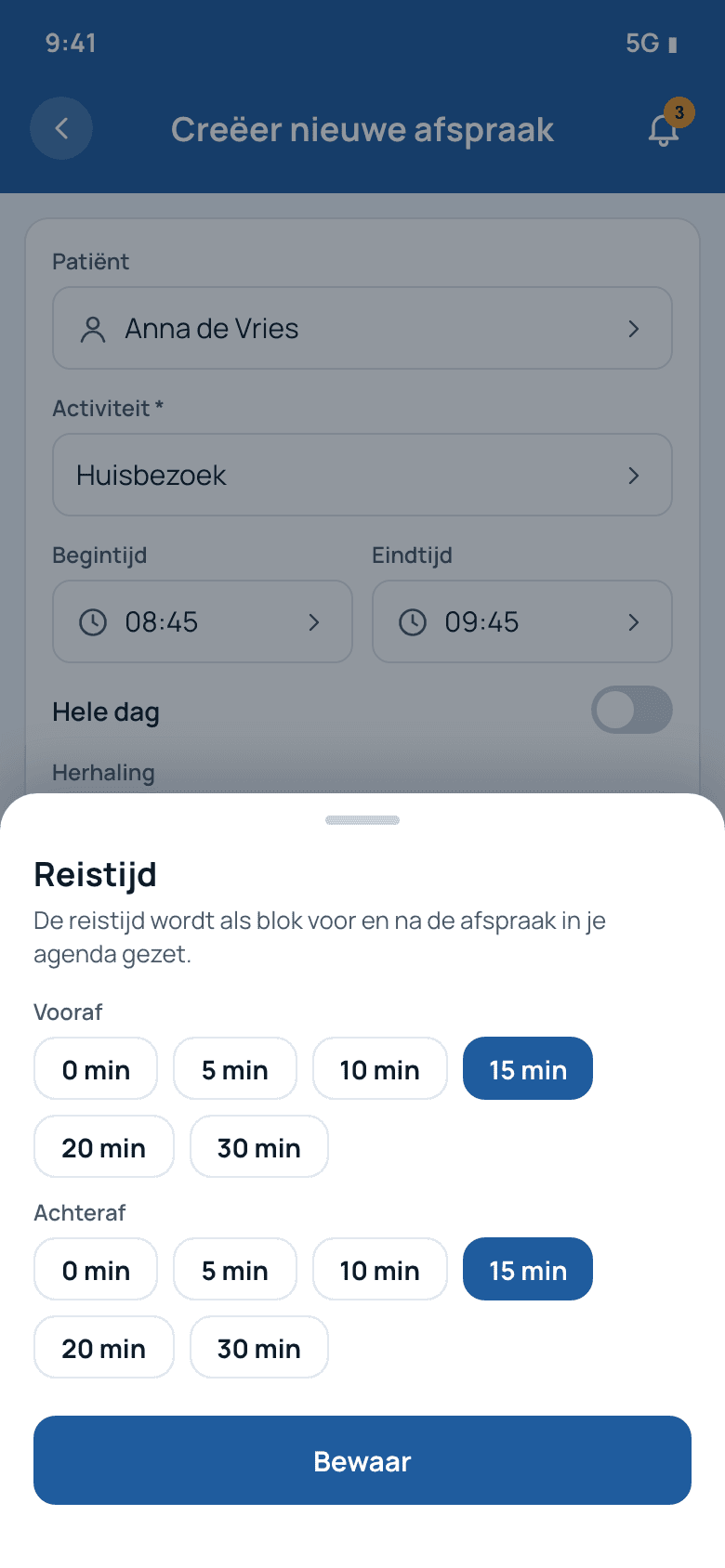
Reistijd sheet with Vooraf and Achteraf

Travel time Vooraf and Achteraf.

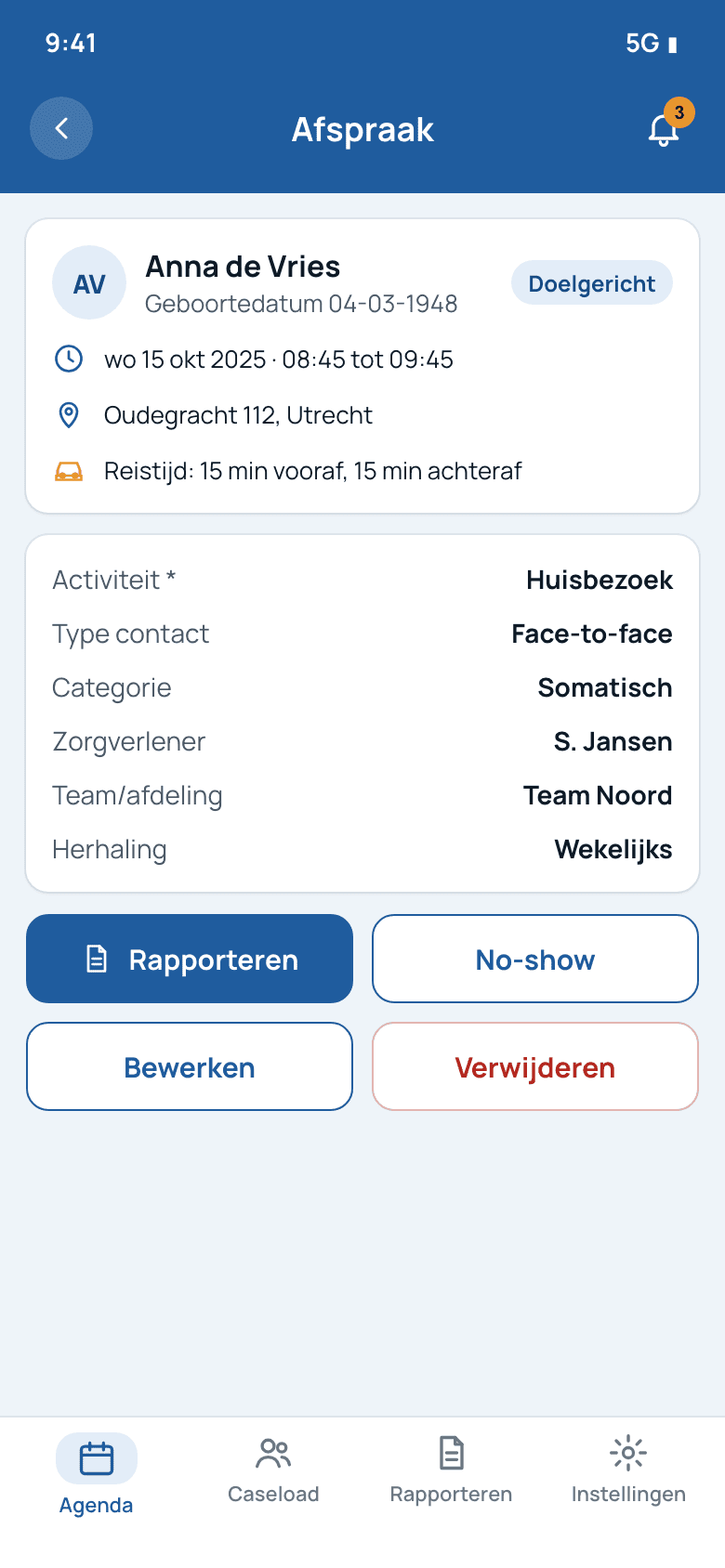
Afspraak details with Rapporteren, No-show, Bewerken, Verwijderen

Afspraak: report, no-show, edit, delete.
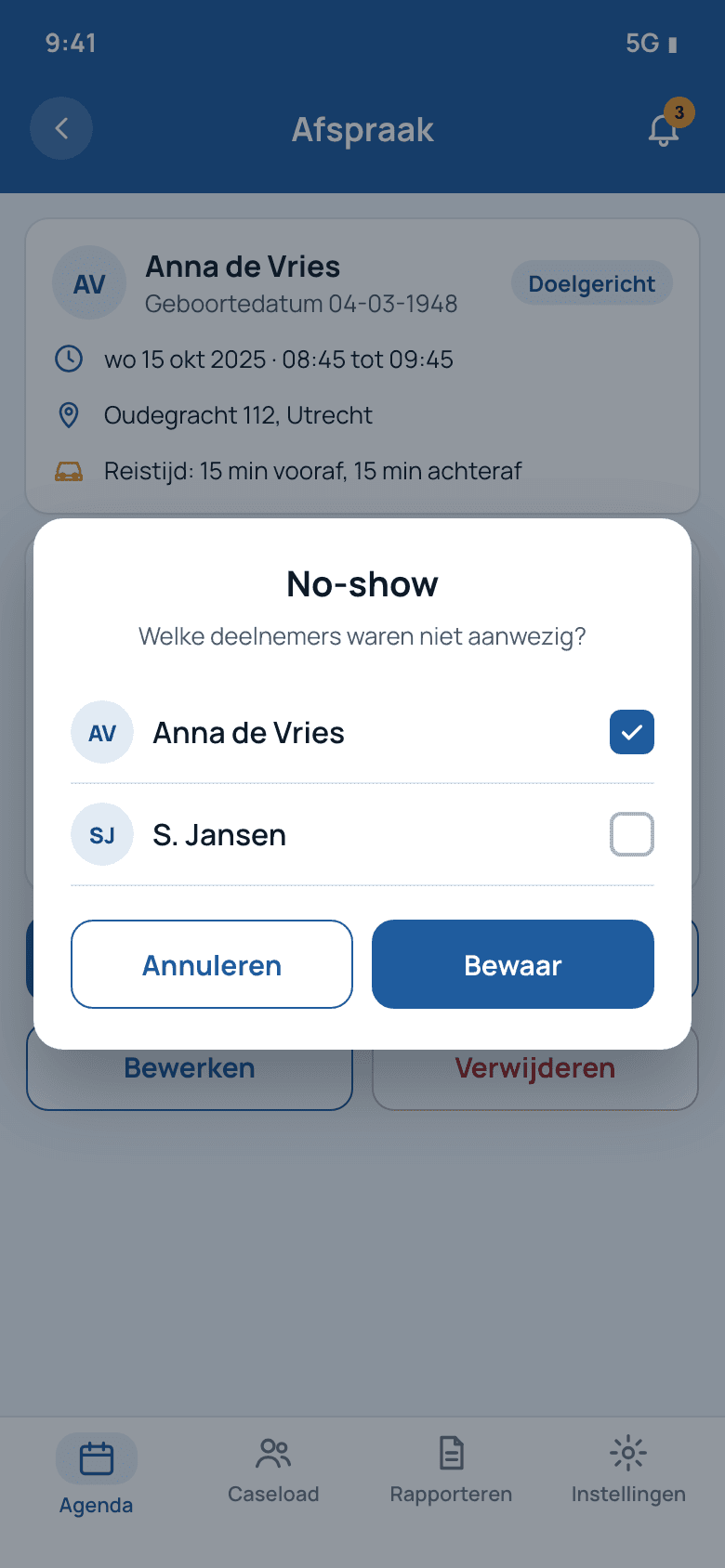
No-show dialog with participant checkboxes

No-show per participant.

3. Open the patient, write the report, add a photo
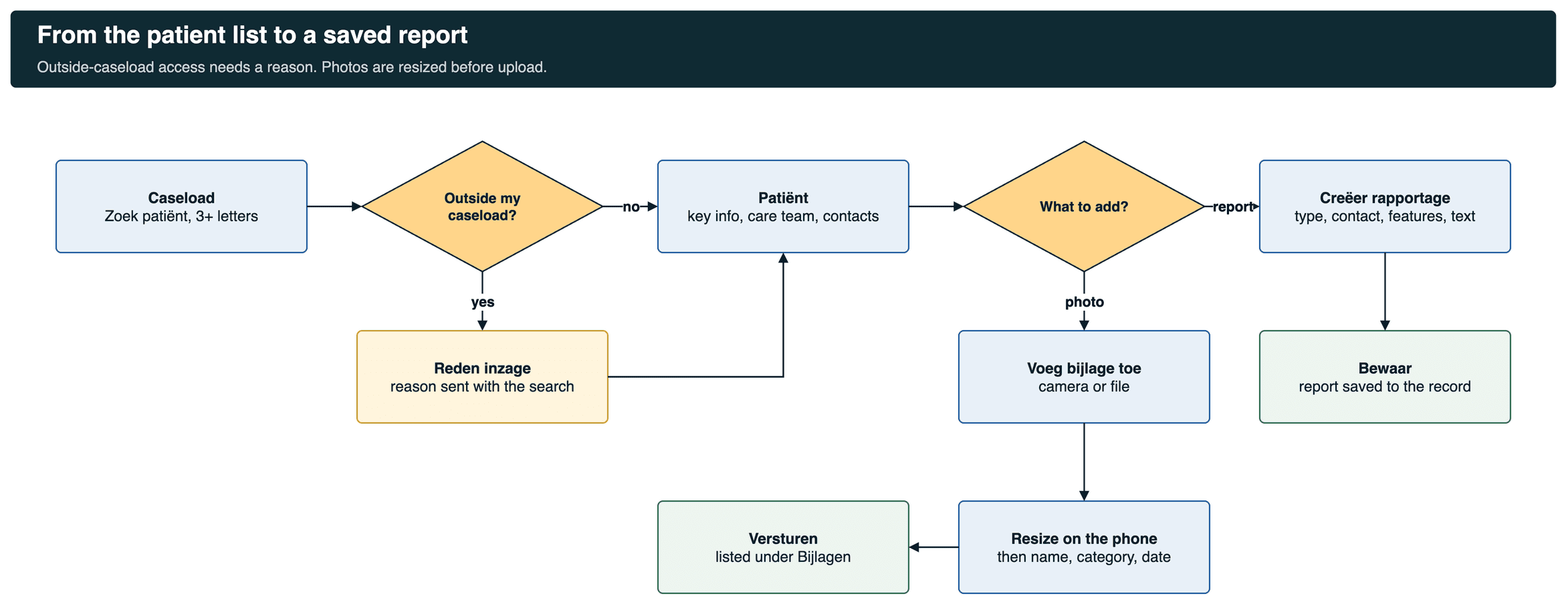
Flowchart: caseload search, outside caseload reason, patient record, report or photo, resize, send

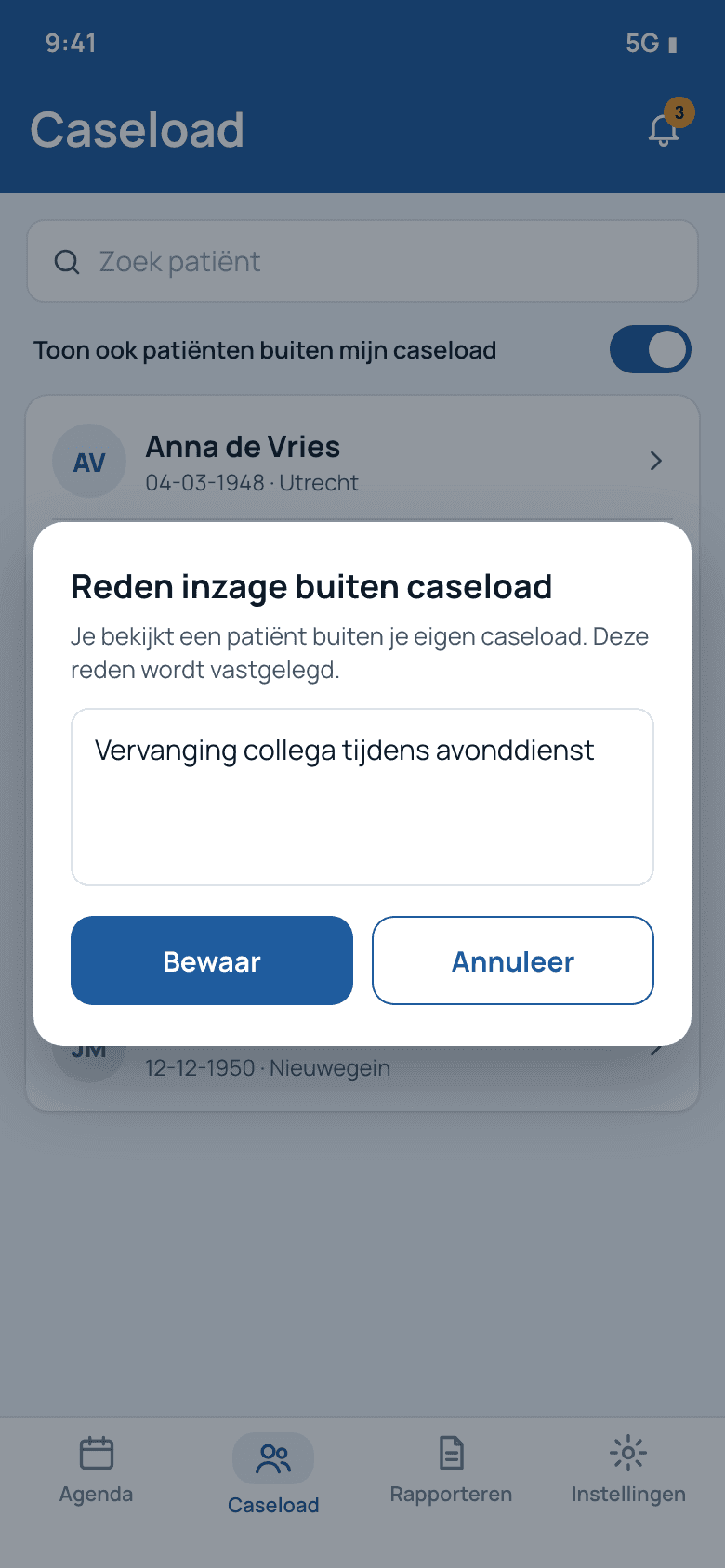
A patient outside your own caseload needs a reason first.
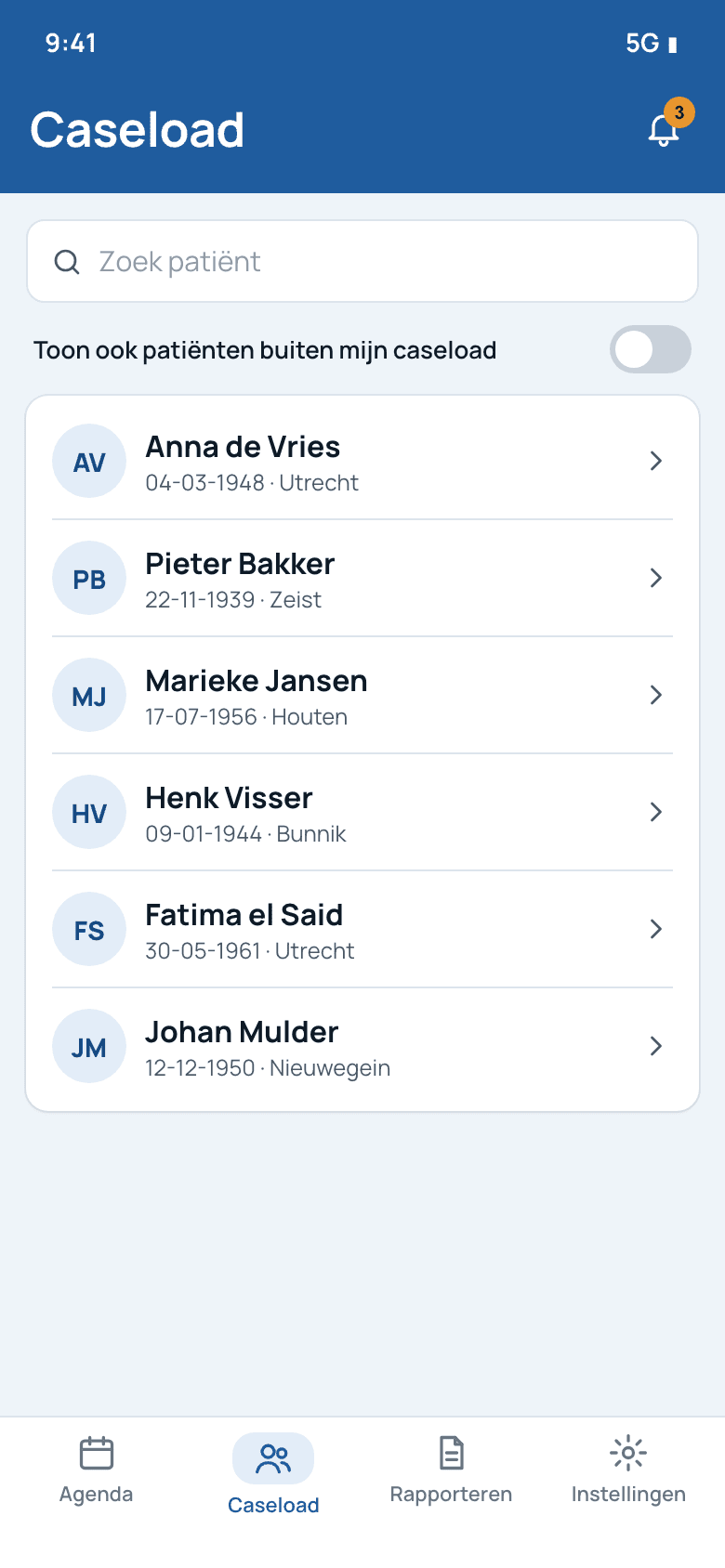
Caseload list with search and toggle

Caseload with search.

Reden inzage buiten caseload dialog

Reason for viewing outside my caseload.
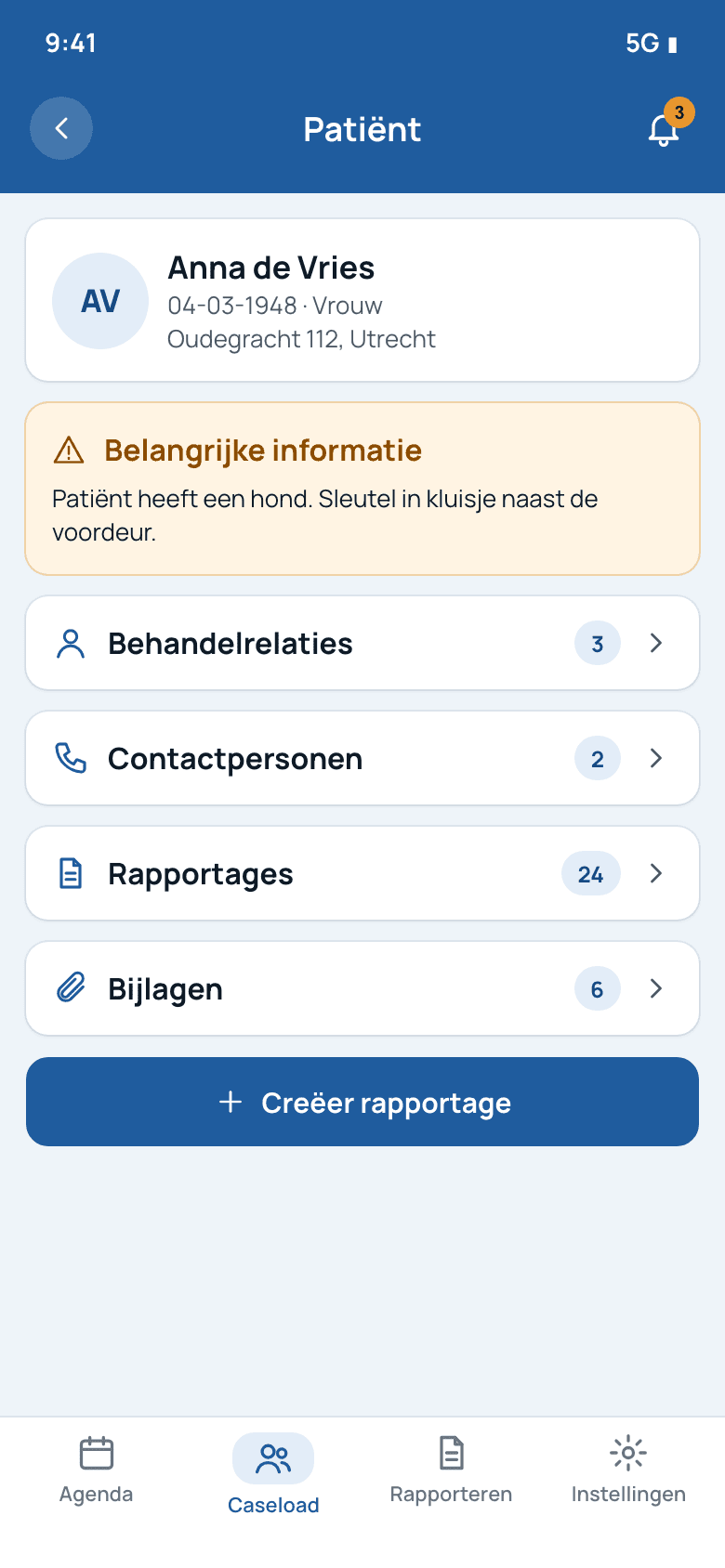
Patient record with key information

Patiënt: key info first.

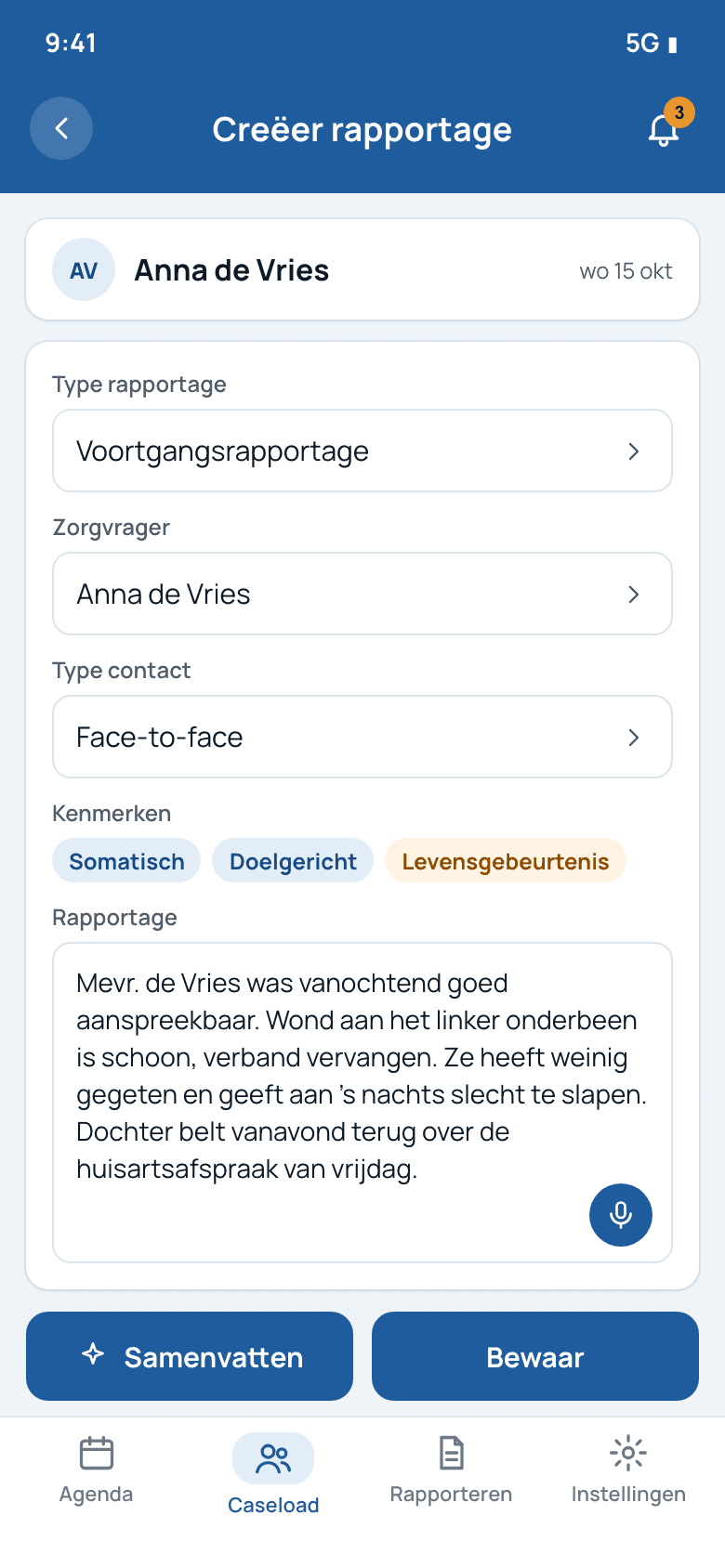
Creëer rapportage form with microphone

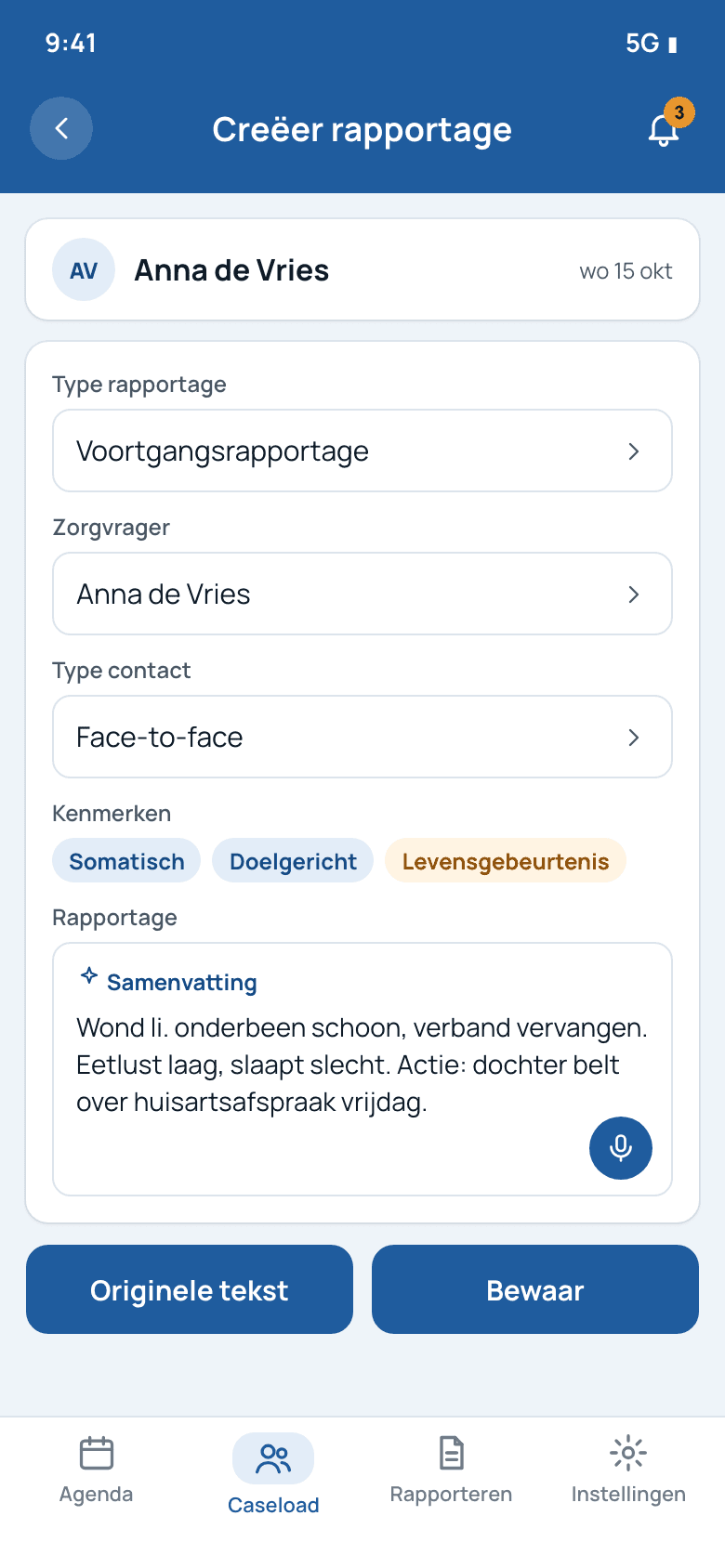
Creëer rapportage (write report).

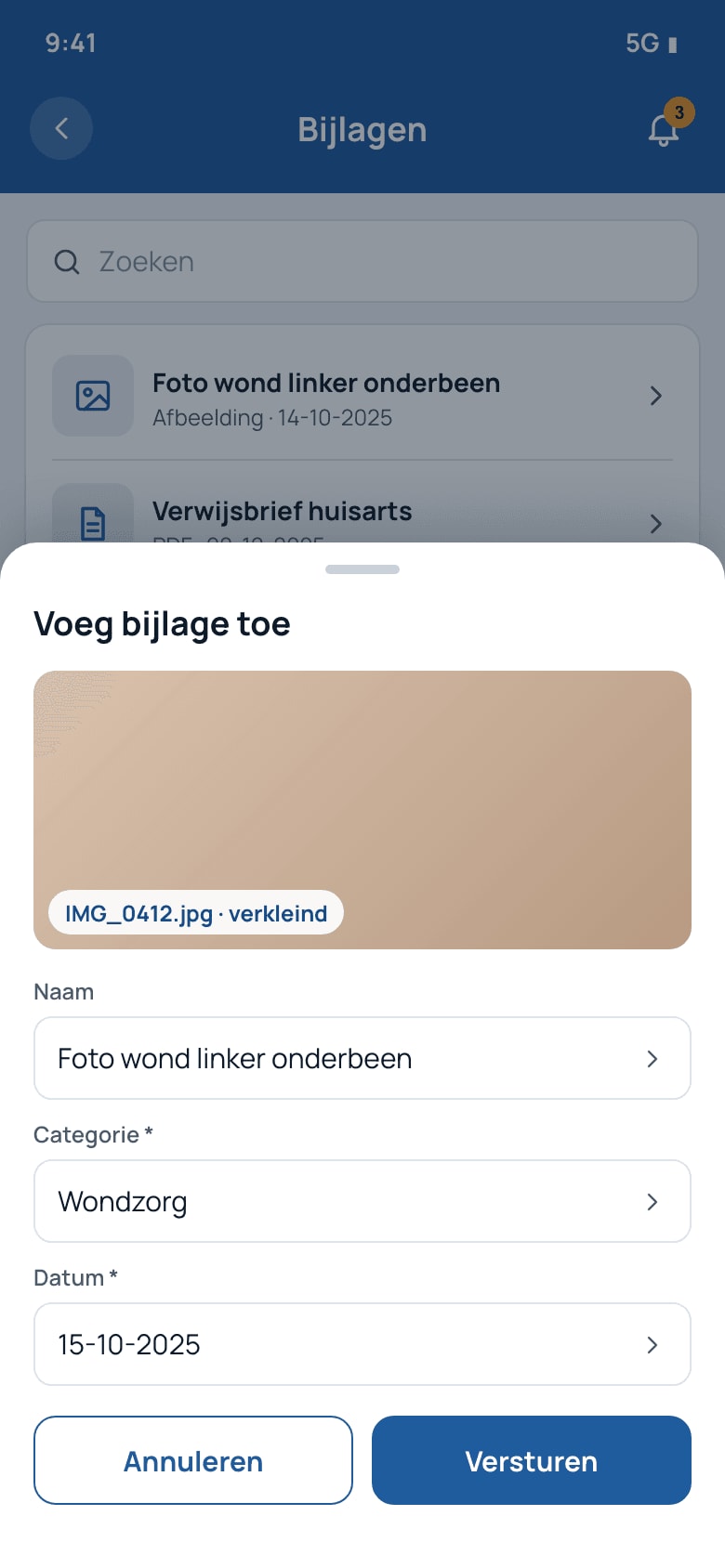
Voeg bijlage toe sheet with resized photo

Bijlagen: add a photo, resized on the phone.

4. AI nursing documentation: summarize a report
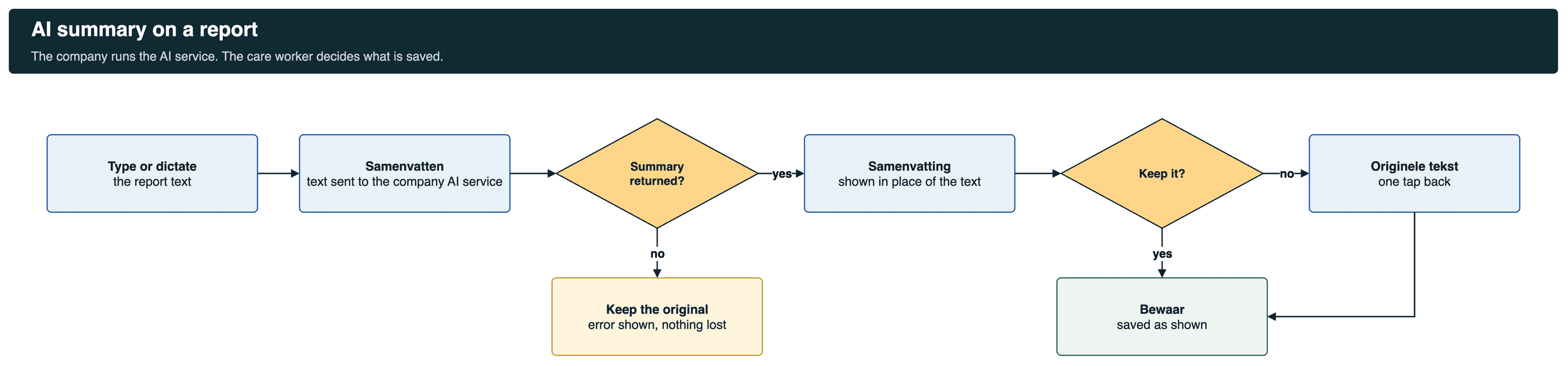
Flowchart: type or dictate, Samenvatten, summary returned decision, keep it decision, original text, save

The care worker always chooses which version is saved.

Report with original text

Original text.

Samenvatting shown with Originele tekst button

Samenvatting, one tap back to the original.

5. Catch up on visits without a report
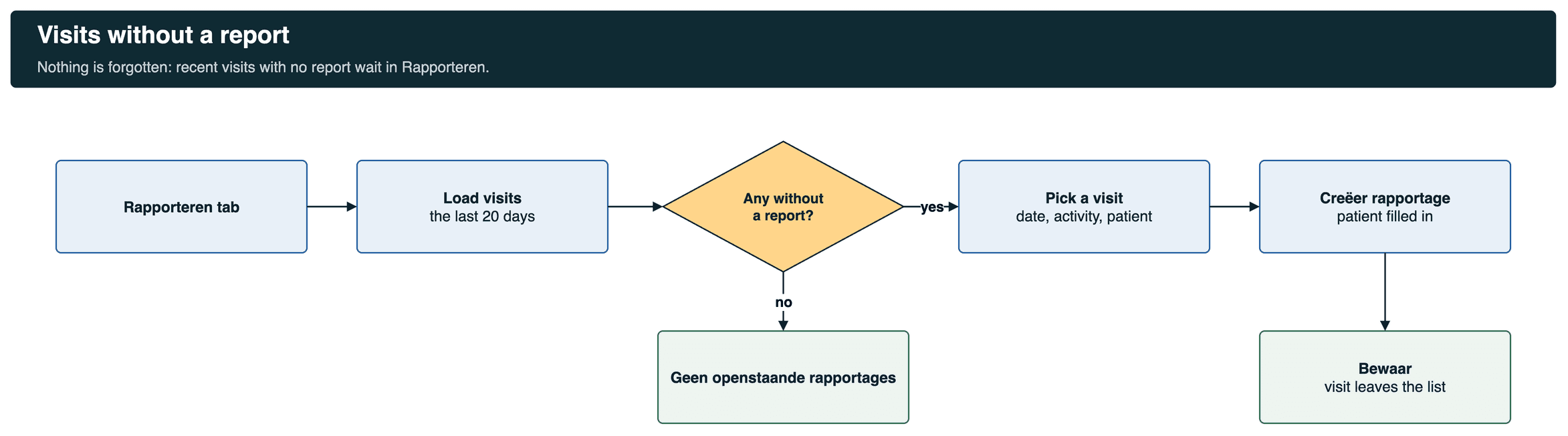
Flowchart: Rapporteren tab, load last 20 days, any without report decision, pick a visit, write and save

Recent visits with no report stay on the list until a report is saved.
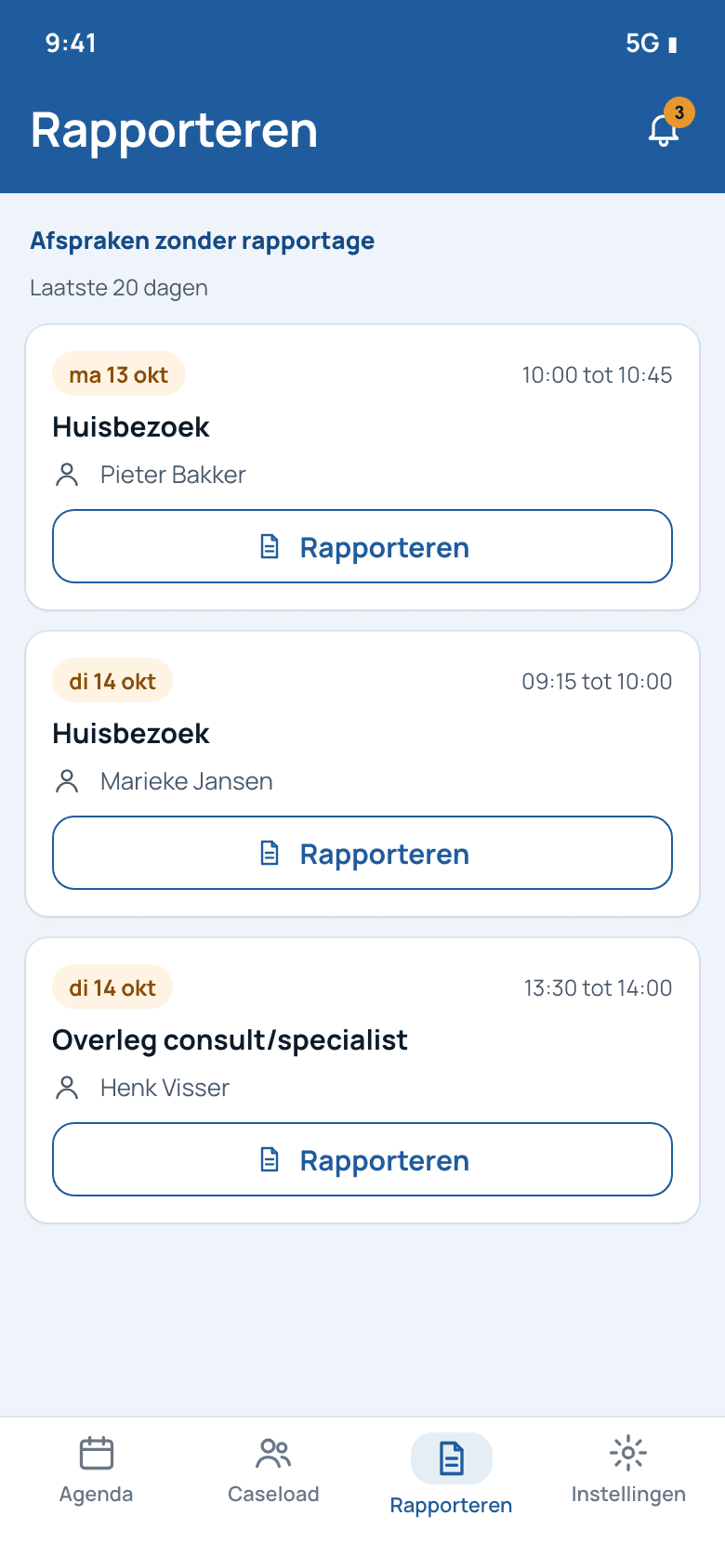
Afspraken zonder rapportage list

Afspraken zonder rapportage.

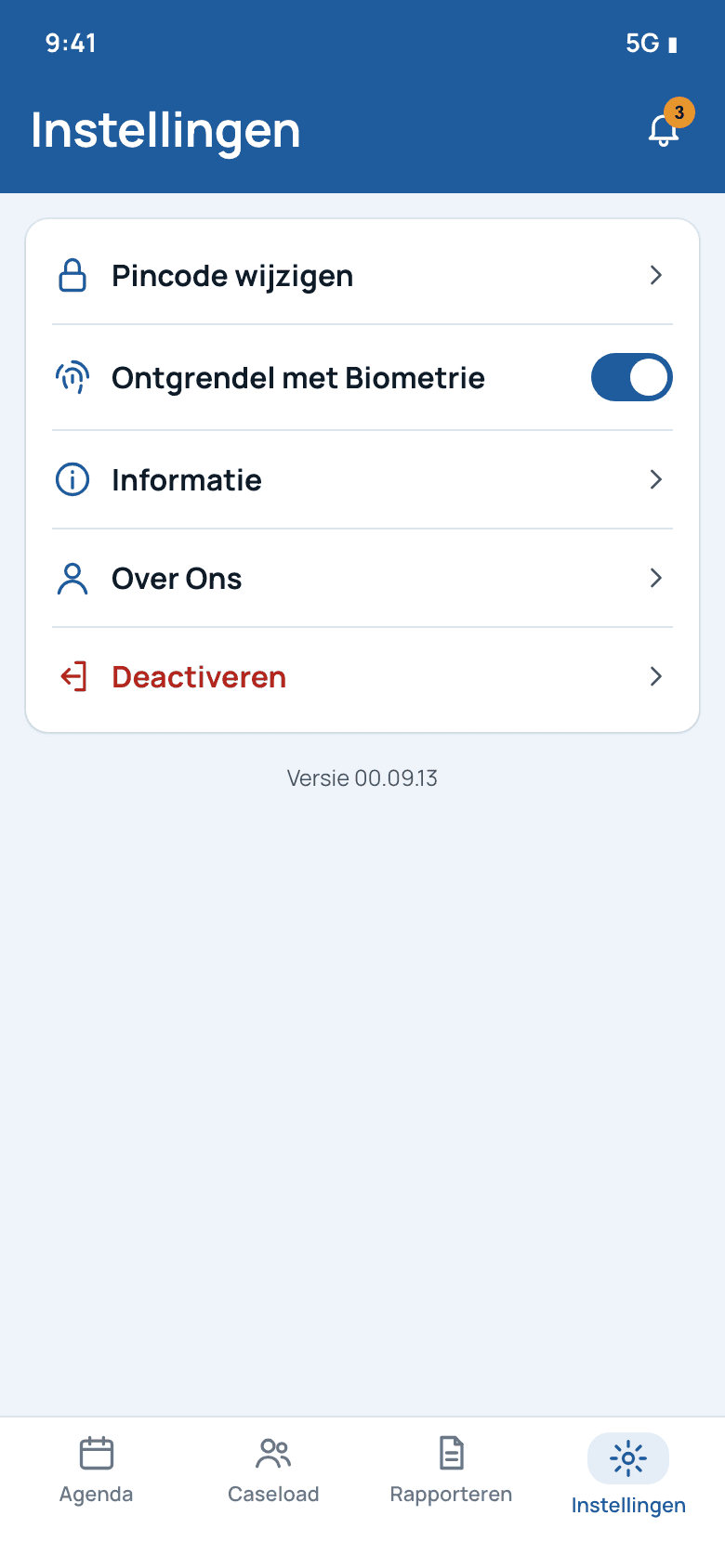
Instellingen menu

Instellingen: PIN, biometrics, deactivate.

The hard problems in a React Native healthcare app, and how we solved them
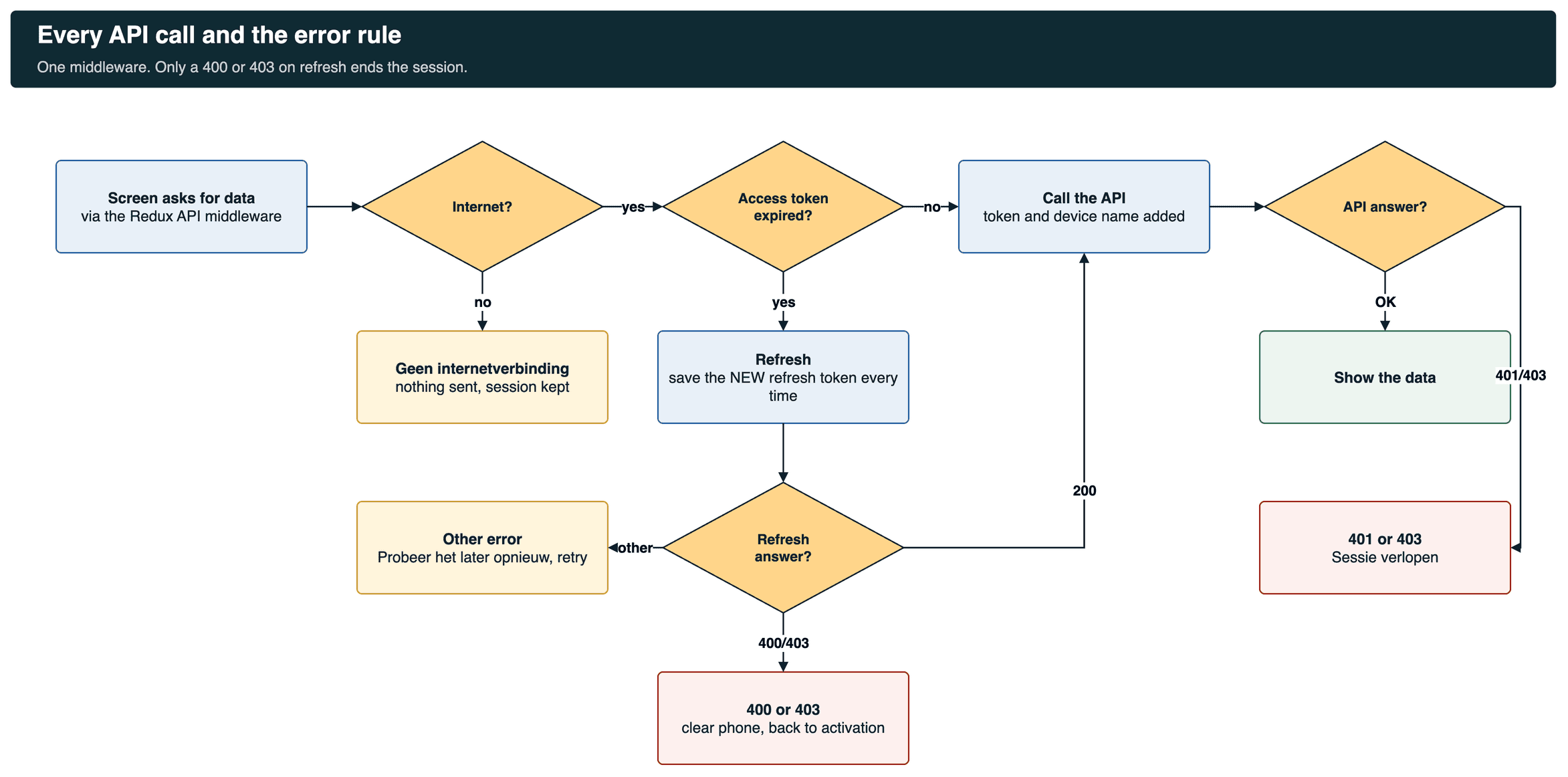
Flowchart: every API call through the middleware, internet check, token expiry, refresh with rotation, 400 or 403 ends the session, other errors retry

Every call takes this path. The refresh step saves the new refresh token each time.

Sign-in without a password on the phone+
The care worker opens the web console, picks ‘Gekoppelde apparaten’ and scans the QR code it shows. The code carries the issuer, a launch id and the client id. The app reads the server's SMART configuration, opens a secure in-app browser and runs the OAuth2 authorization code flow with PKCE, the same pattern we use in SMART on FHIR app development. The tokens are stored on the phone, and daily unlock is a PIN or the phone's fingerprint or face check. The device name goes with each request so the console can show which phone is linked.
Care workers were being logged out+
Users were logged out after about an hour. The client's server issues a new refresh token on every use and retires the old one. The app has to save the new token each time, or the next refresh fails. We moved all token handling into the API middleware. It checks the access token before each call, refreshes it once when it has expired, saves the new pair and retries the call. We then tested with fresh users and long idle periods, together with the client's backend team. In testing, sessions then stayed signed in through long idle periods.
A server hiccup must not end the session+
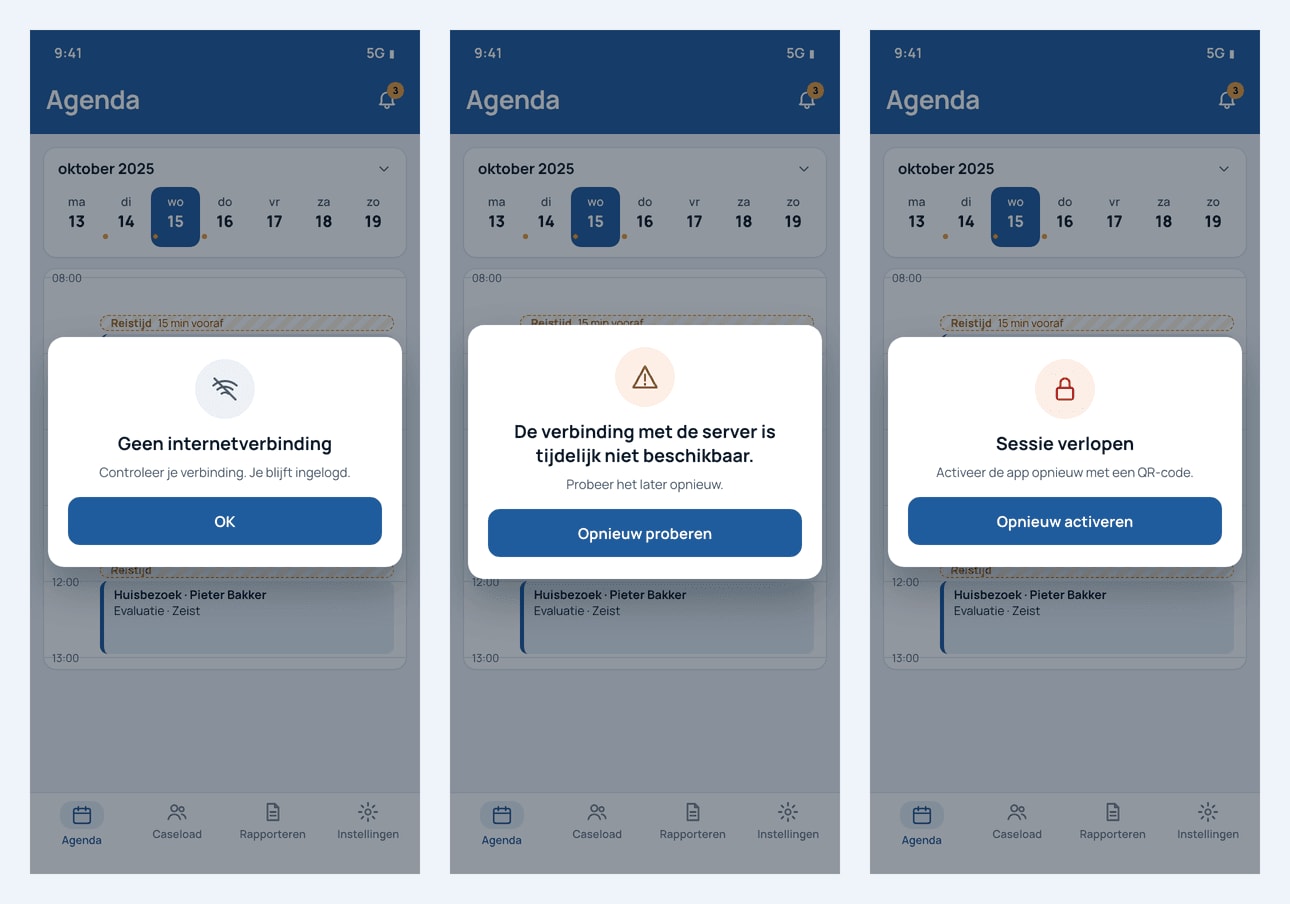
Early builds logged people out on any failed refresh, including a short server outage. We agreed one rule with the client. A 400 or 403 on refresh means the session is really over, so the app clears the phone and returns to activation. Any other error shows “De verbinding met de server is tijdelijk niet beschikbaar. Probeer het later opnieuw.” with a retry button, and the session continues. With no internet, the app says so and sends nothing. iOS does not let an app close itself, so we kept only the retry button there.
The three messages in the app: no internet, server temporarily unavailable, session expired
An agenda that thinks in visits+
We built the day view on react-native-calendars and kept our own fork for the behavior the design needed. Visits can repeat daily, weekly, monthly or yearly, or not at all, and the care worker chooses whether an edit changes one visit or the whole series. Travel time before and after a visit is stored with it and drawn as its own block, so the day shows real availability. Whole-day items, duration rules per activity and no-shows per participant came out of daily reviews with the client's planners.
Seeing a patient outside your own caseload+
By default a care worker sees only their own patients. They can switch on ‘Toon ook patiënten buiten mijn caseload’, but the app then asks for a reason, and that reason goes with the search to the server. Access stays possible for a colleague covering a shift, and it is always recorded.
AI that saves time without changing the record+
The company runs its own AI service. We did not build or train a model. The report screen sends the typed text to the company's summarize endpoint and shows the result in place of the text, with one tap back to the original. The care worker decides which version to save. We cover the wider pattern in ambient listening in healthcare. Dictation through the company's speech-to-text endpoint was the last part we connected, near the end of the work.
Photos and files from the field+
The attachments screen lists a patient's files with search and preview. A new photo is resized on the phone before it is sent, which keeps uploads quick on a mobile connection. The care worker adds a name, a category and a date, and can remove a file again.
Code the client's own team could own+
The client reviewed our code before merging it. We worked through their review on one large pull request, answered each comment, and resolved the merge conflicts between parallel branches. We moved all Dutch labels into one translation file, moved endpoints into constants, and removed test data and console logging. Splitting the largest screens was left for later pull requests so it could be tested on its own.
Delivery plan: sign-in, agenda, caseload and reports, settings and AI, then acceptance testing

Buy, build or reuse

CapabilityChoiceWhy
Sign-inReuse the company's SMART auth serverOne identity for web and app, with standard OAuth2 and PKCE.
CalendarReuse react-native-calendars, in our own forkA proven day view, changed where home care needed more.
BiometricsReuse the phone's own checkThe fingerprint or face never leaves the phone.
AI summary and dictationReuse the company's AI serviceThe company keeps control of the model and the data.
Agenda, caseload, reports, attachments, sessionsBuild, in React NativeThe parts that make the app fit the care worker's day.

Security and privacy

  • The phone is linked to one account with a QR code. No password is typed or stored on it.
  • Sign-in uses the OAuth2 code flow with PKCE, in a secure in-app browser.
  • Daily unlock is a PIN or the phone's own biometric check.
  • Viewing a patient outside your caseload needs a reason, which is recorded.
  • Deactivating the app in settings clears the phone, and it must be linked again.

What we learned

What we foundWhat we didWhat improved
Token rules decide whether an app feels reliable.Read the server's rotation rules first, then put every refresh in one place.No logouts in the long test.
Not every error means “log out”.Agreed one error rule with the client and wrote it down.A passing outage keeps the session.
Agenda rules live in the planners' heads.Asked about past dates, travel time and durations in daily reviews.Rules agreed before code, not after a bug.
A client's code review is part of the build.Planned time for it and answered each comment in its own commit.Code the client's team accepted into its repository.

How this engagement ran

Fixed milestones over about four months, from June 2025, with a three-person React Native team plus a tester and a delivery lead. The code lived in the company's repository, and the work was tracked in its issues. We joined the client's daily stand-up, sent builds to TestFlight and Google Play testing, and fixed findings from their acceptance testing in short cycles.

Planning a home care mobile app?

Tell us about your backend, your sign-in and your users' day. We will map sessions, agenda rules and reporting before a line of code.

Book a 30-min call

Questions buyers ask

How long does home care mobile app development take?
This app took about four months over four milestones with a three-person React Native team, followed by acceptance testing with the client. Timelines depend on how ready your backend and sign-in server are.
What features does a home care app for care workers need?
At minimum: secure sign-in, a day agenda with travel time, the caseload and patient record, reports written at the visit, attachments with camera upload, and clear handling of lost connection. This app added open-report reminders and an AI summary.
Is React Native a good choice for a healthcare app?
For a care worker app like this one, yes. One codebase served iOS and Android, while sign-in, biometrics and the camera used the phones' native features.
How does secure login work in a home care mobile app?
Here the care worker scans a QR code from the web console. The app then runs a SMART launch with the OAuth2 code flow and PKCE. Daily unlock is a PIN or the phone's fingerprint or face check, so no password is stored on the phone.
How do you stop users being logged out of a healthcare app?
Save the new refresh token every time the server rotates it, refresh in one place before each call, and only end the session on a 400 or 403 from the refresh. Other server errors show a retry message and keep the session.
Can AI help care workers with documentation?
Yes. In this app the care worker types or dictates a report and taps Samenvatten. The company's own AI service returns a summary, and the care worker chooses whether to keep it or the original.
Can a home care app be built in Dutch or another language?
Yes. This app is fully Dutch. All labels sit in one translation file, so a new language is a new file, not a change on every screen.
Where is patient data stored in a home care mobile app?
In this app, on the company's own servers. The phone keeps no copy of patient records. It reads and writes through the company's mobile API, and only the sign-in tokens are stored on the phone. Deactivating the app in settings clears the phone.
How does a home care app support GDPR and EU data rules?
The design keeps patient data in the company's own backend rather than on the phone, limits each care worker to their own caseload, records a reason when someone opens a patient outside it, and clears the phone when the app is deactivated. The company's own hosting and data processing agreements cover the rest of GDPR, so check those with your provider.
What happens when a care worker loses connection on a visit?
The app says there is no internet and sends nothing. A short server outage shows a retry message and keeps the session. Only a refresh that the server refuses with a 400 or 403 ends the session and returns the phone to activation.