
Medplum EHR for a consumer health records company: a clinician web app on FHIR
We built the clinician side of a consumer health records product: chart, timeline, labs, care plans, tasks, scheduling, messages and invoices, all on a self-hosted Medplum FHIR server, with the company's own sign-in and strict separation between practices.
November 22, 2026 · 14 min read · Jitendra Choudhary, CTO & Co-Founder
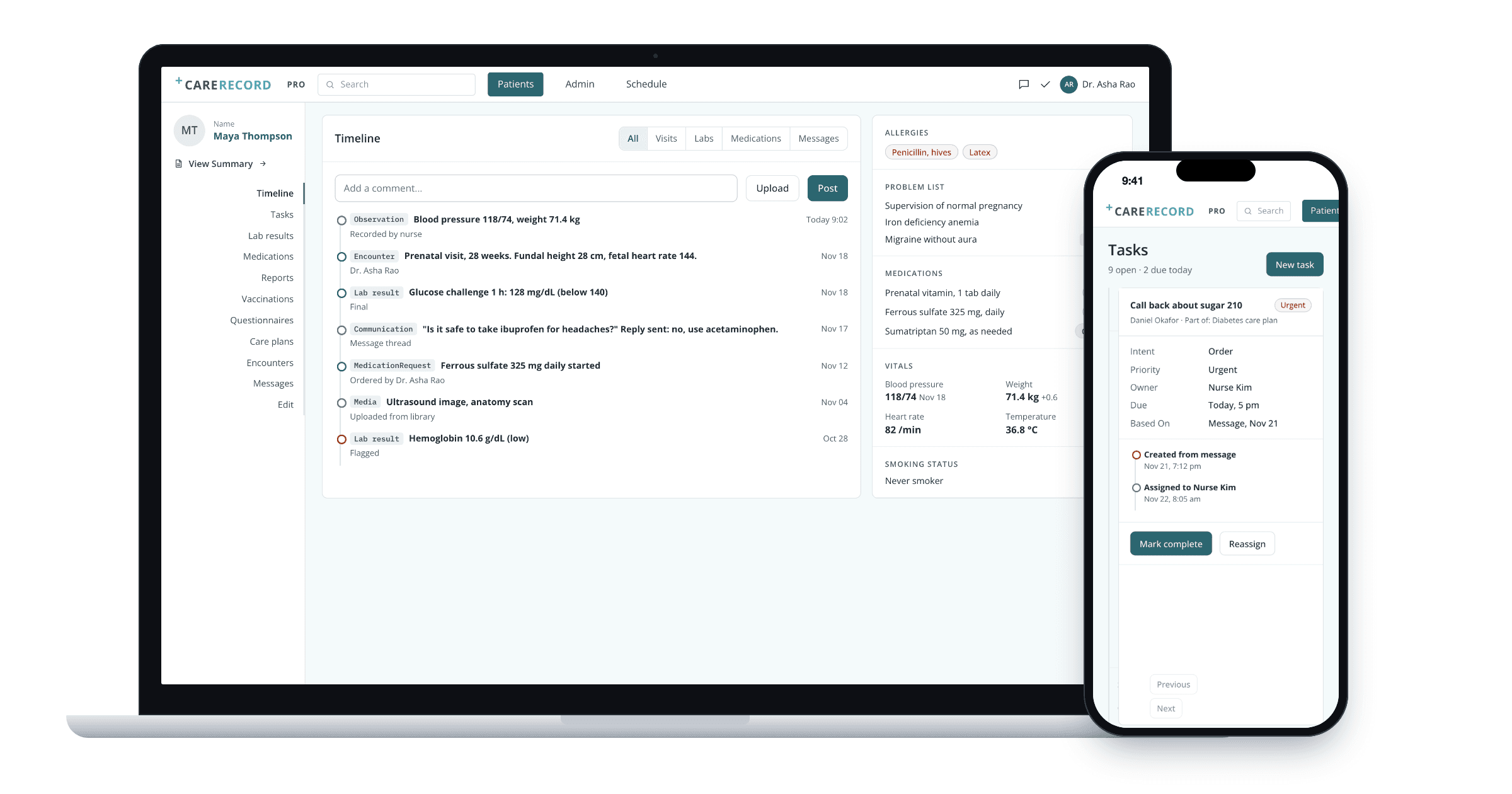
This was custom healthcare software development on an open-source FHIR server, so the company got a working EHR in months and kept its data in a standard shape.
Why a consumer health records company needed an EHR
The company already had an app where people keep their health story: readings, documents, health journeys and reading material. Clinicians caring for those people still worked in other systems. The company wanted a professional web app on the same kind of record, so the two sides could share data later without translation.
- 1
Apr 2025
FHIR server live on the company's cloud; first chart screens
- 2
May
Company sign-in working end to end
- 3
June
Care plans, scheduling and booking complete
- 4
July
Email notices, messages, invoices, education library
- 5
August
Multi-tenant setup proven, scope for phase two
Dates from the project channel, read Nov 22, 2026.
Four roles, one record: what each person does
Screens below follow the delivered app: its layout from screen recordings, and its routes, tabs and form labels from the code.
The physician before a visit
Opens one chart and sees the story: allergies, problems, medications, vitals, then the timeline of readings, labs and messages.
Reads the summary
Allergies, problem list with codes, active medications, latest vitals.
Scans the timeline
Visits, labs, orders, messages and images in one list, loaded in one batch.
Checks a trend
Lab values over time against the normal range.
Writes and signs
The encounter note, linked to the visit and its orders.
Updates the plan
Goals, activities and reading material for the patient.
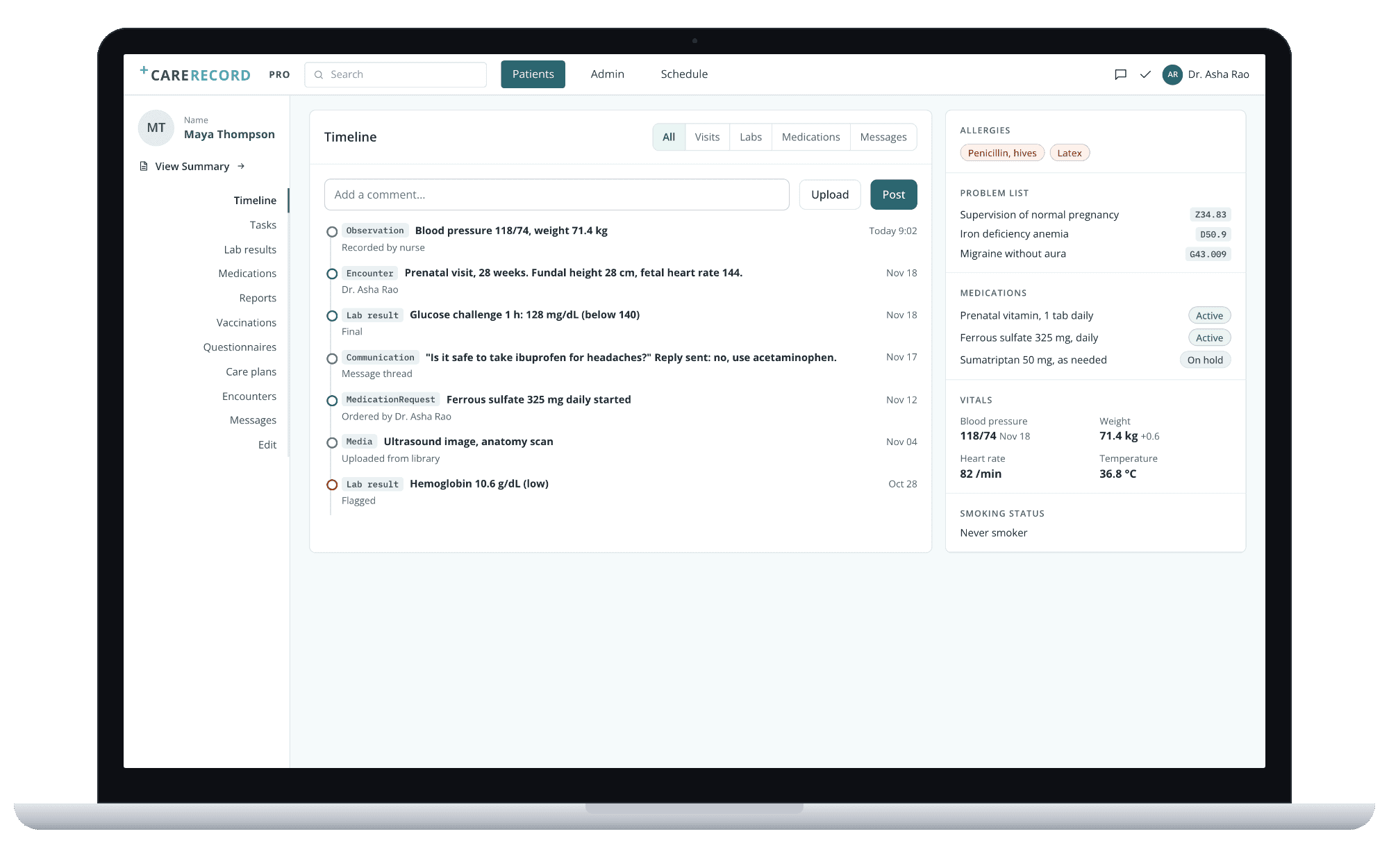
Patient timeline, with the summary panel.
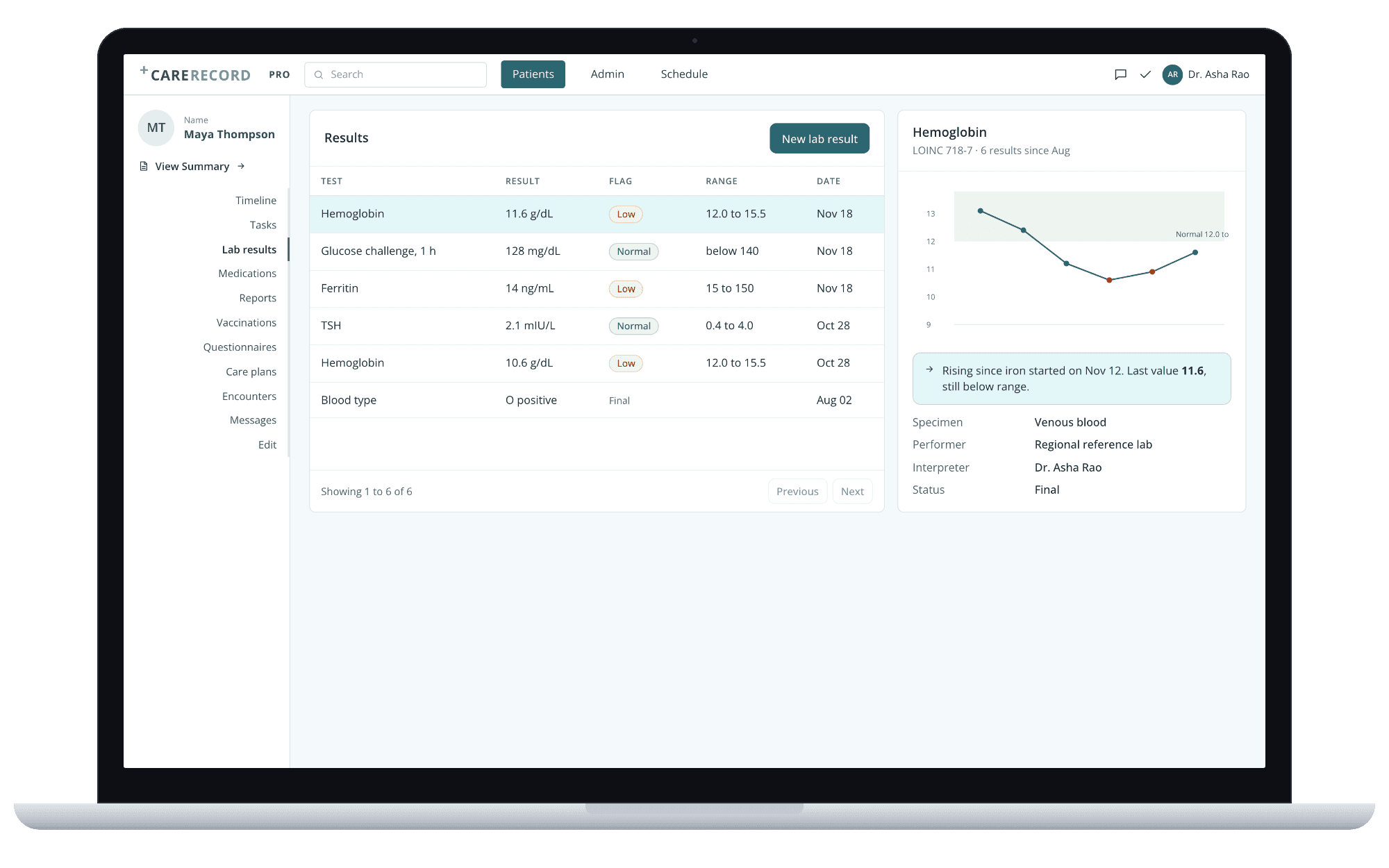
Lab results, with the trend for the selected test.
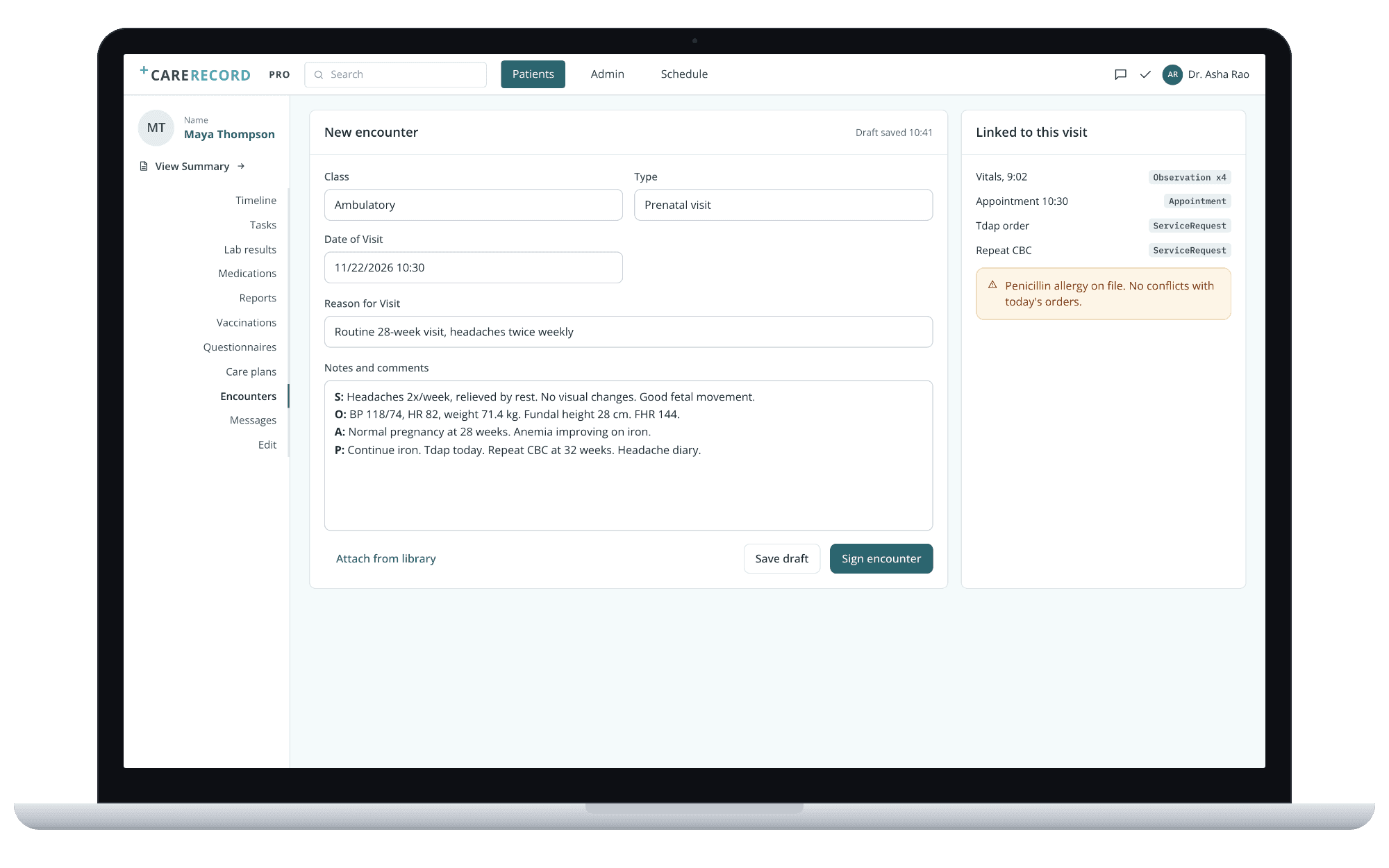
Encounter note, linked to vitals and orders.
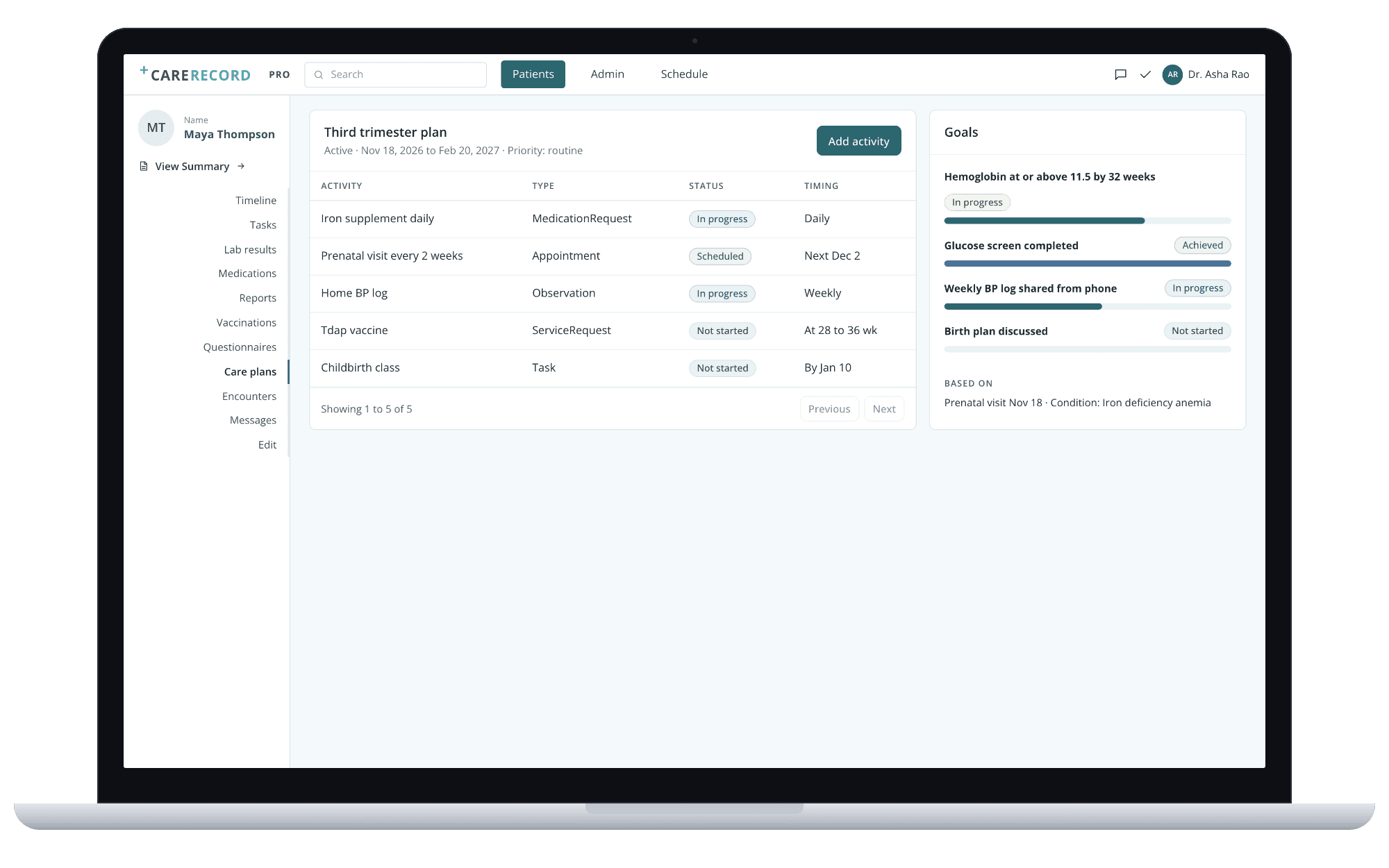
Care plan: activities, goals and progress.
The nurse or care coordinator
Works the task list urgent first, answers messages, sends questionnaires before visits and attaches reading material from the company's library.
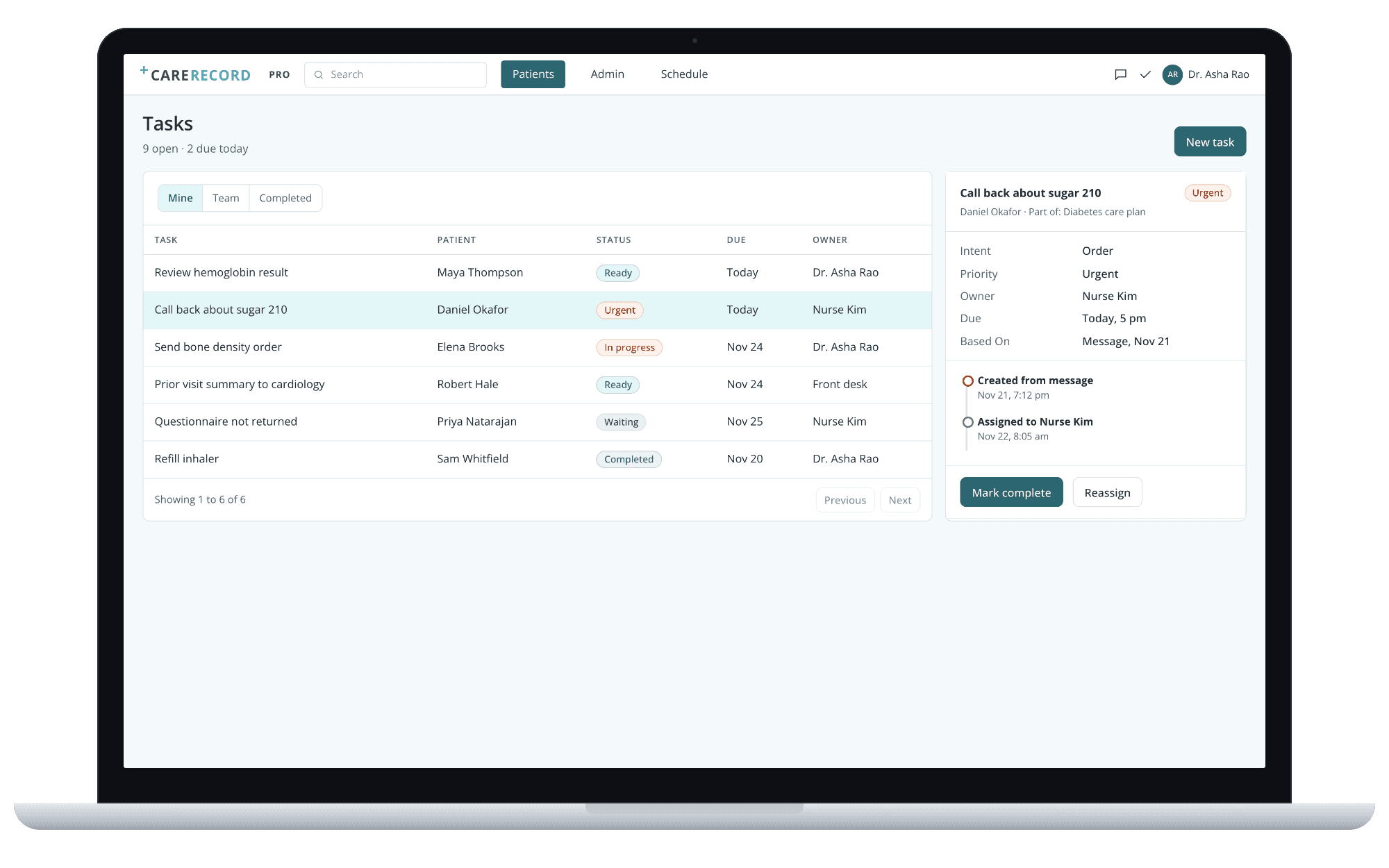
Tasks, with owner, due date and history.
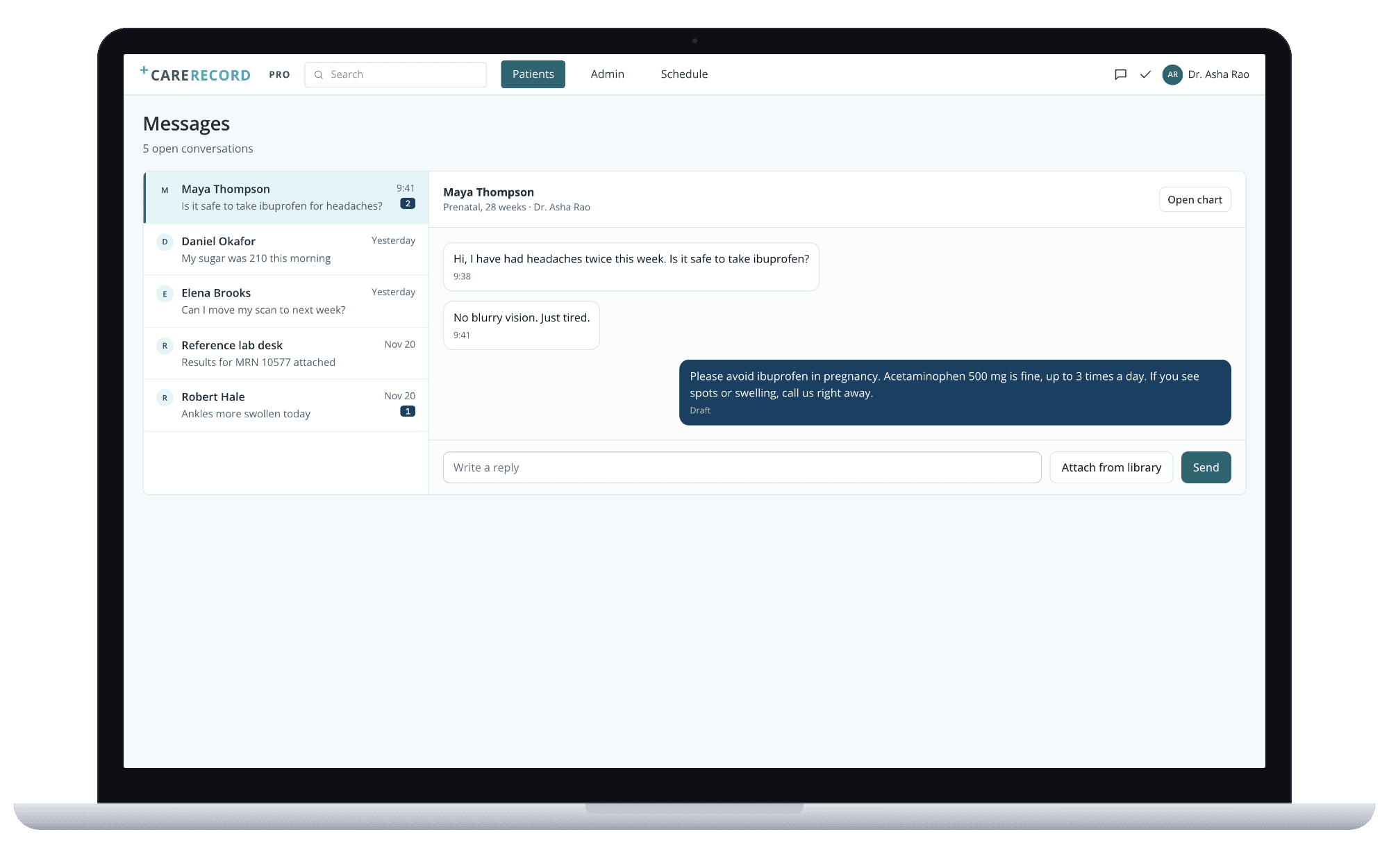
Messages with patients.
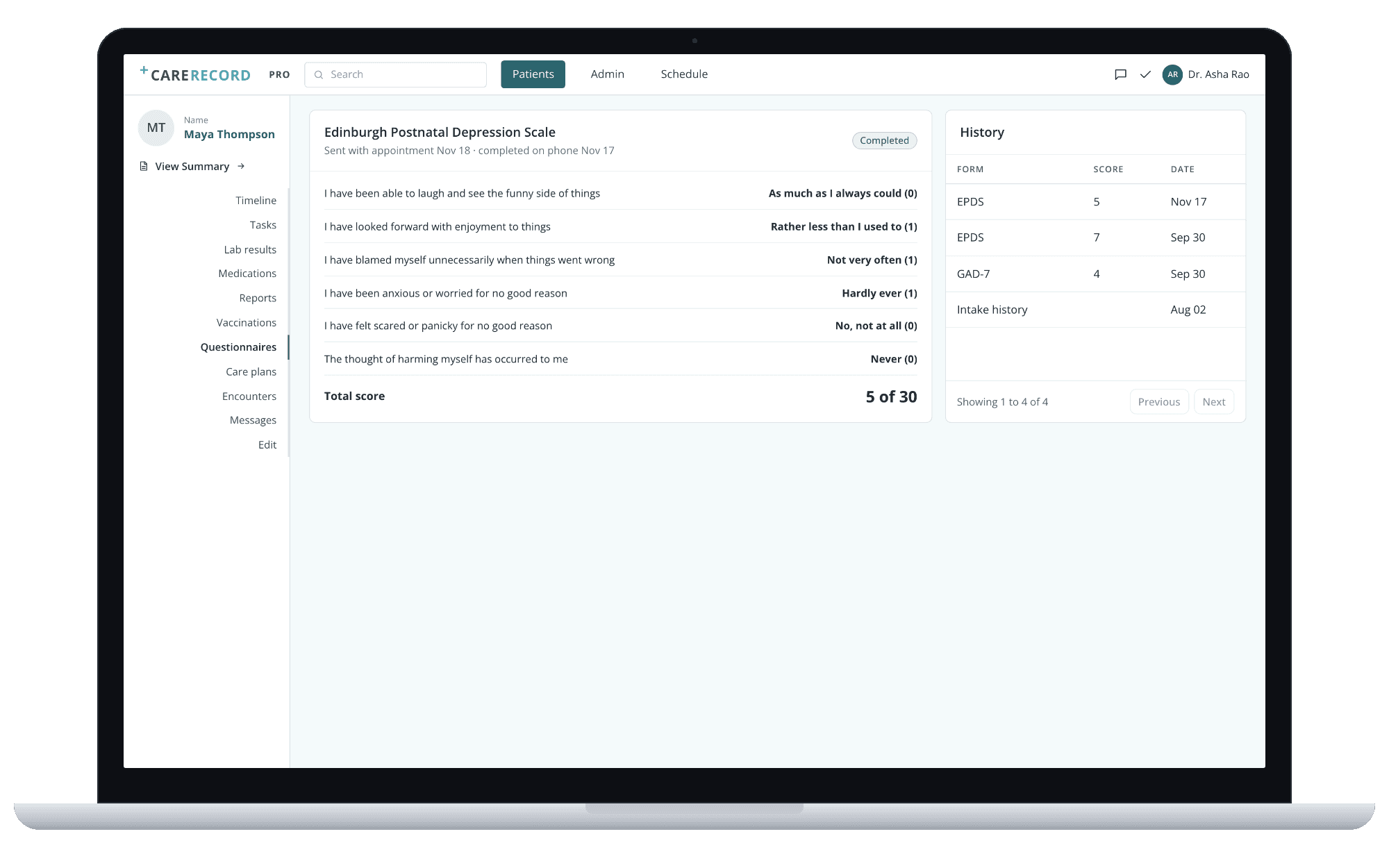
Questionnaire response and history.
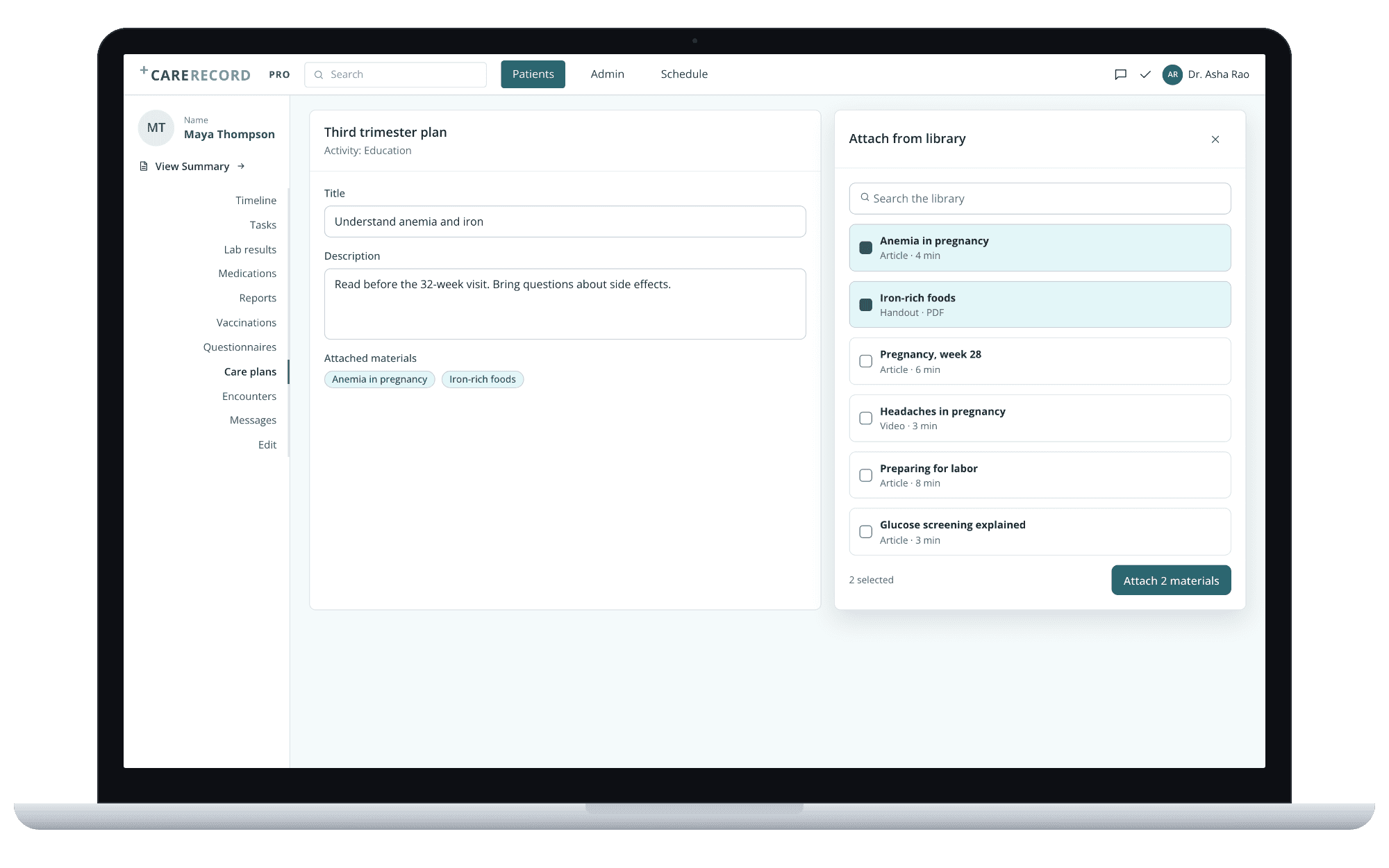
Reading material from the company's library, attached to a care plan.
The front desk and the practice admin
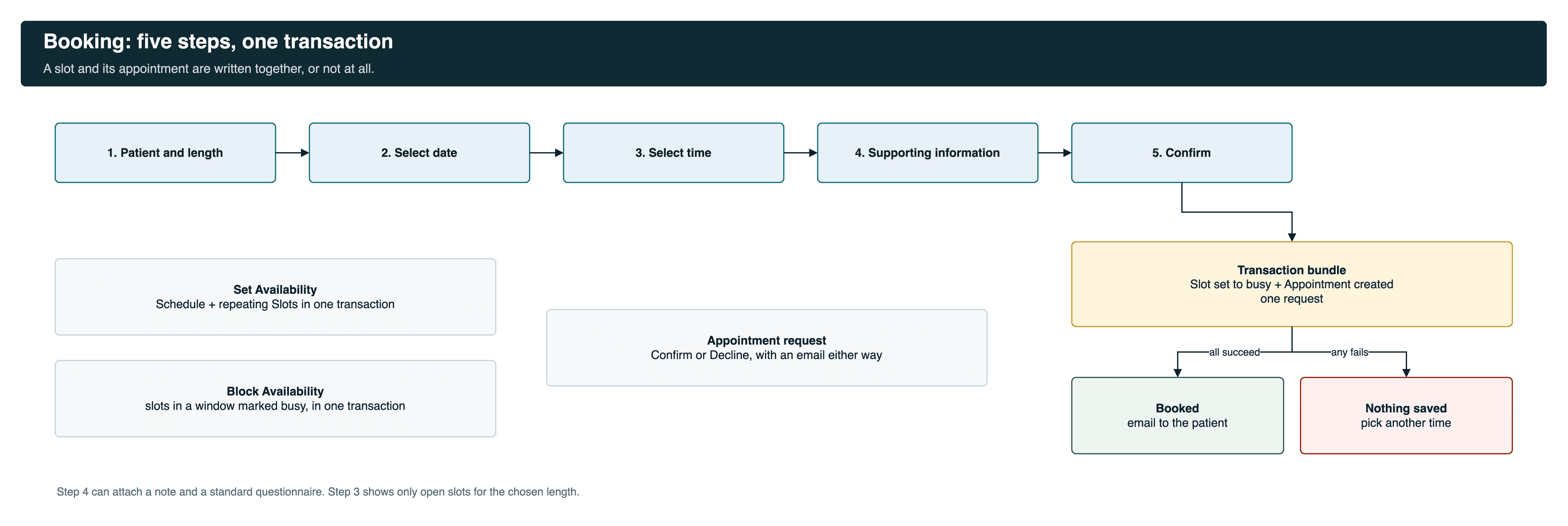
Set availability once for weeks, block time, confirm or decline requests with an email to the patient, book in five steps and issue invoices.
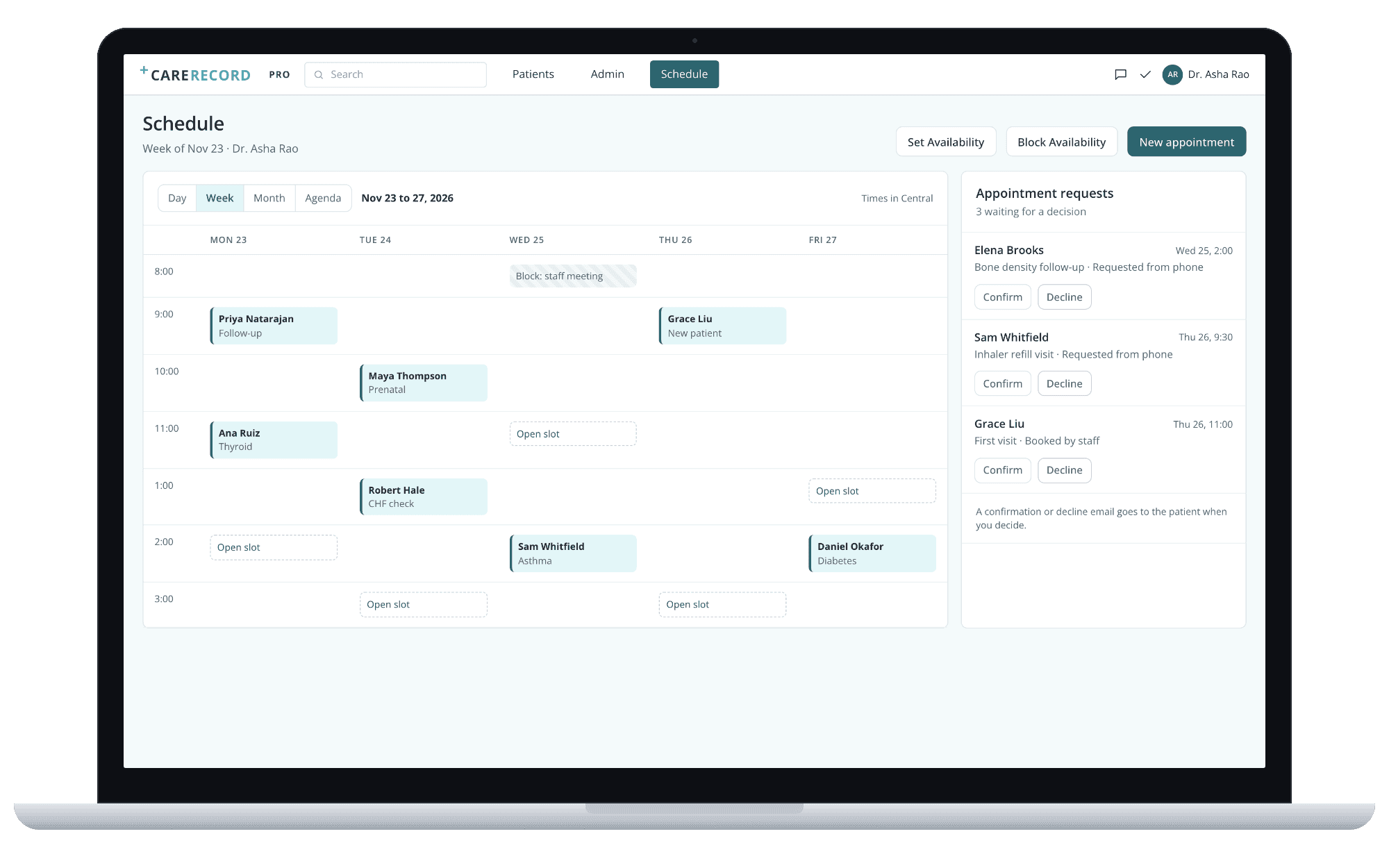
Schedule, with requests waiting for a decision.
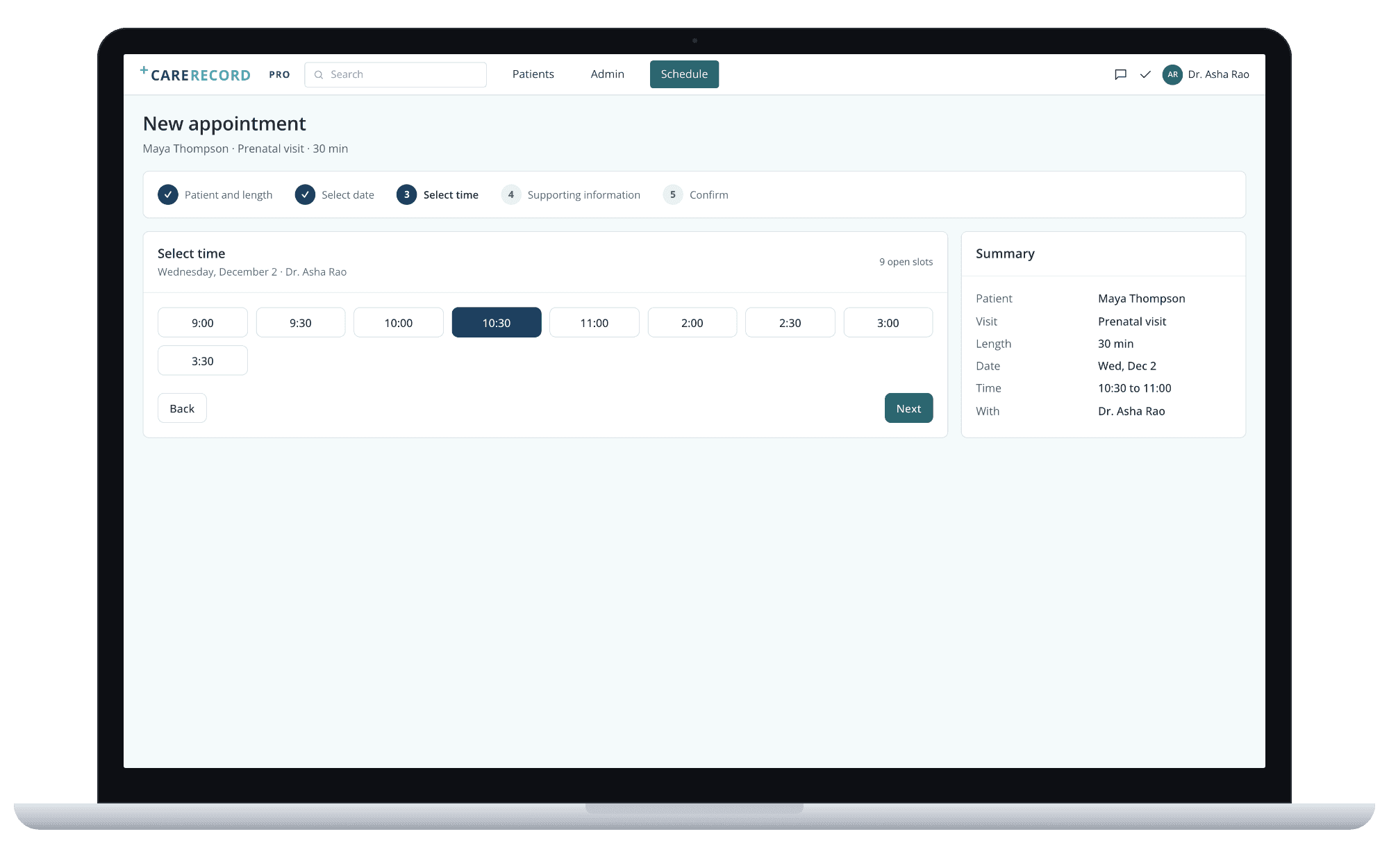
Booking wizard, step 3 of 5.
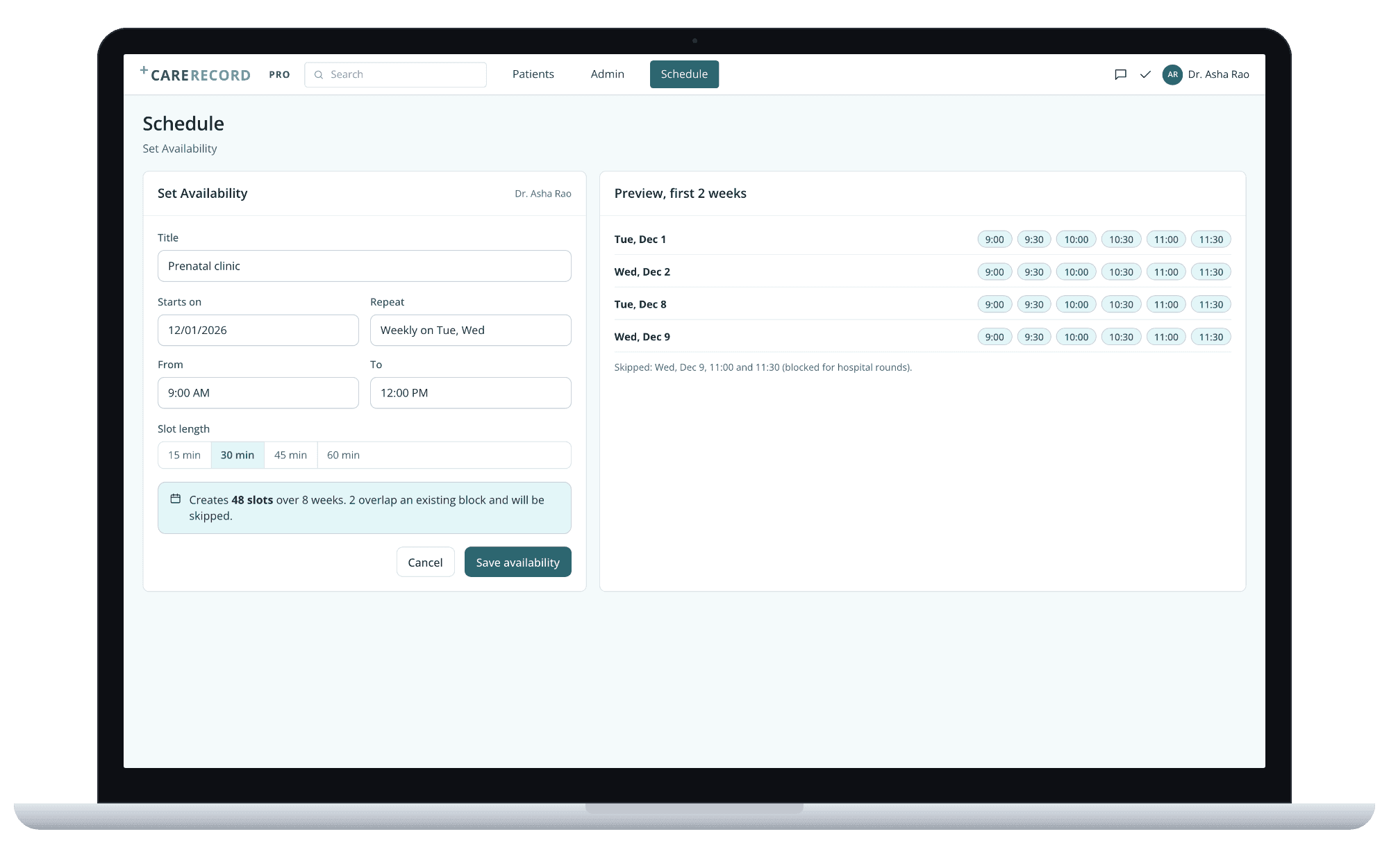
Set availability, with the slots it will create.
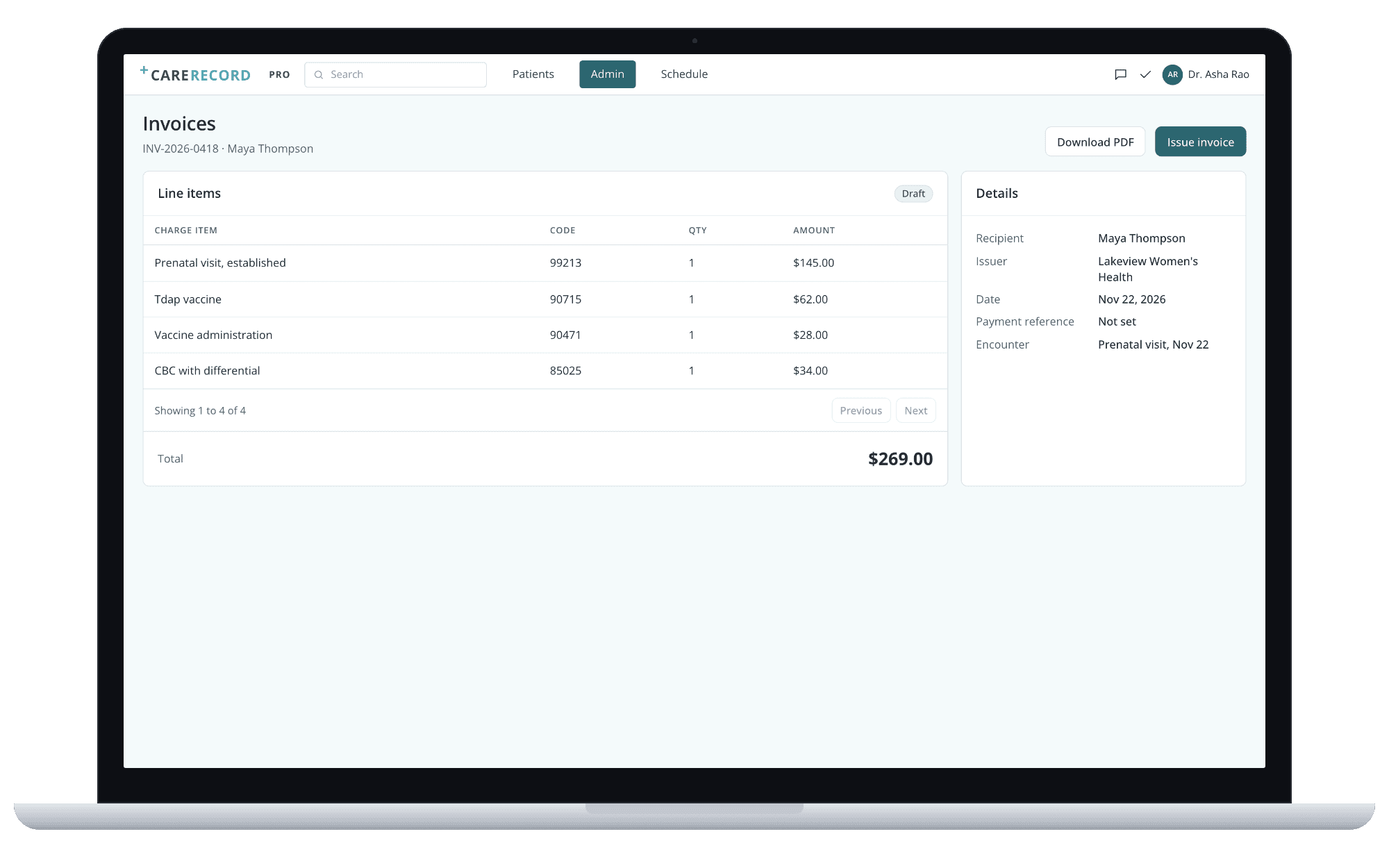
Invoice from the visit.
What we built: 23 clinician scenarios on one FHIR record
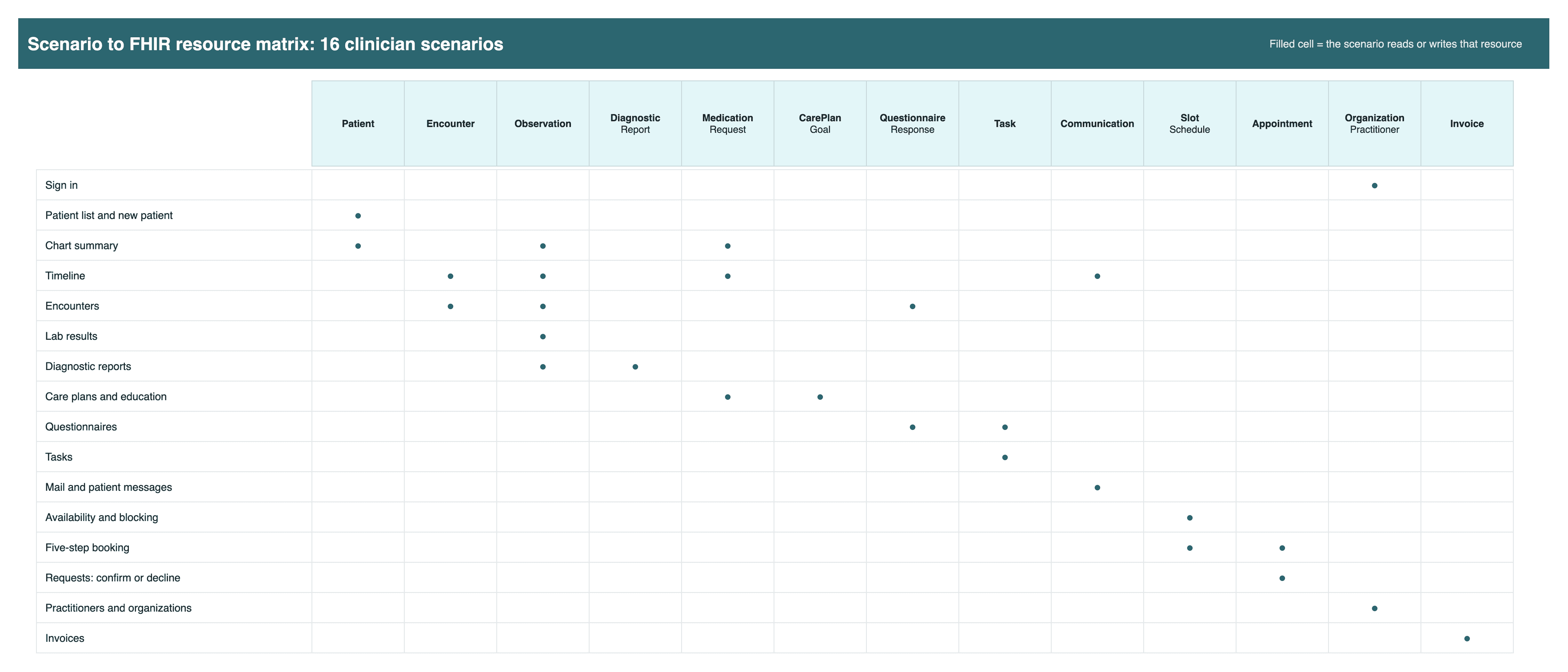
The web app has 47 page routes. They group into 25 scenarios, and 23 of them shipped to the client's development environment. Medications and vaccinations have routes but were left for a later phase.
One company account through Keycloak. The app exchanges that token for a FHIR server session.
A searchable list, a new patient form with Form and JSON views, and edit.
Allergies with onset and reaction, problem list, medications, vitals, smoking status.
Visits, messages, readings and files in one feed, loaded with one batch request.
Visit details, height, weight and blood pressure, with a questionnaire attached.
Results with trend charts, and new measurements added in place.
A custom form whose pickers show only this patient's results, specimens and images.
Goals and activities: medication, service and education requests, with library material.
Open forms as tasks, answers saved as questionnaire responses.
A practitioner inbox and per-patient threads, newest first.
Calendar and agenda, set and block availability, a five-step booking, confirm or decline.
Practitioners, organizations, and invoices built from charge items.
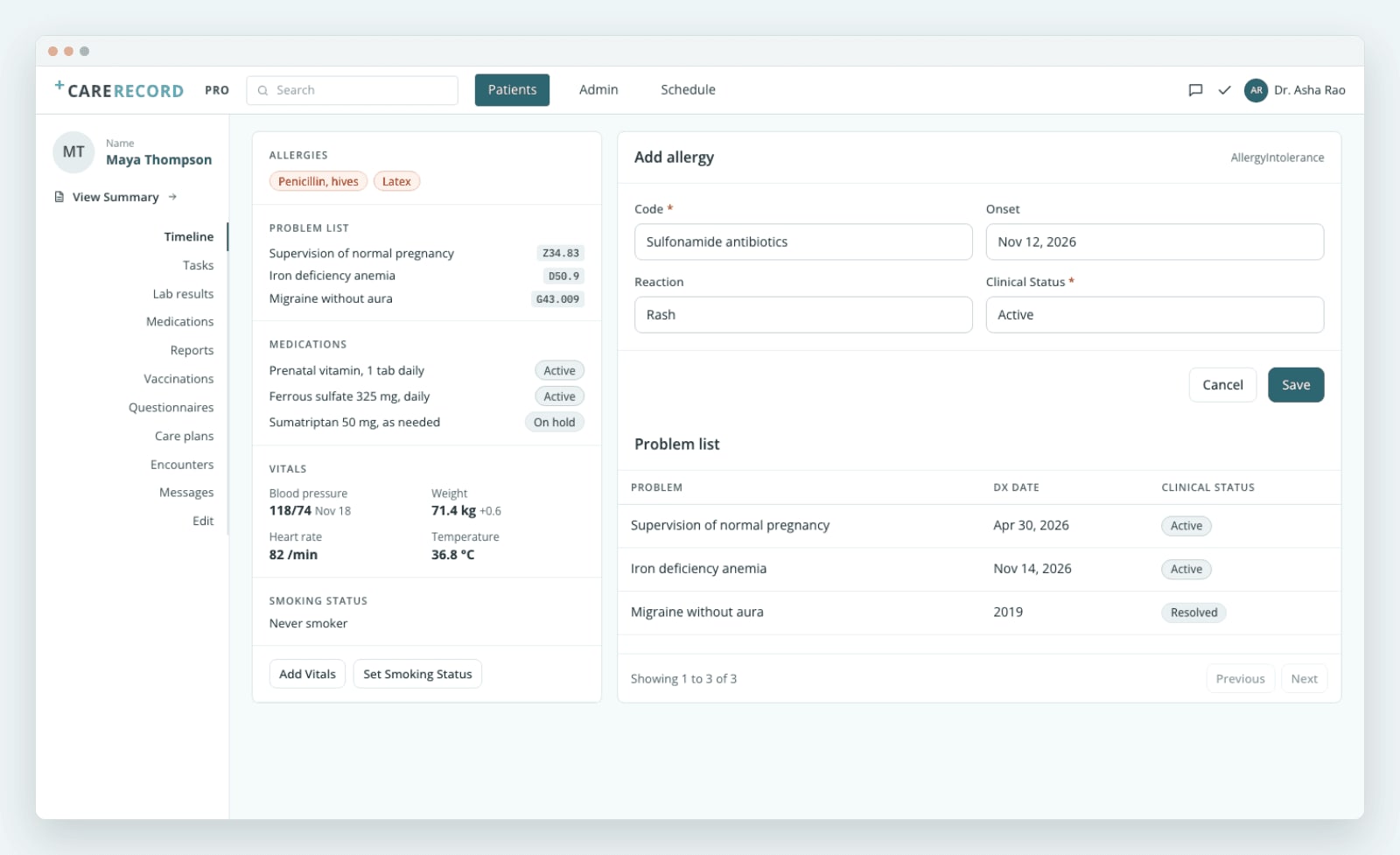
Chart summary. Every value is a FHIR resource on the server.
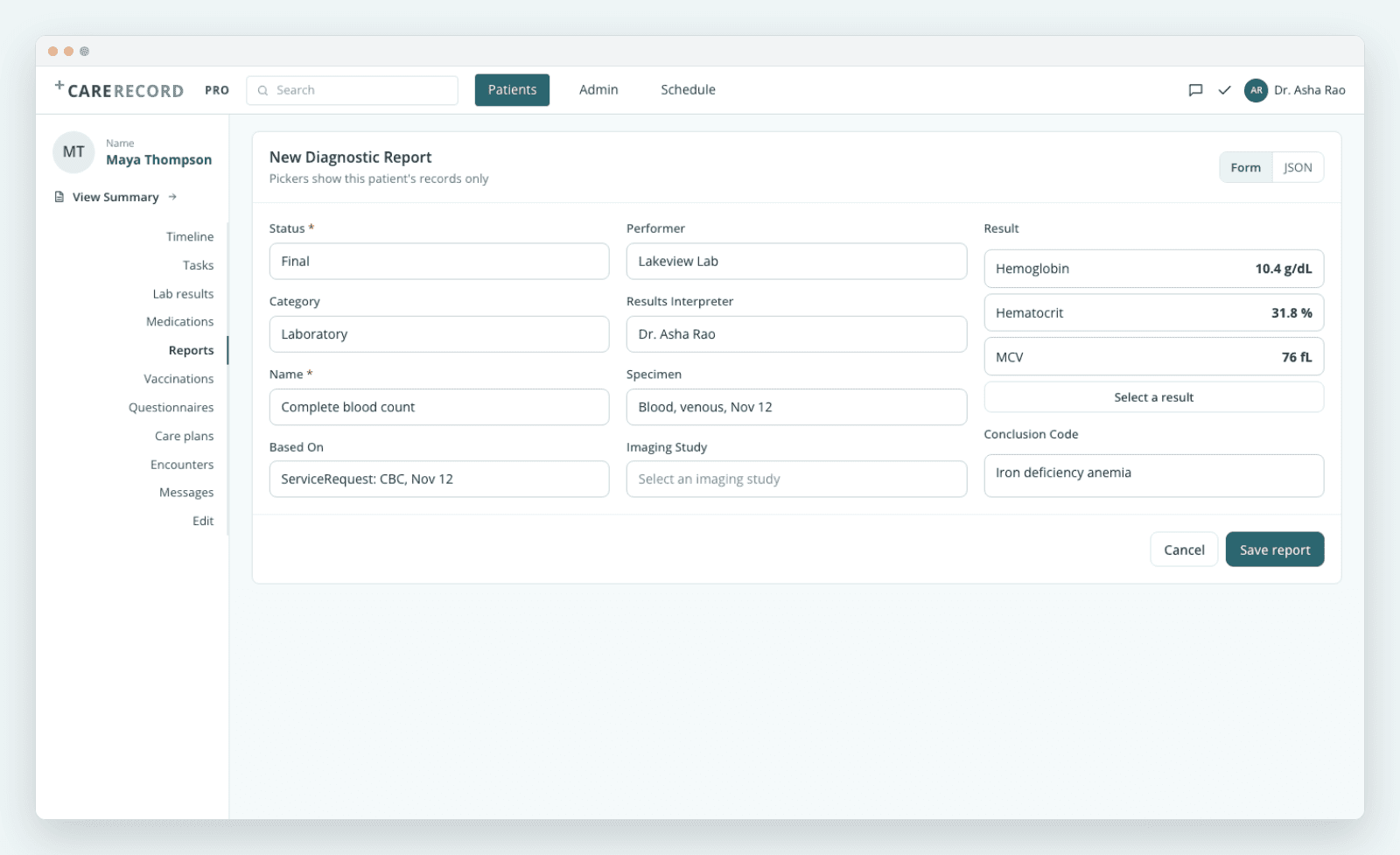
The report form we rebuilt, so every picker shows this patient only.
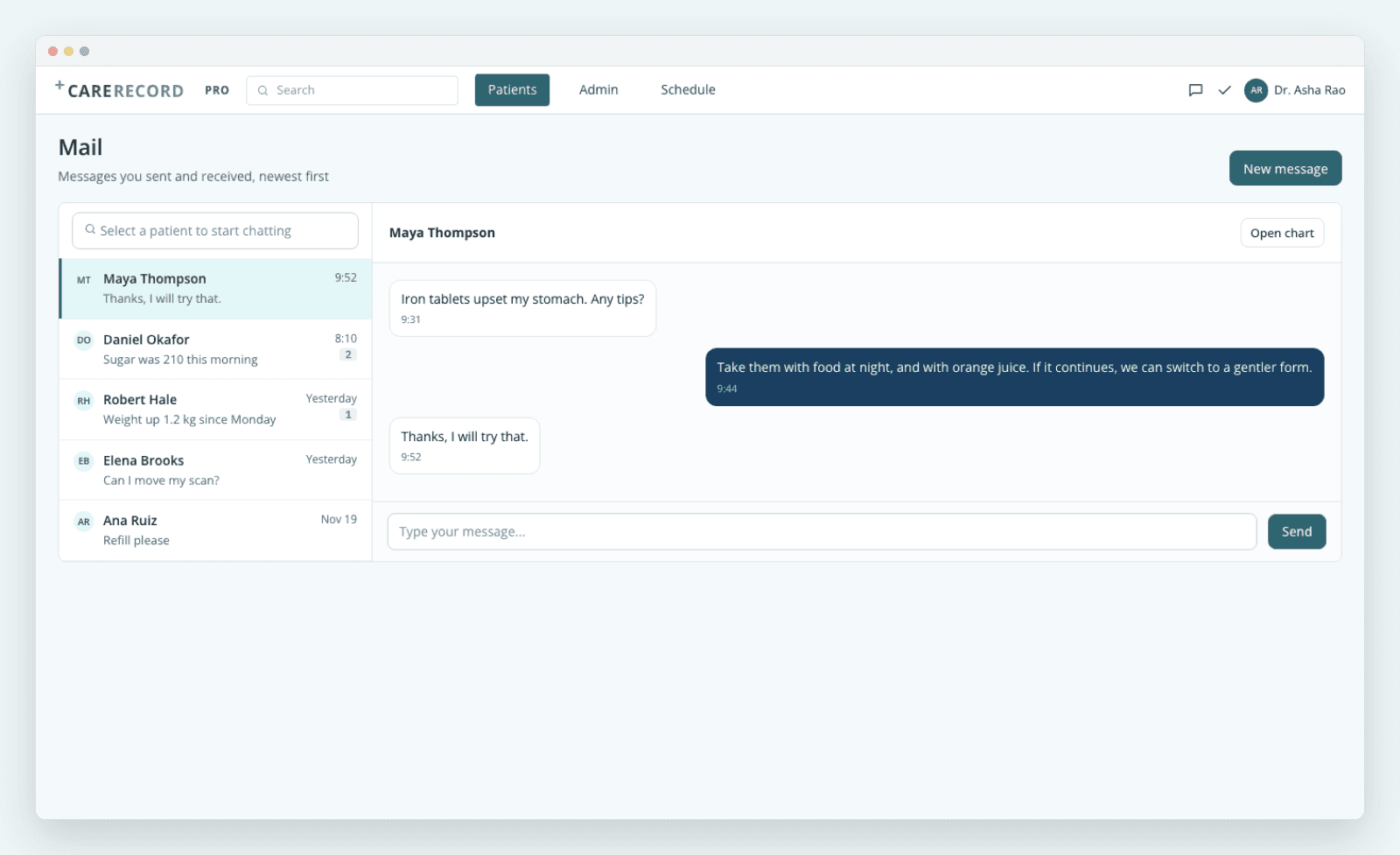
Mail. Messages are FHIR Communication records.
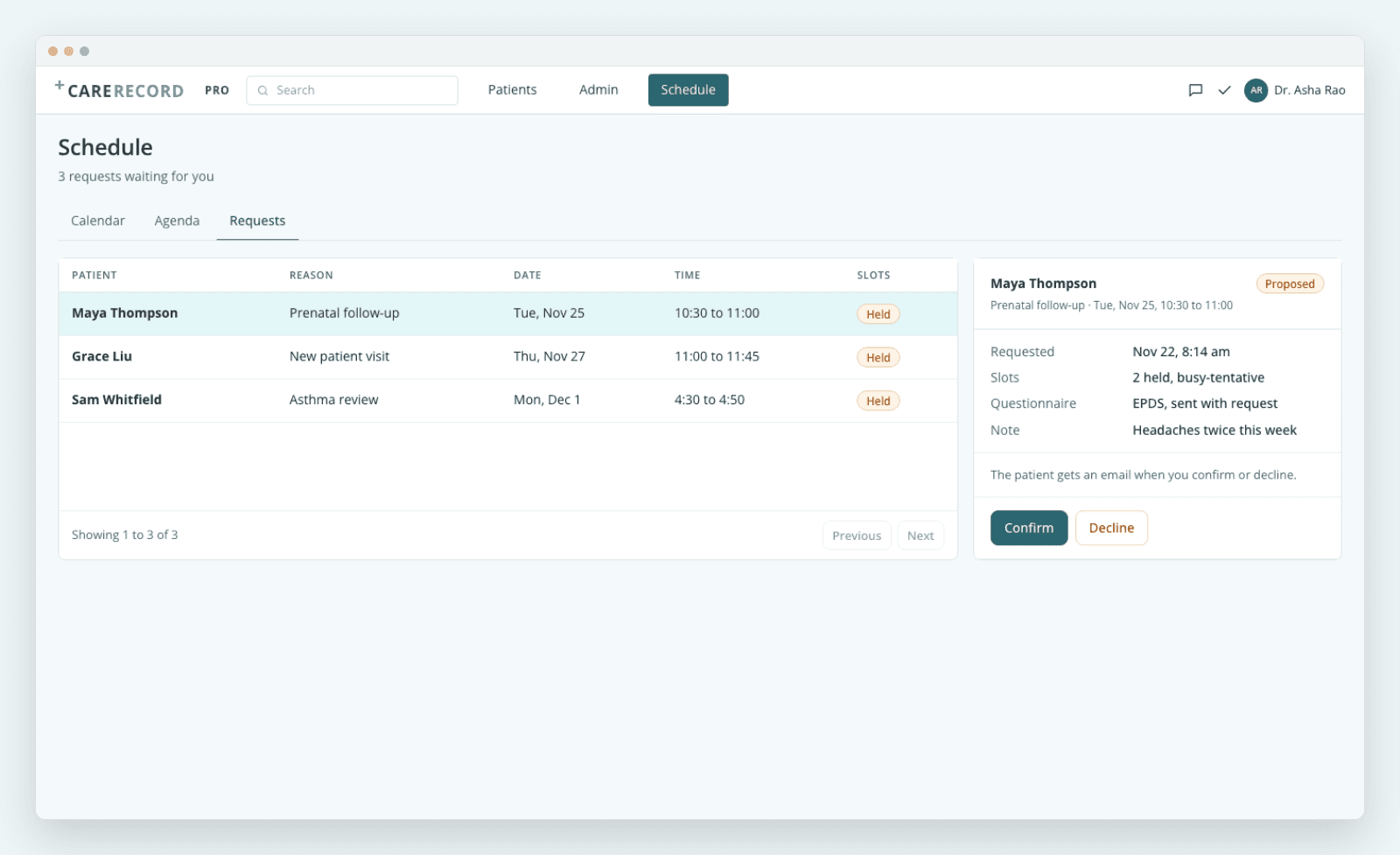
Requests. Confirm or decline, and the patient gets an email.
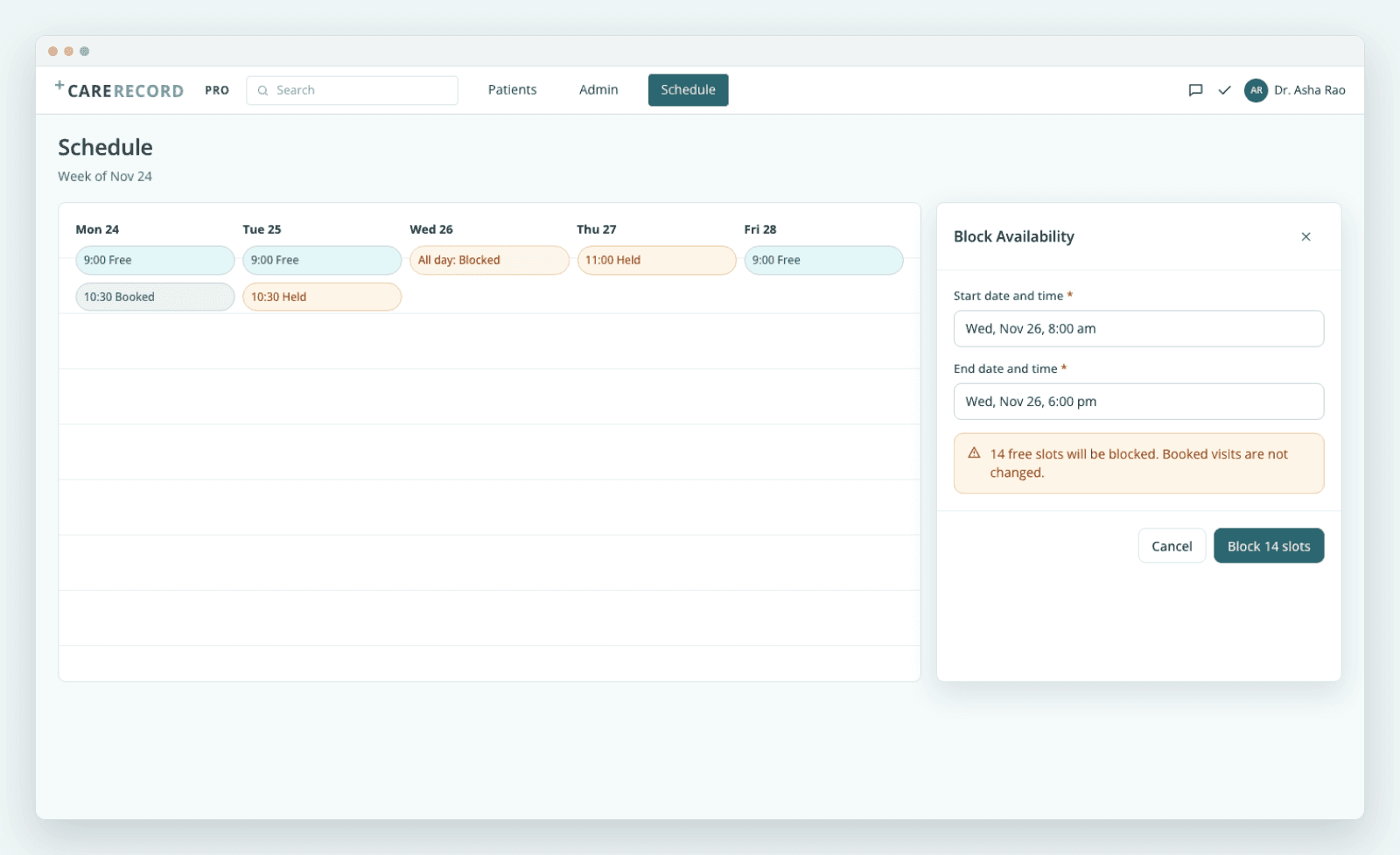
Block time. Free slots change in one transaction.
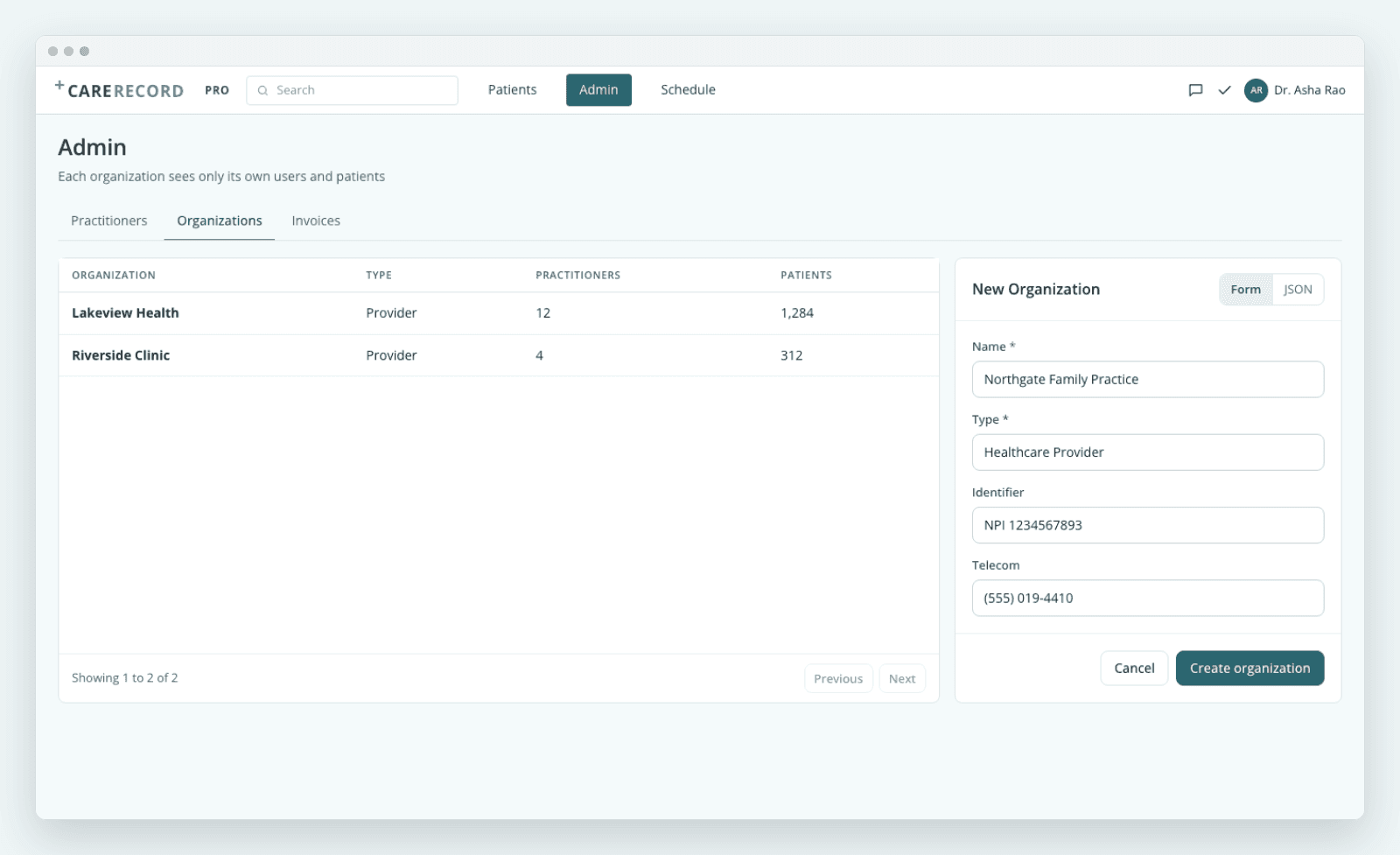
Organizations. Each one sees only its own users and patients.
Ask anything: an AI assistant on the patient's own record
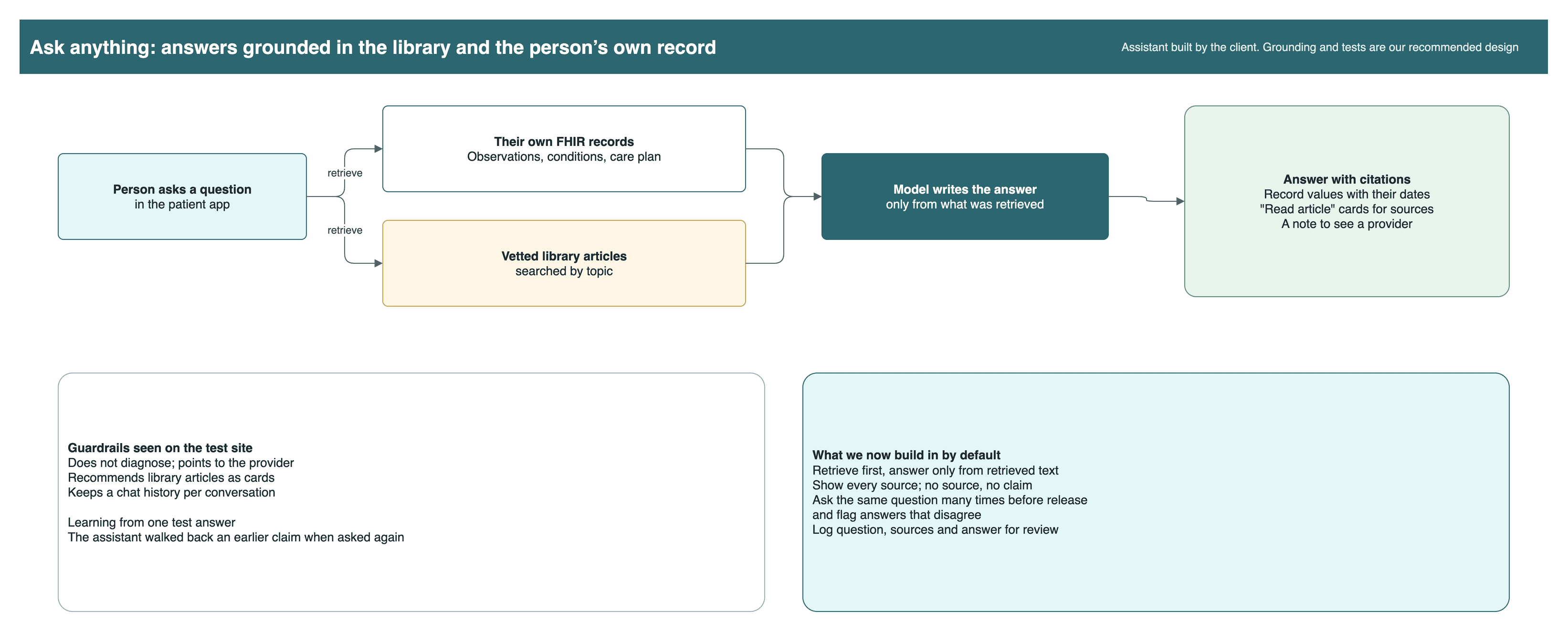
The patient app has an AI health assistant, shown here on the company's test site. The company built the assistant. We wrote the clinician-side connection, which was finished and waiting on a Keycloak token when this phase closed. The design keeps the assistant safe in plain ways: it does not diagnose and sends the person to their provider, it recommends vetted articles from the company library, and it keeps a chat history.
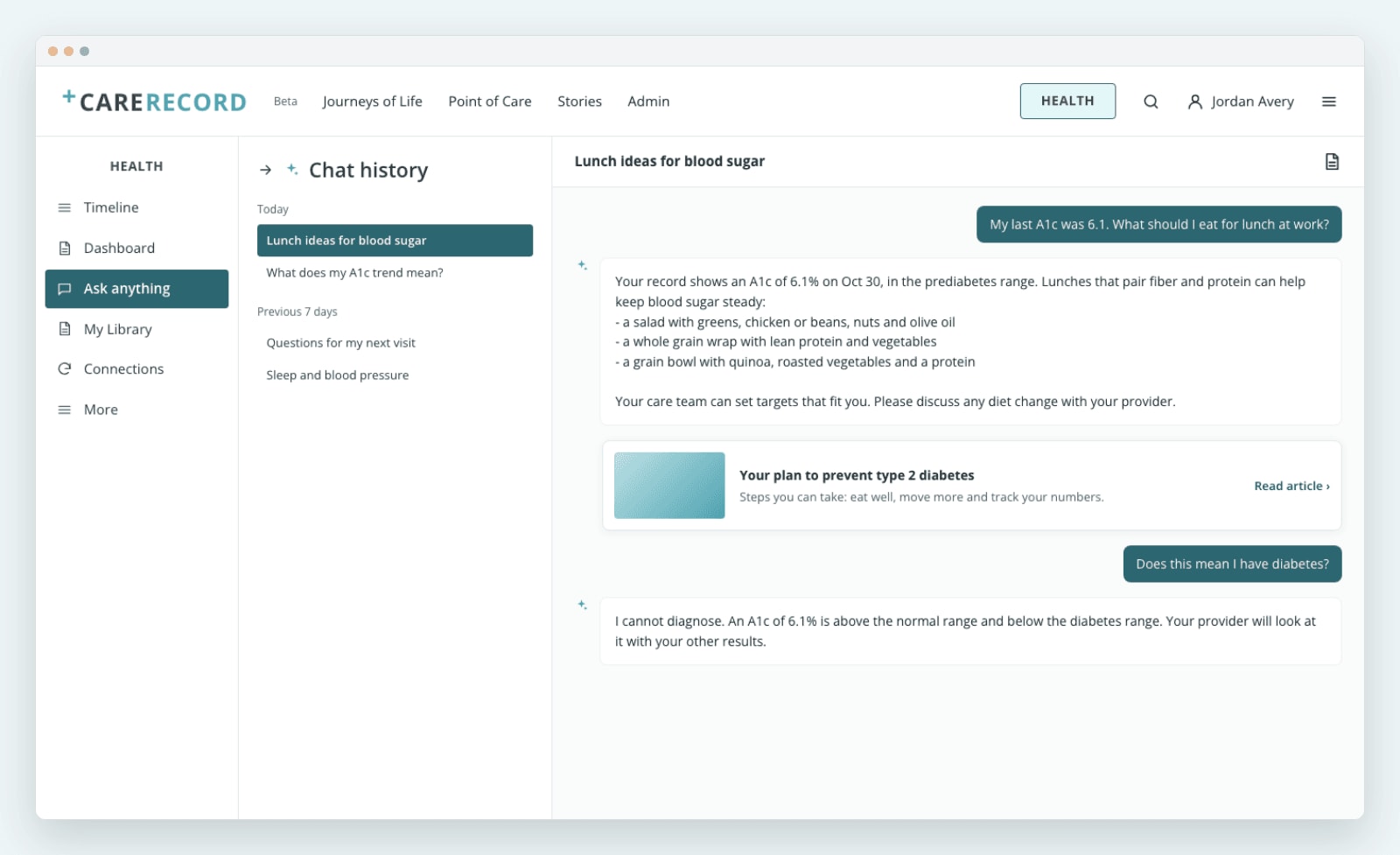
Layout from the test site.
One test answer walked back an earlier claim. The lesson we carry into AI work: ground every answer in the library and in the person's own FHIR records, and test the same question several times for consistent answers before release.
Citations are what make an answer checkable. A record value is quoted with its date, and each library source appears as a "Read article" card the person can open. No source means no claim.
 Open full size
The FHIR complexity under a simple screen
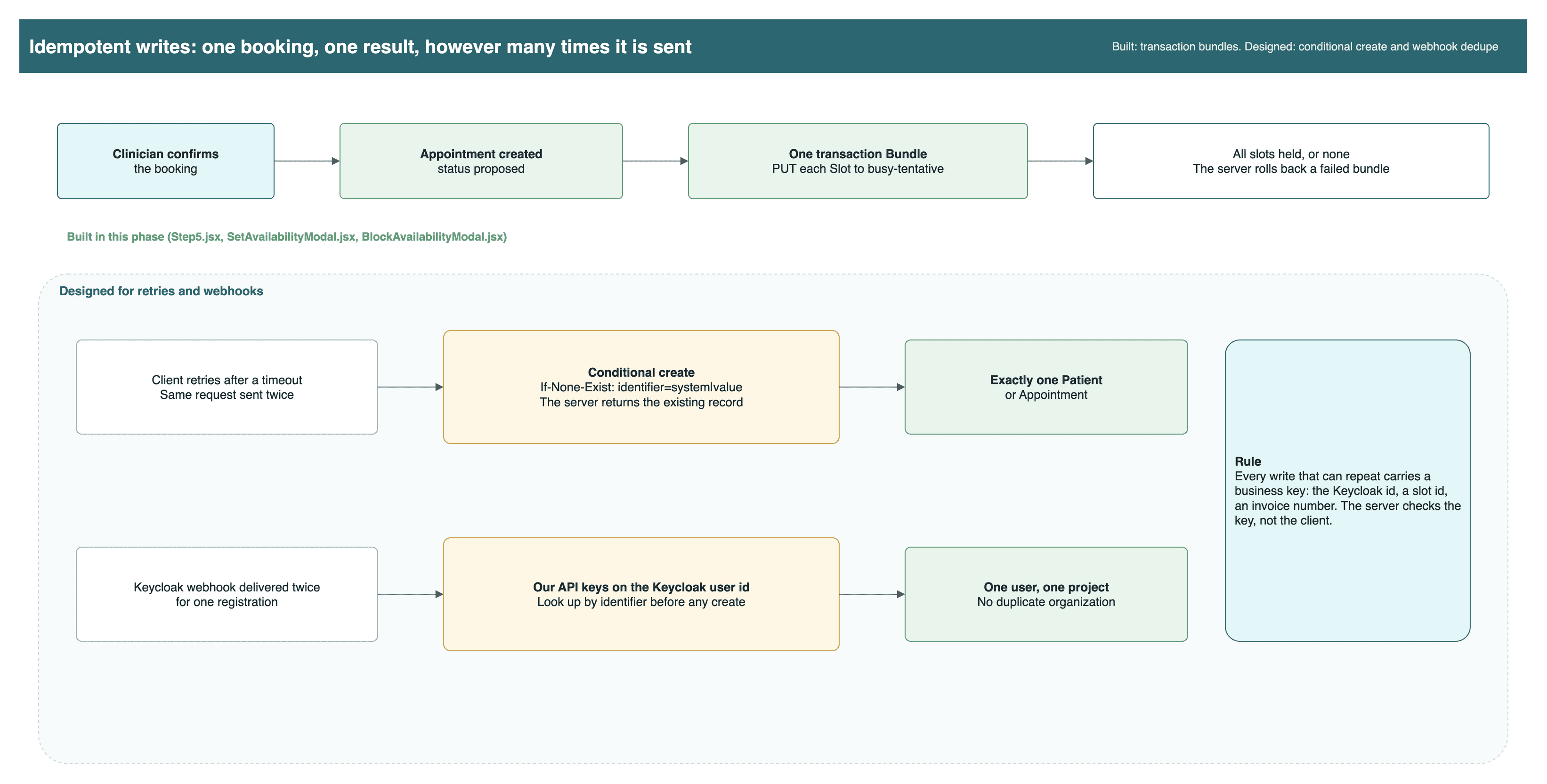
A clinician sees one form. Underneath, every save is a FHIR write that has to be safe to repeat, scoped to the right organization, coded in a standard vocabulary and traceable. Each item below says whether we built it, designed it, or relied on Medplum for it.
 Open full size
Idempotency and retriesBuiltDesigned
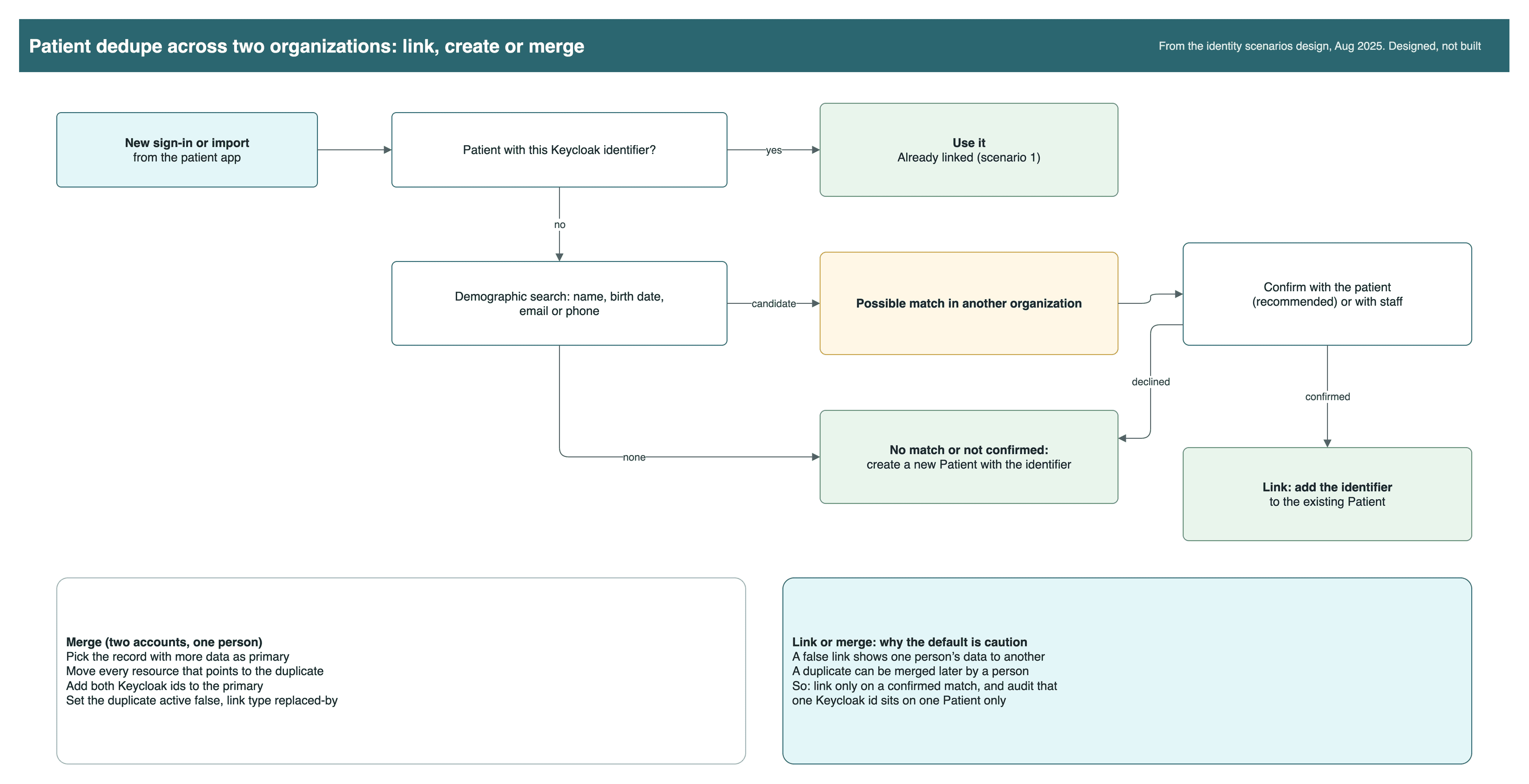
Deduplication across two organizationsDesigned
Versioning and concurrencyMedplum provides
Search and pagingBuilt
References across projectsDesigned
AccessPolicy and compartmentsBuiltMedplum provides
Subscriptions and webhooksDesigned
TerminologyBuilt
Validation and profilesMedplum provides
AuditMedplum provides
 Open full size
Care plans in full
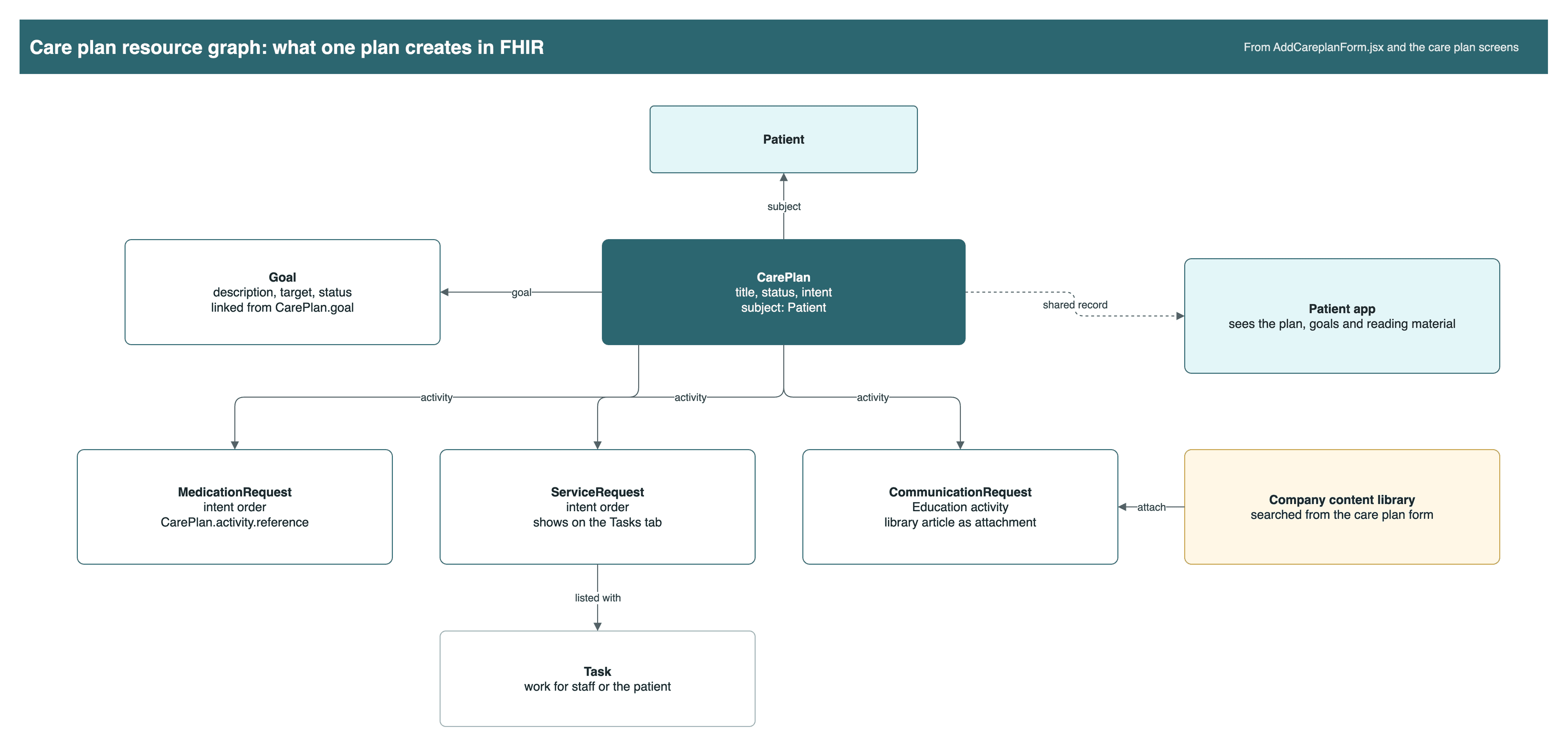
A care plan is the most connected record in the app. One plan writes a CarePlan, its Goals and one request per activity, and the patient sees the same plan with its reading material.
 Open full size
Plan detail: goals with targets, and activities with their status.
An education activity with an article from the company library.
| Part of the plan | FHIR resource | What it does |
|---|---|---|
| The plan | CarePlan | Title, status, intent and the patient. The viewer shows nested goals and activities, which the stock viewer did not. |
| Targets | Goal | What the patient is working toward, with a target and status. |
| Medication activity | MedicationRequest, intent order | A drug to take as part of the plan. |
| Service activity | ServiceRequest, intent order | A test or referral. It shows on the Tasks tab. |
| Education activity | CommunicationRequest | Reading material from the company library, searched from the form. |
| Follow-up work | Task | Work owned by staff or the patient, such as a questionnaire to return. |
The patient app reads the same CarePlan, so the person sees their goals and the attached articles without a second copy. Review caught one bug worth naming: picking a second article replaced the first, and deleting one removed it from other activities. The rule we took from it: attachments belong to one activity, never to the plan as a whole.
The architecture
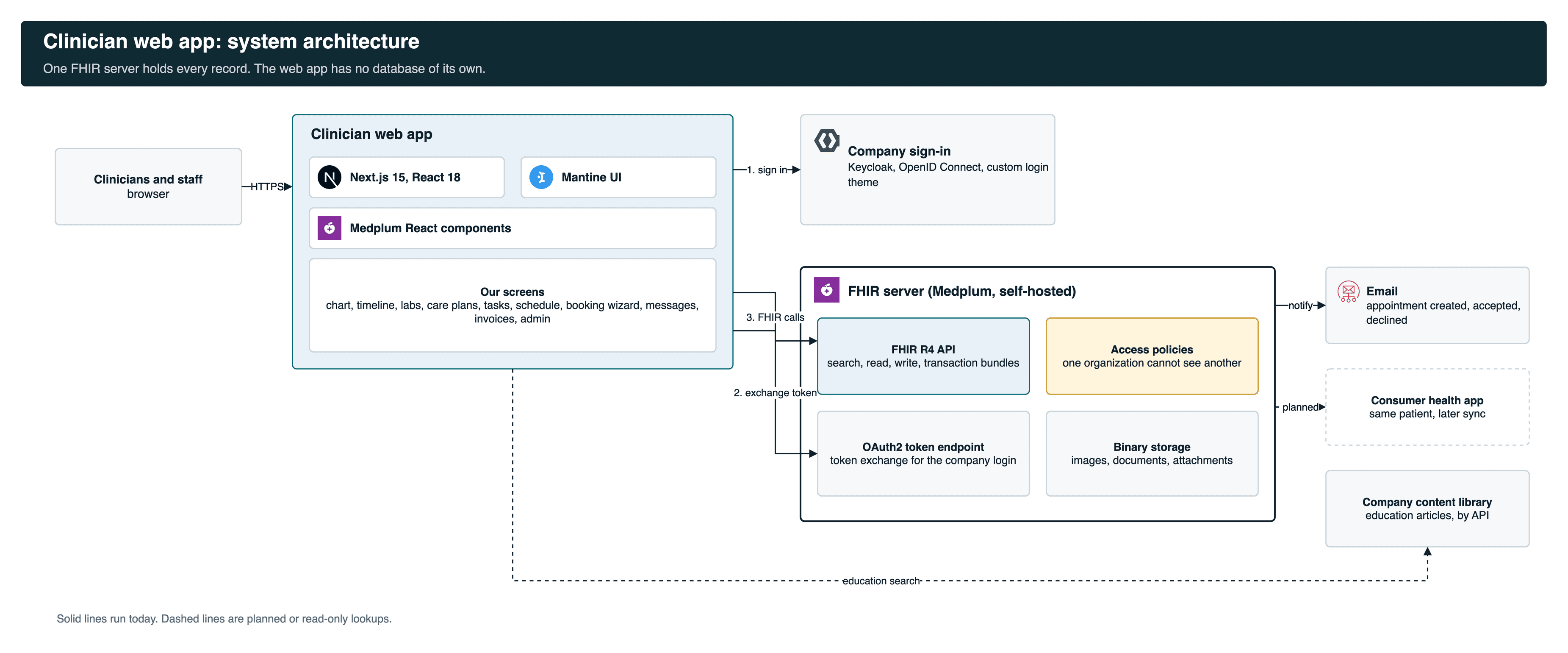
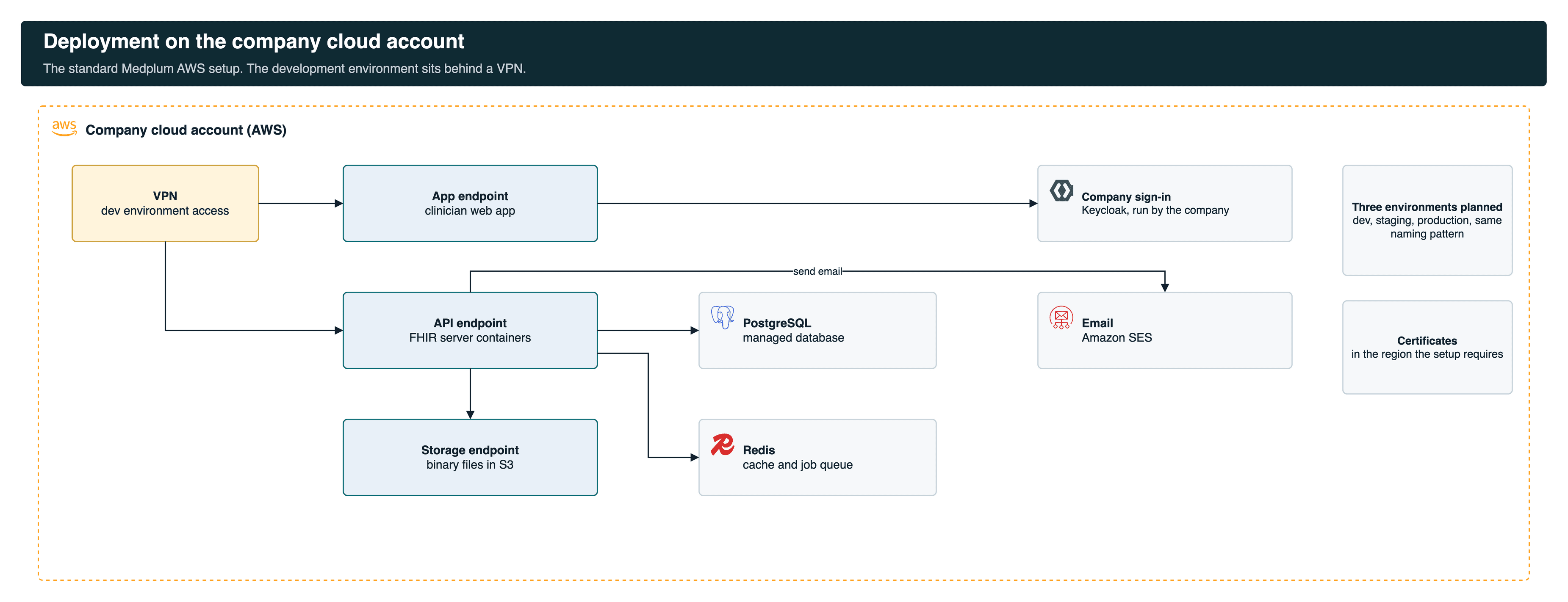
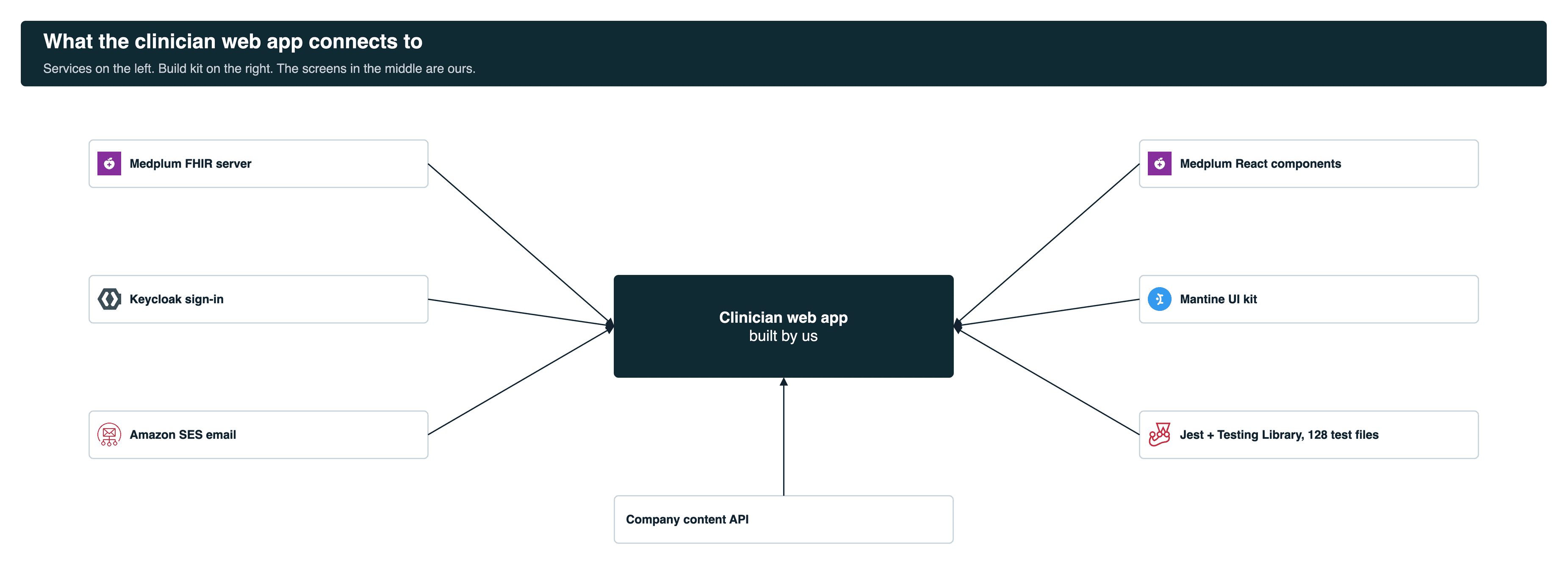
One Next.js app, built on Medplum's React components and Mantine, talks to one FHIR server. Sign-in goes through the company's Keycloak. Email goes through Amazon SES. There is no private database to keep in sync.
 Open full size
Standard records are what make later connections cheap. See our healthcare interoperability work for how FHIR data moves between systems.
FHIR compatibility: what is standard, and what that buys
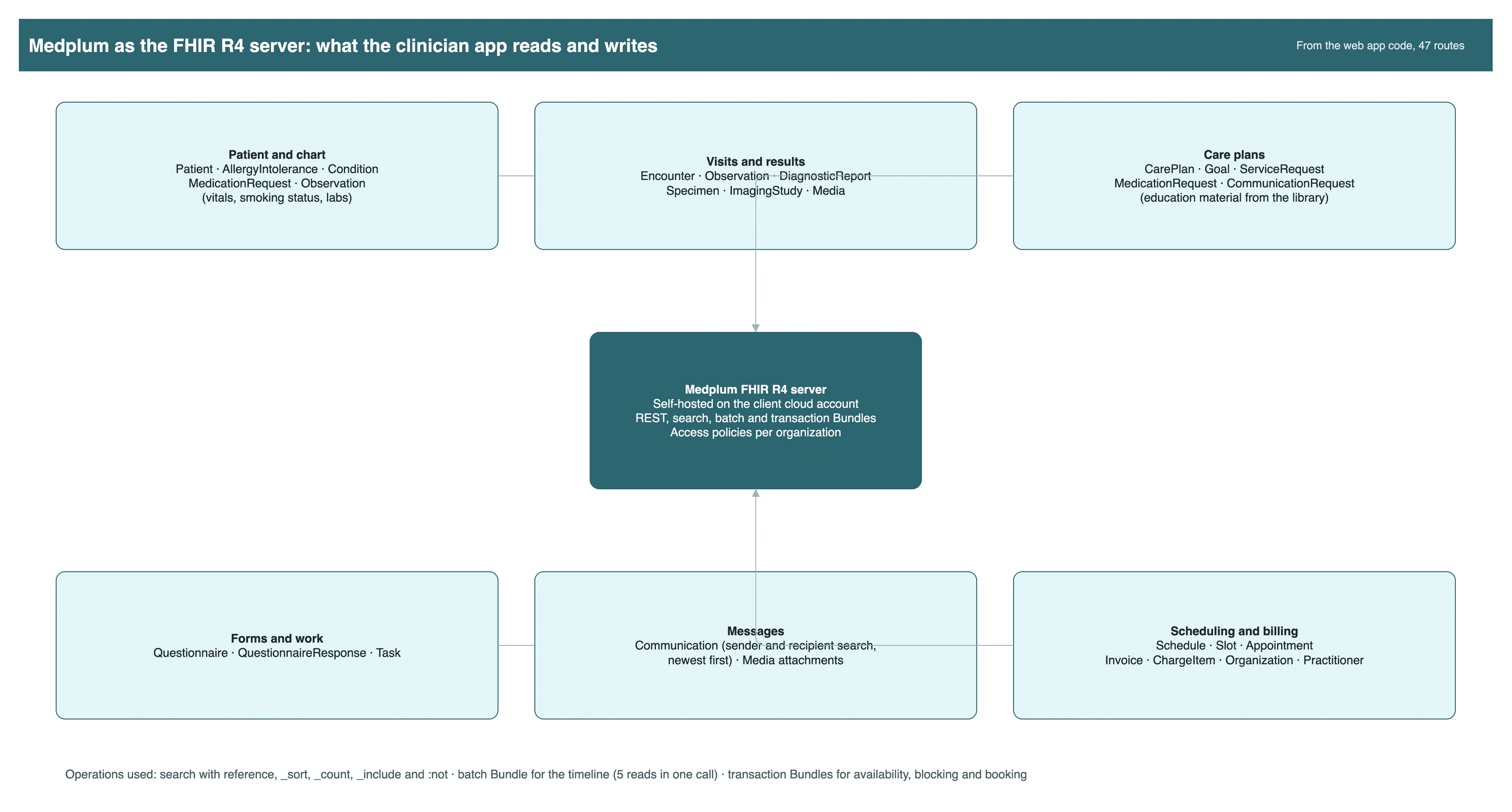
The app stores everything as FHIR R4 resources on Medplum. It writes 20 resource types, from Patient and Encounter to CarePlan, Appointment and Invoice. It uses standard search parameters, sorting, _include, a batch Bundle for the timeline and transaction Bundles for scheduling. Any FHIR R4 client can read the same data. Records from outside systems can arrive later without a new database.
 Open full size
Why a custom interface on Medplum, and not Medplum's own app
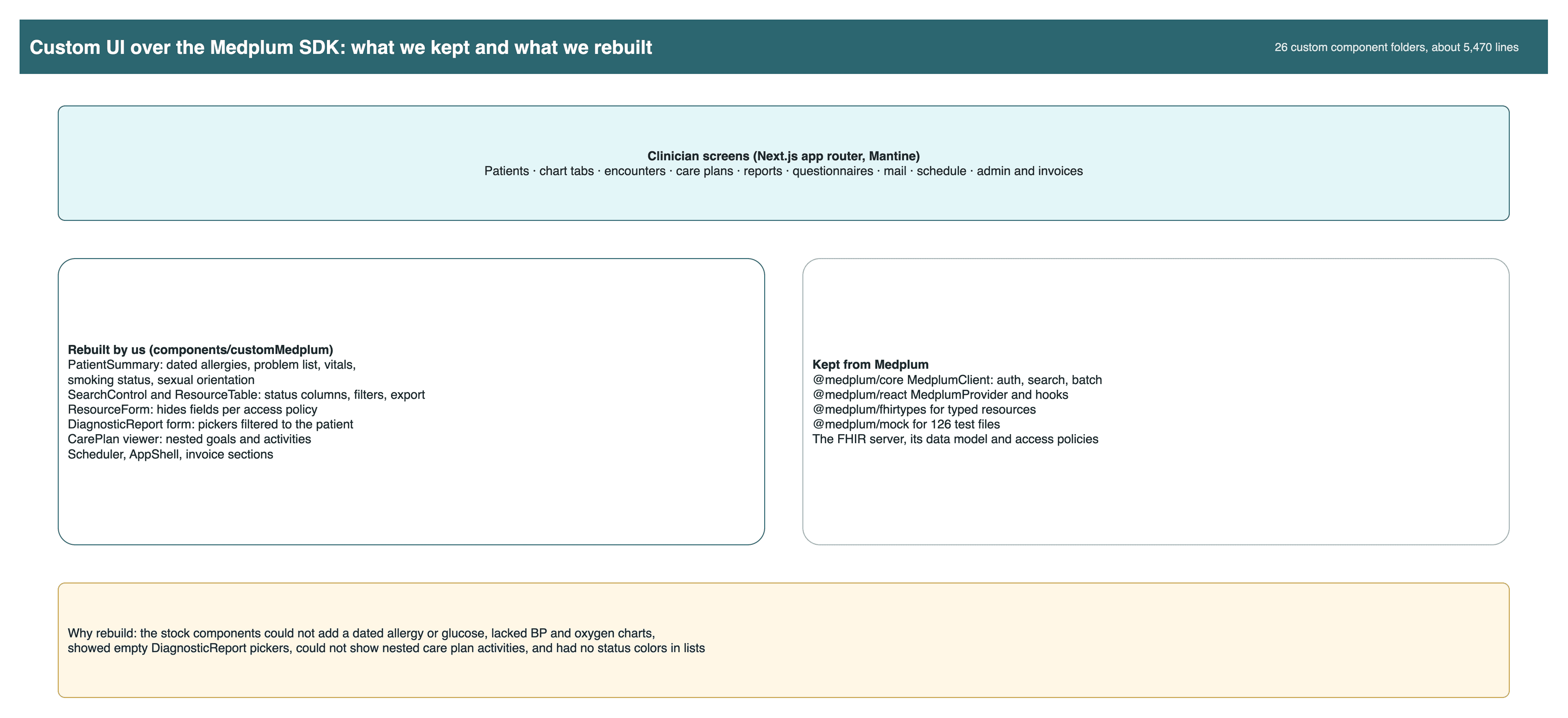
Medplum's app is built for administrators and developers. Clinicians needed the company's own design, its own words and fewer screens. We kept the Medplum client, React provider, types and test mocks. We rebuilt 26 component groups where the stock ones stopped short. The app has 126 test files, most of them on the invoice and form sections.
 Open full size
The hard problems, and how we solved them
Medplum gives a strong FHIR server and good components. A product on top of it still meets real limits. These are the ones we hit and what we did.
Identity and tenancy: one sign-in, separate organizations, one patient record
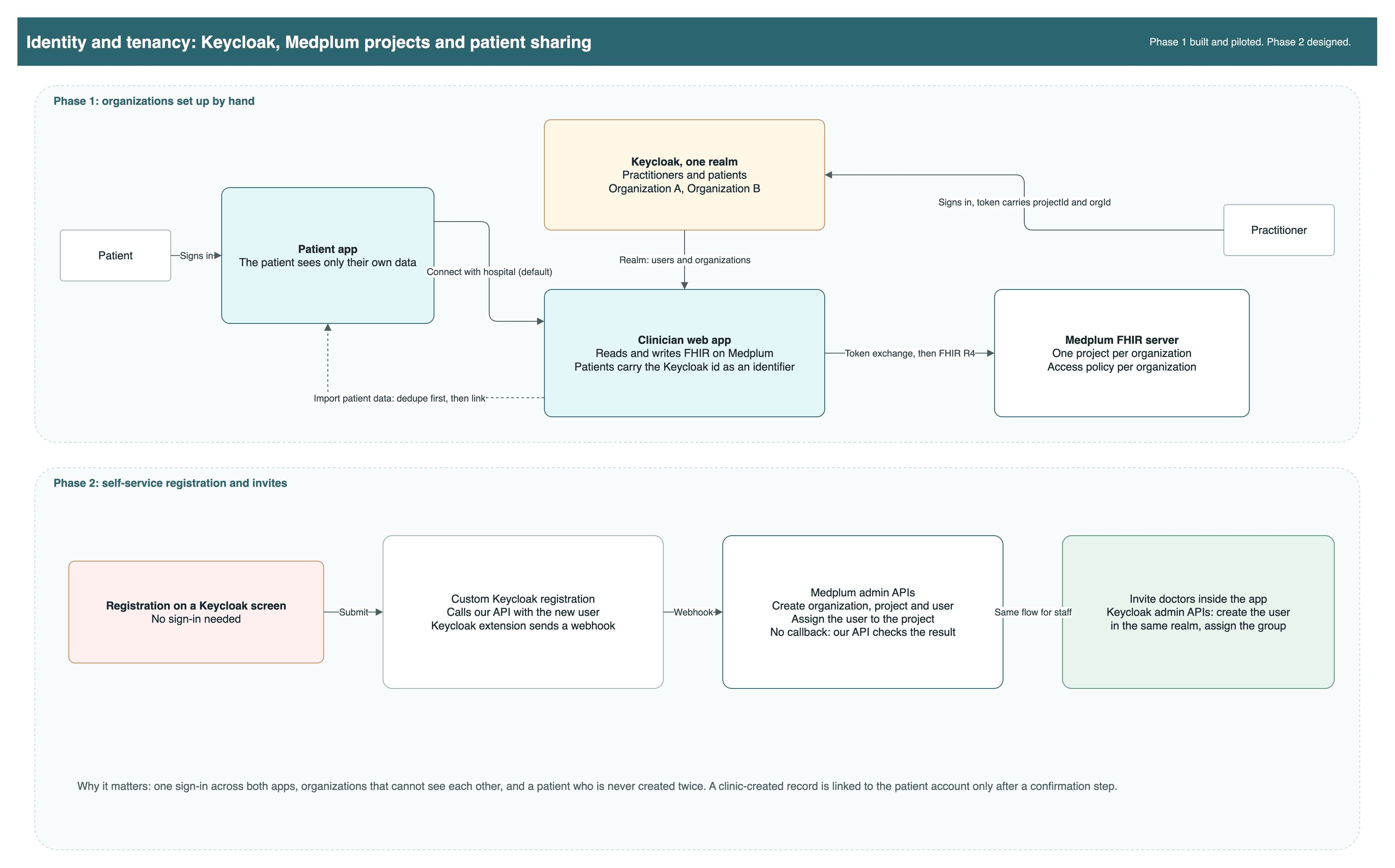
The company runs one Keycloak realm for practitioners and patients. In the first phase, two organizations were set up by hand, each with its own Medplum project. A practitioner signs in through Keycloak, and the app swaps that token for a Medplum session. The second phase was designed: registration on a Keycloak screen, a Keycloak extension that calls our API, Medplum admin APIs that create the organization, project and user, and invites for doctors from inside the app.
 Open full size
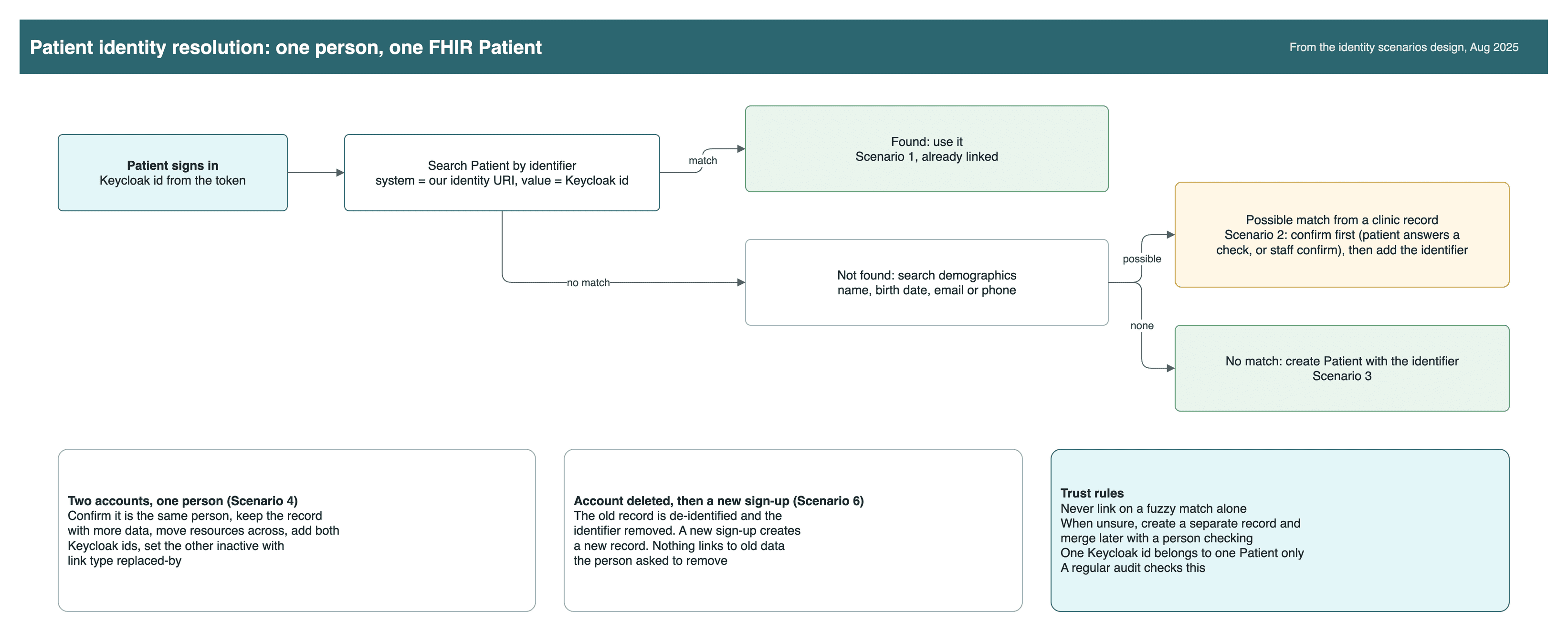
The patient app and the clinician app must find the same person. We wrote the identity rules: the Keycloak id is saved in Patient.identifier under its own system, a clinic-made record is linked only after a confirmation step, and a fuzzy match never links on its own.
 Open full size

Company sign-in into the FHIR server+
Users who exist in two places+
Practices that must never see each other+
A patient who must never be created twice+
Registration with no callback+
Stock components that stopped short+
Booking without double booking+
A domain run from another cloud account+
Why Medplum: a FHIR-native backend made a FHIR EHR faster to build
The company wanted standard data from day one. Starting on a FHIR server meant the data model, API, auth and permissions already existed, and the team spent its time on clinician screens. Our assessment of the options, for this kind of product:
| Medplum | HAPI FHIR | Cloud FHIR stores (Azure, Google, AWS HealthLake) | Firebase or a custom database | |
|---|---|---|---|---|
| Time to first screen | Days. Server, auth and React components ready | Weeks. Server ready, auth and UI to build | Weeks. Store ready, app layer to build | Months. Data model, API and FHIR mapping to build |
| FHIR coverage | R4 REST, search, batch and transaction | The broadest, including most operations | R4 store, operations vary by vendor | None until you write it |
| Auth and permissions | OAuth, external identity providers, access policies per project | Add your own, such as Keycloak and interceptors | Cloud identity and roles | Your own rules |
| Workflow logic | Bots and subscriptions on the server | Interceptors in Java | Cloud functions and events | Your own code |
| App SDK | TypeScript client, React components, mocks for tests | Java client, no UI kit | Generic SDKs | No health SDK |
| Running cost | Open source, self-hosted on the client's cloud account | Open source, self-hosted | Pay per use, tied to one cloud | Low to start, high to make compliant |
We would choose Medplum again for a FHIR EHR with a custom interface. We built on it before for a neonatal and maternity EHR, and we compare the managed options in our FHIR data store comparison. We would also make two choices earlier: plan the custom components from the first design review, and set up identity and tenancy before the first clinical screen.
Buy, build or reuse
| Capability | Choice | Why |
|---|---|---|
| FHIR server and data store | Reuse: Medplum, self-hosted | Open source, FHIR R4, access policies and transactions built in. Saves years of data-layer work. |
| Chart and form building blocks | Reuse, then extend | Medplum React components where they fit. Custom components where they stopped short. |
| Sign-in | Reuse the company's Keycloak | One login across the company's products. We built the link to the FHIR server. |
| Buy: Amazon SES | Already in the company's cloud account. | |
| Screens, booking, tenancy, care plans | Build | This is the product. It had to match the company's design and workflow. |
Security as standard practice
- The development environment sits behind the company's VPN.
- Each tenant is its own FHIR project, with role-based access policies.
- The FHIR server issues its own token for each session, after the company sign-in.
- The development environment held test patients only, inside the company's own cloud account.
Before production we would move tokens out of browser session storage, remove a debug log of the access token and replace placeholder extension URLs with published profiles.
What we learned
| Lesson | What we now do by default |
|---|---|
| Check every design against the stock component in week one. | Map each screen to a Medplum component or a custom build, with an estimate, before the sprint starts. |
| Prove sign-in across two systems in a demo first. | Build the identity flow as a small working demo, then move it into the product. |
| Design tenancy before the first clinical screen. | Decide projects, realms and access policies up front, and test isolation with two organizations. |
| Agree who a patient is before importing anyone. | Write identity rules first: identifier lookup, confirm before linking, merge with a replaced-by link. |
| Make every repeatable write safe to repeat. | Use transaction bundles and business keys, and plan conditional creates for imports and webhooks. |
| Code clinical data in standard vocabularies from the start. | Use LOINC for vitals and SNOMED CT for clinical codes, so outside systems can read the data. |
| Ground AI answers and show their sources. | Answer only from retrieved records and articles, cite each one, and test the same question many times. |
| Make work traceable for the client. | Ticket id in every commit, pull requests to the develop branch, acceptance criteria per ticket. |
How this engagement ran
Time and material. The code lived in the company's own repository and cloud account from day one. Two-week sprints in the company's ticket tracker, a demo every week, acceptance criteria on each ticket and the ticket id in every commit.
The same company also asked us to rebuild its consumer mobile app. That was a separate assignment, told in our health data aggregation app case study.
What comes next
Designs for phase two. Not in the delivered code.
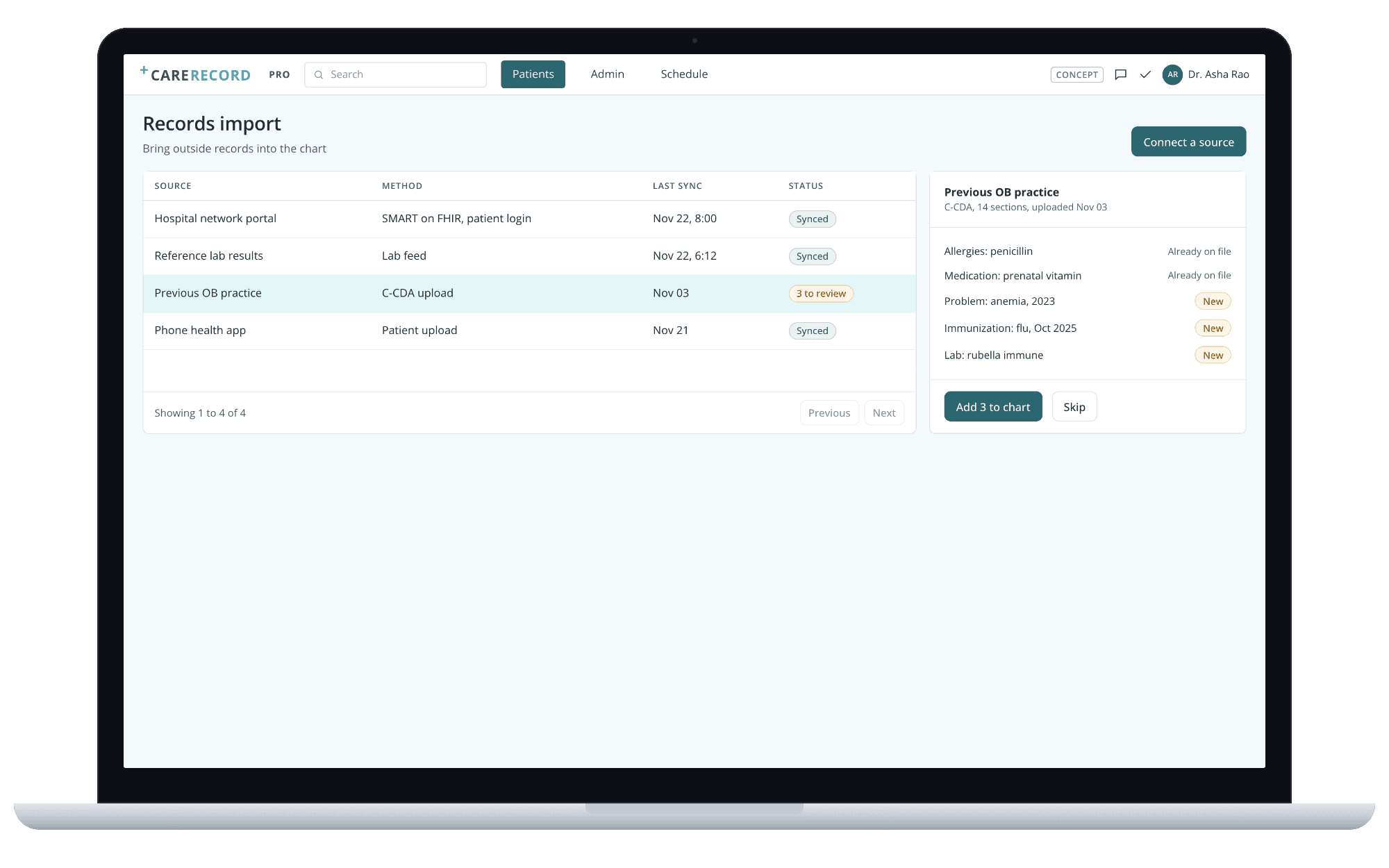
Concept. Import records from the patient app and outside sources, with duplicates checked.
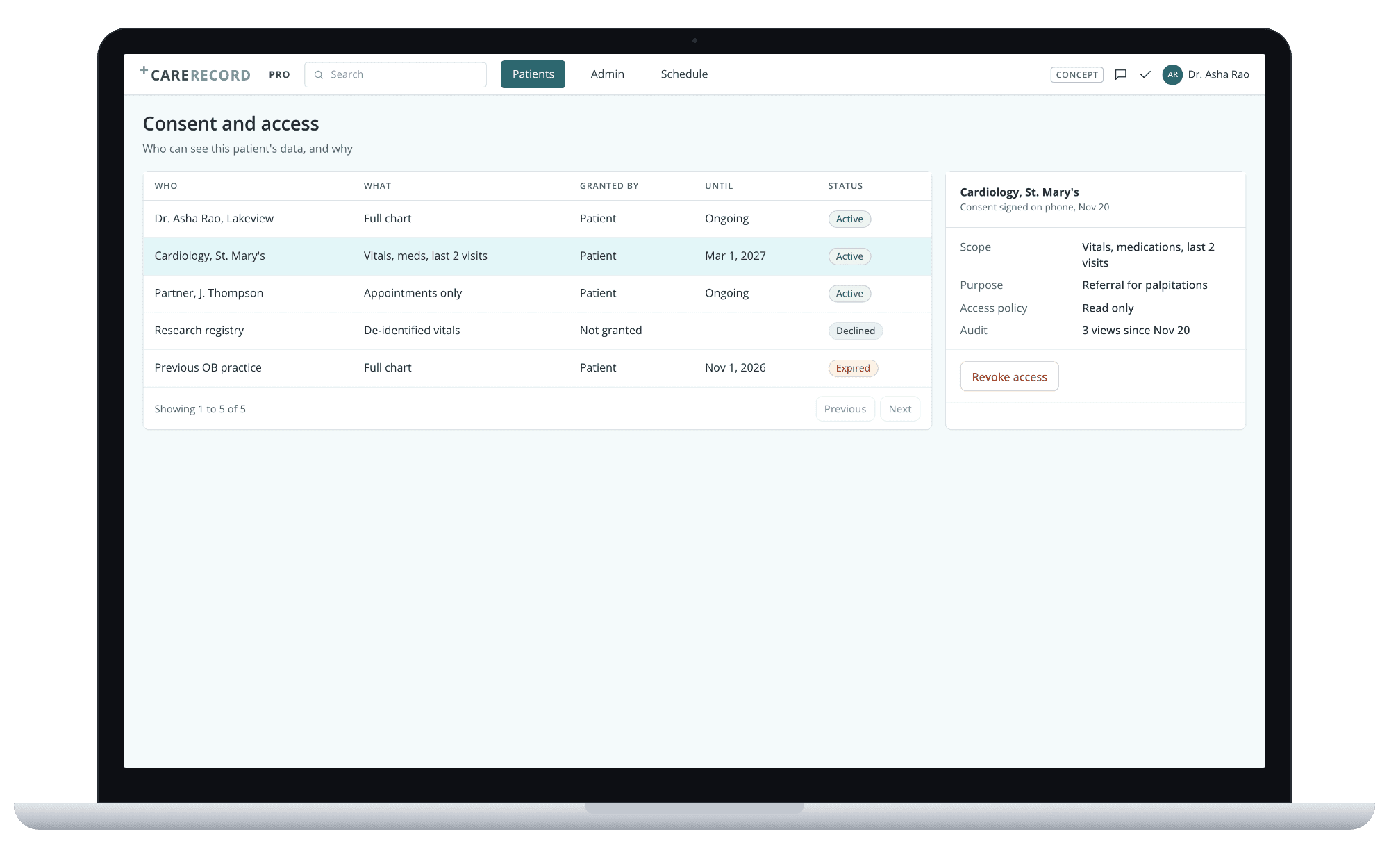
Concept. Who can see this patient's data, why, and until when.
Building an EHR on Medplum?
Tell us your sign-in, your tenancy model and the screens you need. We will show where Medplum fits as is and where it needs product engineering on top.
Sources: the web app repository (routes, 26 resource types, 128 test files, counted Nov 22, 2026) and the project channel, Apr to Sep 2025. No outcome numbers are claimed.