FHIR Server Comparison 2026: 12 Options for US Buyers

Software Development Expert
Writes about software development, scalable architecture, and practical problem-solving across modern digital products. Focuses on turning complex technical ideas into clear, real-world solutions.
Part of our complete guide to why FHIR matters.
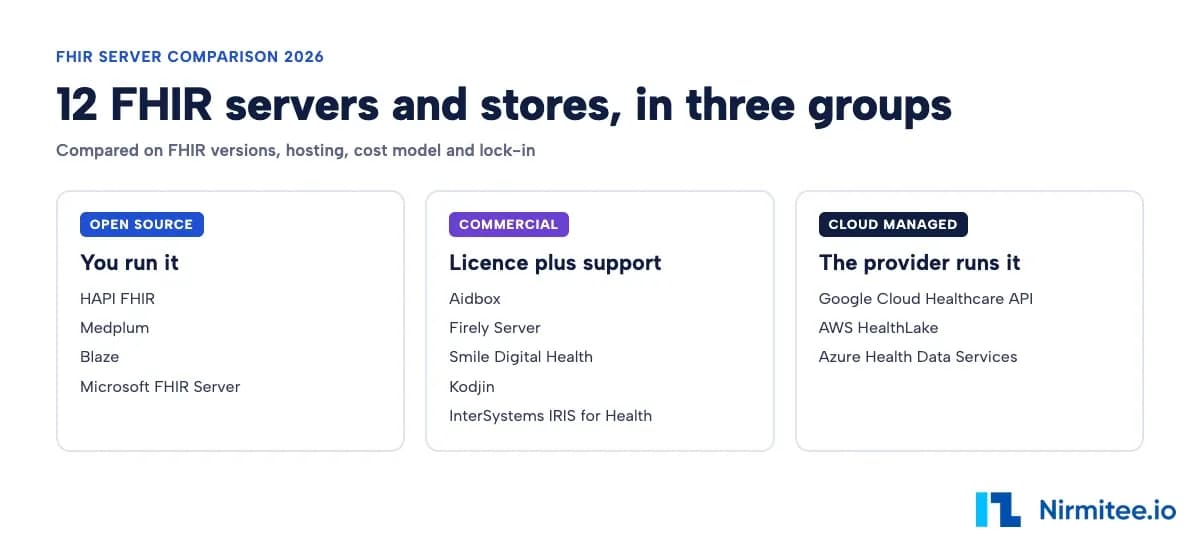
A FHIR server comparison comes down to four things: which FHIR versions you need, where the data must live, how you want to pay, and how hard it will be to leave. In 2026 the realistic choices are twelve products in three groups: open source servers you run yourself (HAPI FHIR, Medplum, Blaze, Microsoft FHIR Server), commercial servers with a licence and support (Aidbox, Firely, Smile, Kodjin, InterSystems), and managed cloud FHIR stores (Google Cloud Healthcare API, AWS HealthLake, Azure Health Data Services).
This guide is for US buyers: product leaders, CTOs and integration leads at health-tech companies, payers and provider groups. It starts with why the choice is a business decision, then compares all twelve options in one format, and ends with a decision path. If you want the platform work done for you, our FHIR data platform services team designs, builds and runs FHIR stores on any of the options below.
Why choosing a FHIR server is a business decision
Choosing a FHIR server is a business decision because integration speed now decides who wins customers. A hospital, payer or provider group will not sign until your product connects to their records system, so every slow integration stalls a deal and delays revenue.
The technology to move health data already exists. The hard part is commercial. Each new partner that needs a custom build adds months of engineering before the first invoice. Each missing record at the point of care is a clinical and reputational risk. And US regulators now expect data to flow: the 21st Century Cures Act lets the HHS Office of Inspector General fine health IT developers and exchanges up to $1 million per information blocking violation, and CMS rules such as CMS-0057-F require payers to run FHIR APIs for patient access, provider access, payer-to-payer exchange and prior authorization.
The FHIR server sits under all of that. Pick one that fits your partners, your team and your growth, and new connections take weeks. Pick the wrong one, and you pay for it in every deal for years.
The integration cost nobody budgets for
The integration cost nobody budgets for is the second, third and twentieth connection. Budgets cover the first integration as a project. They rarely cover the fact that every hospital, lab, insurer and app keeps patient data in its own shape, so without a shared standard each new partner is a new project.
That cost shows up in four places:
- Sales: deals sit in procurement waiting on an integration date.
- Finance: engineering months per partner, repeated for every new customer.
- Clinicians and patients: records that arrive late, incomplete or not at all.
- Leadership: regulatory exposure when data cannot be shared on request.
It also compounds. Every custom link is code someone must maintain when either side upgrades. Teams that skip a shared data layer end up with an integration team that spends most of its time keeping old links alive instead of adding new customers.
Possible solutions: point-to-point, interface engine, general database or FHIR store
There are four common ways to solve the partner integration problem, and only one of them stores data in the standard that partners and regulators expect. The table compares them.
| Option | What it does well | Where it stops | Fit |
|---|---|---|---|
| Point-to-point links | Quick for the first partner | A new build for every partner; breaks when either side changes | Poor |
| Interface engine, such as Mirth Connect | Moves and transforms HL7 v2, X12 and FHIR messages between systems | Routes messages but keeps no shared, queryable patient record | Partial; best paired with a FHIR store |
| General database, such as Google Firestore, MongoDB or PostgreSQL JSON | Stores JSON cheaply and scales well | Knows nothing about FHIR validation, references, search parameters, versions or SMART on FHIR; your team rebuilds all of it | Partial |
| FHIR server or FHIR store | Stores, validates, searches and shares data through the standard FHIR API | Needs FHIR skills to model profiles, tune search and secure access | Best |
In practice, mature teams use two of these together: an interface engine to bring legacy HL7 v2 feeds in, and a FHIR store as the single record every app and partner reads from.
What a FHIR server or FHIR store is
A FHIR server, also called a FHIR store or FHIR database, is a database plus an API built around the FHIR standard. FHIR (pronounced "fire", short for Fast Healthcare Interoperability Resources) is the HL7 web standard for health data: each item, such as a patient, an encounter or a lab result, is a "resource" with a defined shape, sent over a normal REST API as JSON.
The server does three jobs. It stores resources and keeps their history. It checks each resource against the standard and any profiles you require, such as US Core. And it answers standard FHIR searches, such as "all of this patient's lab results since January", so any partner that speaks FHIR can connect without custom work.
"FHIR server" and "FHIR store" mean nearly the same thing. "Server" is the usual word for software you run, such as HAPI FHIR. "Store" is the word Google and others use for a managed FHIR data store inside a cloud service.
How a FHIR server solves the integration problem
A FHIR server solves the integration problem by replacing many custom links with one standard API. Partners, apps and regulators all connect to the same endpoint in the same format.
| Problem | How the FHIR server fixes it |
|---|---|
| A custom link per partner | One FHIR API that any FHIR-capable partner can use |
| Bad or messy incoming data | Validation against FHIR and your profiles when data arrives |
| Regulatory API requirements | Standard FHIR APIs, SMART on FHIR app access and bulk export are built in or close to it |
| Slow onboarding of new customers | New partners map to the standard once, so go-lives move from months toward weeks |
| Analytics and AI need clean data | Bulk $export to NDJSON, or streaming to a warehouse, from one consistent model |
If your partners are large EHRs, the FHIR server is also where data pulled from Epic and other EHR APIs lands, so your product reads one model instead of one per vendor.
What a good FHIR server looks like
A good FHIR server supports the FHIR versions and profiles your partners use, controls and logs every access, stays fast at volume, answers rich searches, and has a price you can forecast. Use this checklist before you sign.
- Standards: the FHIR versions your partners use (R4 is the US baseline) and the profiles they require, such as US Core, CARIN Blue Button and the Da Vinci guides.
- Security: SMART on FHIR app launch, OAuth 2.0 scopes, fine-grained access rules and a full audit trail, all running in a HIPAA-eligible setup.
- Scale: stays fast at millions of resources, with bulk import and $export. Our guide to tuning HAPI FHIR to 10,000 queries a second shows what that takes in practice.
- Search: chained search, _include and _revinclude, and custom search parameters.
- Cost: a pricing model you can forecast as resources and queries grow.
- Exit: clean bulk export so you can move to another server later.
The business outcome is faster partner go-lives, audits you pass the first time, and a product that hospital and payer buyers trust.
The FHIR server market in three groups
The FHIR server market splits into three groups by who runs the software and how you pay.
- Open source FHIR servers: no licence fee, and your team runs, patches and scales them. HAPI FHIR, Medplum, Blaze and Microsoft FHIR Server.
- Commercial FHIR servers: a licence or subscription that includes support and enterprise features. Aidbox, Firely Server, Smile Digital Health, Kodjin and InterSystems IRIS for Health.
- Managed cloud FHIR stores: the cloud provider runs the servers and bills by usage. Google Cloud Healthcare API, AWS HealthLake and Azure Health Data Services.
The next section covers all twelve in the same format: what it is, pros, cons, what to know and best fit.
12 FHIR servers compared
Each of the twelve FHIR servers below is described in the same format so you can compare them directly. Versions, licences and prices were checked on vendor sites on 9 October 2026.
HAPI FHIR (open source)
HAPI FHIR is a widely used open source FHIR server: a Java library and JPA server under the Apache 2.0 licence. Release 8.12.1 shipped on 15 September 2026.
Pros
- Free under Apache 2.0, including production use
- Broad version coverage, with modules for DSTU2, DSTU3, R4, R4B and R5
- Active community, and deep control through interceptors, custom search parameters and validation rules
Cons
- Your team owns hosting, upgrades, security patches and on-call
- Needs database and JVM tuning to stay fast at large volumes
What to know: Commercial support is available through Smile Digital Health, whose Smile CDR product is built on HAPI.
Best fit: Teams with strong Java and DevOps skills that want full control, on-premises or on any cloud, with no licence cost.
Medplum (open source)
Medplum is an open source, full-stack TypeScript platform: a FHIR server on PostgreSQL plus React components and app tools, under Apache 2.0, with an optional hosted service.
Pros
- Fast path from idea to a working product, with app building blocks included
- Self-host free, or use the hosted plans
- Modern TypeScript stack that web developers can pick up quickly
Cons
- FHIR R4 only; Medplum says R5 work is paused and experimental
- Younger than HAPI, with a smaller enterprise track record
What to know: Hosted pricing listed on medplum.com on 9 October 2026: Free $0, Production $2,000 a month, Premium $6,000 a month, Enterprise on request.
Best fit: Startups and product teams building a new FHIR-native app quickly, especially on a TypeScript stack.
Blaze (open source)
Blaze is an open source FHIR server from the Samply community with a built-in CQL engine for population-wide queries, under Apache 2.0.
Pros
- Fast aggregate and CQL queries over millions of patients
- Free licence
- Used in Germany’s Medical Informatics Initiative and European biobanks
Cons
- Implements large parts of the FHIR R4 API, and R4 only
- Small community and few enterprise features, so plan for self-support
What to know: Blaze is built for research and cohort analytics, not as a transactional backend for a commercial product.
Best fit: Research groups and analytics teams that need fast cohort queries over R4 data.
Microsoft FHIR Server (open source)
Microsoft FHIR Server is Microsoft’s open source FHIR server under the MIT licence. Its SQL provider is the codebase behind the managed FHIR service in Azure Health Data Services.
Pros
- Free, and still maintained: release 5.0.101 shipped on 4 October 2026
- Same engine as Azure’s managed service, with good documentation
- Runs on your own Azure subscription or elsewhere
Cons
- R4 only now: R4B support ended on 1 July 2026
- The CosmosDB provider reached end of support on 30 September 2026, so only the SQL provider remains
- Fewer features than the commercial servers, and you host and run it
What to know: If you started on the CosmosDB provider, plan a move to the SQL provider or to the managed service.
Best fit: Microsoft-centred teams that want the Azure FHIR engine under their own control.
Aidbox (commercial)
Aidbox, from Health Samurai, is a commercial FHIR server and platform on PostgreSQL with access policies and SMART on FHIR built in.
Pros
- Documented setups for FHIR R4, R4B and R5, plus a preview based on the R6 ballot
- Strong access control and SMART on FHIR features out of the box
- Free development licence (no real patient data, up to 5 GB)
Cons
- Production licence costs; production pricing is pay-as-you-go and not listed publicly
- Its own way of configuring and extending, which takes time to learn
What to know: The R6 option is built on a ballot (draft) version of FHIR, so treat it as a preview.
Best fit: Product teams that want speed and ready-made security without running HAPI themselves.
Firely Server (commercial)
Firely Server is a commercial .NET FHIR server from Firely, the maker of the Firely .NET SDK.
Pros
- STU3, R4 and R5 side by side in one server (R5 ships but is not loaded by default)
- Modular plug-in design and strong documentation
- Packages for US needs, including Da Vinci prior authorization and CMS-0057-F
Cons
- A paid licence is needed for production
- Configuration takes FHIR and .NET skill
What to know: Licensing is a flat annual fee per production instance with unlimited development and test instances, and a 30-day evaluation licence. Prices are quoted, not published.
Best fit: Teams that need several FHIR versions at once, or a .NET shop that wants a supported server.
Smile Digital Health (commercial)
Smile Digital Health sells Smile CDR, the enterprise FHIR platform built on HAPI FHIR, aimed at payers, health systems and governments.
Pros
- Supports all released FHIR versions from DSTU2 onward, with R4 as default
- Enterprise scale, support and a wide set of HL7 standards
- A clear upgrade path for teams already on HAPI
Cons
- No public pricing; quoted per deal and usually tied to volume
- Cost is high for small teams
What to know: Smile is the natural next step when a HAPI deployment outgrows in-house support.
Best fit: Large payers and health systems, especially those meeting CMS-0057-F API deadlines.
Kodjin (commercial)
Kodjin is a commercial FHIR server from Edenlab, based in Tallinn, Estonia. Edenlab says Kodjin is written in Rust with a microservice architecture.
Pros
- Edenlab says it is built for very large, national-scale deployments
- Edenlab’s documentation covers R4 and earlier versions, with R5 configuration documented
Cons
- Pricing is on request only
- Version support is described differently across Edenlab documents, so confirm R5 in writing
What to know: Edenlab positions Kodjin for government and national health data projects.
Best fit: Very large or national programmes that want a modern, high-throughput FHIR server with vendor support.
InterSystems IRIS for Health (commercial)
InterSystems IRIS for Health combines a database, an interface engine and a FHIR server in one product from a long-standing hospital IT vendor.
Pros
- FHIR server supports STU3, R4 and R5, according to InterSystems
- Built-in HL7 v2 to FHIR conversion, through InterSystems’ SDA format
- Database, engine and FHIR in one place
Cons
- No public pricing, and generally priced for enterprises
- Strong lock-in to the InterSystems stack
What to know: The built-in HL7 v2 and SDA to FHIR transforms support R4 and earlier, not R5, and profile validation is R4 only.
Best fit: Hospitals and health systems that already run InterSystems and want FHIR on the same platform.
Google Cloud Healthcare API (cloud)
Google Cloud Healthcare API is a fully managed service with FHIR stores, DICOM stores and HL7 v2 stores, billed by storage and requests.
Pros
- Fully managed, with DSTU2, STU3 and R4 FHIR stores
- Streams FHIR changes into BigQuery for analytics
- Built-in de-identification and DICOM storage
Cons
- Ties you to Google Cloud
- No R5, and fewer FHIR extras than the commercial servers
What to know: List prices on 9 October 2026 (Iowa): first 1 GB of structured storage free, then about $0.24 per GB-month; first 25,000 requests a month free, then $0.39 per 100,000 standard requests and $0.69 per 100,000 complex requests such as searches.
Best fit: Teams on Google Cloud that want analytics or AI on clinical data. Our guide to {a("cloud", "healthcare cloud architecture on AWS, Azure and Google")} covers the wider platform choice.
AWS HealthLake (cloud)
AWS HealthLake is Amazon’s managed, HIPAA-eligible FHIR data store, with integrated medical natural language processing that pulls structured facts out of clinical notes.
Pros
- Fully managed, with SMART on FHIR app launch on the Advanced tier
- Integrated medical NLP on free-text notes
- Export to Amazon S3 for analytics and AI
Cons
- FHIR R4 only
- A fixed hourly charge per data store, so small workloads cost more than on Google
- Ties you to AWS
What to know: Each data store costs $0.27 an hour and includes 10 GB and 3,500 queries an hour. See the cost worked example below.
Best fit: AWS-centred teams that want AI on clinical notes. To connect AI agents to it, see our guide to the {a("mcp", "AWS HealthLake MCP server for FHIR AI agents")}.
Azure Health Data Services (cloud)
Azure Health Data Services is Microsoft’s managed platform with a FHIR service, a DICOM service and a MedTech service for device data in one workspace.
Pros
- FHIR R4 and STU3, plus DICOM imaging and device data on one platform
- Fits teams already running on Microsoft Azure
- Built on the open source Microsoft FHIR Server
Cons
- Setup across several services takes effort
- Costs climb with storage and API volume
What to know: Azure API for FHIR, the older service, was retired on 30 September 2026; Azure Health Data Services is its replacement. Billing is per GB of storage (1 GB free), per 100,000 API calls (50,000 free) and per million events (100,000 free).
Best fit: Microsoft shops that need FHIR records, medical images and device data together.
AWS HealthLake typical costs: a worked example
AWS HealthLake typical costs start at about $197 a month for one data store, before extra storage and queries. HealthLake charges $0.27 per data store per hour, which includes the first 10 GB of storage and the first 3,500 queries an hour. Above that, the Advanced tier charges $0.37 per GB-month and $0.048 per 10,000 queries; the Standard tier charges $0.25 per GB-month and $0.015 per 10,000 queries. Prices are from the AWS HealthLake pricing page on 9 October 2026 (US East).
Our arithmetic below assumes 730 hours a month and excludes NLP, export and data transfer. It uses the two workloads from AWS's own pricing examples.
| Workload | HealthLake Advanced | HealthLake Standard | Google Cloud Healthcare API (same workload) |
|---|---|---|---|
| Small: 7 GB stored, 2,000 queries an hour | $197.10 a month (data store only) | $197.10 a month | about $7 a month |
| Large: 1,024 GB stored, 13,500 queries an hour | $197.10 + $375.18 storage + $35.04 queries = $607.32 a month | $197.10 + $253.50 + $10.95 = $461.55 a month | about $246 storage + $38 requests = about $284 a month |
Two things stand out. HealthLake has a floor of about $197 a month per data store, so separate stores for development, test and production triple it. And at large volume, storage, not queries, drives the bill. Google's figures assume every request is a standard request; FHIR searches bill as complex requests at $0.69 per 100,000, so a search-heavy app costs more than shown.
Moving between cloud FHIR stores
Moving between FHIR stores is possible because every option here supports FHIR bulk export to NDJSON files. You export from the old store, import into the new one, and then re-create what does not travel with the data: search parameters, access rules, subscriptions or notifications, and every downstream integration. That last list is where migrations take time, so treat a cloud FHIR store migration as a project, not an export job.
Related reading: creating a production FHIR store on Google Cloud Healthcare API, payer-provider data exchange with FHIR APIs and what FHIR is and why it matters.
FHIR server comparison table
The FHIR server comparison table below puts all twelve options side by side on group, FHIR versions, hosting, licence or cost model, lock-in and best fit.
| Server | Group | FHIR versions | Hosting | Licence or cost model | Lock-in | Best for |
|---|---|---|---|---|---|---|
| HAPI FHIR | Open source | DSTU2, DSTU3, R4, R4B, R5 | Self-hosted, any cloud or on-premises | Apache 2.0, free; you pay infrastructure and staff | Low | Full control with in-house engineers |
| Medplum | Open source | R4 | Self-hosted or Medplum hosted | Apache 2.0; hosted from $0 to $6,000 a month | Low to medium | Startups building fast |
| Blaze | Open source | R4 | Self-hosted | Apache 2.0, free | Low | Research analytics and CQL |
| Microsoft FHIR Server | Open source | R4 | Self-hosted, mainly Azure | MIT, free | Low to medium | Azure FHIR engine under your control |
| Aidbox | Commercial | R4, R4B, R5; R6 ballot preview | Self-hosted or vendor cloud | Free dev licence; production pay-as-you-go, quoted | Medium | Speed plus built-in security |
| Firely Server | Commercial | STU3, R4, R5 | Self-hosted | Flat annual fee per production instance, quoted | Medium | Multi-version and .NET teams |
| Smile Digital Health | Commercial | DSTU2 onward, R4 default | Self-hosted or vendor hosted | Quoted, volume based | Medium | Large payers and health systems |
| Kodjin | Commercial | R4 and earlier; R5 configuration documented | Self-hosted | Quoted | Medium | National-scale programmes |
| InterSystems IRIS for Health | Commercial | STU3, R4, R5 (transforms R4 and earlier) | Self-hosted or InterSystems cloud | Quoted, enterprise | High | Hospital all-in-one platform |
| Google Cloud Healthcare API | Cloud | DSTU2, STU3, R4 | Google Cloud only | Pay per GB and per request | High | Analytics on Google Cloud |
| AWS HealthLake | Cloud | R4 | AWS only | $0.27 an hour per data store plus storage and queries | High | AI on clinical notes, AWS shops |
| Azure Health Data Services | Cloud | R4, STU3 | Azure only | Pay per GB, per API call and per event | High | Records plus images on Microsoft |
How to choose a FHIR server
To choose a FHIR server, answer four questions in order; the first yes gives you a shortlist.
- Are you already committed to one cloud, and is lock-in acceptable? Start with that cloud's managed FHIR store: Google Cloud Healthcare API, AWS HealthLake or Azure Health Data Services.
- Do you need on-premises, multi-cloud or full control, and do you have engineers to run it? Choose open source: HAPI FHIR for breadth, Medplum for speed to product, Blaze for research analytics, Microsoft FHIR Server for the Azure engine.
- Do you need a vendor SLA, enterprise support or advanced access rules? Choose commercial: Aidbox, Firely, Smile, Kodjin or InterSystems.
- Do you need R5 today? Shortlist the servers that document R5: HAPI FHIR, Firely, Smile, InterSystems and Aidbox. The three cloud services and Medplum do not offer it.
Then test the shortlist on your own data: load a realistic volume, run the searches your app depends on, and walk through a SMART on FHIR app launch. Our SMART on FHIR sandbox to production guide covers that last step.
Watch: FHIR Server Comparison: 12 Options for Health Tech Buyers (8:53). The twelve servers, the run-or-buy cost question and how to choose, in one video.
Where Nirmitee helps
Nirmitee is a healthcare engineering partner, not a FHIR server vendor, so we recommend whichever of the twelve fits your partners, team and budget. We run the shortlist test on your data, then design, build and operate the FHIR store, including profiles, SMART on FHIR, bulk export and the interface engine feeds that bring legacy data in. Engagements are usually a fixed-price architecture review followed by a delivery team. We do not resell licences or hosting, so vendor and cloud fees stay between you and that provider.
Need a second opinion on your shortlist? Explore our healthcare interoperability services and healthcare product engineering, or book a FHIR architecture review with our team.
Ready to scale?
Talk to our healthcare engineering team about building, integrating, and shipping faster.
Frequently Asked Questions
What is the difference between a FHIR server and a FHIR store?
Is HAPI FHIR free for production use?
Which FHIR servers support R5?
What replaced Azure API for FHIR?
What does AWS HealthLake cost?
Can a FHIR server run on-premises?
Can I migrate between FHIR data stores?