FHIR Questionnaire: The Complete Guide (12 Use Cases, 15 Mistakes, SDC and Tools)

Nirmitee.io Engineering
Author
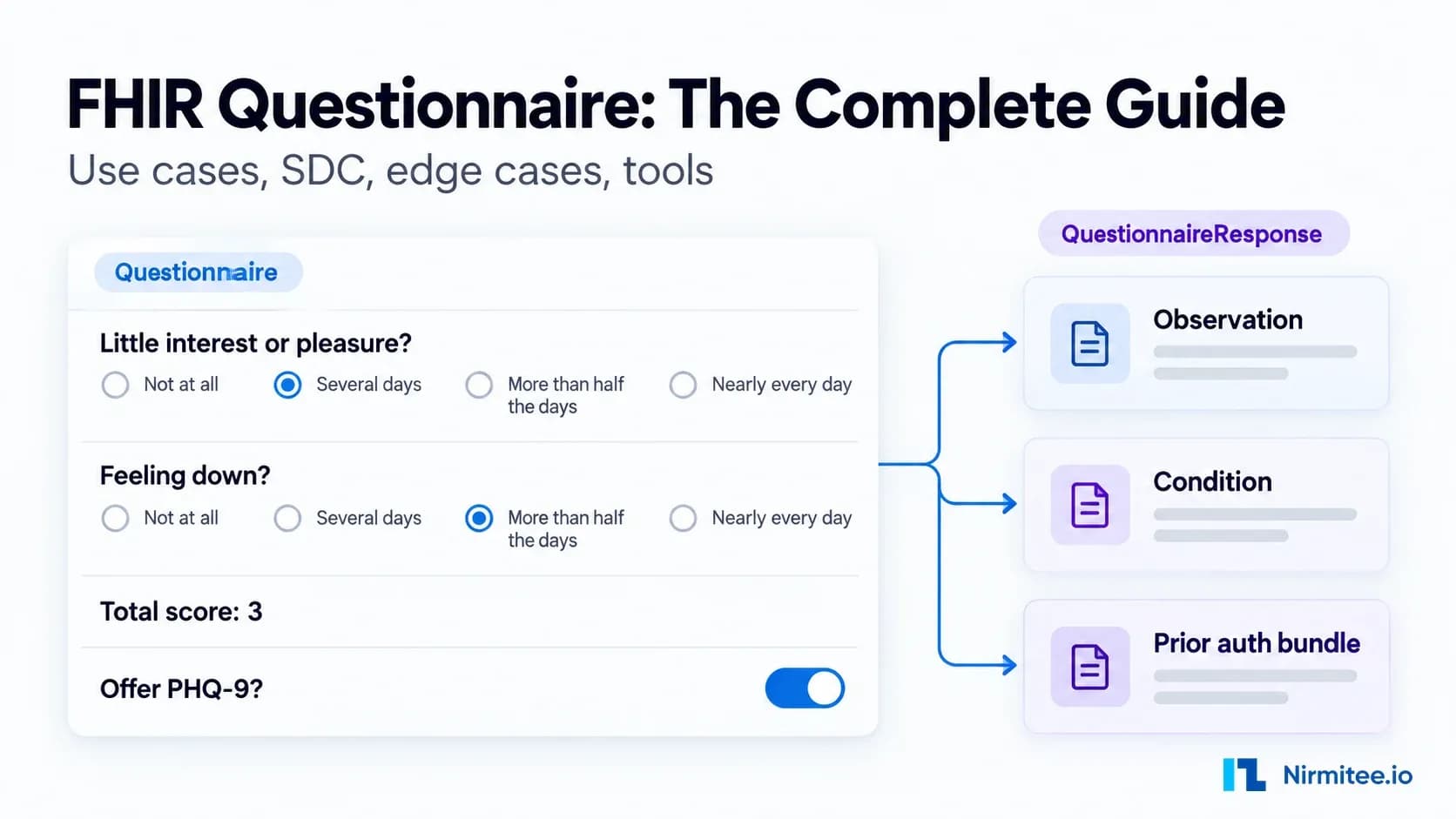
A FHIR Questionnaire is the standard way to define a form in FHIR, and a QuestionnaireResponse holds the answers someone gives to it. Together with the SDC (Structured Data Capture) guide, they let a form pre-fill itself from the patient record, score itself, change as the user answers, and turn its answers into clinical data the EHR can use.
This guide covers the full picture: 12 business use cases, how the resources work, the SDC features that matter, how Questionnaire powers payer prior authorization, the edge cases that break real projects, 15 common mistakes, and how to choose a form tool.
Why FHIR Questionnaire matters in 2026
FHIR Questionnaire matters now because three forces are pushing structured forms into production at the same time. Payer prior authorization, social needs screening and value-based care all depend on answers that a computer can read, score and act on.
- Prior authorization rules. CMS-0057-F requires impacted payers to support prior authorization APIs, with the main API requirements starting in January 2027. The Da Vinci DTR guide, which carries payer documentation forms, is built on Questionnaire.
- Screening requirements. Hospitals and plans now screen for social needs, depression and other risks at scale, and those answers have to be coded to count.
- Outcome-based payment. Patient-reported outcome scores feed quality programs, so the score must be computed the same way everywhere.
Questionnaire is part of core FHIR, so any modern FHIR server can store it. The hard part is everything around storage: pre-filling, rendering, validating and extracting.
12 business use cases for FHIR Questionnaire
FHIR Questionnaire is used wherever an organization needs answers it can trust, score and reuse. The same standard serves very different buyers and budgets.
1. Payer prior authorization (Da Vinci DTR)
Payers publish their documentation requirements as Questionnaires with CQL logic. The EHR pre-fills the form from the chart and the clinician answers only what the chart cannot. This is the use case driving most new Questionnaire budgets in 2026, because CMS-0057-F requires impacted payers to run prior authorization APIs.
- Who buys it: Payers, EHR vendors, utilization management vendors
- What makes it work: CQL pre-population, adaptive forms, extraction into the PAS bundle
2. Patient intake and registration
Demographics, insurance, history, allergies and current medicines collected before the visit and written back into the chart. A good intake form pre-fills what the clinic already knows and asks only for changes.
- Who buys it: Clinics, telehealth companies, patient engagement apps
- What makes it work: Pre-population, write-back through extraction
3. Patient-reported outcome measures (PROMs)
PHQ-9, GAD-7, PROMIS, KOOS and similar instruments, scored on the form and tracked over time. The score has to match across the patient app, the clinician view and the EHR.
- Who buys it: Behavioral health, orthopedics, oncology, value-based care groups
- What makes it work: calculatedExpression scoring, coded answers
4. Social determinants of health (SDOH) screening
Screeners such as AHC HRSN and PRAPARE. Positive answers become coded Observations and Conditions that can trigger a referral to food, housing or transport help.
- Who buys it: Hospitals, ACOs, community health organizations
- What makes it work: Extraction to coded Observations, Gravity Project value sets
5. Medicare Advantage health risk assessments
Annual health risk assessments that feed care plans and care management outreach. They are long, so they need modular sections and saved progress.
- Who buys it: Medicare Advantage plans, care management vendors
- What makes it work: Modular forms, partial save, extraction
6. Clinical trials data capture (eCRF and eCOA)
Case report forms and patient diaries for studies. The form version used for every answer must be provable later.
- Who buys it: CROs, sponsors, academic medical centers
- What makes it work: Strict versioning, audit trail, validation
7. Pre-procedure assessments
Pre-op and anesthesia questionnaires that compute a risk score and flag patients for review before the procedure day.
- Who buys it: Hospitals, ambulatory surgery centers
- What makes it work: Calculated risk scores, enableWhen branching
8. Referrals and orders that need documentation
Specialist referrals, durable medical equipment orders and imaging requests that need specific supporting answers before the receiver accepts them.
- Who buys it: Health systems, DME suppliers, radiology groups
- What makes it work: Conditional logic, pre-population
9. Remote patient monitoring and chronic care check-ins
Short weekly symptom check-ins that sit next to device readings and alert the care team when answers cross a threshold.
- Who buys it: RPM and chronic care management vendors
- What makes it work: Short adaptive forms, calculated alerts
10. Public health and registry reporting
Supplemental case report questions and registry submissions where every answer has to be coded so the agency can aggregate it.
- Who buys it: Health departments, disease registries, labs
- What makes it work: Coded answers, value sets, validation
11. Consent and attestation
Consent capture for treatment, research or data sharing, stored as structured data and linked to a Consent resource with a signature.
- Who buys it: Research teams, telehealth companies, HIEs
- What makes it work: Signature capture, links to Consent
12. Quality measure gap closure
Targeted forms that capture the data a quality measure needs when the chart does not already hold it, for example a screening date done outside the system.
- Who buys it: Payers, ACOs, quality teams
- What makes it work: Pre-population, short targeted questions
How FHIR Questionnaire works
A FHIR Questionnaire works as two resources: the Questionnaire defines the form once, and each QuestionnaireResponse records one person's answers at one time. The two are joined by the form's canonical URL and version, and each answer is matched to its question by linkId.
The Questionnaire resource
The parts of a Questionnaire you will use on every project are these:
- url and version identify the form. Together they are what every response points to.
- item is the list of questions and groups. Items can nest.
- linkId is the permanent identifier of an item inside the form.
- type sets the answer type: group, display, boolean, decimal, integer, date, dateTime, time, string, text, url, choice, open-choice, attachment, reference or quantity (R4).
- code ties the question to a terminology code such as LOINC, which makes extraction and reporting possible.
- answerOption and answerValueSet define the allowed answers, inline or by reference to a value set.
- enableWhen and enableBehavior show or hide an item based on other answers.
- required, repeats, readOnly and maxLength control how the item behaves.
- initial sets a fixed default answer.
Here is a complete PHQ-2 screen in FHIR R4, with a calculated total and a follow-up question that appears only when the total is 3 or more:
{
  "resourceType": "Questionnaire",
  "url": "http://example.org/Questionnaire/phq-2",
  "version": "1.2.0",
  "name": "PHQ2",
  "title": "PHQ-2 depression screen",
  "status": "active",
  "item": [
    {
      "linkId": "phq2-1",
      "code": [{ "system": "http://loinc.org", "code": "44250-9" }],
      "text": "Little interest or pleasure in doing things?",
      "type": "choice",
      "required": true,
      "answerValueSet": "http://example.org/ValueSet/phq-frequency"
    },
    {
      "linkId": "phq2-2",
      "code": [{ "system": "http://loinc.org", "code": "44255-8" }],
      "text": "Feeling down, depressed, or hopeless?",
      "type": "choice",
      "required": true,
      "answerValueSet": "http://example.org/ValueSet/phq-frequency"
    },
    {
      "linkId": "phq2-total",
      "text": "Total score",
      "type": "integer",
      "readOnly": true,
      "extension": [{
        "url": "http://hl7.org/fhir/uv/sdc/StructureDefinition/sdc-questionnaire-calculatedExpression",
        "valueExpression": {
          "language": "text/fhirpath",
          "expression": "%resource.item.where(linkId in ('phq2-1' | 'phq2-2')).answer.value.weight().sum()"
        }
      }]
    },
    {
      "linkId": "follow-up",
      "text": "Offer the full PHQ-9 now?",
      "type": "boolean",
      "enableWhen": [{ "question": "phq2-total", "operator": ">=", "answerInteger": 3 }]
    }
  ]
}
The total uses the weight() function from the current SDC release, which reads the score attached to each answer in the value set. Older renderers use ordinal() or the ordinalValue extension instead, so check which one your renderer supports.
The QuestionnaireResponse resource
A QuestionnaireResponse records the answers, who they are about, who gave them and when. Its status is one of in-progress, completed, amended, entered-in-error or stopped. The item tree mirrors the Questionnaire, matched by linkId.
{
  "resourceType": "QuestionnaireResponse",
  "questionnaire": "http://example.org/Questionnaire/phq-2|1.2.0",
  "status": "completed",
  "subject": { "reference": "Patient/123" },
  "authored": "2026-10-05T10:15:00+05:30",
  "item": [
    { "linkId": "phq2-1", "answer": [{ "valueCoding": { "system": "http://loinc.org", "code": "LA6569-3", "display": "Several days" } }] },
    { "linkId": "phq2-2", "answer": [{ "valueCoding": { "system": "http://loinc.org", "code": "LA6570-1", "display": "More than half the days" } }] },
    { "linkId": "phq2-total", "answer": [{ "valueInteger": 3 }] },
    { "linkId": "follow-up", "answer": [{ "valueBoolean": true }] }
  ]
}
Note the questionnaire element: it holds the URL and the version, separated by a pipe. Without the version, nobody can tell later which wording the patient saw.
The full lifecycle of a form
Every production form goes through six stages: design, pre-populate, render, save, extract and use. Most project failures happen at the pre-populate, save and extract stages, not in the form definition itself.
SDC: the features that make forms smart
SDC (Structured Data Capture) is the HL7 implementation guide that turns a static Questionnaire into a working clinical form. Core FHIR defines the structure; SDC adds the behavior that buyers actually pay for.
Pre-population
Pre-population fills answers from data that already exists, so people do not retype what the system knows. The $populate operation takes a Questionnaire and a patient context and returns a partly completed QuestionnaireResponse. Inside the form, launchContext declares what is available (patient, user, encounter), and initialExpression or candidateExpression pull values with FHIRPath or CQL.
{
  "linkId": "dob",
  "text": "Date of birth",
  "type": "date",
  "extension": [{
    "url": "http://hl7.org/fhir/uv/sdc/StructureDefinition/sdc-questionnaire-initialExpression",
    "valueExpression": { "language": "text/fhirpath", "expression": "%patient.birthDate" }
  }]
}
Calculated fields
Calculated fields compute an answer from other answers, such as a total score, a BMI or a risk band. calculatedExpression recalculates whenever its inputs change, and variable lets you name intermediate values so long expressions stay readable.
Dynamic behavior
Dynamic behavior goes beyond simple enableWhen. enableWhenExpression handles conditions that enableWhen cannot express, and answerExpression builds the answer list at run time, for example from the patient's active medications.
Adaptive forms
Adaptive forms ask one question at a time and pick the next question from the previous answers. A server drives this through the $next-question operation. Computer-adaptive tests such as PROMIS short forms use this pattern to reach a reliable score with fewer questions.
Modular forms
Modular forms reuse sections across many Questionnaires. A demographics block or a medication list is defined once and pulled into each full form, and the $assemble operation produces the complete Questionnaire for renderers that cannot assemble it themselves.
Extraction
Extraction turns answers into the resources the EHR uses, such as Observation, Condition, MedicationStatement or Patient updates. SDC defines several approaches: observation-based extraction for simple coded answers, definition-based extraction that maps items to resource elements, StructureMap-based extraction for complex transforms, and template-based extraction in newer releases. The $extract operation runs it on the server.
FHIR Questionnaire in prior authorization (Da Vinci DTR)
In prior authorization, the FHIR Questionnaire is the payer's documentation form, and the Da Vinci DTR guide defines how it gets filled inside the provider's EHR. Three Da Vinci guides work together: CRD finds out whether documentation is needed, DTR fills the form, and PAS submits the request.
- The clinician signs an order in the EHR, which calls the payer's CRD (Coverage Requirements Discovery) service through CDS Hooks.
- The payer replies with a card that says documentation is required and offers a link to launch DTR.
- The DTR app, either a SMART app or a native EHR feature, fetches the Questionnaire and its CQL libraries from the payer with the $questionnaire-package operation.
- CQL runs against the patient's chart and pre-fills every answer it can.
- The clinician reviews the pre-filled answers, completes the rest and signs.
- The QuestionnaireResponse is saved and attached to the PAS (Prior Authorization Support) request, which the payer receives as a FHIR Claim, with an X12 278 transaction behind it where required.
The quality of the CQL pre-fill decides whether DTR saves clinicians time or adds a new screen to click through. We cover the details in our DTR implementation guide, and the wider workflow in our prior authorization automation guide. For a broader view of prior authorization automation, see our service page.
Edge cases and how to handle them
Edge cases decide whether a Questionnaire project survives production. These are the ones we see break real systems, with the handling we recommend for each.
The form changes while a response is in progress
A patient starts version 1.2.0, and version 1.3.0 is published before they finish. Keep the in-progress response tied to 1.2.0 and let it complete there. Migrate only when the change is a safety correction, and record the migration.
Resuming a half-finished form
Save the response as in-progress on every page or section, and reload it with the same version on return. Re-run pre-population only for items the user has not touched.
Answers left behind by hidden questions
When an earlier answer changes and a dependent item hides, clear the hidden item's answer before saving. Most renderers have a setting for this; check it, then enforce it again in server-side validation.
Repeating groups with nested items
Medication lists, family history and household members repeat. Make sure enableWhen references and calculated expressions resolve inside the right repetition, and test with zero, one and many repetitions.
Pre-filled data that is stale or conflicts with the patient
The chart says one thing and the patient says another. Show the pre-filled value with its source and date, let the user change it, and keep both the source value and the final answer so the conflict can be reviewed.
Units and coded answers
Use the quantity type with a declared unit list for measurements, and never accept a bare number for weight or height. For coded answers, pin the value set version so codes do not change under old responses.
Multiple languages
Use the FHIR translation extension on text elements instead of separate forms per language. That keeps one linkId set and one scoring rule for all languages, which matters for validated instruments.
Offline capture on mobile
Field and home-care staff often lose signal. Cache the Questionnaire and its value sets on the device, save responses locally as in-progress, and sync with conflict detection when the connection returns.
Signatures and attestation
For forms that need a signature, such as DTR attestations and consent, capture it with the SDC signature extension or a linked Provenance resource, and make the signed response read-only.
Amending a completed response
Never edit a completed response silently. Set its status to amended, keep the history through resource versions or Provenance, and make sure any extracted resources are updated too.
15 common mistakes and anti-patterns
These 15 mistakes account for most of the rework we see on FHIR Questionnaire projects. Each one is cheap to avoid at design time and expensive to fix after responses exist.
1. Copying the paper form one to one
What it looks like: Teams scan the PDF and turn every box into a free-text item. The result looks digital but produces no usable data.
The fix: Redesign the form for structured answers. Give each item a type, a code where one exists and an answer list where the answers are known.
2. Changing or reusing linkIds across versions
What it looks like: A linkId is renamed in version 2, or an old linkId is given to a new question. Old responses now point at the wrong question, or at nothing.
The fix: Treat a linkId as permanent once any response exists. Retire it when the question goes away and never give it to a different question.
3. No form versioning
What it looks like: QuestionnaireResponse.questionnaire holds the form URL with no version. Nobody can prove which questions the patient actually saw.
The fix: Set both url and version on the Questionnaire and store url|version on every response.
4. Free text where codes exist
What it looks like: Answers such as "several days" or "yes, sometimes" are stored as strings. Reporting, scoring and extraction all break.
The fix: Use answerValueSet or answerOption with LOINC or SNOMED CT codes, and keep free text for genuinely open questions.
5. Keeping answers to hidden questions
What it looks like: The user answers a follow-up, then changes the earlier answer so the follow-up hides. The old follow-up answer is still saved.
The fix: Clear the answers of disabled items before saving, and add a validation rule that rejects them.
6. Scoring in application code
What it looks like: The web app, the mobile app and the EHR each compute the PHQ-9 score in their own code, and they disagree.
The fix: Put the scoring logic in the Questionnaire as a calculatedExpression so every renderer computes the same number.
7. Pre-filling without showing the source
What it looks like: Pre-populated answers look exactly like typed ones. A clinician signs an attestation over data they never saw come from the chart.
The fix: Mark pre-filled answers in the UI, show where each one came from, and require a review step before the form is completed.
8. Locking into one renderer's extensions
What it looks like: The form depends on vendor-specific extensions and only works in one product.
The fix: Stick to the standard SDC extensions where they exist, and test every form in at least two renderers.
9. No extraction plan
What it looks like: Answers stay inside QuestionnaireResponse. The chart, the problem list and the quality reports never see them.
The fix: Decide at design time which answers become Observations, Conditions or other resources, and how: observationExtract, definition-based or template-based extraction.
10. One giant form
What it looks like: A 200-item form that nobody can review, test or change without breaking something.
The fix: Build modular sub-questionnaires (demographics, medications, a scored instrument) and assemble them into the full form.
11. Ignoring instrument licensing
What it looks like: A licensed instrument is published as an open Questionnaire without permission or the required copyright text.
The fix: Check the license of every validated instrument before building it, and carry the required text in Questionnaire.copyright.
12. No partial save or resume
What it looks like: A long form is abandoned halfway and everything typed so far is lost.
The fix: Save as in-progress as the user goes, support resume, and use the stopped status when a form is ended on purpose.
13. Not validating responses against the form
What it looks like: Malformed responses (wrong types, missing required answers, unknown linkIds) go straight into storage.
The fix: Validate every QuestionnaireResponse against its Questionnaire on write, and reject failures loudly instead of logging them.
14. Assuming every EHR supports SDC
What it looks like: The design relies on $populate, CQL or adaptive forms, and the target EHR supports none of them natively.
The fix: Confirm what each target EHR supports before you design, and plan a fallback such as a SMART on FHIR app that renders the form itself.
15. Testing only the happy path
What it looks like: Tests cover one complete, tidy response. Production breaks on repeating groups, skipped sections, amendments, units and translations.
The fix: Build an edge-case test suite (see the section above) and run it against every renderer and EHR you support.
Choosing a FHIR Questionnaire tool
The right FHIR Questionnaire tool depends on four things: how much of SDC you need, the license you can accept, whether non-developers must build forms, and where the form has to run (patient app, EHR, SMART app). No single option wins on all four.
- LHC-Forms (US National Library of Medicine). Open source renderer with broad SDC support, paired with the NLM Form Builder for authoring. Best for: teams that want a proven free renderer. Limitation: you own hosting, styling and integration.
- SMART Forms (CSIRO, Australia). Open source React renderer that runs as a SMART on FHIR app, with strong pre-population support. Best for: launching forms from inside an EHR. Limitation: React-centric, so other front ends need more work.
- Aidbox Forms (Health Samurai). Commercial form engine with a visual builder, SDC operations and a FHIR server around it. Best for: teams that want a packaged product and a builder for clinical staff. Limitation: commercial licensing and closer coupling to one vendor's platform.
- Your FHIR server alone (for example HAPI FHIR). Stores and validates Questionnaire and QuestionnaireResponse well. Best for: the storage layer. Limitation: rendering and most SDC behavior must come from elsewhere.
- Building your own renderer. Full control over UX, offline behavior and branding. Best for: patient-facing apps with strict design needs. Limitation: SDC is large, and every feature you add needs its own tests.
- Working with an integration partner such as Nirmitee. We design forms, build SDC pre-population and extraction, and embed rendering into your EHR or app, usually on top of the open source renderers above. Best for: DTR programs and multi-EHR rollouts with a fixed deadline. Limitation: you still need someone in-house to own form content and clinical sign-off.
Implementation checklist
Use this checklist before any FHIR Questionnaire goes live.
- Every Questionnaire has url, version, status and a stable linkId set.
- Every response stores questionnaire as url|version.
- Questions with known answers use coded value sets, with versions pinned.
- Scores and derived values live in calculatedExpression, not app code.
- Pre-filled answers show their source and need human review.
- Hidden items are cleared on save and rejected by validation.
- Responses are validated against the Questionnaire on every write.
- Partial save, resume, stopped and amended are supported and tested.
- An extraction method is chosen and tested for every clinically useful answer.
- Licensed instruments are cleared and carry their copyright text.
- Translations use the translation extension on one shared form.
- Each target EHR's SDC support is confirmed in writing, with a fallback renderer.
- The edge-case test suite runs against every renderer you support.
- Responses are audited: who answered, who reviewed, who signed, and when.
How Nirmitee helps
Nirmitee builds FHIR Questionnaire solutions end to end: converting paper and PDF forms into coded Questionnaires, writing the CQL and FHIRPath that pre-fill them, embedding renderers into Epic, Oracle Health and other EHRs, and wiring extraction so answers reach the chart. For payers and EHR vendors, we build Da Vinci CRD, DTR and PAS flows ready for the CMS-0057-F deadline.
Need a team that has done this before? Explore our Healthcare Interoperability Solutions and our Custom Healthcare Software Development services. Talk to our team about a form or DTR architecture review.
Ready to scale?
Talk to our healthcare engineering team about building, integrating, and shipping faster.
Frequently Asked Questions
What is a FHIR Questionnaire?
What is the difference between Questionnaire and QuestionnaireResponse?
What is SDC in FHIR?
How are FHIR Questionnaires used in prior authorization?
Which tools can render FHIR Questionnaires?
Does Epic support FHIR Questionnaire?