FHIR Prior Authorization: Da Vinci PAS Workflow with SMART, CRD and DTR (2027)

Nirmitee.io Engineering
Author
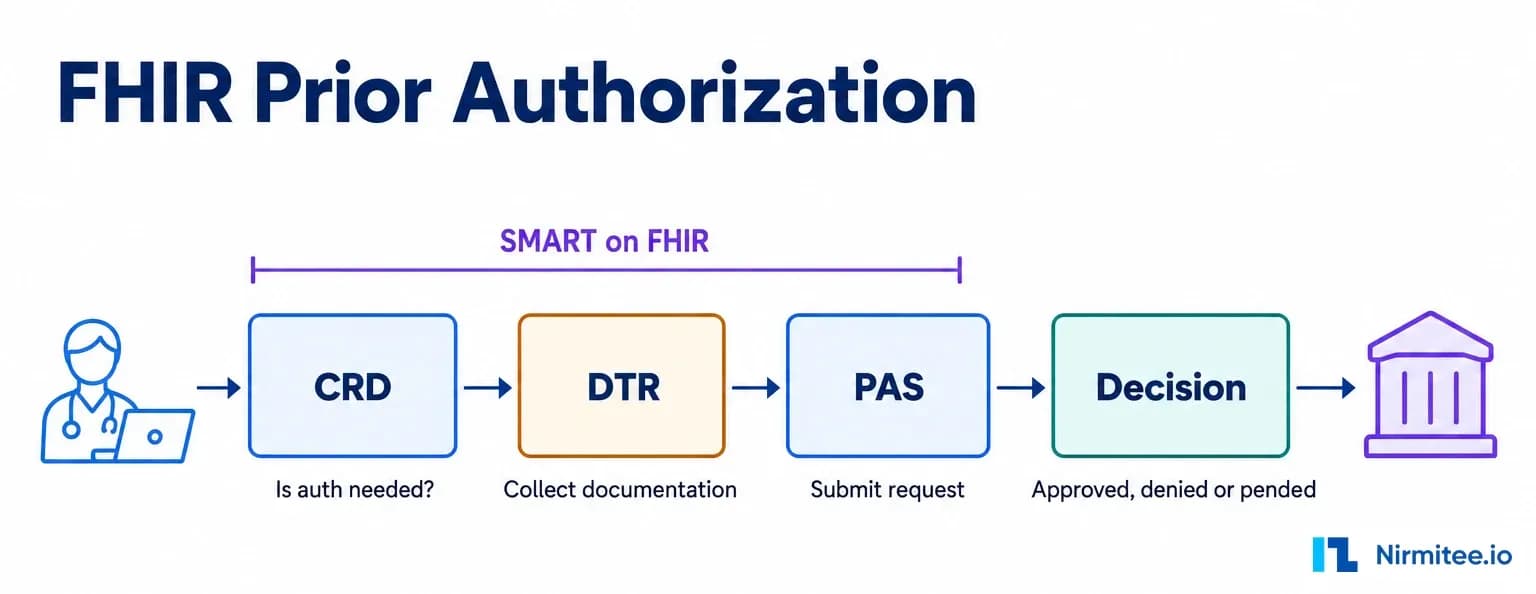
FHIR prior authorization is the API workflow that lets a provider's EHR ask a payer whether a service needs approval, collect the payer's documentation, submit the request and receive a decision without fax, phone or portal. It is built from three HL7 Da Vinci guides, CRD, DTR and PAS, joined together by SMART on FHIR, and it is the method CMS recommends for the Prior Authorization API that impacted payers must run from 1 January 2027 under CMS-0057-F.
The short answer: CRD tells the clinician at order signing that prior authorization is needed. DTR, launched as a SMART on FHIR app, fills the payer's form from the chart. PAS sends the request as a FHIR Bundle to Claim/$submit and returns a ClaimResponse that is approved, denied or pended. Pended requests finish later through a Subscription notification or Claim/$inquire, and an intermediary can translate to X12 278 where a payer still needs it.
The FHIR prior authorization journey: CRD, DTR and PAS, with SMART on FHIR carrying identity and context across the first three steps.
This guide walks the full Da Vinci PAS workflow step by step, with real JSON, the exact SMART on FHIR scopes and token flow, the CMS-0057-F deadlines, the failure points we hit while taking our open-source CRD, DTR and PAS servers through the official Inferno test kits, and a practical build vs buy view. It is written for payer technology leaders, payer IT vendors and EHR or health-tech product owners who have to ship this by January 2027.
What FHIR prior authorization replaces
FHIR prior authorization replaces a workflow where staff look up payer rules in PDFs, fill a portal form or fax clinical notes, wait for a request for missing documents, resubmit, and then phone for status. The FHIR version moves each of those steps into the EHR at the moment the order is signed.
Left: the manual loop. Right: the same request through CRD, DTR and PAS. The PAS guide asks payers to answer synchronously, with a target of 15 seconds or less.
- Coverage rules arrive at order time. The payer's CRD service answers while the clinician is still in the order screen.
- The payer's form fills itself. DTR runs payer-supplied CQL against the patient record, so the clinician only answers what the chart cannot.
- The request is structured. PAS sends coded services, the coverage, the requesting provider and the completed QuestionnaireResponse in one Bundle.
- Status is pushed. A pended request finishes with a notification instead of a phone call.
For the business case and the cost data behind manual prior authorization, see our analysis of the true cost of prior authorization. Teams that want this delivered end to end can start with our prior authorization automation services.
The FHIR prior authorization reference architecture
A FHIR prior authorization deployment has ten moving parts across the provider, an optional intermediary and the payer. Naming them early saves months, because most delays come from a part nobody owned.
Reference architecture. Numbers match the end-to-end sequence below. Path 8a is the direct FHIR submission; 8b is the optional route through an intermediary to X12 278.
| Component | Owner | Standard | What it does |
|---|---|---|---|
| EHR and CDS client | Provider / EHR vendor | CDS Hooks 2.0, CRD client | Fires order-select, order-sign, order-dispatch and appointment-book hooks and stores the payer's coverage-information on the order |
| EHR authorization server | EHR vendor | SMART App Launch 2.x | Publishes .well-known/smart-configuration, runs /authorize and /token for the DTR app |
| EHR FHIR API | EHR vendor | US Core | Serves the Patient, Coverage, ServiceRequest, Condition and Observation data that DTR's CQL reads |
| DTR client | EHR vendor or app vendor | DTR SMART app or native DTR | Fetches the payer's Questionnaire and CQL, pre-fills, saves the QuestionnaireResponse |
| PAS client and Subscription endpoint | EHR vendor | PAS, Subscriptions R5 Backport | Builds the PAS Bundle, calls Claim/$submit, receives rest-hook notifications |
| CRD service | Payer or delegate | CDS Hooks, CRD 2.2.1 | Returns coverage, prior authorization and documentation requirements for each order |
| Payer authorization server | Payer | SMART Backend Services | Issues system tokens to trusted EHRs and DTR apps using signed JWT client assertions |
| DTR payer endpoint | Payer or delegate | DTR 2.2.0, SDC, CQL | Serves Questionnaire/$questionnaire-package and $next-question |
| PAS endpoint | Payer or delegate | PAS 2.2.1 | Serves Claim/$submit, Claim/$inquire and the PAS Subscription topic |
| Intermediary | Clearinghouse (optional) | X12 278 005010X217 | Translates FHIR to X12 278 and back where the payer's back end still runs on X12 |
| UM system | Payer | Internal | Applies rules and clinical review and produces the decision |
The Da Vinci guides call this pattern the Burden Reduction set. Each of the three guides has its own deep dive on our site: CRD and CDS Hooks, DTR implementation and Da Vinci PAS and X12 278. This page joins them into one workflow. Payers who need the architecture assessed against their own stack can book a CMS-0057-F implementation review.
Current versions of CRD, DTR, PAS and SMART
The versions to build against in October 2026 are CRD 2.2.1, DTR 2.2.0 and PAS 2.2.1, all published by HL7 on 27 March 2026, plus SMART App Launch 2.2.0. ONC adopted those three Da Vinci versions for certified EHR modules in the FY 2027 IPPS final rule, effective 1 October 2026, replacing the 2.0.1 versions with no transition period.
| Specification | Current version | Role in the workflow |
|---|---|---|
| Da Vinci CRD | 2.2.1 (STU 2) | Coverage and prior authorization requirements at order time |
| Da Vinci DTR | 2.2.0 (STU 2) | Payer forms and rules, pre-filled from the chart |
| Da Vinci PAS | 2.2.1 (STU 2) | Submission, decision, pended updates and inquiry |
| SMART App Launch | 2.2.0 (STU 2.2) | User launch of the DTR app and Backend Services for system calls |
| CDS Hooks | 2.0 | The calling convention CRD is built on |
The ONC change is in the FY 2027 IPPS/LTCH final rule. CMS itself still names SMART App Launch 2.0.0 and US Core 6.1.0 as the baseline on its API standards page, and allows payers to use newer versions that ONC has approved.
The Da Vinci PAS workflow end to end, step by step
The Da Vinci PAS workflow runs in four phases: CRD at order signing, DTR over SMART on FHIR, PAS submission, and the pended-to-final path. The sequence below numbers every call so engineering, product and the payer's UM team can talk about the same step.
The FHIR prior authorization sequence in 14 numbered calls, from the clinician signing an order to the final decision.
Step 1 and 2: the order-sign CDS Hook
When the clinician signs an order, the EHR's CDS client sends an order-sign hook to the payer's CRD service. CRD 2.2.1 defines six hooks (appointment-book, encounter-start, encounter-discharge, order-dispatch, order-select and order-sign) and makes coverage information mandatory for the primary ones: order-sign, order-dispatch and appointment-book.
POST https://crd.payer.example/cds-services/prior-auth-order-sign
Authorization: Bearer eyJhbGciOiJFUzM4NCIsImtpZCI6ImVoci1rZXktMSIsInR5cCI6IkpXVCIsImprdSI6Imh0dHBzOi8vZWhyLmV4YW1wbGUvandrcy5qc29uIn0...
Content-Type: application/json

{
  "hook": "order-sign",
  "hookInstance": "6c1f5b8e-2f0a-4c55-9f58-1b2c3d4e5f60",
  "fhirServer": "https://ehr.example/fhir/r4",
  "fhirAuthorization": {
    "access_token": "opaque-token-issued-by-ehr",
    "token_type": "Bearer",
    "expires_in": 300,
    "scope": "patient/Patient.r patient/Coverage.rs patient/ServiceRequest.rs",
    "subject": "payer-crd-client"
  },
  "context": {
    "userId": "PractitionerRole/pr-1001",
    "patientId": "pat-2001",
    "encounterId": "enc-3001",
    "draftOrders": {
      "resourceType": "Bundle",
      "type": "collection",
      "entry": [{
        "resource": {
          "resourceType": "ServiceRequest",
          "id": "sr-mri-lumbar",
          "status": "draft",
          "intent": "order",
          "code": { "coding": [{ "system": "http://www.ama-assn.org/go/cpt", "code": "72148", "display": "MRI lumbar spine without contrast" }] },
          "subject": { "reference": "Patient/pat-2001" },
          "insurance": [{ "reference": "Coverage/cov-4001" }]
        }
      }]
    }
  },
  "prefetch": {
    "patient": { "resourceType": "Patient", "id": "pat-2001", "birthDate": "1971-04-12", "gender": "female" },
    "coverage": { "resourceType": "Bundle", "type": "searchset", "entry": [ { "resource": { "resourceType": "Coverage", "id": "cov-4001", "status": "active" } } ] }
  }
}
Three details matter here. The Authorization header is a JWT the EHR signs itself; it is not an OAuth access token. The fhirAuthorization block is the reverse direction: a short-lived token the EHR gives the payer so CRD can read anything it did not prefetch. And prefetch should carry what the payer declared in its /cds-services discovery document, so the payer can answer without a round trip.
The payer answers with a system action that writes a coverage-information extension onto the order. CRD 2.2.1 states that this "Coverage Information" response type "SHALL NOT use a card". Cards can still come back alongside it for instructions, links or alternatives:
{
  "cards": [{
    "uuid": "c7d1e0a2-5b44-4b8e-a0d4-8f2e9b6c1a33",
    "summary": "Prior authorization required: documentation form available",
    "indicator": "info",
    "source": { "label": "Example Health Plan" }
  }],
  "systemActions": [{
    "type": "update",
    "description": "Coverage information for MRI lumbar spine",
    "resource": {
      "resourceType": "ServiceRequest",
      "id": "sr-mri-lumbar",
      "extension": [{
        "url": "http://hl7.org/fhir/us/davinci-crd/StructureDefinition/ext-coverage-information",
        "extension": [
          { "url": "coverage", "valueReference": { "reference": "Coverage/cov-4001" } },
          { "url": "covered", "valueCode": "covered" },
          { "url": "pa-needed", "valueCode": "auth-needed" },
          { "url": "doc-needed", "valueCode": "clinical" },
          { "url": "doc-purpose", "valueCode": "withpa" },
          { "url": "questionnaire", "valueCanonical": "https://dtr.payer.example/fhir/Questionnaire/lumbar-mri-pa|1.0" },
          { "url": "date", "valueDate": "2026-10-08" },
          { "url": "coverage-assertion-id", "valueString": "CA-2026-000123" }
        ]
      }]
    }
  }]
}
The coverage-assertion-id is the trace number that follows the order all the way to the claim. CRD requires the EHR to send it with the eventual X12 837 so the payer can honour what it said at order time.
Step 3 to 8: DTR over SMART on FHIR
When the coverage-information extension says documentation is needed, the EHR launches DTR. In DTR 2.2.0, the launch for DTR is driven by the Coverage Information response; CRD notes that the "Launch SMART Application" card "is no longer to be used for launching DTR applications". The DTR app or native DTR then asks the payer for the questionnaire package, pre-fills it with CQL and saves a QuestionnaireResponse. The SMART section below covers the launch and tokens in depth.
DTR in detail: package, pre-fill against EHR data, adaptive questions, and the finished QuestionnaireResponse that travels in the PAS Bundle.
- Get the package. The DTR client calls
Questionnaire/$questionnaire-packagewith the Coverage and the order. The payer returns a Bundle with the Questionnaire, its CQL Libraries (raw CQL and compiled ELM, both required by DTR) and ValueSets. - Pre-fill. The client runs the CQL against the EHR's FHIR API. DTR allows other pre-fill engines only if they are "at least as complete and accurate" as running the CQL.
- Ask only for gaps. Pre-filled answers are marked with their origin, so the payer can tell what came from the chart and what the clinician typed.
- Adaptive forms. For adaptive questionnaires, the client calls
Questionnaire/$next-questionuntil the payer has what it needs. - Save. The completed QuestionnaireResponse is stored in the EHR and attached to the PAS request.
The FHIR side of these forms is covered in our FHIR Questionnaire complete guide, including SDC pre-population and the mistakes that break DTR forms.
Step 9: the PAS Bundle and Claim/$submit
The PAS request is a FHIR Bundle posted to [base]/Claim/$submit. The Bundle holds a Claim with use set to preauthorization and every resource the Claim references.
Anatomy of a PAS request Bundle. Every reference in the Claim must resolve inside the Bundle.
POST https://pas.payer.example/fhir/Claim/$submit
Authorization: Bearer system-token-from-payer-auth-server
Content-Type: application/fhir+json

{
  "resourceType": "Bundle",
  "meta": { "profile": ["http://hl7.org/fhir/us/davinci-pas/StructureDefinition/profile-pas-request-bundle"] },
  "identifier": { "system": "http://provider.example/bundle-ids", "value": "pas-req-20261008-0001" },
  "type": "collection",
  "timestamp": "2026-10-08T10:15:00Z",
  "entry": [
    {
      "fullUrl": "urn:uuid:9a1d6a7e-2c1b-4c53-8a77-4c8b2f1e0d11",
      "resource": {
        "resourceType": "Claim",
        "status": "active",
        "type": { "coding": [{ "system": "http://terminology.hl7.org/CodeSystem/claim-type", "code": "professional" }] },
        "use": "preauthorization",
        "patient": { "reference": "urn:uuid:5b2e1f4a-7c3d-4e2a-9b1c-0f6e8d7a2c44" },
        "created": "2026-10-08T10:15:00Z",
        "insurer": { "reference": "urn:uuid:3f7a9c2e-1d4b-4a6e-8c5f-2b9d0e1a7f55" },
        "provider": { "reference": "urn:uuid:8e4c2a1f-6b3d-4f7e-9a2c-5d1b0e3f9a66" },
        "priority": { "coding": [{ "system": "http://terminology.hl7.org/CodeSystem/processpriority", "code": "normal" }] },
        "supportingInfo": [{
          "sequence": 1,
          "category": { "coding": [{ "system": "http://hl7.org/fhir/us/davinci-pas/CodeSystem/PASTempCodes", "code": "additionalInformation" }] },
          "valueReference": { "reference": "urn:uuid:2d6b8e1c-4a3f-4b7e-8c9d-1e0f2a3b4c77" }
        }],
        "insurance": [{ "sequence": 1, "focal": true, "coverage": { "reference": "urn:uuid:7c1e3a5b-9d2f-4e6a-8b4c-3a2d1f0e9b88" } }],
        "item": [{
          "sequence": 1,
          "category": { "coding": [{ "system": "https://codesystem.x12.org/005010/1365", "code": "1", "display": "Medical Care" }] },
          "productOrService": { "coding": [{ "system": "http://www.ama-assn.org/go/cpt", "code": "72148" }] },
          "servicedDate": "2026-10-20",
          "quantity": { "value": 1 }
        }]
      }
    }
  ]
}
The excerpt shows the Claim only. A conformant Bundle also carries the Patient, Coverage, insurer Organization, requesting PractitionerRole and Practitioner, the QuestionnaireResponse, and any ServiceRequest linked through the PAS requestedService item extension. Each item.sequence is the trace key: the PAS guide requires the ClaimResponse to echo the same sequence on every item. The QuestionnaireResponse from DTR is referenced from Claim.supportingInfo with the PAS category additionalInformation, and PAS requires every supportingInfo sequence to be unique within the Claim.
Step 10 and 11: the ClaimResponse, approved, denied or pended
The payer answers $submit synchronously with a response Bundle whose ClaimResponse carries a review action for each item. PAS says this "SHOULD happen synchronously with a maximum of 15 seconds". The decision sits in ClaimResponse.item.adjudication.extension(reviewAction).code and uses the X12 278 review action codes.
Decision outcomes and the CMS-0057-F clocks. A pended item becomes final through UM review and is delivered by notification or inquiry.
{
  "resourceType": "ClaimResponse",
  "status": "active",
  "type": { "coding": [{ "system": "http://terminology.hl7.org/CodeSystem/claim-type", "code": "professional" }] },
  "use": "preauthorization",
  "patient": { "reference": "Patient/pat-2001" },
  "created": "2026-10-08T10:15:06Z",
  "insurer": { "reference": "Organization/payer-01" },
  "outcome": "queued",
  "item": [{
    "itemSequence": 1,
    "adjudication": [{
      "category": { "coding": [{ "system": "http://terminology.hl7.org/CodeSystem/adjudication", "code": "submitted" }] },
      "extension": [{
        "url": "http://hl7.org/fhir/us/davinci-pas/StructureDefinition/extension-reviewAction",
        "extension": [{
          "url": "code",
          "valueCodeableConcept": { "coding": [{ "system": "https://codesystem.x12.org/005010/306", "code": "A4", "display": "Pended" }] }
        }]
      }]
    }]
  }]
}| Review action | Meaning | What the EHR shows |
|---|---|---|
| A1 | Certified in total | Approved, with the authorization number and validity period |
| A3 | Not certified | Denied, with the specific reason CMS-0057-F requires |
| A4 | Pended | Waiting for review or more documentation |
| A6 | Modified | Approved for a different service, quantity or period |
| C | Cancelled | Request withdrawn |
CMS's own Prior Authorization API FAQ frames the same three outcomes in plain words: approve with an end date or circumstance, deny with a specific reason, or request more information.
Step 12 to 14: pended to final, Subscription or $inquire
A pended request becomes final through a Subscription notification to the requesting system or through Claim/$inquire. PAS states that when a final response cannot be returned in time, "a subscription-based mechanism SHALL be used by the client to be informed of updates to the authorization".
Two ways a pended request is resolved. The requesting system subscribes; any other authorised system inquires.
- One Subscription per sending system. The EHR creates a Subscription on the PAS Subscription Topic once, filtered by
org-identifier(the sending system identifier, equivalent to ISA06), not one per request. - rest-hook only. PAS servers "SHALL only support the rest-hook channel type".
- Full resource in 2.2.1. PAS clients and intermediaries "SHALL only support subscriptions with content='full-resource'", so the notification carries the updated response Bundle. In STU 2.0.1 notifications were id-only and the client followed up with
$inquire. - Inquiry for everyone else. The performing provider, a patient app or a second EHR use
[base]/Claim/$inquire, which returns zero or more inquiry response Bundles.
The X12 278 route through an intermediary
An intermediary is optional in FHIR prior authorization. Where the payer's UM platform still speaks X12, a clearinghouse maps the PAS Bundle to an X12 278 (005010X217) request and maps the 278 response back to a ClaimResponse, inside the same synchronous window.
How the main PAS resources line up with X12 278 loops. The intermediary keeps item.sequence as the trace across both formats.
The PAS guide treats everything behind the $submit endpoint as "a black box" that includes "business associate(s), clearinghouse(s), payers, contracted review entities, and other intermediaries", and makes that black box responsible for meeting regulatory timeframes. On the HIPAA side, HHS has used enforcement discretion since February 2024, so a payer that runs an all-FHIR Prior Authorization API is not penalised for skipping the 278. CMS's enforcement discretion FAQ also says the reverse does not work: an X12 278 on its own "cannot meet the other requirements" of the rule. For the segment-level detail, read our Da Vinci PAS and X12 278 guide, and for translation work see our X12 EDI integration services.
SMART on FHIR prior authorization: where SMART fits
SMART on FHIR does two separate jobs in prior authorization. It launches the DTR app inside the EHR with the clinician's identity and the order's context (user launch), and it authenticates system-to-system calls from the EHR or DTR app to the payer (Backend Services). CDS Hooks for CRD uses a third mechanism, a signed JWT, which teams often confuse with the other two.
SMART on FHIR in prior authorization: user context for the DTR app (steps 1 to 7) and system context for payer calls (steps 8 to 10).
| Call | Who calls whom | Mechanism | Identity it proves |
|---|---|---|---|
| CRD hook | EHR to payer CRD | CDS Hooks signed JWT in Authorization | The EHR (issuer), checked against its JWKS |
| CRD data read-back | Payer CRD to EHR FHIR | fhirAuthorization token from the hook | A short-lived grant the EHR chose to give |
| DTR launch | DTR app to EHR | SMART App Launch, authorization code + PKCE | The clinician, plus patient and order context |
| DTR to payer | DTR app or EHR to payer | SMART Backend Services | The registered app or EHR system |
| PAS submit and inquire | EHR to payer PAS | SMART Backend Services (agreed at registration) | The provider organisation's system |
Discovery through .well-known/smart-configuration
Every SMART flow starts with discovery. The app reads [fhir base]/.well-known/smart-configuration to learn the endpoints and what the server supports, instead of hard-coding them per EHR.
GET https://ehr.example/fhir/r4/.well-known/smart-configuration

{
  "issuer": "https://ehr.example/auth",
  "jwks_uri": "https://ehr.example/auth/jwks.json",
  "authorization_endpoint": "https://ehr.example/auth/authorize",
  "token_endpoint": "https://ehr.example/auth/token",
  "grant_types_supported": ["authorization_code", "client_credentials"],
  "token_endpoint_auth_methods_supported": ["private_key_jwt"],
  "scopes_supported": ["openid", "fhirUser", "launch", "offline_access", "patient/*.rs", "patient/QuestionnaireResponse.cu"],
  "code_challenge_methods_supported": ["S256"],
  "capabilities": [
    "launch-ehr", "client-confidential-asymmetric", "context-ehr-patient", "context-ehr-encounter",
    "permission-v2", "permission-patient", "permission-user", "sso-openid-connect", "permission-offline"
  ]
}
Check three things before you build: launch-ehr (the EHR can launch apps), permission-v2 (it understands the v2 scope syntax DTR asks for) and client-confidential-asymmetric (it accepts private_key_jwt rather than a shared secret).
The EHR launch sequence for DTR
The EHR launch gives the DTR app the user, the patient, the encounter and the order in one token response. In order:
- Launch. The EHR opens the app's launch URL with two parameters:
iss(the EHR's FHIR base) andlaunch(an opaque handle for this context):https://dtr.app.example/launch?iss=https%3A%2F%2Fehr.example%2Ffhir%2Fr4&launch=abc123 - Discover. The app reads
.well-known/smart-configurationfromiss. - Authorize. The app redirects to
authorization_endpointwithresponse_type=code, itsclient_id,redirect_uri, thelaunchvalue,audset to the FHIR base, a randomstate, a PKCEcode_challengewithS256, and the scopes below. - Code. The EHR authenticates the user (usually already signed in) and redirects back with a one-time
code. - Token. The app posts the code, the PKCE verifier and a signed client assertion to
token_endpoint. - Context. The token response carries the context DTR needs.
{
  "access_token": "eyJ...ehr-issued...",
  "token_type": "Bearer",
  "expires_in": 3600,
  "scope": "launch openid fhirUser patient/*.rs patient/QuestionnaireResponse.cu offline_access",
  "id_token": "eyJ...openid-connect...",
  "refresh_token": "rt-7f3c...",
  "patient": "pat-2001",
  "encounter": "enc-3001",
  "fhirContext": [
    { "reference": "ServiceRequest/sr-mri-lumbar" },
    { "reference": "Coverage/cov-4001" }
  ],
  "need_patient_banner": false
}
DTR 2.2.0 says the openid, user and patient launch contexts "SHALL be requested and provided", and the launch context SHOULD include fhirContext references to one active Coverage plus exactly one of: the CRD order or encounter, an incomplete QuestionnaireResponse (to resume a session), or a Questionnaire Task. That is how the order and coverage travel from CRD into DTR without the clinician picking them again.
appContext vs fhirContext. CDS Hooks defines appContext as a string a CDS card's SMART link can pass to the app, delivered "as part of the OAuth 2.0 access token response". It is still used for SMART apps launched from cards. For DTR in CRD 2.2.1, the order, coverage and questionnaire travel through the coverage-information extension and fhirContext instead, because CRD no longer uses a SMART link card to launch DTR. If your EHR still launches DTR from a card with appContext, plan the change to the 2.2 pattern.
The exact scopes in SMART v2 syntax
SMART v2 scopes use context/Resource.permissions, where permissions are a subset of cruds in order (create, read, update, delete, search). DTR states that "in most cases, apps will simply request patient/*.rs and patient/questionnaireresponse.cu", and the EHR still decides what sensitive data to withhold.
| Scope | Why DTR needs it |
|---|---|
launch | Receive the EHR launch context |
openid fhirUser | Know which clinician is filling the form |
patient/*.rs | Read and search the record for CQL pre-fill (Condition, Observation, Procedure, DocumentReference and others) |
patient/QuestionnaireResponse.cu | Create and update the saved response |
offline_access or online_access | Get a refresh token for long forms |
A tighter alternative names resources one by one, for example patient/Condition.rs patient/Observation.rs patient/Coverage.rs patient/ServiceRequest.rs, and can narrow further with v2 query filters such as patient/Observation.rs?category=http://terminology.hl7.org/CodeSystem/observation-category|laboratory. Narrow scopes work only when you know every resource the payer's CQL touches, which you rarely do for every payer. Our SMART App Launch v2 scopes guide covers the v1 to v2 mapping.
Refresh tokens
A refresh token keeps a DTR session alive when a clinician leaves a long form and comes back. offline_access asks for a refresh token that works "even after the end-user no longer is online"; online_access asks for one that works only while the user is still signed in to the EHR. For DTR, online_access is usually the safer request, because a payer form should not be filled when the clinician is gone. To resume a saved form on another day, relaunch with the incomplete QuestionnaireResponse in fhirContext instead of relying on a long-lived token.
Backend Services for the payer calls
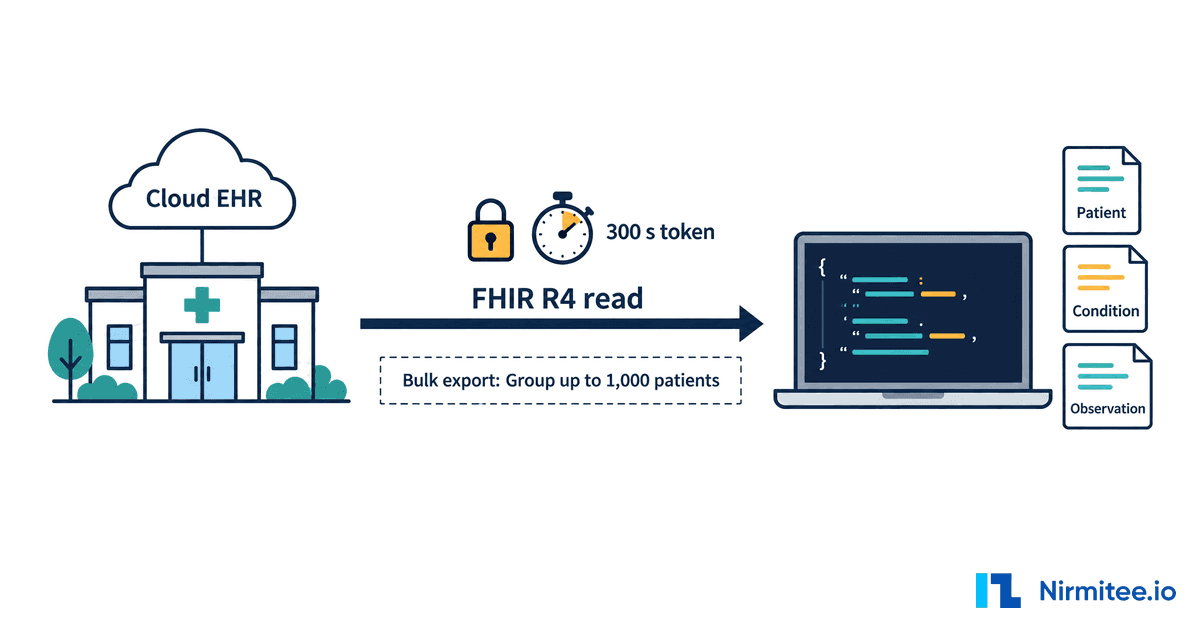
Calls from the EHR or DTR app to the payer have no payer user, so they use SMART Backend Services. DTR is explicit: "Payers SHALL require DTR apps and EHRs connecting to their endpoint to authenticate using SMART on FHIR Backend Services."
POST https://auth.payer.example/token
Content-Type: application/x-www-form-urlencoded

grant_type=client_credentials
&scope=system/Questionnaire.rs system/Claim.c
&client_assertion_type=urn:ietf:params:oauth:client-assertion-type:jwt-bearer
&client_assertion=eyJhbGciOiJSUzM4NCIsImtpZCI6ImVoci1zaWduLTIwMjYiLCJ0eXAiOiJKV1QifQ...
The client assertion is a JWT the client signs with its private key: iss and sub are the client_id, aud is the payer's token endpoint, exp is no more than five minutes ahead, and jti is unique to stop replay. The payer verifies the signature against the public keys the client registered, either as a JWKS URL or a JWK Set. Supported algorithms are RS384 and ES384. The scope strings for payer operations are not fixed by the Da Vinci guides; agree them with each payer at registration, along with the BAA that DTR requires before an app touches patient data.
How the CDS Hooks JWT differs
The CDS Hooks JWT is not a token request. The EHR signs a JWT and sends it as the bearer value on every hook call. Its header carries alg, kid, typ: JWT and optionally jku (the URL of the EHR's JWK Set); its payload carries iss, aud (the exact CDS service URL being called), exp, iat and jti, and optionally tenant. The CRD service validates it and keeps an allowlist of trusted iss and jku values. Nothing is exchanged for a token, and the payer never sees the clinician's EHR session.
Native DTR vs the SMART DTR app
DTR can run as a SMART app or as logic built into the EHR, which the guide calls a native app. The rules are the same: "CQL and FHIR Questionnaires SHALL be required even when DTR is implemented within a DTR Native App as opposed to a DTR SMART App."
| SMART DTR app | Native EHR DTR | |
|---|---|---|
| Who builds it | App vendor, payer or delegate | EHR vendor |
| Launch | SMART EHR launch with fhirContext | In-EHR workflow, no OAuth hop |
| EHR data access | SMART scopes, EHR can restrict | Direct, under EHR policy |
| Payer access | Backend Services, registered per payer | Backend Services, registered per payer |
| Best for | EHRs without native DTR, multi-EHR vendors | Large EHRs that ship DTR in the product |
For payers the lesson is simple: your Questionnaire and CQL must work in both, because you do not choose which one each provider runs. For implementation pitfalls on the EHR side, see our notes on six SMART on FHIR authentication failures.
CMS-0057-F prior authorization API: deadlines and who must build what
CMS-0057-F requires impacted payers to run a Prior Authorization API from 1 January 2027, after operational rules that took effect on 1 January 2026. CMS issued the rule on 17 January 2024 and it appeared in the Federal Register on 8 February 2024 (89 FR 8758).
The CMS-0057-F timeline and the payers it covers. The four APIs are due in 2027; the decision clocks have applied since 2026.
| Date | Requirement |
|---|---|
| 1 January 2026 | Decisions within 72 hours for expedited and 7 calendar days for standard requests (Medicare Advantage, Medicaid and CHIP, items and services); a specific reason for every denial |
| 31 March 2026 | First annual public posting of prior authorization metrics |
| 1 January 2027 | Patient Access API (now with prior authorization data), Provider Access API, Payer-to-Payer API and Prior Authorization API. Medicaid and CHIP managed care: rating periods on or after this date. QHP issuers on the FFEs: plan years on or after this date |
| Proposed, not final | CMS-0062-P would require CRD, DTR and PAS 2.2 and extend electronic prior authorization to drugs. See our CMS-0062-P explainer |
Sources: the CMS electronic prior authorization page and the CMS summary Electronic Prior Authorization: Industry Commitments and Finalized and Proposed Rulemaking (September 2026). The full rule walkthrough is in CMS-0057-F explained, and the API-only view is in the CMS Prior Authorization API guide.
What each party must build
| Party | Must build or buy | Proof to keep |
|---|---|---|
| Impacted payer | CRD service, DTR endpoint with Questionnaires and CQL for every service that needs authorization, PAS endpoint with Subscription and inquiry, Backend Services authorization, UM integration, metrics | Inferno payer-server runs, connectathon logs, monitoring of response times against the 72-hour and 7-day clocks |
| Payer IT vendor or UM delegate | The pieces it runs for the payer, usually DTR content and the UM link, under a BAA | The same evidence, per payer client |
| EHR vendor | CRD client, DTR (native or SMART host), PAS client, Subscription endpoint, payer endpoint directory | ONC certification to 170.315(g)(31) to (g)(33) where it certifies |
| Health system | Payer registrations, BAAs, which hooks to enable, workflow training | Go-live checklists per payer |
There is no CMS certification for payer APIs; compliance is demonstrated through implementation, testing and monitoring. Our post on proving CMS-0057 compliance without a certification program sets out the evidence pack.
State of EHR support and testing
EHR support for CRD, DTR and PAS is moving from pilots to production in 2026. Epic announced live real-time CRD checks with Ochsner Health, Froedtert ThedaCare Health, Denver Health and Summit Health, and with UnitedHealthcare, Network Health and Aetna as payers, with sixteen more payers in testing (Epic). A vendor write-up of the 2026 CMS FHIR Connectathon lists Epic, MEDITECH, Oracle Health, MEDHOST, Altera and Darena among the EHR clients in the Burden Reduction track (Health Samurai). For hook support per vendor, see CDS Hooks in production on Epic and Oracle; integration teams can also use our Epic integration and Oracle Health integration services.
Testing runs on the ONC-hosted Inferno test kits, which have separate suites for each guide and each side. The payer-server suites act as the EHR and drive your CRD, DTR and PAS endpoints through discovery, authentication, required responses, Subscriptions and error cases. Our step-by-step guide on testing with Inferno covers set-up, and our prior authorization API testing guide covers the 25 scenarios we run.
Common failure points from our Inferno work
Nirmitee published three open-source payer servers in Go and .NET and ran each through the official Inferno suites on public inferno.healthit.gov sessions on 12 September 2026:
- davinci-crd-server: CRD v2.2.1, 136 pass and 0 fail (Inferno CRD test kit v0.14.2).
- davinci-dtr-server: DTR v2.2.0, 43 pass; the only failures are two known test-kit defects, one still open upstream (#130) and one fixed upstream (#131).
- davinci-pas-server: PAS v2.2.1, 84 of 84 (Inferno PAS test kit v0.15.2).
These are the points that cost the most time, in the order a project meets them.
- CDS Hooks JWT validation. The CRD service must fetch the caller's JWK Set, check
kid,alg,audequal to the exact service URL,expandjti, and reject everything else. Inferno tests the rejection cases, not only the happy path. - TLS from day one. Inferno's TLS test cannot pass on plain HTTP, so local runs always show one failure. Run the public suite behind real TLS before you call a build done.
- Coverage edge cases. The CRD 2.2.1 suite adds a group for technical errors, an unknown member, coverage not found and no active coverage. Each needs a specific, coded response; a generic 500 fails.
- Echo what the client sent. PAS requires the same
fullUrland identifiers for resources returned from the request, and the sameitem.sequenceon every ClaimResponse item. Small reorderings break traceability and tests. - Subscription shape. PAS 2.2.1 needs rest-hook, full-resource content and a filter on
org-identifier. Teams that copy STU 2.0.1 code ship id-only notifications and fail. - Profile versions in validation. The kits validate against specific US Core versions per suite. Pin the profiles each suite expects, or valid resources fail validation.
- Synthetic data that is really synthetic. A sample payer NPI in our first PAS draft matched a real provider in NPPES. We replaced it before publishing. Check every sample identifier.
- No default credentials. A reference server that accepts a known static token is a security finding waiting to happen. Make test tokens opt-in through environment variables.
- Known test-kit defects. When a kit test contradicts the guide, document it, file it upstream and show the evidence. That is better than bending the server to pass a wrong test.
Build vs buy for the FHIR prior authorization API
Most payers should buy the platform pieces that are the same for everyone and build or commission the parts that encode their own policy. The FHIR plumbing is identical across payers; the Questionnaires, CQL and UM link are not.
| Component | Usually buy or reuse | Usually build or commission |
|---|---|---|
| FHIR server, Subscriptions, SMART Backend Services | Yes, from a FHIR platform or open source | |
| CRD service shell (discovery, JWT, hooks) | Yes, or start from an open reference | |
| Coverage rules behind CRD | Yes, from your medical policy | |
| DTR Questionnaires and CQL | Yes, one set per service family; this is the largest effort | |
| PAS endpoint and ClaimResponse mapping | Platform or open reference | UM system integration |
| X12 278 translation | Clearinghouse | |
| Testing and evidence | Inferno runs, connectathon, monitoring |
The open-source servers above give a payer or vendor team a working, Inferno-tested base in Go or .NET to read, run and extend, so the budget goes to policy content and UM integration rather than protocol plumbing. Our build, buy or partner framework for CMS-0057-F goes deeper on cost and risk. For the platform layer, see our FHIR integration services.
Plan your FHIR prior authorization rollout
With less than three months to 1 January 2027, the safest plan is to stand up all three endpoints on a tested base, prove them on Inferno, and spend the remaining time on Questionnaire and CQL content for your highest-volume services. Nirmitee builds and tests CRD, DTR and PAS for payers, payer IT vendors and EHR product teams, starting from the open-source servers we publish. Explore our healthcare interoperability solutions and prior authorization automation services, or talk to our team to scope a fixed-price CMS-0057-F readiness assessment.
Ready to scale?
Talk to our healthcare engineering team about building, integrating, and shipping faster.
Frequently Asked Questions
What is FHIR prior authorization?
How does SMART on FHIR fit into prior authorization?
What is the difference between CRD, DTR and PAS?
What happens when a PAS request is pended?
Do payers still need X12 278 for prior authorization?
When is the CMS-0057-F Prior Authorization API due?
Which versions of CRD, DTR and PAS should we build to?
How do you test a FHIR prior authorization API?