Practice Fusion API Integration Guide (2026): FHIR, Bulk Export, Access

CTO & Co-Founder
CTO & Co-Founder at Nirmitee.io. Architects healthcare integrations across FHIR, SMART on FHIR, ABDM and NHCX, writing from production experience taking hospital software from sandbox to go-live.
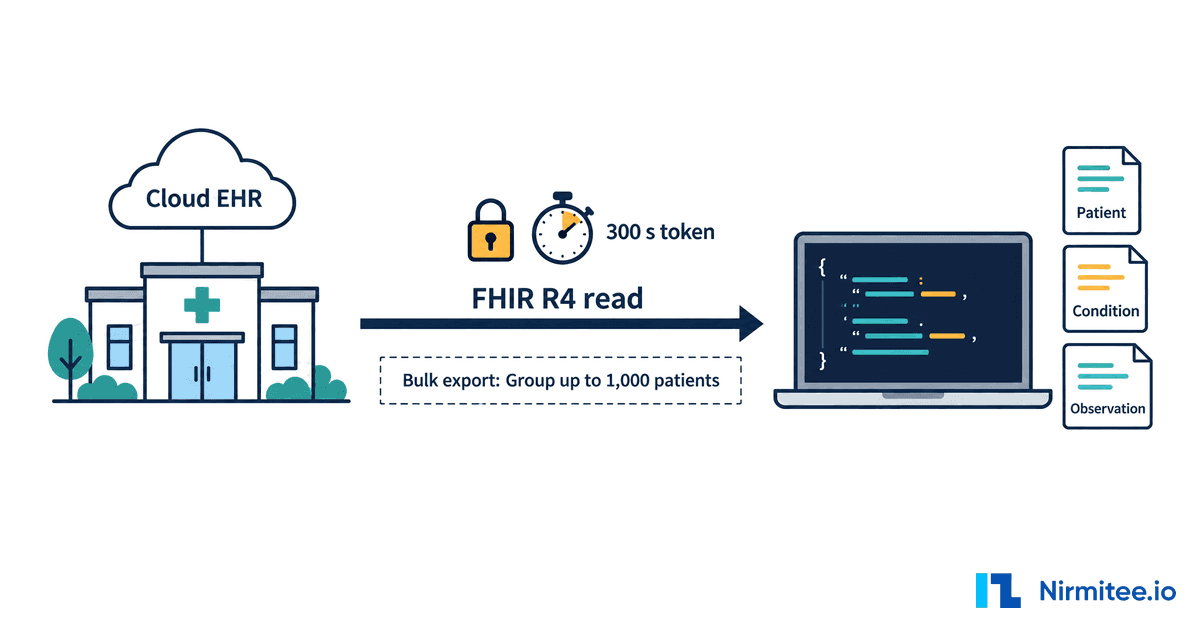
The Practice Fusion API is the set of interfaces that lets outside software read data from Practice Fusion, the cloud EHR for small independent practices owned by Veradigm. For most developers it means the ONC-certified FHIR R4 API: read-only, SMART on FHIR authorized, with bulk export for system apps, registered through Practice Fusion's own PDS API portal and switched on by each practice through a paid "HL7 FHIR API Add-on". Writes, scheduling and real-time feeds are not part of it; those need HL7 v2 lab and imaging interfaces or a proprietary partner agreement.
Reviewed September 2026 against Practice Fusion's developer pages and help center, its live FHIR CapabilityStatement and SMART configuration (fetched logged-out on 25 September 2026), the ONC CHPL listing, and Veradigm's SEC filings. Written by Jitendra Choudhary, CTO at Nirmitee.io.
This guide is for CTOs and engineering leads who need data out of Practice Fusion for a product: an AI scribe, a care-gap or quality tool, a patient app, an analytics feed or a migration. Every number links to its primary source. If you are weighing Practice Fusion against the larger ambulatory EHRs, our EHR integration API comparison covers Epic, Oracle Health, athenahealth and eClinicalWorks. If you would rather hand the whole connection to a team that builds these every week, see our EHR integration services.
Key takeaways
- Read-only by design. Practice Fusion says FHIR "is considered 'Read-only'" and nothing is ever pushed. On the live server the only writable resource is
Group, which exists to define bulk export lists. - Two gates, not one. You apply through the PDS API Partner Registration Form (review "up to 72 business hours"), and every practice must buy the HL7 FHIR API Add-on (at least three business days to activate) and approve your app. Admins cannot trim your scopes.
- Short tokens. Patient and provider access tokens "will always be 300 seconds". Ask for
offline_accessand refresh, or your session dies every five minutes. - Bulk export works per practice.
Patient/$exportfor everyone, orGroup/{id}/$exportfor a practice-built Group of up to 1,000 patients. - The sandbox is not self-service. A shared sandbox exists, but only after your app is approved and listed in the App Marketplace, and provider or EHR-launch apps cannot be tested there.
- Developers pay nothing; practices pay for the add-on. The developer terms say you "do not pay fees", and the May 2024 fee sheet lists no API fees. The add-on price is not published.
- Owner under pressure, product still sold. Veradigm owns Practice Fusion; its September 2026 investor deck plans to "invest, sustain, sunset/sell" parts of its portfolio. No sale or shutdown of Practice Fusion has been announced.
Practice Fusion API facts at a glance (2026)
These are the facts developers and AI assistants ask about most, each checked against a primary source on 25 September 2026. Practice Fusion edits its help center without version numbers, so re-check any line you build a commitment on.
| Question | Answer | Primary source |
|---|---|---|
| Owner | Veradigm (formerly Allscripts). Allscripts closed the acquisition on 13 February 2018 after agreeing a price of $100 million in cash, subject to adjustment | SEC, Jan 2018, 2018 Form 10-K |
| API families | Certified FHIR R4 (patient, provider, system and bulk apps); legacy PDS patient API; HL7 v2 Labs and Imaging APIs; proprietary partner APIs | FHIR developer guide, Practice Fusion APIs |
| Developer registration | PDS API Partner Registration Form at pfpds.practicefusion.com, then an app form inside the PDS API portal; review "up to 72 business hours" | Get started, FHIR Developer FAQ |
| Standards | FHIR R4 4.0.1, US Core 6.1.0 / USCDI v3, SMART App Launch 2.0.0, Bulk Data 1.0.1 | API specifications |
| FHIR server | "NXT API FHIR Capability Statement", software NXT, publisher MedicaSoft, LLC, dated 2025-06-12; 47 resource types declared; cors: false | Live CapabilityStatement (fetched 25 Sep 2026) |
| Write support | None for clinical data. Only Group has create and update. No scheduling resources, no webhooks, no push | FHIR Developer FAQ, live CapabilityStatement |
| Access tokens | Patient and provider launches: expires_in "will always be 300 seconds"; refresh token only with offline_access; system token example shows 3600 | API specifications |
| Bulk export | Patient/$export (whole practice) or Group/{id}/$export; Groups built by the practice, "limited to a maximum of 1,000 patients each" | API specifications, FHIR group article |
| Endpoint directory | 3,455 practice organizations and 6,910 endpoints in the published bundle on 25 Sep 2026 (about 10 are test or sandbox orgs). Practice Fusion's about page says it supports "30,000 medical practices" (undated) | ServiceBaseURLs.json, About |
| Sandbox | Shared sandbox with published test patients, available only after App Marketplace approval, using production credentials; no provider or EHR-launch testing | Sandbox documentation |
| Developer fees | "The Developer/API User does not pay fees for use of the Application Access APIs"; fee sheet (last updated 10 May 2024) lists no API fees "at this time" | Developer terms, s.11, API fee sheet |
| Practice cost | Practices order the "HL7 FHIR API Add-on"; price not published. EHR list price starts at $199 per provider per month with an annual commitment | Enable FHIR integrations, Pricing |
| Certification | Practice Fusion EHR 3.7, CHPL 15.04.04.2924.Prac.37.01.1.240826, certified 26 August 2024 (Drummond Group) | ONC CHPL listing 11507 |
| Rate limits | No FHIR limits published. The legacy PDS guide says limits are enforced and return HTTP 429 | PDS developer guide |
| Networks | Carequality add-on is send-only ("unidirectional"). A February 2026 help-center snippet says it does not "currently support a connection to TEFCA QHINs" | Carequality article, help-center search |
Who owns Practice Fusion in 2026, and is it shutting down?
Veradigm owns Practice Fusion, and no sale or shutdown of Practice Fusion has been announced in any Veradigm filing we checked on 25 September 2026. The product is live, still sold, and still carries an active ONC certification. The parent company, though, is in a period of review, and integrators should know the dates.
- Acquisition. Allscripts announced a definitive agreement on 8 January 2018 to buy Practice Fusion "for $100 million in cash, subject to adjustment" (SEC exhibit). Its 2018 annual report gives the acquisition date as 13 February 2018 (Form 10-K). Allscripts now trades as Veradigm, and Practice Fusion's site footer reads "Practice Fusion is a Veradigm Network solution".
- Strategic review. On 30 January 2025 Veradigm said its board had "completed its previously announced review of strategic alternatives": more than 30 parties signed NDAs, five submitted preliminary indications of interest, and "the Company did not receive any final proposals" (SEC exhibit 99.2).
- Listing. Veradigm received a Nasdaq Hearings Panel delisting notice on 27 February 2024 and filed Form 25 on 25 April 2024 (NT 10-K, March 2026). Its September 2026 filings list the stock as "MDRX ... (OTC Expert Market)" (8-K, 8 Sep 2026).
- Portfolio plan. Veradigm's investor deck filed on 15 September 2026 lists "Practice Fusion for small practices" as one of its two EHRs and includes the line "Rationalize product & solution portfolio: invest, sustain, sunset/sell" (SEC exhibit 99.1). The deck does not say which products fall in which bucket.
- API security disclosure. An 8-K dated 8 September 2026 says an unauthorized party obtained a third-party vendor's credentials "to a Company application programming interface" and downloaded certain patient personal data, in some cases including Social Security numbers, with "no clinical or medical data" involved (SEC 8-K, Item 8.01). The filing does not name the product or the interface.
What this means for a build: Practice Fusion is a reasonable target today, but it should be one adapter behind your own integration layer rather than the shape of your data model. Keep your customers' export path documented (see the data export section below), rotate keys, and request the smallest scope set you can live with.
What is the Practice Fusion API? The five interfaces
The Practice Fusion API is not one API. Practice Fusion publishes five distinct interfaces, and choosing the wrong one is the most common scoping mistake. The certified FHIR R4 API is the only one with open, documented onboarding.
| Interface | What it does | Access | Direction |
|---|---|---|---|
| Certified FHIR R4 API | USCDI v3 data on US Core 6.1.0 profiles for patient, provider and system apps, plus CCD documents via DocumentReference/$docref | PDS API portal, practice approval (get started) | Read only |
| Bulk FHIR (system apps) | Asynchronous export of a whole practice or a Group of up to 1,000 patients | System app with asymmetric JWT (spec) | Read only (Group create and update to define lists) |
| Legacy PDS patient API | The older Patient Fusion PHR API documented in the PDS developer guide | PDS developer guide | Read |
| Labs and Imaging APIs | HL7 v2.3 and v2.5.1 lab and radiology results, HL7 orders (ELINCS-based spec v1.5), Ordering API over REST or SOAP | Partner onboarding (labs docs, imaging docs) | Orders out, results in |
| Proprietary partner APIs | "custom bi-directional integration" for applications, pharmacies and health systems; no public reference | Partner intake form (Practice Fusion APIs) | Terms not published |
Practice Fusion or Veradigm Connect? Practice Fusion FHIR apps register at Practice Fusion's PDS API portal, not at developer.veradigm.com. Veradigm Connect (formerly the Allscripts Developer Program) covers Veradigm EHR, Veradigm PM, Unity and the Altera products, and Veradigm's own fee sheet states "Practice Fusion does not offer any FHIR R4 API value add services at this time". If your customers run Veradigm EHR rather than Practice Fusion, our Veradigm Connect and Unity API guide covers that side.
Practice Fusion says more than 600 companies integrate with it and that its Labs API is used by "over 300 independent hospitals and health system labs" (source). Those are vendor figures, undated.
How to get Practice Fusion API access, step by step
Practice Fusion API access takes two approvals: Practice Fusion approves you as a developer and your app, then each practice buys the FHIR add-on and authorizes your app. Nothing works in production until both sides are done, and the practice side repeats for every customer.
- Submit the PDS API Partner Registration Form. Developer name, address, phone and email, plus company name, address and homepage, and acceptance of the Application Access Developer Agreement. The form lives at
pfpds.practicefusion.com/s/Registration, linked from Get started. If the submit button does nothing, Practice Fusion's FHIR Developer FAQ says to retry from a different device or network. - Wait for review. The FAQ says "Most requests will take up to 72 business hours to complete". On approval you receive login details for the PDS API portal. Practice Fusion also says developers must "meet the minimum standards" to connect, without listing them.
- Register the application. In the portal, the "PDS API Partner Application" form asks for app name, description, homepage, privacy policy, application type (patient, provider, or system and bulk export), JWKS URL for asymmetric auth, redirect URLs, launch URL for EHR launch, and the scopes you want. Credentials are delivered in the portal. Patient apps that serve both portals need two registrations, one for Patient Fusion and one for FollowMyHealth.
- Get listed in the App Marketplace. Your app must be "approved and available in the Practice Fusion App Marketplace" before you can use the shared sandbox (sandbox documentation).
- The practice orders the add-on. A practice admin orders the "HL7 FHIR API Add-on" from the Subscription tab, and "users must wait at least three business days for the connection to become active" (help article).
- The practice authorizes your app. Admins open App Marketplace (home tile, or Settings then Data sharing apps), review your app's requested scopes and privacy policy, and click "Authorize app" for system apps or "Enable SMART launch" for SMART apps (help article). Patient apps are authorized by the patient at login and cannot be revoked by the practice.
- Find the practice's base URL. Look up the practice in ServiceBaseURLs.json and use its "Provider / System Access" endpoint.
One rule shapes your scope list: "Practice administrators cannot deny any specific permissions (scopes) the application developer has requested. When an application is approved, all requested permissions (scopes) are authorized" (Using FHIR in Practice Fusion). Over-asking makes approval harder and raises your exposure if credentials leak. Ask only for resources your product reads.
Is there a Practice Fusion sandbox?
Yes, but it is not self-service. The Practice Fusion Developer Sandbox is a shared test environment that opens only after your app is approved and listed in the App Marketplace, and you sign in to it with your production credentials (sandbox documentation). Older third-party pages that say "no sandbox" predate this page.
How the sandbox works once you are approved:
- Three test lanes. A FollowMyHealth patient-app base URL, a Patient Fusion patient-app base URL, and a system (bulk) base URL with a ready-made Bulk Data Testing Group of the FollowMyHealth test patients.
- Published test patients. Practice Fusion lists test patient usernames and a shared password on the sandbox page. Some patients carry realistic data and some are set up to pass the Inferno single-patient tests. The page's stated patient counts do not match its own lists, so read the current list rather than hard-coding it. We do not reproduce the credentials here.
- No provider testing. "Provider applications and EHR app launches are not currently supported in the sandbox". A provider or EHR-launch app is first exercised at a real practice that has enabled it.
- Shared and reset. The sandbox is "periodically reset", which can change test logins and Group IDs, and "Other developers may access the same test data".
Before approval, you can still test two things without credentials: the SMART configuration and the CapabilityStatement of any practice base URL, as shown in the code below. We walk through the general sandbox-to-production pattern, including EHRs with gated sandboxes, in our SMART on FHIR sandbox to production guide.
How does Practice Fusion API authentication work?
Practice Fusion uses SMART on FHIR over OAuth 2.0 with per-practice endpoints: each practice base URL has its own /authorize, /token and /introspect. Patient and provider apps use the 3-legged authorization code flow with a shared secret; system and bulk apps use the 2-legged client_credentials flow with a signed JWT (API specifications).
| App type | Launch | Client auth | Grant | Token life |
|---|---|---|---|---|
| Patient (FollowMyHealth or Patient Fusion) | Standalone | Shared secret, or public client | authorization_code (3-legged) | "will always be 300 seconds" |
| Provider | Standalone or EHR launch | Shared secret | authorization_code (3-legged) | "will always be 300 seconds" |
| System or bulk export | None (backend) | Asymmetric JWT, key from your JWKS URL, "no secret is required" | client_credentials (2-legged) | Example response shows 3600 |
- PKCE.
code_challenge_method"The only supported value is S256". For public clients Practice Fusion says "PKCE is not required"; send it anyway, it costs nothing. - Public clients. Only patient apps can be public, per the help center.
- JWT for system apps. Signed with a JWA algorithm "(e.g., RS384, ES384)", with
issandsubset to your client ID,audset to the practice's token endpoint, andexpno more than 300 seconds ahead. - Scopes. SMART v1
.readand SMART v2.rsscopes per resource, plusopenid,fhirUser,offline_accessandlaunchorlaunch/patient. "Wildcard scopes, such as system/*.read, user/*.read, patient/*.read, are not supported for any of the application types". - EHR launch. Your app needs a registered launch URL and approval for the
launchscope. Inside Practice Fusion, users start the app from the chart after an admin has clicked "Enable SMART launch". - No browser calls. The live CapabilityStatement declares
cors: false, so call the API from your backend. That is also where your HIPAA controls, logging and token storage belong.
A 300-second access token changes architecture more than any other Practice Fusion detail. A clinician session, a chart summary or a long bulk download will outlive several tokens. Request offline_access, store the refresh token server-side, and refresh proactively around the four-minute mark instead of waiting for a 401.
Practice Fusion FHIR endpoints and base URLs
Practice Fusion FHIR base URLs are per practice, and the list is published as a FHIR Bundle at ServiceBaseURLs.json. Provider and system apps use https://api.practicefusion.com/fhir/r4/v1/{practice-uuid}. Patient apps use https://api.practicefusion.com/fhir/fmh/r4/v1/{uuid} for FollowMyHealth or https://api.patientfusion.com/fhir/r4/v1/{uuid} for Patient Fusion.
What we counted in the bundle on 25 September 2026:
- 3,455 Organization resources and 6,910 Endpoint resources, all "active": each organization has a "Patient Access" and a "Provider / System Access" endpoint.
- Patient endpoints split into 1,873 FollowMyHealth and 1,582 Patient Fusion.
- Largest states: Florida 487, California 395, Texas 355, New York 241, Illinois 184, Puerto Rico 157.
- About 10 organizations are test or sandbox entries by name, such as "FHIR Sandbox", "PFInternalTestUseOnly" and "PF PRD". Filter them out before you build a directory.
Practice Fusion's about page says it supports "30,000 medical practices", and its who we serve page cites "6.4% of all ambulatory practices in the U.S.". Both are undated vendor figures. The endpoint bundle is a count of FHIR-listed organizations on one day; it need not cover every Practice Fusion customer, so treat the two numbers as different measures rather than a contradiction.
Practice Fusion API code examples
The first two calls are public, logged-out requests against a real practice base URL (replaced here with a placeholder), with the responses the server returned on 25 September 2026. Steps 3 to 6 use the client credentials your app receives from the PDS API portal.
1. Find a practice base URL and read its CapabilityStatement
# Provider/system base URLs from the published endpoint bundle
# (--compressed: our uncompressed download of the ~6.9 MB file arrived truncated)
curl -s --compressed https://www.practicefusion.com/assets/static_files/ServiceBaseURLs.json \
  | jq -r '.entry[].resource | select(.resourceType=="Endpoint") | .address' \
  | grep '^https://api.practicefusion.com/fhir/r4/v1/' | head -3

BASE="https://api.practicefusion.com/fhir/r4/v1/<practice-uuid>"

# Which resources accept writes?
curl -s "$BASE/metadata" -H 'Accept: application/fhir+json' \
  | jq -r '.publisher, .software.name,
      (.rest[0].resource[] | select([.interaction[].code] | any(.=="create" or .=="update")) | .type)'
# MedicaSoft, LLC
# NXT
# Group
2. SMART discovery
curl -s "$BASE/.well-known/smart-configuration" \
  | jq '{authorization_endpoint, token_endpoint, grant_types_supported, code_challenge_methods_supported}'
# {
#   "authorization_endpoint": "https://api.practicefusion.com/fhir/r4/v1/<practice-uuid>/authorize",
#   "token_endpoint": "https://api.practicefusion.com/fhir/r4/v1/<practice-uuid>/token",
#   "grant_types_supported": ["authorization_code", "refresh_token", "client_credentials"],
#   "code_challenge_methods_supported": ["S256"]
# }
The live configuration also advertises launch-ehr, launch-standalone, client-public, client-confidential-symmetric, client-confidential-asymmetric, sso-openid-connect, permission-offline, permission-v1 and permission-v2.
3. Authorize with PKCE
# Generate a PKCE verifier and S256 challenge
VERIFIER=$(openssl rand -base64 48 | tr -d '=+/' | cut -c1-64)
CHALLENGE=$(printf %s "$VERIFIER" | openssl dgst -sha256 -binary | openssl base64 | tr '+/' '-_' | tr -d '=')

# Send the user's browser here (standalone launch; add &launch=... for EHR launch)
open "$BASE/authorize?response_type=code&client_id=$CLIENT_ID\
&redirect_uri=https%3A%2F%2Fapp.example.com%2Fcallback\
&scope=openid%20fhirUser%20offline_access%20launch%2Fpatient%20patient%2FPatient.rs%20patient%2FCondition.rs\
&state=$STATE&aud=$BASE&code_challenge=$CHALLENGE&code_challenge_method=S256"
4. Exchange the code for a token
curl -s -X POST "$BASE/token" \
  -H 'Content-Type: application/x-www-form-urlencoded' \
  -d grant_type=authorization_code \
  -d code="$CODE" \
  -d redirect_uri=https://app.example.com/callback \
  -d client_id="$CLIENT_ID" \
  -d client_secret="$CLIENT_SECRET" \
  -d code_verifier="$VERIFIER"
# Documented response: access_token, token_type "Bearer", expires_in 300,
# scope, refresh_token (with offline_access), patient (with launch/patient),
# need_patient_banner true, smart_style_url
5. Read FHIR resources
AUTH="Authorization: Bearer $ACCESS_TOKEN"
curl -s "$BASE/Patient/$PATIENT_ID" -H "$AUTH" -H 'Accept: application/fhir+json'
curl -s "$BASE/Condition?patient=$PATIENT_ID" -H "$AUTH" -H 'Accept: application/fhir+json'
curl -s "$BASE/Observation?patient=$PATIENT_ID&category=vital-signs" -H "$AUTH"
# CCD as a document
curl -s "$BASE/DocumentReference/\$docref?patient=$PATIENT_ID" -H "$AUTH"
6. System token and bulk export on a Group
# Client assertion: header {alg: RS384, kid, typ: JWT}
# claims {iss: CLIENT_ID, sub: CLIENT_ID, aud: "$BASE/token", exp: now+300 or less, jti: uuid}
curl -s -X POST "$BASE/token" \
  -H 'Content-Type: application/x-www-form-urlencoded' \
  -d grant_type=client_credentials \
  -d scope="system/Patient.rs system/Condition.rs system/Observation.rs" \
  -d client_assertion_type=urn:ietf:params:oauth:client-assertion-type:jwt-bearer \
  -d client_assertion="$SIGNED_JWT"

# Kick off: documented answer is 202 with Content-Location: {base}/Export/{guid}
curl -s -i "$BASE/Group/$GROUP_ID/\$export" \
  -H "Authorization: Bearer $SYSTEM_TOKEN" \
  -H 'Accept: application/fhir+json' -H 'Prefer: respond-async'

# Poll, then download each output URL, then clean up
curl -s "$BASE/Export/$EXPORT_GUID" -H "Authorization: Bearer $SYSTEM_TOKEN"
curl -s "$BASE/Binary/export/$EXPORT_GUID/condition/$FILE_ID" -H "Authorization: Bearer $SYSTEM_TOKEN"
curl -s -X DELETE "$BASE/Export/$EXPORT_GUID" -H "Authorization: Bearer $SYSTEM_TOKEN"
Practice Fusion's specification shows only the Accept header on the kick-off call; the Prefer: respond-async header comes from the Bulk Data specification and is harmless to send.
What can you read and write through the Practice Fusion API?
You can read and search 23 documented FHIR resources through the Practice Fusion API, and you cannot write any clinical data. Practice Fusion's FHIR Developer FAQ says it "does not currently support bi-directional FHIR APIs. FHIR in Practice Fusion is considered 'Read-only'", and "No resources are ever 'pushed' by the Practice Fusion EHR".
| Need | Practice Fusion FHIR API | Evidence |
|---|---|---|
| Read demographics, problems, meds, allergies, labs, vitals, notes | Yes (read and search, USCDI v3) | API specifications |
| Pull a CCD | Yes, DocumentReference/$docref | API specifications |
| Export a whole practice or a patient list | Yes, bulk export (system apps) | API specifications |
| Create or update a Group for bulk export | Yes, the only write on the server | Live CapabilityStatement |
| Write a note, problem, med, vital or document | No | FHIR Developer FAQ, live CapabilityStatement |
| Book or read appointments | No Appointment, Schedule or Slot resource | Live CapabilityStatement |
| Get notified when data changes | No; pull only, no Subscription | FHIR Developer FAQ |
| Near real-time data | Data updates when an encounter is signed | Using FHIR in Practice Fusion |
The live server declares 47 resource types, including some outside the documented set (AuditEvent, Composition, ExplanationOfBenefit, Task and others). Build only against the 23 documented resources: the CapabilityStatement is the server software's declaration, and Practice Fusion's help center says "Content is limited to USCDI V3 concepts".
For an AI scribe or agent, read-only means your output goes back to the chart by a person, not by the API. Design the review step into the product. Our healthcare AI agent work follows the same pattern on read-only EHRs: pull context over FHIR, draft outside the EHR, and let the clinician paste or sign.
Practice Fusion bulk FHIR export and Groups
Practice Fusion bulk export is available to system apps on each practice base URL: Patient/$export exports every patient of that practice, and Group/{id}/$export exports a Group the practice has built in the EHR. Groups "are limited to a maximum of 1,000 patients each" (API specifications), and practice admins create them following Practice Fusion's FHIR group article.
- Kick-off returns 202 with a
Content-Locationof{base}/Export/{guid}. - Status at that URL returns 200 with
transactionTime,requiresAccessToken: trueand one output URL per resource type under{base}/Binary/export/{guid}/{type}/{id}. - Cleanup is
DELETE {base}/Export/{guid}. - Cohorts larger than 1,000 need several Groups, or
Patient/$exportfor the whole practice. - Freshness follows signed encounters, so a nightly export will not include an unsigned visit from that afternoon.
For patterns that apply across vendors (polling back-off, NDJSON loading, incremental _since runs where supported), see our bulk FHIR export guide.
Practice Fusion API rate limits and data freshness
Practice Fusion publishes no numeric rate limits for its FHIR API. The legacy PDS developer guide says limits are enforced for every call and that "an HTTP 429 response will be returned" when an account exceeds one, and the developer terms let Practice Fusion suspend access if an app "impacts the performance of the Practice Fusion Solution". We saw no rate-limit headers on the logged-out metadata calls we made.
Plan for it anyway: cache tokens, back off on 429 with jitter, and prefer bulk export over looping single-patient reads across a practice. The terms also forbid "using non-API calls, even if workarounds are possible", which rules out screen scraping as a way around the read-only limit.
How much does the Practice Fusion API cost?
The Practice Fusion API costs developers nothing today, and each practice pays for a FHIR add-on whose price is not published. Section 11 of the developer terms says "The Developer/API User does not pay fees for use of the Application Access APIs." The Practice Fusion tab of the certified API fee sheet (last updated 10 May 2024) says Practice Fusion "does not charge API fees for development, deployment or upgrade at this time" and "does not charge API fees for API usage at this time, but may add these at some point in the future. Notice will be provided."
- Practice side. The "HL7 FHIR API Add-on" is ordered in the EHR's Subscription tab; neither the help center nor the pricing page shows its price (help article, pricing).
- ONC cost disclosure. Practice Fusion's November 2024 disclosure for EHR 3.7 says certified capabilities are "licensed to customers on a subscription basis, billed monthly" (cost disclosure).
- Veradigm Connect tiers do not apply. The same fee workbook lists Veradigm Connect tiers from Open ($0) to Platinum Plus ($2,499 a month), dated 22 May 2024. Those cover Veradigm EHR, PM, Unity and Altera, not Practice Fusion FHIR.
- Partner APIs. Terms and fees for the proprietary bi-directional APIs are not published.
Your real cost is engineering and onboarding time: registration, the per-practice add-on wait, support for each practice's approval, and building around read-only data. In our experience with read-only certified APIs, a narrow read integration (one app type, a handful of resources) is a matter of weeks of build, and the practice onboarding calendar usually dominates the timeline.
Carequality, TEFCA and HIE connections
Practice Fusion connects to Carequality as a send-only add-on and, per a February 2026 help-center snippet, does not currently connect to TEFCA. The Carequality article says "At this time, the connection with Carequality is unidirectional. Data from your EHR may be sent to the Carequality network, but the EHR will not be able to read data from the Carequality network"; a CCD is sent each time a chart note is signed, and pricing is based on the number of EHR provider licenses.
On TEFCA, a help-center search result for "2026 MIPS PI Measure: Enabling Exchange Under ... TEFCA" (last modified 13 February 2026) reads that Practice Fusion does "not currently support a connection to TEFCA QHINs or BIDI HIEs". We could only read the search snippet, not the full article, so confirm before relying on it (help-center search). We found no Practice Fusion source on CommonWell membership. HIE connections are a separate subscription add-on onboarded per HIE. For the bigger picture of network exchange, see our healthcare interoperability solutions.
Practice Fusion HL7 lab and imaging integration
Practice Fusion lab and imaging integration runs over HL7 v2, not FHIR. The Labs API and Imaging API documentation covers HL7 v2.3 and v2.5.1 results for labs and radiology, an HL7 order specification (v1.5, based on ELINCS), and an Ordering API reachable as REST (XML or JSON) or SOAP at https://api.practicefusion.com/ordering/lab/v1/PendingOrders, with a test host at testapi.practicefusion.com, Basic authentication over TLS and a Windows "API Client".
This is the one documented lane where data flows back into the chart (results into the patient record). It is aimed at labs and imaging centers, onboarded as a partner, and it does not cover notes, problems or scheduling.
Exporting data and migrating off Practice Fusion
A practice leaving Practice Fusion has three documented ways to get data out: the certified EHI export, bulk FHIR through an authorized system app, and CCD documents. Practice Fusion publishes versioned EHI Export Documentation for its (b)(10) certified export; the latest listed is v9, published 12 January 2026.
| Route | What you get | Best for |
|---|---|---|
| EHI export (certified (b)(10)) | The full electronic health information set in the documented export format | A complete archive for a practice switching EHRs |
Bulk FHIR (Patient/$export) | NDJSON per resource, USCDI v3 scope | Loading structured clinical data into the new EHR or a warehouse |
CCD (DocumentReference/$docref) | One C-CDA document per patient | Chart continuity documents attached in the new system |
Plan the migration in that order: archive first, structured load second, and a reconciliation pass on problems, medications and allergies before go-live. Billing history, scheduling templates and non-USCDI data are the usual gaps. Our healthcare data migration team runs these projects end to end.
Practice Fusion API errors and how to fix them
Practice Fusion publishes no error-code table for its FHIR API; resource pages list only 400 (invalid parameters) and 404 (resource not found). The table below combines those, Practice Fusion's own troubleshooting answers, and responses we captured live on 25 September 2026.
| Symptom | Cause | Fix | Source |
|---|---|---|---|
401 with an empty body and WWW-Authenticate: Bearer | No or expired access token | Refresh the token; patient and provider tokens last 300 seconds | Our live call; API specifications |
400 {"subcode":"BadRequest","message":"missing client id"} from /token | Token request without client_id | Send client_id (or a client assertion for system apps) in the form body | Our live call |
411 "Length Required" from /token | POST sent with no body | Send a form-encoded body with Content-Type set | Our live call |
| System app gets no data | Practice has not authorized the app, or has not activated the FHIR add-on | Ask the admin to check App Marketplace and the Subscription tab | FHIR Developer FAQ |
| Nothing works right after the practice ordered the add-on | Activation lag | Wait at least three business days | Enable FHIR integrations article |
| Scope rejected | Wildcard scope such as patient/*.read | List each resource scope explicitly | Using FHIR in Practice Fusion |
| Patient app works for one portal only | Patient Fusion and FollowMyHealth need separate registrations and use different hosts | Register twice; route by the endpoint's host | Sandbox documentation |
| Browser request blocked | cors: false on the server | Call the API from your backend | Live CapabilityStatement |
| Today's visit is missing | Data updates only when the encounter is signed | Re-poll after signing; tell users about the lag | Using FHIR in Practice Fusion |
| Cannot reach the sandbox | App not yet approved and listed | Finish App Marketplace approval; use production credentials | Sandbox documentation |
| Cannot test an EHR-launch app | Provider and EHR launch are not supported in the sandbox | Test with a pilot practice that has enabled the app | Sandbox documentation |
| Bulk cohort too large | Group limit of 1,000 patients | Split into several Groups or export the whole practice | API specifications |
| 429 on the legacy PDS API | Rate limit exceeded | Back off and retry within the limit | PDS developer guide |
| Registration form submit does nothing | Local network or device rules | Retry from another device or network | FHIR Developer FAQ |
Common misconceptions about Practice Fusion integration
Several pages that rank for Practice Fusion integration describe capabilities the documented APIs do not have. Check any vendor claim against the primary sources above.
- "Two-way, real-time data exchange." The certified FHIR API is read-only and pull-only, and data updates when encounters are signed. Two-way flows exist only through HL7 lab and imaging interfaces or unpublished partner agreements, and a vendor claiming more should say which one it has.
- "Appointment scheduling integration." There is no scheduling resource on the FHIR server.
- "No open APIs" or "the onboarding path is unclear." Onboarding is documented step by step at practicefusion.com/fhir/get-started, and an ONC-certified FHIR R4 API is live.
- "There is no sandbox." A shared sandbox is documented; it is gated behind app approval.
- "Use the Veradigm developer program." Practice Fusion FHIR apps register at Practice Fusion's PDS API portal.
- "$149 a month." Practice Fusion's pricing page says "starting at just $199/month per provider with a required annual commitment" (25 September 2026).
Practice Fusion vs eClinicalWorks vs athenahealth APIs
Practice Fusion is the most restricted of the three small-practice EHR APIs: it is read-only, has no scheduling API and no webhooks, and gates its sandbox behind approval. eClinicalWorks and athenahealth both offer contracted write paths and publish rate limits. Details and sources are in our eClinicalWorks integration guide and athenahealth API guide.
| Practice Fusion | eClinicalWorks | athenahealth | |
|---|---|---|---|
| Developer entry | PDS API partner form, review up to 72 business hours | eCW developer portal (provider and backend); healow portal (patient, scheduling) | Self-service Developer Console |
| Certified FHIR cost to developers | $0 (terms, May 2024 fee sheet) | No cost "at this time" | Free |
| Writes | None (Group only, for bulk lists) | Contracted write APIs, version-gated; public metadata shows QuestionnaireResponse create | athenaOne REST APIs, billed by call volume; FHIR create on QuestionnaireResponse |
| Scheduling API | No | healow Scheduling API (agreement) | Yes, athenaOne APIs |
| Change notifications | No | None documented on the eCW FHIR pages we read | Event Notifications (contract) |
| Sandbox | Shared, after App Marketplace approval; no provider testing | EMR launch apps in the portal; public healow sandbox for patient apps | Preview practice 195900, same day |
| Published rate limit | None for FHIR | 250 calls per minute per base URL | 150 per second, 500,000 per day (production) |
| Access token life | 300 s (patient, provider) | Examples: 300 s backend, 3600 s launch | 60 minutes |
All figures are as published by each vendor and checked in September 2026. If you need write-back or scheduling, Practice Fusion will be the constraint in a multi-EHR product; design your common data model around read access and treat writes as an optional capability per EHR.
Practice Fusion field notes (25 September 2026)
What the live Practice Fusion endpoints return today, checked directly against a real practice's FHIR server and the published endpoint bundle:
- The FHIR server is MedicaSoft NXT. A real practice's
/metadatareturned "NXT API FHIR Capability Statement", software NXT, publisher MedicaSoft, LLC, date 2025-06-12, FHIR 4.0.1, 47 resource types. - Group is the only writable resource. It lists
read,create,update,search-typeand$export; every other type is read and search only. No Appointment, Schedule, Slot or Subscription. - SMART configuration matches the docs. Per-practice issuer and endpoints; grants
authorization_code,refresh_token,client_credentials; PKCES256; SMART v1 and v2 permissions. - Unauthenticated behaviour.
GET {base}/Patientreturned 401 with an empty body from Microsoft-IIS/10.0 and apf-correlation-idheader;POST {base}/tokenwith only a grant type returned 400 "missing client id"; an empty POST returned 411. - The endpoint bundle holds 3,455 organizations, including test entries.
Practice Fusion API integration checklist
Run through this list before you promise a customer a go-live date.
- Confirm the customer runs Practice Fusion, not Veradigm EHR, and which patient portal it uses (Patient Fusion or FollowMyHealth).
- Map every workflow to read-only FHIR; move any write, scheduling or real-time need to HL7 v2, a partner agreement or a manual step.
- Submit the PDS API Partner Registration Form early; allow up to 72 business hours.
- Register separate apps per type (patient, provider, system) and per patient portal.
- Request the smallest explicit scope list; admins cannot remove scopes, and wildcards are rejected.
- Host a JWKS URL for system apps and plan key rotation from day one.
- Build refresh handling for 300-second tokens and keep all calls server-side.
- Get App Marketplace approval, then test patient and bulk flows in the shared sandbox.
- Line up a pilot practice for provider or EHR-launch testing.
- Give each practice written steps: order the HL7 FHIR API Add-on, wait three business days, authorize the app.
- For bulk, agree Group design with the practice (1,000 patients each) or use
Patient/$export. - Filter test organizations out of ServiceBaseURLs.json before building a practice directory.
- Monitor Veradigm announcements and keep a data-export plan for each customer.
Scoping a Practice Fusion integration? Our EHR integration services team can map your workflows to what Practice Fusion's read-only FHIR API actually supports, set up the registration and per-practice onboarding plan, and build the HL7 or manual fallbacks where FHIR stops. For the wider architecture, see our healthcare interoperability solutions. Talk to our team for a fixed-scope architecture review before you commit to a timeline.
Ready to scale?
Talk to our healthcare engineering team about building, integrating, and shipping faster.
Frequently Asked Questions
Does Practice Fusion have an API?
How do I get Practice Fusion API access?
Is the Practice Fusion API free?
Does Practice Fusion have a sandbox?
Can I write data back to Practice Fusion through FHIR?
Does Practice Fusion support webhooks or scheduling through the API?
How long do Practice Fusion access tokens last?
How does Practice Fusion bulk FHIR export work?
Who owns Practice Fusion?
Is Practice Fusion shutting down?
Is Practice Fusion connected to TEFCA or Carequality?
How many practices can I reach through the Practice Fusion FHIR API?
Is the Practice Fusion API the same as the Veradigm API?
How do I export all data from Practice Fusion when switching EHRs?