
Founders, CTOs and product leaders
Choose the first workflow, expose the integration dependencies and compare build, buy and partner options before committing a roadmap.
Parts 2, 4, 6 and 7
Free technical guide · October 2026 edition
A practical guide to choosing, connecting and running AI agents in healthcare.
The demo is one step. The harder decisions are which job to automate, how the agent reaches the EHR and payer, who reviews exceptions, and how you know it still works next month. This free guide brings those decisions into one engineering and operations reference.
A practical definition
Healthcare agent operations is the work of connecting, supervising and maintaining AI agents inside healthcare workflows. It covers the agent’s permitted actions, data access, versions, performance, human review and incident response. A useful operating plan follows a task all the way through: from the trigger and source data to the action, verified result and exception queue.
Start with a bounded job that has a named owner and an answer a reviewer can check. For an eligibility workflow, that means knowing the appointment, coverage source, payer route, expected response and destination for unresolved cases. Agree what counts as a completed check before comparing speed or cost. A model response alone does not establish that the payer accepted a request or that the EHR contains the right result.
The guide focuses on the decisions that connect a workflow to a running system. For a scoped engineering engagement, explore AI agents for healthcare and our healthcare interoperability services.
If a fixed interface or rules-based automation can do the whole job, compare that option before adding a model. The guide includes cases where an agent is the wrong starting point.
Read for the decision in front of you
Choose the first workflow, expose the integration dependencies and compare build, buy and partner options before committing a roadmap.
Parts 2, 4, 6 and 7
Compare administrative jobs, define what staff still review and ask vendors for evidence about completion, exceptions and cost per finished task.
Parts 2, 5 and 6; vendor questions on page 64
Review the architecture, permissions, operating controls and handoff responsibilities before considering a site rollout.
Parts 3 and 6; security on page 56
The complete guide at a glance
Use the roadmap to find the chapter your team needs. Each part connects a technical topic to an artifact or decision you can review.
Pages 7–12
Compare an agent with a chatbot and fixed automation. Review unsuitable jobs, buyer responsibilities and the questions that sit between a successful demo and a production decision.
Work toward: A shared definition of the job and the people who can approve it.
Pages 14–19
Follow the patient journey, compare six specialties and use five selection tests to judge a possible first job. The side-by-side scoring example shows how access and consequences affect a choice.
Work toward: A short list with reasons, constraints and a measurable result.
Pages 21–25
Work through the eight steps of a run. Separate model decisions from ordinary code, define hard rules and choose where a person reviews, approves or takes over.
Work toward: An execution path with explicit limits and human responsibilities.
Pages 27–35
Compare APIs, X12, HL7, portals, phones and screen interaction. The EHR-by-EHR map, clinic and hospital paths, and write-back discussion expose access questions to settle before estimating.
Work toward: A connection plan with read access, write destinations, approvals and fallbacks.
Pages 37–45
Apply the method to prior authorization, eligibility, claims, denials, front desk voice, chart notes and coding suggestions. Each example makes the action and exception path concrete.
Work toward: A reference workflow to adapt to your own site and payer mix.
Pages 47–56
Use agent records, release checks, live metrics, audit trails, staffed handoffs and incident handling to prepare for ongoing operation. Supporting pages cover security and review evidence.
Work toward: An operating pack with owners, checks, alerts and a way to stop the agent.
Pages 58–64
Review the control plane and production components, identify cost drivers and work through an explicitly illustrative eligibility calculation. Use the vendor questions to challenge a proposal.
Work toward: A cost model and a build, buy or partner discussion grounded in your workflow.
Pages 66–71
Use the planning sequence, four go-live gates, responsibility map and readiness scorecard. The final section describes an eligibility pilot as a starting point for a scoping discussion.
Work toward: A reviewed first-site plan with acceptance evidence and a go or no-go owner.
Architecture you can walk through
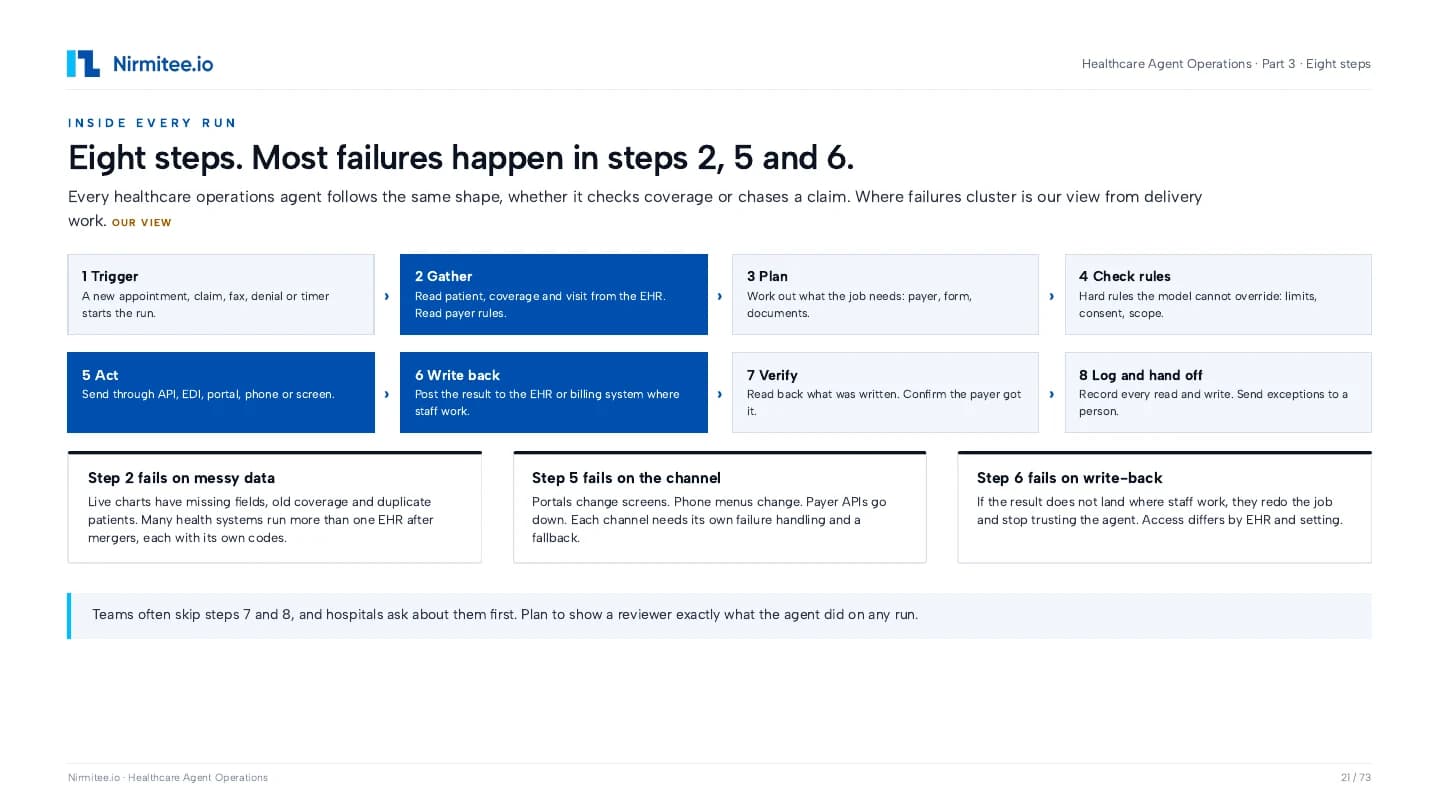
A healthcare agent needs more than a prompt and a tool call. Use this sequence to review how it obtains context, applies limits, acts and checks the result. The worked diagram is on page 21.
Identify the appointment, claim, document or event that starts one run.
Collect the permitted records and current rules; surface missing or conflicting data.
Choose the route, evidence and action needed for this specific task.
Apply scope, consent, limits and approval requirements outside the model’s discretion.
Use the approved connection and handle timeouts, rejections and uncertain outcomes.
Put an approved result in the intended EHR or billing workflow, where access permits.
Check the resulting system state and receipt; distinguish a submission from an accepted result.
Record the run and send unresolved work to a person with enough context to continue.
A planned action, a request sent, a response received and a verified result are distinct states. Record each state so an operator can tell where a run stopped.
Design the route before promising the workflow
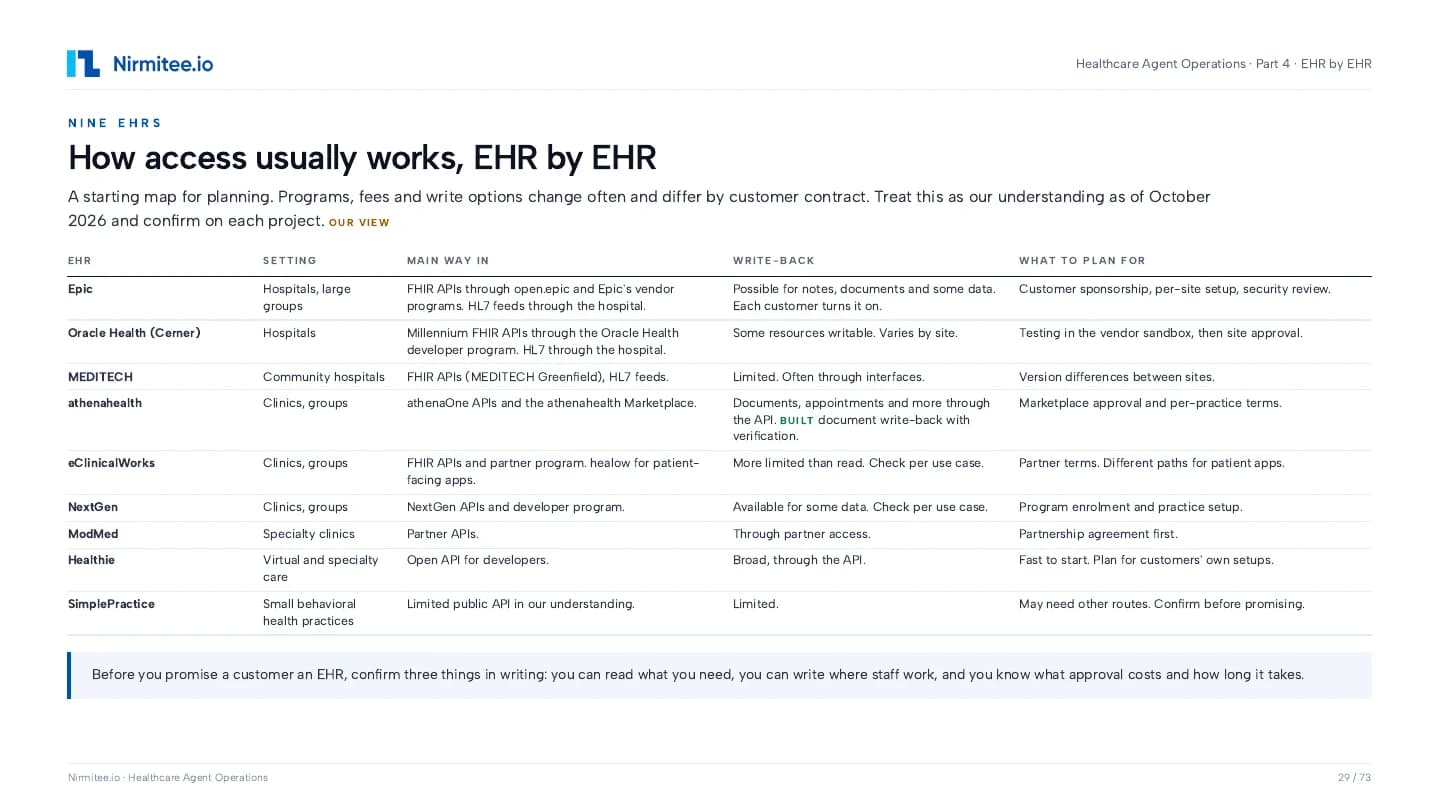
Start with the supported route that fits the task. A clinic API integration and a hospital interface project can have different owners, access conditions and review paths. Treat the EHR planning map in the PDF as a dated starting point and confirm access for the actual customer site.
| Connection | What it supports | What to confirm before building |
|---|---|---|
| EHR and payer APIs | Structured reads and permitted actions through the system’s supported interfaces. | Confirm the resource or endpoint, app scope, patient context, site enablement and actual write destination. |
| X12 and clearinghouses | Eligibility, claims and status transactions routed through a clearinghouse or trading partner. | Confirm enrollment, identifiers, response interpretation and how pending or rejected transactions reach staff. |
| HL7 and interface engines | Event feeds and hospital interfaces that supply context or move a result into an existing system. | Confirm the site’s message profile, mappings, acknowledgement handling and reconciliation process. |
| Portals | Work that remains in a payer or vendor portal when a supported structured route is unavailable. | Plan for authentication, permitted use, screen changes, ambiguous outcomes and a staff fallback. |
| Phones and voice | A call-based workflow with identity checks, turn-taking and escalation to a person. | Define disclosure, recording and review requirements for the actual setting; handle transfers and incomplete calls. |
| Screen interaction | A constrained interface path for a specific task where access and authorization allow it. | Treat UI changes and uncertain clicks as failure modes. Verify the resulting record rather than trusting a click. |
An app registration or sandbox connection does not establish production access, permission to write, or approval at every hospital. Confirm these gates separately.
Seven workflows, with their review boundaries
The guide uses concrete workflows to show the method. Use them to challenge the scope and exception handling of your own project. They explain design choices; they are not a set of measured customer outcomes.
Gather the relevant evidence, identify the payer’s route and prepare the request. Keep missing documents, uncertain rules and clinical decisions in an explicit review path. A prepared packet and a payer decision are separate states.
Read appointment and coverage context, request benefits through the available route and classify the response. Route inactive coverage, mismatched identifiers and incomplete benefits to staff instead of filling the gaps with a guess.
Follow the claim through submission, acknowledgement and status. Connect each response to the correct claim and expose cases that need correction or human follow-up. A transport acknowledgement is one step in the loop.
Bring the denial reason, supporting records and next action together for a reviewer. Make the evidence and escalation visible before considering a draft response or a resubmission.
Define the limited job a caller can complete, which systems the agent can use and when staff take over. Review identity, failed calls, transfers and the record of what the caller actually requested.
Separate drafting, review and posting. Check patient and encounter context, the approved destination and the result returned by the EHR. The workflow must account for a note that was generated successfully but never posted.
Make the supporting evidence and reviewer decision part of the workflow. Treat a suggested code as a candidate for review, with a clear record of who accepted or changed it.
Build the operating layer with the agent
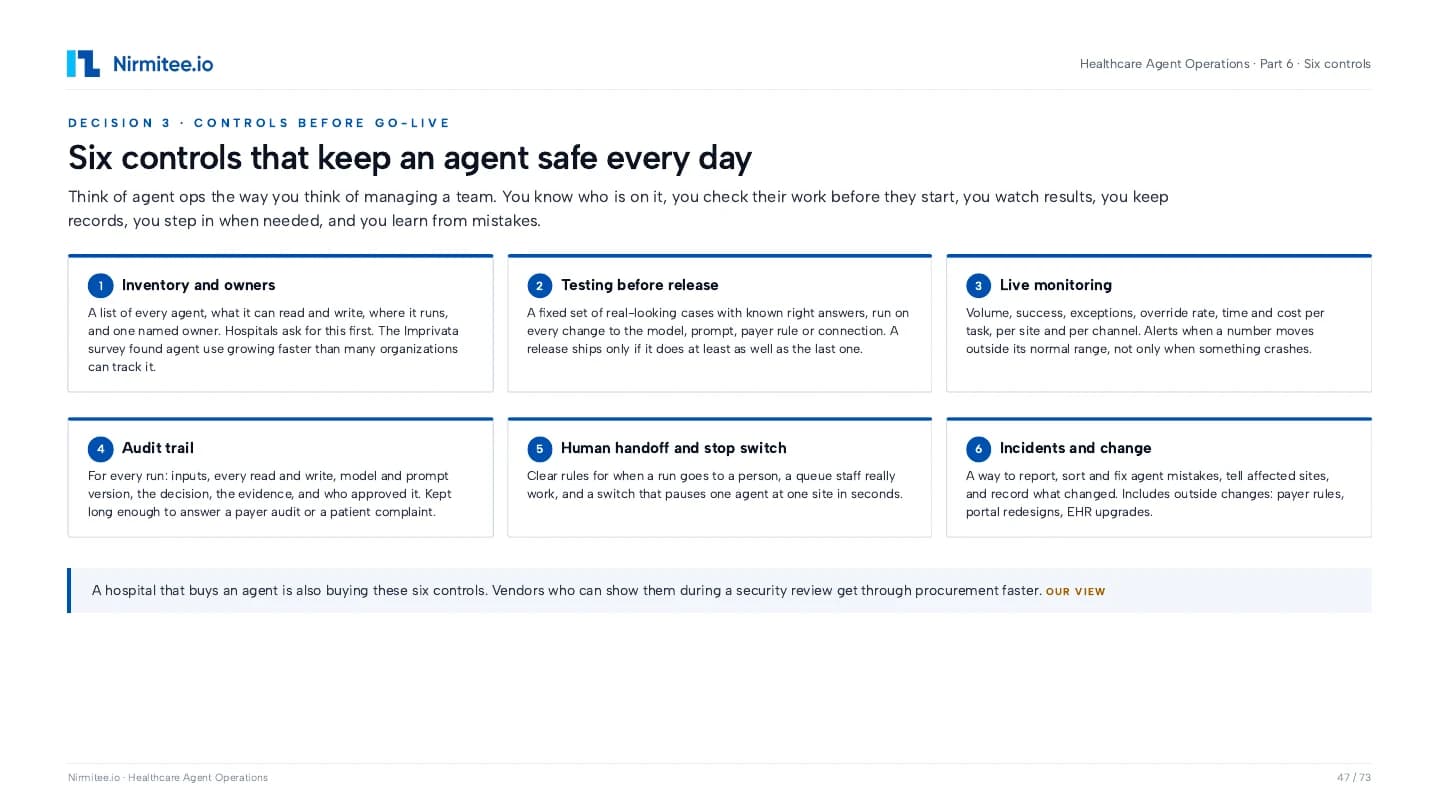
Use these controls to prepare the evidence for an operational and security review. The question is what the team can show for a specific agent, site and run.
An agent record naming the owner, sites, task, permissions, versions and permitted reads and writes.
Review question: Can the site identify what is running and who is accountable for it?
A repeatable set of representative cases with expected results, including exceptions and guardrail cases.
Review question: What changed when the model, prompt, payer rule or connector changed?
Task completion, exceptions, overrides, latency and cost broken down by site, payer and channel.
Review question: Can you see a quality change even when the service remains online?
Run history linking the source context, action, evidence, relevant version and reviewer decision.
Review question: Can a reviewer reconstruct what happened to this particular task?
A staffed exception queue, escalation rules, pause controls and a rehearsed response.
Review question: Who takes over, with what information, and how do you stop a problematic run?
A process to assess impact, notify the right owners, correct the cause and add a regression case.
Review question: What happens when a payer rule, portal, EHR or agent behavior changes?
These controls support an engineering review. Compliance, contractual obligations and any certification need their own assessment against the current requirements.
Keep the denominator honest
The guide separates setup costs from ongoing work: connections, agent implementation, release checks and operating controls on one side; model use, transaction fees, human exception handling and upkeep on the other. Compare them for the same task, site and time window.
A low model bill can sit beside an expensive exception queue. Track tasks completed, cases handed to staff, review time and unresolved work. If a person finishes a task, include that effort when assessing the full workflow.
Page 62 works through a made-up eligibility example to explain the arithmetic. It is an illustration you can replace with your own inputs. It is not a Nirmitee price, savings claim or ROI forecast.
Five templates to take into a review
Capture purpose, owner, model and prompt versions, sites, allowed tools, read/write scope and human review rules.
Organize representative cases, expected results and pass criteria so a change can be compared with the previous version.
Check the named owner, exception coverage, monitoring, audit review and tested undo and rollback paths.
Ask about actual EHR access, payer routes, operational evidence, exceptions, security responsibilities and cost.
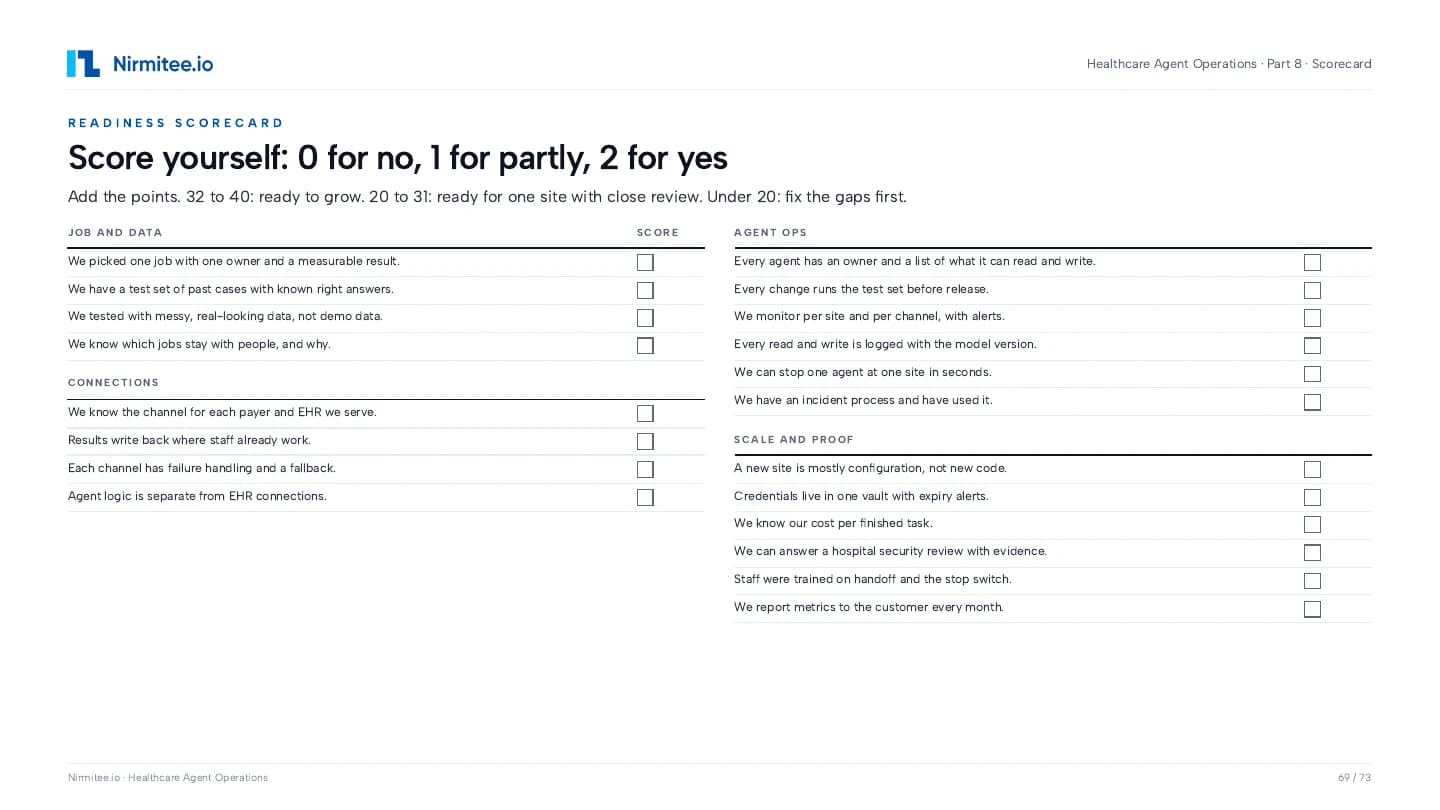
Review the job and data, connections, operating controls, scale and proof before deciding what to address next.
All five are included in the PDF. No separate editable workbook is included, and the PDF is not fillable. The scorecard is a planning aid rather than an independent validation or certification.
Use evidence to make the next decision
In shadow mode, staff continue the workflow while the agent’s output is compared with their work. Review disagreements and exceptions before deciding whether its actions should affect the live process.
Select one workflow at one site, agree the result and request EHR and payer access early. Establish a baseline and a set of cases that reviewers can judge.
Run the checks, put the operating controls in place and compare agent results with staff work in shadow mode. Resolve disagreements through a named reviewer.
Review the agreed gates, site sign-off, handoff coverage and pause procedure. Expand only after the site has evidence that supports the next step.
The PDF includes a 90-day planning sequence. Site approvals, contracts, EHR access and security reviews can extend the schedule. Agree the evidence and sign-off gates for your project rather than treating the sequence as a delivery guarantee.
Look inside the actual PDF
These are pages from the supplied guide, with their original page numbers. Enter your email to get the complete PDF.
Before you request it
Healthcare agent operations covers the connections, permissions, versions, monitoring, human review and incident processes needed to run AI agents in healthcare workflows. It follows a task from its trigger through action, verification and handoff, so a team can review what happened and respond when something changes.
The complete 73-page PDF has eight parts, seven worked examples, six operating controls and five practical templates. It includes EHR and payer connections, workflow selection, architecture, costs, shadow mode, go-live questions and a readiness scorecard. The previews on this page come from that same PDF.
Healthcare founders, CTOs and product leaders can use it to scope a first agent and its connections. Revenue cycle and operations leaders can use the worked examples and vendor questions. Hospital IT, security and governance teams can start with the controls, architecture and security sections.
The route depends on the task and the access available at the site. The guide compares APIs, X12 through clearinghouses, HL7 interfaces, portals, phones and screen interaction. Read access, write permission, commercial terms and customer approval must be confirmed separately for the specific workflow.
Yes. Page 29 provides an October 2026 planning map covering Epic, Oracle Health, MEDITECH, athenahealth, eClinicalWorks, NextGen, ModMed, Healthie and SimplePractice. It is a starting map, not a promise of access or compatibility. Confirm the current vendor program, contract, version and site enablement for your project.
The seven worked examples cover prior authorization, eligibility, claims, denials, front desk voice, chart notes and coding suggestions. They explain workflow design and review boundaries. They do not establish measured outcomes for a customer deployment.
The guide covers an agent inventory with named owners, checks before release, live monitoring, an audit trail, human handoff with a stop switch, and incident and change handling. These are engineering and operating practices. They do not by themselves establish legal compliance or certification.
The five templates and worked examples are included as pages in the PDF. This email does not include a separate editable workbook, and the PDF is not a fillable form. Adapt the structures to your own project documents and review process.
No. Survey findings have dated sources, delivery judgments are labeled, and illustrative calculations use made-up inputs. The readiness scorecard is a planning aid. The rollout sequence depends on site approvals, access, contracts and review requirements; it is not a guaranteed production date or a compliance determination.
Enter your work email in the form on this page and we send the complete PDF to your inbox. Requesting a copy does not subscribe you to marketing emails.
You can request a scoping discussion using your EHR, payer mix and current workflow as context. Scope, fee, access prerequisites, review responsibilities and timing need agreement before a pilot begins. Use sanitized project context in the inquiry; patient data is not needed for the initial discussion.
Build the supporting context
A bounded next step
For an eligibility pilot, bring your EHR, payer mix, workflow owner and current process. We can discuss the connection route, human review, shadow-mode comparison and acceptance evidence before agreeing an engagement.
Discuss an eligibility pilot ↗Scope, fee, access prerequisites and timing require agreement. Share sanitized project context only; patient data is not needed for this first discussion.