Healthcare Analytics Dashboard: How to Build One People Act On, With a Prediction Loop

CTO & Co-Founder
CTO & Co-Founder at Nirmitee.io. Architects healthcare integrations across FHIR, SMART on FHIR, ABDM and NHCX, writing from production experience taking hospital software from sandbox to go-live.
Updated October 2026
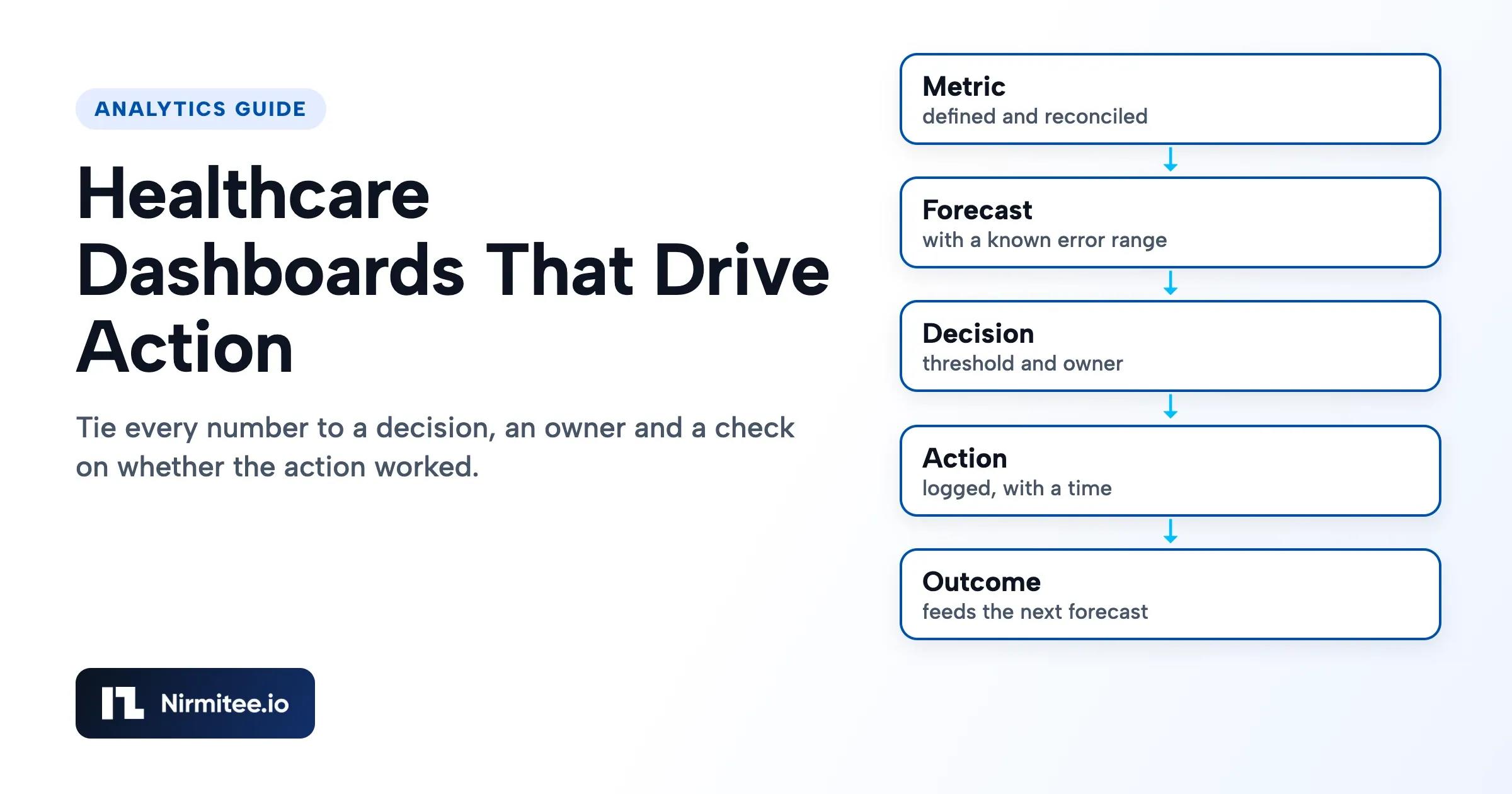
An actionable healthcare analytics dashboard ties every number to a decision, a named owner, a threshold and a logged action. Our position is blunt: if nobody can say what they would do differently when a number moves, take that number off the screen.
Example galleries show what a dashboard can look like. This guide covers what makes one change behavior, how forecasts and predictions fit in, and how you prove the loop works. For the data foundation underneath, see our healthcare data engineering services.
Nirmitee is a healthcare software engineering firm that builds data platforms for health systems and health tech companies. If you are planning this work, you can start with our fixed-price Healthcare Data Platform Assessment.
Why do most healthcare dashboards get ignored?
Most healthcare dashboards get ignored because they answer "what happened" and stop. A chart without a threshold or an owner leaves the reader to work out whether it is bad, whose problem it is and what to do. Busy people skip that work and go back to the phone and the spreadsheet.
Trust is the second cause. If a director has once found the census wrong, they will check it by hand forever. Numbers need a reconciled source and a visible as-of date before design matters at all. Our data quality guide covers that groundwork.
Those numbers depend on healthcare data integration with reconciliation gates.
What makes a healthcare dashboard actionable?
A healthcare dashboard is actionable when each number has a written contract with five parts: the question, the metric, the rule, the action and the proof. Fill these in before anyone opens a BI tool. Any request that cannot fill in all five should stay a report.
| Weak dashboard item | The same item as a decision | Why the second one works |
|---|---|---|
| Average length of stay trend | Patients past expected discharge date, by unit, for the morning huddle | Names the patients to review and the meeting that acts |
| Denial rate this quarter | Denials by reason and payer above the agreed limit, assigned to a billing lead | Points to a root cause someone owns |
| Staffing hours chart | Forecast shortfall by unit for the next few days, with options to fill | Arrives early enough to act |
| Readmission rate | Discharges due for a follow-up call today, with the care manager named | Moves from a score to a task |
The table is illustrative. Your list should come from the meetings where decisions already happen. Sit in on three of them before you design a screen, and note what gets asked, what gets guessed and what gets argued about.
How should a dashboard, an alert, a forecast and a model differ?
Use the simplest tool that supports the decision, because each step up costs more to run and to defend. A plain metric with a threshold beats a model nobody trusts. An urgent decision belongs in a work queue, since nobody watches a dashboard all day.
Forecasts and predictions are different jobs. A forecast estimates a group total, such as tomorrow's census for a unit. A risk prediction scores one patient. Forecasts are usually the better first step for operations leaders, since the data is less sensitive, the result is easy to check the next day, and a person reviews the number before acting. A wrong staffing forecast can still affect care, so operational leaders should review the error range and keep a fallback.
What is the prediction and forecasting loop in healthcare analytics?
The prediction loop runs from measure to forecast, decide, act, observe and learn, then back again. The steps most teams skip are the action log and the outcome join. Without those two, you cannot tell a useless forecast from a useful one that nobody acted on.
Three design rules keep the loop honest:
- Freeze every prediction. Save the score, the model version, the inputs' as-of time and what the user saw. Recomputing later with corrected data flatters the model.
- Capture the action inside the workflow. An accept or override with a reason takes seconds in the tool people already use. A separate form will not get filled in.
- Expect the loop to disturb its own data. If a good prediction triggers an intervention and the bad outcome is avoided, the record now looks like a false alarm. Retraining on that data without recording the intervention teaches the model the wrong lesson. Our guide to model drift in clinical AI covers how to watch for decay.
How do you know a healthcare prediction is good enough to show?
A healthcare prediction is good enough when it beats a simple baseline, is calibrated on your own population, helps at the threshold you would use, and survives a silent run with an owner's sign-off. High accuracy from a vendor's own test proves none of that.
The published record is the reason for caution. A 2021 external validation in JAMA Internal Medicine tested a widely used proprietary sepsis model on 38,455 hospitalizations at one health system. It measured an AUC of 0.63, missed 67% of patients with sepsis (1,709 of 2,552) and alerted on 18% of all hospitalized patients. One study at one site does not settle how that model performs everywhere, and vendors have updated models since. It does show why you test on your own data.
| Gate | What it catches | What it does not catch | Reference |
|---|---|---|---|
| Rolling backtest against a baseline | A forecast that adds nothing beyond last week's value | Whether anyone will act on it | Forecasting: Principles and Practice |
| Calibration | Risk scores that overstate or understate real risk | Whether the threshold is useful | Van Calster et al., BMC Medicine, 2019 |
| Net benefit at your threshold | A model doing more harm than a treat-all or treat-none policy | Workflow fit and staff time | Vickers and Elkin, 2006 |
| Silent run, by subgroup | Live data differences and uneven performance | Behavior once people see the score | TRIPOD+AI reporting guideline, 2024 |
The baseline check is the cheapest and the most humbling. The query below compares logged forecasts to actuals, against a simple baseline such as the same weekday last week. We ran it on a small synthetic data set, where the forecast won at one horizon and lost at another, which is why you should look at each horizon separately.
-- Forecast error against a simple baseline, by horizon. Rows come from the prediction log.
SELECT p.horizon_days,
       COUNT(*) AS n,
       AVG(ABS(p.predicted_value - a.actual_value)) AS forecast_mae,
       AVG(ABS(p.baseline_value  - a.actual_value)) AS baseline_mae,
       CASE WHEN AVG(ABS(p.predicted_value - a.actual_value))
               < AVG(ABS(p.baseline_value - a.actual_value))
            THEN 'beats baseline' ELSE 'keep baseline' END AS verdict
FROM prediction_log p
JOIN actuals a ON a.unit_id = p.unit_id AND a.target_date = p.target_date
GROUP BY p.horizon_days
ORDER BY p.horizon_days;
Patient-level recommendations also raise a regulatory question. FDA's guidance on clinical decision support software sets out when such software counts as a device. Have your regulatory lead review the intended use before any patient-level score reaches a clinician. An operational census forecast usually raises a much simpler question, but ask rather than assume.
How do you design healthcare dashboards people will actually use?
Design one view per role and one main question per screen, and show the exception first. A CFO, a unit manager and a quality lead have different decisions, so a single page serving all three serves none of them well.
- Lead with what needs attention. Sort by distance from the threshold. Show what is fine in a collapsed row.
- Show the as-of date beside every number. Different sources refresh at different speeds, and readers should not have to guess.
- Show the forecast range. A single line invites false confidence. A range tells the reader how far to rely on it.
- Design the stale and empty states. A failed load should say so, with the last good date. Silently old data does the most damage.
- Protect small numbers. Hide patient detail by role, and apply your privacy lead's small-cell rule on anything shared widely. CMS's cell size suppression policy is a common reference.
- Retire on a schedule. Review usage and actions on each view, and remove what nobody acts on. New views should have to replace something.
For an operational example, see our anonymized case study on bed management and patient flow. If a model feeds several screens, a feature store keeps its inputs consistent.
Who should own healthcare dashboards and predictions?
Operational leaders should own the decisions, and the data team should own the machinery. When analytics owns the threshold, nobody in operations feels bound by it. The model below keeps those roles apart and makes retirement someone's job.
For monitoring what is live, use our guide on the clinical performance dashboard a CMO needs. Review each loop on a set date, and ask three things: was the forecast accurate, did people act, and did the outcome move? Be careful with that last one. A before-and-after change can come from season, staffing or mix, so state your evidence level and treat it as a signal until you have a comparison group.
How to decide who should build your healthcare analytics
Hire the team that can show you its controls before it shows you its tools. The six questions below are the ones we would ask in your seat. The answers describe what we would put in your plan, so hold us to them in writing.
Risks and how we control them
| Risk | What it costs you | Control we put in the plan |
|---|---|---|
| Beautiful screens on untrusted data | Leaders return to spreadsheets | Reconcile before design. As-of date on each number |
| Alert fatigue | Staff ignore the real signals | Each alert has an owner, a threshold set with them and an override count we review |
| A model degrades unnoticed | Wrong decisions with false confidence | Prediction log, calibration checks on a schedule, named model owner |
| Patient-level software crosses into device territory | Regulatory exposure | Intended use review before build, with your regulatory lead |
| Uneven performance across groups | Harm and inequity | Subgroup checks in the silent run and in monitoring |
Governance and PHI handling
Dashboards tend to spread PHI further than any other layer, so role and row rules are set per view, and exports are limited. We sign BAAs, and the design keeps access logs available to your compliance team. Discovery and test design start with synthetic or de-identified examples. Access to production data comes later, in approved environments, under a signed BAA. Nirmitee is ISO 27001:2022 certified, which covers how we run our security management. It does not make your platform compliant, so your privacy and security leads still review the design.
Who owns the code and the data
Once paid, you own the custom code we write for you and all of your data. We keep our reusable tools and open-source parts. Our design keeps your data in accounts your organization controls. The custom work includes the data contracts and mappings, the pipeline and quality tests, the replay and recovery procedures, and the freshness monitoring.
What the team looks like
Expect an analytics lead, an analytics engineer, a data engineer, a product designer and, where forecasting or models are in scope, a data scientist. Clinical judgment stays with your clinicians, who review anything patient-level. Your side supplies a business owner for each published number, a source system owner for each feed, and a privacy or compliance reviewer. A project without those three people on your side will stall, whoever you hire.
What you receive
A build engagement should leave you with running pipelines in your environment, documented grain and definitions, reconciliation reports you can rerun, a runbook, and a handover walkthrough with the people who will operate the platform. Write these into the acceptance criteria.
How to judge a vendor
- Ask them to show a metric contract, with the owner and action filled in.
- Ask how they would test a model against a simple baseline, and what would make them recommend against it.
- Ask where predictions are stored, and whether you can replay what a user saw on a given day.
- Be wary of accuracy claims that lack a population, a date and a comparison.
- Ask what they would remove from your current dashboard. A team with no answer has not read it critically.
Healthcare Data Platform Assessment: $3,500, fixed
The Healthcare Data Platform Assessment costs a fixed $3,500, takes 2 to 3 weeks and is credited against the build. It gives you a build plan you can take to any vendor, including us. It suits a team whose dashboards exist, but whose decisions still run on spreadsheets.
- Source inventory: every source, its owner, access route, refresh behavior and known gaps.
- Target architecture: layers, platform recommendation and the tradeoffs behind it.
- Data model outline: core entities, grain and the definitions that need an owner.
- Risk list: technical, vendor, privacy and operating risks, ranked.
- Costed build plan: phases, acceptance checks and an engineering estimate.
Not included: building pipelines, production PHI access, vendor license or API fees, vendor approvals, legal review and ongoing support. Ask for a Healthcare Data Platform Assessment and bring one decision the data must support.
Ready to scale?
Talk to our healthcare engineering team about building, integrating, and shipping faster.
Frequently Asked Questions
What is a healthcare analytics dashboard?
What makes a dashboard actionable?
What is the difference between forecasting and prediction in healthcare?
What KPIs should a hospital dashboard include?
How do you validate a healthcare prediction model?
Can Power BI or Tableau build an actionable dashboard?