ABDM FHIR Bundles: A Complete Guide to NRCeS Profiles and the 8 Health Information Types (2026)

CTO & Co-Founder
CTO & Co-Founder at Nirmitee.io. Architects healthcare integrations across FHIR, SMART on FHIR, ABDM and NHCX, writing from production experience taking hospital software from sandbox to go-live.
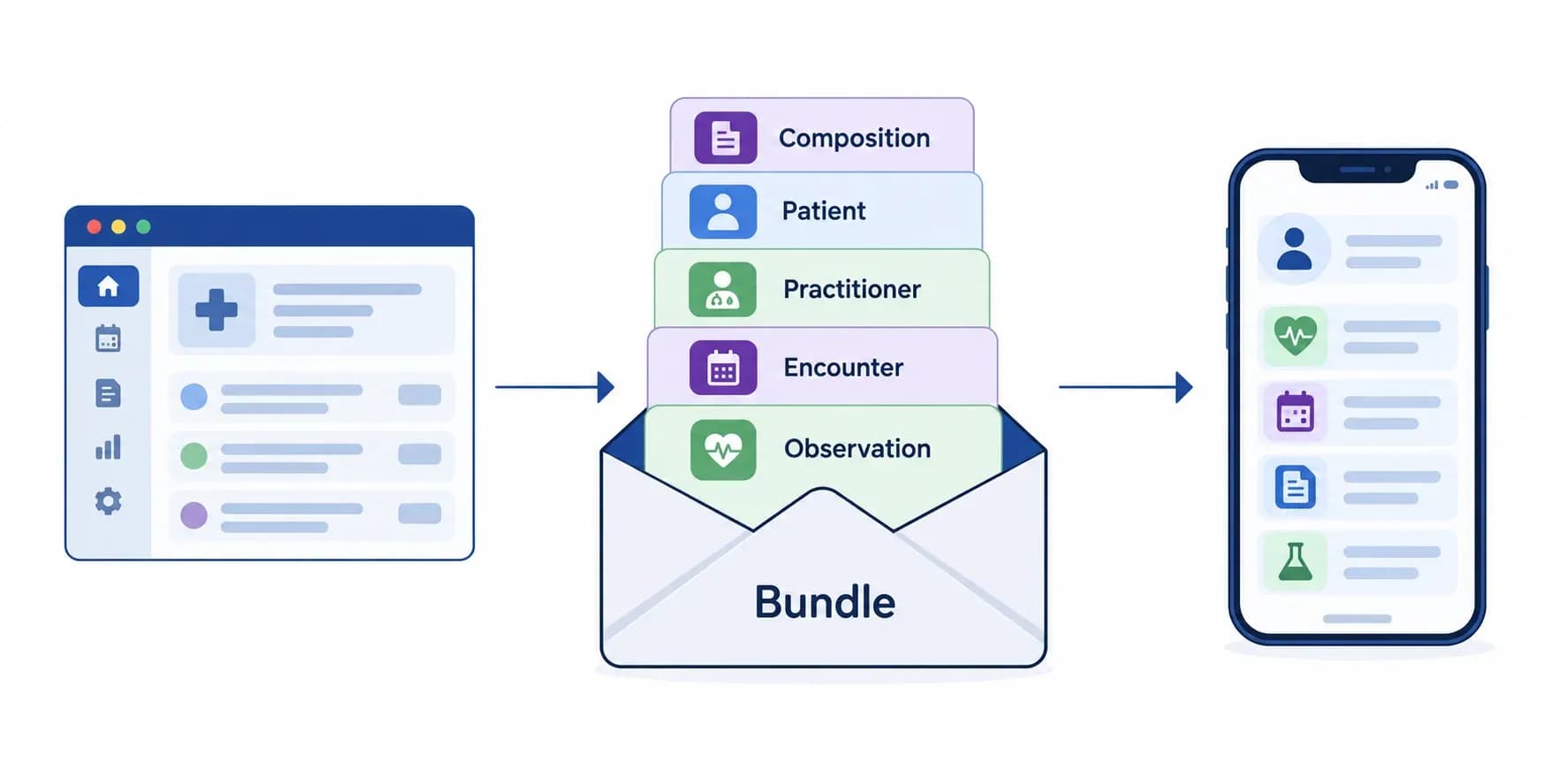
An ABDM FHIR bundle is a FHIR R4 document Bundle, built to the NRCeS implementation guide, that carries one health record (an OP consultation, a prescription, a lab report, a discharge summary and so on) from the hospital that created it to the patient or another provider through ABDM. Every bundle starts with a Composition that acts as its table of contents, references the patient, practitioner, organization and clinical resources inside it by urn:uuid, and declares NRCeS profiles so the receiving system knows which rules apply.
This guide takes you from zero FHIR knowledge to building valid ABDM bundles: what FHIR and bundles are, where bundles sit in the ABDM flow, the Composition, the NRCeS profiles in version 6.5.0 of the implementation guide, all 8 ABDM health information types with their codes, how to validate a bundle, and the mistakes that make PHR apps show N/A. It is Part 1 of a two-part series; Part 2 follows one patient through a hospital visit and shows each bundle in action. Updated September 2026.
ABDM FHIR bundles in short
| Question | Answer |
|---|---|
| Which FHIR version does ABDM use? | FHIR R4 (4.0.1) |
| Which implementation guide? | The NRCeS FHIR Implementation Guide for ABDM, version 6.5.0, package ndhm.in |
| Which bundle type? | document for clinical records (collection is used for claims and coverage) |
| What comes first in the bundle? | The Composition, with the profile for the health information type |
| How do resources reference each other? | By urn:uuid inside the bundle |
| How many health information types? | 8: OPConsultation, Prescription, DiagnosticReport, DischargeSummary, ImmunizationRecord, WellnessRecord, HealthDocumentRecord, Invoice |
| Who builds them? | The Health Information Provider (HIP) in Milestone 2; the Health Information User (HIU) reads them in Milestone 3 |
If your team needs these bundles built into an HMIS or app, our ABDM integration services team builds and validates them as part of M2 and M3.
What is FHIR? The format ABDM uses for every record
FHIR (Fast Healthcare Interoperability Resources, pronounced "fire") is the HL7 standard for exchanging health data as structured resources, usually in JSON. ABDM uses FHIR R4, so any system that understands R4 can read an ABDM record once it knows India's profiles.
Five ideas are enough to read any ABDM bundle:
- Resources are the building blocks: Patient, Practitioner, Encounter, Condition, Observation, MedicationRequest and so on.
- References connect them: an Observation points to the Patient it belongs to.
- Profiles constrain a base resource for a use case. NRCeS profiles say which fields ABDM needs.
- Coding systems give fields a shared meaning: SNOMED CT for clinical terms, LOINC for lab and vital observations, ICD-10 for diagnoses where used.
- Bundles package resources that belong together into one record.
What is a FHIR bundle, and which type does ABDM use?
A FHIR Bundle is a container resource that groups related resources into one package. A single OPD visit produces a patient, a practitioner, an encounter, complaints, a diagnosis and medicines; the bundle carries them together as one record.
| Bundle type | Purpose | Used in ABDM? |
|---|---|---|
document | A clinical document with a Composition as its table of contents | Yes, every clinical record |
collection | A set of resources grouped for administrative purposes | Yes, for claims and coverage (NHCX) |
transaction | Operations executed together on a FHIR server | No |
message | Event-based messaging between systems | No |
searchset | Results of a FHIR search | No |
Every ABDM document bundle has the same outer shape:
{
  "resourceType": "Bundle",
  "id": "3f2b8c1e-6a4d-4c1e-9b7a-2d5e8f0a1b3c",
  "meta": {
    "versionId": "1",
    "lastUpdated": "2026-09-28T10:30:00+05:30",
    "profile": ["https://nrces.in/ndhm/fhir/r4/StructureDefinition/DocumentBundle"],
    "security": [{
      "system": "http://terminology.hl7.org/CodeSystem/v3-Confidentiality",
      "code": "V", "display": "very restricted"
    }]
  },
  "identifier": { "system": "https://your-hospital.example/bundle", "value": "3f2b8c1e-6a4d-4c1e-9b7a-2d5e8f0a1b3c" },
  "type": "document",
  "timestamp": "2026-09-28T10:30:00+05:30",
  "entry": [
    { "fullUrl": "urn:uuid:comp-0001", "resource": { "resourceType": "Composition" } },
    { "fullUrl": "urn:uuid:pat-0001",  "resource": { "resourceType": "Patient" } },
    { "fullUrl": "urn:uuid:prac-0001", "resource": { "resourceType": "Practitioner" } }
  ]
}
Required on every bundle: the DocumentBundle profile, a unique identifier, type: document, a timestamp with time zone, a confidentiality tag in meta.security, and the Composition as the first entry.
Where FHIR bundles fit in the ABDM flow
Bundles are the part of ABDM that carries clinical data; everything else (ABHA, linking, consent, encryption) exists to make sure the right bundle reaches the right person with the patient's permission.
- ABHA: the patient's 14-digit health account number (for example 91-XXXX-XXXX-XXXX), created and verified in Milestone 1.
- HIP: the hospital, clinic or lab that creates records. It builds the bundles and links each record to the ABHA as a care context (Milestone 2).
- HIU: the doctor, hospital or app that asks for records with consent (Milestone 3).
- ABDM gateway and consent manager: route requests and consents. They do not store the records.
The flowchart below shows what happens to one record, from the end of a visit to the patient's app.
The linking, consent and encryption steps are covered in our ABDM integration step-by-step guide and Fidelius encryption guide.
The Composition: every bundle's table of contents
The Composition is the first entry in every ABDM document bundle. It says what the document is, who it is about, who wrote it, which organization holds it, and which sections it contains, each section pointing to the resources that hold the data.
{
  "resourceType": "Composition",
  "id": "comp-0001",
  "meta": { "profile": ["https://nrces.in/ndhm/fhir/r4/StructureDefinition/OPConsultRecord"] },
  "status": "final",
  "type": { "coding": [{ "system": "http://snomed.info/sct", "code": "371530004", "display": "Clinical consultation report" }], "text": "Clinical consultation report" },
  "subject": { "reference": "urn:uuid:pat-0001", "display": "Test Patient" },
  "date": "2026-09-28T10:30:00+05:30",
  "author": [{ "reference": "urn:uuid:prac-0001", "display": "Dr. Test Doctor" }],
  "title": "OP Consultation Record",
  "custodian": { "reference": "urn:uuid:org-0001", "display": "Test Hospital" },
  "section": [{
    "title": "Chief complaints",
    "code": { "coding": [{ "system": "http://snomed.info/sct", "code": "422843007", "display": "Chief complaint section" }] },
    "entry": [{ "reference": "urn:uuid:cond-0001" }]
  }]
}meta.profilecarries the health information type profile (OPConsultRecord, PrescriptionRecord and so on). The bundle itself carriesDocumentBundle.typeidentifies the document, with a SNOMED CT code where NRCeS uses one.subject,authorandcustodianpoint to the Patient, Practitioner and Organization.section[]is the heart of the record: each section has a title, a code and entry references.
NRCeS profiles: how India adapts FHIR for ABDM
NRCeS (the National Resource Centre for EHR Standards) publishes India's FHIR implementation guide for ABDM. The current version is 6.5.0, published as the FHIR package ndhm.in for FHIR 4.0.1. It defines constrained resources, one Composition profile per health information type, value sets and Indian identifier systems.
Every profile URL follows https://nrces.in/ndhm/fhir/r4/StructureDefinition/{ProfileName}. The ones you use most:
| Resource | NRCeS profile | What it adds for ABDM |
|---|---|---|
| Bundle | DocumentBundle | Document structure, identifier, timestamp, confidentiality |
| Patient | Patient | ABHA and hospital identifiers, name, gender, birth date |
| Practitioner | Practitioner | Registration number and name, so the record shows who authored it |
| Organization | Organization | Facility identity (HFR ID where available) |
| Encounter | Encounter | Visit class (for example outpatient or inpatient) and period |
| Condition | Condition | Complaints and diagnoses with SNOMED CT codes |
| Observation | Observation and the vital sign, body measurement and lifestyle profiles | LOINC-coded values with units |
| MedicationRequest | MedicationRequest | Medicine, dose, timing, route and reason |
| DiagnosticReport | DiagnosticReportLab and DiagnosticReportImaging | Results linked to observations, specimens and images |
| DocumentReference | DocumentReference | Attached PDFs and scans |
Identifiers use systems such as https://healthid.ndhm.gov.in for ABHA numbers, https://doctor.ndhm.gov.in for practitioner registration and https://facility.ndhm.gov.in for facility IDs. The official profiles, value sets and example bundles are all in the guide; our public ABDM FHIR bundle examples add ready-to-run samples.
The 8 ABDM health information types
ABDM defines 8 health information (HI) types. Each is a document bundle with its own Composition profile; consent requests name the HI types a patient agrees to share.
| HI type | Composition profile | Composition type in the NRCeS examples | Created when | Key resources |
|---|---|---|---|---|
| OPConsultation | OPConsultRecord | SNOMED 371530004, Clinical consultation report | An outpatient visit ends | Encounter, Condition, AllergyIntolerance, Procedure, MedicationStatement, MedicationRequest, ServiceRequest, Appointment, DocumentReference |
| Prescription | PrescriptionRecord | SNOMED 440545006, Prescription record | A doctor prescribes | MedicationRequest per medicine, Binary for a scanned copy |
| DiagnosticReport | DiagnosticReportRecord | SNOMED 721981007, Diagnostic studies report | Lab or imaging results are ready | DiagnosticReport, Observation per parameter (LOINC), Specimen, ServiceRequest |
| DischargeSummary | DischargeSummaryRecord | SNOMED 373942005, Discharge summary | An inpatient is discharged | Encounter, Condition, Procedure, DiagnosticReport with Observations and Specimen, MedicationRequest, CarePlan, DocumentReference |
| ImmunizationRecord | ImmunizationRecord | SNOMED 41000179103, Immunization record | A vaccine is given | Immunization, ImmunizationRecommendation |
| WellnessRecord | WellnessRecord | Typed by text ("Wellness Record") in the example | Vitals, body measurements, activity or lifestyle data are recorded | Observations using the vital sign, body measurement, physical activity, general assessment, lifestyle and women's health profiles (19 in the NRCeS example) |
| HealthDocumentRecord | HealthDocumentRecord | SNOMED 419891008, Record artifact | Any document that fits no other type | DocumentReference with the file |
| Invoice | InvoiceRecord | Typed by text ("Invoice Record") in the example | A bill is raised | Invoice, a ChargeItem per line, Medication for pharmacy items |
The codes above are taken from the example bundles in the NRCeS guide, version 6.5.0. The WellnessRecord and InvoiceRecord examples set the Composition type as text rather than a SNOMED code, so use the text form unless your implementation has a reason to add a code.
How to validate an ABDM FHIR bundle
Validate every bundle against the NRCeS package before you share it; a bundle that fails validation may be rejected by the requester or shown badly in the patient's app. The HL7 FHIR validator can load the package directly:
# Validate one bundle against NRCeS 6.5.0 (package ndhm.in) on FHIR R4
java -jar validator_cli.jar op-consultation-bundle.json \
  -version 4.0.1 \
  -ig ndhm.in#6.5.0
Run it in your build pipeline on sample bundles for every HI type your system produces, and again on a sample of real (de-identified) bundles before each release. Errors on profiles, required fields and code systems are what you must fix; warnings about display text are worth fixing because they affect what the patient sees.
Six mistakes that break ABDM FHIR bundles
- The HI-type profile on the Bundle.
Bundle.meta.profileis DocumentBundle; OPConsultRecord and the other type profiles belong on the Composition. - Relative references. Inside a document bundle,
fullUrland references useurn:uuid, notPatient/123. - Composition not first. Receivers read the Composition to understand the rest.
- Fields the PHR app needs are missing. A missing birth date, practitioner name or dosage text shows as N/A to the patient. Our guide to fixing N/A fields in ABDM bundles lists each field.
- Free text where codes are expected. Use SNOMED CT for clinical terms and LOINC for observations, always with display text.
- No confidentiality tag, or too much data. Add
meta.securityand send only the HI types and date range the consent covers.
From our delivery work
We build these bundles inside hospital software for M2 and read them back for M3. In a live test against the ABDM sandbox in September 2026, every value in every test record arrived intact at the requesting side: 526 of 526 values and 30 of 30 attachments. Two habits made that possible: we validate each HI type against the NRCeS package in the build, and we check each record in the PHR app as a patient would see it, not only in a validator. For how the HIP side is designed end to end, see building an ABDM HIP from scratch.
Next: Part 2, the patient journey
You now know the building blocks: FHIR resources, document bundles, the Composition, NRCeS profiles and the 8 HI types. In Part 2: ABDM FHIR bundles in a real patient journey, we follow one patient from reception to discharge and look inside each bundle the visit creates.
Building ABDM FHIR bundles into your HMIS or app? Our ABDM integration team designs the mapping, validation and data push, and our FHIR integration services cover FHIR beyond ABDM. Talk to our team for a review of your bundles.
Ready to scale?
Talk to our healthcare engineering team about building, integrating, and shipping faster.
Frequently Asked Questions
What FHIR version does ABDM use?
What is an ABDM FHIR bundle?
How many health information types does ABDM support?
What are ABDM FHIR profiles?
What is NRCeS?
Where is the official ABDM FHIR documentation?
How do I validate an ABDM FHIR bundle?
Why does my ABDM record show N/A in the PHR app?