Practice Better integration · United States

Practice Better API Integration on the Public Beta REST API

We connect nutrition and wellness practices, and the tools they use, to Practice Better. Practice Better offers a REST API in public beta for accounts on paid plans, turned on with an API Access add-on that its support team reviews. We set up the key and token flow, build the sync, and design for a beta API that can still change.

  • Practice Better
  • REST API
  • Public beta
  • API Access add-on
  • IP allowlist
  • Short-lived tokens
  • Wellness

A beta API with a review step.
  1. 01Request the add-on

    Add API Access (Beta) from My Subscription; Practice Better's support team reviews the request.

  2. 02Create a restricted key

    Create an API key with access restrictions and, where possible, an IP allowlist; the secret is shown once.

  3. 03Exchange for a token

    Swap the client ID and secret for a short-lived bearer token before each batch of calls.

Evidence you can check

The problem

Sound Familiar?

Nutrition and wellness practices on Practice Better, and the tools they use, raise these four problems first.

Zaps that break quietly

A Zapier workflow stops after a field change, and nobody notices for a week.

Clients in two places

The CRM and Practice Better disagree on phone numbers, emails and who is still active.

Tools with no built-in integration

The lab portal or supplement store you use has no Practice Better integration.

Building on a beta

The API is in public beta, and you are not sure what happens when it changes or pricing starts.

Use cases

What It Looks Like When It Works

Four use cases, each shown as the screen your team works in. The people and organizations are fictional; the behavior follows the vendor's published documentation.

API Access Set Up Safely

Today

Keys get created with full access and shared in chat.

With the integration

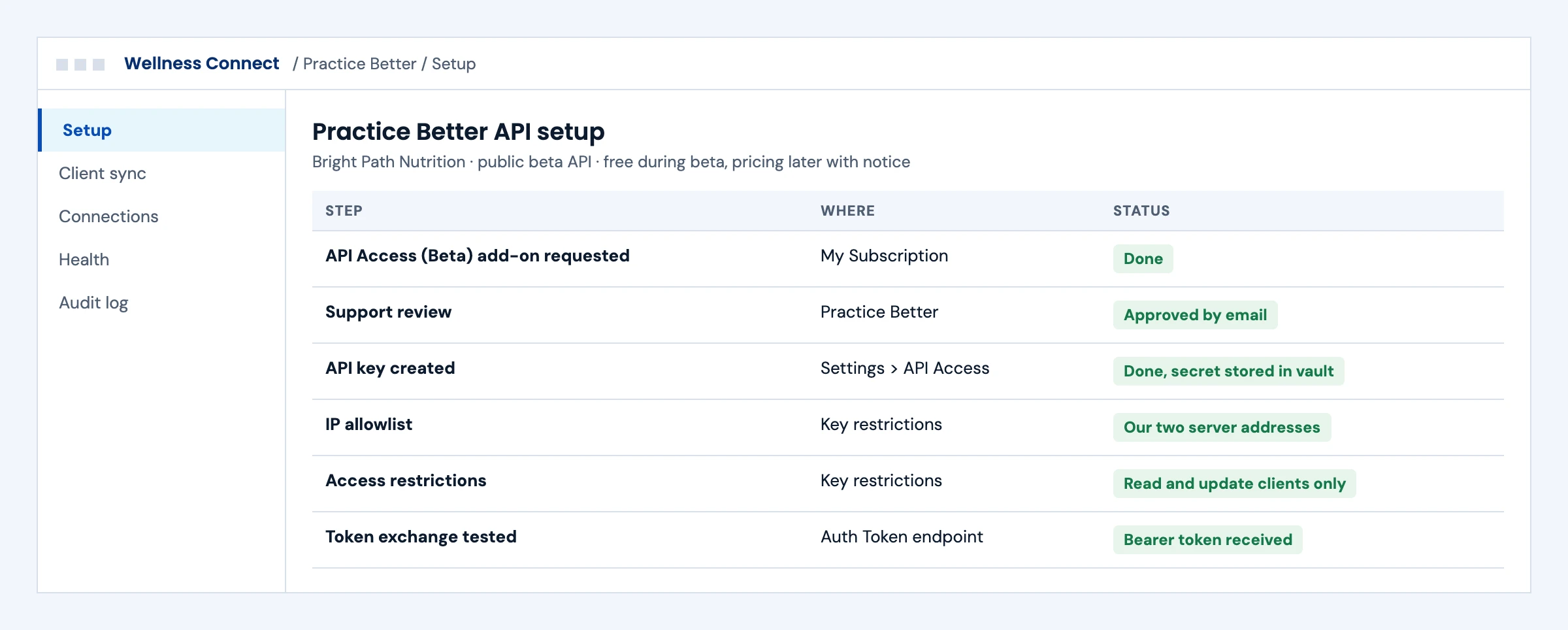
The add-on is requested and approved, the key is restricted to the data you need and your server addresses, and the secret goes straight into a vault.

What we build
  • Add-on request and approval steps
  • Restricted keys with an IP allowlist
  • Token exchange tested
Practice Better API setup checklist from the add-on request to a tested token exchange
Illustrative screen with fictional clients: practice Better API setup checklist from the add-on request to a tested token exchange. Tap to open full size.

Client Records in Step

Today

Staff update the same client in the CRM and in Practice Better.

With the integration

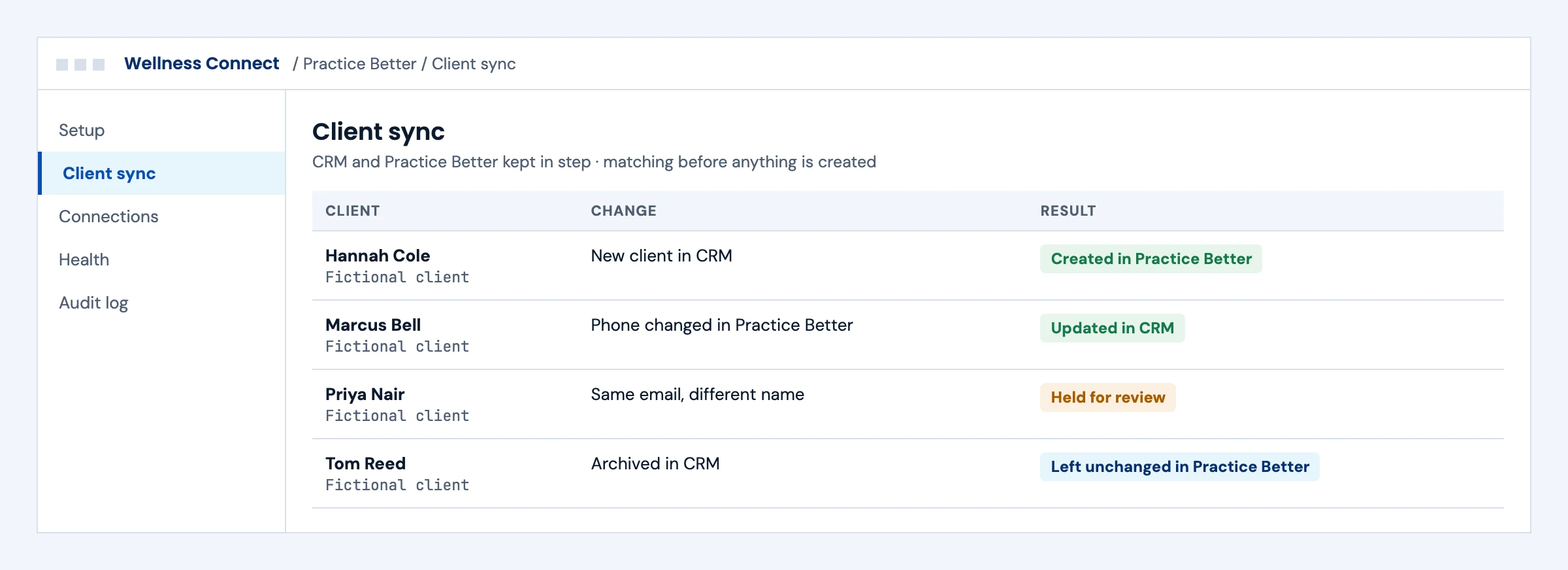
Client changes move both ways with matching rules, and anything uncertain waits for review instead of creating a duplicate.

What we build
  • Two-way client sync
  • Matching before create
  • Review queue for uncertain matches
Client records synced between a CRM and Practice Better, with one uncertain match held for review
Illustrative screen with fictional clients: client records synced between a CRM and Practice Better, with one uncertain match held for review. Tap to open full size.

Every Tool on the Right Route

Today

Each new tool gets a new Zap, and nobody knows what connects to what.

With the integration

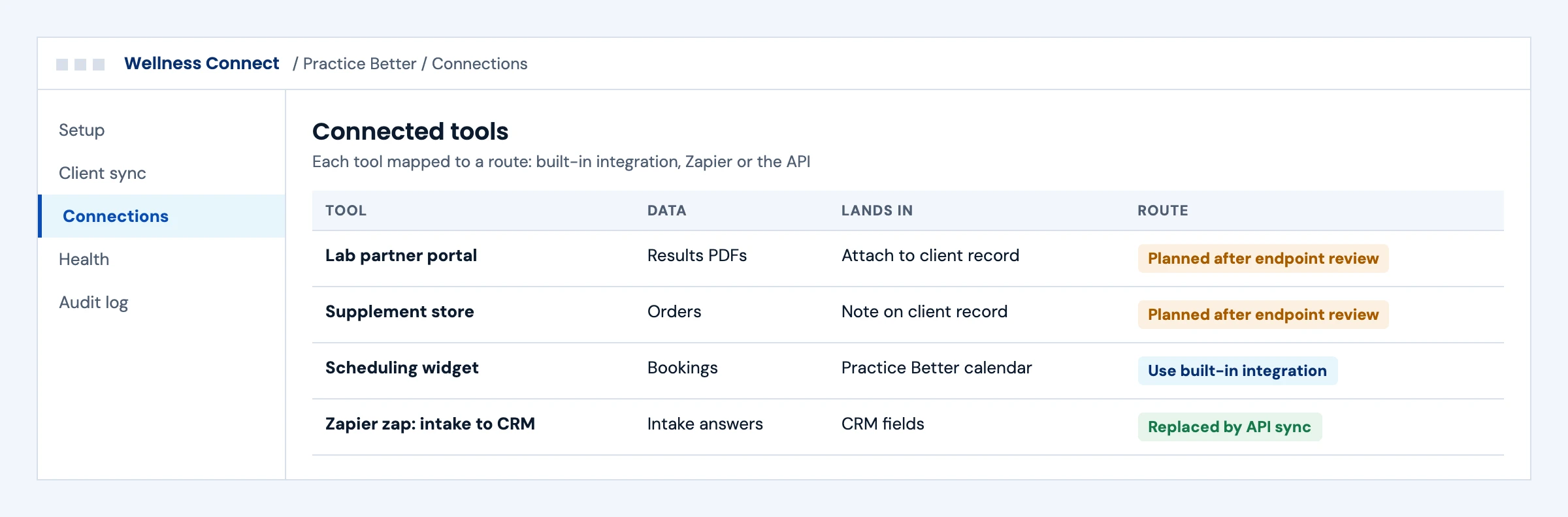
Each tool is mapped to a built-in integration, Zapier or the API, so the API is used only where it adds something.

What we build
  • Tool-by-tool route map
  • API connectors where needed
  • Retiring fragile Zaps
Tools mapped to Practice Better built-in integrations, Zapier or the API, with planned and replaced connections
Illustrative screen with fictional clients: tools mapped to Practice Better built-in integrations, Zapier or the API, with planned and replaced connections. Tap to open full size.

Beta Changes Caught Early

Today

A beta change breaks the sync, and staff find out from clients.

With the integration

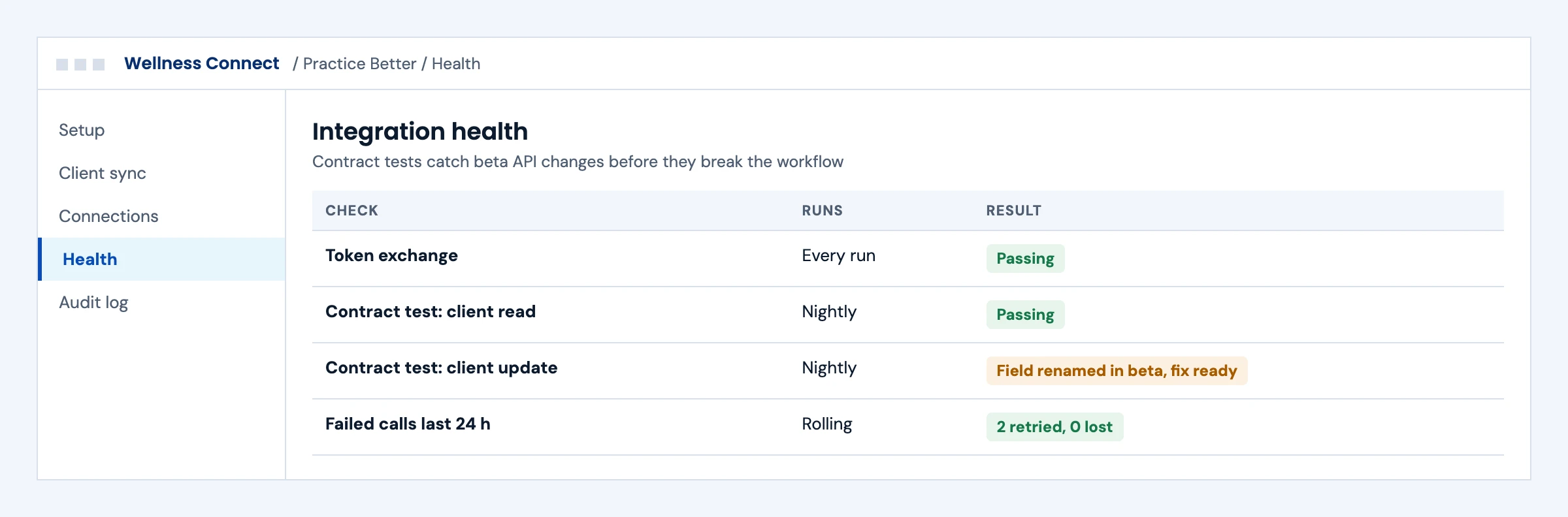
Contract tests run nightly against the API and flag a renamed field before it reaches production, with retries for failed calls.

What we build
  • Nightly contract tests
  • Retries with no lost updates
  • Alerts with the failing check named
Integration health checks with passing tests and one beta field change caught before production
Illustrative screen with fictional clients: integration health checks with passing tests and one beta field change caught before production. Tap to open full size.

First call

Questions We Will Ask You on the First Call

The answers decide the route, the timeline and where these projects usually go wrong. You do not need them all before we talk.

Is your account on a paid plan?

The API add-on is available on paid plans only.

Has the API Access (Beta) add-on been approved?

Support reviews the request before keys can be created.

Which records need to move, and in which direction?

Two-way sync needs matching and conflict rules.

Which tools already connect through built-in integrations or Zapier?

We keep those where they work and use the API only where it adds something.

Which server addresses will call the API?

Keys can be limited to an IP allowlist.

How will you handle beta changes?

Contract tests catch them before they reach your workflow.

Who budgets for add-on pricing after the beta?

Practice Better says pricing will be introduced with notice.

Who owns the integration after launch?

Someone must own alerts and the review queue.

The short answer

Does Practice Better Have an API?

Yes. Practice Better offers a RESTful API to retrieve, update and create data in a Practice Better account. It is in public beta for users on paid plans. You turn it on by adding the API Access (Beta) add-on in My Subscription, and Practice Better's support team reviews the request first. You then create an API key in Settings, with optional IP restrictions and access limits, and exchange the client ID and secret for a short-lived token. Practice Better says the add-on is free during the beta and that pricing will apply afterwards with notice. The full endpoint list is visible in the documentation once the add-on is active.

Who it is for
Dietitians, nutritionists, health coaches and wellness practices, and the lab, supplement, scheduling and reporting tools they connect.
What we build
The key and token flow, data sync for the records your workflow needs, retries and monitoring, designed to absorb beta changes.
The outcome we design for
Client and program data moving between Practice Better and your tools without retyping. These are intended outcomes, confirmed once the add-on is active and the endpoints are reviewed.

Practice Better API

How Practice Better API Access Works

From Practice Better's help center article on the API (beta), read in October 2026. The endpoint reference opens only after the add-on is active, so this page lists no endpoints from other sources.

StepWhat happensWho does itWhat to plan for
Add API Access (Beta)The add-on is requested from My SubscriptionThe practice ownerSupport reviews the request before the add-on is added
Create an API keyA key and secret are created in Settings under API AccessThe practice owner or adminName the key, set access restrictions and an IP allowlist; store the secret, it is shown once
Get a tokenThe client ID and secret are exchanged at the Auth Token endpointYour integrationTokens are short-lived; request a new one when it expires
Call the APIRead, update and create account data through RESTYour integrationUse the documentation's exported specification to generate and test requests
After the betaPricing for the add-on is introduced with noticePractice BetterBudget for it and watch for contract changes

Some third-party guides describe Practice Better base URLs and signing schemes that contradict each other. We work only from Practice Better's own documentation once the add-on is active.

What we build

What Our Practice Better Integration Builds

Pick the workstreams you need. Each one ships with a specification, tests and an owner.

01

Key and Token Handling

Restricted keys stored in a vault, token exchange before each batch, and renewal when a token expires.

Client credentials · short-lived tokens · IP allowlist

02

Client Record Sync

Client records kept in step between Practice Better and your CRM or reporting tool, with matching rules before anything is created.

Read · update · create

03

Program and Intake Data

Intake and program data moved to or from your tools, mapped to the records the documentation exposes.

Mapping confirmed against the API reference

04

Partner Tool Connections

Lab, supplement or scheduling tools connected through the API where Practice Better has no built-in integration for your case.

Custom connector

Laboratory integration →
05

Beta Change Watch

Contract tests that run against the API so a beta change is caught before it breaks your workflow.

Contract tests · alerts

Buyer decisions

Practice Better Integration Options Compared

Practice Better's built-in integrations and Zapier cover simple cases. The API is for what they cannot do.

OptionBest fitStrengthsWhat to plan for
Built-in integrationsTools Practice Better already connectsNo buildLimited to what Practice Better offers
ZapierSimple one-way automationsQuick to set upLimited mapping and error handling
Practice Better REST API (beta)Custom sync and product integrationsRead, update and create through RESTBeta changes, a review step and future add-on pricing
Login-based automationA gap the API does not coverWorks where the API stopsPractice Better's terms, the practice's written authorization and strict controls

Integration boundaries

Practice Better Integration Boundaries: Who Owns What

We write the split down before the build starts.

The practice

Requests the add-on, owns the API key and its restrictions, and approves what data moves.

Practice Better

Owns the API, the beta terms, the review and future pricing.

Your product or tool

Owns what it does with Practice Better data.

The integration layer (ours)

Token handling, sync, contract tests and alerts. Defects in this layer are ours to fix.

Security and PHI

A BAA is available for agreed work involving PHI. We work inside our ISO 27001:2022 certified management system, encrypt data in transit and at rest, keep credentials in a vault and keep raw payloads out of operational logs.

Deliverables

Practice Better Integration Deliverables

Everything lands in your repository and your runbook.

01

Access checklist

Add-on request, key creation, restrictions and IP allowlist steps for the practice.

02

Integration code in your repository

Token handling, API client and mapping, generated from the exported specification.

03

Contract tests

Tests that flag a beta API change before it reaches production.

04

Monitoring and runbook

Alerts, retry rules and support steps.

Delivery phases

Practice Better Integration Timeline

Initial planning estimate: 3 to 6 weeks to a first live sync, subject to the add-on review and the endpoints your workflow needs. We confirm a release plan after the documentation is reviewed.

  1. 01

    Access and discovery

    Week 1

    Add-on requested, documentation reviewed, workflow mapped

  2. 02

    Build

    Weeks 1 to 4

    Token flow, sync and contract tests built

  3. 03

    Practice validation

    Weeks 3 to 5

    Data checked with the practice team

  4. 04

    Go-live and hypercare

    Weeks 4 to 6

    Live sync, monitoring on, runbook handed over

Cost drivers

What Drives Practice Better Integration Cost

Use the scoping call to pin down the workflow, the access you need and what goes into a scoped proposal. These are the factors that move cost.

Records involved

Each record type adds mapping and tests.

Direction

Two-way sync needs matching and conflict rules.

Beta changes

Contract tests and fixes when the API changes.

Add-on pricing

Practice Better's own add-on pricing after the beta is separate.

Support level

Monitoring and on-call support are priced per connection.

Book a call ↗

Proof

API Work You Can Check

Client names are withheld. These published guides show how we approach health API work; they do not prove Practice Better approval or a live Practice Better integration.

Published engineering guide

Multi-EHR API Comparison

How health record APIs differ in authorization, reads and writes.

Read the guide →

Published engineering guide

EHR Automation Without API Access

When an API stops short, how we choose a route and the controls it needs.

Read the guide →

Published engineering guide

HL7 MDM Document Messages

How documents move between clinical systems.

Read the guide →

Security

ISO 27001:2022 Certified, BAAs Signed

We are ISO 27001:2022 certified and sign Business Associate Agreements for work that touches patient data.

FAQ

Practice Better Integration: Questions Buyers Ask

Does Practice Better have an API?

Yes. Practice Better offers a RESTful API to retrieve, update and create account data. It is in public beta for users on paid plans.

How do we turn on the Practice Better API?

Add the API Access (Beta) add-on from My Subscription. Practice Better's support team reviews the request, and once it is approved you can create API keys in Settings under API Access.

How does Practice Better API authentication work?

Exchange the client ID and client secret from your API key at the Auth Token endpoint for a short-lived bearer token, and request a new token when it expires.

Can we restrict a Practice Better API key?

Yes. When creating a key you can add an IP allowlist and set access restrictions. The secret is shown only once, so store it securely.

Does the Practice Better API cost extra?

Practice Better says the add-on has no charge during the public beta and that pricing will be introduced afterwards, with notice to participants.

Which Practice Better endpoints are available?

The endpoint reference opens once the add-on is active, and the specification can be exported for tools such as Postman. We review it with you before scoping, rather than relying on third-party guides.

Is the Practice Better API stable?

It is in public beta, so it can change. We add contract tests that flag a change before it breaks your workflow.

Should we use Zapier or the API?

Zapier and built-in integrations suit simple one-way automations. The API suits custom sync, two-way data and product integrations with proper error handling.

Do you sign a BAA for Practice Better data?

A BAA is available for agreed work involving PHI, under our ISO 27001:2022 certified management system.

How long does a Practice Better integration take?

Our initial planning estimate is 3 to 6 weeks to a first live sync, depending on the add-on review and the endpoints your workflow needs.

How much does a Practice Better integration cost?

Cost depends on the records involved, one-way or two-way sync, beta changes and the support level. Practice Better's own add-on pricing after the beta is separate. After a scoping call we send a scoped proposal with the access dependencies listed.

Next step

Plan Your Practice Better Integration

Tell us what needs to move between Practice Better and your tools. An engineer replies with the access steps and the open questions to settle once the add-on is active.

Start with your workflow

Tell Us About Your Practice Better Integration

Share the tools involved, what needs to move and your target date. Use de-identified examples only. Read by an engineer, answered within one business day.

Please exclude patient data and credentials. We use these details to respond to your inquiry. Privacy policy

Thank you. Your inquiry has been received. Our team will review your requirements.