Jane integration · United States

Jane App API Integration on the Jane Developer Platform

We build Jane Extensions for technology partners serving allied health and wellness clinics. The Jane Developer Platform lets an extension act for a practitioner who authorizes it, reading patients and appointments and creating clinical records such as observations, allergies, medications and care plans. We handle partner registration steps, the OAuth flow and the sync.

  • Jane Developer Platform
  • Jane Extensions
  • OAuth 2.0 PKCE
  • Practitioner consent
  • Webhooks
  • Date-based versions
  • Allied health

Every connection is one practitioner in one clinic.
  1. 01Register as a partner

    Jane's partnerships team registers your extension and issues client credentials and scopes per environment.

  2. 02Practitioner connects

    A practitioner signs in to their clinic and approves your extension's scopes through OAuth 2.0 with PKCE.

  3. 03Act on their behalf

    Calls return only what that practitioner can see in that clinic; webhooks tell you what changed.

Evidence you can check

The problem

Sound Familiar?

Technology partners building for clinics on Jane run into these four problems first.

Connections that cover one practitioner

A clinic signs up, but each practitioner has to connect separately, and half of them never do.

Outcome scores stuck in your app

Patients complete outcome measures in your product, and the therapist copies the scores into Jane.

Home programs in two places

Exercises live in your app while the care plan in Jane says something else.

Missed changes

Your product does not hear about check-ins or disconnects until someone complains.

Use cases

What It Looks Like When It Works

Four use cases, each shown as the screen your team works in. The people and organizations are fictional; the behavior follows the vendor's published documentation.

A Connect Flow Practitioners Finish

Today

Practitioners get a vague prompt and give up halfway.

With the integration

Your product explains exactly what it will ask Jane for, then sends the practitioner to Jane to approve their own clinic profile through OAuth with PKCE.

What we build
  • Plain-language connect screen
  • OAuth 2.0 with PKCE and refresh tokens
  • Clinic and practitioner shown on every connection
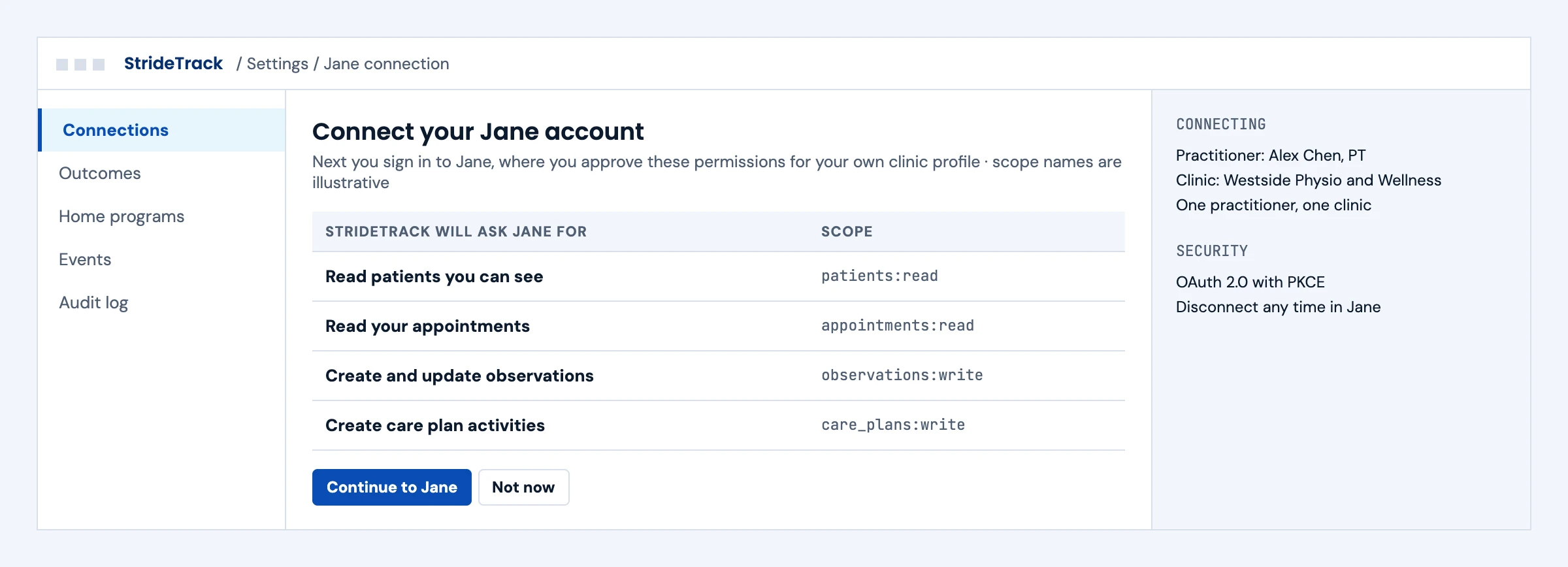
Product screen explaining the scopes it will request before sending a practitioner to Jane to approve
Illustrative screen with fictional patients: product screen explaining the scopes it will request before sending a practitioner to Jane to approve. Tap to open full size.

Outcome Scores Written to the Chart

Today

Therapists copy outcome scores from your app into the Jane chart.

With the integration

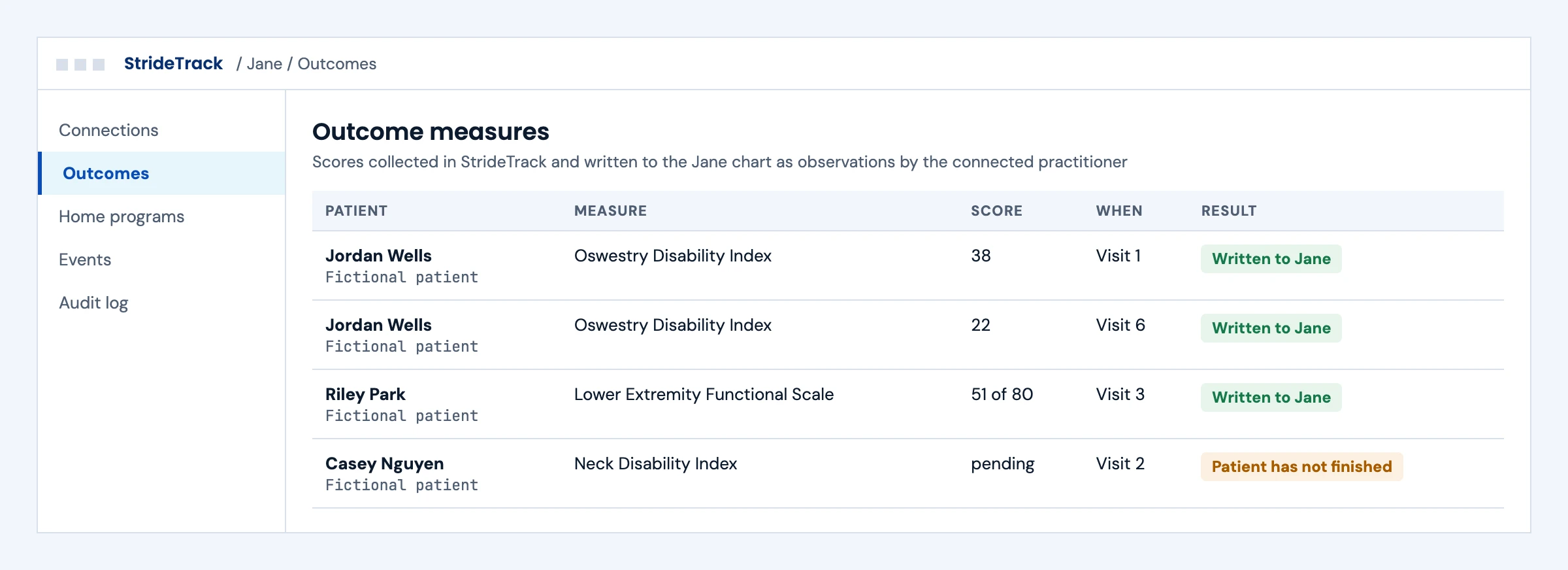
Scores collected in your product are written to Jane as observations by the connected practitioner, and unfinished measures stay out.

What we build
  • Observation writes per measure
  • Patient matching within the practitioner's access
  • Skipping incomplete measures
Outcome measure scores written to Jane as observations, with one unfinished measure held back
Illustrative screen with fictional patients: outcome measure scores written to Jane as observations, with one unfinished measure held back. Tap to open full size.

Home Programs in the Care Plan

Today

The exercise plan in your app and the care plan in Jane drift apart.

With the integration

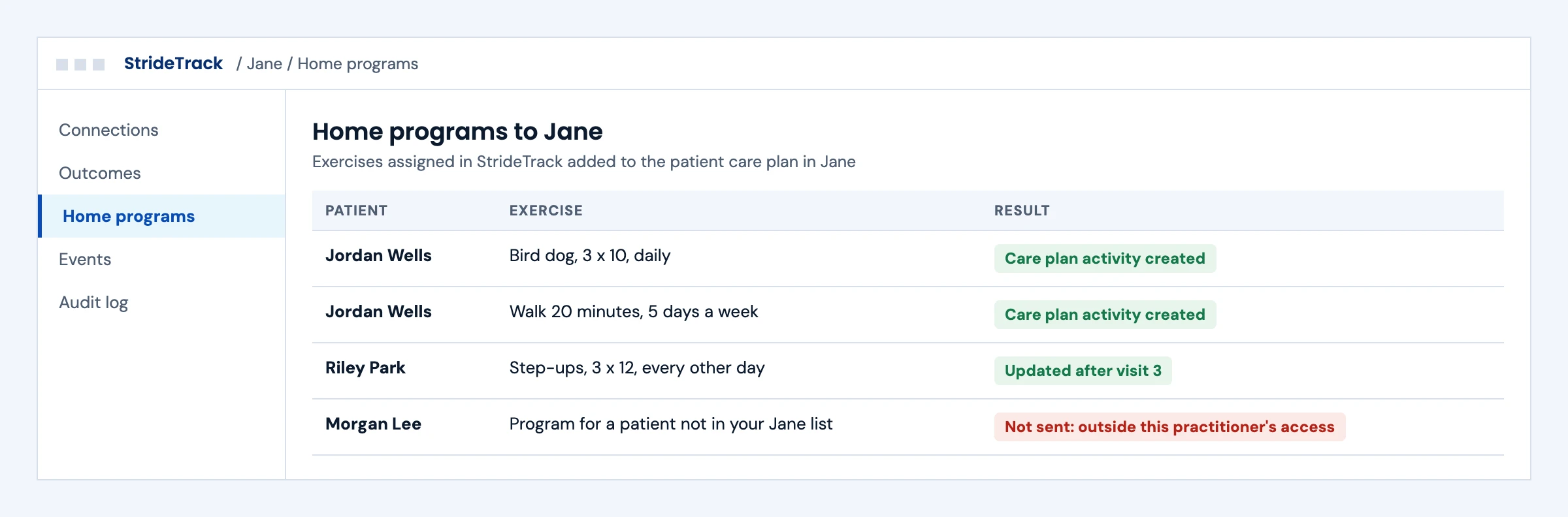
Exercises assigned in your product are added or updated as care plan activities in Jane, and patients outside the practitioner's access are never sent.

What we build
  • Care plan activity create and update
  • Access checks before every write
  • Clear reasons for anything not sent
Home program exercises added to Jane care plans, with one patient outside the practitioner's access not sent
Illustrative screen with fictional patients: home program exercises added to Jane care plans, with one patient outside the practitioner's access not sent. Tap to open full size.

Changes and Disconnects Handled

Today

Your product learns about check-ins and disconnects days later.

With the integration

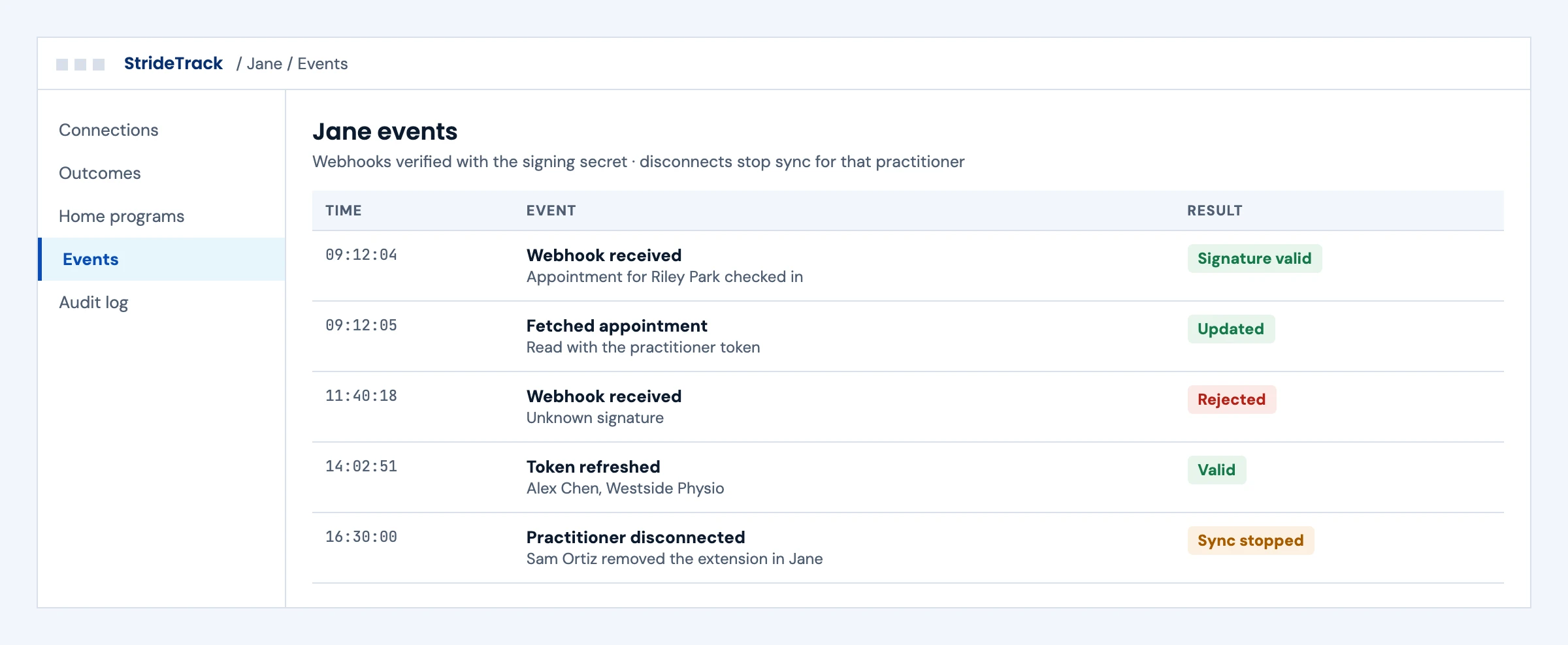
Webhooks are verified with the signing secret, the appointment is read with the practitioner's token, and a disconnect stops sync for that practitioner.

What we build
  • Signed webhook verification
  • Follow-up reads with the practitioner token
  • Disconnect and token refresh handling
Jane webhook events verified and processed, one rejected for an unknown signature and one practitioner disconnect
Illustrative screen with fictional patients: jane webhook events verified and processed, one rejected for an unknown signature and one practitioner disconnect. Tap to open full size.

First call

Questions We Will Ask You on the First Call

The answers decide the route, the timeline and where these projects usually go wrong. You do not need them all before we talk.

Are you registered as a Jane technology partner yet?

Registration with Jane's partnerships team comes before production credentials.

Which scopes does your product need?

Each scope is shown to the practitioner, so ask only for what you use.

How will multi-practitioner clinics onboard?

Each practitioner authorizes separately; the onboarding plan should expect that.

Which records will you write?

Observations, allergies, medications and care plans each need mapping and review.

Do you need to create appointments?

The API index we read lists appointment reads only, so we confirm with Jane first.

How will you handle webhooks?

The signing secret is shown once and must be stored to verify events.

Which API version will you pin?

Dated versions ending in -beta can change before release.

What happens when a practitioner disconnects?

Sync for that practitioner should stop cleanly and tell someone.

The short answer

Does Jane App Have an API?

Yes. The Jane Developer Platform lets technology partners build Jane Extensions that access clinic data on behalf of a practitioner who authorizes them. Authorization uses OAuth 2.0 with PKCE, and each authorization covers a single practitioner in a single clinic, because Jane keeps a separate database for each clinic. Partners register through a Jane partnerships contact and receive client credentials and scopes for a development or production environment. The API reference lists patients, appointments, locations, staff and treatments to read, clinical records such as observations, allergies, medications and care plans to create and update, document uploads and webhooks. Versions are dated in the URL.

Who it is for
Technology partners building for physiotherapy, chiropractic, massage, mental health and other allied health clinics on Jane.
What we build
The extension's OAuth flow, patient and appointment reads, clinical record writes, document uploads, webhooks and the partner registration pack.
The outcome we design for
An extension practitioners can connect in minutes, with data scoped to what each practitioner can see. These are intended outcomes, not a promise about Jane's registration decisions.

Jane API

What the Jane Developer Platform Lets You Do

From the Jane Developer Platform quick start and API reference index, read in October 2026 (version 2026-01-01, with beta versions marked -beta).

AreaOperations listedTypical useWhat to plan for
PatientsGet, list and free-text search (search sent in the request body so personal details stay out of URLs)Matching clinic patients to your product's usersResults limited to the practitioner's accessible patients
AppointmentsGet and list, including group and class bookingsVisit context, reminders, outcome trackingNo create endpoint in the index we read; confirm booking needs with Jane
Clinical recordsObservations, allergies, medications (with change history) and care plans with activities: create, get, update and list; allergies archiveOutcome measures, home programs, medication toolsRecords are written as the authorizing practitioner
DocumentsUpload a document and receive a document ID for use in other callsReports and forms from your productOnly the uploading user can read the upload back
Clinic setupCompany, locations, staff members, disciplines and treatmentsMapping services and locationsRead only
WebhooksList, register, get and deregister subscriptions; signing secret shown onceReacting to changes in the clinicStore the signing secret and verify every event

Jane uses date-based versions in the URL path. A version ending in -beta may change before release, so production code should pin a released version.

What we build

What Our Jane Integration Builds

Pick the workstreams you need. Each one ships with a specification, sandbox tests and an owner.

01

Practitioner Connect Flow

The OAuth 2.0 authorization code flow with PKCE, token storage and refresh, and a clear screen showing which clinic and practitioner are connected.

OAuth 2.0 · PKCE · refresh tokens · scopes

SMART on FHIR app development →
02

Patient and Appointment Reads

Patients matched to your users and appointments read for context, reminders or outcome tracking.

Patients · search · appointments

03

Clinical Record Writes

Outcome scores as observations, home program items as care plan activities, and allergies or medications where your product owns them.

Observations · care plans · allergies · medications

FHIR integration services →
04

Document Uploads

Reports and forms from your product uploaded to Jane and attached where the API allows.

Document uploads · document IDs

05

Webhook Processing

Signed webhook receivers that verify each event and update your product, with a fallback read when an event is missed.

Webhook subscriptions · signing secret

Buyer decisions

Jane Integration Options Compared

A Jane Extension is the supported route for partner products.

OptionBest fitStrengthsWhat to plan for
Jane Extension on the Developer PlatformPartner products serving Jane clinicsPractitioner consent, dated API versions, webhooksPartner registration and practitioner-scoped access
Clinic exportsOne-time migrations and analyticsNo partner registrationManual steps and no ongoing sync
Login-based automationA gap the API does not coverWorks where the API stopsJane's terms, the clinic's written authorization and strict controls

Integration boundaries

Jane Integration Boundaries: Who Owns What

We write the split down before the build starts.

The practitioner and clinic

Connect your extension, approve its scopes and can disconnect it.

Jane

Owns the Developer Platform, partner registration, scopes and the extension catalog.

Your product team

Owns what your product does with Jane data and how it appears to users.

The integration layer (ours)

OAuth flow, API calls, webhook processing and alerts. Defects in this layer are ours to fix.

Security and PHI

A BAA is available for agreed work involving PHI. We work inside our ISO 27001:2022 certified management system, encrypt data in transit and at rest, keep credentials in a vault and keep raw payloads out of operational logs.

Deliverables

Jane Integration Deliverables

Everything lands in your repository and your runbook.

01

Registration pack

The extension details, redirect URIs and scopes for your Jane partnerships contact.

02

Integration code in your repository

OAuth flow, API client, webhook receivers and data mapping.

03

Test evidence

Sandbox runs for connect, disconnect, token refresh, writes and webhook events.

04

Monitoring and runbook

Alerts, a disconnect playbook and support steps.

Delivery phases

Jane Integration Timeline

Initial planning estimate: 4 to 8 weeks to a first connected clinic, subject to Jane's partner registration and your product's workflow. We confirm a release plan after discovery.

  1. 01

    Discovery and registration

    Weeks 1 to 2

    Scopes chosen, registration details sent to Jane

  2. 02

    Sandbox build

    Weeks 2 to 5

    OAuth flow, reads, writes and webhooks built in the partner sandbox

  3. 03

    Clinic validation

    Weeks 4 to 7

    First practitioners connect, data checked with the clinic

  4. 04

    Go-live and hypercare

    Weeks 5 to 8

    Production credentials, monitoring on, runbook handed over

Cost drivers

What Drives Jane Integration Cost

Use the scoping call to pin down the workflow, the access you need and what goes into a scoped proposal. These are the factors that move cost.

Scopes and records

Each clinical record type you write adds mapping, review and tests.

Multi-practitioner clinics

Each practitioner authorizes separately, which shapes onboarding and support.

Webhooks

Event processing and fallback reads add design and tests.

Clinics per year

A smooth connect flow matters most at scale.

Support level

Monitoring and on-call support are priced per connection.

Book a call ↗

Proof

API Work You Can Check

Client names are withheld. These published guides show how we approach EHR API work; they do not prove Jane registration or a live Jane extension.

Published engineering guide

Multi-EHR API Comparison

How EHR APIs differ in authorization, scopes and writes.

Read the guide →

Published engineering guide

EHR Automation Without API Access

When an API stops short, how we choose a route and the controls it needs.

Read the guide →

Published engineering guide

HL7 MDM Document Messages

How documents move between clinical systems.

Read the guide →

Security

ISO 27001:2022 Certified, BAAs Signed

We are ISO 27001:2022 certified and sign Business Associate Agreements for work that touches patient data.

FAQ

Jane App Integration: Questions Buyers Ask

Does Jane App have an API?

Yes. The Jane Developer Platform lets technology partners build Jane Extensions that access clinic data on behalf of a practitioner who authorizes them.

How do practitioners connect our extension?

Through OAuth 2.0 with PKCE. The practitioner signs in to their clinic, approves your extension's scopes, and your server exchanges the code for access and refresh tokens.

Why does each practitioner have to connect separately?

Jane keeps a separate database for each clinic, and each authorization covers a single practitioner in a single clinic. Data returned is limited to what that practitioner can access.

Can the Jane API create appointments?

The API reference index we read lists getting and listing appointments, including group and class bookings, but no create endpoint. We confirm booking needs with Jane before scoping them.

Can we write clinical data into Jane?

Yes, for the records the API lists: observations, allergies, medications and care plans with activities can be created and updated, as the authorizing practitioner.

Does Jane support webhooks?

Yes. Partners can register webhook subscriptions. The signing secret is returned once when you register, so it must be stored securely and used to verify each event.

How do we register a Jane Extension?

Provide your extension details to a Jane Developer Platform partnerships contact. Once approved and registered, Jane issues client credentials and scopes for the development or production environment.

Is there a Jane sandbox?

Yes. Jane's quick start names a partner sandbox realm and a separate production environment, each with its own credentials.

How does Jane version its API?

With dates in the URL path. A version ending in -beta may change before release, so production code pins a released version.

How long does a Jane integration take?

Our initial planning estimate is 4 to 8 weeks to a first connected clinic, depending on partner registration and the records you need.

How much does a Jane integration cost?

Cost depends on the scopes and record types, multi-practitioner onboarding, webhooks, how many clinics you add and the support level. After a scoping call we send a scoped proposal with the access dependencies listed.

Next step

Plan Your Jane Extension

Tell us what your product does for Jane clinics. An engineer replies with the scopes, the records involved and the registration steps.

Start with your workflow

Tell Us About Your Jane Integration

Share the use case, the clinics you serve and your target date. Use de-identified examples only. Read by an engineer, answered within one business day.

Please exclude patient data and credentials. We use these details to respond to your inquiry. Privacy policy

Thank you. Your inquiry has been received. Our team will review your requirements.