WebPT integration · United States

WebPT API Integration Through WebPT's HL7 Interfaces

We connect rehab therapy clinics and the vendors who serve them to WebPT. WebPT does not publish a public REST API that we could find; its own integrations page describes standard HL7 interfaces that WebPT builds and maintains. We build the other side of those interfaces, the mapping and the testing, so patients, claims and documents move without retyping.

  • WebPT
  • HL7 ADT
  • HL7 BAR and DFT
  • HL7 MDM/ORU
  • eDoc
  • Interface engine
  • Rehab therapy

WebPT's integration route is HL7, not a REST API.
  1. 01Pick the interface

    Patient registration into WebPT, billing out of WebPT, documents out to an EHR, or documents into the WebPT eDoc section.

  2. 02Agree the spec with WebPT

    WebPT assigns a point of contact for its side; we agree message types, fields and test cases with them.

  3. 03Build and test our side

    Your interface engine or product sends or receives the HL7 messages, with acknowledgments, retries and a review queue.

Evidence you can check

The problem

Sound Familiar?

Teams connecting rehab therapy clinics to WebPT run into these four problems first.

Patients typed in twice

The hospital registers the patient, then the therapy front desk types them into WebPT again, with a different spelling every time.

Charges retyped into billing

Therapists document in WebPT, and someone rekeys CPT codes, units and modifiers into the billing system.

Notes faxed to the referring physician

Completed progress notes are printed or faxed back to the physician who referred the patient.

Looking for an API that is not there

Your product team expected a REST API and found that WebPT integrates through HL7 interfaces it builds with you.

Use cases

What It Looks Like When It Works

Four use cases, each shown as the screen your team works in. The people and organizations are fictional; the behavior follows the vendor's published documentation.

Patients Registered Once

Today

The front desk retypes every referral from the hospital system into WebPT.

With the integration

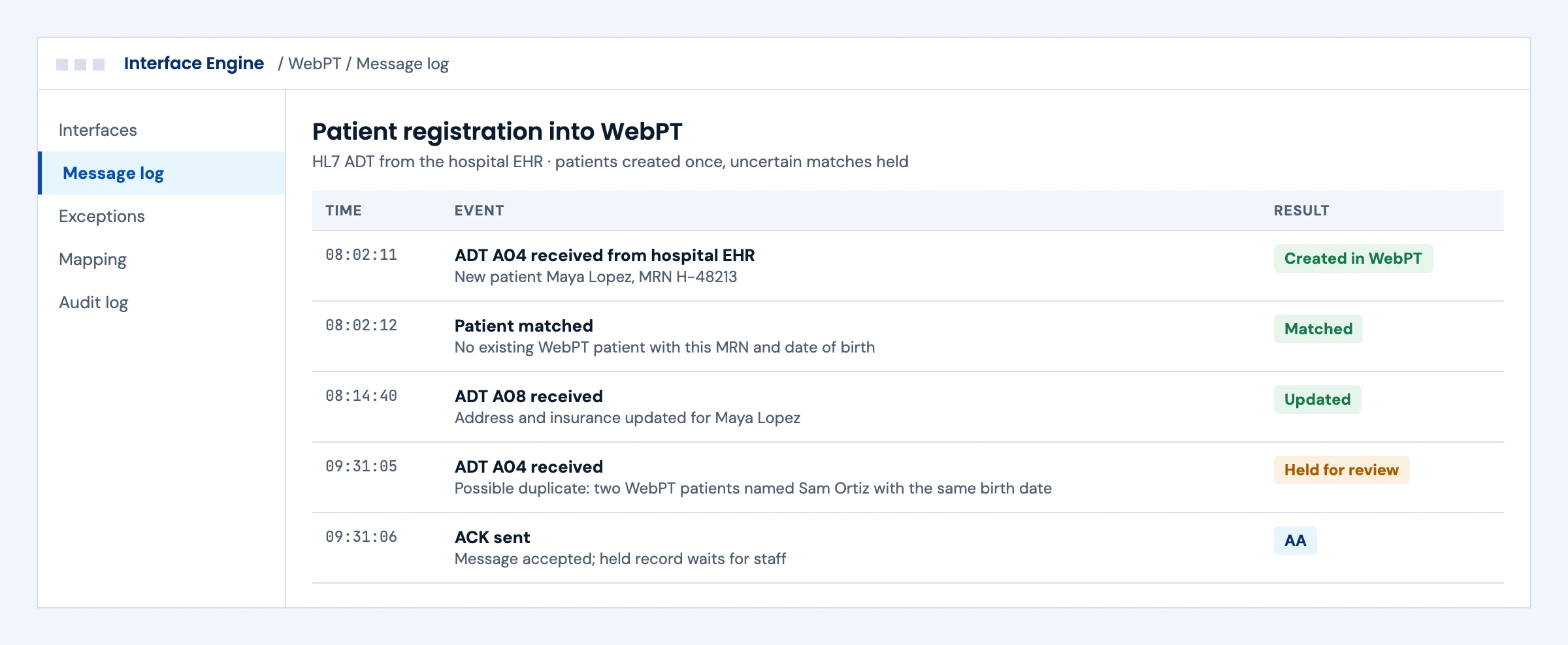
Registrations and updates from the hospital EHR create and update the patient in WebPT through HL7 ADT, and uncertain matches wait for a person.

What we build
  • ADT feed from your EHR to WebPT
  • Matching on MRN and date of birth before anything is created
  • A review queue for possible duplicates
Message log of HL7 ADT registrations into WebPT, with a possible duplicate patient held for review
Illustrative screen with fictional patients: message log of HL7 ADT registrations into WebPT, with a possible duplicate patient held for review. Tap to open full size.

Charges Flow to Billing Without Rekeying

Today

Billing staff rekey therapy charges from WebPT into the billing system.

With the integration

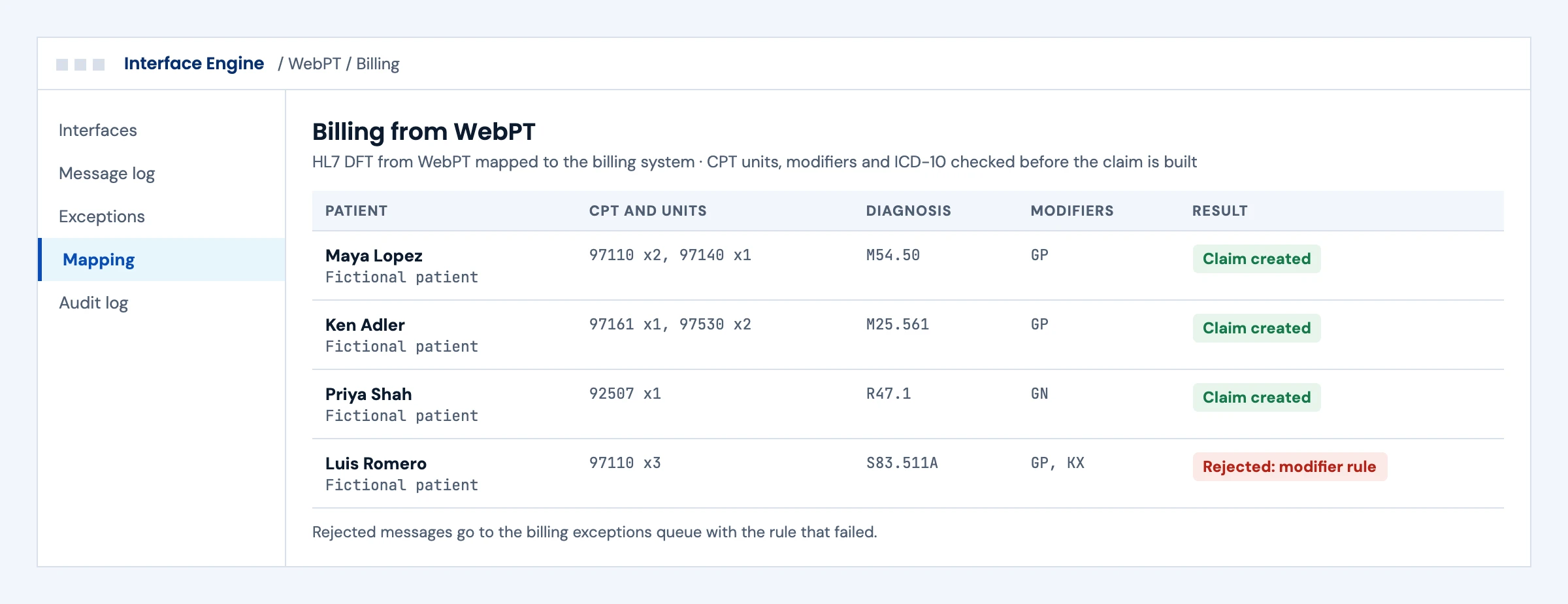
WebPT sends billing messages when treatment is recorded, and our mapping checks CPT units, therapy modifiers and diagnoses before the claim is built.

What we build
  • Receiving channel for WebPT ADT, BAR and DFT
  • CPT, units, modifier and ICD-10 mapping
  • An exceptions queue that names the failed rule
Billing messages from WebPT mapped to claims, with CPT units, therapy modifiers and one rejected claim
Illustrative screen with fictional patients: billing messages from WebPT mapped to claims, with CPT units, therapy modifiers and one rejected claim. Tap to open full size.

Notes Reach the Referring Physician

Today

Progress notes are faxed or printed for the referring physician.

With the integration

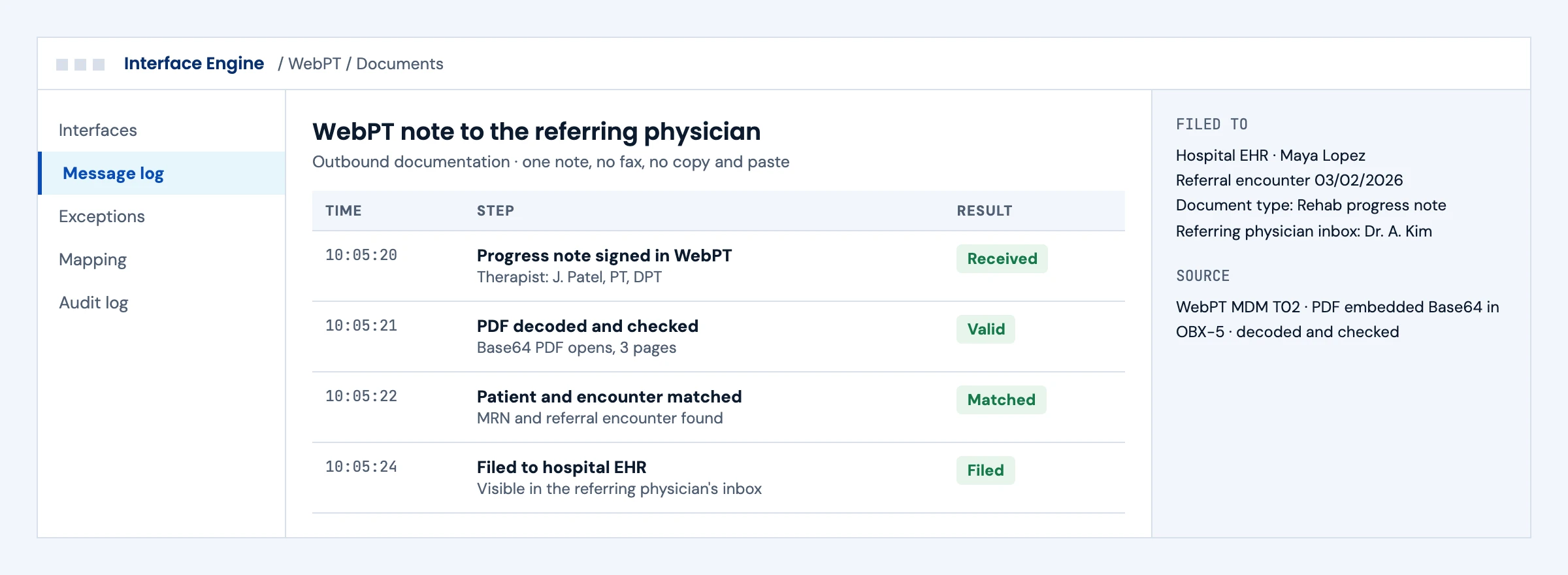
When a note is completed in WebPT, the PDF arrives in an HL7 document message and is filed to the right patient and encounter in the hospital EHR.

What we build
  • Receiving channel for MDM or ORU
  • Base64 PDF decoded and checked
  • Filing to the referring physician's inbox
A WebPT progress note decoded from an HL7 document message and filed to the referring physician in the hospital EHR
Illustrative screen with fictional patients: a WebPT progress note decoded from an HL7 document message and filed to the referring physician in the hospital EHR. Tap to open full size.

One View of Every WebPT Interface

Today

Nobody can say which interfaces are live, which are in testing and who owns a failure.

With the integration

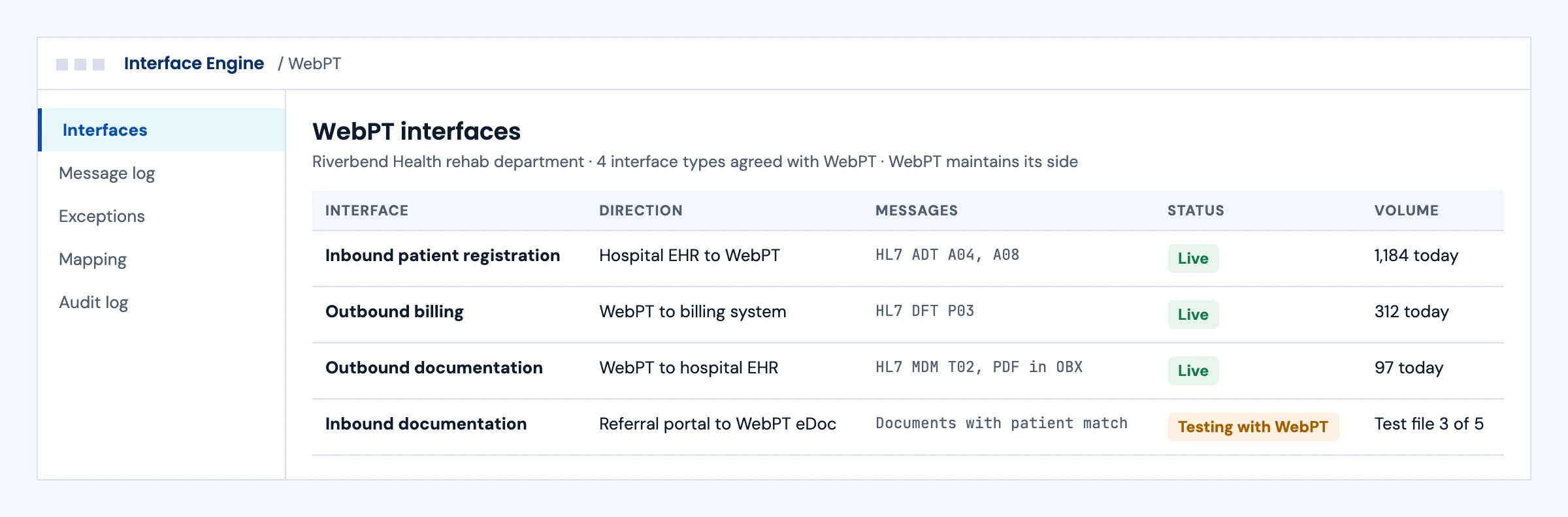
One screen shows each interface type agreed with WebPT, its status and its volume, with WebPT maintaining its side and us maintaining ours.

What we build
  • Interface inventory and status
  • Volume and failure alerts
  • A shared runbook with WebPT's contact
Overview of four WebPT HL7 interfaces with direction, message types, status and daily volume
Illustrative screen with fictional patients: overview of four WebPT HL7 interfaces with direction, message types, status and daily volume. Tap to open full size.

First call

Questions We Will Ask You on the First Call

The answers decide the route, the timeline and where these projects usually go wrong. You do not need them all before we talk.

Which WebPT interface types do you need?

Patient registration in, billing out, documents out and documents in are separate interfaces with separate testing.

Which system sits on the other side?

A hospital EHR, a billing system and your own product each need a different receiving or sending setup.

Do you already run an interface engine?

An engine such as Mirth Connect makes acknowledgments, retries and error queues far easier.

Which identifiers do both systems share?

A shared MRN makes patient registration reliable; without one we design matching rules.

How should therapy charges map to your billing system?

CPT codes, units, therapy modifiers and diagnosis pointers decide whether claims build cleanly.

Where should finished notes land?

An inbox, an encounter or a document folder; each EHR files documents differently.

Who has asked WebPT for the integration?

The clinic usually requests it, and WebPT assigns a point of contact.

Who owns failures after go-live?

WebPT maintains its side; someone on your side must own the exceptions queue.

The short answer

Does WebPT Have an API?

WebPT does not publish public REST API documentation that we could find. Its official integration route is a set of standard HL7 interfaces described on WebPT's integrations page: inbound patient registration through HL7 ADT, outbound billing through HL7 ADT, BAR and DFT, outbound documentation through HL7 MDM or ORU with the PDF embedded in the message, inbound documents into the WebPT eDoc section, and custom integrations by request. WebPT says it is integrated with more than 60 vendors and monitors its interfaces around the clock. A WebPT integration therefore means agreeing an interface with WebPT and building the system on the other side.

Who it is for
Hospital and health system rehab departments, therapy groups using a separate billing system, and vendors whose product must exchange data with WebPT clinics.
What we build
The sending or receiving side of WebPT's HL7 interfaces: an interface engine channel, field mapping, acknowledgments, PDF handling and test evidence.
The outcome we design for
Patients registered once, claims created from therapy notes and finished documents in the referring EHR without manual steps. These are intended outcomes, confirmed in testing with WebPT.

WebPT interfaces

WebPT's Standard Integration Types

From WebPT's integrations page, read in October 2026. WebPT builds and maintains its side; we build and test the other side and the mapping between them.

Integration typeDirection and messagesWhat it doesWhat we build
Inbound patient registrationInto WebPT, HL7 ADTRegistrations and updates made in another system create and update patients in WebPTADT feed from your EHR or product, patient matching rules and identifier mapping
Outbound billingOut of WebPT, HL7 ADT, BAR and DFTTreatment information recorded in WebPT creates claims in a billing systemReceiving channel in your billing system, charge and diagnosis mapping, rejected message queue
Outbound documentationOut of WebPT, HL7 MDM or ORUA completed document is sent with the PDF embedded in Base64Receiving channel, PDF decoding and filing to the right patient and encounter in your EHR
Inbound documentationInto WebPTDocuments such as prescriptions land in the eDoc section of the WebPT chartDocument feed, naming and patient matching so referrals land in the right chart
Custom integrationAgreed with WebPTWebPT offers custom solutions on requestRequirements, message design and testing on our side once WebPT agrees the scope

We could not find public REST API documentation from WebPT. Third-party catalogs say the same. If a workflow needs data beyond these interfaces, ask WebPT about a custom integration first.

What we build

What Our WebPT Integration Builds

Pick the interfaces your clinics or product need. Each one ships with a specification, test runs and an owner.

01

Patient Registration Feed

HL7 ADT messages from your EHR or scheduling system to WebPT, with the identifiers and demographics WebPT needs and rules for updates and merges.

ADT A04 · A08 · A40 · patient identifiers

HL7 integration services →
02

Billing Interface

Receiving WebPT's ADT, BAR and DFT messages in your billing system, mapping CPT codes, units, modifiers and diagnoses so claims build correctly.

ADT · BAR · DFT P03 · CPT and ICD-10 mapping

RCM integration →
03

Documentation to the Referring EHR

Receiving MDM or ORU messages when a WebPT document is completed, decoding the PDF and filing it to the right patient in the hospital or physician EHR.

MDM T02 · ORU R01 · Base64 PDF

HL7 MDM document messages in Mirth Connect →
04

Referrals and Prescriptions In

Sending referral packets and prescriptions to WebPT so they land in the eDoc section of the chart.

Inbound documents · eDoc · patient matching

05

Interface Engine Channels

Channels in your interface engine, such as Mirth Connect, with filters, transformers, acknowledgments and a queue for messages that fail.

Mirth Connect · ACK handling · error queue

Mirth Connect integration services →
06

Monitoring and Support

Alerts when messages stop or fail on our side, a shared runbook with WebPT's contact, and redacted operational logs.

Message counts · alerts · runbook

Integration monitoring and support →

Buyer decisions

WebPT Integration Options Compared

Use WebPT's standard interfaces first. They are the route WebPT maintains.

OptionBest fitStrengthsWhat to plan for
WebPT standard HL7 interfacesRegistration, billing and documentsMaintained and monitored by WebPTScheduling with WebPT's integration team and HL7 work on your side
Custom integration with WebPTWorkflows the standard types do not coverAgreed with the vendorScope and timing set by WebPT
Reports and exportsAnalytics and one-time migrationsNo interface buildManual steps and no ongoing sync
Login-based automationA gap no interface coversWorks where interfaces stopWebPT's terms, the clinic's written authorization and strict controls

Unofficial WebPT APIs automate the web application. We do not recommend one for a production integration unless WebPT's terms and the clinic's authorization allow it.

Integration boundaries

WebPT Integration Boundaries: Who Owns What

We write the split down before the build starts.

The clinic

Requests the integration from WebPT, approves what data moves and names an owner for exceptions.

WebPT

Builds, monitors and maintains its side of the interface and decides on custom work.

Your EHR or billing vendor

Owns the receiving or sending endpoint on its side if it is not built by us.

The integration layer (ours)

Channels, mapping, acknowledgments, error queues and alerts. Defects in this layer are ours to fix.

Security and PHI

A BAA is available for agreed work involving PHI. We work inside our ISO 27001:2022 certified management system, encrypt data in transit and at rest, keep credentials in a vault and keep raw payloads out of operational logs.

Deliverables

WebPT Integration Deliverables

Everything lands in your repository, your interface engine and your runbook.

01

Interface specification

Message types, fields, identifiers and test cases agreed with WebPT.

02

Channel code and configuration

Interface engine channels and mapping, with environment settings kept out of the code.

03

Test evidence

Recorded runs for new patients, updates, merges, billing messages, documents and failure cases.

04

Monitoring and runbook

Alerts, an exception queue and who to call at WebPT for each kind of failure.

Delivery phases

WebPT Integration Timeline

Initial planning estimate: 6 to 10 weeks for one interface type, subject to WebPT's integration schedule, the other system's readiness and testing. We confirm a release plan after discovery.

  1. 01

    Discovery and request

    Weeks 1 to 2

    Interfaces chosen, request sent to WebPT, fields and identifiers listed

  2. 02

    Specification and build

    Weeks 2 to 6

    Message spec agreed, channels and mapping built

  3. 03

    Joint testing

    Weeks 5 to 8

    Test messages exchanged with WebPT, failures fixed

  4. 04

    Go-live and hypercare

    Weeks 7 to 10

    Live traffic, monitoring on, runbook handed over

Cost drivers

What Drives WebPT Integration Cost

Use the scoping call to pin down the workflow, the access you need and what goes into a scoped proposal. These are the factors that move cost.

Interface types

Each direction and message family adds mapping and tests.

The other system

Whether your EHR or billing system already has an interface engine changes the build.

Matching and identifiers

Shared patient identifiers make registration simpler; without them we add matching rules.

Document handling

Filing PDFs to the right place in the receiving EHR can take more mapping than the messages themselves.

Support level

Monitoring and on-call support are priced per interface.

Book a call ↗

Proof

Interface Work You Can Check

Client names are withheld. These published guides show how we approach HL7 interface work; they do not prove WebPT approval or a live WebPT interface.

Published engineering guide

HL7 MDM Document Messages

How document messages are built and filed, the same pattern WebPT uses for outbound documentation.

Read the guide →

Published engineering guide

EHR Automation Without API Access

How we decide between interfaces, APIs and login-based automation, and the controls each needs.

Read the guide →

Published engineering guide

X12 EDI for Practice Billing

The claim transactions that follow once billing data leaves WebPT.

Read the guide →

Security

ISO 27001:2022 Certified, BAAs Signed

We are ISO 27001:2022 certified and sign Business Associate Agreements for work that touches patient data.

FAQ

WebPT Integration: Questions Buyers Ask

Does WebPT have an API?

WebPT does not publish public REST API documentation that we could find. Its integrations page describes standard HL7 interfaces for patient registration, billing, outbound documentation and inbound documents, plus custom integrations on request.

How do you integrate with WebPT?

Through WebPT's standard HL7 interfaces. The clinic requests the integration, WebPT assigns a point of contact, the message specification is agreed, and the other system sends or receives the HL7 messages. We build and test that other side.

Which HL7 messages does WebPT use?

WebPT's page lists HL7 ADT for inbound patient registration, ADT, BAR and DFT for outbound billing, and MDM or ORU for outbound documentation with the PDF embedded in Base64. Inbound documents land in the WebPT eDoc section.

Can we send referrals and prescriptions into WebPT?

Yes. WebPT's inbound documentation integration stores documents such as prescriptions in the eDoc section of the patient's chart. We build the sending side and the patient matching so each document lands in the right chart.

Can WebPT send completed notes to our hospital EHR?

Yes. WebPT's outbound documentation integration sends HL7 MDM or ORU messages when a document is completed, with the PDF embedded. Your EHR or interface engine has to decode the PDF and file it to the right patient and encounter.

Can WebPT send charges to our billing system?

Yes. WebPT's outbound billing integration sends HL7 ADT, BAR and DFT messages that create claims in a billing system. The receiving system needs mapping for codes, units, modifiers and diagnoses.

Is there an unofficial WebPT API?

Some companies sell access that automates the WebPT web application. We start with WebPT's own interfaces and use login-based automation only where WebPT's terms and the clinic's written authorization allow it.

Who maintains a WebPT interface after go-live?

WebPT maintains and monitors its side. We maintain the channels, mapping and alerts on your side, with a shared runbook for failures.

Do we need an interface engine?

Usually yes. HL7 interfaces are easiest to run through an engine such as Mirth Connect, which handles acknowledgments, retries and error queues. If your product has its own HL7 listener, we build there instead.

How long does a WebPT integration take?

Our initial planning estimate is 6 to 10 weeks for one interface type, depending mostly on WebPT's integration schedule and how ready the other system is.

How much does a WebPT integration cost?

Cost depends on the interface types, the receiving or sending system, patient matching, document handling and support level. After a scoping call we send a scoped proposal with the access dependencies listed.

Next step

Plan Your WebPT Integration

Tell us which data needs to move and the systems on the other side. An engineer replies with the WebPT interface type for each workflow and the open questions for WebPT.

Start with your workflow

Tell Us About Your WebPT Integration

Share the workflows, the systems involved and your target date. Use de-identified examples only. Read by an engineer, answered within one business day.

Please exclude patient data and credentials. We use these details to respond to your inquiry. Privacy policy

Thank you. Your inquiry has been received. Our team will review your requirements.