Nextech integration · United States

Nextech API Integration for Specialty Practices

We build Nextech integrations for health tech products serving dermatology, ophthalmology, plastic surgery and med spa practices. Nextech documents FHIR APIs for its Select (NexCloud) EHR and Practice+ practice management products, each with its own host, sign-in method and functions. We match your workflow to the product each practice runs, request access through Nextech's vendor partnership form and build within its limits.

  • Nextech Select
  • Practice+
  • FHIR STU3 and R4
  • OAuth 2.0
  • nx-practice-id
  • Booking
  • Documents

Which Nextech product a practice runs decides the API.
  1. 01Find the product

    Select (NexCloud), IntelleChartPRO, Practice+ or SRSPro. Each has its own API documentation and FHIR base URLs.

  2. 02Request access

    Vendors fill Nextech's vendor partnership request; credentials come from a Nextech representative and the practice ID goes on every call.

  3. 03Build within limits

    20 requests per second per endpoint, on-demand calls, and _lastUpdated searches instead of bulk syncing.

Evidence you can check

The problem

Sound Familiar?

Teams building for dermatology, ophthalmology and plastic surgery practices on Nextech run into these four problems first.

Consult requests that wait for a phone call

Patients ask for a cosmetic consult or cataract evaluation online, then wait until the front desk calls back to find a time.

Duplicate patients from every campaign

Each new consult form creates another patient record, and staff merge charts every week.

Photos and consent forms in the wrong place

Before and after photos and signed consents live in a tablet app or email, not on the patient's chart.

An integration that slows down at the worst time

Your sync hits the rate limit during clinic hours, and nobody knows which practice runs which Nextech product.

Use cases

What It Looks Like When It Works

Four use cases, each shown as the screen your team works in. The patients and practices are fictional; the API behavior follows Nextech's published Select and Practice+ references.

Online Booking Against Real Open Slots

Today

A consult request sits in an inbox until someone calls the patient back.

With the integration

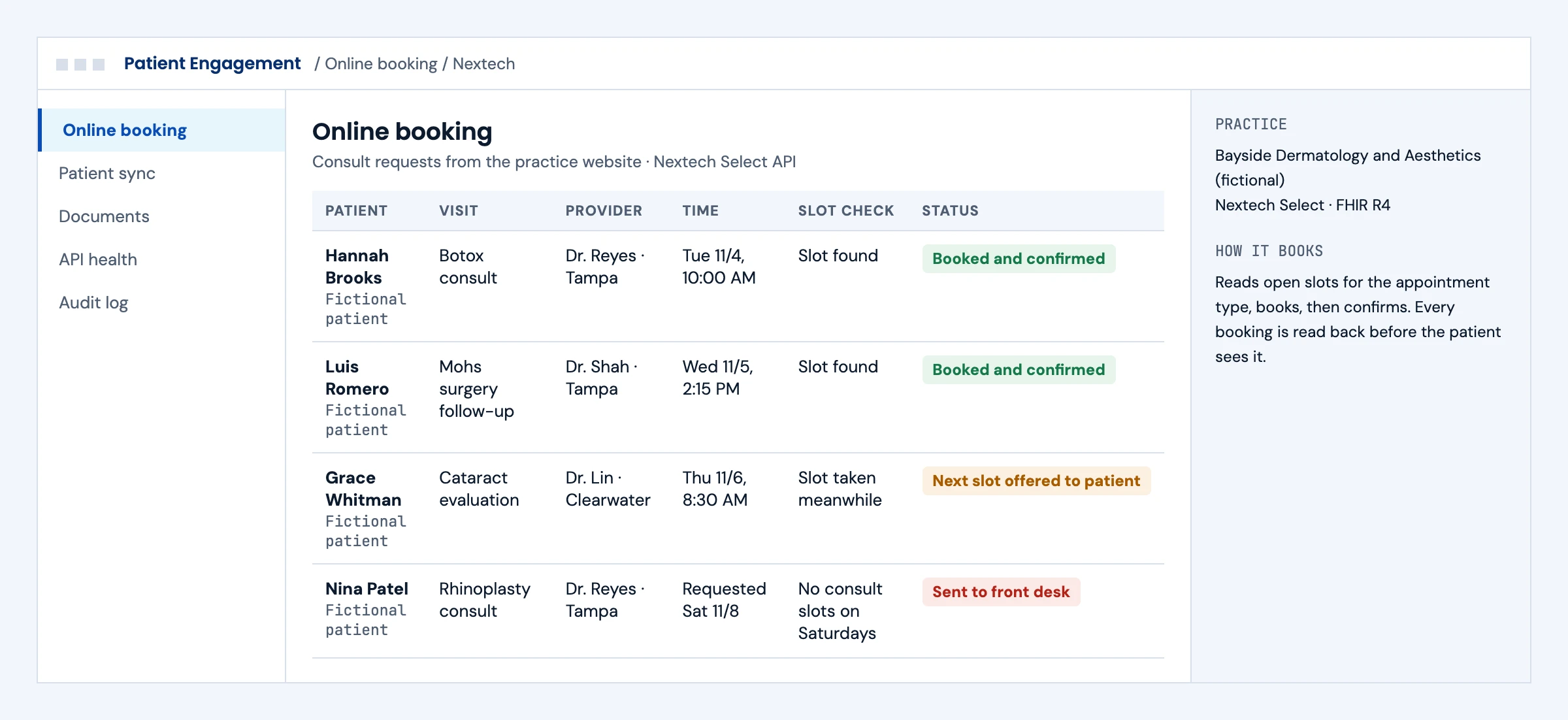
The request is matched to an open slot for the right appointment type, booked and confirmed in Nextech, and read back before the patient sees it. A taken slot or a closed day goes to the front desk.

What we build
  • Slot and appointment type reads on Nextech Select
  • Booking and confirmation with a read-back check
  • Clear routing for conflicts and requests outside clinic hours
Online consult booking against Nextech open slots, with confirmed bookings, a taken slot and a request sent to the front desk
Illustrative screen with fictional patients and practices: online consult booking against Nextech open slots, with confirmed bookings, a taken slot and a request sent to the front desk. Tap to open full size.

New Patients Without Duplicates

Today

Every campaign lead becomes a new chart, and staff merge records by hand.

With the integration

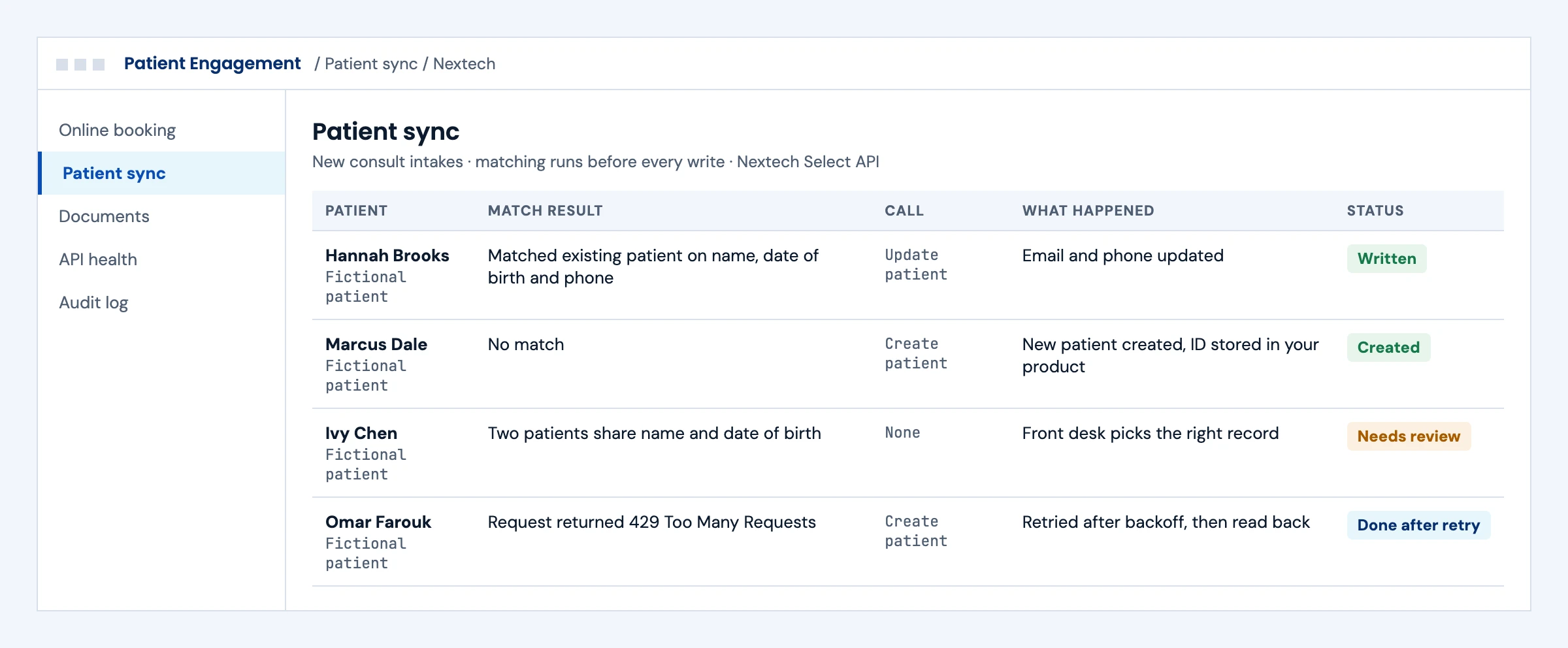
Matching runs before every write: an existing patient is updated, a new one is created, an uncertain match waits for staff, and a rate-limited call is retried and read back.

What we build
  • Matching on name, date of birth and contact details before any write
  • Create and update patient calls through the documented functions
  • Backoff on HTTP 429 with a read-back before retrying
Patient sync to Nextech with an update, a new patient, an uncertain match for review and a retried call after HTTP 429
Illustrative screen with fictional patients and practices: patient sync to Nextech with an update, a new patient, an uncertain match for review and a retried call after HTTP 429. Tap to open full size.

Photos and Consents on the Chart

Today

Photos and signed consents live in a separate app and are hard to find at the next visit.

With the integration

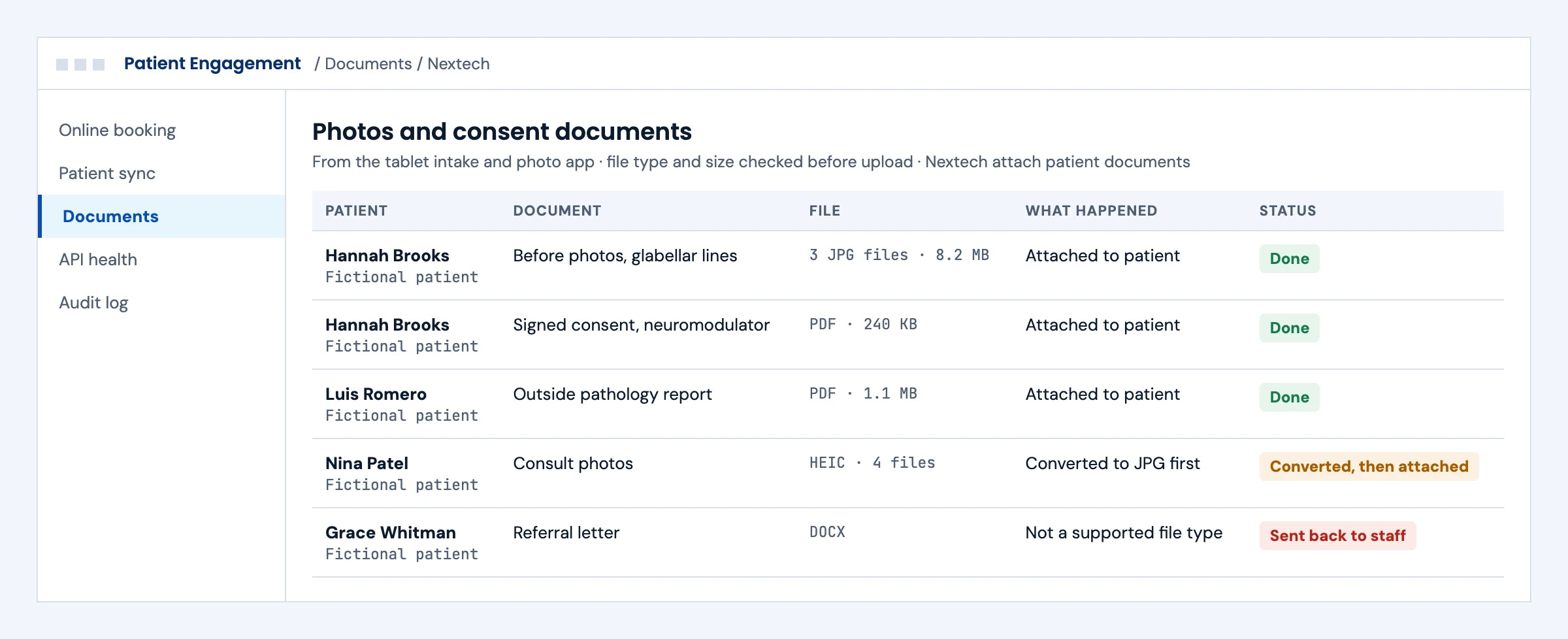
Before photos, consent forms and outside reports are attached to the right patient as documents, with file types checked and converted first, and unsupported files sent back to staff.

What we build
  • Document attachment through Nextech's attach patient documents function
  • File type and size checks, with photo conversion where needed
  • A log of every attachment and every rejected file
Photos, consent forms and outside reports attached to patients in Nextech, with a converted photo and a rejected file type
Illustrative screen with fictional patients and practices: photos, consent forms and outside reports attached to patients in Nextech, with a converted photo and a rejected file type. Tap to open full size.

Steady Syncs Inside the Rate Limit

Today

The integration slows clinics down at peak hours and fails quietly when credentials expire.

With the integration

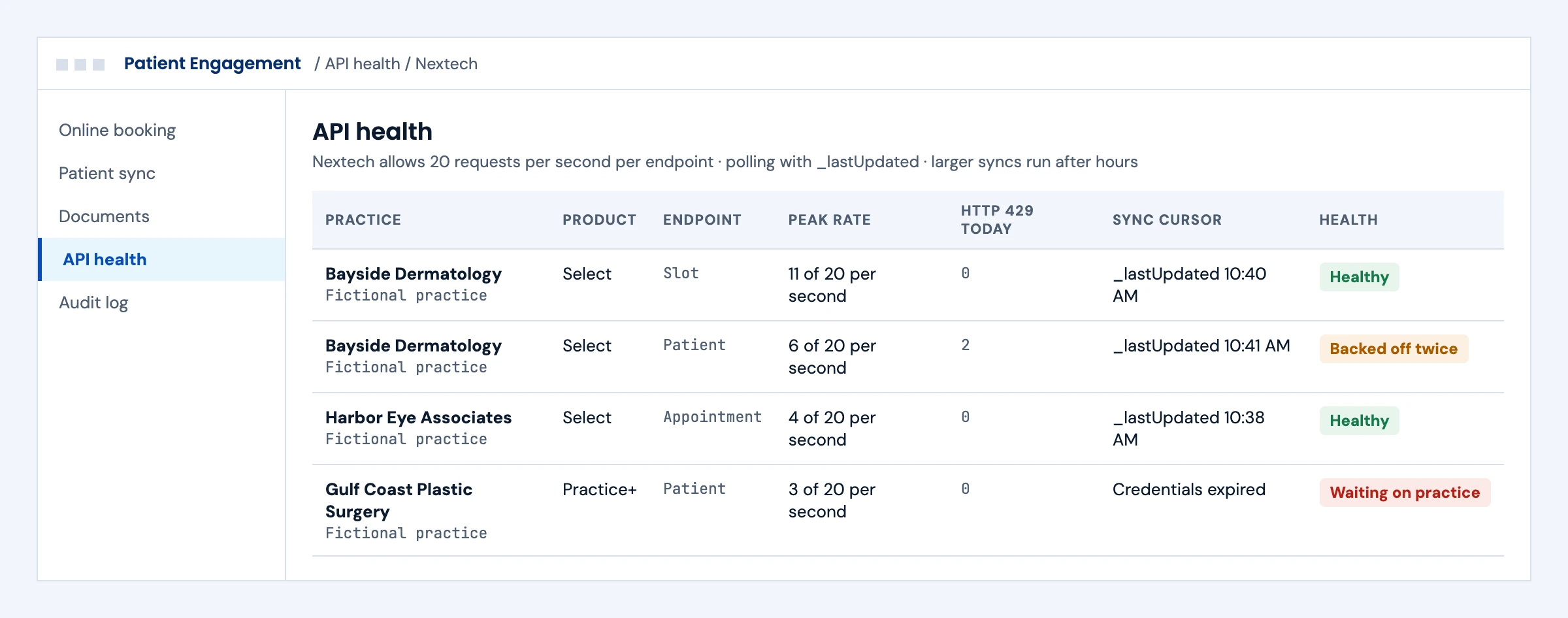
Each practice's product, endpoint rate and sync cursor are visible. Polling uses _lastUpdated, larger syncs run after hours, and expired credentials pause the job with the practice told what to do.

What we build
  • Per-endpoint pacing under 20 requests per second
  • _lastUpdated cursors per practice and product
  • Alerts for 429 spikes and expired credentials
Nextech API health by practice and product with request rates, HTTP 429 counts, sync cursors and expired credentials
Illustrative screen with fictional patients and practices: nextech API health by practice and product with request rates, HTTP 429 counts, sync cursors and expired credentials. Tap to open full size.

First call

Questions We Will Ask You on the First Call

The answers decide which Nextech API you use, how access works and where these projects usually go wrong.

Which Nextech product does each practice run?

Select, IntelleChartPRO, Practice+ and SRSPro each have their own API documentation, sign-in and functions.

Has the vendor partnership request been submitted?

Credentials come from a Nextech representative, so this starts the clock on access.

Which workflows come first: booking, intake, payments, documents or recalls?

Each maps to specific functions, and Practice+ lists fewer than Select.

How do you match patients today?

Campaign leads and referrals are the usual source of duplicates.

What photos and documents will you attach, and in which formats?

File types and sizes need checks before upload, especially for photo apps.

How many practices will you connect in the first year?

A repeatable setup checklist matters most when you add many practices.

How fresh must the data be?

Nextech asks for on-demand use and off-peak syncs, so freshness decides the polling plan.

Are any of your practices also on ModMed or another EHR?

Dermatology groups often run different systems at different sites, which changes the integration design.

The short answer

Does Nextech Have an API? Yes, One per Product

Nextech publishes FHIR-based APIs for its Select (NexCloud) EHR, IntelleChartPRO EMR, Practice+ practice management and SRSPro products. The Select API covers patient demographics and clinical information, creating and updating patients, posting payments, booking and confirming appointments, slots, non-clinical notes and document attachments. The Practice+ API covers demographics, patients, payment posting, appointment information, confirmations and documents. Calls are JSON over HTTPS with an OAuth 2.0 bearer token from Microsoft Entra and the practice's nx-practice-id header, limited to 20 requests per second per endpoint. Nextech supports its STU3 APIs and recommends FHIR R4 for new projects. Vendors start with Nextech's vendor partnership request; neither reference documents webhooks, so integrations search with _lastUpdated.

Who it is for
Patient engagement, booking, payments, photography, AI and analytics products serving dermatology, ophthalmology, plastic surgery, med spa and orthopedic practices on Nextech.
What we build
Patient and appointment sync, online booking against open slots, payment posting, document and photo attachment, recall workflows and clinical reads.
The outcome we design for
Your product connected to each practice's Nextech product through the access Nextech grants, with a setup checklist per practice. These are intended outcomes, not a promise about Nextech's decisions.

Nextech APIs

What Nextech's APIs Let You Read and Write

From Nextech's developers portal and its published Select and Practice+ API references, checked in October 2026. Confirm which product and version each practice runs before scoping.

InterfaceWhat it coversWrite accessWhat to plan for
Nextech Select (NexCloud) APIDemographics, clinical data (allergies, conditions, medications, observations, procedures, documents), appointments, slots, recalls, coverage, claims and paymentsCreate and update patient, post payments, book and confirm appointments, create non-clinical notes, attach documentsResource owner password grant through Microsoft Entra; credentials from a Nextech representative expire at first sign-in
Nextech Practice+ APIDemographics, appointments, slots, recalls, payers, coverage, claims, encounters and paymentsCreate and update patient, post payments, confirm appointments, attach documentsClient credentials grant with a partner ID and secret; host api.pm.nextech.com
IntelleChartPRO and SRSProFHIR documentation for each product on Nextech's developers portalPer product documentationConfirm the product with the practice; SRSPro patients use a separate patient portal
Rate limits20 requests per second per endpoint, per user; HTTP 429 when exceededNot applicableExponential backoff, staggered requests and caching
Change detectionNeither reference documents webhooksNot applicableSearch with _lastUpdated and run larger syncs outside each practice's peak hours, as Nextech advises
Patient and SMART appsPatient access through MyPatientVisit and SMART on FHIR apps for providersReadNo fee to patients for open APIs; apps are screened by Nextech before connection

Nextech supports its STU3 APIs and recommends FHIR R4 for new projects. Its partner OpenAPI specifications use resource owner credentials rather than the SMART authorization flow.

What we build

What Our Nextech Integration Builds

Pick the workstreams your product needs. Each one ships with a specification, test runs and an owner.

01

Online Booking Against Open Slots

Consult and follow-up booking from your site or app using Nextech's slots and appointment types, confirmed back to the practice, with conflicts sent to the front desk.

Slot · Appointment · Appointment-Type · confirm

02

Patient Sync

Patients created or updated from your intake with matching before every write, so a cosmetic consult or new referral never creates a duplicate.

Patient create and update · search

03

Payment Posting

Deposits, package payments and patient payments from your product posted to the right patient and account, with reconciliation reports.

PaymentReconciliation · Account

RCM integration →
04

Photos and Consent Documents

Before and after photos, consent forms and outside records attached to the patient as documents, with file type and size checked first.

DocumentReference · Binary

FHIR DocumentReference for clinical notes →
05

Recalls and Reminders

Recall lists read from Nextech to drive your reminder and reactivation campaigns, with outcomes written back as non-clinical notes where the product supports it.

Patient-Recall · non-clinical notes

06

Rate Limits, Polling and Support

A scheduler that stays under 20 requests per second per endpoint, searches with _lastUpdated, backs off on 429 and alerts on failures, with redacted operational logs.

429 handling · _lastUpdated · alerts

Integration monitoring and support →

Buyer decisions

Nextech Integration Options Compared

Choose by the Nextech product the practice runs and the workflow. A product serving many practices may need more than one.

OptionBest fitStrengthsWhat to plan for
Select (NexCloud) APIPractices on Nextech's EHR needing booking, payments, documents and clinical readsThe widest documented function setPassword grant credentials and per-practice IDs
Practice+ APIPractices on Nextech's practice management productClient credentials suit server-to-server workFewer functions than Select; no booking listed
SMART on FHIR appProvider-facing apps launched from NextechOpens from the EHR with the patient in contextNextech screening; read access
ExportsOne-time migrations and analytics backfillsNo build on Nextech's sideManual steps and no ongoing sync
Login-based automationWorkflows neither API coversWorks where the API stopsWritten authorization, Nextech's terms and strict controls

For dermatology groups on ModMed instead of Nextech, see our ModMed integration page.

Integration boundaries

Nextech Integration Boundaries: Who Owns What

We write the split down before the build starts.

The practice

Confirms which Nextech product it runs, requests or approves your access and decides which data you may use.

Nextech

Owns its APIs, terms, screening and credentials, and states that it is not responsible for building or maintaining third-party applications. We build to the published interfaces.

Your product team

Owns what your product does with Nextech data and how it appears to staff and patients.

The integration layer (ours)

Clients, token handling, matching, polling, backoff, redacted operational logs and alerts. Defects in this layer are ours to fix.

Clinical records

Clinical charting stays in Nextech. The documented write functions cover patients, payments, appointments, documents and non-clinical notes.

Security and PHI

A BAA is available for agreed work involving PHI, under our ISO 27001:2022 certified management system. Credentials are kept in a vault and raw payloads stay out of operational logs.

Deliverables

Nextech Integration Deliverables

Everything lands in your repository and your runbook.

01

Product and workflow map

Which Nextech product each practice runs and which API functions serve each workflow.

02

Integration code in your repository

Clients for each product, token handling, matching and polling, with practice IDs kept out of the code.

03

Practice setup checklist

The access request, credential reset, practice ID and FHIR base URL steps for each practice.

04

Test evidence

Recorded runs covering bookings, duplicates, payments, documents, 429 responses and expired credentials.

05

Security pack

Credential handling, permissions and log redaction, documented for your review and Nextech's screening.

06

Monitoring and runbook

Failure alerts, rate limit dashboards and a support runbook per practice.

Delivery phases

Nextech Integration Timeline

Initial planning estimate: 6 to 10 weeks to a first live practice, subject to Nextech's access process, the practice's product and workflow validation. Discovery confirms the first workflow and access before you commit to a release date.

  1. 01

    Discovery and access

    Weeks 1 to 2

    Product confirmed per practice, workflows mapped, vendor partnership request submitted

  2. 02

    Build

    Weeks 2 to 6

    Clients, booking, sync, payments and documents built and tested

  3. 03

    Practice validation

    Weeks 5 to 8

    First practice's credentials and practice ID set up, data checked with the practice team

  4. 04

    Go-live and hypercare

    Weeks 7 to 10

    First practice live, monitoring on, setup checklist handed over

Cost drivers

What Drives Nextech Integration Cost

Use the scoping call to pin down the workflow, the access you need and what goes into a scoped proposal. These are the factors that move cost.

Products covered

Supporting both Select and Practice+ adds a second client and sign-in method.

Workflows

Booking, payments, documents and recalls each add mapping and tests.

Matching

Existing patients in both systems need matching rules and a review step.

Sync volume

Many practices under a per-endpoint rate limit need careful scheduling.

Practices per year

A repeatable setup checklist matters most when you add many practices.

Support level

Monitoring and on-call support are priced per connection.

Book a call ↗

Proof

EHR API Work You Can Check

Client names are withheld. These published guides show how we approach EHR API work; they do not prove Nextech approval or a live practice integration.

Published engineering guide

Multi-EHR API Comparison

How Epic, Oracle Health, athenahealth and eClinicalWorks expose their APIs, and what that means for a product that must serve several EHRs.

Read the guide →

Published engineering guide

EHR Automation Without API Access

When an EHR's API stops short, this is how we decide between APIs, RPA and computer-use agents, and the controls each needs.

Read the guide →

Published engineering guide

FHIR DocumentReference for Clinical Documents

How documents and attachments are stored and returned across EHRs, which applies to photos and consent forms in specialty practices.

Read the guide →

Security

ISO 27001:2022 Certified, BAAs Signed

We are ISO 27001:2022 certified and sign Business Associate Agreements for work that touches patient data.

FAQ

Nextech Integration: Questions Buyers Ask

Does Nextech have an API?

Yes. Nextech publishes FHIR-based API documentation for its Select (NexCloud) EHR, IntelleChartPRO EMR, Practice+ practice management and SRSPro products on its developers portal, and vendors request access through its vendor partnership form.

Is the Nextech API FHIR STU3 or R4?

Both are documented. Nextech says it will keep supporting its STU3 APIs but recommends FHIR R4 for all new projects, because R4 will be best supported and gain more endpoints as USCDI expands.

What can the Nextech Select API write?

Its reference lists creating and updating patients, posting payments, booking and confirming appointments, creating non-clinical patient notes and attaching documents. Clinical charting is read, not written.

How do you authenticate to the Nextech API?

With an OAuth 2.0 bearer token from Microsoft Entra and the practice's nx-practice-id header on every call. The Select API uses a resource owner password grant with credentials from a Nextech representative; Practice+ uses a client credentials grant with a partner ID and secret.

What are Nextech's API rate limits?

The default is 20 requests per second per endpoint, per user, and the API returns HTTP 429 when it is exceeded. Nextech advises exponential backoff, staggered requests, caching and syncing outside peak hours.

Does Nextech support webhooks?

Neither the Select nor the Practice+ reference documents webhooks. Nextech advises searching with _lastUpdated to avoid re-reading unchanged data, so integrations poll on a schedule that fits the rate limit.

Can patients book online through the Nextech API?

On Select, yes: the API lists slot information and booking and confirming appointments. The Practice+ reference lists appointment information and confirmations but not booking, so we confirm the practice's product first.

Which Nextech product does a practice use?

Practices run Nextech Select (NexCloud), IntelleChartPRO, Practice+ or SRSPro, and each has its own API documentation and FHIR base URLs. We confirm the product and version with each practice before mapping workflows.

Is there a Nextech integration for dermatology?

Yes. Many dermatology, plastic surgery and med spa practices run Nextech, and its APIs support booking, patients, payments and documents such as photos and consent forms. For dermatology groups on ModMed, see our ModMed integration page.

Does Nextech charge for API access?

Nextech states it does not charge patients to access its open APIs through SMART on FHIR apps. Vendor access follows Nextech's partnership request and terms, which we review with you during discovery.

How long does a Nextech integration take?

Our initial planning estimate is 6 to 10 weeks to a first live practice, subject to Nextech's access process, the practice's product and workflow validation. Later practices can differ in setup.

How much does a Nextech integration cost?

Cost depends on the Nextech products covered, the workflows, patient matching, sync volume, how many practices you add and the support level. After a scoping call we send a scoped proposal with the access dependencies listed.

Next step

Plan Your Nextech Integration

Tell us the workflows your product needs and which Nextech products your practices run. An engineer replies with the likely API per workflow, the access steps and the open questions.

Start with your workflow

Tell Us About Your Nextech Integration

Share the workflows, the Nextech products and your target date. Use de-identified examples only. Read by an engineer, answered within one business day.

Please exclude patient data and credentials. We use these details to respond to your inquiry. Privacy policy

Thank you. Your inquiry has been received. Our team will review your requirements.