How to Receive ADT Feeds from Epic (2026): Setup and Cost

CTO & Co-Founder
CTO & Co-Founder at Nirmitee.io. Architects healthcare integrations across FHIR, SMART on FHIR, ABDM and NHCX, writing from production experience taking hospital software from sandbox to go-live.
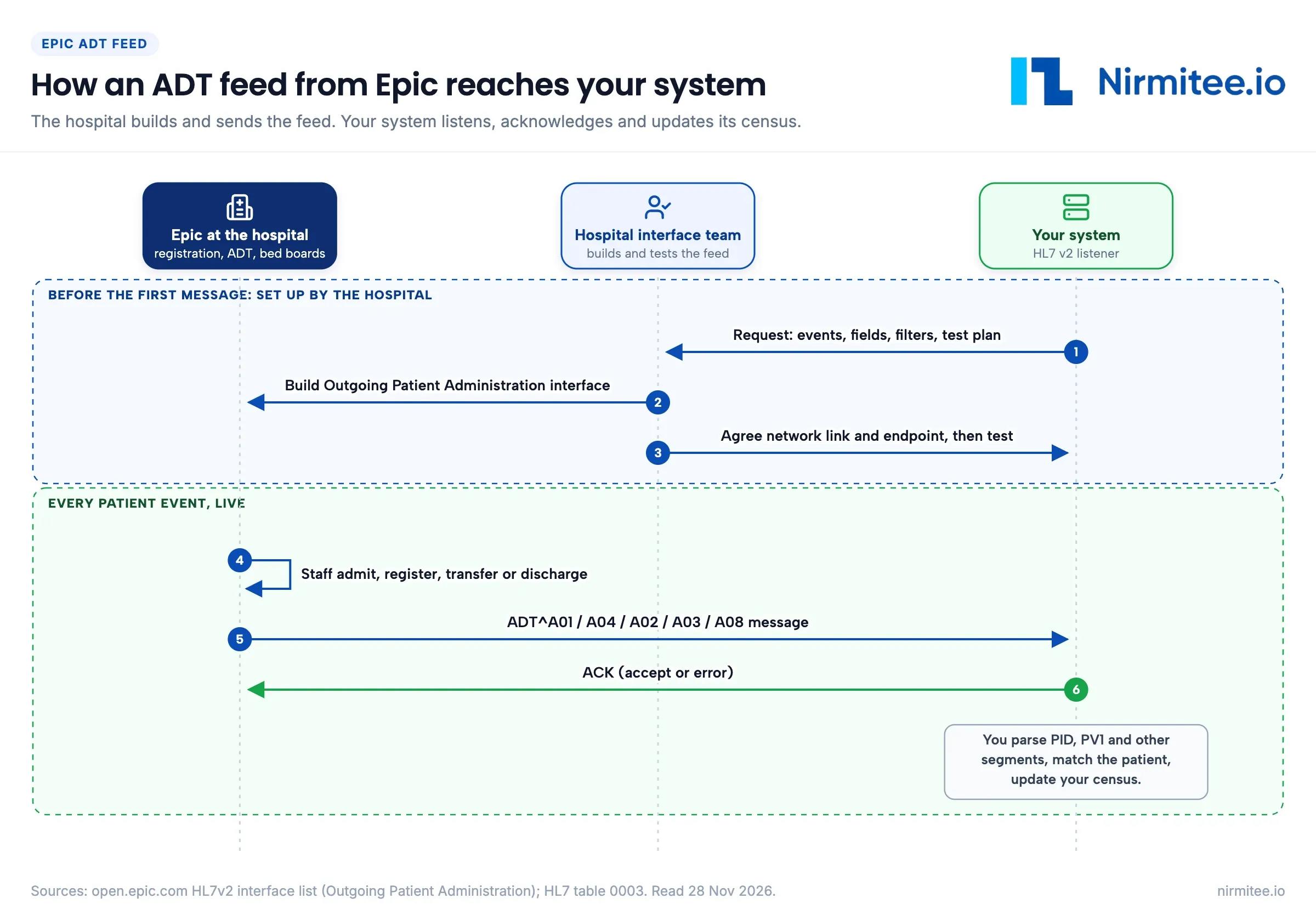
To receive ADT feeds from Epic, you ask each hospital that runs Epic to turn on its outgoing ADT interface for you. Its interface team builds the feed in its own Epic. The feed sends HL7 v2 messages such as A01 (admit), A04 (register), A02 (transfer), A03 (discharge) and A08 (update) to a listener you run. Your system answers each message with an acknowledgement.
Epic itself does not hand out ADT feeds. Each customer runs its own Epic and decides who connects, so the feed is a project with each hospital. Epic does not publish a price for it.
Last checked Nov 28, 2026 against open.epic.com, the HL7 code tables and the CMS rule text.
What is an Epic ADT feed, at a glance?
| Question | Short answer |
|---|---|
| Who turns the feed on? | The hospital that runs Epic. Its interface team builds and tests it. |
| What is the Epic interface called? | "Outgoing Patient Administration" in Epic's HL7v2 list on open.epic.com. |
| What does it send? | New patients, demographic changes, visits (ADT), registration with guarantors and insurance, allergies and bed status updates. |
| Which events matter most? | A01 admit, A04 register, A02 transfer, A03 discharge, A08 update. Cancels (A11, A13) and merges (A40) too. |
| Is there a FHIR way? | Epic's public FHIR list shows Encounter read and search. It lists no FHIR Subscription for admissions. |
| What does it cost? | Epic does not publish a price. Ask the hospital what it charges, if anything. |
| How long does it take? | Epic does not publish a timeline. It depends on the hospital's interface queue and security review. |
| Biggest limit | One feed per hospital. A second hospital is a second setup. |
How do you receive ADT feeds from Epic, step by step?
You get an ADT feed from Epic by agreeing a feed with each hospital, then running a listener that accepts and acknowledges its messages. The steps below are the usual order. Epic's developer guide says the same thing in general terms: you connect directly to each Epic customer, and the customer controls how and with whom it connects.
- Find a sponsor at the hospital. Usually the team that wants your product (care management, bed management, a service line). They ask their interface team for the feed.
- Write the request. Which events, which patient groups (one unit, all inpatients, ED only), which fields, and how fast you need them.
- Agree the connection. The hospital and you settle how messages travel, where your listener sits, and how it is secured. Ask which transport they use (for example MLLP over TCP through a VPN tunnel, or a file drop) and who owns each firewall rule.
- The hospital builds the outgoing interface in its Epic, using Epic's Outgoing Patient Administration interface, and points it at your test listener.
- Test in non-production. Run real-life scenarios: admit, transfer, discharge, cancel, merge, a name change. Check every field you use.
- Go live with the hospital's sign-off, then watch error queues and acknowledgements for the first weeks.
- Repeat for the next hospital. Each Epic customer runs its own build, so filters and field use can differ.
Which Epic interface sends ADT messages?
Epic's interface for this is called Outgoing Patient Administration. On open.epic.com, Epic says it tells external systems about new patients and demographic changes. It also sends visits (ADT), registration (guarantors and insurance coverage), allergies and bed status updates. Epic says these messages are triggered from many of its applications.
Two limits are in Epic's own description:
- Allergy updates are sent only from the Allergy activity.
- It does not send final coded diagnoses, procedures or DRGs after a hospital account is coded. If you need coded data, that is a different interface.
Epic's HL7v2 interface list shows more than 900 product entries already integrated with this interface (counted Nov 28, 2026), including payers, labs, telehealth and analytics vendors. The full message specification sits behind an open.epic login, so most vendors see it through the hospital or through Epic's Vendor Services program.
Epic also lists other ADT-related interfaces that suit narrower cases:
| Epic interface (open.epic HL7v2 list) | What Epic says it does | Who it suits |
|---|---|---|
| Outgoing Patient Administration | Sends new patients, demographics, visits (ADT), registration, allergies, bed status | Most vendors who need a live census or admission alerts |
| Event Notifications via Direct | Sends CMS Event Notifications that follow DirectTrust's Event Notifications via the Direct Standard guide, with HL7v2 attachments | Practices and post-acute providers who receive admit and discharge alerts over Direct |
| Outgoing External Encounters | Sends HL7v2 ADT messages built from external encounters, intended for Payer Platform | Payers on Epic's Payer Platform |
| Incoming External Encounters | Receives encounters that happened at an outside entity, for Payer Platform or Healthy Planet | Sending ADT into Epic, the other direction |
For the wider picture of Epic's HL7 v2 interfaces, see our Epic Bridges guide.
Which ADT events should you ask Epic for?
Ask for the events your product acts on, plus the cancels and merges that undo them. The event names below come from HL7's own table of trigger events.
| Event | HL7 name | Why you need it |
|---|---|---|
| A01 | Admit/visit notification | Patient admitted. Starts an inpatient stay in your census. |
| A04 | Register a patient | Outpatient or ED registration. Many ED alerts start here. |
| A02 | Transfer a patient | Unit or bed change. Keeps your bed view right. |
| A03 | Discharge/end visit | Ends the stay. Triggers follow-up and readmission work. |
| A08 | Update patient information | Corrections to demographics or the visit. Usually the most frequent event. |
| A11 | Cancel admit/visit notification | Undoes an A01 or A04 sent in error. Without it your census drifts. |
| A13 | Cancel discharge/end visit | Puts a discharged patient back. |
| A40 | Merge patient, patient identifier list | Two records become one. Your patient matching must follow it. |
Each message carries segments. The ones you read most are MSH (message header), EVN (event type), PID (patient identification), PV1 (patient visit) and, on merges, MRG (merge patient information). Your listener replies with an acknowledgement that carries an MSA (message acknowledgment) segment.
Here is a short synthetic A01 (made-up patient, hospital and IDs) so you can see the shape. Real Epic messages carry more fields, and each hospital's build decides which ones.
MSH|^~\&|EPIC|DEMOHOSP|YOURAPP|YOURORG|20261128093000||ADT^A01|MSG00001|P|2.5.1
EVN|A01|20261128093000
PID|1||100200300^^^DEMOHOSP^MR||TEST^PATIENT^A||19800101|F
PV1|1|I|4WEST^401^A^DEMOHOSP||||1234^DOCTOR^DEMO
Your listener answers with an acknowledgement like this:
MSH|^~\&|YOURAPP|YOURORG|EPIC|DEMOHOSP|20261128093001||ACK^A01|ACK00001|P|2.5.1
MSA|AA|MSG00001
Our guide to ADT messages A01, A04, A08 and A40 shows sample messages, and our real-time census guide shows how to turn the events into a census.
Can you get Epic ADT events through FHIR instead of HL7 v2?
Not as a pushed feed, based on what Epic publishes today. Epic's public FHIR catalog on open.epic.com lists Encounter read and search (R4). On Nov 28, 2026 neither that list nor the fhir.epic.com documentation described a FHIR Subscription for encounters or admissions. For the other gaps, see what you can and can't do with the Epic FHIR API.
That leaves two FHIR patterns, and neither replaces a live feed:
| Option | How it works | Fit for ADT |
|---|---|---|
| HL7 v2 Outgoing Patient Administration | Epic pushes each event as it happens | Best for a live census, alerts and bed boards |
| FHIR Encounter search | Your app asks for encounters for a known patient | Good for looking up visits, weak for "tell me when anyone is admitted" |
| FHIR Subscription (standard) | In the FHIR standard, the server posts a notification when a matching resource is created or updated | Epic does not list it for encounters on open.epic today |
CDS Hooks do not fill the gap either. The HL7 CDS Hooks specification calls decision support from within a clinician's workflow and returns cards to the user, so it fires when someone works in the chart, and it is not a feed of every admission.
Epic named "FHIR notifications" as a topic at its Open@Epic event, but it has not published details on open.epic yet. Check the FHIR list again before you design around it.
Who has to approve an Epic ADT feed?
The hospital approves it, because Epic leaves the connection to each customer. Epic's developer guide says every customer runs its own independent Epic and decides which apps can connect. It also says no special relationship with Epic is needed to build or deploy.
Inside the hospital, expect these people to be involved:
- The business sponsor, who wants your product and asks for the feed.
- The interface team, who build, test and monitor the outgoing interface. Epic's own contact page tells customers to go to their "EDI or application TS" team for interfaces.
- Security and privacy, who review your listener, the network link and your data handling, often with a security questionnaire and a business associate agreement.
- The network team, who open the connection and firewall rules.
Epic's role is smaller. Epic's developer guide says a Showroom listing is optional and "is not needed for additional customers to connect with your product". Each hospital can still run its own security review, and many do. Its free Technology Guidance form helps you pick a technology. If the right one is an Epic private technology, Epic shares licensing terms through Vendor Services. For a small number of complex technologies Epic wants a customer to show interest in your product first.
Does a hospital have to send ADT notifications anyway?
For some recipients, yes. The CMS hospital rule at 42 CFR 482.24(d) says a hospital with a conformant EHR must send electronic notifications when a patient registers in the emergency department or is admitted, and at or just before discharge or transfer. Each notification must include at least the patient name, the treating practitioner and the sending hospital.
The rule names who should get them: post-acute care providers and suppliers, and the patient's established primary care practitioner or group, or another practitioner the patient names as mainly responsible for their care. Notifications can go directly or through an intermediary such as an HIE. Epic's Event Notifications via Direct interface is one way hospitals meet it.
If you serve primary care groups or post-acute providers, this gives your customers a reason to ask the hospital for notifications. If you are a software vendor outside those roles, the rule does not oblige the hospital to send you a feed.
How much does an Epic ADT feed cost?
Epic does not publish a price for an outgoing ADT interface, and the Vendor Services pages show no public fee table (checked Nov 28, 2026). Any price you hear comes from a contract between you and a hospital, or from a third party, so check it yourself.
Costs to plan for, with the question to ask for each:
| Cost item | Who charges it | Question to ask |
|---|---|---|
| Interface build and test time | The hospital (internal time, sometimes a fee to you) | "Do you charge vendors for a new outgoing interface, and how much?" |
| Network link | The hospital and you | "Which transport do you use, and who pays for the tunnel or connection?" |
| Your listener, storage and monitoring | You | Your own hosting, logs, alerts and on-call. |
| Vendor Services membership | Epic, if you need spec access or private technology | Ask Epic for current terms. They are not public. |
| An intermediary (HIE or integration company) | That company | Their per-feed or per-message price, if you route through them. |
How long does an Epic ADT feed take to set up?
Epic publishes no timeline for this. The time depends on the hospital's interface backlog, its security review, the network work and how much testing it wants. Ask the hospital three things on the first call: when its interface team can start, what its security review needs from you, and what its test sign-off looks like. Those answers set your date.
What breaks most often in an Epic ADT feed?
Most problems come from treating the feed as a clean event log when it is a stream of corrections.
- Census drift. Missing A11 or A13 handling leaves patients admitted or discharged in your system who are not.
- Patient matching. A40 merges change which record is right. Store the hospital's identifiers and follow merges.
- A08 volume. Updates can far outnumber admits. Filter to the fields you use, and make updates safe to apply twice.
- Hospital-specific build. Each Epic customer configures its own interface, so field use and filters differ between hospitals. Keep a mapping per hospital.
- Silent stops. If acknowledgements fail or the link drops, messages queue on the hospital side. Agree who watches the queue and alert on gaps in the stream.
- Coded data. Epic's interface does not send final coded diagnoses, procedures or DRGs. Plan another source if you need them.
How do you build the listener for an Epic ADT feed?
The listener is a small, always-on service. It accepts each message, checks it, stores it, sends the acknowledgement, and only then processes it. Most teams use an interface engine such as Mirth Connect or a small custom service.
| Part | What it does |
|---|---|
| Endpoint | Receives messages over the agreed transport, one hospital per channel |
| Validation | Checks message type, event and required segments (MSH, EVN, PID, PV1) |
| Store first | Writes the raw message before any processing, for replay and audit |
| Acknowledge | Returns the acknowledgement (MSA) so the hospital does not resend |
| Process | Applies the event to your census, with cancel and merge handling |
| Monitor | Alerts on errors, rejects and long gaps in traffic |
Keep the raw messages under your HIPAA safeguards. An ADT feed carries names, dates and visit details, so it is protected health information from the first message.
As a sample of how we work, our sandbox demo video How to Integrate with Epic in 2026: 6 Ways + Live FHIR Write-Back walks through Epic's integration routes in Epic's developer sandbox. It uses sandbox data, not a hospital feed.
What should you ask a hospital before an Epic ADT feed starts?
Take this list to the first call with the hospital's interface team:
- Which events will you send, and which units or patient types are included?
- Do you send cancels (A11, A13) and merges (A40)?
- Which transport do you use, and who sets up the network link?
- Which identifiers are in PID, and which one is stable across visits?
- Do you charge vendors for a new outgoing interface?
- What does your security review need from us, and do you need a BAA?
- What does test sign-off look like, and who signs?
- Who watches the interface queue after go-live, and how do we reach them?
For the rest of the Epic route, including client IDs and the developer programs, see how to integrate with Epic.
Explore our Epic integration services and wider healthcare interoperability work, or talk to our team.
Ready to scale?
Talk to our healthcare engineering team about building, integrating, and shipping faster.
Frequently Asked Questions
How do I receive ADT feeds from Epic?
Can Epic send me ADT feeds directly?
Which ADT events does Epic send?
Does Epic have a FHIR API for ADT events?
How much does an Epic ADT feed cost?
Do I need Epic Vendor Services to get an ADT feed?
Does an Epic ADT feed include diagnosis codes?
Are hospitals required to send ADT notifications?
What is the difference between A01 and A04?
Why does my census not match the hospital's?