How to Integrate Patient Apps with Epic MyChart (2026)

CTO & Co-Founder
CTO & Co-Founder at Nirmitee.io. Architects healthcare integrations across FHIR, SMART on FHIR, ABDM and NHCX, writing from production experience taking hospital software from sandbox to go-live.
To integrate a patient-facing app with Epic MyChart, register the app on Epic on FHIR. Patients then sign in with their MyChart username through OAuth 2.0 and approve the data your app asks for. If the app uses only the standard patient access APIs, Epic sends its client ID to US Epic health systems automatically. If it must open from inside MyChart or use other APIs, each health system has to request and set it up.
Last checked Nov 28, 2026 against fhir.epic.com and open.epic.com.
Epic MyChart integration at a glance
| Question | Short answer |
|---|---|
| Who grants access? | The patient, by logging in to MyChart and approving your app. The health system controls apps that open from inside MyChart. |
| Who signs? | You accept the open.epic terms when you register. A health system signs with you only when it brings your app in through its own request process. |
| Public documents? | Yes. fhir.epic.com documents the OAuth 2.0 flow, the FHIR APIs and the sandbox test patients. |
| Routes | Standalone launch (your app starts the MyChart login), launch from a MyChart menu item, and TEFCA Individual Access Services. |
| Cost | App creation and API access on Epic on FHIR are free for developers. Epic licenses its APIs to health systems, so any API fee is between Epic and the health system. |
| Time | Epic does not publish approval or go-live times for patient apps. |
| Biggest limit | Epic on FHIR has no record locator, so your app has to know or ask which health systems the patient uses. |
What is Epic MyChart, and what does a MyChart integration mean?
MyChart is the patient portal and mobile app that health systems on Epic give their patients. A MyChart integration means one of two things: your app uses the patient's MyChart login to read or write their record over FHIR, or your app opens from a menu item inside MyChart.
Both use SMART on FHIR, the HL7 standard for app launch and OAuth 2.0 authorization on top of FHIR APIs. Epic's documentation says patients authenticate "using their MyChart credentials", are sent to their own provider's MyChart page, and choose which data types to share. They can revoke that access later.
There is no separate public "MyChart API". The data comes from the health system's Epic FHIR server, and MyChart is the login and consent screen in front of it. If you want this built for you, see our Epic mobile and MyChart integration services or our wider Epic integration services.
How do I integrate a patient-facing app with Epic MyChart?
You build a SMART on FHIR app, register it on Epic on FHIR with "Patients" as the user type, and test it against the Epic sandbox with Epic's MyChart test accounts. Then you connect to each health system's production FHIR endpoint, where the patient logs in with their real MyChart account.
These are the steps, in order:
- Create a free account on fhir.epic.com and register the app. Pick the FHIR APIs you need. Your client ID lists them, and your app can only call APIs that are both on the client ID and approved by the patient.
- Answer the Data Use Questionnaire. Epic uses your answers on the screen patients see when they approve your app.
- Choose the launch type. A standalone launch starts from your app. A MyChart launch starts from a menu item the health system adds to MyChart.
- Build the OAuth 2.0 flow. Read the server's SMART configuration, send the patient to the authorize endpoint, swap the code for an access token, and read the
patientvalue from the token response. - Test in the sandbox. Epic gives MyChart test logins, for example
fhircamila(Camila Lopez) andfhirderrick(Derrick Lin), with the passwordepicepic1. - Mark the app ready for production and get the client ID to health systems, either by automatic distribution or by each health system's request.
- Connect to production endpoints from Epic's User-access Brands Bundle, which lists each health system's FHIR endpoint, name and logo so patients can find theirs.
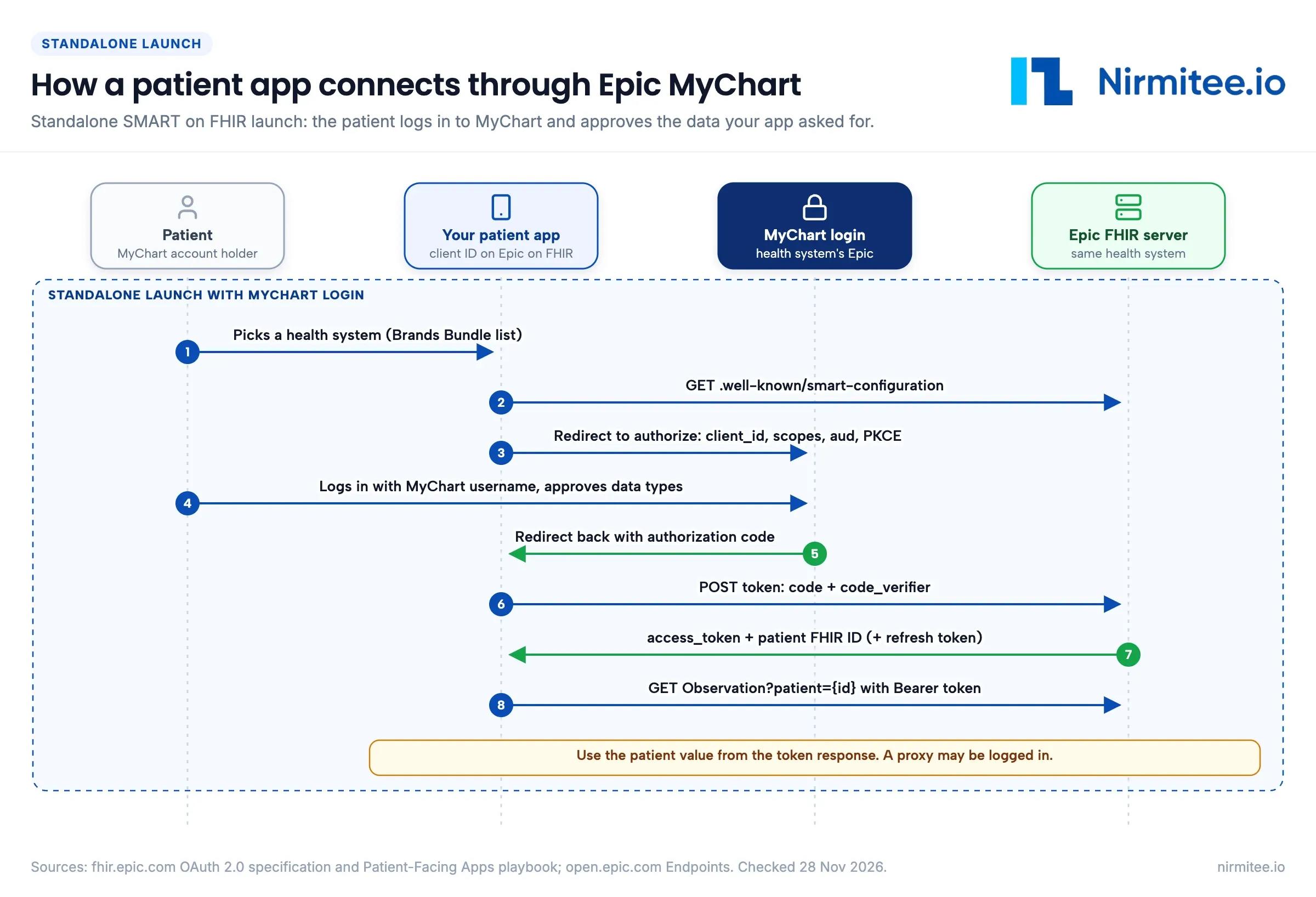
The diagram shows the standalone launch, the most common route for a patient app.
Standalone launch request, step by step
GET https://{health-system-fhir-base}/.well-known/smart-configuration
-> authorization_endpoint, token_endpoint

GET {authorization_endpoint}?response_type=code
    &client_id={your_client_id}
    &redirect_uri={your_redirect}
    &scope=openid fhirUser launch/patient patient/Observation.read
    &state={random}
    &aud={health-system-fhir-base}
    &code_challenge={pkce}&code_challenge_method=S256
-> patient logs in to MyChart and approves -> redirect with ?code=...

POST {token_endpoint}
    grant_type=authorization_code&code=...&redirect_uri=...&code_verifier=...
-> { "access_token": "...", "expires_in": ..., "patient": "{FHIR id}", ... }
Always use the patient value from the token response. Epic warns that it can differ from the logged-in user, for example when a parent is signed in as a proxy for a child.
Which Epic MyChart launch type should a patient app use?
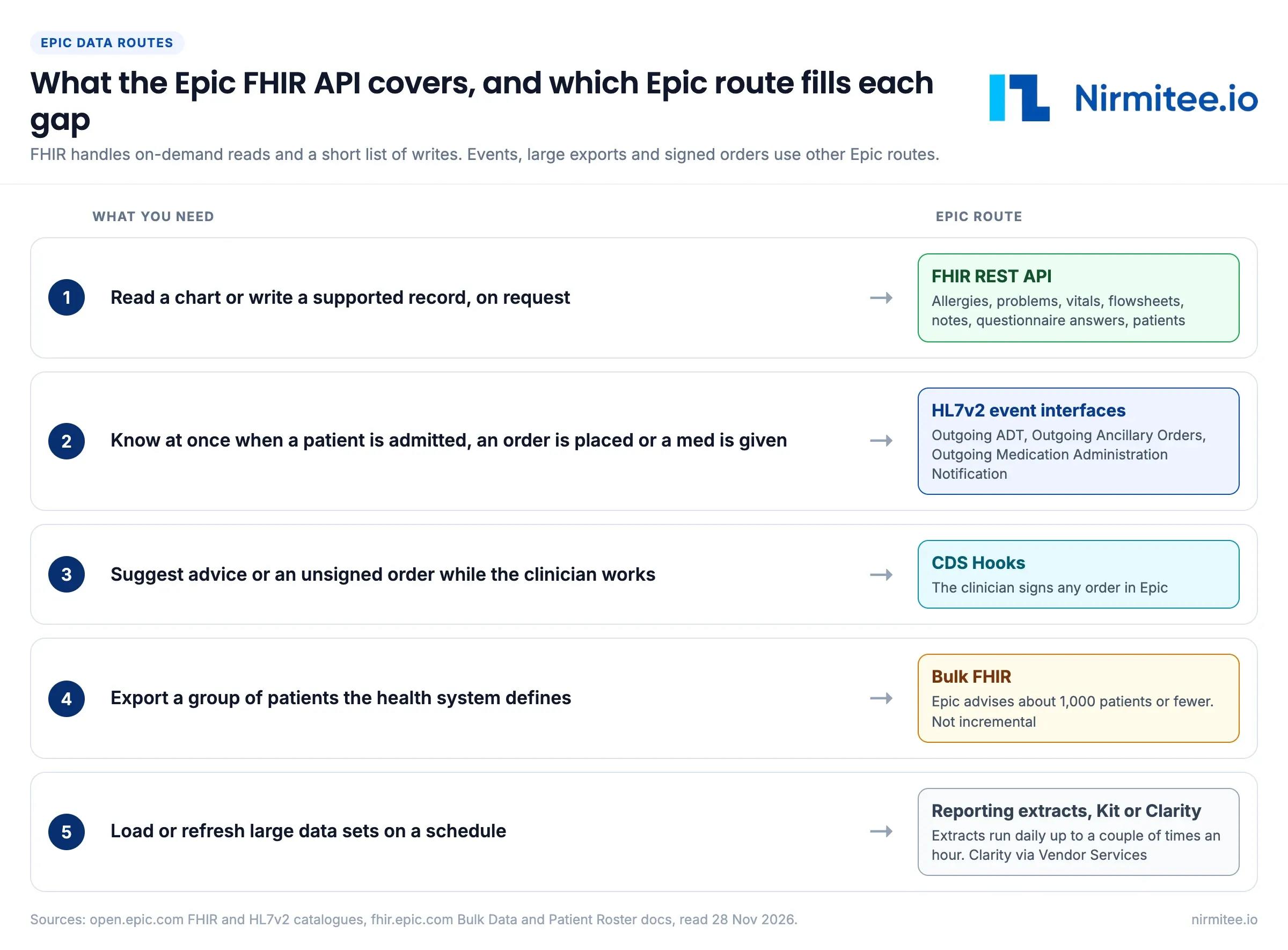
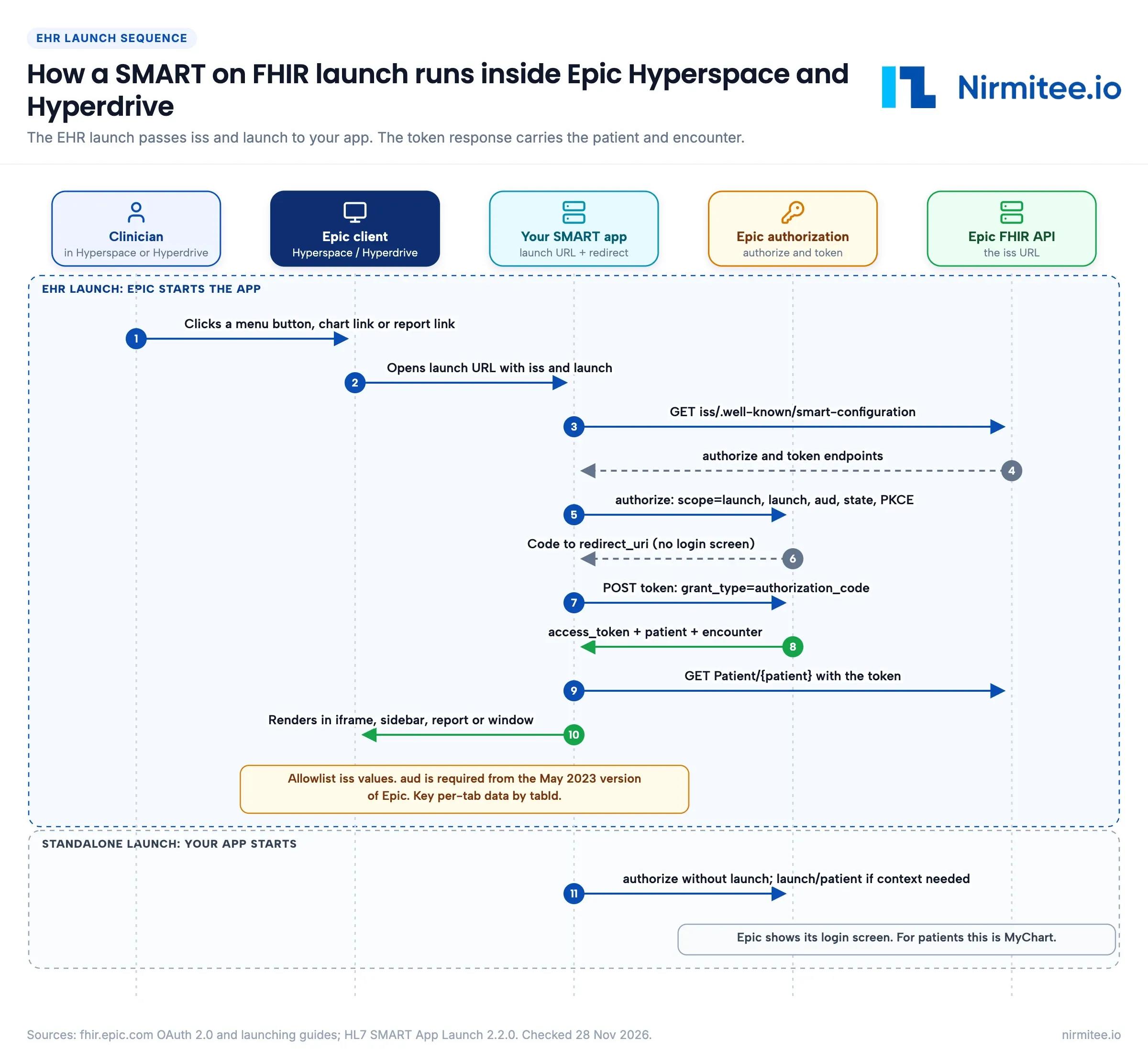
A standalone launch fits most consumer and research apps, because the patient starts in your app and needs nothing set up by the health system. A launch from inside MyChart fits apps a health system offers its own patients, such as a hospital's wayfinding or bedside dining app, and the health system's IT team has to build the menu item. For the request-by-request detail of both, see SMART EHR launch vs standalone launch in Epic.
| Standalone launch | Launch from MyChart (EHR launch) | TEFCA Individual Access Services | |
|---|---|---|---|
| Where it starts | Your app or website | A menu item in MyChart web or mobile | Your app, through a TEFCA network |
| Who sets it up at the health system | Nobody, if your app qualifies for automatic distribution | The health system's IT team builds the menu item | Health systems live on TEFCA and IAS |
| What your app gets | Access token, patient FHIR ID, refresh token if you are a confidential client | Access token and patient context. MyChart can also pass the patient ID, MyChart account ID, name or date of birth | FHIR data from participants that respond to IAS |
| Finding the patient's health system | Your app asks the patient, using the Brands Bundle | Already known | TEFCA can locate organizations where the patient likely has data |
| Test in Epic's sandbox | Yes, with MyChart test logins | Yes, with Epic's SMART on FHIR LaunchPad | Epic offers a testing plan before production |
Epic's own data on patient apps helps here. Web-only apps completed the MyChart login and approval 1.70 times more often than mobile-only apps, and 2.20 times more often than apps on both web and mobile.
Does a patient app need each Epic health system to approve it?
Not if the app only uses the standard patient access APIs. Epic says all US provider organizations receive client IDs that meet its automatic distribution rules, and lists three kinds of app that qualify:
- USCDI apps that use only USCDI v1 or v3 APIs, depending on the Epic version.
- CCDS (MU3) apps that use only a subset of the older DSTU2 FHIR APIs.
- CMS payer apps that use only ExplanationOfBenefit and a subset of other FHIR APIs.
For a USCDI app, Epic lists these conditions for automatic download:
| Condition | What Epic requires |
|---|---|
| APIs | Only USCDI v3 FHIR APIs on Epic August 2024 and later, or only USCDI v1 APIs on May 2024 and earlier |
| Data direction | Only reads data from Epic |
| Audience | Patient-facing |
| Refresh tokens | None, or a client credential you upload for each health system |
| App settings | "Enable Auto-download" and "USCDI v1" or "USCDI v3" selected on the app creation page |
| Status | Marked "Ready for Production" |
| Health system side | Licensed for USCDI APIs under its open.epic agreement, and has not turned auto-download off |
Health systems pick up new client IDs on a rolling 12-hour cycle, so a new app can take up to 12 hours to appear at each one.
Mark "Ready for Production" only when the app is final. Epic says neither you nor Epic can change an app after that, except to add redirect URIs or change JWK Set URLs. Any other technical change needs a new app.
Everything else goes through the health system. If your app writes data, needs an API outside those lists, opens from a MyChart menu, or is part of a product with a clinician side, each health system requests your client ID through Epic's App Request Process. You can work with one health system directly or ask for a listing on Epic Showroom so others can find you.
The table below sums up what needs the health system.
| What you want | Health system involvement |
|---|---|
| Read the patient's USCDI data after MyChart login | None for auto-distributed apps |
| Keep access without new logins (refresh token) | None to set up. Epic's app guidelines ask for a BAA with the health system or a clear notice to the patient about how long you keep access |
| Open your app from a MyChart menu or MyChart mobile | IT team builds the menu item and downloads your client ID |
| Write data, for example Observation.Create for home readings | Request and setup by the health system. The patient needs an active MyChart account |
| Use APIs outside the automatic lists | App Request Process at each health system |
What data can a patient app read and write through Epic MyChart?
A patient app can read the parts of the record that the patient approves and that your client ID lists. For auto-distributed apps that is the USCDI data set, which covers problems, medications, allergies, lab results, vital signs, immunizations, procedures, care plans, goals and clinical notes. Writes are possible for some resources, but they move your app out of automatic distribution.
| What | Read | Write | Notes from Epic's docs |
|---|---|---|---|
| Patient demographics | Yes | No | The token response gives the patient's FHIR ID |
| Labs, vitals, smoking history (Observation) | Yes | Yes, for some flowsheets | Observation.Create files to patient-entered flowsheets. Patients can change those readings in MyChart |
| Conditions, medications, allergies, immunizations | Yes | Not covered in the patient docs we read | Approved per data type by the patient |
| Care plans and goals | Yes | Not covered in the patient docs we read | Test data exists for Derrick Lin |
| SMART Health Cards | Yes | No | Patients download them from MyChart as a QR code or a file |
| Claims (ExplanationOfBenefit) | Yes, for payer apps | No | Part of the CMS payer app category |
Remote monitoring is the main write case. Epic documents a flow where the patient opens your account linking page from MyChart, your app receives an access token, a refresh token and the patient's FHIR ID, and then files readings with Observation.Create. Readings filed that way show up in MyChart.
What can't you do with Epic MyChart integration?
You cannot get into MyChart's own screens, messages or appointment booking flows from outside software through these public patient APIs. What MyChart shows the patient is built by Epic and the health system. Your app sits next to it, opens from it, or reads the same record through FHIR.
Other gaps to plan for:
- No record locator. Epic says Epic on FHIR connections do not have record location, so a patient app has to query every endpoint it needs or ask the patient where they get care. TEFCA IAS can find the organizations instead.
- No login without MyChart. The patient needs an active MyChart account at that health system. Patients without one cannot connect.
- No runtime lookup of endpoints from open.epic.com. Epic tells developers to download the endpoint list regularly, for example weekly, and host it themselves. Epic gives no uptime promise for those files.
- No performance testing in the sandbox. The sandbox holds synthetic data only and is not meant for load or security testing.
How much does Epic MyChart integration cost?
Building and registering the app costs nothing on Epic's side. Epic says Epic on FHIR "offers free app creation services and API access to all developers".
Epic licenses its standard and public APIs to health systems, so any fee for production use is charged to the health system, and Epic says those fees are "based on production usage". Epic recommends that health systems ask for a licensing estimate based on your client ID's scope. Keep the scope narrow, because a broad list of APIs makes your app look more expensive to turn on.
Epic does not publish the amount of those fees. Vendor Services, Epic's optional paid program for developers, does not show a price on its public pages either. Ask the health system for its licensing estimate before you sign.
How long does an Epic MyChart integration take?
Epic does not publish a timeline for patient apps. The parts you control are building the OAuth 2.0 flow and testing it against the sandbox. The parts you do not control are each health system's review, its build of a MyChart menu item, and its upgrade and build freeze calendar, which Epic lists among the scoping questions for every implementation.
One timing fact is published: after you upload or change your app's public key, it can take up to 60 minutes to reach the sandbox and up to 12 hours to reach a health system's Epic.
What quirks should you know before building on Epic MyChart?
These come from Epic's own documentation and catch teams late:
- Proxies. A parent or caregiver may log in as a proxy. From the February 2027 Epic version, send the
selfaccessscope if your app only needs the logged-in patient's own record, so MyChart skips the patient picker. - Refresh tokens need a confidential client. Epic's app form says the confidential client profile is "required for refresh tokens". For apps that use JWT client authentication, tick "Require Refresh Tokens" before you can upload a public key.
- Refresh tokens and upgrades. Epic documents a case where refresh tokens issued before a health system upgraded to the November 2025 version could not reach new FHIR sub-resources until the tokens expired.
- PKCE for mobile. Epic has supported PKCE since August 2019 and recommends it for native mobile apps.
- Login drop-off. Apps that explained why they needed the data before the MyChart login had a 1.85 times higher median success rate. Completing the Data Use Questionnaire went with a 1.40 times higher rate.
What should you take care of before an Epic MyChart project?
Epic's app guidelines set the bar a health system's security review will use. Use TLS 1.2 or higher, ask only for the APIs you use, protect tokens and secrets, and treat the health system's test environments as if they hold real patient data.
For patient apps, the guidelines also ask you to publish a plain data use policy, get the patient's consent before any secondary use, never sell the data, and give patients a way to stop sharing and delete what you hold. Write these down before your first health system asks, along with answers to these questions:
- Which FHIR APIs does the app need on day one, and which can wait for a second client ID?
- Will the app keep access with refresh tokens, and for how long?
- Does it need to open from MyChart, or is a standalone launch enough?
- Does it write anything back to the record?
- Who at the first health system owns MyChart and the app review?
How has Nirmitee worked with Epic MyChart logins?
We have built a SMART on FHIR patient-facing app on Epic, and our provider-side Epic work is in progress. You can watch our own sandbox demo, Epic vs Cerner (Oracle Health): Live SMART on FHIR, Side by Side, which runs one SMART on FHIR app against the Epic and Oracle Health developer sandboxes. It uses sandbox test data only.
For the full Epic picture, read how to integrate with Epic, our Epic FHIR integration guide and Epic Vendor Services vs open.epic. If you plan a Showroom listing, see the Epic Showroom approval guide.
Ready to scale?
Talk to our healthcare engineering team about building, integrating, and shipping faster.
Frequently Asked Questions
Is there an Epic MyChart API?
Do patients need a MyChart account to use my app?
Is it free to build a MyChart patient app?
Do I need approval from every Epic health system?
What are the Epic sandbox MyChart test logins?
How does my app find the patient's health system?
Can my app open from inside MyChart?
Can a patient app write data into Epic?
Can my app keep access without the patient logging in each time?
What is TEFCA Individual Access Services?