How SMART on FHIR Launch Works in Epic Hyperspace (2026)

CTO & Co-Founder
CTO & Co-Founder at Nirmitee.io. Architects healthcare integrations across FHIR, SMART on FHIR, ABDM and NHCX, writing from production experience taking hospital software from sandbox to go-live.
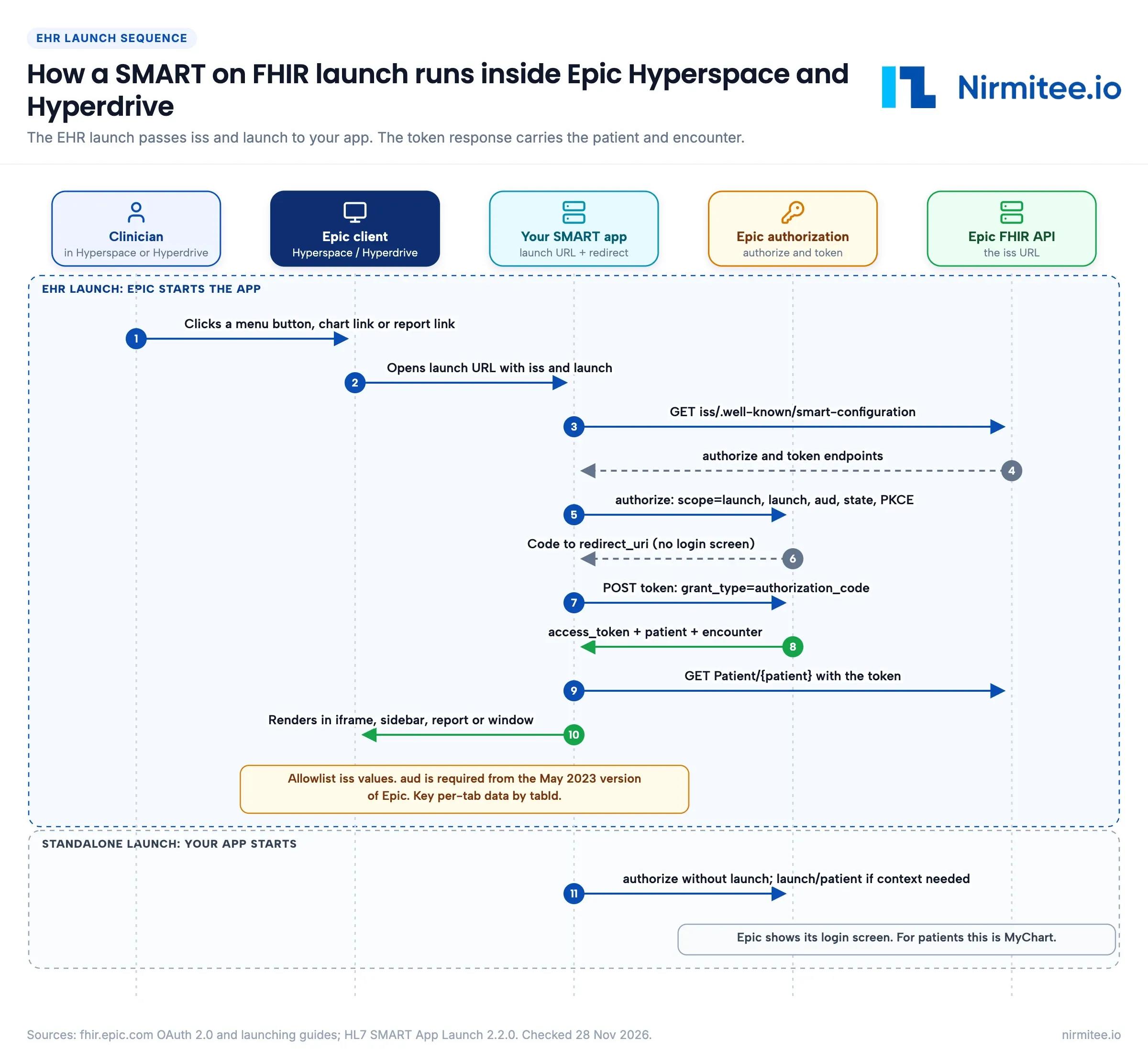
A SMART on FHIR launch inside Epic Hyperspace or Hyperdrive starts when a clinician clicks a button the health system built for your app. Epic opens your launch URL with iss (the FHIR server) and launch (a one-time token), your app completes OAuth 2.0 with that token, and the token response names the open patient and encounter.
That flow is the SMART EHR launch. The other flow, the standalone launch, starts outside Epic: your app sends the user to Epic's login page on its own, and no clinician button is involved. Below are both flows as Epic runs them, with the real requests.
Last checked Nov 28, 2026 against Epic's developer documentation on fhir.epic.com and open.epic.com, and the HL7 SMART App Launch 2.2.0 specification.
What is the difference between a SMART EHR launch and a standalone launch in Epic?
In an EHR launch, Epic starts your app from inside the clinician's or patient's Epic session and hands it the open patient. In a standalone launch, your app starts first and asks Epic to log the user in, and Epic shows a login screen (MyChart for patients).
Both run on the FHIR authorization rules in the HL7 SMART App Launch specification. Epic's own developer guide describes both: the EHR launch for apps opened from Epic, and the standalone launch "when you'd like to use OAuth 2.0 for SSO, but you do not need your app to be launched from Epic". If you want either launch built and tested for you, see our Epic FHIR API integration services.
EHR launch vs standalone launch at a glance
| Question | EHR launch | Standalone launch |
|---|---|---|
| Who starts it | Epic, from a button, link, toolbar or chart open | Your app, for example from a phone home screen or your website |
| What Epic sends first | iss (FHIR base URL) and launch (one-time token) to your launch URL | Nothing. Your app already knows the iss it wants |
| Scope that carries context | launch | launch/patient or launch/encounter, if you want context |
| Login screen | None. The user is already in Epic | Epic's login page. For patients, the MyChart login |
| Patient selection | Already decided by the open chart | Comes from who logs in, or the EHR may show a patient picker |
aud parameter | Required from the May 2023 version of Epic | Needed only if you ask for launch/patient or launch/encounter |
| Where the app shows | Inside Hyperspace or Hyperdrive (iframe, sidebar, report) or a separate window | Your own app or browser window |
| Typical users | Clinicians in Hyperspace or Hyperdrive, Haiku, Canto, Rover; patients in MyChart | Patient apps, and provider apps used outside Epic |
| Who sets it up at the health system | Epic analysts build the launch record and the button | The health system turns on your client ID. No button is built |
How does SMART on FHIR launch work inside Epic Hyperspace or Hyperdrive?
Inside Hyperspace or Hyperdrive, a SMART on FHIR app is opened by an EHR launch. Epic's guide says "a SMART on FHIR launch uses OAuth 2.0 to embed an iframe within Hyperspace for provider access", and the steps below are the same in both clients.
- The clinician clicks a launch point. The health system's Epic team places it. Epic lists a menu button, a link in a navigator, a link in a report, a button on the user toolbar (no patient context) and an automatic launch when a chart opens. A launch that needs the patient's MRN has to come from a patient chart.
- Epic opens your launch URL with
issandlaunch.issis the organization's FHIR endpoint andlaunchis an opaque token for this one launch. Epic tells you to keep an allowlist ofissvalues and reject any other, to stop phishing. - Your app reads the SMART configuration. It sends a GET to
issplus/.well-known/smart-configuration(Epic versions from August 2021) to find the authorize and token URLs. - Your app sends the user to the authorize URL with the
launchvalue. The request carriesscope=launchplus your data scopes, your client ID, redirect URI,state, a PKCE challenge, andaudset to the FHIR base URL. The user is already logged in to Epic, so no login screen appears. - Your app swaps the code for a token. The token response carries the access token and the context:
patient, andencounterif you asked for it, plus Epic extras such asneed_patient_bannerandsmart_style_url. - Your app renders in the place the health system chose. Epic lists five display types: embedded in the patient chart, embedded as a sidebar, embedded as a report display, an external browser on Citrix next to Hyperspace, and an external browser on the user's local desktop. Health systems can also set a floating window. Epic can open the app in several tabs for different patients and its browser shares session storage across them, so key your session data by the
tabIdEpic passes, or a clinician can see the last patient's data.
Epic's testing guide calls Hyperdrive "Epic's new Windows client application", with "an embedded browser based on Chromium". Epic's Hyperdrive page lists SMART on FHIR among the integration types that "will not require changes" for Hyperdrive. Web apps hosted inside Hyperspace "may require changes", so test the page itself in Epic's Hyperdrive Web Developer Test Harness, which shows a site in an iframe or a Hyperdrive embedded window. For the wider picture of what can run in the Epic workspace, read our Epic Hyperspace integration guide.
What does an Epic EHR launch look like, request by request?
Below is the EHR launch against Epic's public sandbox, with the URLs Epic publishes in its OAuth 2.0 guide. Production uses each health system's own iss.
1. Epic calls your launch URL
GET https://yourapp.example.com/launch?iss=https%3A%2F%2Ffhir.epic.com%2Finterconnect-fhir-oauth%2Fapi%2FFHIR%2FR4&launch=GwWCqm4CCTxJaqJiROISsEsO...
2. Your app reads the SMART configuration
GET https://fhir.epic.com/interconnect-fhir-oauth/api/FHIR/R4/.well-known/smart-configuration
Accept: application/json
The JSON names the authorization_endpoint and token_endpoint. In the sandbox these are https://fhir.epic.com/interconnect-fhir-oauth/oauth2/authorize and .../oauth2/token.
3. Your app redirects to authorize
https://fhir.epic.com/interconnect-fhir-oauth/oauth2/authorize?scope=launch&response_type=code
  &redirect_uri=[redirect_uri]&client_id=[client_id]&launch=[launch_token]
  &state=[state]&code_challenge=[code_challenge]&code_challenge_method=S256&aud=[audience]
This is Epic's own template. aud is the FHIR base URL you will call. HL7's spec says that in an EHR launch it is the same value as iss. Epic requires it for EHR launches with context from the May 2023 version. Add openid fhirUser to the scope if you need the user's identity. Epic supports fhirUser for apps set to R4 or later.
4. Your app exchanges the code
POST https://fhir.epic.com/interconnect-fhir-oauth/oauth2/token
Content-Type: application/x-www-form-urlencoded

grant_type=authorization_code&code=[code]&redirect_uri=[redirect_uri]&client_id=[client_id]&code_verifier=[verifier]
5. The token response carries the context
This is trimmed from Epic's published example for a provider launch:
{
  "access_token": "...",
  "token_type": "Bearer",
  "scope": "... fhirUser launch launch/encounter launch/patient offline_access openid",
  "encounter": "eUAW2-QkdwCE7KH7awS8sfw3",
  "location": "eweKBcq8ruM-1MzZAX-A-0uj2rDm4SMniPONiaM5VGQk3",
  "loginDepartment": "e4W4rmGe9QzuGm2Dy4NBqVc0KDe6yGld6HW95UuN-Qd03",
  "need_patient_banner": "false",
  "patient": "eRp.HuKDlKB8MhAkzHFthQQ3",
  "smart_style_url": "https://fhir.epic.com/interconnect-fhir-oauth/api/epic/2016/EDI/HTTP/style/..."
}
Your app then calls GET [iss]/Patient/eRp.HuKDlKB8MhAkzHFthQQ3 with the access token. need_patient_banner set to false means Epic already shows the patient banner around your iframe, so you can leave your own banner out.
How does a standalone launch work with Epic?
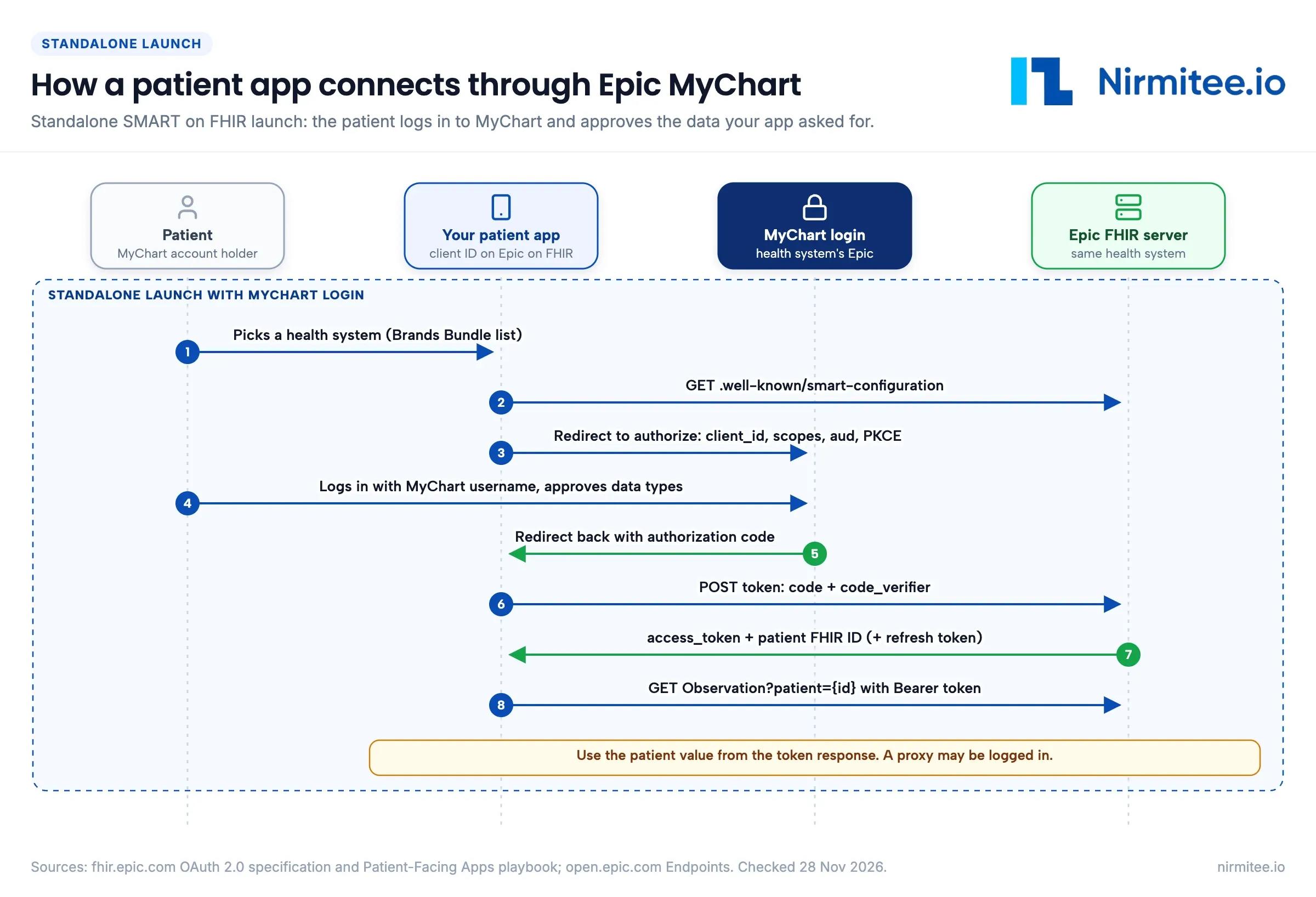
A standalone launch starts in your app. The user opens your app, your app already knows which Epic organization to use (its iss), reads the same SMART configuration, and sends the user to the authorize URL without a launch parameter. Epic shows its login screen, and for a patient app that is the MyChart login.
The differences from the EHR launch are small but they break builds:
- No
launchtoken. If you want a patient in context, ask for thelaunch/patientscope. HL7's spec says the EHR may then show a patient selection screen. audonly with context scopes. Epic saysaudis "not required for standalone launches unless you request the launch/patient or launch/encounter scope".- You choose the organization. Epic keeps a list of its customers' FHIR endpoints on epic.com. Your app needs a way for the user to pick their health system, then you store that
iss. - Proxy patients. Epic's guide says that starting in the February 2027 version of Epic, adding the
selfaccessscope stops a patient who is also a proxy from being asked to pick a patient.
Standalone suits patient apps on phones and provider tools used outside the Epic screen. If a clinician must see your app beside the chart in Hyperspace or Hyperdrive, you need the EHR launch.
Which SMART launch should your Epic app use?
Use the EHR launch when the user already works in Epic and your app needs the open patient or encounter. Use the standalone launch when the user starts in your app, such as a patient on a phone.
Many apps build both, and Epic's guide allows that ("alternatively or additionally"). A common split is an EHR launch for clinicians in Hyperspace or Hyperdrive and a standalone launch for the same app on the web or a phone. Epic says its mobile apps Haiku, Canto and Rover have the same SMART on FHIR support as the desktop.
Our own sandbox demo shows the EHR launch running in Epic's and Oracle Health's developer sandboxes in one session: Epic vs Cerner (Oracle Health): Live SMART on FHIR, Side by Side. It is a sandbox recording with synthetic test patients, not a customer system. Nirmitee has built a patient-facing SMART on FHIR app on Epic, and our provider-side Epic work is in progress.
Where can a SMART app appear inside Epic?
The health system decides where your app opens, and each place changes your build. Epic's launch guide names the launch points and display types below.
| Display type in Epic | What your app must handle |
|---|---|
| Embedded in the patient chart | Runs in an iframe. Your pages must allow framing by the customer's Epic domains |
| Embedded as a sidebar | A narrow fixed width. Epic warns some embeds need a set page size |
| Embedded as a report display | Also a set page size |
| External browser on Citrix next to Hyperspace | Runs on the Citrix server, so its network and browser rules apply |
| External browser on the local desktop | The window does not close when the clinician switches patients |
| Floating window (set by the health system) | Epic's fallback for apps that cannot run in an iframe, tried before the system browser |
Epic gives three more rules for embedded apps:
- Several copies at once. Epic can open your app in separate tabs for different patients. Its browser "does not support segregated session storage", so key session data by the
tabIdEpic gives you. - Fallback order. Apps that cannot run in an iframe should try a floating window first and use the system browser only as the last option.
- Allowlists. Document every domain your app loads, navigates to or calls, so the customer can add them to its web security allowlists.
How do you test an Epic SMART launch before a customer?
Start in Epic's free sandbox on fhir.epic.com. Register an app, get the non-production client ID, and run the launch from Epic's SMART on FHIR LaunchPad, which Epic calls "a lightweight way to validate your app launch from Epic without Hyperdrive".
Then test the embedded experience:
- LaunchPad for the
issandlaunchhandling, the token exchange and the context. - "Use Two Browsers" in the sandbox to run two copies of your app in one session and prove your tab handling.
- Hyperdrive Web Developer Test Harness to see your pages in an iframe and in a Hyperdrive embedded window.
- Hyperspace for Mac, if your team is on Macs: Epic says testing there should focus on URL launches for SMART on FHIR, HTTP GET and SAML.
Development redirect URIs can use http. Production needs https. For the full path from sandbox to a live customer, read SMART on FHIR from sandbox to production.
What goes wrong most often in Epic SMART launches?
These are failure points Epic's own documentation calls out, listed with the fix.
| Problem | What happens | Fix |
|---|---|---|
Accepting any iss | An attacker can send users to a fake server | Keep an allowlist of each customer's iss |
Missing aud | Epic versions from May 2023 refuse EHR launches with context | Send aud = FHIR base URL |
Missing launch scope | No context comes back in an EHR launch | Ask for scope=launch and pass the launch value |
| Session data shared across tabs | Patient A's data shows on patient B's tab | Store per-tab data by tabId |
| Page blocks framing | The embedded app shows blank in Hyperspace or Hyperdrive | Allow the customer's Epic domains in your frame rules |
| POST authorize while embedded | The login page will not load in the iframe | Allow that page to be framed, as Epic notes |
| Launch from the user toolbar | No patient arrives | Place patient apps on chart launch points |
For changes in the newer SMART version, such as granular scopes, see SMART App Launch v2.2 changes.
What does the health system have to do for an Epic EHR launch?
The health system builds the launch, and your team cannot do it alone. Its Epic analysts turn on your client ID, create the launch record, and place the button or link where clinicians will see it. Epic's implementation guide names a Citrix and desktop administrator role when the app is embedded in Epic.
Epic does not publish how long a customer takes to do this build, so ask each health system for its own change process and dates at the start. Bring your list of domains, your page sizes and your launch URL to the first call. For how the whole Epic project runs, read how to integrate with Epic. For what the API behind the launch can and cannot return, read what you can and can't do with the Epic FHIR API, and for build help see our Epic integration services.
Ready to scale?
Talk to our healthcare engineering team about building, integrating, and shipping faster.
Frequently Asked Questions
What is a SMART on FHIR EHR launch?
What is a SMART on FHIR standalone launch?
How does a SMART app launch inside Epic Hyperspace?
Does Hyperdrive change SMART on FHIR launches?
Is the aud parameter required in Epic?
Where does Epic send the patient ID in a SMART launch?
Can one Epic app support both EHR and standalone launch?
How do I test an Epic EHR launch without Hyperdrive?
Why does my app show blank inside Hyperspace?
Does Epic support PKCE for SMART launches?