Epic Hyperspace Integration: Apps in Hyperdrive (2026)

CTO & Co-Founder
CTO & Co-Founder at Nirmitee.io. Architects healthcare integrations across FHIR, SMART on FHIR, ABDM and NHCX, writing from production experience taking hospital software from sandbox to go-live.
Epic Hyperspace is the application doctors, nurses and staff use to work in Epic. Epic calls it its "primary end user application." Today it runs in Hyperdrive, a secure web browser that Epic built for its own software.
This guide is for product leads and health system teams who need an app to show up inside Hyperspace. It covers what Hyperspace and Hyperdrive are, every route Epic documents into the screen, who approves each step, what it costs and what Epic leaves unpublished. Each health system runs its own Epic, so every step happens one customer at a time. Last checked: Nov 27, 2026.
What are the short answers about Epic Hyperspace?
Epic Hyperspace access is granted by each health system, the documents are public, and Epic's own fees are small. The table gives the seven short answers.
| Question | Short answer |
|---|---|
| Who grants access? | Each Epic customer, for its own instance. There is no central Epic endpoint. |
| Who signs? | The health system that licenses your product. Epic is involved only if you choose Vendor Services. |
| Are the documents public? | Yes. open.epic.com and fhir.epic.com are free. Private APIs need Vendor Services. |
| Which routes reach the screen? | SMART on FHIR launch, CDS Hooks, Subspace and FHIRcast, Active Guidelines, HL7 v2 through Bridges. |
| What does Epic charge? | open.epic: nothing. Vendor Services: $1,900 a year. Epic support: hourly, rate not published. |
| How long does it take? | Epic does not publish approval or build times. |
| Biggest limit? | Every health system places the launch button, grants access and tests your app in its own Epic. |
What is Epic Hyperspace, and how does Hyperdrive change it?
Hyperspace is the Epic screen staff log into. Hyperdrive is the newer Windows client that now runs it, built on a Chromium browser.
Epic says it "has moved its primary end user application, Hyperspace, to a web-based framework called Hyperdrive." Epic describes Hyperdrive as "a secure, Epic-specific web browser." Its fhir.epic.com testing guide adds that Hyperdrive is a Windows client "that includes an embedded browser based on Chromium," made "for users to access Hyperspace activities." An activity is one screen inside Hyperspace, such as Chart Review.
Hyperdrive also carries a Windows plugin layer for other products. Epic says this is why "Hyperdrive is essential for almost all end users."
Dates. Epic says most organizations moved their users in 2022 and 2023, and a few later. During the move, both clients sat on the same workstations. We found no Epic public page that gives an end date for the classic client.
Hyperspace Web and Mac. Epic's pages name a "Hyperspace Web (HSWeb) platform," which can use mutual TLS certificates to recognize a trusted browser and tie it to a workstation record. Epic also lists Hyperspace for Mac in Apple's App Store. The listing says it lets users work "without the friction of logging in through a published application." Epic warns that most client integrations work only on Windows.
Mobile. Haiku and Canto are Epic's mobile apps for physicians. Rover is its mobile app for nurses. Epic says all of them "have the same support for SMART on FHIR as their desktop platform counterparts." So a SMART app built for Hyperspace can also be placed in these apps, if the customer builds it.
Upgrades. Epic ships a major version every quarter, in February, May, August and November. Customers choose when to take each one.
How is Epic Hyperspace delivered through Citrix or VDI?
Many health systems publish Hyperspace or Hyperdrive through Citrix or a virtual desktop. Epic's own guides treat this as a normal setup.
Epic lists "an external browser running on Citrix alongside Hyperspace" as one way to show an app. Its implementation guide names a "Citrix & Desktop administrator" on the customer's team whenever an app is embedded in Epic. Epic also says that when Hyperdrive runs as a published application, a component called Slingshot can make some integrations available on the user's own device. Epic does not explain Slingshot further on its public pages.
Citrix, writing about its own product in 2020, called Citrix with Epic "the de facto application virtualization solution" for EHRs. Epic does not publish how many customers use Citrix today.
If your app talks to the desktop (a scanner, a dictation tool, a signature pad), ask the site early whether it runs Hyperdrive locally or as a published app. The answer changes where your component must be installed.
What can you build inside Epic Hyperspace?
You can build apps that open in the chart, alerts at the moment of an order, desktop tools that follow the open patient, and feeds that file results. Each use case below points to a row in the table under "What is possible". Build complexity is our own rating.
1. A risk score or dosing panel that opens from the chart
medium
- Who it is for: clinical decision support and pharmacy software companies.
- The value: the clinician sees the score next to the patient without a second login.
- Build complexity: medium.
- How well it works: well. Epic's Bayesian dosing playbook says these products "launch from Hyperspace using SMART on FHIR." See rows P1 and P2.
2. An AI scribe or note assistant in a sidebar
high
- Who it is for: ambient documentation and AI vendors.
- The value: the draft note sits next to the chart while the clinician works.
- Build complexity: high.
- How well it works: possible. Epic lists "Embedded in Hyperspace as a sidebar" as a display type, and warns that the sidebar may need a fixed page size. Writing the note back depends on the APIs each customer turns on. See rows P1, P2 and P3.
3. An alert card when a clinician signs an order
medium
- Who it is for: prior authorization, imaging appropriateness and safety vendors.
- The value: the advice lands at the last moment the order can still change.
- Build complexity: medium.
- How well it works: well for the three hooks Epic supports. Epic's order-sign hook fires after Sign Orders and before the order is final. See row P5.
4. A PACS or imaging viewer that follows the open patient
medium to high
- Who it is for: imaging and cardiology vendors.
- The value: the viewer always shows the same patient or study as Epic.
- Build complexity: medium to high.
- How well it works: well. Epic says its XML context sync APIs are "commonly used with PACS and CPACS vendors," and FHIRcast keeps "all applications" on "the same patient or study." See row P6.
5. Speech recognition that types into Epic and into your embedded app
high
- Who it is for: dictation and speech vendors.
- The value: one voice tool works across Epic and the embedded apps.
- Build complexity: high.
- How well it works: documented. Epic publishes a Speech Recognition API, plus one for non-Epic apps "embedded (iframed) within Hyperdrive." See row P7.
6. Badge tap login and workstation lock
high
- Who it is for: single sign-on and identity vendors.
- The value: clinicians log in and lock screens fast and safely.
- Build complexity: high.
- How well it works: documented. Epic supports Desktop Generic Authentication and OpenID Connect for login, and Subspace for session actions such as locking the workstation. See row P8.
7. Scan, sign and file documents from a document system
high
- Who it is for: document management and e-signature vendors.
- The value: staff scan and link papers without leaving Epic.
- Build complexity: high.
- How well it works: documented. Epic publishes Scan Acquisition, Scan Viewing, E-Signature and the Tapestry Document Linker, which opens an activity in a running Hyperspace session. See row P9.
8. Embedded call controls for a contact center
medium
- Who it is for: telephony and contact center vendors.
- The value: agents take, place and transfer calls from inside Epic.
- Build complexity: medium.
- How well it works: documented. Epic says phone systems use the Active Guidelines Telephone Alert API "to notify the agent of an incoming call and open embedded call controls." See row P10.
9. Lab or device results that appear in the chart
medium
- Who it is for: lab, device and remote monitoring companies.
- The value: results file as discrete values, so clinicians see them in Results Review and flowsheets.
- Build complexity: medium.
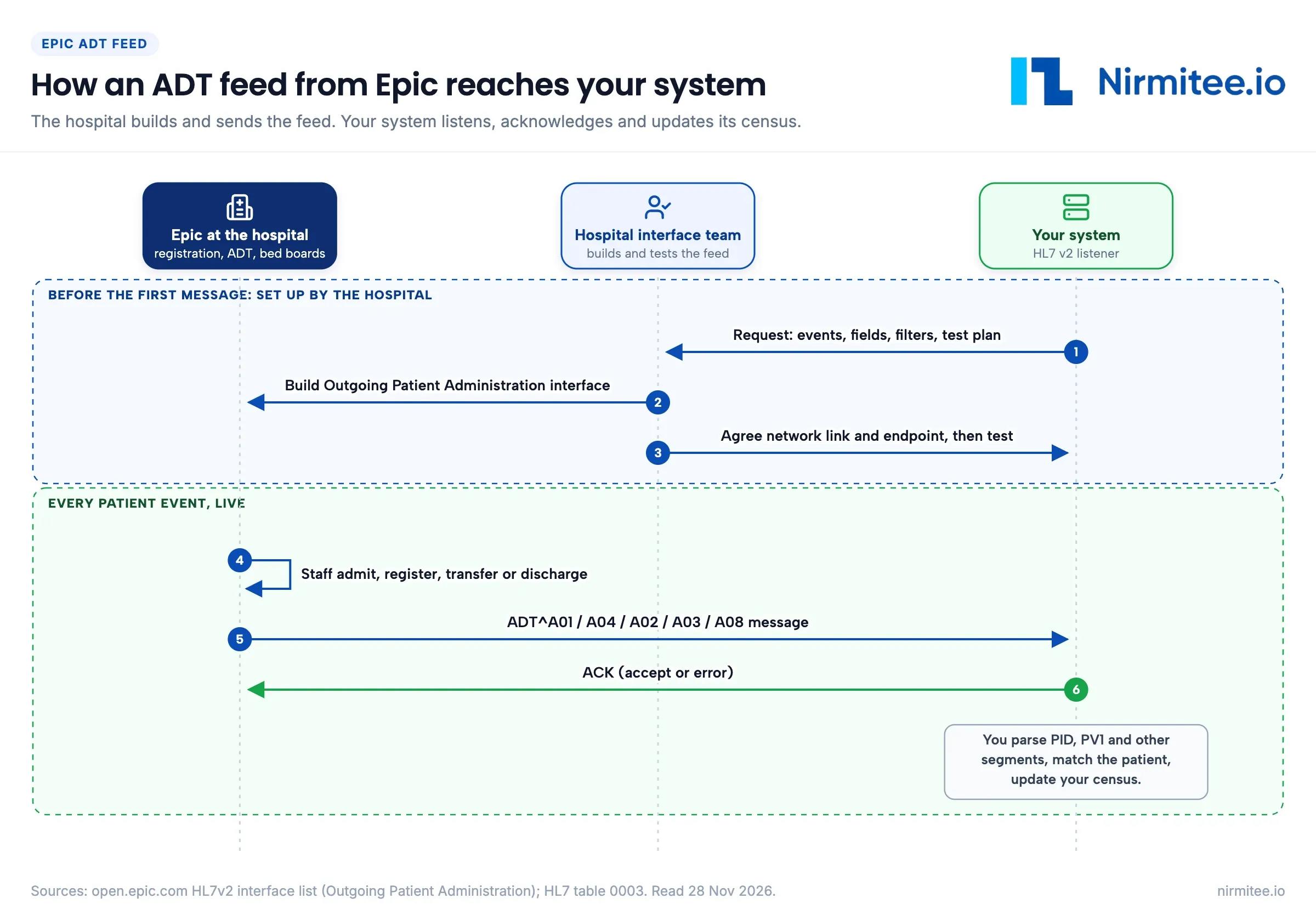
- How well it works: well. HL7 v2 messages go through Bridges, Epic's core messaging system, usually via the customer's interface engine. See row P11.
Use case comparison
| Use case | Who it is for | Complexity |
|---|---|---|
| 1. Risk score or dosing panel | Decision support, pharmacy | Medium |
| 2. AI scribe sidebar | AI documentation | High |
| 3. Alert card at order sign | Prior auth, safety | Medium |
| 4. Imaging viewer in sync | Imaging, cardiology | Medium to high |
| 5. Speech recognition | Dictation | High |
| 6. Badge tap login | Identity | High |
| 7. Scan and sign documents | Document management | High |
| 8. Embedded call controls | Contact center | Medium |
| 9. Results into the chart | Lab, devices | Medium |
How do you get access to Epic Hyperspace?
You get access one health system at a time. You register your app on open.epic, and each customer asks for it in its own Epic.
Epic calls this a federated model: "every customer runs their own independent Epic instance and decides which apps can connect." Epic also says "no special relationship is required to develop or deploy an app."
The steps Epic publishes are these.
- Design. Read Epic's data sharing playbooks and pick the APIs and interfaces.
- Register a client record on open.epic. You get a production and a non-production client ID. Epic asks you to add only the APIs you will use in production.
- Develop and test against the sandbox, then test embedding in Hyperdrive with Epic's test harnesses.
- Customer implementation. The customer requests the client ID for its environments. You approve it yourself, without Epic.
- Showroom listing (optional). After your first live customer you may list in Connection Hub. Epic says the listing "is not needed for additional customers to connect with your product."
Who signs and who builds. The health system licenses your product. Its teams do the build. Epic's own implementation guide lists the people involved: application analysts for the workflow, the interface administrator, a web and service servers administrator, a Citrix and desktop administrator if the app is embedded, the users and security team, and training.
Where Showroom and App Orchard fit. Showroom is Epic's catalog site (see our Showroom approval guide). Connection Hub is its open directory, announced in December 2022 and opened in January 2023. Epic moved App Market vendors to Vendor Services at that time. The old apporchard.epic.com address now redirects to vendorservices.epic.com (checked Nov 27, 2026). Toolbox is a Showroom designation for some product categories, available through Vendor Services.
What do you get access to in Epic Hyperspace?
You get a free sandbox and test tools first. Live data only comes from each customer's own environments, after its build.
| Stage | What opens up | Source |
|---|---|---|
| open.epic account | Public FHIR and Epic APIs, documentation, LaunchPad, FHIR developer sandbox, Hyperdrive Client Test Harness | |
| Hyperdrive Web Developer Test Harness | Shows how your site renders in an iframe or Hyperdrive embedded window | |
| Hyperspace for Mac on the sandbox | URL launch testing (SMART on FHIR, HTTP GET, SAML) at https://fhir.epic.com/HSWeb_uscdi | |
| Vendor Services ($1,900 a year) | Private APIs, Kit, Clarity, content imports, expanded test environments, paid help from Epic staff | |
| Customer TST environment | Where most of your testing happens, with APIs, Interconnect and interfaces set up | |
| Customer PRD | Live users and patients |
Epic's sandbox resets every Sunday at about 8 PM Central Time, and anything you wrote that week is erased. It also goes down for about a day when Epic upgrades it each quarter.
What are the ways to integrate with Epic Hyperspace, from SMART on FHIR to CDS Hooks?
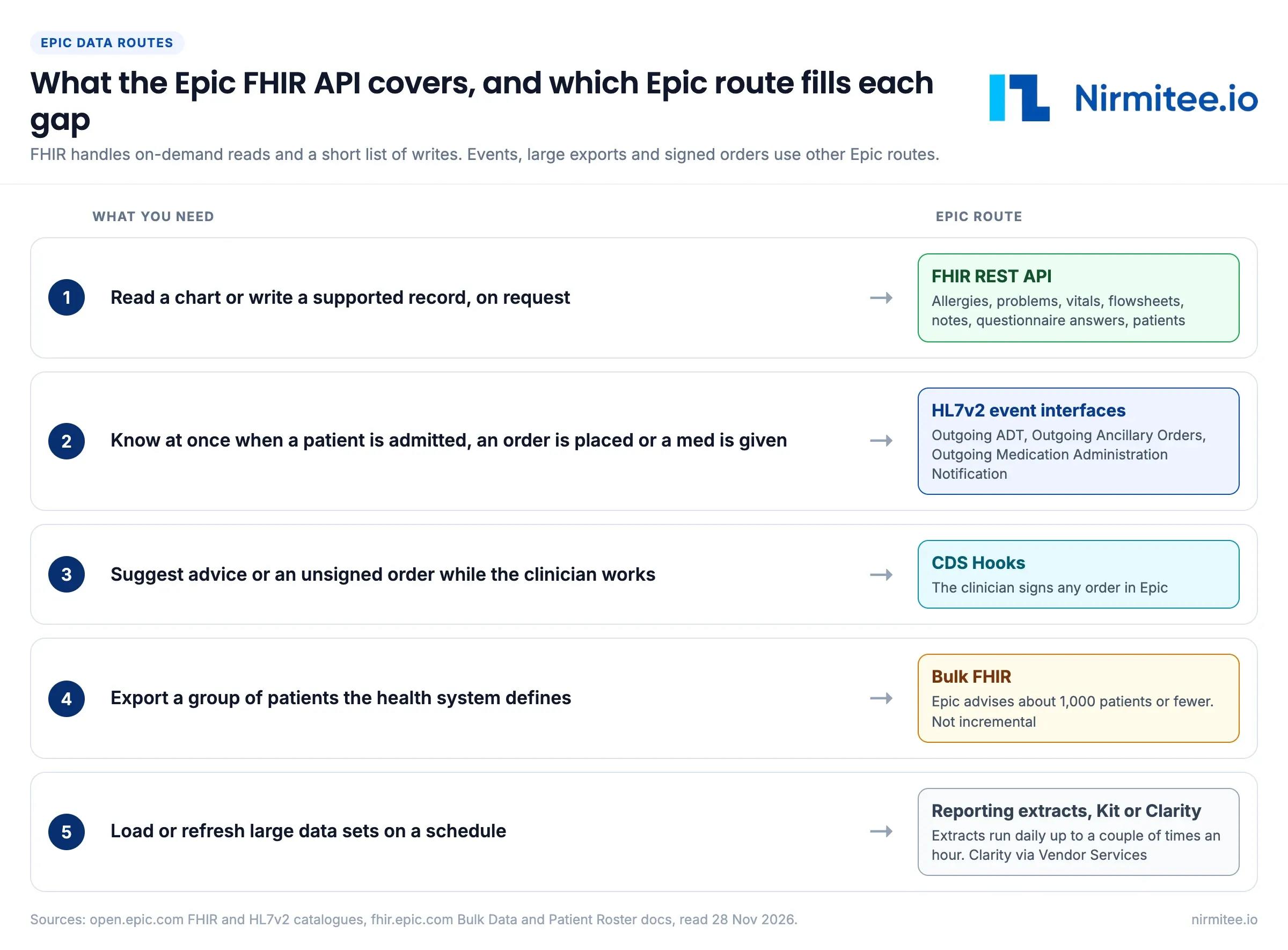
Epic documents five routes into the clinician's screen, plus server routes behind it. Most products combine two.
For how each launch runs request by request, see SMART EHR launch vs standalone launch in Epic.
| Route | What the user sees | Hyperdrive change needed? (Epic) | Best for |
|---|---|---|---|
| SMART on FHIR EHR launch | Your web app in the chart, a sidebar, a report or a floating window | No | Apps a clinician opens while charting |
| CDS Hooks | A card, interruptive or passive | Not listed by Epic | Advice at chart open or order sign |
| Active Guidelines (AGL) | A web app in a sandboxed iframe that talks to Epic by web messaging | Web apps "may require changes" | Embedded tools such as call controls |
| Subspace and FHIRcast | A desktop app kept on the same patient, able to launch activities | Built for Hyperdrive | Imaging, dictation, scanners, identity |
| XML context sync and URL launch | Single sign-on and patient sync with outside viewers | Epic expects no change | PACS and legacy viewers |
| HL7 v2 through Bridges | Results, documents and events filed in the chart | No | Labs, devices, ADT |
| COM-based desktop APIs | Legacy desktop links | Yes, must be updated | Nothing new |
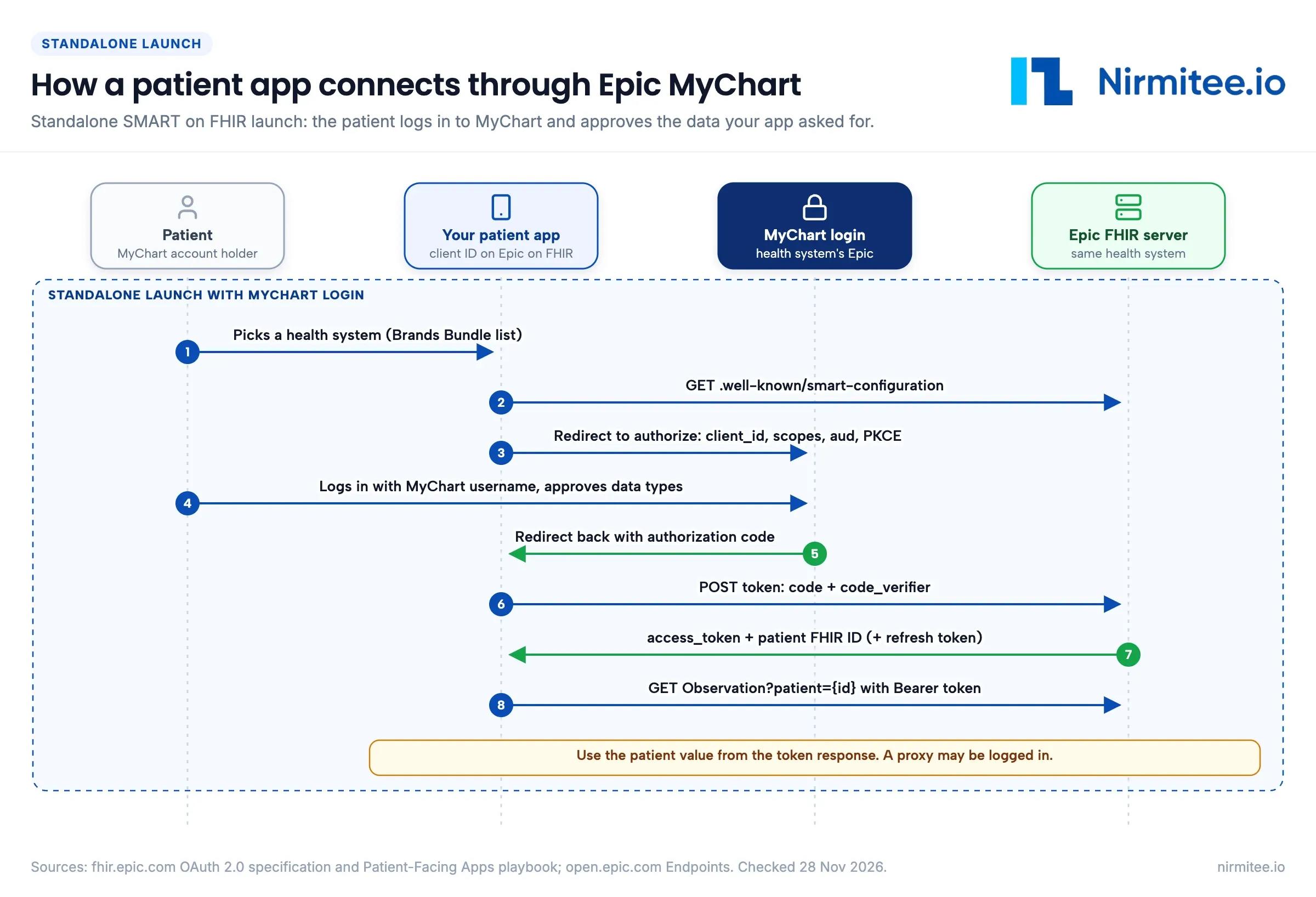
SMART on FHIR. SMART on FHIR is an open standard for launching a web app from inside an EHR with the user and patient already known. Epic says "A SMART on FHIR launch uses OAuth 2.0 to embed an iframe within Hyperspace."
CDS Hooks. CDS Hooks is an HL7 standard for calling an outside service at a set point in the workflow. In Epic it runs through OurPractice Advisory records, formerly BestPractice Advisory.
Subspace. Epic calls Subspace "a pattern for asynchronous, semi-event-driven integrations between Epic and external applications." It uses the FHIRcast specification.
What is possible with Epic Hyperspace integration?
With the customer's build, you can launch inside the chart with the patient known, read the chart, show alerts, sync desktop tools and file results. Each row names its source.
| Row | Function | Possible? | Route | Source |
|---|---|---|---|---|
| P1 | Launch your app from a menu button, navigator link, report link, toolbar or on chart open | Yes | SMART on FHIR | |
| P2 | Receive patient and encounter context at launch | Yes, in the token response | SMART on FHIR | |
| P3 | Run several copies of your app in tabs, one per open patient | Yes, with a tabId in the URL | SMART on FHIR | |
| P4 | Show your app on Haiku, Canto or Rover | Yes, same SMART support as desktop | SMART on FHIR | |
| P5 | Show a card at chart open or order sign | Yes, three standard hooks | CDS Hooks | |
| P6 | Keep an outside viewer on the same patient or study | Yes | FHIRcast, XML context sync | |
| P7 | Let speech software type into Epic and into an iframed app | Yes | Speech Recognition APIs | |
| P8 | Log users in, re-authenticate, lock or log out the session | Yes | Desktop Generic Authentication, OIDC, Subspace | |
| P9 | Launch an Epic activity from outside, move or resize the Hyperspace window | Yes | Subspace, Tapestry Document Linker | |
| P10 | Open embedded call controls | Yes | Active Guidelines | |
| P11 | File results and events into the chart | Yes | HL7 v2 through Bridges | |
| P12 | Run your own SQL against customer reporting data | Yes, with Vendor Services | Kit or Clarity license |
What is not possible with Epic Hyperspace?
You cannot install your app into a customer's Epic yourself, change Epic's screens, or use one connection for every Epic site.
For research questions across many health systems, see our guide to Epic Cosmos, the research dataset pooled from Epic customers.
| Not possible | Why | What to do instead |
|---|---|---|
| Turn your app on in a hospital's Epic | Each customer controls its own instance | Your customer requests the client ID and builds the launch |
| Use one endpoint for all Epic sites | "There is no central Epic endpoint" | Keep site settings in configuration. Mind that MRNs are not unique across sites |
| Keep a COM-based desktop link as is | Must be updated for Hyperdrive | Move to SMART on FHIR or Subspace |
| Assume a Hyperdrive build works in classic Hyperspace | Epic says it may not | Support both clients until all your customers have moved |
| Pick any launch point for any data | Context comes from where the button sits; an MRN launch must come from a chart | Choose the launch point with the customer's analyst |
| Use the toolbar launch for patient work | Toolbar launches are for apps that do not need patient context | Launch from the chart |
| Fire an alert on every chart open | Epic recommends against it | Combine the trigger with specific criteria in Epic |
| Use more than patient-view on a DSTU2 app | DSTU2 apps get only patient-view | Register as R4 |
| Keep sandbox data | Erased every Sunday | Script your test data each week |
| Get Epic staff help for free | Support is invoiced hourly through Vendor Services | Use the customer's Epic team or join Vendor Services |
What are the limits of Epic Hyperspace integration?
The limits are per-site build work, quarterly upgrades, browser behavior inside Hyperdrive, and Windows-only desktop features. Epic publishes no rate limits in the pages we read.
- Per-site build. Each customer places your launch, grants your APIs and tests.
- Embedded browser. Hyperspace's browser "does not support segregated session storage," so store tab data under a tabId.
- Pop-outs. If your app cannot run in an iframe, Epic says to use a floating window, with the system browser as the last choice. The system browser does not close when the user switches patient.
- Domains. Customers must allowlist your domains. Epic asks you to list them in three groups: top-level pages, script or cookie domains, and static files.
- Page size. Sidebar and report display launches may need a set page size.
- Windows only. Most client integrations work only on Windows. Mac testing covers URL launches.
- Upgrades. Epic ships every quarter, and customers upgrade on their own schedule.
- aud parameter. Required for EHR launches with launch context from the May 2023 version.
How much does Epic Hyperspace integration cost?
Epic publishes two fees: open.epic is free and Vendor Services is $1,900 a year (open.epic vs Vendor Services). It does not publish its hourly support rate or any listing fee.
| Cost item | Who pays | Amount |
|---|---|---|
| open.epic APIs, sandbox, test harness | Vendor | Free |
| Vendor Services membership | Vendor, optional | $1,900 a year |
| Epic support services | Vendor, optional | Hourly. Rate not published |
| Connection Hub listing | Vendor, optional | Not published on Epic's pages on Nov 27, 2026 |
| Customer analyst and Citrix team time | Health system, sometimes passed to the vendor | Set by each customer |
What to ask. Ask Epic's Vendor Services team for the current hourly support rate and any Showroom listing fee. Ask each health system whether it charges vendors for its analyst build time.
How long does an Epic Hyperspace integration take?
Epic does not publish how long a customer takes to sync a client ID, build a launch, or approve a listing.
What Epic does publish sets some fixed dates:
- The sandbox upgrades within a few weeks of each quarterly release and is down for about one day.
- Customers take Epic upgrades on their own schedule, four major versions a year.
What to ask each health system: how long its security review takes, when its next change window is, which environment (POC or TST) has APIs set up, and when that environment is next refreshed. Epic itself tells developers to "know these schedules before starting to test."
How do you build an Epic Hyperspace integration step by step?
Pick the route, register, build on the sandbox, test inside Hyperdrive, then repeat a customer build at each site. For the wider Epic picture, see how to integrate with Epic and our Epic FHIR integration guide.
- Pick the route from the table above. Decide what the user sees and what you write back.
- Register on open.epic. Choose only the APIs you will use. Keep production and non-production client IDs apart.
- Build on the sandbox. Test the launch with LaunchPad, which works "without Hyperdrive."
- Test inside Hyperdrive. Use the Web Developer Test Harness for iframe and embedded window rendering, and the Client Test Harness for FHIRcast and desktop workflows. Run two instances at once with "Use Two Browsers."
- Write your domain list for the customer's allowlist.
- First customer. They request your client ID, you approve it, and their analysts build the launch point.
- Test in their TST environment, then go live in PRD.
The diagram below shows what happens during an Epic SMART on FHIR launch from Hyperspace, from the button click to the screen in the iframe.
What are the fine details and quirks of Epic Hyperspace?
Most surprises come from the embedded browser, launch points and how each site deploys Hyperdrive.
"Hyperspace integration" usually means a web app now
Epic says SMART on FHIR needs no change for Hyperdrive, while COM integrations must be rebuilt. New products rarely need desktop code.
Tabs share one session store
Epic can open your app in several tabs, one per open patient. Hyperspace's browser does not split session storage, so key every value by a tabId in the URL.
POST authorize needs iframe permission
If you use POST for the authorize call while embedded, the page must allow being framed.
The toolbar has no patient
Toolbar launches are for apps that do not need patient or encounter context.
Hyperdrive version numbers matter for Subspace
Epic's change log ties Subspace changes to Hyperdrive major versions, such as 100.2510 for a FHIRcast sync error change.
SUP is not a test environment for your app
Epic describes SUP as a copy of production where "typically, only Hyperspace is available." Plan your testing in TST.
Published Hyperdrive moves desktop pieces
When Hyperdrive runs as a published app, Epic says Slingshot can expose some integrations on the endpoint device. Ask the site how it deploys Hyperdrive.
Partners document the same pattern
ServiceNow documents that its Care Team Portal "must be configured to work within an iFrame" and that Epic's FDI, Activity and Menu records make "a button in Epic" launch it. Hyland's OnBase docs carry a section for "SMART on FHIR Hyperdrive Deployments."
What should you check before an Epic Hyperspace project?
Check the route, the client, the people and the paper before you write code.
- Route. Which of the routes above, and why.
- Client. Does the site run Hyperdrive locally, through Citrix, or both? Is any classic Hyperspace still in use?
- Launch point. Which activity, which roles, and does it need patient context?
- Display. Chart, sidebar, report or floating window, and the page size.
- Domains. Your allowlist file is ready.
- APIs. Only the ones you will use in production.
- Security. Where patient data goes, where tokens are stored, who can see production data.
- Testing. TST environment ready, with its refresh dates known.
Questions to ask the health system before signing: who owns the build, what its security review asks for, whether it passes analyst time to vendors, and when its next upgrade lands.
Questions to ask Epic (if you join Vendor Services): the current hourly support rate, whether your category qualifies for Toolbox, and any listing fee.
What should you do next to get your app into Epic Hyperspace?
Pick your route, get one health system champion, and test inside Hyperdrive before their team asks. We can help with the route and the build.
Ready to scale?
Talk to our healthcare engineering team about building, integrating, and shipping faster.
Frequently Asked Questions
What is Epic Hyperspace?
What is the difference between Epic Hyperspace and Hyperdrive?
When did health systems move to Hyperdrive?
Is Epic Hyperspace still used?
Does Epic Hyperspace have an API?
How do I embed my app in Epic Hyperspace?
Do I have to pay Epic?
Do I need a Showroom listing?
What happened to App Orchard?
Does my app work on Haiku, Canto and Rover?
Can I test Hyperspace on a Mac?
Will my old desktop integration still work?