What Can and Can't You Do With the Epic FHIR API? (2026)

CTO & Co-Founder
CTO & Co-Founder at Nirmitee.io. Architects healthcare integrations across FHIR, SMART on FHIR, ABDM and NHCX, writing from production experience taking hospital software from sandbox to go-live.
With the Epic FHIR API you can read most of a patient's chart and write a short list of record types back. You can also launch an app inside Epic or from a patient's phone. You cannot sign orders, get pushed events, or sync a whole hospital's data through it. Those jobs need HL7v2 interfaces, CDS Hooks, reporting extracts or Clarity. The health system's Epic team switches each one on.
| You can do this with the Epic FHIR API | You cannot do this with the Epic FHIR API |
|---|---|
| Read and search patients, problems, allergies, medications, labs, vitals, notes, encounters and immunizations | Sign or place a real order from outside Epic |
| Read the medication administration record (MedicationAdministration) and flowsheet rows (Observation) | Get events pushed to you when something changes |
| Write problems, allergies, vitals and flowsheet values, clinical notes, questionnaire answers and new patients | Create or change encounters and immunizations |
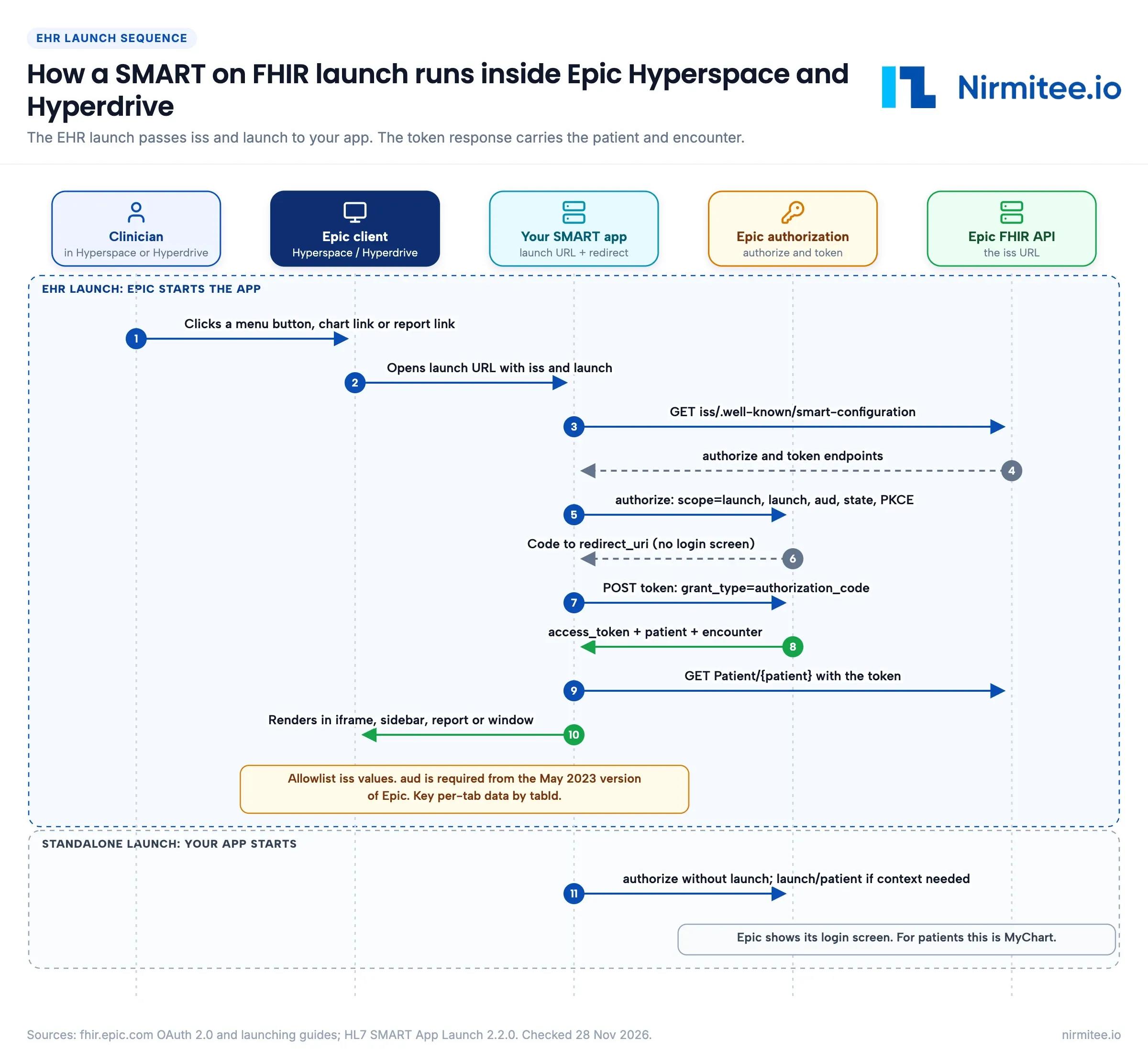
| Launch inside Epic (EHR launch) or from a patient app (standalone launch) | Copy a full hospital database or keep a warehouse in sync |
| Export a defined patient group with Bulk FHIR | Reach a health system's data from a clinician or backend app before that customer activates it |
Last checked Nov 28, 2026 against open.epic.com and fhir.epic.com. By Jitendra Choudhary, CTO, Nirmitee.
What can and can't you do with the Epic FHIR API, at a glance?
The Epic FHIR API is strong for reading and narrow for writing. The table below gives the short answer for each question buyers ask first.
| Question | Short answer |
|---|---|
| Can I read clinical data? | Yes. Epic lists read and search for most R4 clinical resources on open.epic.com. |
| Can I write data back? | Yes, for a short list: allergies, problems, vitals and flowsheets, notes, questionnaire answers, patient records and a few more. |
| Can I place orders? | No signed orders. Only unsigned orders suggested through CDS Hooks, which a clinician signs in Epic. |
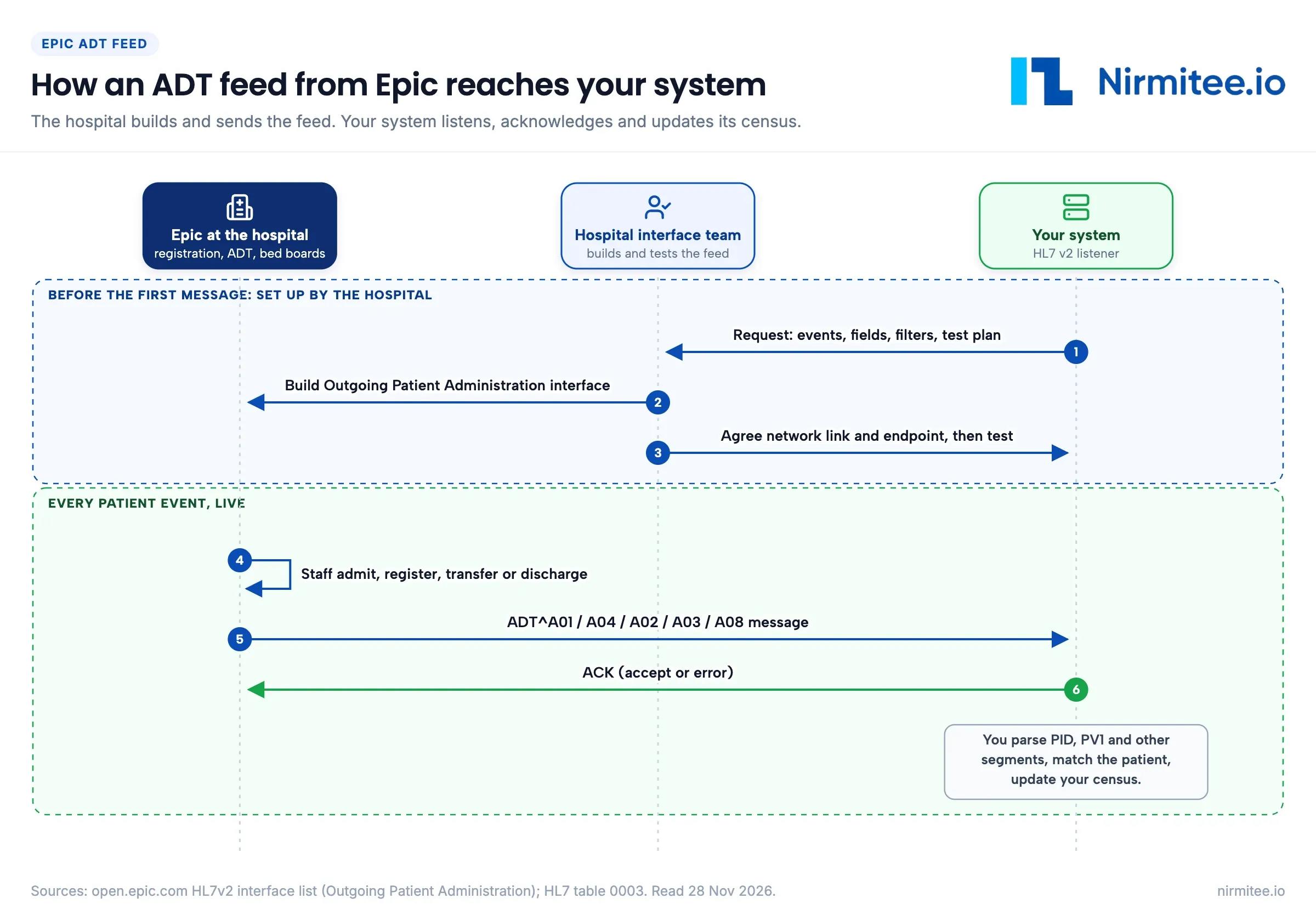
| Can I get real-time events? | Not from the FHIR API. Epic points you to HL7v2 interfaces, such as the Outgoing ADT interface. |
| Can I pull data for many patients? | Yes, with Bulk FHIR, for groups the health system defines. Epic advises about 1,000 patients or fewer. |
| Does API access cost money? | Epic says Epic on FHIR gives free app creation and API access to all developers. A Connection Hub listing is optional and costs $500 per product per year. |
| Is there a published rate limit? | No call quota is stated in Epic's public FHIR docs. Each health system controls its own production setup. |
| Who switches it on? | Each health system activates clinician and backend apps. For qualifying patient-facing apps, Epic distributes the client ID to US provider organizations automatically. |
What can you read with the Epic FHIR API?
You can read almost every clinical record type a product team asks for. Epic's FHIR catalog on open.epic.com lists R4 read and search for patients, conditions, allergies and medications. It also lists labs, vitals, encounters, immunizations, appointments, orders and clinical notes.
A few points surprise teams:
- The medication administration record is there. Epic lists MedicationAdministration.Read and Search in R4. Many teams assume the MAR is missing.
- Flowsheets are there. Observation (Flowsheets) supports read, search and create. Flowsheets are where Epic stores most discrete nursing and device data.
- Notes come in two steps. You find the note with DocumentReference, then fetch the text with Binary.Read (Clinical Notes).
- Outside records are separate. Many resources have an "Outside Record" version for data that came from other organizations.
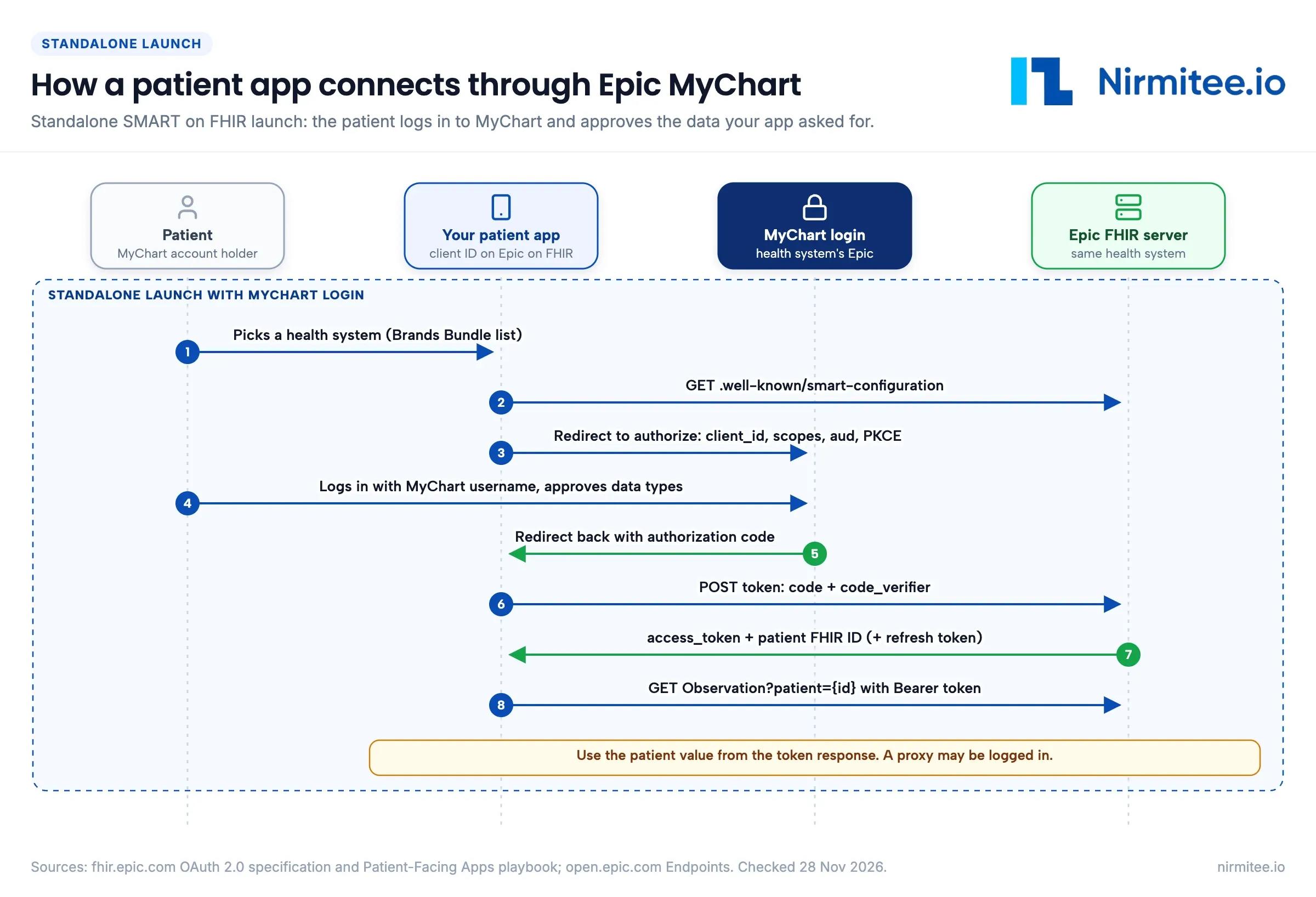
Reading is the easy part. It is also where FHIR works best in Epic, because the data is already structured and coded. Our Epic FHIR integration guide walks through authentication and the first calls, and SMART EHR launch vs standalone launch in Epic covers how your app gets its token. For a team to build it, see our Epic FHIR API integration services.
What can you write back into Epic with FHIR?
You can write a short, fixed list of record types. On open.epic.com the R4 create and update operations are:
| Record | Epic FHIR operation | What it is for |
|---|---|---|
| Allergy | AllergyIntolerance.Create (Patient Chart) | Add an allergy to the chart |
| Problem | Condition.Create (Problems) | Add a problem list entry |
| Clinical note | DocumentReference.Create (Clinical Notes) | File a note, such as an AI scribe draft |
| Vitals and flowsheet values | Observation.Create (Vital Signs, Flowsheets, Lines Drains Airways) | File readings and nursing data |
| Patient | Patient.Create (Demographics) | Register a new patient |
| Questionnaire answers | QuestionnaireResponse.Create (Patient-Entered Questionnaires) | File forms a patient filled in |
| Community referral update | Communication.Create, Task.Update (Community Resource) | Social care referrals |
| Document details | DocumentReference.Update (Document Information) | Update document metadata |
Two limits matter for most products. First, every write lands in a specific build at that health system. For flowsheets, Epic's own guide says customers must map flowsheet row IDs before an interface can file to a row. Second, Epic is clear that the vendor carries the risk of "mapping or saving data to patient records incorrectly". Expect each customer to test writes before go-live.
Vitals have their own quirk. Epic's remote monitoring guide says each reading is posted as its own Observation.Create call. To make several readings share a time in Epic, send them with the same effectiveDateTime.
What can't you do with the Epic FHIR API?
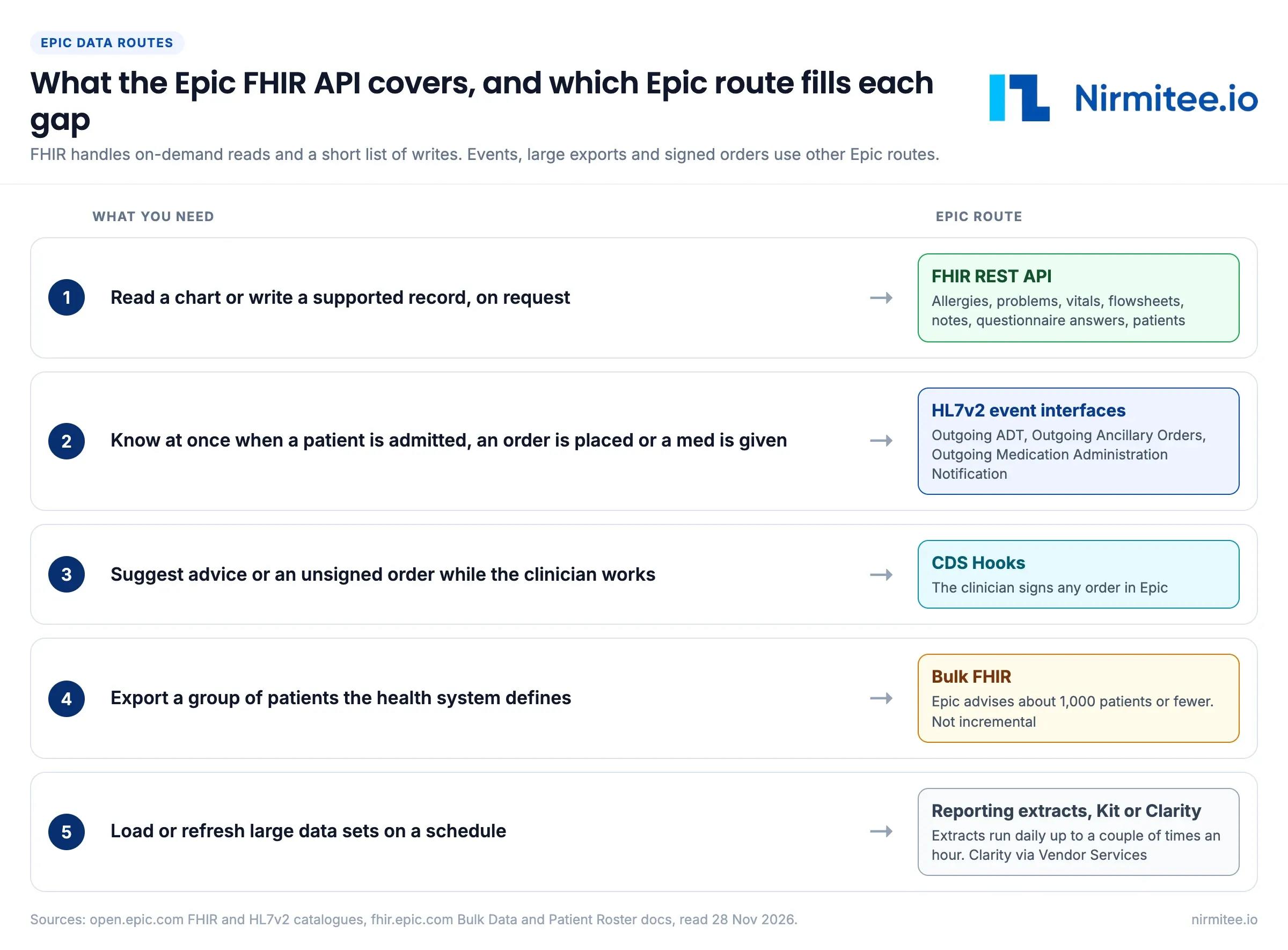
You cannot use the Epic FHIR API for events, signed orders, encounter changes or large-scale sync. Each gap has a different Epic route, and the table shows where to go instead.
| What you need | Why FHIR falls short | What Epic offers instead |
|---|---|---|
| Real-time notice of admissions, discharges, new orders | FHIR in Epic is request and response. Epic calls HL7v2 interfaces "a tried-and-true method to push information based on an event in Epic in real time" | HL7v2 Outgoing ADT, Outgoing Appointment Scheduling, Outgoing Ancillary Orders |
| Place a signed order | Only unsigned orders through CDS Hooks are listed | CDS Hooks suggestion that the clinician signs, or HL7v2 Incoming Orders from CPOE Systems |
| Create or change an encounter | Encounter is read and search only in R4 | HL7v2 Incoming Patient Administration or Incoming External Encounters |
| Record an immunization | Immunization is read and search only in R4 | HL7v2 Incoming Vaccination Administration |
| Book an appointment | Appointment.$book is listed for STU3, R4 is read and search | HL7v2 Incoming Appointment Scheduling, or the STU3 operation where the customer supports it |
| Mirror a hospital into your warehouse | Epic lists data warehouse sync and incremental loads as poor uses of Bulk FHIR | Reporting extracts, or a Kit or Clarity license through Vendor Services |
| Stream device data at high volume | One Observation.Create per reading | HL7v2 Incoming Device Data or Incoming Clinical Documentation Flowsheet Data |
Epic also warns against using CDS Hooks as a notification channel. Its docs say CDS Hooks "should be used only to trigger real-time, end user-facing decision support" and recommend an event-based interface when you only need a notice.
How does Epic's Bulk FHIR export fit, and where does it stop?
Bulk FHIR exports FHIR data for a group of patients that the health system defines in Epic. The standard was built for population exports, but Epic's own guidance for its system favors one-time loads and small scheduled pulls over sync. Bulk data runs on the organization's operational database, which is why Epic asks for small cohorts.
Epic's Bulk Data tutorial states the limits plainly:
- The export is not incremental. Epic collects all data for the request before returning any of it.
- You have fourteen days to finish the request and download the files. After that the data is deleted.
- Good uses: a one-time load before continuous exchange, monthly targeted loads, weekly exports of small groups (fewer than one hundred patients).
- Poor uses: data warehouse sync, periodic loads of large clinical data, incremental loads.
- Epic recommends a cohort of about 1,000 patients or fewer for good performance.
- Check status every ten minutes for groups under one hundred, or every thirty minutes for larger groups.
Before any export, the customer must define the patient group (a roster) inside Epic. Our Bulk FHIR export guide shows the calls step by step.
How do you get Epic data the FHIR API does not give you?
You combine FHIR with the Epic route built for the job. Epic's own "Building a Patient Roster" article describes this mix: event interfaces for real-time triggers, Bulk FHIR for small groups, and reporting extracts for larger sets. For the real-time part, see how to receive ADT feeds from Epic.
| Route | Best for | Who sets it up | Timing |
|---|---|---|---|
| FHIR REST (read and write) | On-demand reads, a short list of writes | You register the app, the customer activates it | Per request |
| HL7v2 interfaces | Events: admissions, orders, results, MAR, flowsheets | The health system's interface team | Real time |
| CDS Hooks | Advice and unsigned order suggestions inside the clinician workflow | Customer build plus your service | While the clinician works |
| Bulk FHIR | One-time loads, small scheduled groups | The customer defines the group | Hours, not instant |
| Reporting extracts | Larger scheduled sets | Customer report writers | Daily up to a couple of times an hour, per Epic |
| Kit or Clarity | Deep reporting data you query yourself | License through Vendor Services | Batch |
Most real products use two routes. A typical pattern: an Outgoing ADT feed tells you a patient was admitted, then your app calls FHIR to read that patient's chart. Our guide to Epic Bridges interfaces covers the HL7v2 side.
What do Epic FHIR access and approvals cost?
Epic says Epic on FHIR gives free app creation and API access to all developers. Epic also says a Connection Hub listing on Showroom is not required to connect, and that you can hand customers your client ID at no cost. If you choose a listing, Epic's terms set an annual, non-refundable fee of $500 per product per year, and you need at least one live Epic customer first. Vendor Services, which adds technical support and limited connectivity testing, has a fee that Epic does not publish on its public site.
What you pay in practice is time with each health system. Your client ID must reach every customer environment. For qualifying patient-facing apps, Epic distributes the client ID to US provider organizations automatically. Clinician and backend apps need each customer to turn them on and test them. There is no single central endpoint: once your app is live and synced, Epic's docs say you connect to customer-specific endpoints, so plan for one base URL and one configuration per health system. Ask each customer three things before you plan: which FHIR version their Epic runs, who on their team activates apps, and whether HL7v2 feeds are in scope. Our Vendor Services vs open.epic comparison covers the program choice.
What has Nirmitee built on the Epic FHIR API?
We have built a SMART on FHIR patient-facing app on Epic, and provider-side Epic work is in progress. Our sandbox demo video, How to Integrate with Epic in 2026: 6 Ways + Live FHIR Write-Back, shows a FHIR write landing in Epic's developer sandbox. It runs on Epic's synthetic test data, with no patient data.
Our Epic integration services team scopes the mix of FHIR, HL7v2 and CDS Hooks for each product. We give a fixed-scope quote after a scoping call.
What should you check before you build on the Epic FHIR API?
Check each requirement against Epic's catalog before you write code. This list catches most surprises:
- List every data item you read and every item you write. Find each one on open.epic.com.
- Mark anything that needs a push. Plan an HL7v2 interface for it.
- Mark any order you place. Decide if a CDS Hooks suggestion is enough.
- Size any bulk pull. Above about 1,000 patients, plan an extract instead.
- For each write, ask the customer who maps flowsheet rows, note types and departments.
- Check the FHIR version (R4, STU3, DSTU2) each customer runs.
- Plan per-customer testing. Epic places the risk of wrong filing on the vendor.
Need help beyond Epic? See our healthcare interoperability services and healthcare product engineering. Talk to our team.
Ready to scale?
Talk to our healthcare engineering team about building, integrating, and shipping faster.
Frequently Asked Questions
Can the Epic FHIR API write data back into Epic?
Does the Epic FHIR API include the medication administration record?
Can I read flowsheets through the Epic FHIR API?
Does Epic FHIR support subscriptions or webhooks?
Can I place orders through the Epic FHIR API?
Is the Epic FHIR API free?
What is the Epic Bulk FHIR limit?
Does Epic publish FHIR rate limits?
Can I create encounters with the Epic FHIR API?
Do I need each hospital's approval to use the Epic FHIR API?