Wearable App Development for Healthcare: Add Apple Health, Garmin and Google Data Without Rebuilding

Nirmitee.io Engineering
Author
Wearable app development for healthcare is mostly integration work: getting heart rate, sleep, steps and vitals from Apple Health, Google Health Connect, Garmin, Oura and similar sources into your platform reliably, and keeping it working as you add devices. Teams that treat each device as a one-off feature end up rebuilding part of the product every time sales signs a customer who uses a different watch.
This guide is for founders, CTOs and product heads at digital health, remote patient monitoring, care management and clinical-trial companies. It covers the risks you will not see in a vendor demo, and the design that keeps the second, fifth and tenth device cheap to add.
Watch: Wearable App Development: How to Design a Device Integration Platform (9:44). The architecture behind adding a new device without touching the core.
Why each new wearable usually means a rebuild
Each new wearable means a rebuild when device code leaks into the core of the product. The first integration is written straight against one vendor's data, so its field names, units and quirks end up in the database, the alerts and the dashboards.
The second device then needs special cases: "if Garmin, read this field; if Apple, read that one". By the fourth device, every change to an alert rule has to be tested against every device, and a mapping bug in one vendor's data can corrupt readings that clinicians rely on. The cost shows up as slower releases, not as one large invoice, which is why it is easy to miss when you choose a build plan.
The four ways wearable data reaches your platform
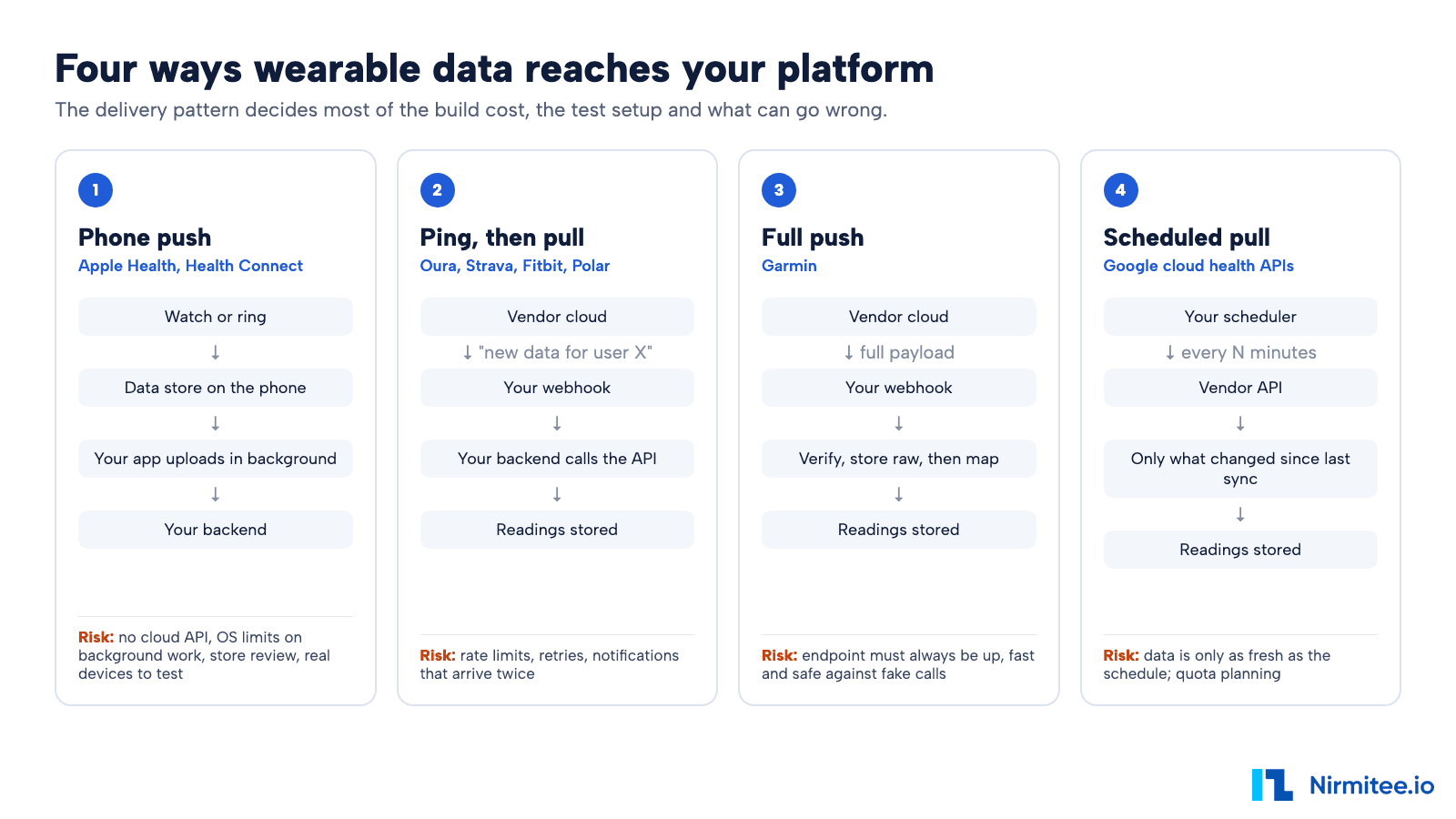
Wearable data arrives in one of four patterns, and the pattern decides most of the cost, the test setup and the failure modes. Knowing which pattern each of your target devices uses is the first thing to settle in any plan.
| Pattern | Examples | What you build | Main cost driver |
|---|---|---|---|
| Phone push | Apple Health, Health Connect | Mobile app with background upload | App work, store review, real-device testing |
| Ping, then pull | Oura, Strava, Fitbit, Polar, Whoop, Withings | Webhook plus API fetch jobs | Queues, retries, rate limits |
| Full push | Garmin (push mode) | Always-on webhook | Uptime and message checks |
| Scheduled pull | Google's cloud health APIs | Scheduler and sync jobs | Quota planning, data freshness |
1. Phone push: Apple Health and Health Connect
Apple Health (HealthKit) and Google Health Connect have no cloud API. The data lives on the patient's phone, so your own mobile app has to read it and upload it to your backend, including when the app is not open.
- You need a mobile app. A web portal cannot read this data. If your product is web-only today, adding Apple Health means adding an iOS app.
- Background upload is limited by the operating system. iOS and Android decide when background work runs, so readings can arrive late. Clinical workflows that expect near real-time data need to be designed around this.
- Store review applies. Apple reviews apps that use HealthKit and expects a clear reason for each data type you request. Google Play reviews Health Connect permissions in a similar way. Plan review time into the launch date.
- Testing needs real devices. Realistic testing needs a physical iPhone, and a paired Apple Watch for watch data. Simulators do not reproduce real sensor data or background behaviour.
Typical estimate: this is usually the most expensive pattern to add first, because it includes mobile app work and store approval, not only backend work.
For the developer detail behind this pattern, see our guide to HealthKit and Health Connect integration with a FHIR server.
2. Ping, then pull: Oura, Strava, Fitbit, Polar
In the ping-then-pull pattern, the vendor's cloud sends your server a short notice that a user has new data, and your server then calls the vendor's API to fetch it. Whoop and Withings work the same way. Whoop's webhooks carry only the user, the record id and the event type, and Withings sends the user, the data category and a time window, so in both cases your server calls the API to get the readings.
The cost here is in the backend: a webhook receiver, a job queue, retries, and careful use of each vendor's rate limits. Typical estimate: once the shared layer described below exists, a new cloud integration of this kind is usually a matter of days to a couple of weeks, depending on how many data types you need.
3. Full push: Garmin
In the full-push pattern, the vendor sends the whole data payload to your webhook as soon as it is ready. Garmin's Health API lets you choose, per data feed, between a ping-and-pull setup and push, where the data itself arrives at your endpoint.
There is less fetching to build, but your endpoint has to be available, respond quickly and reject calls that do not come from the vendor. If your endpoint is down, you depend on the vendor's retry behaviour and on how far back you are allowed to request history.
4. Cloud pull on a schedule: Google's cloud health APIs
In the scheduled-pull pattern, your server asks the vendor's cloud API for anything new every few minutes or hours. Google's cloud health APIs, which are replacing the older Fitbit Web API, fit this pattern.
It is simple to reason about, but data is only as fresh as your schedule, and quota planning matters once you have thousands of patients. Google has been changing its health APIs, so check the current API and its migration timeline before you commit to a plan.
The plug-and-socket design that keeps new devices cheap
A plug-and-socket design keeps the core of your product the same when you add a device. Each device is a plug; your platform offers one socket that every plug must fit.
At Nirmitee we build wearable integration layers around four ideas.
- One contract per integration, with five parts: login and consent, sessions (workouts, sleep), all-day readings (steps, heart rate), webhook in, and webhook setup. A new device is finished when it fills those five parts, and not before.
- Each device declares what it can do. Garmin may provide stress scores, a scale provides weight, a ring provides sleep stages. The platform reads that list, so screens and alerts show only what the patient's device can supply, with no "if device" code in the core.
- One unified data model: events (a workout, a night of sleep), readings (a heart rate at a time), personal facts (height, date of birth) and a source map that records which device and account every value came from.
- Raw payloads are stored. Every original message is kept before it is mapped. When a mapping bug is found, you fix the mapping and replay the stored data, instead of asking patients to resync or losing weeks of readings.
This is the same discipline we apply in our custom healthcare software development work: keep vendor detail at the edge, keep the core stable.
Eight risks a wearable build plan should cover
The eight risks below cause most production problems in wearable integrations, and none of them show up in a demo. Ask any vendor or internal team how their plan handles each one.
1. Duplicate readings
Vendors resend notifications, phones retry uploads, and users reconnect accounts. Without de-duplication on a stable key per reading, the same blood pressure can appear three times and trigger three alerts.
2. Rate limits
Every cloud API caps how often you can call it. A plan that fetches every user on every notice will hit those caps as the patient count grows, and data will silently stop arriving. Calls need queuing, back-off and monitoring per vendor.
3. Expired or revoked access
Login tokens expire, and patients revoke access or change passwords. The platform has to refresh tokens, notice when access is gone, and tell the care team that a patient's data has stopped, instead of showing a quiet gap that looks like a healthy patient.
4. Fake webhook calls
A public webhook can be called by anyone. Where the vendor signs its messages, every message should be checked against that signature before it is accepted. Whoop, for example, signs each webhook with an HMAC-SHA256 signature and a timestamp. A signature check proves the message came from the vendor; it does not prove the readings are clinically correct, so range checks still apply.
5. Limited history
Vendors limit how far back you can request data. Garmin offers a backfill tool for history, with limits that are set in its partner documentation, and Health Connect by default only lets an app read about 30 days of data from before the user granted permission, unless the app holds an extra history permission. If a trial or programme needs baseline data, plan the history request at enrolment, not later.
6. Time zones and units
Sleep that crosses midnight, a patient who travels, a scale set to pounds: each vendor reports these differently. Store every reading in a standard unit with its original time zone, or daily totals and trend charts will be wrong.
7. The same reading from two devices
A patient who wears a watch and carries a phone may report steps from both, often through Apple Health as well as directly. Without a source priority rule per data type, steps are double-counted. The source map in the data model is what makes that rule possible.
8. Health data security
Once wearable data sits in a care or RPM platform run by a covered entity or its business associate, it is protected health information under HIPAA. Access tokens for patient accounts should be encrypted at rest, raw payloads should be protected like any other PHI, and access should be logged. A business associate agreement covers who is responsible; it does not make the system secure on its own.
Our recommended approach: twelve strategies for a wearable integration layer
The strategy we suggest is to make every risk above the job of the shared layer, so no single device integration has to solve it alone. Below are the twelve strategies we recommend, and why each one pays off for the business.
Design strategies
- Capability and coverage declarations instead of per-device branches. Each integration states which data types it provides and how far back it can reach. The platform checks these declarations when it starts, so a missing or contradictory flag stops a release instead of reaching patients. Why: screens, alerts and reports stay free of device-specific code, so adding a device does not mean retesting the whole product.
- A self-registering plugin registry. A new integration registers itself with the platform when it is added, instead of someone editing a central list. Why: two teams can build two integrations at the same time without editing the same file, and removing a vendor is a clean change.
- A unified model of events plus typed details. Workouts and sleep are events with a details record per type. All-day readings go into one time-series table, with a type definition per data type (code, unit, valid range). A source map links every value to its device and account. Why: a new device adds rows and type definitions, not new tables, so database changes stop being part of every integration.
- Contract tests from recorded sample payloads. For each integration we keep real-format sample messages with synthetic values and test that each one maps to the expected readings. Why: when a vendor changes its format or a mapping is edited, the test fails before release, not after a clinician spots wrong numbers.
Data safety strategies
- Store the raw payload before mapping. The original message is saved first, then mapped. Why: a mapping fix can be replayed over past data, so nothing is lost and patients are not asked to resync.
- Idempotent writes keyed on source and record id. Writing the same reading twice has the same result as writing it once, because each reading is keyed on its source and the vendor's own record id. Why: resent notifications and phone retries can no longer create duplicate readings or duplicate alerts.
- UTC time plus the original offset, and one canonical unit per data type. Every reading is stored in UTC with the patient's local offset at that moment, and converted to one unit (for example kilograms for weight) on the way in. Why: daily totals, sleep nights and trends stay correct when patients travel or change device settings.
- Source priority per data type. For each data type, the platform keeps a ranked list of sources, for example watch before phone for steps. Overlapping readings from a lower-ranked source are kept but not counted. Why: totals are not double-counted, and the raw data is still there if the ranking changes.
Reliability and security strategies
- Reschedule with back-off instead of blocking on rate limits. When a vendor says "too many requests", the job is put back on the queue for later, with a growing delay. Why: one busy vendor does not hold up workers needed for other vendors, and data catches up on its own.
- Encrypted tokens and a reconnect flow. Patient access tokens are encrypted at rest. When access expires or is revoked, the platform marks the connection as broken, tells the care team and sends the patient a simple reconnect link. Why: a data gap is visible and fixable, instead of looking like a patient with nothing to report.
- HMAC signature checks on webhooks. Where a vendor signs its webhooks, the signature and timestamp are checked before anything is stored, and old timestamps are rejected. Why: forged or replayed calls are dropped at the door. Readings are still range-checked afterwards, because a valid signature says who sent the data, not that the data is clinically plausible.
- A backfill strategy for each history limit. Each integration declares how far back it can fetch, and the platform requests that history at enrolment, in batches that respect the vendor's limits. Why: baselines for trials and care programmes are captured while they are still available.
The healthcare layer: getting wearable data into the EHR with FHIR
Wearable data reaches the EHR when it is mapped to FHIR, the standard most EHRs now accept for clinical data exchange. Each reading becomes a FHIR Observation with a standard code, a unit and a reference to the patient and the device.
For example, heart rate maps to LOINC code 8867-4 and body weight to 29463-7, which are the codes the FHIR vital signs profiles require. Step counts map to 55423-8, a pedometer code whose time period is recorded on the Observation, so a daily total and an hourly count use the same code with a different period. The unified data model above makes this a single mapping step for all devices, instead of one mapping per vendor. Our FHIR integration and EHR integration teams build this layer, and we have written about integrating RPM device data with Epic and Cerner in more detail.
Two decisions belong to the clinical side, not the engineering side: which readings are worth sending to the chart, and which should stay in your platform as trends. Sending every step count to the EHR creates noise for clinicians.
Checklist for evaluating a wearable app development vendor or build plan
Use this checklist in vendor calls or internal design reviews. A strong plan has a clear answer to each item.
- Which of the four data patterns does each of our target devices use, and what does each one cost to add?
- Is there one contract per device, so adding a device does not change the core?
- Are raw payloads stored so data can be replayed after a mapping fix?
- How are duplicate readings detected?
- How are rate limits handled as patient numbers grow?
- What happens, and who is told, when a patient's access expires or is revoked?
- Are webhook signatures checked, and are readings range-checked as well?
- How much history can we get at enrolment for each device?
- How are time zones, units and overlapping sources handled?
- How are tokens and raw data protected, and is access logged?
- How are readings mapped to FHIR, and who decides what goes to the EHR?
- Does the timeline include App Store and Google Play review and real-device testing?
If you are planning a wearable or RPM programme, we can review your build plan against this checklist and give you a scoped estimate for the integrations you need. Explore our healthcare interoperability and healthcare product engineering services, or talk to our team to book an architecture review.
Ready to scale?
Talk to our healthcare engineering team about building, integrating, and shipping faster.
Frequently Asked Questions
How much does wearable app development cost for a healthcare product?
Can a web app read Apple Health data?
Is wearable data covered by HIPAA?
How do you stop steps being counted twice from a watch and a phone?
Can wearable data be sent to Epic or other EHRs?